What Is Content Delivery Network: A Simple Guide (2026)
- what is content delivery network
- cdn explained
- website performance
- ecommerce speed
- shopify cdn
Launched
June, 2026

You've probably seen this happen. Your Shopify store looks sharp on your laptop, product photography is polished, and the homepage feels quick enough in your office. Then a customer in another country messages support to say the site feels sluggish, images take ages to appear, or checkout pages seem uneven during a campaign.
That gap usually isn't about design. It's about distance.
If your website serves everything from one central location, every visitor has to travel back to that same place to fetch images, scripts, stylesheets, and other files. The farther away they are, the more friction they feel. That's where the question what is a content delivery network starts to matter, especially for merchants who want to sell beyond one city or one country.
Why Your Website Feels Slow to Global Customers
A common ecommerce problem looks like this. You launch a sale, paid traffic starts landing, and local visitors get a decent experience. But shoppers in other regions wait longer for banners, product galleries, and theme assets to load. Some stay. Some leave before the page finishes rendering.
The frustrating part is that nothing seems “broken”. Your hosting is live, the store opens, and the products exist. But every request still has to travel across networks to reach your main server and come back again. For global customers, that extra journey adds delay where it matters most. The first impression.
A content delivery network, usually shortened to CDN, solves that distance problem by keeping copies of website content closer to the people requesting it. IBM describes CDNs as “edge” servers placed nearer to end users than the origin host, and IBM also cites Cisco research showing that 72% of all web traffic crosses through CDNs. That's why they're no longer a niche add-on. They're part of the internet's normal delivery layer for media, ecommerce, and modern web apps, as explained in IBM's overview of content delivery networks.
The bottleneck most store owners don't spot
Think of your store like a stockroom with one loading dock. If every customer order had to ship from that one dock, people nearby would get parcels quickly, while buyers farther away would wait longer. Your website works in a similar way when it relies too heavily on one origin location.
That's also why CDN thinking overlaps with broader infrastructure planning. If you're trying to understand the bigger scaling picture, this guide on how to scale SaaS in the cloud is useful because it frames performance as an architecture decision, not just a front-end tweak.
Slow websites often aren't “heavy” in the abstract. They're simply serving too much content from too far away.
For a practical next step, Grumspot's guide on how to improve website loading speed is a good companion if you want to connect CDN delivery to page speed work like image handling, theme optimisation, and asset management.
How a Content Delivery Network Actually Works
The simplest way to understand a CDN is to stop thinking about servers and start thinking about coffee shops.
Your origin server is the main roastery. It holds the original beans, equipment, recipes, and supply. A CDN's Points of Presence, often called PoPs or edge servers, are the local cafés scattered around different cities. Customers don't need every flat white made at the central roastery. They go to the nearest branch.
This visual helps make the idea concrete.
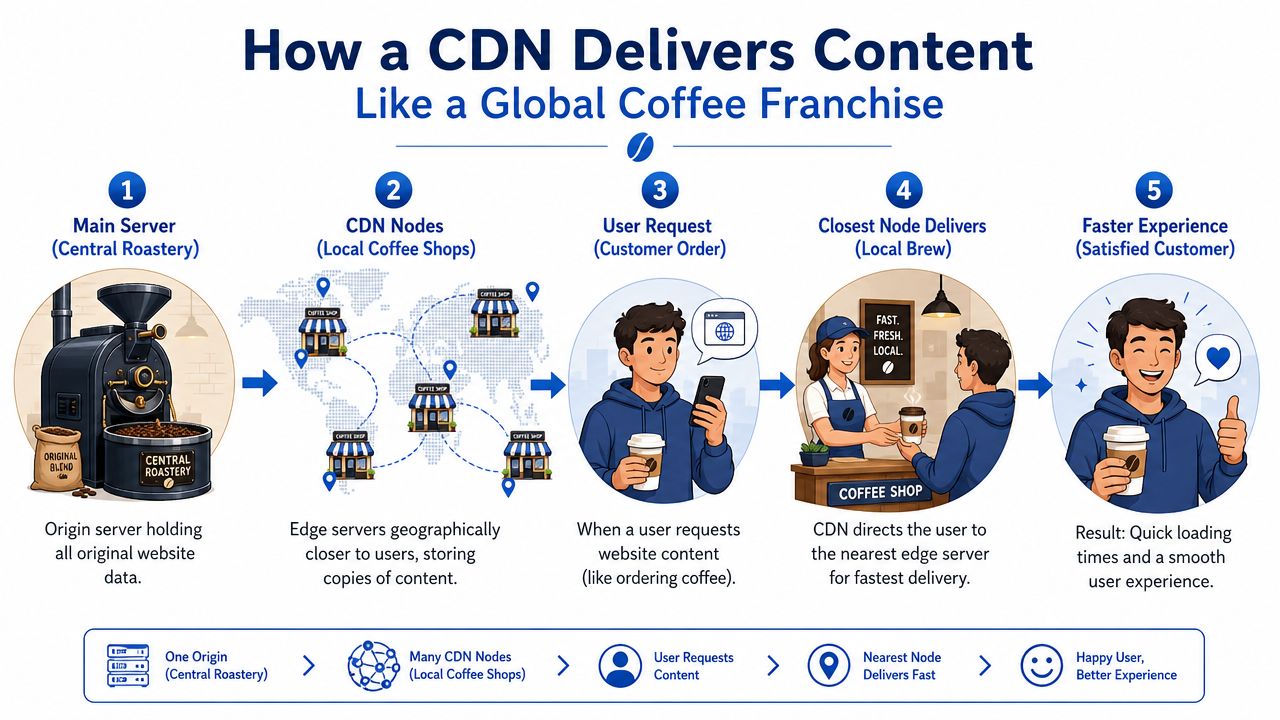
The simple version
When someone opens your site, the CDN looks for the nearest suitable edge location. Instead of forcing that person's browser to fetch every file from the origin, the CDN serves cached files from an edge server closer to the visitor.
Akamai explains it this way: a CDN operates on an edge-cache model, where a user's request is routed to the nearest Point of Presence or edge server, which serves cached assets such as HTML, CSS, JavaScript, images, and video. That shortens round-trip latency by reducing the physical distance data travels from the origin server, according to Akamai's CDN glossary.
What gets cached
Not every part of a website behaves the same way. Some assets are ideal for CDN delivery because they're the same for everyone, or close to it.
- Images and product photos are usually great cache candidates because many visitors request the same files.
- CSS and JavaScript files work well because your theme and front-end logic get reused across many page views.
- Video and media files benefit because they're large and expensive to fetch repeatedly from one central source.
- Some HTML can also be cached, depending on how your site handles updates and personalisation.
A useful analogy is a library system. The main library owns the original catalogue, but local branches keep copies of popular books. If a branch already has the book, readers don't wait for it to be sent from the main building again.
What happens on the first request
The first person in a region might trigger a fetch from the origin if the edge server doesn't already have that file. After that, nearby visitors can often receive the cached version much faster.
That's why people get confused when they test a CDN once and expect magic immediately. A CDN isn't teleportation. It's a smart distribution layer that gets stronger when frequently requested content is cached in the right places.
If you're working with composable commerce or content-heavy storefronts, Grumspot's explanation of what a headless CMS is helps because headless setups often rely even more heavily on smart asset delivery.
Here's a short walkthrough if you prefer to see the flow in action.
Practical rule: the CDN doesn't replace your original server. It sits in front of it and answers repeatable requests from locations nearer to the customer.
Why nearby matters so much
A London shopper doesn't care how elegant your backend is if every product image has to travel from far away. What they feel is delay. A CDN improves that experience by shortening the path between browser and content.
That's the simple answer to “what is content delivery network” in plain English. It's a network of nearby outlets for your website's files, so customers don't have to fetch everything from one far-off warehouse.
The Core Benefits of Using a CDN
When people say a CDN makes a site faster, they're right, but that answer is too narrow. Its primary value usually lands in three areas: performance, reliability, and security.
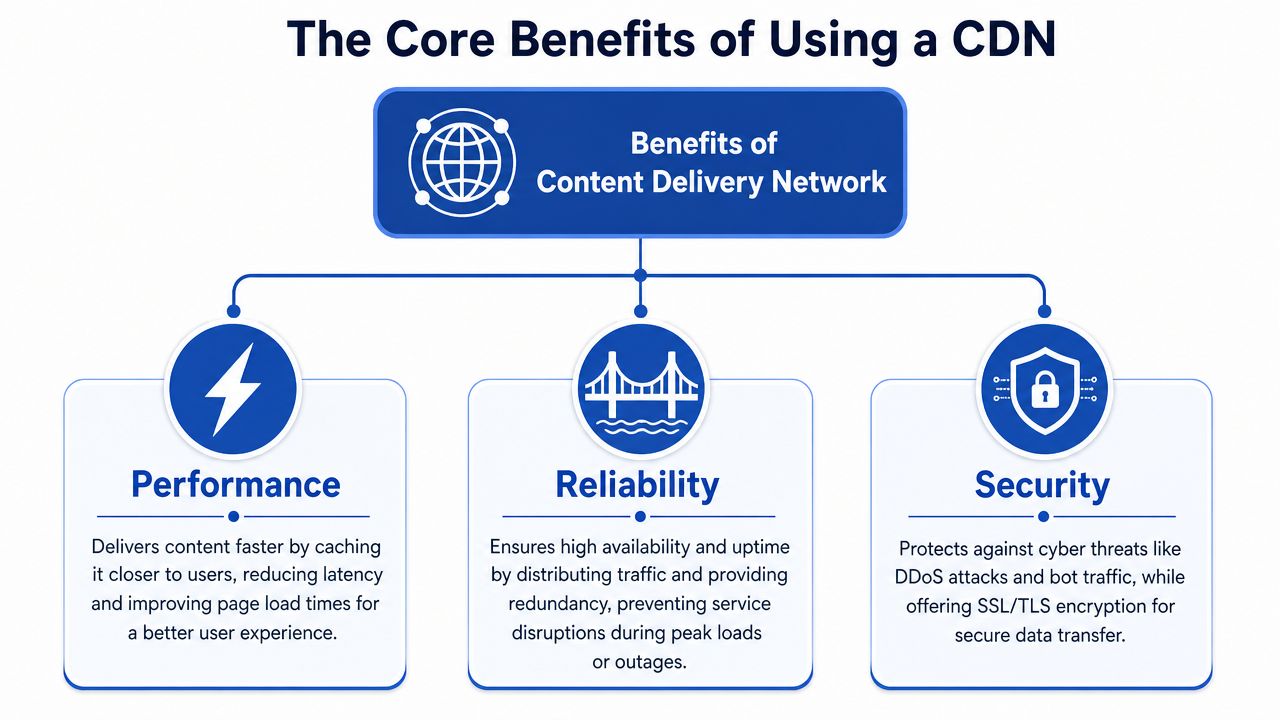
Performance
This is the most visible benefit. If your product pages load more smoothly, people can browse more comfortably, switch between variants with less friction, and reach key buying moments without waiting on every image or theme asset.
For merchants, performance is rarely just a technical metric. It affects how polished the brand feels. A quick site feels organised. A slow one feels risky, even when the products are excellent.
Reliability
A distributed delivery model also helps when traffic surges. If one location is under pressure, the overall network is better positioned to continue serving content than a setup that depends too heavily on one central origin for every request.
That matters during launches, seasonal campaigns, and influencer spikes. You don't want your store's front-end assets choking just because lots of people arrived at once.
| Benefit area | What it looks like in practice |
|---|---|
| Performance | Product images, scripts, and styling arrive faster for shoppers in different regions |
| Reliability | Traffic is spread across distributed infrastructure instead of hammering one origin for every file |
| Operational stability | Your main server has less repetitive work because the CDN handles many repeat requests |
Security
Many CDN providers also sit at the edge as a protective layer. That can help filter bad traffic, absorb unwanted request floods, and enforce secure delivery rules before traffic reaches the origin.
For store owners, the takeaway is simple. A CDN isn't only a speed tool. It's also part of your resilience plan.
A good CDN setup reduces strain on your origin in calm periods and gives you more breathing room during chaotic ones.
Why these benefits compound
These three benefits strengthen each other. Faster delivery lowers friction. Lower origin strain improves stability. Better edge protection reduces the chance that nuisance traffic affects real customers.
That's why a CDN often becomes part of core infrastructure rather than a one-off optimisation project. Once a business serves multiple regions, uses richer media, or runs frequent campaigns, distributed delivery starts to feel less optional and more like table stakes.
Understanding Different CDN Types and Features
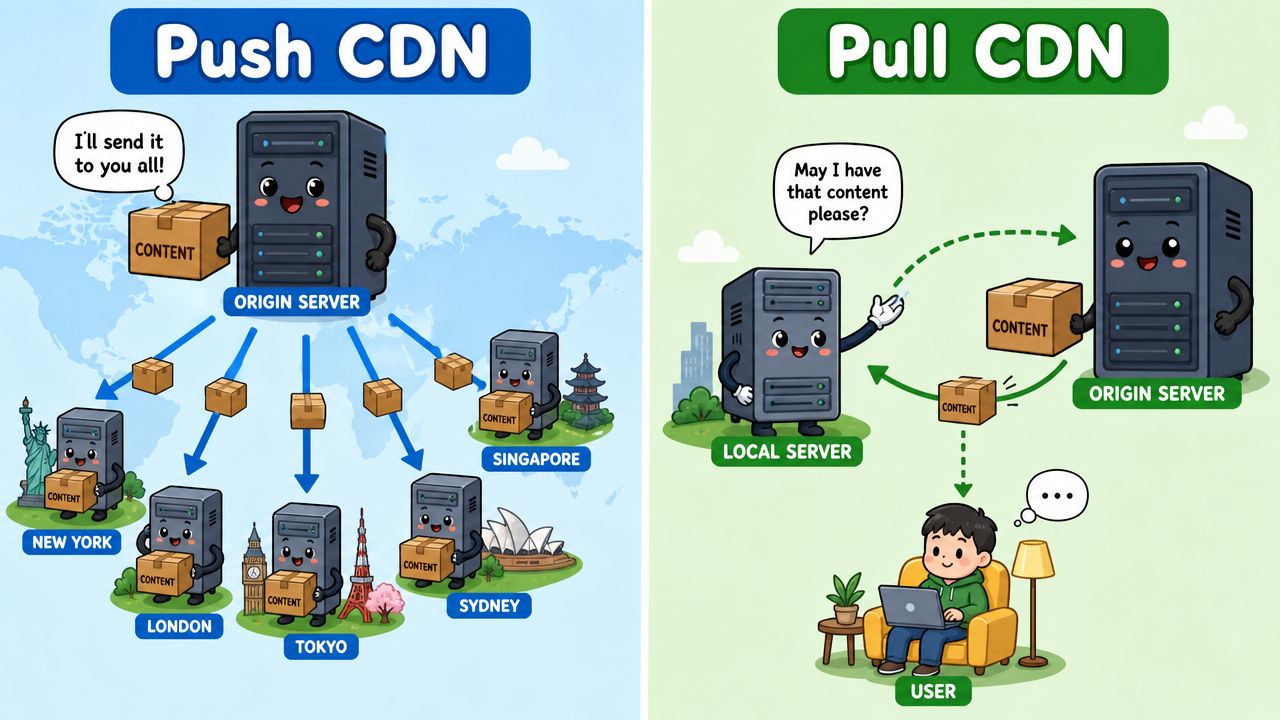
Not every CDN behaves the same way. Two delivery models come up often: pull CDNs and push CDNs. The names sound technical, but the difference is fairly simple.
Pull CDN
A pull CDN is the easier mental model for most merchants. The CDN fetches content from your origin when someone requests it and the edge location doesn't already have it cached.
You can think of it as “we stock what people ask for”. A local branch doesn't hold every possible item on day one. It brings in content when demand appears, then keeps it ready for later requests.
This model often suits stores and websites with changing catalogues, regular content updates, or a setup where you don't want to manually manage file distribution.
Push CDN
A push CDN is closer to “you stock the shelves in advance”. You upload or distribute files directly to the CDN so they're already sitting there before requests arrive.
That can work well for large static libraries, downloadable assets, or media collections that don't change often. The trade-off is more control, but also more operational responsibility.
A quick comparison
Pull CDN
Easier to set up. Better when content changes regularly. Less manual effort.Push CDN
More deliberate distribution. Useful for static files and planned asset delivery. More hands-on.
Features worth looking for
The type of CDN matters, but so do the features around it. Modern CDN providers often include tools that make a bigger practical difference than the delivery model alone.
Media handling
If your store depends heavily on product imagery, look for image optimisation features, sensible caching controls, and support for serving media efficiently across devices.
Cache control
You'll want a clear way to decide how long files should stay cached and how updates should be refreshed. This becomes important when a hero banner changes but shoppers still see the previous version.
Analytics and visibility
Good CDN reporting helps you see what's being cached, where requests are coming from, and whether your origin is still doing too much work.
The most useful CDN feature set isn't the one with the longest list. It's the one that gives you clear control over cached content without making updates painful.
Edge logic
Some platforms let you run logic at the edge. That can support routing, localisation, or selective content handling closer to the visitor instead of pushing everything back to the origin.
For a simple brochure site, that may be overkill. For a multi-region commerce setup, it can become very relevant.
Choosing and Using a CDN for Shopify Stores
Shopify merchants commonly face confusion on this point. They hear that CDNs are important and assume they need to go shopping for one immediately. In many cases, they don't.
Shopify already includes CDN delivery for store assets, which means many merchants are benefiting from edge delivery without ever configuring it manually. For day-to-day storefront performance, that built-in layer already does a lot of the heavy lifting.
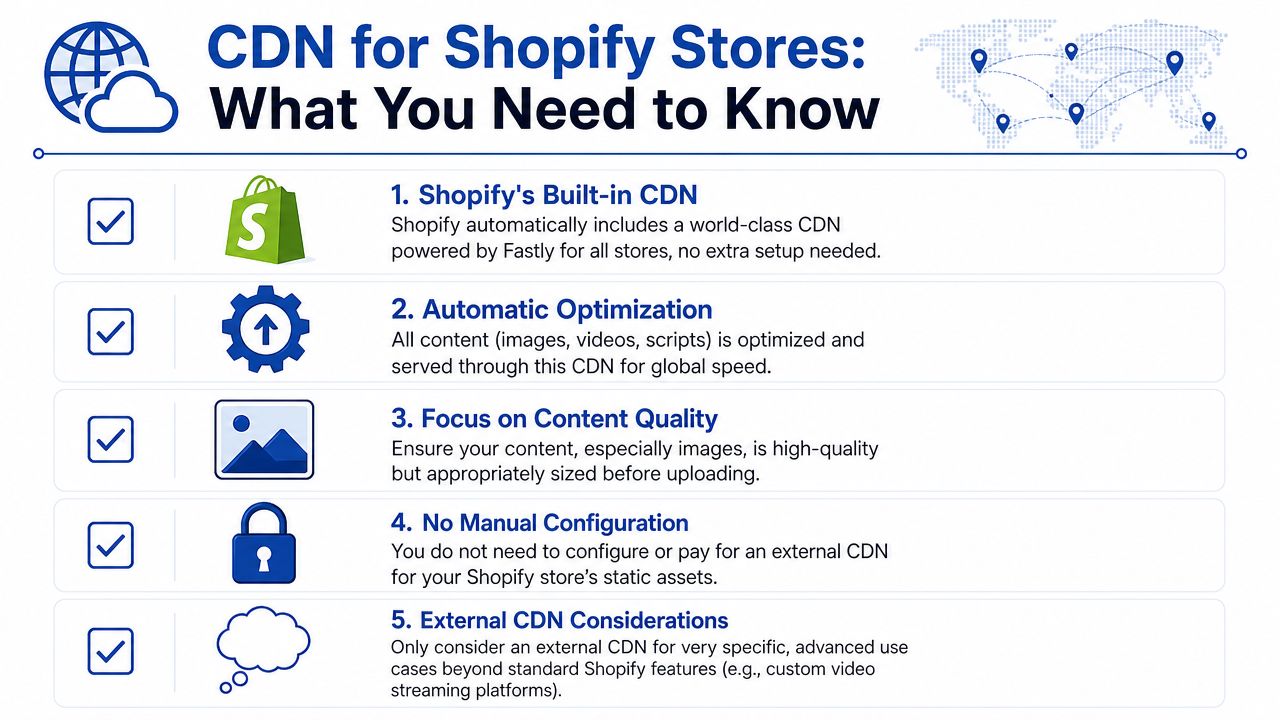
Why this matters for Shopify specifically
Shopify merchants often ask “what is content delivery network” as if it's a separate tool they need to buy. In practice, it's already part of the ecosystem they're using. The more useful question is whether the built-in setup is enough for their storefront and expansion plans.
That matters because CDNs are now a major part of cloud delivery infrastructure. Future Market Insights estimates the CDN market at USD 18.84 billion in 2026 and projects it to reach USD 80.30 billion by 2036, with a 15.6% CAGR over the forecast period. The same source says website caching is expected to hold 54.6% share and Software-as-a-Service is projected to account for 71.20% of service demand in 2026, which helps explain why CDN delivery is so central to SaaS platforms such as Shopify. You can review those projections in the Future Market Insights CDN market report.
When Shopify's built-in CDN is usually enough
For most stores, the default setup is the right starting point.
- Standard theme assets such as CSS, JavaScript, and uploaded media are already delivered through Shopify's infrastructure.
- Global browsing is generally improved without merchants managing edge servers themselves.
- Routine operations stay simpler because you're not layering extra caching rules on top unless there's a clear need.
If your catalogue, theme, and customer journeys are fairly standard, adding another CDN too early can create complexity without much upside.
When an additional layer might make sense
Some stores outgrow the default pattern, especially when they need unusual control or have a more custom stack.
Complex headless commerce
If your storefront is decoupled from Shopify, you may want more granular control over how different assets, APIs, or regional experiences are cached and routed.
Advanced security rules
Some brands want tighter control over edge security policies, bot filtering, or application firewall behaviour beyond what they're already using.
Special media delivery needs
If you serve unusual media formats, have region-specific delivery requirements, or run a custom content platform alongside Shopify, an extra CDN layer may be worth evaluating.
Deeper performance work
Sometimes the issue isn't “get a CDN”. It's “configure the storefront better around the CDN you already have”. In that situation, a technical review is more useful than another tool purchase. Resources like Grumspot's guide to Shopify site speed optimisation can help you identify whether the bottleneck is images, apps, theme code, third-party scripts, or cache behaviour.
A simple decision filter
Ask these questions before adding anything external:
- Are shoppers slow because of distance, or because your theme is overloaded?
- Do you need unusual cache rules, or are you solving a broader performance problem?
- Is your stack still mostly standard Shopify, or have you moved into custom architecture?
If you're still on a typical Shopify setup, the best move is often to use the built-in CDN properly, keep assets tidy, and reduce unnecessary front-end weight.
Common CDN Costs and Troubleshooting Tips
CDN pricing can sound more mysterious than it is. In plain terms, providers usually charge based on how much data they deliver, how requests are handled, and which extra services you enable around security, media processing, or edge logic.
For a merchant, the practical issue isn't memorising pricing models. It's recognising what you're paying for. If lots of large files are being delivered repeatedly, costs usually follow usage. If you add advanced edge features, security controls, or custom rules, the bill can become more layered.
Common cost patterns
- Bandwidth-based charging means the amount of data delivered affects cost.
- Request-based charging means high volumes of file requests can matter, especially on busy sites.
- Feature-based charging adds cost for services beyond basic caching, such as advanced filtering, image handling, or edge functions.
The three problems people hit most often
Changes aren't showing up
You update a banner or image, but visitors still see the old one. That usually points to cached content still being served.
First step: clear or refresh the relevant cache where possible, then test in a fresh browser session.
The site feels inconsistent by location
One customer says the store is quick. Another says it feels delayed. That can happen when different edge locations have different cache states, or when the origin is slow on uncached requests.
First step: test key pages from more than one region and compare media-heavy pages against lighter templates.
Security or certificate warnings appear
These issues usually come from the secure delivery layer rather than from the cached file itself.
First step: check which platform is handling HTTPS and whether a recent change introduced a mismatch between delivery layers.
If content updates matter a lot, use versioned file names where possible. That often avoids the “why is the old image still there?” problem.
Frequently Asked Questions About CDNs
Does a CDN replace my website hosting
No. Your hosting or origin server is still the main source of truth. The CDN sits in front of it and delivers cached copies of suitable content from locations nearer to users.
Is a CDN only useful for huge companies
No. Even smaller stores benefit when they serve customers across regions, use lots of imagery, or rely on a media-rich storefront. The value comes from reducing distance and repeat load on the origin, not from being a giant brand.
Can a CDN hurt SEO
A well-configured CDN generally supports the user experience rather than hurting it. Problems tend to come from bad cache rules, outdated assets being served, or technical misconfiguration around canonical content and rendering.
How can I tell if a website is using a CDN
Sometimes you can spot it through how assets are delivered or which infrastructure patterns appear in the browser, but for most business users the better question is whether the site behaves like one. If pages and media load consistently across regions, there's often some form of distributed delivery involved.
Should every Shopify merchant add another CDN
No. Many merchants should first make better use of Shopify's built-in delivery layer and tidy up assets, apps, and theme code. Add another CDN only when you have a specific need for more control, different security handling, or a custom architecture.
What kind of content benefits most from a CDN
Usually the repeatable files people request again and again. Product images, theme assets, scripts, stylesheets, and media files are common examples.
If my site is still slow, does that mean the CDN failed
Not necessarily. A CDN can speed up delivery of cached assets, but it won't fix every bottleneck. Heavy apps, poor image choices, inefficient theme code, and slow backend logic can still drag the experience down.
If your Shopify store feels slower than it should, or you're unsure whether your current setup is making the most of CDN delivery, Grumspot can help you assess the actual bottlenecks in your storefront and improve performance without adding unnecessary complexity.
Let's build something together
If you like what you saw, let's jump on a quick call and discuss your project

Related posts
Check out some similar posts.