Hire Shopify Developer for Your UK Business in 2026
- hire shopify developer
- shopify plus agency
- shopify developer uk
- ecommerce developer
- freelance shopify dev
Launched
February, 2026

Before you even think about posting a job advert, you need a solid technical roadmap. This isn't just about writing a job description; it's about deeply understanding what your business actually needs to grow. It means getting honest about your project's complexity, figuring out if you need standard Shopify or Shopify Plus expertise, and taking a hard look at your current apps to spot where a custom solution might serve you better.
Defining Your Shopify Development Needs
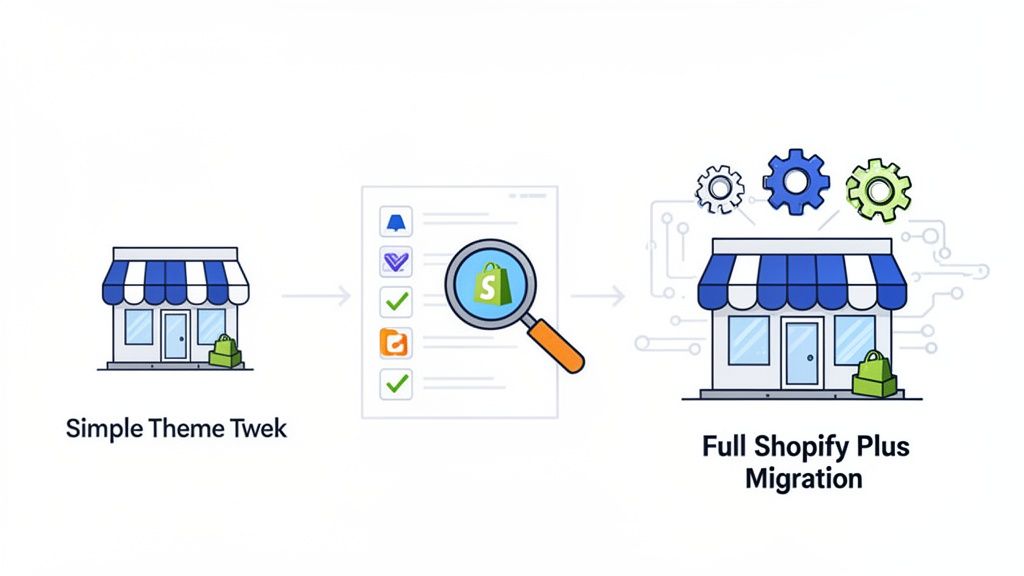
Diving into the hiring process without a clear plan is a recipe for wasted time and money. You might find someone, but they probably won't be the right one. The first real step is an honest self-assessment of what you technically require. This goes beyond a simple feature list—it's about connecting every technical task to a business goal.
Start by asking the big question: "What problem are we actually trying to solve?" Is your site loading at a snail's pace and killing your conversion rate? Are you wrestling with a clunky workflow for personalised orders? Or maybe you're gearing up for a major push into international markets. Your answer will shape everything that follows.
Gauge Your Project's Complexity
Not all development work is the same. A tiny theme adjustment is a world away from a full-scale migration to Shopify Plus. When you properly categorise your needs, you can find a developer with the right skills without overpaying for expertise you don't need.
Most projects tend to fall into one of these buckets:
- Minor Fixes & Tweaks: This covers small CSS changes, sorting out broken links, or making tiny adjustments to your Liquid code. A junior developer or a flexible freelancer is usually perfect for this.
- Theme Customisation: Here, we're talking about more noticeable changes to your storefront's design and function, like building custom page sections or altering the checkout experience. This calls for a developer with strong front-end skills in Liquid, HTML, CSS, and JavaScript.
- App Integration & Customisation: You might need to link your store to a third-party system (like a CRM or an ERP) or build a unique feature that no off-the-shelf app can provide. This demands a developer with solid API experience.
- Full Store Build or Migration: Whether you're moving from a platform like Magento or building a new store from the ground up, this is a major undertaking. It requires a senior developer or an agency with proven project management, design, and development capabilities.
A common mistake I see is merchants underestimating how complex a "simple" request can be. What looks like a small front-end tweak can sometimes unravel into a significant backend job, especially if your theme is already heavily customised.
To help you match the job to the talent, here’s a quick breakdown of what skills are typically needed for different projects.
Shopify Developer Expertise Matrix
| Project Type | Required Skills | Best Hire Type (Freelancer/Agency) |
|---|---|---|
| Theme Fixes & Small Tweaks | Basic Liquid, CSS, HTML. Good problem-solving skills for debugging. | Freelancer. Cost-effective for small, one-off tasks. |
| Advanced Theme Customisation | Strong front-end: Liquid, JS (including frameworks like Alpine.js or Vue.js), advanced CSS. Understanding of UX/UI principles. | Experienced Freelancer or Small Agency. Depends on the scale. |
| Custom App Development | Back-end: Ruby on Rails, Node.js. Front-end: Polaris, React. Deep knowledge of Shopify APIs and webhooks. | Specialist Freelancer or Agency. Requires a specific, deep skillset. |
| Platform Migration/Full Build | Project management, UX/UI design, SEO, front-end and back-end development, data migration expertise. | Agency. Best for managing the multiple disciplines required for a complex launch. |
| Shopify Plus-Specific Tasks | Expertise with Shopify Scripts, Launchpad, Wholesale channel, and advanced APIs. | Shopify Plus Partner Agency or Certified Freelancer. Non-negotiable for Plus features. |
Ultimately, the goal is to align the complexity of your project with the developer's experience to ensure a smooth and successful outcome.
Standard Shopify vs Shopify Plus Expertise
It's vital to realise that standard Shopify and Shopify Plus are two different beasts. While standard Shopify is a powerhouse for most businesses, Shopify Plus is built for high-volume, enterprise-level merchants who have more complex operational needs. If you're on Plus or thinking of upgrading, you absolutely need a developer who gets its unique ecosystem.
A true Shopify Plus developer will be comfortable with:
- Shopify Scripts: For writing custom checkout logic to handle complex shipping rules, payment options, and tiered discounts.
- Launchpad: For automating flash sales, product drops, and major sales campaigns.
- Wholesale Channel: For managing your entire B2B operation from within the Shopify admin.
- Advanced APIs: For handling the high number of API calls needed for sophisticated, high-traffic integrations.
The stakes are simply higher on Plus. For instance, recent data shows that UK merchants on Shopify Plus are growing revenues at an average of 126% YoY. To support that kind of growth, you need developers who are experts in conversion-first design and can manage a complex tech stack without a hitch. As you can see from Shopify statistics published by UK agencies, top-tier talent is essential for scaling seamlessly.
Audit Your Current App Stack
Finally, take a good, hard look at all the apps you have installed. Are you using all of them? Are any of them slowing down your site? A quick audit often reveals redundancies and opportunities for improvement.
I've often seen stores where a single, well-coded custom feature could easily replace three separate apps, leading to a faster site and lower monthly subscription fees. When you first speak with a potential developer, bringing up your app stack is a great move. It shows you're thinking strategically about performance and long-term costs, not just adding more features.
Choosing Between a Freelancer and a Shopify Agency
So, you need a Shopify expert. The big question is: do you hire a freelance developer or go with a full-service agency? This is one of the most important decisions you'll make, and it’s about far more than just the cost. It’s about finding the right partner to match your store's complexity, your team's capabilities, and your ambition.
There's a common misconception that freelancers are just for small jobs and agencies are for the big, expensive ones. While there’s a grain of truth there, the reality I’ve seen play out time and again is much more nuanced. The right choice really hinges on your project's scope, how much you can manage yourself, and where you want your business to be in a year or two.
When to Hire a Freelance Shopify Developer
Hiring a freelancer is often the perfect move for a specific, well-defined task. Think of them as a specialist you bring in for a surgical strike. When you have a crystal-clear brief and a single objective, a freelancer can be incredibly effective.
For example, let's say your product page conversion is lagging. You might hire a freelancer who specialises in theme customisation to rework the product form, add trust badges, and implement a sticky 'add to cart' button. They have a very focused skill set, and they can get that one job done quickly and efficiently, without the overhead of a larger team.
A freelancer is likely your best fit if:
- Your project has a clear, finite scope, like optimising site speed or customising a single page template.
- You have the time and technical confidence to manage the project yourself—providing clear briefs, giving feedback, and coordinating the work.
- Your budget is tight, and you need a cost-effective solution for a one-off problem.
- You need niche expertise, such as a developer who only works with Shopify subscription logic or a specific app's API.
The real "hidden cost" of hiring a freelancer is your own time. You become the project manager, the quality assurance tester, and the strategic lead. If you lack the time or technical confidence for that role, what seems like a saving can quickly turn into a bottleneck.
This model is fantastic for targeted improvements. But it starts to fall apart with larger, multi-faceted projects. If your plan involves design, development, and marketing strategy, trying to juggle multiple freelancers can quickly become a full-time job in itself.
When to Choose a Shopify Agency
This is where a Shopify agency comes in. You aren’t just hiring a developer; you’re bringing on an entire team. You get a project manager, a UX/UI designer, a conversion rate optimisation specialist, and a quality assurance team, all working together under one roof. That integrated approach is what makes complex projects succeed.
Imagine you're migrating from Magento to Shopify Plus while also launching in two new European markets. That's a huge undertaking. It involves data migration, a bespoke theme build, setting up internationalisation for different languages and currencies, and wiring up complex third-party integrations.
An agency is built to handle all those moving parts. A dedicated project manager becomes your single point of contact, saving you from the headache of trying to coordinate a scattered team of individuals.
A Shopify agency is your best bet when:
- The project is large or complex, like a full store rebuild, a platform migration, or custom app development.
- You need a multi-disciplinary team covering strategy, design, and development.
- You're looking for a partner for long-term growth, not just a single project fix.
- You don't have the internal resources to manage a technical project and need that structured, expert support.
The Value of an Agency Retainer
For businesses focused on growth, an agency retainer can be a game-changer. It gives you predictable monthly costs for on-demand access to a full team of experts. Honestly, it's far more efficient than hiring, training, and managing an in-house team, and you can scale the support up or down without the HR burden. You can learn more about how a dedicated Shopify agency can provide this kind of flexible, high-impact support.
A retainer shifts the dynamic from a reactive, project-by-project relationship to a proactive partnership. The focus becomes continuous improvement, strategic planning, and driving your business forward.
Sourcing and Vetting Top Shopify Developer Candidates
Finding the right talent means going where the best Shopify developers actually spend their time. Just posting an advert on a generic job board and hoping for the best is a slow path to disappointment. To hire a Shopify developer who can make a real impact, you need a smart sourcing strategy and a rigorous vetting process that separates the true experts from the pretenders.
This hiring process flowchart helps visualise the key decision points, from identifying the project need to choosing between an individual or an agency.
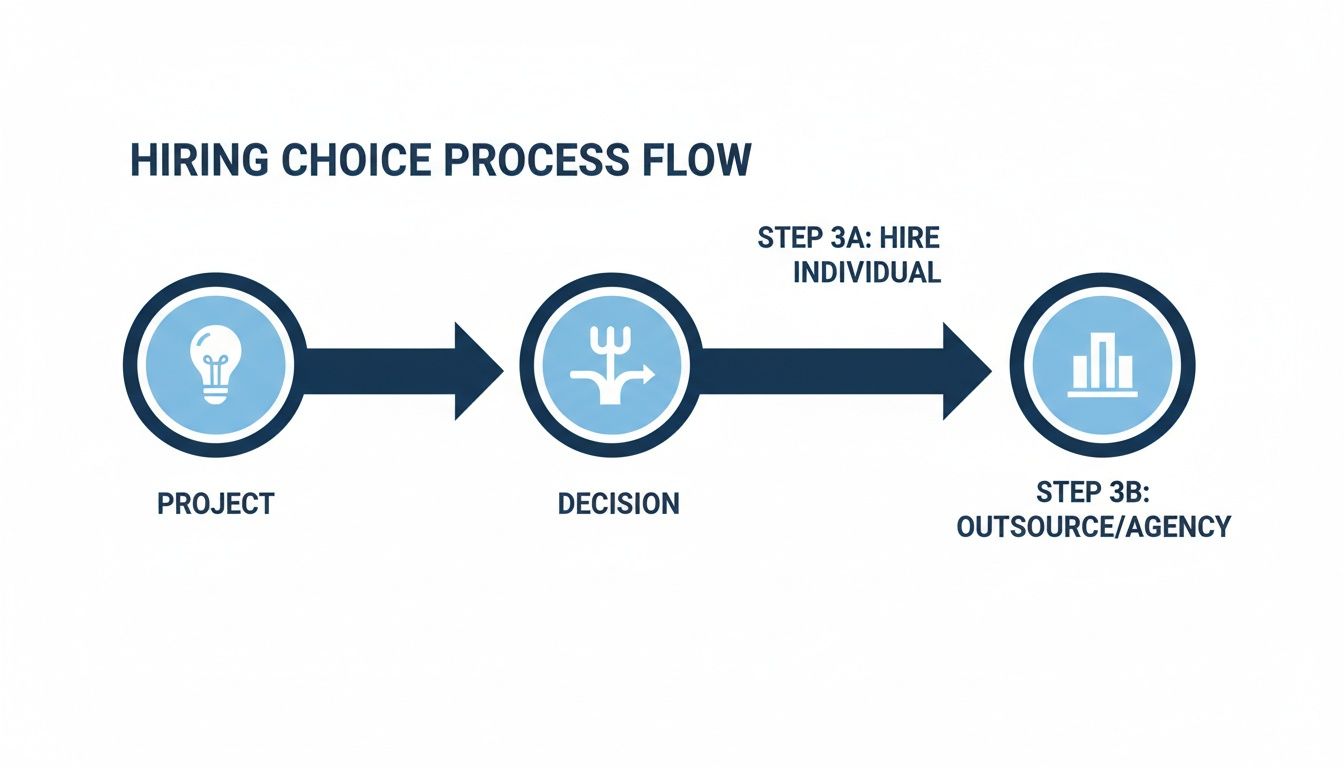
As you can see, your hiring path—whether it leads to a freelancer or an agency—is really determined by your initial project scope and what your team can handle internally.
Where to Find Proven Shopify Talent
Let's be honest: the best developers are often not actively looking for work. They’re too busy delivering great results for their current clients. You need to know where to find them and how to approach them. My advice? Forget the big, generic platforms and focus your search on curated communities where expertise is the main currency.
Here are the most effective places I’ve found for sourcing top-tier candidates:
The Official Shopify Partner Directory: This should be your first port of call. Exploring the official Shopify Partner network gives you a pre-vetted list of qualified agencies and freelance developers. Shopify has already done the basic checks, making this a gold standard for finding talent with a proven track record.
Curated Freelance Marketplaces: Platforms like Codeable and Toptal have incredibly strict screening processes. Developers must pass tough technical tests and interviews just to get listed, which saves you a huge amount of vetting time right from the start.
Developer Communities: This is an insider tip. Niche communities on GitHub, and even specific Slack or Discord channels, are where developers share work and solve complex problems together. You can spot strong candidates by observing their contributions and how they communicate their expertise.
Word-of-Mouth Referrals: Never underestimate the power of your network. Ask other eCommerce founders in the UK who they’ve had great experiences with. A personal recommendation is often the most reliable signal of quality you can get.
How to Analyse a Portfolio Like an Expert
Once you have a shortlist, the real work begins. A portfolio is much more than a gallery of pretty websites; it’s a story about a developer’s problem-solving skills, technical depth, and commercial awareness. Anyone can tweak a pre-built theme, but a top-tier developer builds custom solutions that actually drive business results.
When you're reviewing a portfolio, look for these specific clues:
Genuine Customisation: Look past the shiny homepage. Ask the developer to walk you through a specific custom feature they built. Can they clearly explain why they built it that way and what business problem it solved?
Performance-Obsessed Design: Check the live sites in their portfolio using a tool like Google PageSpeed Insights. A great developer cares deeply about site speed and user experience, and their work will prove it.
Code Quality on GitHub: If a candidate shares their GitHub profile, it's a fantastic window into their work. You don’t have to be a coder to spot good practices. Look for well-documented code, a history of consistent contributions (commits), and how they engage with other developers.
A portfolio full of beautiful but slow-loading websites is a massive red flag. It suggests a focus on aesthetics over performance, which can be disastrous for your conversion rates and SEO. A truly skilled developer delivers both.
Crafting a Technical Test That Actually Works
The final step before interviews should be a small, paid technical test. The goal here is not to get free work. It's to see how a candidate approaches a real-world problem, how they communicate, and whether they can follow instructions. For a deeper dive, check out our guide on what to look for when you hire a Shopify expert.
A good technical test should be:
Small and Focused: It should take no more than 2-4 hours to complete. For instance, ask them to debug a specific issue in a demo store or build a small, custom section for a product page.
Paid: Always offer to pay for their time. This shows you respect their expertise and helps you attract higher-calibre professionals who value their skills.
Problem-Oriented: The task should mirror a real challenge your business is facing. This gives you direct insight into how they would perform on the job.
By combining strategic sourcing with a meticulous vetting process, you shift from hoping for a good hire to engineering one.
Running an Effective Interview and Technical Assessment
You’ve sifted through portfolios and CVs, and now you have a promising candidate. This is where the real evaluation begins. The interview is your chance to see beyond the code and understand how they think, communicate, and solve problems.
A great developer is more than just a pair of hands; they're a strategic partner. You're looking for someone who understands how their technical decisions impact your bottom line.
Forget generic questions like, "What's your biggest weakness?" To really gauge a Shopify developer's skill, you need to dig into the nitty-gritty of the platform. Your goal is to see how they handle the kind of complex, real-world challenges your growing store will inevitably face.
Asking the Right Questions
The best questions don't have a single right answer. Instead, they open a window into the candidate's thought process and practical experience.
I've found it's best to focus on common, yet tricky, scenarios that push beyond textbook knowledge. You want to see if they can connect the dots between a technical issue and a business outcome.
Here is a set of questions, organised by category, that I’ve found to be incredibly revealing during interviews. They are designed to separate the true experts from those who just know the buzzwords.
Key Interview Questions for Shopify Developers
| Category | Sample Question | What to Look For in the Answer |
|---|---|---|
| Performance & Optimisation | "You've found a store's product page is slow due to excessive Liquid loops. Talk me through your step-by-step process for diagnosing and fixing this." | Do they mention specific tools like the Shopify Theme Inspector? Do they discuss solutions like using map or where filters, or even moving logic to metafields or the frontend with JavaScript? This shows a deep understanding of Liquid efficiency. |
| API & Integrations | "We need a custom integration with a new fulfilment partner's API. What are the first three things you check in their docs, and what potential pitfalls are you looking out for?" | A strong answer will mention checking authentication methods (e.g., API keys, OAuth), rate limits, and the structure of key endpoints (like orders and inventory). They should also bring up the importance of error handling and webhook reliability. |
| Architecture & Strategy | "Describe a scenario where a headless commerce setup is the right choice for a Shopify brand, and one where it would be overkill. What are the key trade-offs?" | Look for an answer that goes beyond the technical. They should talk about business needs—like needing unique frontend experiences or integrating content from multiple sources—versus the added complexity and cost. It shows they think strategically. |
| App Ecosystem | "A client wants to add five new features and has found an app for each. How would you advise them?" | A great candidate will immediately talk about the risks of "app bloat," performance impact, and conflicting code. They should suggest auditing the actual need, looking for multi-purpose apps, or considering a custom solution for core functionality. |
A candidate who asks you clarifying questions about your business goals, customer base, or long-term vision is a huge green flag. It shows they're already thinking like a partner, not just a coder waiting for instructions.
The e-commerce boom in the UK, where Shopify now powers an incredible 244,694 websites, has made finding developers with these skills more competitive than ever. For the 5,804 Shopify Plus stores in the UK, expertise in complex areas like internationalisation and custom integrations is non-negotiable. You can explore more data on the Shopify market in the UK on ecommercetrix.com to see just how specialised this field has become. It's a landscape where experienced agencies like Grumspot often step in, offering everything from one-off migrations to ongoing retainers.
The best developers I've ever hired are the ones who can explain a complex technical concept in simple business terms. If they can make you understand why a particular solution is the right one for your bottom line, you've likely found a winner.
The Final Check: A Paid Technical Test
The interview confirms their thinking, but a practical test confirms their execution. A small, paid technical assessment isn't about getting free work; it's the single best way to see how a candidate performs on a real task.
This shouldn't be a generic puzzle. It needs to be a simulation of a problem you are actually facing or are likely to face.
Define a Realistic, Bounded Task
Don't ask them to build an entire app. Give them a focused, bite-sized challenge. For example: "Create a custom Shopify section using Liquid that displays related products based on a specific tag. Please include clear documentation on how a non-technical person could add it to a theme."
Set Up a Sandbox Environment
This is crucial. Give them collaborator access to a fresh development store with a standard theme like Dawn. This mimics your real working environment and tests their familiarity with standard Shopify workflows without putting your live store at risk.
Always Pay for Their Time
Good professionals won't work for free, and offering to pay for the task shows you respect their time and expertise. A budget of £100-£200 for a task that should take 2-4 hours is a fair and standard practice. It weeds out the amateurs and attracts serious candidates.
The code they deliver is only half the story. Pay close attention to the process. Did they ask smart questions before they started? Was their code clean, organised, and well-commented? Did they provide simple instructions for you to use their work? These details tell you everything you need to know about their professionalism and communication skills—qualities that are just as vital as their technical abilities.
Getting the Paperwork and Onboarding Sorted

So, you’ve found your perfect developer. The interviews were great, their technical skills checked out, and you’re ready to get them started. This is a huge step, but don't rush the final part. How you handle the contract and onboarding can make or break the relationship before any code is even written.
Think of it this way: a solid contract isn't just legal cover; it's a roadmap that keeps everyone on the same page. And a smooth onboarding process means your new hire can hit the ground running and start adding value immediately, rather than spending their first week chasing you for access and information.
First, Let's Talk Money: Choosing a Pricing Model
Before you can even think about a contract, you need to agree on how you're going to pay them. There’s no single “best” way; it all comes down to the kind of work you need and how you prefer to manage your budget.
Here’s a look at the three most common models I see:
- Hourly Rate: This is as straightforward as it gets—you pay for the time they work. It’s perfect for ongoing maintenance, bug fixes, and projects where the scope isn't set in stone. The flexibility is fantastic, but you absolutely need a good system for tracking hours and regular check-ins to keep the budget under control.
- Fixed-Price Project: You agree on one total price for a very specific, clearly defined project. This is your best bet for one-off jobs like a theme customisation or building a specific landing page. It offers total cost predictability, which is a massive plus. Just be aware that any work outside that original scope (we call this "scope creep") will mean a new conversation and a new quote.
- Monthly Retainer: Here, you pay a set fee each month for a certain number of hours or for guaranteed access to the developer. This model is ideal for long-term growth partnerships. It gives you a dedicated expert for continuous improvements, strategic advice, and proactive support.
If you want to get into the weeds on budgeting, our guide on the cost of ecommerce website development breaks these models down even further.
Crafting a Contract That Actually Protects You
A handshake and a smile are great, but they won't help you when there’s a disagreement over deliverables. Your contract is the blueprint for your entire working relationship, so it needs to be crystal clear.
A strong contract is your first line of defence against scope creep, missed deadlines, and disputes over payment. Don’t start any work without one, no matter how small the project seems.
Make sure your agreement covers these non-negotiables:
- Scope of Work (SoW): Be painfully specific. List exactly what's being built or fixed.
- Payment Terms: How much, when, and how will you pay? Include invoice schedules and payment methods.
- Intellectual Property (IP): A crucial clause stating that once you pay for the work, your company owns it. All of it.
- Communication: How will you talk? Define the main channels (Slack, email, etc.) and what a reasonable response time looks like.
- Timelines and Milestones: Break the project into smaller, manageable chunks with clear deadlines for each.
- Confidentiality (NDA): A standard non-disclosure agreement to protect your business's sensitive information.
The Onboarding Checklist: Set Them Up for Success from Day One
A developer who has to spend their first few days begging for passwords and assets is not a productive one. A smooth onboarding is the final piece of the puzzle. Your goal is to give them everything they need to start solving problems for you right away.
This is especially true in the UK's bustling Shopify scene. With 212,903 stores and counting, the competition for good developers is fierce. For the 5,534-5,804 UK merchants on Shopify Plus—who are seeing mind-boggling 126% year-on-year growth—getting a developer up to speed quickly is vital. These brands rely on experts to navigate the 150+ new features Shopify rolls out twice a year, a trend highlighted in recent research on the UK Shopify ecosystem.
Get this checklist sorted before their first official day:
- Grant Store and Tool Access: Give them collaborator access to a Shopify development store, never your live one. Also, add them to your project management tool (like Trello or Jira), your code repository (GitHub), and any design files (Figma).
- Share Your Brand Kit: Put your logo files, brand style guide (fonts, colours, etc.), and any key marketing copy in a shared folder. Make it easy for them to find.
- Make Key Introductions: Loop them in with the main points of contact they'll be working with, whether that's a project manager, a designer, or your marketing lead.
- Assign a Clear First Task: Don't just say, "get familiar with the site." Give them a small, well-defined task. It could be a minor bug fix or a small CSS tweak. This helps them learn your workflow and theme structure with a clear objective.
Answering Your Questions About Hiring a Shopify Developer
Hiring a developer for your Shopify store is a big step. It’s natural to have questions—after all, it's a serious investment of your time and money. Let's run through some of the most common queries I hear from UK merchants, giving you the straightforward answers you need.
How Much Should I Budget to Hire a Shopify Developer in the UK?
Let's talk numbers. The cost of hiring a Shopify developer isn't a one-size-fits-all figure; it hinges on experience, the complexity of your project, and how you choose to hire. It’s less about finding the cheapest rate and more about finding the right value for your specific needs.
For small tweaks or bug fixes, you might find a junior freelancer charging between £30-£50 per hour. However, for more complex challenges, a senior developer or a Shopify Plus specialist will command a higher rate, typically £75-£150+ per hour. Their ability to quickly diagnose and solve intricate problems often means they're more cost-effective in the long run.
When it comes to project-based work, the scope is the biggest factor:
- Simple theme customisations usually fall into the £1,000-£3,000 bracket.
- A full store build from scratch is a significant undertaking, ranging from £10,000 to £50,000 or more.
- Agency retainers for ongoing support and development often start around £3,000-£5,000 per month. This gives you predictable spending and access to a full team of specialists.
What’s the Difference Between a Shopify Developer and a Shopify Expert?
This is a common point of confusion, but the distinction is pretty clear once you know it. The title "Shopify developer" is a broad term for any professional who writes code for the Shopify platform—working with Liquid, JavaScript, and APIs to build and customise stores.
A "Shopify Expert," on the other hand, is an official badge of honour. It's a title Shopify gives to freelancers and agencies that have been thoroughly vetted and accepted into its partner programme. This is based on a proven track record of high-quality work and client satisfaction.
Think of it this way: while all official Shopify Experts are top-tier developers, not every brilliant developer has gone through the formal approval process. Hiring from the Experts marketplace just gives you an extra layer of reassurance, as you’re starting with a talent pool Shopify has already approved.
Do I Have to Give a Developer My Store Login?
Never. You should absolutely not give anyone your main admin login details. The correct and professional way to grant access is by using Collaborator access.
This feature is designed specifically for this situation. The developer or agency will send a request from their Shopify Partner Dashboard. You’ll get an email to approve it, and from there you can grant them specific permissions—like only access to Themes or Apps. It’s completely secure, you never share your password, and it creates a clear audit trail. Once the job is done, you can revoke access with a single click.
How Long Will My Shopify Project Take?
This is the classic "how long is a piece of string?" question. The timeline is entirely dictated by the scope of your project. Any good developer or agency will give you a detailed timeline with clear milestones before they even start, so you always know what to expect and when. For a deeper dive into the whole process, this ultimate guide to recruiting and hiring software engineers is a fantastic resource.
As a rough guide, here’s what you might expect:
- A small app customisation or a tricky bug fix could be sorted in a few days.
- More involved theme modifications might take anywhere from 1 to 4 weeks.
- A full store build from design to launch, including data migration, is typically a 2 to 4-month process.
- Complex Shopify Plus projects, especially those involving major integrations with ERPs or custom back-end systems, can easily take 4 to 6 months, sometimes longer.
At Grumspot, we provide the clarity and expertise you need to make your next project a success. Whether you need a quick fix, a full store build, or a long-term growth partner, our team of senior Shopify developers, UX designers, and CRO specialists is ready to help. See how we can transform your Shopify store today.
Let's build something together
If you like what you saw, let's jump on a quick call and discuss your project

Related posts
Check out some similar posts.

- web design agency southampton
Find the best web design agency Southampton. Our 2026 guide covers vetting, pricing, red flags & cho...
Read more
- ecommerce development uk
Your complete guide to ecommerce development UK. Learn to plan, hire an agency, choose a tech stack ...
Read more
- web design agency hampshire
Grumspot is a leading web design agency hampshire specializing in Shopify Plus. We build high-conver...
Read more
- Shopify developer on demand
Find your Shopify developer on demand. This guide compares freelancers, agencies & retainers, covers...
Read more