Marketing Automation Ecommerce: Your 2026 Growth Guide
- marketing automation ecommerce
- shopify automation
- ecommerce workflows
- klaviyo shopify
- customer lifecycle marketing
You've probably reached the point where manual marketing has stopped being “good enough”.
Orders are coming in. Your catalogue has grown. You're running paid traffic, posting on social, and trying to keep email moving. But welcome emails go out late, abandoned carts sit untouched, repeat customers get the same message as first-time buyers, and your team spends too much time exporting lists, checking tags, and patching together campaigns that should already be running on their own.
That's usually when store owners start looking into marketing automation ecommerce tools. The mistake is thinking this is just about installing an app and turning on a few templates. For a growing Shopify Plus brand, automation only works properly when the data underneath it is clean, connected, and reliable. If your ERP, CRM, subscription platform, loyalty system, and storefront all hold different versions of the customer, your automation will reflect that confusion.
What Is Marketing Automation for Ecommerce
Marketing automation for ecommerce is the system that sends the right message, to the right customer, based on what they do.
That sounds simple, but the practical shift is bigger than most brands expect. Instead of your team manually building one-off campaigns for everyone, automation creates responsive journeys. A shopper joins your list, starts a checkout, buys for the first time, browses a category three times, or goes quiet for months. The system reacts to each of those moments without someone pressing send every time.
A useful way to think about it is this. Automation acts like a team of digital operators working around the clock. One handles first impressions. Another recovers near-missed orders. Another follows up after delivery. Another flags customers who are drifting away. They don't replace strategy, but they do carry out the repetitive work with consistency.
What it looks like in a real store
In a Shopify store, that usually means:
- Welcome journeys triggered when someone subscribes
- Cart recovery sequences triggered when checkout starts but doesn't finish
- Browse follow-ups triggered when a visitor shows product interest but leaves
- Post-purchase messaging tied to order status, product type, or customer history
- Win-back flows triggered when a customer hasn't bought again within a sensible timeframe
The key difference between basic emailing and proper automation is behaviour. Batch campaigns talk to lists. Automation responds to events.
Practical rule: if the message could be sent more accurately based on customer behaviour, it probably belongs in a flow, not a campaign.
What automation is not
It isn't a shortcut for weak strategy. It won't fix poor offer positioning, unclear product pages, or messy customer data.
It also isn't “set and forget”. Good automation starts with sensible core flows, then gets refined through segmentation, content changes, trigger tuning, and deeper integration with the rest of your stack. That's where scalable marketing automation ecommerce starts to separate itself from the generic app-led approach.
The Core Business Value and Key Metrics
Most stores first approach automation as an email project. That's too narrow. In practice, it's a revenue system, an operational system, and a customer experience system at the same time.
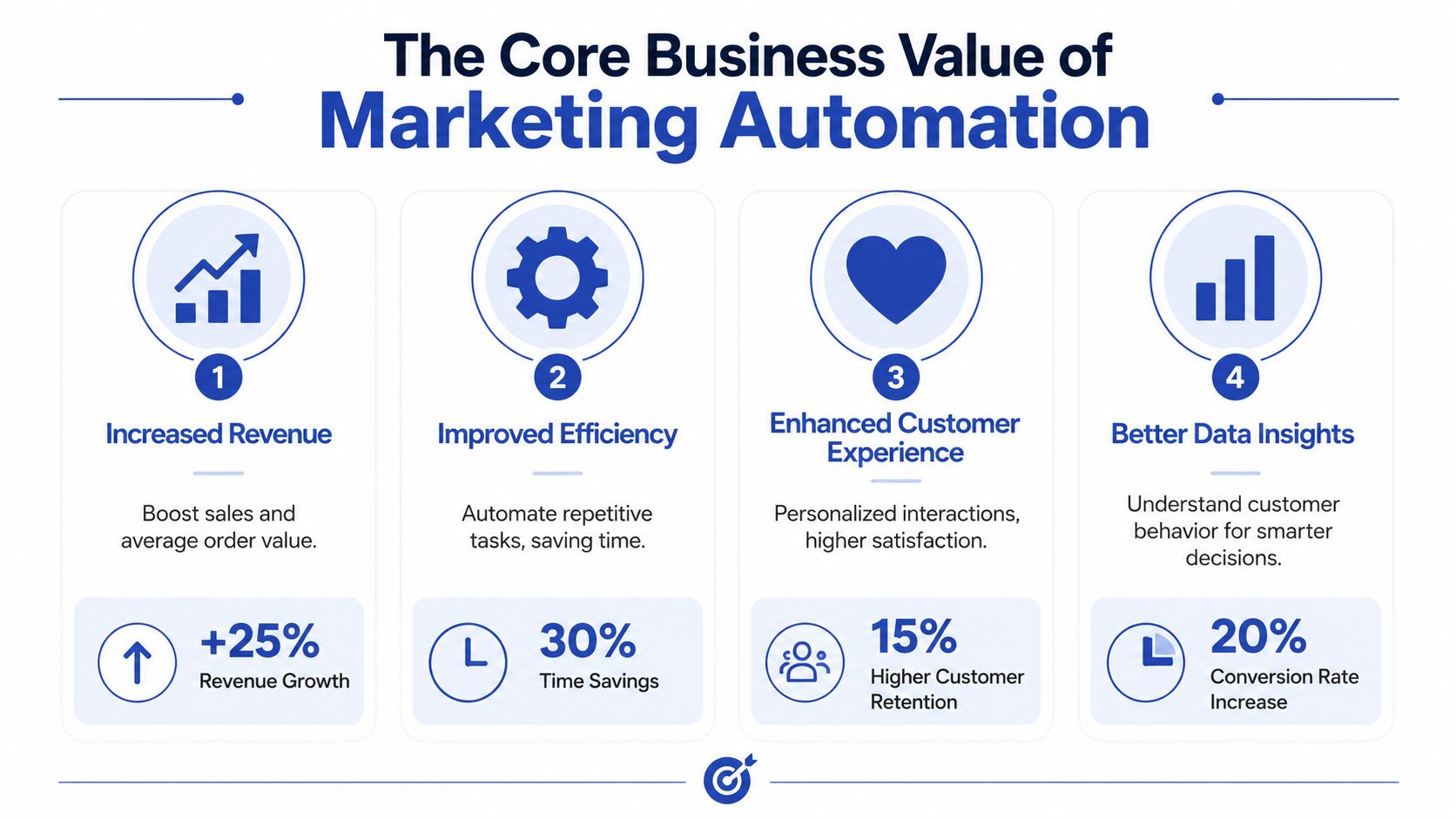
The commercial case is straightforward. Businesses that use marketing automation to nurture prospects experience a 451% increase in qualified leads, and ecommerce flows like abandoned cart recovery can recoup up to 15% of lost sales, according to Invesp's marketing automation statistics roundup. Those figures matter because they point to something store owners already feel: timely follow-up converts intent that would otherwise disappear.
Four ways automation creates value
The first is direct revenue recovery. Cart abandonment, browse abandonment, and back-in-stock alerts all target shoppers who already showed intent. These aren't cold audiences. They're close to buying, which is why these flows often outperform broad promotional sends.
The second is customer lifetime value. A first order is only the start. Post-purchase education, replenishment reminders, cross-sell logic, loyalty prompts, and win-back journeys help brands keep customers active without resorting to blanket discounting.
Third is operational efficiency. Teams stop rebuilding the same sends every week. They spend less time on repetitive segmentation and more time improving offers, creative, and landing pages. If you want a broader operational view, Machine Marketing's automation guide is a useful read because it frames automation as process improvement rather than just campaign execution.
Fourth is personalisation at scale. Not fake personalisation with just a first name token. Real relevance based on category interest, order history, average order value, geography, fulfilment status, subscription behaviour, and customer stage.
The metrics that actually matter
A lot of dashboards are noisy. For ecommerce, I'd keep attention on a smaller set of operational metrics:
- Abandoned cart recovery rate. Are checkout recovery flows bringing orders back
- Flow-specific conversion rate. Which journeys move customers to purchase
- Repeat purchase rate. Are post-purchase and lifecycle flows creating second and third orders
- Customer lifetime value. Is retention improving over time
- Revenue by flow. Which automations deserve more development time
- List growth quality. Are new subscribers becoming buyers, not just contacts
For stores trying to tighten targeting, a sound customer segmentation strategy for ecommerce growth often does more than writing more emails. Better segments usually beat more volume.
The strongest automation programmes don't send more messages. They send fewer irrelevant ones.
Five Essential Automated Ecommerce Workflows
A strong automation setup doesn't begin with dozens of flows. It begins with a handful that match how customers behave from first visit to repeat purchase.
Below is the order I'd prioritise for most stores.
Workflow summary
| Workflow | Primary Goal | Typical Trigger |
|---|---|---|
| Abandoned cart recovery | Recover near-complete purchases | Checkout started but order not completed |
| Browse abandonment | Re-engage high-intent visitors | Product or category viewed without cart activity |
| Welcome and lifecycle | Turn subscribers into first-time buyers | Email or SMS sign-up |
| Post-purchase sequence | Improve retention and repeat purchase | Order placed or fulfilled |
| SMS and push alerts | Drive action on urgent updates | Consent given plus key customer event |
Abandoned cart recovery
This is usually the first flow worth building because the customer is already close to conversion. They selected products, entered checkout details, and then dropped.
A good cart flow doesn't just say “you left something behind”. It removes friction. That might mean surfacing shipping clarity, restating your returns policy, showing product imagery, or reminding the customer why the item mattered in the first place. If every cart email is just a generic discount prompt, you'll train customers to wait.
One practical tip is to align message content with cart value and product type. A low-consideration impulse product needs a different recovery message from a premium product that requires reassurance.
Browse abandonment
This flow catches a customer one step earlier. They've shown interest, but they haven't committed enough to start checkout.
That makes browse flows useful, but also easy to misuse. If your tracking is noisy or your product pages attract casual browsers, this automation can become intrusive. It works best when the trigger threshold is more thoughtful than a single page view. Repeat views, category depth, or return visits often create stronger intent signals.
Don't automate every detectable behaviour. Automate the behaviours that show buying intent.
Welcome and lifecycle journeys
Welcome flows are often underbuilt. Brands focus on the sign-up incentive and forget the relationship-building part.
The first message should confirm value and set expectations. The next messages can introduce best sellers, brand story, category guidance, or product education. For many stores, the welcome sequence is also where segmentation begins. A skincare shopper and a homeware shopper shouldn't be pushed into the same follow-up path if their interests are easy to distinguish early.
A broader lifecycle email marketing approach for ecommerce brands becomes important once your catalogue and customer base diversify. That's when welcome, active customer, VIP, replenishment, and win-back logic need to work as one system rather than isolated campaigns.
Post-purchase sequences
This is the flow many brands waste. They send an order confirmation, a shipping update, then go silent.
Post-purchase messaging should do more than confirm logistics. It should support product adoption, reduce buyer's remorse, answer common questions, and create the next reason to buy. For consumables, that might mean replenishment timing. For apparel, it may be fit guidance and complementary products. For technical products, onboarding content matters more than a sales push straight away.
Useful post-purchase touchpoints often include:
- Order reassurance. Confirmation, fulfilment updates, and support access
- Product education. Care instructions, usage tips, or setup help
- Review requests. Timed after likely product use, not immediately after dispatch
- Cross-sell prompts. Relevant add-ons based on what the customer already bought
SMS and push notifications
Email does a lot of heavy lifting, but some moments work better in channels built for speed. SMS and push are effective when the message is urgent, specific, and expected.
Back-in-stock alerts, delivery updates, limited-time reminders, and checkout nudges can fit well. Daily promotion blasts do not. The fastest way to burn list quality is to treat SMS like a louder version of email.
The discipline here is consent and restraint. If the message doesn't justify an interruption, it shouldn't be sent.
How to Choose Your Automation Platform
Platform selection usually goes wrong in one of two ways. Some brands buy the biggest system they can afford and use a fraction of it. Others choose a tool because it looks simple, then outgrow its data model, reporting, or logic as soon as they need more advanced segmentation.
For Shopify and Shopify Plus stores, the better question is not “Which platform is best?” It's “Which platform fits our current operations and the stack we'll need next?”
Start with data depth, not templates
Most platforms can build a welcome flow. That isn't the differentiator.
What matters is how much Shopify data the platform can use. Can it read product, customer, and order events in a clean way? Can it handle custom properties, line item detail, subscriptions, bundles, loyalty status, and custom events from your storefront? If you're on Shopify Plus, can it support more advanced event design instead of only standard ecommerce triggers?
A platform becomes limiting when your strategy depends on data it can't ingest or act on.
Evaluate the logic builder under real conditions
Visual builders often look similar during a demo. The differences show up later, when you need branching rules that reflect your specific business.
Look for questions like these:
- Can it branch by product category or SKU group without awkward workarounds
- Can it suppress messages when customer service issues or returns are open
- Can it trigger flows from non-Shopify systems such as a CRM or ERP
- Can it manage frequency controls across email, SMS, and push in one place
- Can your team understand and maintain it after implementation
That last point matters. A powerful system that nobody on your team can confidently operate becomes agency-dependent in the wrong way.
Multi-channel and CRM fit
For many scaling brands, the platform decision overlaps with the CRM decision. If customer records sit in multiple systems, the automation layer has to know which one acts as the source of truth. That becomes especially important for B2B hybrid brands, stores with account managers, and businesses with longer buying cycles.
If you're comparing customer data approaches for Shopify Plus, this guide to CRM solutions for Shopify Plus stores helps frame where CRM ends and lifecycle automation begins.
A short walkthrough can help when teams are comparing setup paths and trade-offs:
What a scalable choice looks like
The right platform usually has these traits:
- Strong Shopify integration with dependable event sync
- Flexible segmentation based on behavioural and transactional data
- Cross-channel support for email, SMS, and sometimes push
- Clear attribution reporting without forcing the team into spreadsheet archaeology
- Practical governance so multiple team members can work safely inside it
Choose the platform your business can operate well, not the one with the longest feature sheet.
Integrating Automation with Your Shopify Tech Stack
Here, many automation projects either become durable or become fragile.
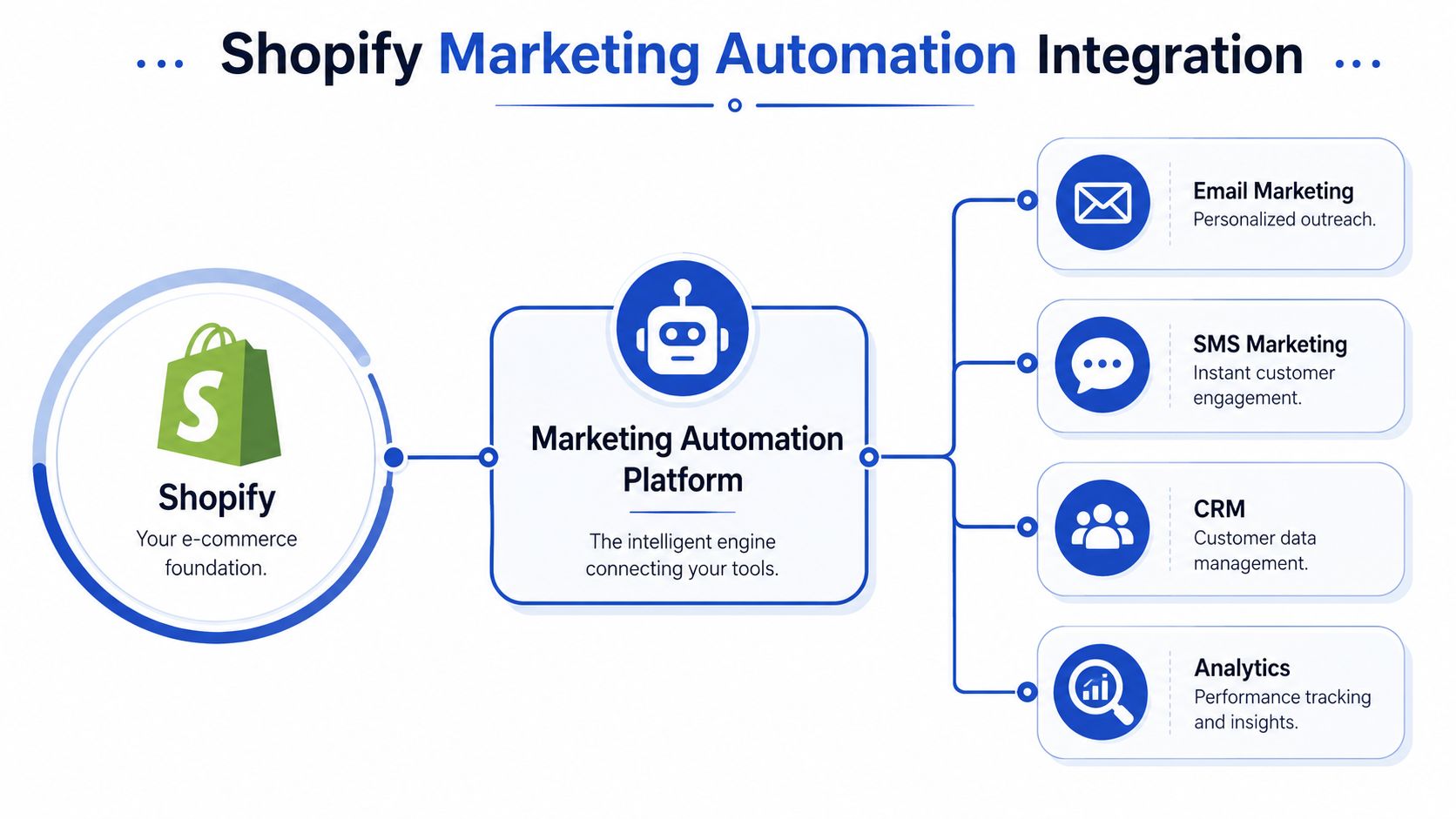
A lot of brands install an app, sync contacts, turn on a few default flows, and assume they've built an automation system. They haven't. They've built a thin messaging layer on top of Shopify. That can work for a while, but it starts to break as soon as the business adds complexity such as subscriptions, multiple warehouses, ERP-managed stock, custom product logic, or a separate CRM.
Level one with app-level integration
The first layer is the standard app connection. You install the automation platform from the Shopify App Store, authorise access, sync customer and order data, and start using built-in triggers.
This is enough for many early-stage flows. Welcome emails, simple cart recovery, basic post-purchase messaging, and broad segmentation can all run at this level.
The weakness is that you only get what the default connector exposes. If your automation depends on custom checkout behaviour, bundled product structure, nuanced stock states, or operational data outside Shopify, app-level sync won't carry enough context.
Level two with custom events and API-driven enrichment
The second layer is where serious personalisation starts. Here, the store sends richer data into the automation platform using APIs, webhooks, and custom event tracking.
Examples include:
- Custom storefront behaviour such as quiz completions, product comparison actions, or bundle builder interactions
- Merchandising signals like margin group, seasonality, or collection-specific logic
- Customer state changes such as loyalty tier updates, subscription pauses, or support issue flags
- Content model data from Shopify metafields or metaobjects that shape message content dynamically
Not all intent is visible in a simple product view or completed order. For Shopify Plus stores, custom event architecture often becomes the difference between generic messaging and flows that reflect customer context.
If your automation platform only sees orders and email sign-ups, it only understands a fraction of the customer journey.
Level three with ERP, CRM, PIM, and operations systems
At scale, marketing automation can't live in isolation. It has to connect to the systems that control stock, product information, fulfilment, support, and customer ownership.
That usually means integration with:
- ERP systems for cleaner inventory status, order state, and operational truth
- CRM platforms for account history, lifecycle ownership, and sales context
- PIM tools for enriched product data across large catalogues
- Support and loyalty tools for suppressions, service-triggered messaging, and retention logic
A common example is back-in-stock automation. If the trigger only relies on storefront visibility, you may send alerts too early, too late, or against inventory already allocated elsewhere. When ERP stock status is connected properly, the message gets sent when the product is ready for sale.
Another example is customer suppression. If someone has an unresolved support issue, your automation shouldn't keep pushing promotional messages. That requires the automation layer to understand service context, not just marketing activity.
The architectural principle that matters most
One system needs to own each critical data point. Otherwise you get duplicate triggers, conflicting segments, and bad reporting.
Decide where truth lives for inventory, customer profile, consent, order state, and account value. Then design sync rules around that model. Shopify Plus brands that get this right tend to scale automation cleanly. Brands that don't end up with flows that look complex on paper but behave unpredictably in production.
Your Implementation Roadmap and Best Practices
The fastest way to make automation feel overwhelming is to build too much too early. The better approach is staged implementation with a clear operating rhythm.
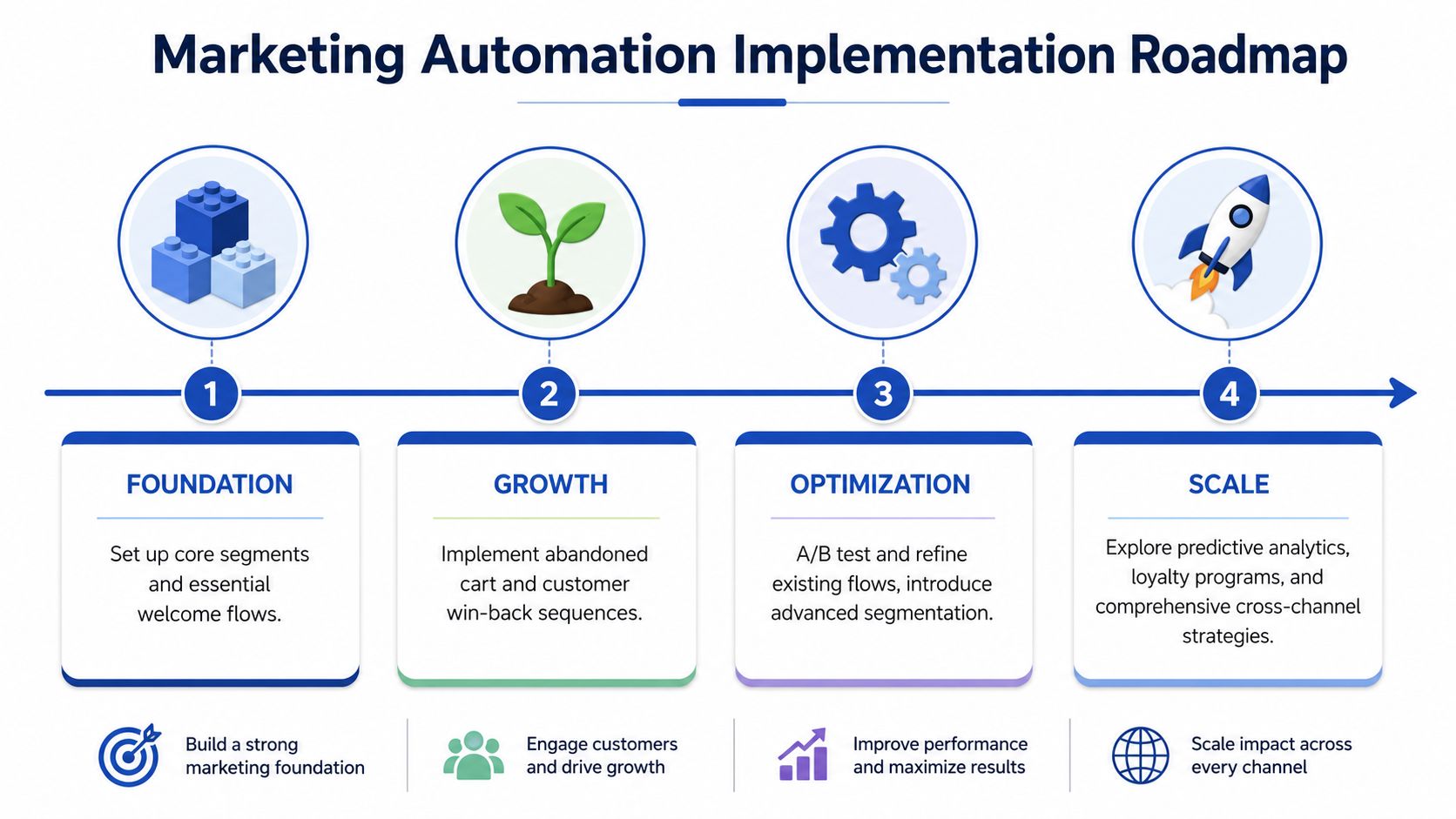
Phase one with foundational flows
Start with the flows that almost every store needs. That normally means welcome, abandoned cart, and a basic post-purchase sequence.
The goal here isn't complexity. It's reliability. Get the triggers right. Confirm consent handling. Make sure products populate correctly. Check discount logic, suppression rules, and brand tone. A simple flow that works every time beats an advanced one built on shaky data.
Focus early effort on:
- Clean segmentation for subscribers, first-time customers, and repeat customers
- Template quality so core emails render well across devices
- Message hierarchy so each send has one clear job
- Baseline reporting that shows whether the flow is doing useful work
Phase two with lifecycle expansion
Once the foundation is stable, add browse abandonment, win-back, replenishment, and more nuanced post-purchase paths.
Many brands should begin splitting customer journeys by product category, purchase type, or customer value band. A customer who buys consumables has a different post-purchase cadence from one who buys occasional gifts or high-consideration products.
Phase three with optimisation discipline
Optimisation isn't about changing everything at once. It's about isolating one decision and learning from it.
Useful tests often include:
- Subject line intent. Does benefit-led copy outperform product-led copy
- Offer timing. Should an incentive appear later in the sequence, or not at all
- Channel mix. Which moments deserve SMS support and which should stay email-only
- Content structure. Does a shorter message convert better than a detailed one for that audience
What doesn't work is constant random tweaking without a clear test plan. That creates noise, not learning.
“Over-communication is usually a segmentation problem disguised as a content problem.”
Best practices that protect long-term performance
A few habits make a disproportionate difference over time:
- Keep brand voice consistent. Transactional emails, lifecycle messages, and campaigns should sound like the same company.
- Use suppression logic seriously. Exclude recent purchasers, support-active customers, and people already in overlapping journeys.
- Review deliverability regularly. High send volume to disengaged contacts erodes performance.
- Build for maintenance. Name flows clearly, document trigger logic, and archive old branches when strategy changes.
- Map ownership internally. Someone should own performance, someone should own creative, and someone should own data quality.
The strongest automation programmes are organised like systems, not collections of campaigns.
From Theory to Practice Examples and Next Steps
The practical difference between average automation and effective automation usually comes down to context.
Take a fashion retailer with broad catalogue depth. A generic post-purchase flow tends to push the same “shop again” message to everyone. A segmented version can split by product type, season, and customer status, then recommend complementary items that make sense for what was just bought. That feels less like marketing pressure and more like assisted merchandising.
A subscription-led brand has a different challenge. Instead of waiting for churn signals after a failed renewal, the smarter approach is a pre-renewal journey built around education, usage encouragement, and support access. When automation is connected to subscription state and customer activity, the brand can intervene before frustration becomes cancellation.
For a Shopify Plus store with ERP and CRM dependencies, the biggest gains often come from infrastructure rather than copy. Once inventory status, customer profile data, and lifecycle events move cleanly across systems, the automation layer becomes far more dependable. Flows stop firing on stale assumptions. Reporting becomes more believable. Teams can optimise with confidence because the events underneath the dashboards are trustworthy.
That's the core point of marketing automation ecommerce. It isn't just a way to send emails faster. It's a way to turn customer data, operational signals, and buying behaviour into a structured growth engine that keeps improving as the business gets more complex.
If your store has outgrown app-only automation and you need help connecting Shopify Plus with ERPs, CRMs, subscriptions, or custom lifecycle logic, Grumspot can help design and build an automation-ready ecommerce stack that scales cleanly.
Want this kind of work on your store?
Send us the URL and what is slowing it down. We look at the store before we reply.
Related posts
Check out some similar posts.