Your BigCommerce to Shopify Migration Playbook
- BigCommerce to Shopify migration
- eCommerce replatforming
- Shopify migration guide
- Shopify SEO
- eCommerce growth
Launched
April, 2026

Thinking about moving from BigCommerce to Shopify? It’s more than just a technical swap; it's a strategic decision about where your brand is heading. At its core, this kind of project involves carefully moving your entire online operation—products, customer data, orders, and your store's design—over to the Shopify ecosystem.
The goal isn't just to change platforms. It's to tap into Shopify's powerful app marketplace, its famously high-converting checkout, and its flexible design tools. Getting it right means planning every detail, from transferring your data without a hitch to making sure your hard-won SEO rankings don't take a nosedive.
Knowing When It's Time to Move
Replatforming is a serious undertaking, so before you get lost in data exports and theme code, you need to be certain this move aligns with your long-term goals. This isn't about which platform is "better" on paper; it's about whether BigCommerce is actively holding your business back.
For many brands on the rise, the limitations of their platform eventually become impossible to ignore. Are you constantly fighting with clunky design templates that stop you from creating the unique user experience your brand deserves? Maybe you're tired of a checkout flow that feels restrictive and isn't built to maximise conversions. These are the classic growing pains that signal it might be time for a change.
Key Drivers for Making the Switch
The decision to migrate from BigCommerce to Shopify is almost always driven by a need for more agility and a better toolset. Brands making this jump are looking for specific, tangible improvements in how they operate and market themselves.
Some of the most common motivations we see include:
- Unlocking a Vast App Ecosystem: The Shopify App Store is a game-changer. It gives you thousands of ready-made solutions for marketing, subscriptions, and loyalty programmes, often eliminating the need for expensive custom development work.
- Superior Mobile Experience: With most of your customers shopping on their phones, a mobile-first design isn't just nice to have—it's essential. Shopify’s architecture is built from the ground up for mobile.
- Streamlined International Selling: Tools like Shopify Markets take the headache out of selling across borders. They handle everything from currency conversion and local payment options to calculating duties and taxes.
- A Checkout Built to Convert: Shopify's checkout is legendary for its speed and optimisation. It’s designed to reduce friction and turn more of your visitors into paying customers.
This trend is especially strong in mobile-first regions. In the UK, for instance, a staggering 47% of mid-sized online retailers on BigCommerce started a migration to Shopify between 2022 and 2024. The primary reason? A need for better mobile performance, which makes sense when 71% of UK Shopify traffic now comes from mobile devices.
BigCommerce vs. Shopify Key Differences for Growing Brands
To help you see where these differences lie, here’s a quick-glance comparison of the features that matter most to ambitious e-commerce brands.
| Feature | BigCommerce | Shopify |
|---|---|---|
| Core Business Model | "All-in-one" with many built-in features, fewer apps needed. | "Core + Apps" model, relies on a vast app store for extended functionality. |
| Ease of Use | More complex backend, can have a steeper learning curve for beginners. | Widely regarded as the most user-friendly and intuitive platform. |
| App Ecosystem | Smaller app marketplace (around 1,000+ apps). | The largest e-commerce app store, with over 8,000+ apps for every possible need. |
| Design & Themes | Good selection of themes, but customisation can be less intuitive. | Excellent theme store (Shopify 2.0) with drag-and-drop sections for easy customisation. |
| Checkout Conversion | Solid, customisable checkout, but requires more setup. | Industry-leading, optimised for speed and conversion with options like Shop Pay. |
| Transaction Fees | 0% transaction fees on all plans. | 0.5% - 2% fees if not using Shopify Payments. 0% if using Shopify Payments. |
| Ideal For | Brands wanting many features out-of-the-box without relying heavily on apps. | Brands prioritising flexibility, ease of use, and access to a massive ecosystem of tools. |
This table highlights the fundamental philosophical difference: BigCommerce aims to give you everything upfront, while Shopify provides a powerful, lean core that you can build upon with best-in-class apps. For most growing brands, Shopify's model offers far more flexibility to adapt and scale.
By focusing on clear outcomes—like a higher conversion rate or less time spent on operational tasks—you can build a solid business case for the move. A successful migration is about unlocking new growth potential. If you feel boxed in by your current setup, that's a strong sign it's time to see what else is out there. When handled by experienced Shopify migration experts, the entire process can be a huge catalyst for your business.
Building Your Pre-Migration Success Blueprint
Diving into a BigCommerce to Shopify migration without a solid plan is asking for trouble. I’ve seen it happen. From my experience, a successful move is ninety percent preparation and only ten percent execution. Your pre-migration blueprint is the single most important document you'll create, acting as a complete inventory of your current operation and a clear roadmap for rebuilding on Shopify.
Think of it as a meticulous stocktake of your entire digital business. This process forces you to look beyond just products and customers to really understand the machinery that makes your store tick, ensuring no detail gets left behind.
This early planning stage is also the perfect time to get honest about why you’re migrating in the first place. What are the core drivers?
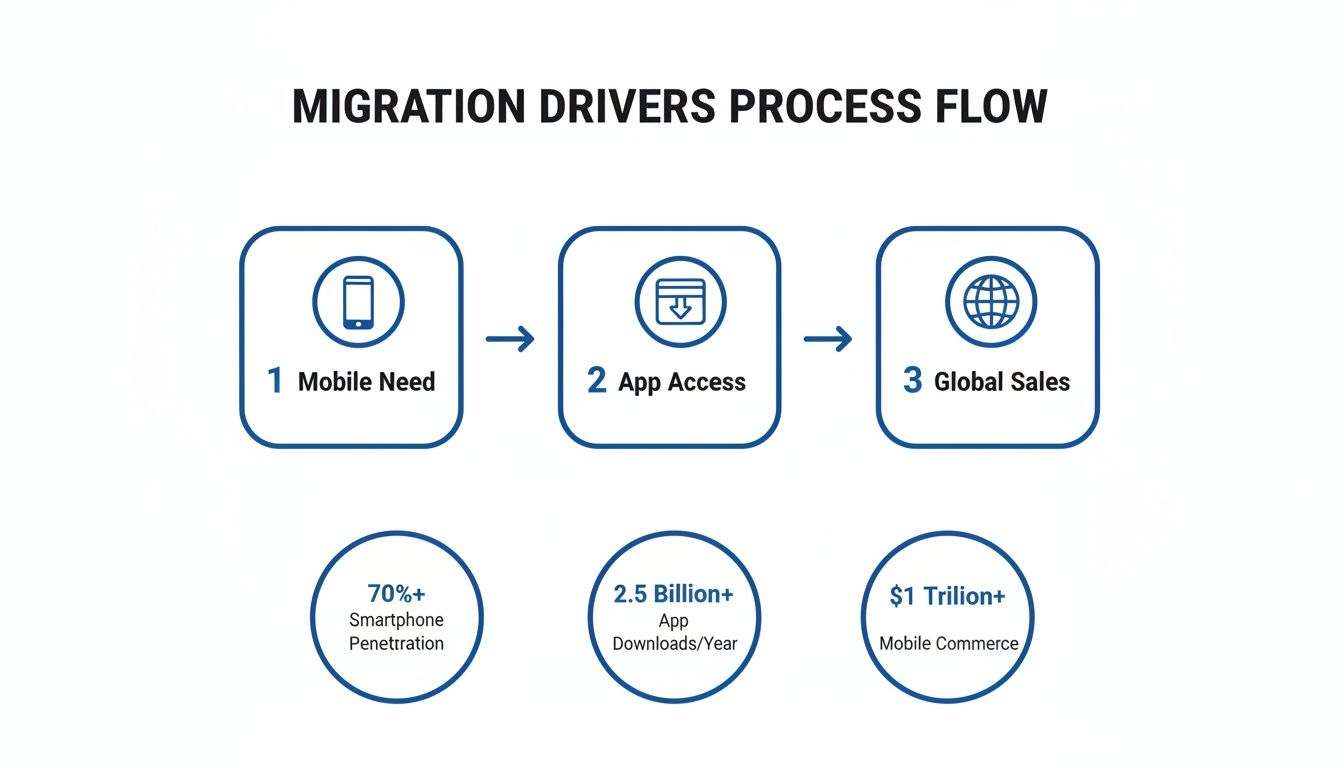
As you can see, the journey often starts with a specific pain point—like poor mobile performance—and evolves. You start exploring Shopify's app ecosystem, which then opens your eyes to new growth opportunities, such as simplified international selling. It’s a great reminder that a migration isn't just about fixing what’s broken; it's about setting yourself up for future growth.
Conducting a Full Store Inventory
First things first, you need to create a complete catalogue of everything on your BigCommerce store. And I mean everything. This goes much deeper than a simple product count; you need to document all the intricate details that shape your store’s functionality and customer experience.
I recommend organising your audit into these key areas:
- Core Data: This is your product list (with every variant, SKU, and custom field), all customer accounts (including special groups or tags), and your complete order history. Decide how much historical order data you genuinely need for customer service.
- Content & SEO Assets: Make a list of every blog post, buying guide, and static page like 'About Us' or 'Returns Policy'. These are valuable assets you can't afford to lose.
- Apps & Integrations: What third-party apps does your store depend on? Think email marketing (Klaviyo, Mailchimp), reviews (Yotpo, Judge.me), loyalty programmes, and custom shipping calculators. Every single one needs a Shopify equivalent mapped out.
- Critical Business Systems: Don't forget connections to external systems like an Enterprise Resource Planning (ERP) or Customer Relationship Management (CRM) platform. These integrations are often the most complex and need specialist attention.
A thorough audit turns a list of unknown risks into a manageable checklist. It’s what prevents those dreaded "we forgot about that" moments mid-project and lays the foundation for a smooth, predictable migration.
Mapping Functionality and Custom Code
With your full inventory in hand, the next job is to map every feature and function to its future home in the Shopify ecosystem. This is where you translate your BigCommerce setup into a Shopify build plan. A crucial tip: never assume a direct one-to-one equivalent exists for everything.
For instance, your BigCommerce store might rely on a custom script for a unique "buy one, get one" offer. You’ll need to research and find a Shopify app or develop a new script that can replicate that logic. The same goes for complex customer group rules for wholesale pricing; you'll need a plan to rebuild this using Shopify's B2B features or a specialised app.
This mapping exercise should cover:
- App Functionality: For each BigCommerce app, find the best Shopify replacement. Read reviews, compare features, and check for parity. Does the Shopify version of your reviews app offer the same rich snippets and Q&A features you currently use?
- Custom Code Assessment: Go through every piece of custom code or script on your site—from small front-end tweaks to complex backend logic. A developer will need to evaluate each one and determine if it's still necessary before rebuilding it for Shopify.
- Promotional Logic: How do you run sales? Document your most common discount types and identify the corresponding tools within Shopify to make them happen.
Honestly, this process is also a fantastic opportunity for a spring clean. You’ll likely find you're paying for apps you don't use anymore or have old code slowing your site down. A BigCommerce to Shopify migration is the perfect excuse to refine your tech stack, ensuring your new store is lean, fast, and ready for whatever comes next.
Executing the Data Migration Without the Headaches
Let's be honest, moving your store’s data is often the part of a BigCommerce to Shopify migration that keeps people up at night. It’s the core of your business—your products, your customers, and all that valuable order history. Getting it wrong can be a nightmare, but getting it right is entirely achievable with a solid plan.
This is all about moving your core business assets from one digital home to another, and ensuring everything lands in the right place.
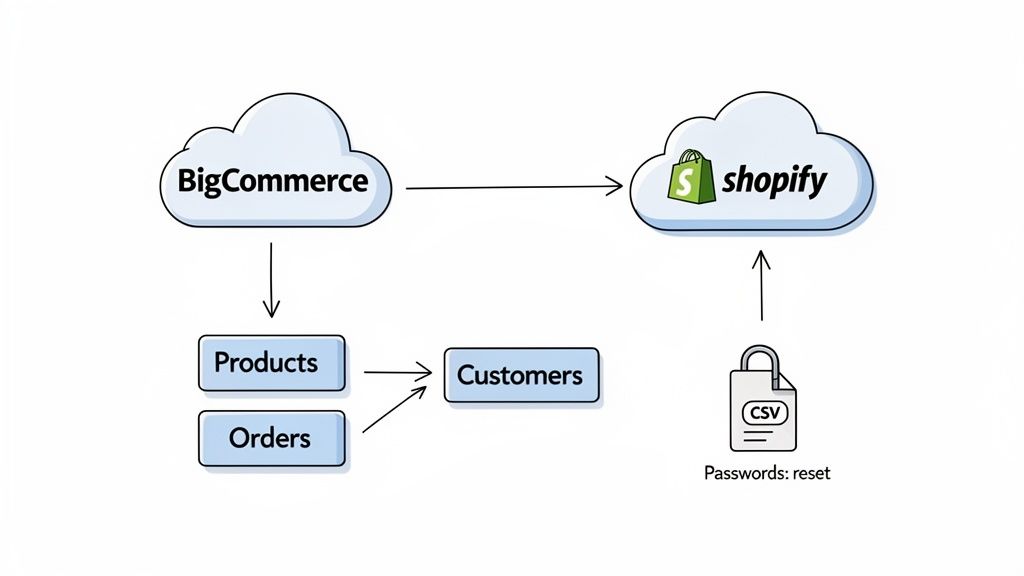
The path you take really boils down to your store's complexity, your team's technical confidence, and of course, your budget. Each route has its pros and cons.
Choosing Your Migration Path
You've essentially got three ways to tackle this, from a completely hands-on approach to a fully managed service. Knowing which one fits your situation is the first real decision you'll make.
Manual CSV Imports: This is the do-it-yourself route. You export data from BigCommerce into CSV files, then spend time cleaning and reformatting them to match Shopify's required structure before importing. It’s a perfectly fine option for smaller shops (think under 500 products) with straightforward data, but it is notoriously time-consuming and a single slip-up with a spreadsheet can cause major headaches.
Migration Apps: This is the sweet spot for many. Tools like Cart2Cart, LitExtension, or Matrixify are designed to automate the heavy lifting. They act as a bridge between the two platforms, moving data with minimal manual input from you. For most mid-sized businesses, this strikes a great balance between cost and efficiency.
Agency-Led Migration: If you’re running a large, complex store with years of data, heavy customisation, or are moving to Shopify Plus, bringing in an agency is the safest bet. Experts will manage the entire process—extraction, cleansing, mapping, validation, and post-launch checks. It's an investment in peace of mind and data integrity.
No matter which path you choose, remember the golden rule: garbage in, garbage out. A successful migration is built on a foundation of clean data. The time you spend tidying up your BigCommerce exports before the move will pay you back tenfold.
Data Cleaning: The Non-Negotiable First Step
Before you even think about exporting a file, it's time for a data-cleansing audit. Doing this work upfront stops common problems dead in their tracks, like broken product images, mismatched variants, and messy customer records showing up on your shiny new Shopify store.
Your pre-migration cleaning checklist should look something like this:
- Standardise Product Variants: Consistency is key. Go through your variants and make sure they all use the same terminology. For example, unify "Lrg," "Large," and "L" into a single, clean "Large."
- Validate Image URLs: Crack open your product export file and spot-check the image URLs. You're looking for broken links or any URLs that aren't publicly accessible.
- Clean Up HTML in Descriptions: Over the years, product descriptions collect messy, inline HTML from old text editors. You’ll want to strip this out to ensure your formatting looks sharp and consistent on Shopify.
- Review Customer Data: This is a great opportunity to merge duplicate customer accounts and standardise address formats. It’s a crucial tidy-up for both data quality and customer experience.
Following these data migration best practices will make a tangible difference. The effort you put in here directly translates to a smoother, more professional launch.
Handling Sensitive Data and Order History
Some data just needs more careful handling, either because of technical constraints or privacy regulations like GDPR. Knowing the nuances here is vital for a responsible migration.
First, and most importantly, customer passwords cannot be migrated. This is a hard-and-fast rule. For security, passwords are encrypted on every platform and simply cannot be transferred. This means your existing customers will need to create a new password when they first visit your new Shopify site. You absolutely must communicate this to them clearly before you go live.
Order history, thankfully, is a different story. It can—and should—be moved over. Here’s a simple breakdown of the sequence.
| Data Type | Can it be Migrated? | Best Practice for Migration |
|---|---|---|
| Products | Yes | Migrate these first. They are the backbone of your store. |
| Customers | Yes | Import customer records without passwords. Prepare a password reset email campaign for launch day. |
| Order History | Yes | Import historical orders after products and customers are loaded. This preserves essential data for your team and your customers. |
Bringing over historical orders is absolutely critical for your customer support team. When a customer calls with a query about a past purchase, your team needs that information at their fingertips. You probably don’t need a decade of data, but migrating at least the last two years of order history is a solid strategy to ensure business continuity.
Don’t Let a Migration Tank Your SEO
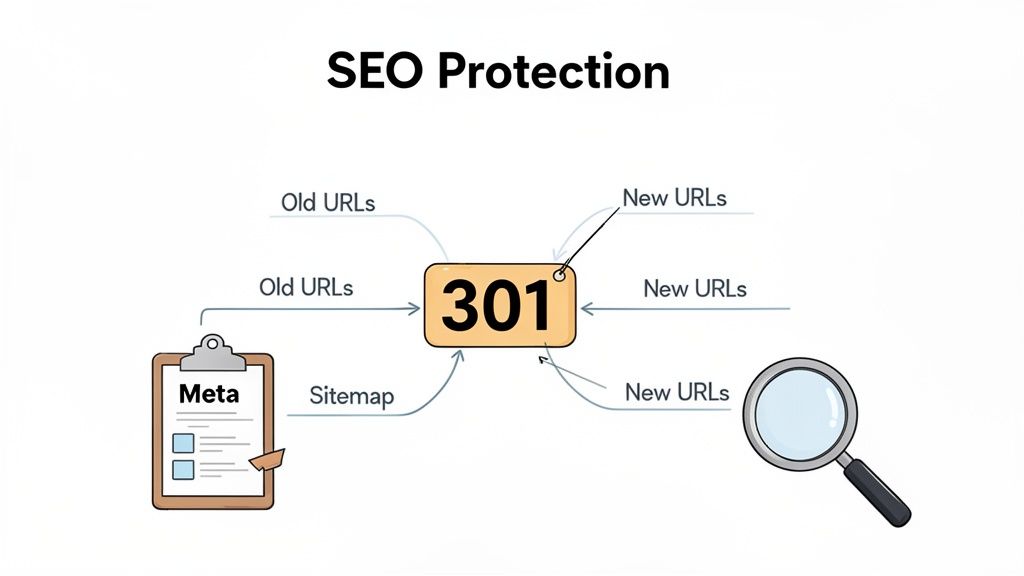
Let's be blunt: your organic traffic is one of your most valuable assets. You’ve poured years of work into building your search rankings, and the last thing you want is for a platform switch to send them plummeting. Protecting your search engine optimisation (SEO) isn’t just another task on the list—it’s the most critical part of a successful BigCommerce to Shopify migration.
Get it wrong, and you risk severing the very connections that feed your business. The good news? A carefully planned strategy doesn't just prevent disaster; it often leads to even stronger SEO on the other side. It all comes down to giving search engines a clear, new map to your content.
This isn’t something you can afford to leave to chance. SEO preservation is a non-negotiable metric for success. In fact, UK-based data shows that 92% of stores maintain or improve their rankings within six months when a proper plan is executed. We saw this firsthand with a Birmingham beauty brand that retained 96% of its Google UK traffic by implementing full URL mapping, which helped drive a 17% increase in organic revenue.
While a secure SEO migration might add £800-£2,500 to the budget, it's a small price to pay to avoid the 15-20% traffic drops we’ve seen in migrations that lack a proper SEO focus.
Master Your 301 Redirect Map
The single most crucial document for your SEO is your 301 redirect map. Think of it as a comprehensive forwarding service for your website. It tells search engines (and your customers) that a page has permanently moved from an old BigCommerce URL to a new Shopify URL, ensuring that all that hard-earned "link equity" from backlinks gets passed on correctly.
The URL structure on Shopify is different from BigCommerce. A BigCommerce product URL might look like /products/cool-gadget.html, but on Shopify, it becomes /products/cool-gadget. Without a redirect, anyone clicking the old link will hit a dead end—the dreaded 404 "Page Not Found" error.
Your redirect map needs to be a complete, one-to-one list of every important URL.
- Every Product Page: Map every single product URL from BigCommerce to its new home on Shopify.
- Every Collection Page: Don't forget your category pages. These are often high-traffic hubs that are vital to protect.
- Every Blog Post: All your content marketing efforts live here. Make sure they move with you.
- Every Static Page: This includes your "About Us," "Contact," and various policy pages.
A "best effort" redirect plan just won't cut it. You need a comprehensive, URL-by-URL map that accounts for every single indexed page on your old site. This is your insurance policy against lost traffic and revenue.
Migrate Metadata and Content Structure
Beyond redirects, you need to make sure the on-page signals search engines rely on remain consistent. This means carefully migrating your metadata—the page titles and meta descriptions that show up in search results. These little snippets are hugely important for click-through rates and signalling relevance to Google.
During your pre-migration audit, you should have documented the metadata for all your high-value pages. Now’s the time to ensure this information is transferred correctly into Shopify. Honestly, this is also a golden opportunity to rewrite and optimise any underperforming titles and descriptions.
Preserving your blog's structure is just as important. If your blog posts are organised into categories on BigCommerce, you’ll want to recreate that structure using tags within Shopify's blog system. Maintaining a logical content hierarchy helps both users and search engines understand how all your content fits together. To ensure you've got every angle covered, you can get more details from our deep-dive on how to master Shopify migration SEO preservation.
Final SEO Checks: Before and After Launch
Your SEO work doesn't stop once the redirects are set up. A few final steps are essential for a clean and successful transition.
Before you go live, implement canonical tags across your new Shopify site. These tags tell search engines which version of a page is the "master" copy. This is crucial for preventing duplicate content issues that can sometimes pop up with product variants or filtered collection pages.
Then, immediately after you launch, you need to get straight into Google Search Console.
- Submit Your New XML Sitemap: Your sitemap is the official roadmap of your new site. Submit it to Google Search Console to encourage search engines to start crawling and indexing your new Shopify URLs as quickly as possible.
- Monitor Google Search Console: Keep a very close eye on the "Coverage" report. This tool will be your best friend, alerting you to any 404 errors or other crawling issues as they happen. This allows you to fix them fast, before they can do any real damage to your rankings.
By following this meticulous SEO plan, your BigCommerce to Shopify migration becomes a powerful opportunity to build on your existing success, not start from scratch.
Your Go-Live Checklist and Post-Launch Strategy
Getting your new Shopify store live is a huge achievement, but don't pop the champagne just yet. A truly successful BigCommerce to Shopify migration is measured by what you do in the hours, days, and weeks that follow. Having a thorough go-live checklist and a solid post-launch plan is what separates a smooth handover from a weekend of chaos.
The moment you flip the DNS switch to point to Shopify, you're live. This isn't the time to be guessing or hoping for the best. Your final pre-launch checks need to be as rigorous as a pilot's pre-flight inspection, making sure every single system is green-lit before take-off.
The Final Go-Live Checklist
As you get closer to the launch window, your focus needs to pivot from building things to checking them. This is your final opportunity to spot any lingering issues before they become your customers' problems.
Here’s what your final checks should cover:
- A Full Quality Assurance (QA) Sweep: Go through the entire site one last time with fresh eyes. Click every link, read through content for typos, and check that all images load properly on both desktop and mobile.
- Test the Full Checkout Funnel: This is non-negotiable. Place a genuine order using a live payment method. Experience the entire journey, from adding an item to your basket right through to getting the order confirmation email. Then, immediately process a refund in the Shopify admin to confirm that works, too.
- Verify All Tracking Scripts: Use your browser's developer tools or an extension like the Facebook Pixel Helper. You need to be 100% certain that Google Analytics, marketing pixels, and any other tracking scripts are firing correctly on all your key pages.
- Freeze Content and Code Changes: Put a strict code and content freeze in place at least 24 hours before you plan to launch. The last thing you need is a well-intentioned, last-minute tweak bringing the whole thing down.
The go-live process isn't a single button press. It's a carefully orchestrated sequence of events designed to minimise risk and ensure a seamless cutover for your customers. Treat it with the respect it deserves.
The First 48 Hours Monitoring Plan
Once you've made the DNS switch and your Shopify store is live, the real work starts. The first two days are absolutely critical for catching and fixing any problems that slipped through the net. Your team needs to be on high alert.
Here’s your plan for the first 48 hours:
- Watch Real-Time Analytics: Keep your analytics platform open on a screen. You're looking for anything out of the ordinary—sudden drops in traffic or a jarring spike in the bounce rate could signal a problem with your tracking or redirects.
- Monitor Google Search Console: Head straight to the "Coverage" report in Google Search Console. You're hunting for any new 404 errors. As we've covered, even one missed redirect for a high-traffic page can hit your bottom line hard. We dive deeper into this in our guide to 301 redirects for a Shopify migration.
- Check App Functionality: Are your critical apps performing as they should? Are review requests going out? Are loyalty points being awarded correctly? Is your new email marketing platform actually capturing sign-ups? Verify everything.
- Listen to Customer Feedback: Your customer support team are your eyes and ears on the ground. Make sure they're prepared for questions and know how to spot patterns in customer complaints that might point to a wider site issue.
Your Strategy for the First 90 Days
With a stable launch in the rear-view mirror, your focus can shift from firefighting to growth. The first three months on Shopify are all about setting a new performance baseline and starting to use the platform's powerful tools to push your business forward.
It's the perfect time to establish new benchmarks. Your old conversion rate on BigCommerce is history; you now need to figure out what "good" looks like on Shopify. Once the site is live, the game becomes about website conversion optimization to make sure your new investment delivers a real return.
Finally, invest time in training your team. A powerful platform is only as effective as the people using it day-to-day. Run training sessions on managing products, fulfilling orders, and using new marketing apps. Empowering your team to master the new platform will be one of the smartest investments you make post-migration.
How to Budget for Your Migration
Let's talk about the money. Getting a clear handle on the full cost of a BigCommerce to Shopify migration is absolutely essential before you dive in. Too often, I see merchants focus only on the data transfer fee, completely forgetting about major expenses like theme development or new app subscriptions. A proper budget accounts for both the one-time project costs and your new, ongoing monthly expenses on Shopify.
The final figure can swing wildly. A simple migration for a small store might only set you back a few thousand pounds. On the other hand, a complex, enterprise-level project can easily sail past the tens of thousands. The main things driving that cost are the complexity of your current store, the number of SKUs you have, and how much custom work you need.
Breaking Down the Core Expenses
When you’re putting your budget together, you need to itemise everything. It’s a common pitfall to assume a single migration app or agency fee will cover the lot – it won't.
A realistic budget really needs to cover:
- Shopify Subscription Fees: This is your new baseline cost for using the Shopify platform. It depends entirely on which plan you need, whether that's a standard plan, Advanced, or Shopify Plus.
- Theme Development: Are you buying a premium theme (typically £150-£350) and having it customised, or are you going for a completely bespoke build from the ground up? A custom theme is a significant investment, often starting from £15,000.
- App Subscriptions: Tally up the monthly fees for all the new Shopify apps required to replicate or, better yet, improve on your BigCommerce setup's functionality.
- Migration Service or Agency Fees: This is often the single biggest line item. It's the cost of using a dedicated migration tool, bringing a freelancer on board, or partnering with a full-service agency to manage the entire process for you.
While those numbers might feel a bit steep at first, it helps to see them as a strategic investment. For instance, we've seen many UK merchants actually achieve significant long-term savings after making the switch. In fact, UK brands migrating from BigCommerce to Shopify have reported their total cost of ownership dropping by an average of 30% over two years. You can find more data-driven insights on the financial benefits of this migration on Wiro.agency.
Realistic Cost and Timeline Ranges
To help you set some solid expectations, here are a few typical project scopes we see. For larger, enterprise-level UK stores with over 5,000 SKUs, a migration project usually lands somewhere between £12,000 and £40,000. These projects almost always involve deep customisation and tricky integration work, typically spanning 10-16 weeks.
For mid-market stores with 500 to 5,000 SKUs, the investment is more moderate, generally falling into the £4,000 to £12,000 range. These migrations are much quicker, often wrapping up within a 4-8 week timeline. The return here is usually recouped fast, thanks to performance gains and the more favourable fee structures on Shopify Plus.
Got Questions About Your BigCommerce to Shopify Move?
When you’re considering a move from BigCommerce to Shopify, it’s only natural for a lot of questions to pop up. Let's get straight into the answers for the most common ones we hear from merchants just like you.
How Long Does a Migration Actually Take?
Honestly, it depends. Every store is different, but we can give you a pretty solid idea. For a straightforward shop with a manageable number of products and not too much custom code, you're likely looking at a 4-8 week timeline from start to finish.
If your business is more complex—think thousands of SKUs, a massive order history, or unique features that need to be rebuilt from the ground up on Shopify—then a 10-16 week window is far more realistic. The single most important factor in hitting your go-live date is putting in the time for proper planning upfront.
What Happens to My Customer Passwords?
This is a big one, and the answer is simple: you can't migrate them. For very good security reasons, customer passwords are encrypted and can't be moved from one platform to another. This isn’t a Shopify or BigCommerce quirk; it's an industry-wide standard to protect customer data.
Your customers will have to create a new password after the migration. The trick is to manage this smoothly. A well-timed email campaign explaining the change before you launch is crucial to avoid a flood of confused support tickets.
Will I Have to Sacrifice My SEO Rankings?
A drop in your search rankings is a major fear, but it's absolutely avoidable. With a carefully managed migration, there's no reason you should lose your hard-won SEO progress. In fact, many brands see an improvement after moving to Shopify's modern architecture.
The non-negotiable part of this process is building a meticulous 301 redirect map. This essentially tells search engines where to find the new version of every single old page. Skipping this or doing it poorly is the number one reason migrations fail from an SEO perspective, instantly wiping out link equity and traffic. Get this right, and you're golden.
Planning a replatforming project can feel like a mountain to climb, but you don't have to go it alone. Grumspot specialises in seamless, SEO-focused Shopify migrations that protect your revenue and set you up for future growth. Explore our migration services to see how we can help.
Let's build something together
If you like what you saw, let's jump on a quick call and discuss your project

Related posts
Check out some similar posts.
- seo technical audit checklist
Use this SEO technical audit checklist to find and fix 10 ecommerce issues across crawling, speed, i...
Read more
- internal linking strategy
Build a high-impact internal linking strategy that boosts rankings and conversions. Learn auditing, ...
Read more
- breadcrumb navigation
Learn what breadcrumb navigation is, why it matters for UX and SEO, and how to implement it correctl...
Read more
- image optimization
Practical image optimization for web that improves Core Web Vitals, SEO and conversions. Format choi...
Read more