Shopify Technical Audit: A 2026 Guide to Peak Performance
- Shopify technical audit
- Shopify SEO
- Shopify speed optimization
- ecommerce audit
- Grumspot
Launched
May, 2026

Your store probably doesn’t feel broken. It feels stubborn.
Traffic comes in, but key pages don’t convert as well as they should. Paid campaigns become more expensive to justify. A product page occasionally loads with a layout jump. Search visibility looks inconsistent. Your team fixes one issue, then another small bug appears somewhere else. Nothing looks catastrophic on its own, yet growth starts to flatten.
That’s usually what technical debt looks like on Shopify. Not one dramatic failure. A long list of small structural problems that subtly tax revenue, search performance, and operational confidence.
A proper Shopify technical audit gives that mess a shape. Instead of guessing whether the problem is speed, duplicate URLs, app bloat, tracking gaps, or theme code conflicts, you get a diagnostic report that tells you what’s happening, why it matters, and what should be fixed first.
Your Shopify Store Is Leaking Revenue
A common client conversation starts like this. Sales aren’t collapsing, but they’re not moving in the right direction either. The homepage feels acceptable on a fast laptop, yet mobile pages feel heavy. Merchandising is strong, paid media is active, and the catalogue is healthy, but the store still underperforms.
In that situation, most merchants assume the next move is more acquisition. More ad spend. More landing pages. More content. Sometimes that’s right. Often it isn’t.
If the store has technical friction, every marketing pound works less efficiently. That’s why a technical audit belongs in the same commercial conversation as ecommerce conversion rate optimization. Conversion work and technical work aren’t separate disciplines in practice. They affect the same customer journey.
The stuck-store pattern
The pattern shows up in a few familiar ways:
- Slow product detail pages: Buyers reach the page, hesitate, and drop before interacting.
- Search inconsistency: Important collection or product pages don’t rank as expected, even when demand exists.
- Theme and app conflicts: A useful feature gets installed, but it leaves extra scripts, duplicate elements, or tracking noise behind.
- Unclear prioritisation: The team knows there are issues, but no one knows which fixes will move revenue.
A store audit replaces scattered observations with a sequence. That’s the difference.
Practical rule: If your team keeps saying “we should probably look into that” about speed, indexing, tracking, or checkout friction, you’re already overdue for a diagnostic.
Technical debt also rarely sits in one department. It touches UX, SEO, compliance, analytics, and merchandising. That’s why a broader review often sits alongside a dedicated Shopify UX audit, especially when the store has grown through multiple redesigns, app installs, and campaign experiments.
The point isn’t to create a longer checklist. It’s to stop revenue loss at the source.
What Is a Shopify Technical Audit Really
A real Shopify technical audit is closer to a structural survey than a quick website check. If you were renovating a house, you wouldn’t start with furniture and lighting before checking the foundation, roof, drainage, and wiring. The same logic applies to an ecommerce store.
You can run campaigns on a store with indexing issues, bloated code, and unreliable tracking. You just won’t get a clean return from that investment.
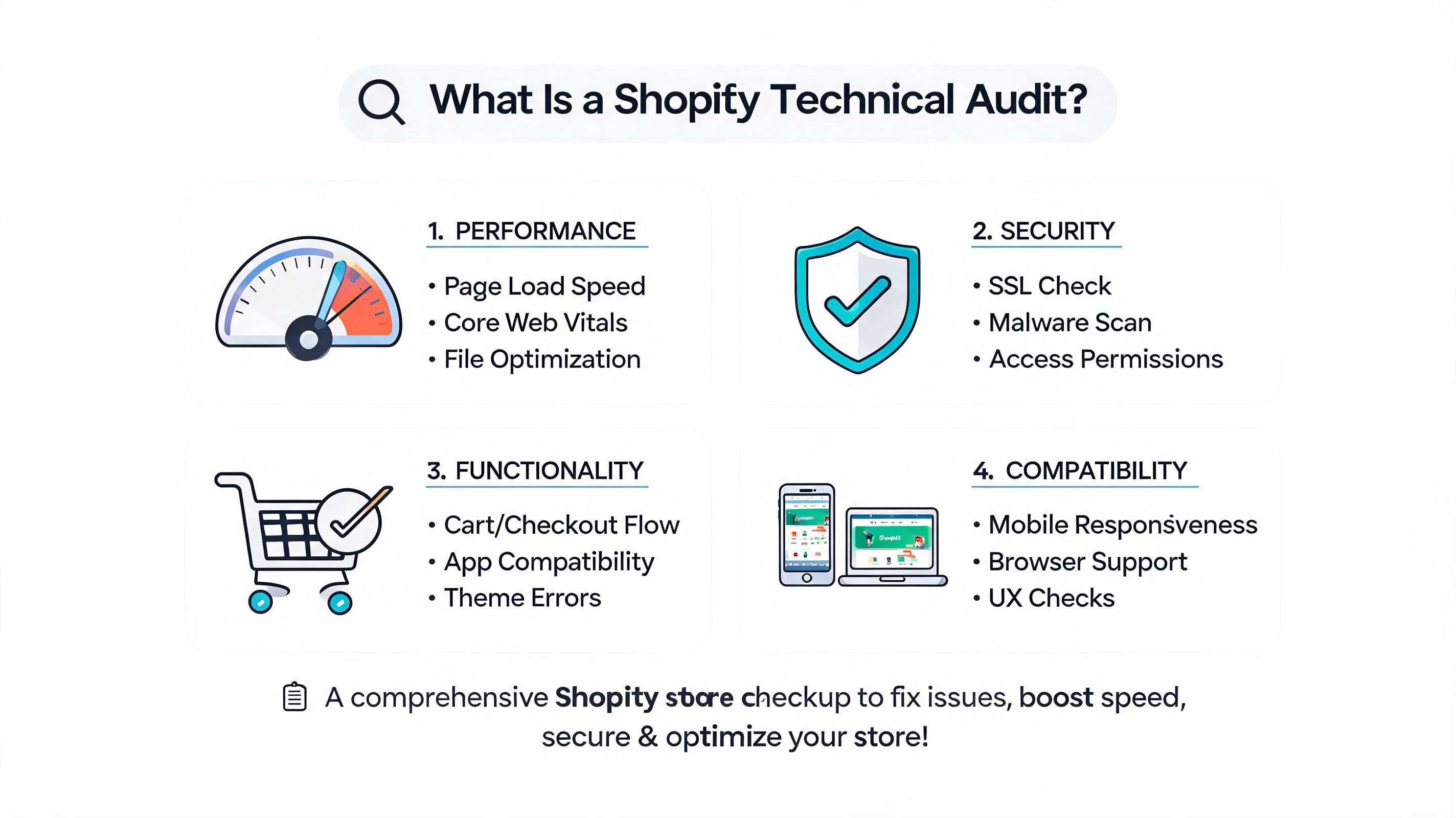
What a proper audit includes
A Shopify technical audit looks at the systems underneath the storefront:
- Performance: How quickly key templates load, especially on mobile and on product detail pages.
- Crawlability and indexation: Whether search engines can reach, understand, and prioritise the right URLs.
- Theme and code health: Whether customisations, liquid logic, and scripts are causing conflicts or unnecessary weight.
- Tracking reliability: Whether analytics, events, and attribution are recording user behaviour correctly.
- Compliance and operational risk: Whether consent, data handling, and region-specific implementations are exposing the business to avoidable issues.
That’s very different from an automated “site health” score.
What it is not
A superficial review usually tells you obvious things. Compress images. Fix some metadata. Remove broken links. Useful, but incomplete.
A real audit connects findings to business impact. It asks harder questions. Which scripts load on every page but only matter on one template? Which product URLs are competing with collection-based duplicates? Which apps still inject code after the team stopped using them? Which market or tax settings are creating indexable pages that confuse UK shoppers?
That’s why experienced teams often cross-check findings against broader frameworks like Four Eyes' website audit recommendations. The value isn’t in having more tools. It’s in making sure the audit isn’t narrowly framed as an SEO clean-up when the store has operational, UX, and compliance debt as well.
A useful audit doesn’t hand over a pile of warnings. It tells you what to ignore, what to fix immediately, and what to plan properly.
If you want a parallel lens on wider trading performance, a full ecommerce audit checklist helps contextualise the technical findings inside merchandising, UX, and conversion decisions. That’s important because technical issues don’t exist in isolation. They shape every downstream investment.
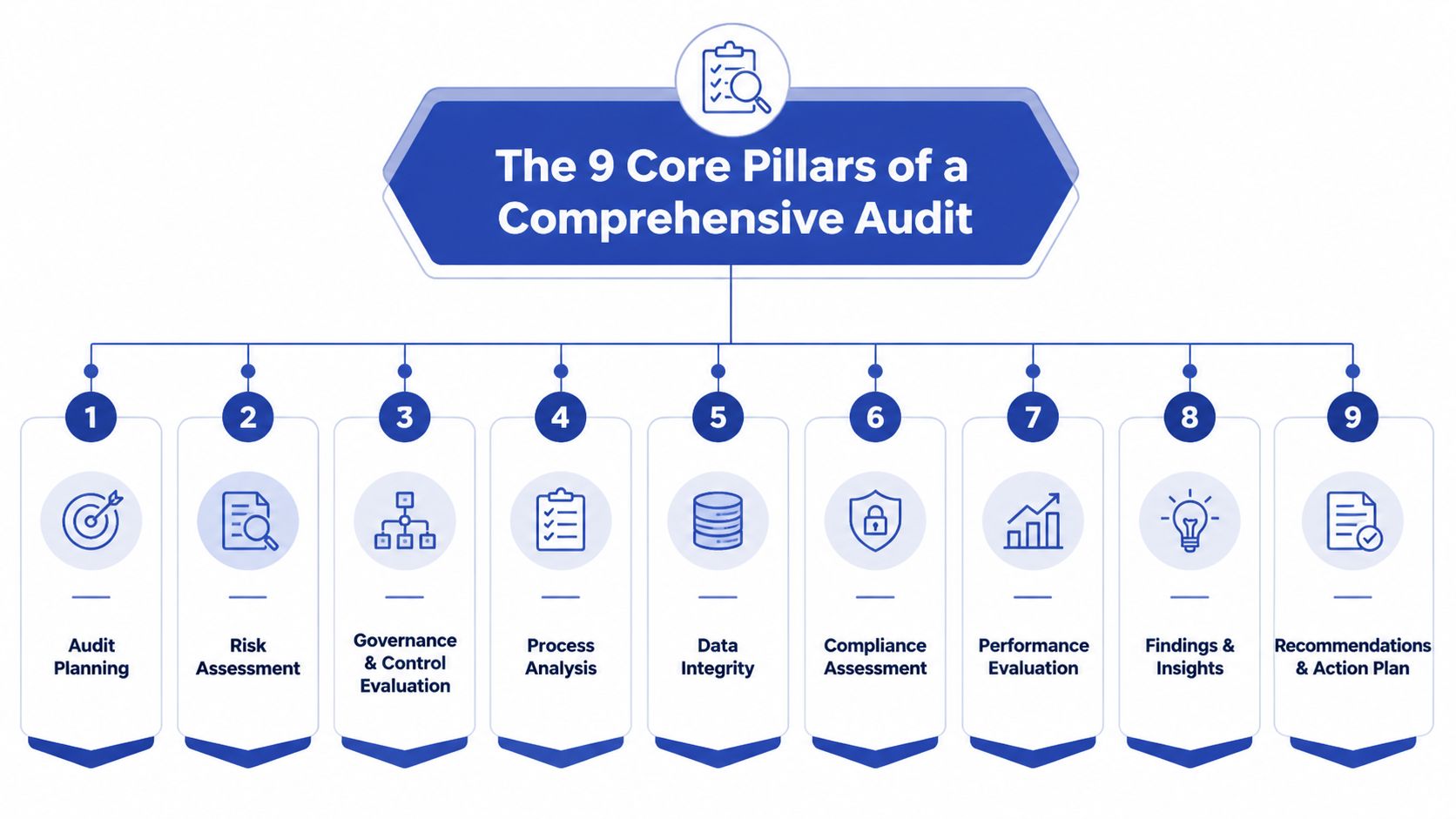
The 9 Core Pillars of a Comprehensive Audit
A Shopify technical audit should show where revenue is being lost, why it is happening, and which fixes deserve engineering time first. The nine pillars below give that structure. They cover storefront performance, search visibility, data quality, operational risk, and the technical debt that subtly drags down conversion.
Performance
A slow store loses money before anyone reaches checkout.
For Shopify, speed needs to be reviewed at template level, not as one average score for the whole site. Homepage, collection pages, product pages, cart, and blog templates often behave differently because they load different media, scripts, and app components. The pages with the highest commercial intent usually deserve the closest inspection.
Common causes on Shopify include:
- Unoptimised images: Oversized hero banners, bloated product media, and poor mobile image handling.
- App bloat: Scripts from apps that still load site-wide after the feature stopped being useful.
- Heavy theme code: Legacy snippets, duplicated section logic, and JavaScript doing work that could be handled more lightly.
- Missing lazy loading: Below-the-fold assets loading too early and delaying meaningful rendering.
The audit should connect each issue to a commercial cost. A product page that feels sluggish on mobile does not just fail a lab test. It interrupts buying momentum, increases abandonment, and weakens paid traffic efficiency.
Code quality
A polished front end can still sit on unstable foundations.
Code quality work looks at Liquid structure, JavaScript weight, DOM complexity, section architecture, duplicated logic, app conflicts, and theme customisations that have been layered on without a clear standard. Some issues are cosmetic. Others create recurring cost by slowing releases, making bugs harder to trace, and turning small changes into risky deployments.
That distinction matters. Cleaning code for the sake of neatness rarely gets priority. Cleaning code because the merchandising team cannot launch campaigns without developer support is a business case.
Technical SEO
Technical SEO checks whether search engines can crawl, understand, and prioritise the right pages. On Shopify, that usually means reviewing canonicals, duplicate URL patterns, internal linking, redirects, structured data, collection pagination, faceted navigation, and indexation controls.
Duplicate paths remain one of the most common Shopify problems. Product URLs can exist in multiple contexts. Collection filtering can create low-value parameter pages. Market and regional settings can generate indexable variants that dilute authority if they are not configured carefully. UK stores often feel this more sharply when category structures, VAT messaging, and market-specific content are added without a clear search strategy.
As noted earlier, structural fixes can improve organic performance without publishing new content. That is why this pillar should be tied to revenue potential, not treated as a housekeeping task.
Working rule: Do not invest heavily in new content while the store still creates crawl waste, duplicate signals, and weak internal linking.
Migration readiness
Stores do not need to be mid-migration for this pillar to matter.
A good audit tests whether the current setup could survive a theme rebuild, Shopify 2.0 transition, app replacement, international rollout, or URL restructuring without creating avoidable loss. That means checking redirect discipline, template dependencies, metadata handling, content model consistency, and where business-critical logic currently lives.
Weak migration readiness usually shows up as hidden risk. Teams discover too late that filters depend on an app they plan to remove, or that product templates contain hard-coded content no one documented. The audit brings those dependencies into view before a larger project amplifies them.
Apps and integrations
Apps solve immediate commercial problems. They also leave residue.
This pillar reviews what each app adds to the storefront, which scripts load on which templates, whether features overlap, and whether removed tools still inject code or affect styling. It also checks operational integrations such as ERP, CRM, subscriptions, reviews, loyalty, search, and personalisation.
The practical question is simple. Does each integration still justify its performance cost, maintenance burden, and failure risk?
In many stores, the answer is no.
Analytics and tracking
If tracking is unreliable, every reporting discussion starts from the wrong baseline.
This review checks tag implementation, event duplication, checkout measurement, channel attribution, consent interactions, and whether the data layer supports the reporting decisions the business is making. Seeing tags in the source code is not enough. The audit should test whether events fire correctly, whether values are passed consistently, and whether reporting tools reflect reality.
This is also where technical work overlaps with UK compliance. If consent settings are weak, analytics may be both legally exposed and commercially misleading. A business can end up underreporting some channels, overstating others, and making budget decisions on incomplete data.
Security and compliance
For UK merchants, this pillar needs more than a generic privacy check.
The audit should examine cookie behaviour, consent mode setup, script firing rules, app data collection, privacy policy alignment, and whether VAT-related customer journeys are presented clearly where required. It should also check for region-specific issues created by Shopify Markets, especially when stores serve both UK and international users from the same build.
GDPR failures are not only a legal problem. They affect tracking quality, customer trust, and the brand's margin for error when adding new tools. The same applies to VAT handling. If pricing, tax display, or invoice-related logic creates confusion, conversion and customer service costs both rise.
Accessibility
Accessibility problems often appear first as conversion friction.
This pillar reviews keyboard access, focus order, semantic HTML, colour contrast, image alt text, form labels, modal behaviour, and mobile interaction patterns. On Shopify stores, common failures include inaccessible variant selectors, filter controls that are difficult to operate, and pop-ups that trap focus or hide key actions.
These fixes improve the buying experience for more than users of assistive technology. Clearer forms, more predictable navigation, and better error messaging reduce hesitation for everyone.
Conversion blockers
This final pillar ties technical findings back to buying behaviour.
The audit looks for issues such as delayed variant changes, broken review widgets, unstable sticky add-to-cart bars, intrusive pop-ups, mobile layout shifts, inconsistent stock messaging, and checkout interruptions caused by apps or theme logic. None of these problems sit neatly inside one technical discipline. They sit at the point where technical debt starts costing sales.
A useful summary looks like this:
| Pillar | What it protects |
|---|---|
| Performance | Buying momentum |
| Technical SEO | Discoverability |
| Tracking | Decision quality |
| Compliance | Risk control |
| Accessibility | Usability at scale |
| Apps and code | Operational efficiency |
The stores that get the most value from an audit are not the ones with the fewest issues. They are the ones that can see which problems are suppressing revenue now, which create future risk, and which can wait until the next development cycle.
Essential Tools and Expert Methodologies
Tools don’t perform a Shopify technical audit. People do.
PageSpeed Insights can tell you a page is slow. Screaming Frog can show duplicate URLs, redirect chains, orphaned pages, and canonical inconsistencies. Chrome DevTools can reveal layout shifts, script execution costs, and network bottlenecks. Search Console can show indexing symptoms. Schema validators can flag implementation errors.
Useful data. Still only data.
What the tools are good at
Certain tools are consistently practical in Shopify work:
- Google PageSpeed Insights: Good for isolating performance issues on homepage, collection, and PDP templates.
- Screaming Frog: Useful for crawl analysis, canonicals, status codes, metadata, internal links, and duplicate patterns.
- Chrome DevTools: Best for diagnosing what the browser is doing when pages load and interact.
- Google Search Console: Strong for understanding indexing, coverage, and search-side signals.
- Schema validation tools: Helpful for checking whether product, breadcrumb, and review markup is usable.
The mistake is assuming these outputs tell you what to fix first.
What methodology adds
A strong audit methodology does three things.
First, it cross-references findings. If product pages are slow, the audit checks whether that lines up with script load, image handling, app injection, and poor mobile interaction patterns. One symptom rarely has one cause.
Second, it prioritises by business impact. A warning in a tool isn’t automatically urgent. Some issues are noisy but low consequence. Others affect search visibility, checkout confidence, or reporting quality and need immediate action.
Third, it maps effort against commercial value. That’s where experienced judgement matters. A technically perfect fix might not be the right first move if a simpler remediation removes most of the risk.
Tools surface symptoms. Methodology identifies causes, dependencies, and sequencing.
A practical audit workflow usually looks like this:
- Collect baseline data across templates, crawl outputs, tracking behaviour, and theme structure.
- Validate findings manually so automated reports don’t drive false priorities.
- Group issues by pillar rather than by tool.
- Assign severity and effort based on revenue, visibility, trust, and operational cost.
- Create an implementation roadmap with quick wins separated from structural work.
In practice, some teams handle this internally, some use a specialist developer, and some use agencies with dedicated audit processes. One option in that mix is Grumspot, which provides Shopify design, development, and audit support across technical, UX, CRO, and SEO work. The important point isn’t the vendor format. It’s whether the output helps the business act with confidence.
From Red Flags to Actionable Insights A Sample Report
A merchant opens an audit expecting a clear answer on why revenue has stalled. Instead, they get screenshots, crawl exports, and a list of errors with no sense of what is costing sales now versus what can wait. That report creates more work than clarity.
A useful audit report does three jobs at once. It explains the technical issue in plain language, ties it to a commercial outcome, and sets out the next action with the right level of urgency. On Shopify, that also means calling out platform-specific risks that generic audits often miss, including UK compliance gaps around GDPR consent handling and VAT display logic.
What a real finding looks like
Here is the standard I would expect from a report a trading team can use.
| Finding (The Technical Issue) | Business Impact | Recommendation |
|---|---|---|
| Uncompressed hero images on key templates | Slower first render on mobile, weaker engagement on landing pages | Compress and resize assets, review image delivery rules, prioritise above-the-fold media |
| Excessive JavaScript from retired apps | Longer load times and more interaction lag on high-intent pages | Remove unused app scripts, test remaining integrations by template |
| Duplicate H1 tags from theme logic | Mixed page hierarchy for search engines and weaker content clarity | Refactor template output so each page has one clear H1 |
| Canonical inconsistency across product URLs | Search engines may split signals across duplicate versions of the same product | Standardise canonical logic and validate indexed URLs after deployment |
| Layout shift caused by dynamic widgets | Buyers lose visual stability during page load and interaction | Reserve space for injected elements and delay non-critical widgets |
| Analytics events firing inconsistently | Reporting becomes harder to trust, especially during campaign analysis | Audit event triggers, deduplicate tags, and test conversion paths end to end |
| VAT-exclusive pricing pages accessible to search engines | UK users may land on confusing pricing states that reduce purchase confidence | Restrict or localise indexable pricing variants and align region logic |
The strongest reports add context beside the finding. If inconsistent analytics affects paid social attribution, that changes budget decisions. If a consent banner fires tags before acceptance, that is not only a data-quality problem. It can also create GDPR exposure for UK stores.
Why this format works
Senior teams need a decision document, not a data dump. Founders want to know what is affecting conversion. Marketers need to know what is distorting acquisition reporting. Developers need enough detail to implement the fix cleanly, without guessing at intent.
That is why issue scoring matters. A slow collection page with strong traffic and poor mobile conversion often deserves faster action than a low-traffic blog template with minor heading errors. The trade-off is rarely technical purity versus inaction. It is usually whether the team spends this sprint protecting revenue, fixing measurement, or reducing future maintenance cost.
External benchmarks can help here. Reviewing sample SEO audit templates makes it easier to judge whether a report moves from evidence to action, or just lists problems.
For page-level diagnostics, a focused Shopify page audit service can also be useful when the issue is isolated to a key template or conversion path rather than the entire store.
What progress looks like in practice
The best outcomes usually come from sequencing the work properly. Quick fixes such as image compression, script cleanup, or heading corrections can improve speed and reduce friction fast. Structural issues such as canonical logic, theme architecture, consent implementation, or event tracking need testing, change control, and someone owning the rollout.
That distinction matters because technical debt is a revenue issue before it becomes a development issue. A store can keep spending on ads, email, and content while hidden theme problems suppress conversion, weaken organic visibility, or corrupt reporting. The audit report should make that cost visible, then turn it into an order of operations the team can execute with confidence.
The Grumspot Audit Process Timelines and Deliverables
A good audit process should lower uncertainty, not add to it. By the time a report is delivered, your team should know what was checked, what the findings mean for revenue, and what needs to happen first.
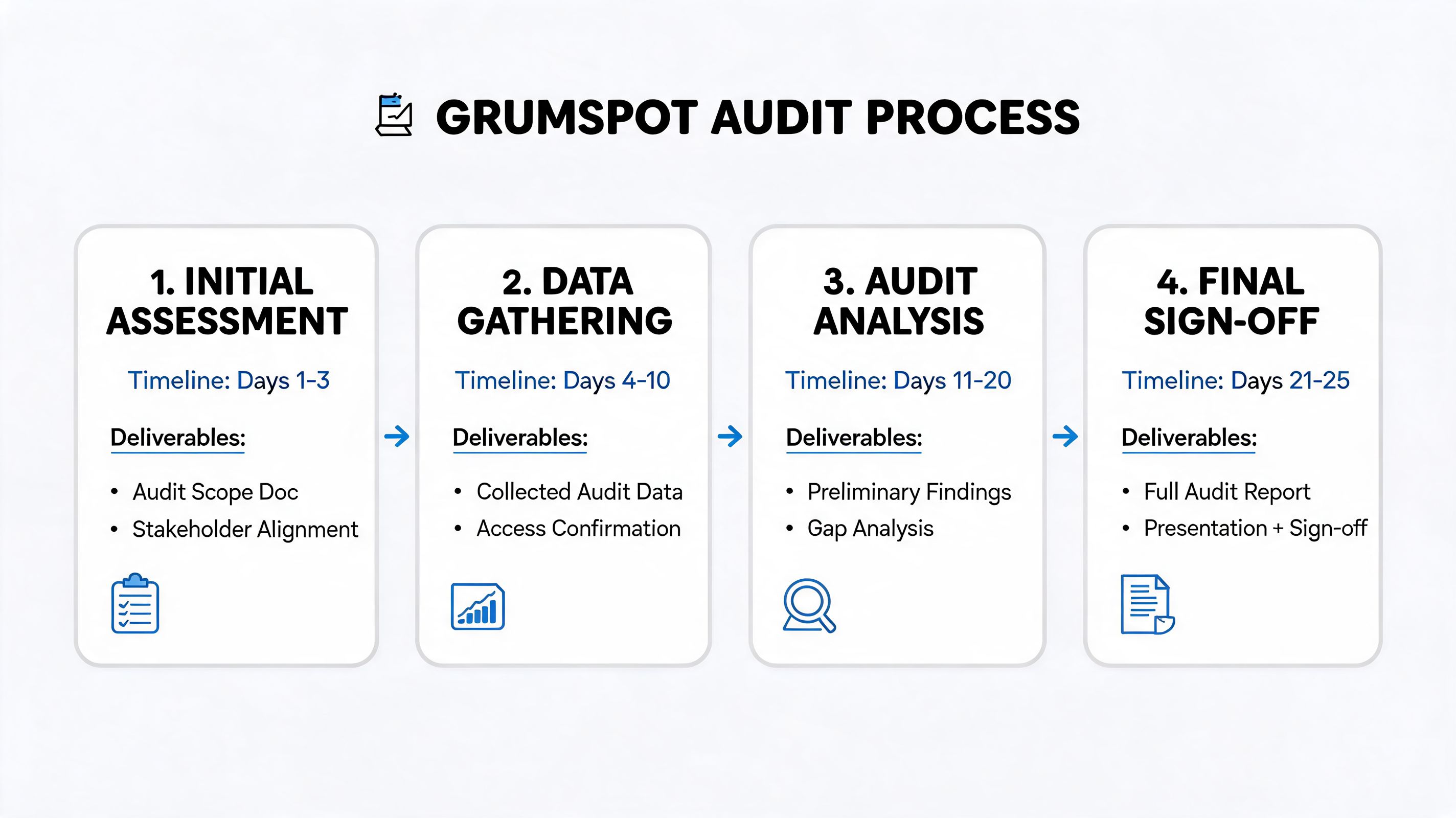
What the timeline usually looks like
For a typical Shopify store, the analysis itself often takes several hours before reporting even starts. Industry guidance from Semrush's site audit workflow reflects the same reality we see in live engagements. The checking is only one part of the job. Scope review, manual validation, prioritisation, and stakeholder walkthroughs usually take longer than teams expect.
In practice, the work tends to run in four stages:
- Kick-off and access review: business goals, known issues, app stack, theme context, analytics access, and stakeholder concerns
- Technical investigation: crawl review, template testing, app impact checks, code inspection, tracking validation, and compliance review
- Prioritisation: findings sorted by commercial risk, implementation effort, and dependency
- Delivery and walkthrough: a working session where the report is explained, challenged, and translated into a rollout plan
That structure matters. A fast audit with no validation can produce a long issue list and still miss the fixes that protect sales first.
What the deliverable should contain
The deliverable needs to help a team act safely. Raw exports from crawling tools do not do that, and neither does a generic checklist copied from a blog.
A useful report should include:
- Issue summaries in plain English
- Commercial impact notes, especially where speed, indexing, tracking, or checkout friction affect revenue
- Severity and implementation priority
- Dependencies between fixes
- Recommended owners, such as developer, SEO lead, ecommerce manager, or retention team
- Validation notes that explain how each fix should be tested after release
For larger stores, we also flag where a change belongs in BAU maintenance versus a planned theme or tracking project. That distinction saves time and reduces rework.
The UK-specific detail many audits miss
UK stores need more than generic platform checks. GDPR consent behaviour, VAT presentation, market configuration, and location-specific indexing rules can all affect conversion, reporting accuracy, and compliance risk.
A common example is pricing and tax display. If Google indexes pages showing the wrong pricing context for UK shoppers, search traffic can land on a product page that creates confusion before the customer even reaches checkout. The problem is technical, but the cost shows up in lower conversion rate, support friction, and mistrust.
The same applies to consent setup. If analytics fires before valid consent, reporting can become unreliable at the same time the store creates compliance exposure. An audit should catch both issues together, because fixing measurement without fixing consent just creates a different problem.
If the concern is isolated to one key template or landing path, a focused Shopify page audit for a specific conversion journey is often the better starting point than a full-store review.
Your Audit Is Complete What Happens Next
The report lands. It’s detailed. It’s useful. It can also feel heavy.
The right next step isn’t fixing everything at once. It’s sequencing the work so momentum builds early and higher-risk changes get proper QA.
How to use the report well
Start with the items that are both commercially meaningful and straightforward to implement. Those usually include asset compression, dead script removal, basic canonical corrections, internal linking clean-up, and event tracking fixes.
Then separate the larger projects into planned workstreams:
- Template performance improvements
- Theme refactoring
- Tracking redesign
- Compliance implementation
- SEO architecture fixes
- Market and localisation updates
The audit is diagnosis. Growth comes from implementation discipline.
Keep one principle in view. Every change should have a validation method. If you fix speed, test templates again. If you update canonicals, check indexing behaviour. If you rebuild tracking, verify events before trusting reports.
Some businesses handle the roadmap as a one-off remediation sprint. Others turn it into ongoing monthly optimisation. Both approaches can work. The difference is whether the audit becomes a shelf document or an operating plan.
Frequently Asked Questions About Shopify Audits
How is a Shopify technical audit different from a theme health check
A theme health check is usually narrower. It focuses on code cleanliness, compatibility, app conflicts, and some front-end performance concerns.
A Shopify technical audit is broader. It includes crawlability, indexation, canonicals, schema, analytics, compliance, accessibility, app behaviour, and conversion friction. A theme can be stable while the store still loses visibility or misreports performance.
Can I perform a Shopify technical audit myself
You can absolutely do a partial audit yourself.
Tools like PageSpeed Insights, Search Console, Screaming Frog, and browser developer tools can reveal a lot. For merchants with technical confidence, that’s often enough to identify obvious issues.
The limitation is interpretation. Stores rarely suffer from one isolated problem. A slow PDP may involve image handling, app scripts, theme logic, and widget behaviour at the same time. DIY audits often produce long lists without clear sequencing.
How often should a store be audited
Audit frequency depends on change velocity.
A store with frequent app installs, landing page experiments, international expansion, or recurring theme updates needs more regular review than a stable catalogue with light merchandising changes. In practice, audits are most useful after major redesigns, migrations, performance complaints, tracking changes, or periods of unexplained growth stagnation.
Is a technical audit only about SEO
No. SEO is one pillar, not the whole exercise.
A proper audit also looks at speed, tracking integrity, compliance risk, accessibility, app load, and user friction on core buying paths. Some stores ask for an SEO audit when the actual issue is technical debt affecting conversion and data quality.
What should I expect at the end of the process
You should expect a prioritised roadmap, not a pile of screenshots.
The report should tell you what matters now, what can wait, who should handle each fix, and how success will be validated. If the output leaves your team asking “so what do we do first?”, the audit hasn’t done its job.
Is every warning worth fixing
No.
That’s one of the biggest misconceptions in ecommerce diagnostics. Some issues are technically imperfect but commercially minor. Others look small and carry real impact because they affect search visibility, buyer trust, or tracking accuracy.
An experienced audit filters noise. That’s part of the value.
If your Shopify store feels harder to grow than it should, a structured audit is usually the fastest way to replace assumptions with evidence. Grumspot works with merchants who need that clarity, whether the next step is a focused fix, a deeper rebuild, or a longer-term optimisation plan.
Let's build something together
If you like what you saw, let's jump on a quick call and discuss your project

Related posts
Check out some similar posts.
- seo technical audit checklist
Use this SEO technical audit checklist to find and fix 10 ecommerce issues across crawling, speed, i...
Read more
- core web vitals optimization
Master core web vitals optimization with a step-by-step playbook covering LCP, INP, CLS fixes, Shopi...
Read more
- internal linking strategy
Build a high-impact internal linking strategy that boosts rankings and conversions. Learn auditing, ...
Read more
- breadcrumb navigation
Learn what breadcrumb navigation is, why it matters for UX and SEO, and how to implement it correctl...
Read more