Customer Service Automation for Shopify: 2026 Guide
- customer service automation
- shopify customer service
- ecommerce automation
- ai chatbot
- helpdesk automation
Your support team probably doesn't need more people first. It needs fewer avoidable tickets, cleaner routing, and faster access to order context.
That's the pattern I see in growing Shopify stores. Sales go up, ticket volume follows, and suddenly the team spends most of the day answering order tracking questions, return requests, address changes, subscription edits, and “did my discount apply?” messages. The expensive part isn't only payroll. It's that skilled agents get trapped doing low-judgement work while pre-sale questions, escalations, and retention-saving conversations wait in the queue.
Customer service automation fixes that when it's implemented as an ecommerce operating layer, not as a novelty chatbot on the corner of your site. For Shopify merchants, that means tying support directly to customers, orders, fulfilments, subscriptions, returns, and CRM records so automation can actually do something useful.
Why Your Support Team Is Drowning And How Automation Helps
A familiar scenario. You launch a promotion, orders spike, and support gets buried under “Where is my order?”, “Can I change my shipping address?”, “How do I return this?”, and “When will you restock?”. None of those questions are unusual. The problem is volume.
When a store handles those requests manually, growth creates drag. Agents copy tracking links into emails, check order notes one by one, verify subscription status in another tool, then switch back to the helpdesk to reply. The team looks understaffed, but the main issue is that the system is doing almost none of the repetitive work for them.

In the UK, this shift is already well underway. UK businesses have increasingly adopted AI tools to handle repetitive support tasks, and customer-facing automation is one of the most common use cases because service organisations have a structural incentive to automate for faster response times, lower handling costs, and round-the-clock availability, as outlined in Azumo's overview of AI in customer service.
What automation changes first
The first win is simple. Routine contacts stop consuming the same amount of human time.
A good setup can:
- Deflect repetitive questions: Order status, delivery windows, return policy, exchange steps, and password reset guidance shouldn't need an agent every time.
- Route exceptions faster: Damaged orders, missing parcels, charge disputes, and VIP complaints should land with the right person immediately.
- Give agents more selling time: Support staff can focus on pre-sale questions, save-at-risk subscribers, and recovery conversations that protect margin.
Customer service automation works best when it removes repetitive handling, not when it tries to fake empathy in complex situations.
For Shopify brands, that also changes hiring pressure. You may still grow the team, but you won't need to add headcount every time order volume rises. If you're deciding how to resource that work, a Shopify support retainer comparison can help frame what should stay internal and what can be handled through specialist support.
Understanding the Four Types of Customer Service Automation
Most merchants think “automation” means chatbot. That's too narrow. In practice, Shopify support automation usually combines four layers, and each one does a different job.
The four layers in plain terms
Chatbots are the front door. They greet, ask clarifying questions, surface help content, and collect enough information to move the request forward. For a Shopify store, that might mean asking for an order number and then presenting tracking details or return options.
Automated workflows are the rule engine behind the scenes. They tag tickets, assign queues, trigger notifications, create return records, and move data between tools. Customers may never see them, but they're often where efficiency comes from.
Macros are the fastest way to improve agent performance without a big project. A macro is a one-click response or action bundle. In Gorgias or Zendesk, a macro can insert a polished reply, apply a tag, assign a team, and set ticket status at the same time.
AI triage is the smart sorter. It looks at message intent, urgency, and wording, then decides what kind of issue this is and what should happen next. This is the layer that helps distinguish a standard delivery query from a chargeback risk or a high-frustration escalation.
Comparing Automation Types
| Automation Type | Best For | Example Use Case (Shopify) | Effort to Implement |
|---|---|---|---|
| Chatbots | First-contact self-service | Customer asks where an order is and receives tracking guidance | Medium |
| Automated workflows | Routing and repetitive operational tasks | Return request gets tagged, assigned, and sent into the right process | Medium to high |
| Macros | Faster agent replies | Support agent sends a polished exchange policy response in one click | Low |
| AI triage | Intent and priority detection | Urgent delivery complaint from a repeat customer is escalated quickly | Medium |
How they fit together in a real store
A practical setup often looks like this:
- The chatbot captures intent from the first message.
- AI triage classifies the issue as order tracking, returns, billing, product advice, or escalation.
- A workflow triggers the next action, such as checking fulfilment status, sending a return path, or routing to a specialist.
- The agent uses a macro if a human reply is still needed.
That's why stores get stuck when they buy a chatbot and stop there. The visible interface isn't the system. The system is the connection between your helpdesk, Shopify admin, shipping data, subscriptions, returns platform, and CRM.
If your automation can answer questions but can't read order state or trigger the next operational step, it's only doing half the job.
For most brands, macros and workflows are the quickest wins. Chatbots and AI triage become far more useful once those foundations are already clean.
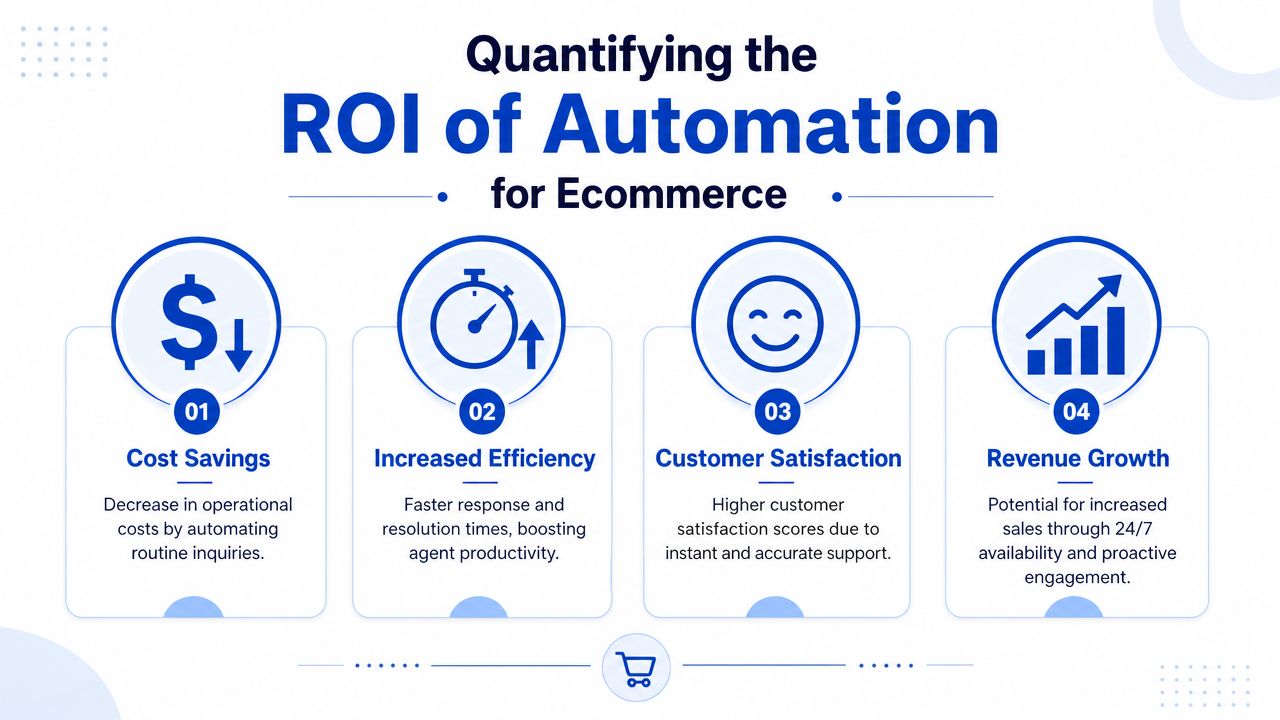
Quantifying the ROI of Automation for Ecommerce
The strongest business case for customer service automation isn't “support will cost less”. It's broader than that. Good automation reduces wasted handling, protects conversion, and gives your team more time for conversations that influence repeat purchase behaviour.
Where the return shows up
Start with labour efficiency. Research cited by COPC says AI assistance increased chat resolutions per hour by 22.2% and lifted novice agents' productivity by 34%, with two months of GenAI use helping them perform like agents with over six months of experience without it, according to COPC's analysis of contact centre technology. For a Shopify support team, that matters in onboarding, seasonal peaks, and weekend cover.
The second return is consistency. If automated flows absorb repetitive requests, first-response lag becomes less volatile during launches, payday traffic, or campaign days. Customers don't care whether your queue is busy. They only see whether you answered.
ROI is not only a support metric
For ecommerce, support affects revenue more directly than many operators realise.
- Pre-sale conversion: Fast answers on sizing, delivery windows, stock, bundle rules, or subscription terms remove hesitation.
- Post-purchase trust: Clear order tracking and return handling reduce anxiety after checkout.
- Retention protection: When support teams aren't swamped, they can handle save attempts, subscription issues, and replacement scenarios with more care.
A lot of Shopify Plus merchants discover that support operations become more valuable as order complexity increases. Multiple markets, subscriptions, bundles, custom fulfilment rules, and third-party tools all create more points of confusion. That's one reason Shopify Plus operations benefit from tighter service workflows instead of patchwork support processes.
The practical way to measure return
Don't ask whether automation “worked” in the abstract. Track whether it changed the economics of support and the quality of customer experience.
Look for:
- Lower manual handling on repetitive topics
- Faster first responses on pre-sale and post-purchase queries
- Shorter ramp time for new agents
- Higher share of agent time spent on exceptions and revenue-sensitive conversations
If those move in the right direction, automation is doing its job.
A 5-Step Roadmap for Shopify Customer Service Automation
The stores that get value from automation don't begin with software demos. They begin with ticket patterns, process gaps, and data access.
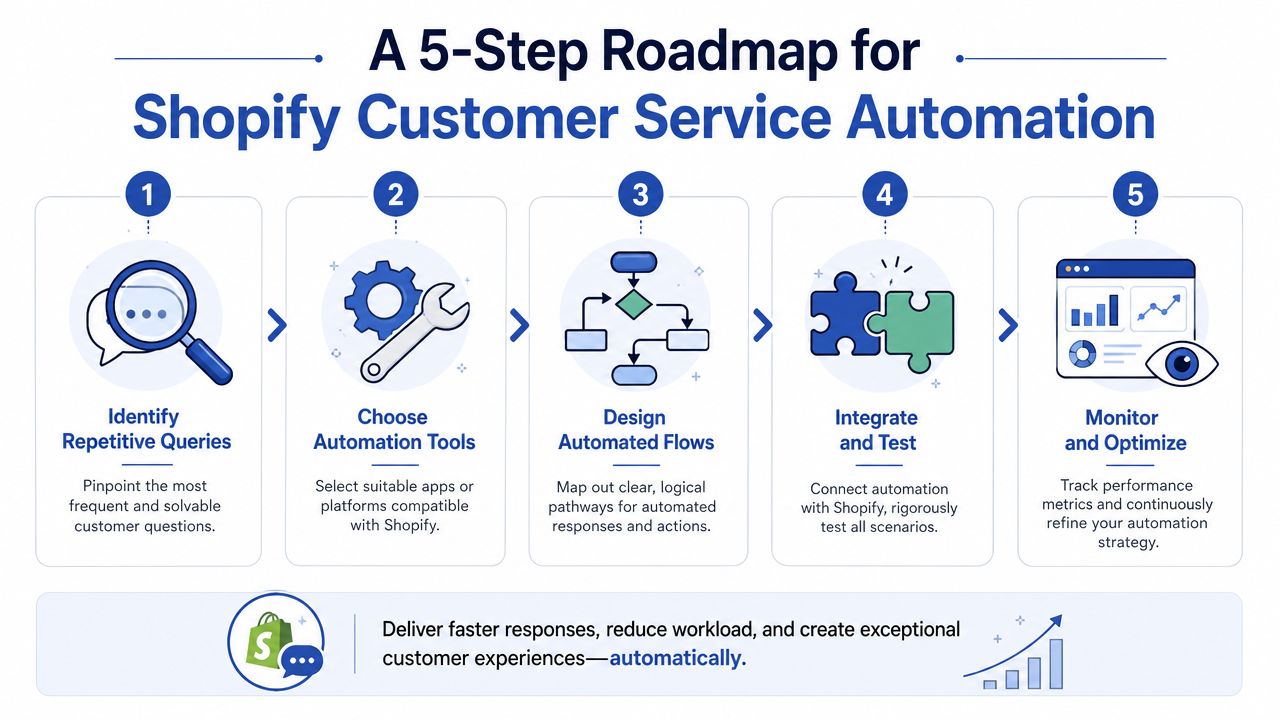
Step 1 Audit repetitive demand
Pull a sample of recent tickets and group them by intent. Order tracking, return eligibility, exchange requests, delivery delays, failed payments, subscription edits, damaged items, account login issues, and product questions usually surface quickly.
Don't start with the loudest complaint. Start with the requests that are both frequent and operationally predictable.
Good first candidates are:
- Order status: The answer already exists in fulfilment data.
- Return and exchange paths: The logic is usually rules-based.
- Address changes: These can follow clear timing rules.
- Subscription edits: If you use Recharge or another subscription platform, many changes are structured.
Step 2 Choose tools that connect deeply with Shopify
Many projects encounter problems. A slick chatbot with weak integrations creates more work, not less.
The architecture that matters most is a workflow layer that combines NLP intent detection and ticket classification so routine requests can be resolved automatically while higher-friction cases move to human agents with full context, as described in IBM's guidance on customer service automation. For Shopify stores, that means choosing tools that connect directly to CRM and order-management systems so automation can perform real transactions rather than only serving FAQ answers.
Common stack options include:
- Gorgias: Strong fit for Shopify-centric support teams.
- Zendesk: Better when operations span multiple brands or more complex service structures.
- Richpanel, Reamaze, Intercom, Gladly: Each can work depending on channel mix and process requirements.
- Shopify Flow: Useful for operational automations inside the Shopify ecosystem.
If your setup includes ERP, WMS, returns, subscriptions, loyalty, or bespoke customer logic, you may need integration work beyond native apps. That's where Shopify third-party integration services become relevant, especially when support needs live access to order, fulfilment, and customer records across systems.
Step 3 Build the first automations around transactions
Your first flows should do something concrete.
Examples:
Where is my order
- Customer enters order identifier
- System checks fulfilment and carrier status
- Customer receives current status and next expected step
Return or exchange request
- Bot confirms order exists and item is eligible
- Workflow presents return or exchange path
- Ticket is created only if the case falls outside policy
Subscription management
- Customer wants to skip, swap, or update
- Automation checks plan state
- If allowed, action is completed or passed to the right queue
Here's a useful walkthrough before you map your own flows:
Step 4 Design the human handoff before launch
This is not a secondary detail. It's the part customers remember.
Create explicit escalation rules for:
- Payment or fraud concerns
- Repeated failed attempts
- Negative sentiment or frustration
- VIP customers or high-value orders
- Policy exceptions and damaged goods
- Medical, regulated, or compliance-sensitive questions
Practical rule: If the bot can't complete the task or confidence is low, hand off early and pass the order data, prior messages, and detected intent to the agent.
Step 5 Train the team and review weekly
Agents need to know what the automation is doing, where it can fail, and when to override it. Launch with a narrow scope, review transcripts, update macros, tighten routing rules, and fix knowledge gaps.
The best automation programmes are maintained like merchandising or CRO. They're never finished.
Common Automation Pitfalls and How to Avoid Them
Most failed customer service automation projects don't fail because the software was weak. They fail because the operating model was sloppy.
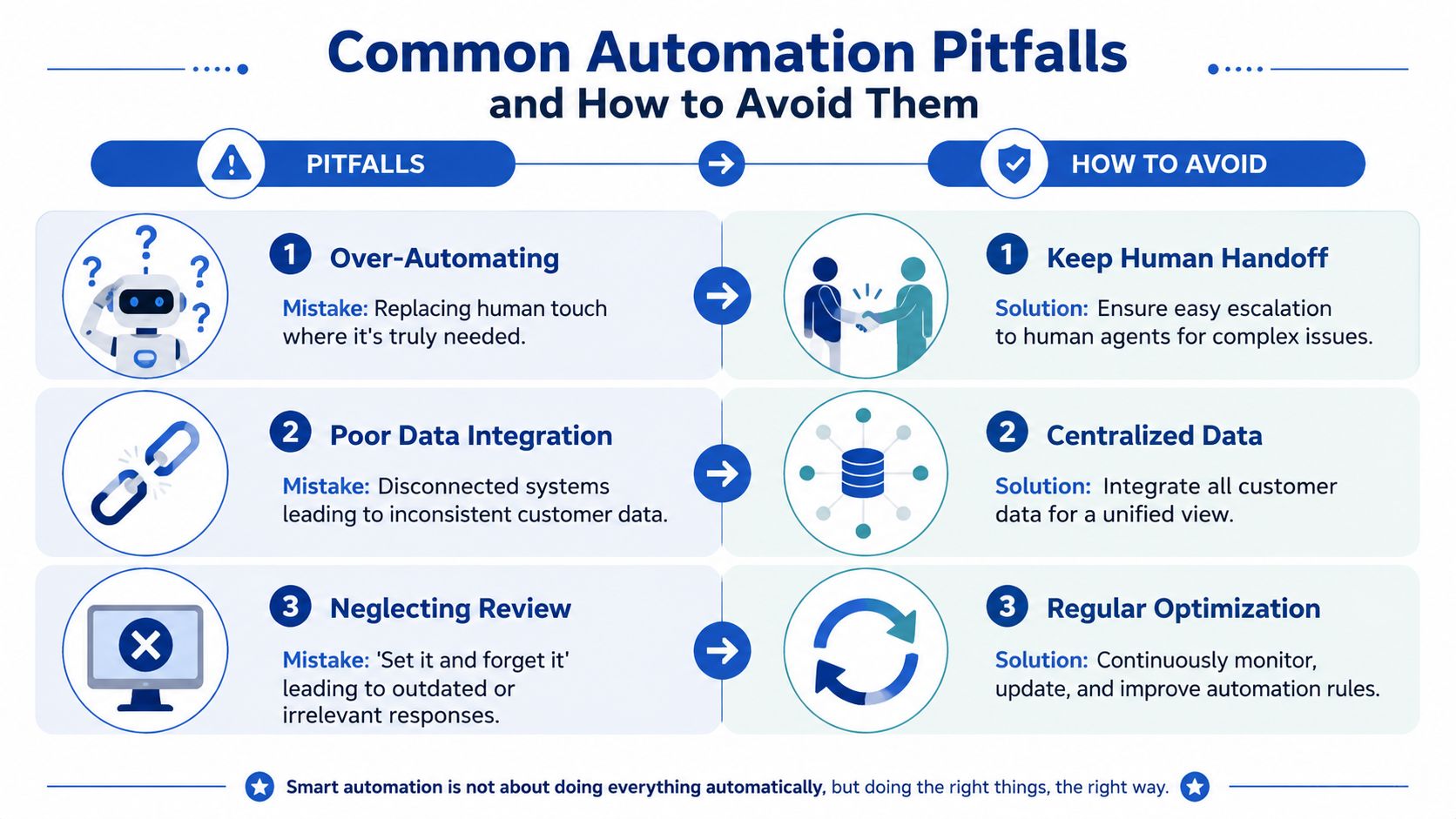
Pitfall one over-automating the wrong conversations
A delivery update is easy to automate. A complaint about a damaged gift delivery before a birthday is not. Stores get into trouble when they push every query through the same scripted path.
Keep automation on structured tasks. Move emotionally charged, unusual, or high-value cases to humans quickly.
Pitfall two disconnected data
If your helpdesk can't see the latest order state, fulfilment note, return status, or subscription record, your bot will sound confident and still be wrong. That's worse than a slow answer.
Fix this by mapping the data the support flow needs before you design prompts or workflows. In Shopify terms, that usually means syncing around customers, orders, fulfilments, tags, shipping events, and any platform that changes post-purchase status.
Pitfall three weak governance and no audit trail
Many teams underestimate the risk, as independent coverage reports that firms have rolled back AI customer-service agents because of governance failures, with reported drivers including customer-data exposure at 31%, hallucinations or brand risk at 22%, and lack of auditability at 16%, according to ITPro's reporting on AI customer service rollbacks.
That tells you something important. The hard part isn't generating answers. It's controlling when the system acts, what it can access, and how it hands over.
A safer operating checklist
- Set permission boundaries: Decide what the bot can read, suggest, and change.
- Define escalation triggers: Frustration, ambiguity, repeat contact, and exceptions should move to a human.
- Review transcripts regularly: Bad replies, stale articles, and routing mistakes show up fast when you read conversations.
- Keep knowledge current: Automation degrades when policy pages and help content drift out of date.
Auditability matters as much as accuracy. If you can't see why the system made a decision, you can't improve it safely.
Putting Automation into Practice Examples and KPIs
The best way to judge automation is to look at specific store workflows, not abstract promises.
Example one fashion brand order tracking
A fashion retailer usually gets flooded after dispatch days. Customers ask where a parcel is, whether a size exchange is possible, or if a split shipment means something went wrong.
In that setup, the smart move is to automate order tracking and standard returns first. The bot checks fulfilment state, links to tracking, explains delivery stages, and offers the correct next action. Agents stop spending most of the day copying carrier updates and can focus on sizing help, exchange advice, and upset customers whose orders require intervention.
Example two supplements brand pre-sale support
Health and supplement brands often attract pre-purchase questions that sit right between support and conversion. Customers ask about delivery timing, subscription cadence, flavour differences, bundle options, and account management.
A pre-sale assistant can handle straightforward product navigation and subscription admin, then route more sensitive questions to a human. If you're also automating email flows around support follow-ups, it's worth checking deliverability before you rely on those messages. An email spam checker is useful for validating whether support confirmations, return emails, and post-resolution follow-ups are likely to land where customers will see them.
The KPIs that tell you if this is working
Don't measure automation by how clever it sounds. Measure whether customers got help faster and whether the team handled demand more cleanly.
Track these:
- First response time: How quickly customers get an initial useful reply.
- Automation rate: The share of contacts resolved without human touch.
- Escalation rate: How often automation correctly passes the case to an agent.
- Resolution quality: Whether customers needed to come back again on the same issue.
- CSAT or similar feedback signals: Whether the experience felt better, not just faster.
What good KPI reading looks like
A healthy automation programme doesn't aim for maximum deflection at all costs. It aims for the right separation of labour.
If automation rate goes up but repeat contacts also rise, the flow is probably resolving too little and hiding the problem. If first response time drops and agents spend more time on nuanced cases, that's usually a strong sign the system is helping.
The KPI that matters most is whether the customer needed to fight the system to get help.
Frequently Asked Questions About Automation
Will automation replace my support team
No. In most Shopify environments, it changes what the team does.
Automation takes repetitive work off their plate. Humans still handle exceptions, emotional situations, policy judgement, pre-sale nuance, retention risk, and any case where context matters more than speed. If anything, strong automation makes your best agents more valuable because they spend less time acting like a manual lookup tool.
What should a Shopify store automate first
Start with the highest-volume, lowest-risk requests. For most stores, that means order tracking, return routing, exchange guidance, address-change rules, and simple account or subscription edits.
Avoid beginning with edge cases. You want an early win that's easy to verify and easy to improve.
Do I need a chatbot on the storefront
Not always. Some stores get more value first from email triage, macros, help-centre search, and back-office workflows. A storefront bot makes sense when you have meaningful pre-sale traffic or frequent post-purchase contacts that can be resolved in-session.
If you do add one, make sure it can access live store context. A generic chat widget with no operational reach won't help much.
How expensive is customer service automation
Cost varies a lot based on tool choice, volume, channels, and integration complexity. A simple setup using existing helpdesk features and a few rules can be relatively light. A multi-system setup tied into subscriptions, ERP, WMS, returns, and CRM is a bigger implementation.
The right way to evaluate cost is against wasted manual handling, queue delays, and conversion leakage from slow service. If support is already affecting customer experience and team capacity, the cost of doing nothing is often higher than it looks.
Does automation only work on the website
No. It should support the channels your customers already use, including chat, email, and voice-related workflows where relevant. For many stores, the bigger opportunity is not a website bot at all. It's consistent triage and context across every inbox and support queue.
What's the biggest mistake merchants make
They automate the reply but not the workflow.
Answering a question is useful. Completing the task is where the primary value sits. If the system can identify the issue, check Shopify data, trigger the next operational step, and hand off cleanly when needed, you'll feel the difference quickly.
If you're planning customer service automation for Shopify and need the operational side mapped properly, Grumspot can help connect support workflows to the systems that run your store, including Shopify, CRM, ERP, fulfilment, and custom integrations.
Want this kind of work on your store?
Send us the URL and what is slowing it down. We look at the store before we reply.
Related posts
Check out some similar posts.

- marketplace integration
Marketplace integration connects your ecommerce store to Amazon, eBay and more. Covers APIs, connect...
Read more
- Shopify integration
Discover how Shopify third-party integration services connect your store to ERPs, CRMs, & more. Guid...
Read more
- shopify erp integration
Unlock efficiency with our 2026 Shopify ERP integration guide. Covers benefits, data flows, implemen...
Read more