Unlock Growth with Shopify Third-Party Integration Services
- Shopify integration
- Shopify third-party integration services
- Shopify ERP integration
- Shopify custom app
- ecommerce automation
Launched
April, 2026

Growth often creates a strange kind of mess. Sales are up, the storefront looks healthy, and customers are buying. But behind the scenes, someone is still copying order data into an ERP, customer tags in the CRM don’t match what the support team sees, and stock levels drift just enough to create expensive problems.
That’s usually the point where a merchant says, “We already have apps. Why does everything still feel manual?”
The answer is that apps and integrations aren’t the same thing. An app can add a feature. A proper integration changes how your business operates. It moves data between systems in a controlled way, removes repeat admin work, and gives each team one version of the truth. That matters because approximately 60% of Shopify merchants rely on third-party apps and integrations to improve store functionality, and Shopify’s merchant solutions revenue reached $5.22 billion in 2023 as the app ecosystem expanded around needs like CRM, ERP, and fulfilment syncing, according to Shopify app ecosystem statistics.
Your Growing Store Needs More Than Just Apps
A typical pattern shows up once a store moves past its early stage.
At first, lightweight tools are enough. One app handles subscriptions, another pushes tracking emails, and someone in operations checks inventory manually when things look off. That works until volume increases and every workaround starts colliding with another one.
Orders begin flowing through multiple channels. Finance wants cleaner reporting. The warehouse wants reliable pick data. Marketing wants customer segments based on real purchase behaviour, not patchy exports. Support needs to see order history and shipping status without logging into four systems.
When apps stop solving the real problem
The issue usually isn’t that the merchant chose the wrong apps. It’s that the business now needs connected systems, not isolated features.
A pre-built tool might handle one task well, but scaling stores usually run into problems like these:
- Inventory drift: Shopify says one thing, the warehouse says another.
- Manual re-entry: Staff move data between systems because the sync isn’t deep enough.
- Broken customer records: Marketing, support, and finance all work from different data.
- Operational lag: Teams wait for exports, imports, or end-of-day updates before they can act.
Growth exposes process flaws that were always there. It just makes them expensive.
This is why Shopify third-party integration services matter. They aren’t only about connecting software. They’re about deciding which systems should own which data, when information should sync, and what happens when something fails.
For merchants trying to diagnose where the friction really sits, a broader review of the storefront and operating model often helps before any integration project begins. A useful starting point is understanding your Shopify website, especially if the symptoms look like a mix of UX, conversion, and back-office issues rather than a single technical fault.
What a proper integration changes
Once integrations are planned properly, the business starts behaving differently.
Orders can move from Shopify to an ERP without anyone touching a spreadsheet. Stock changes in the warehouse can update the storefront before overselling becomes a customer issue. CRM records become more trustworthy because they’re fed by actual order and customer events, not manual exports.
That’s the shift. You stop adding software in reaction to growth and start building an operating system for the business.
How Shopify Integrations Actually Work
Most merchants hear words like API, webhook, GraphQL, and middleware long before anyone explains what they mean in plain English.
The simplest way to think about Shopify integrations is this. Shopify is your commercial front end, but the rest of the business still lives in other systems. The integration layer acts like a central nervous system. It carries signals between the storefront, warehouse, payments, support tools, and finance stack so each part reacts to the same event.
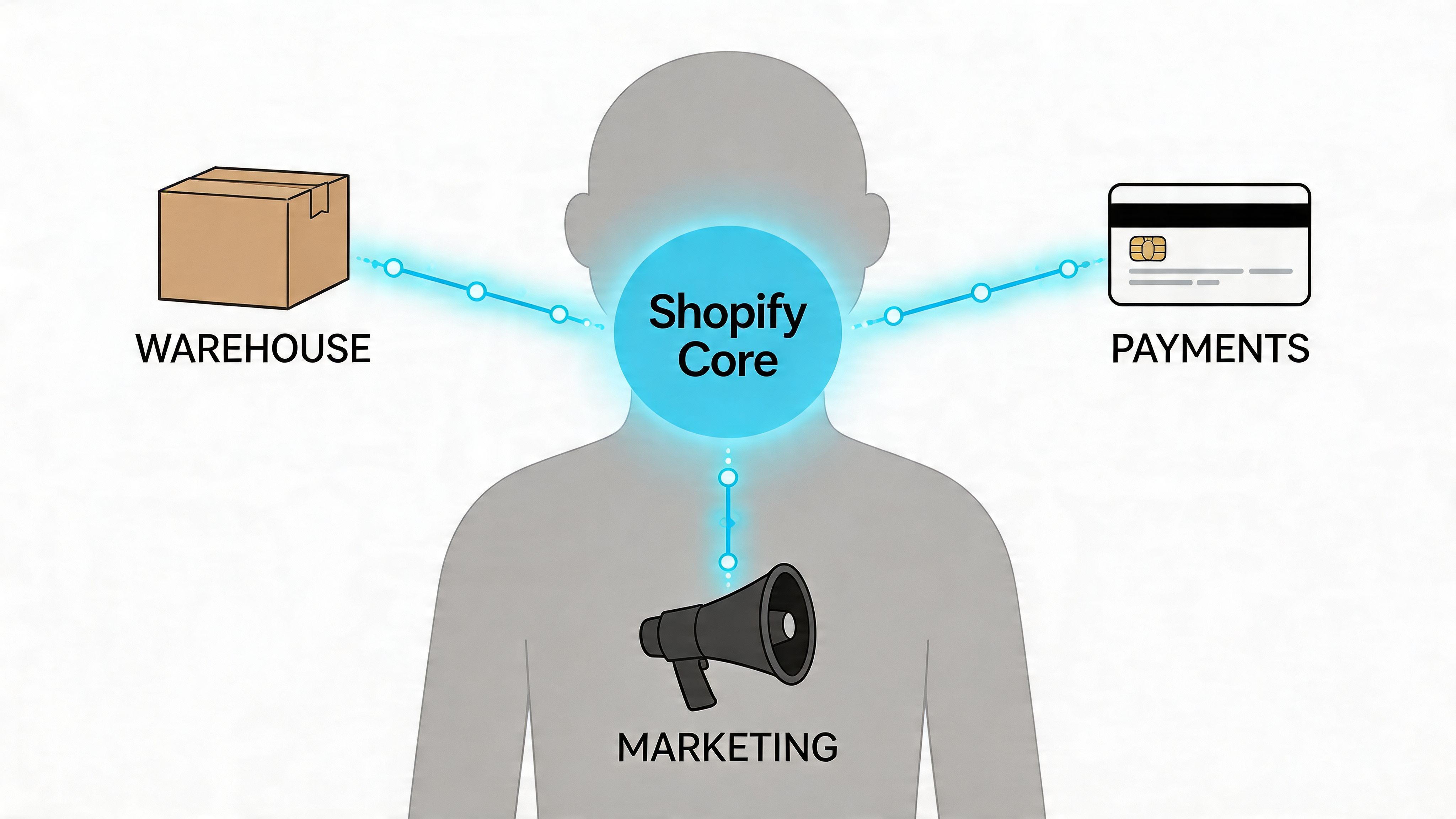
APIs are the controlled way systems talk
An API is a structured way for one system to request or send data to another. In practice, that means Shopify can tell an ERP about a new order, a CRM can fetch customer data, or a warehouse system can update fulfilment status.
On Shopify, the most important building blocks for this are the GraphQL Admin API and REST Admin API. These are commonly used for real-time syncing with systems like NetSuite or SAP, especially when a merchant needs inventory and order data to move quickly between platforms. Combined with webhooks, this approach can reduce stock discrepancies by up to 40% for high-volume merchants, as described in Shopify Plus integration guidance using GraphQL, REST, and webhooks.
GraphQL and REST don’t do exactly the same job in the same way. In real projects, the choice often comes down to the shape of the data, the scale of the workload, and how efficiently the receiving system can handle requests.
Webhooks are the alert system
A webhook is different from an API call. It’s a notification that says, “Something just happened.”
If an order is created, inventory changes, or a fulfilment event occurs, Shopify can send that event out immediately. That matters because polling on a schedule creates delay. Delay creates mismatched data. Mismatched data creates operational mistakes.
A simple example looks like this:
- A customer places an order in Shopify
- Shopify triggers an event such as
order/created - The receiving system processes that event
- Inventory, fulfilment, or customer records update accordingly
That event-driven model is what makes integrations feel live instead of patched together.
Practical rule: If the business process breaks when data is delayed, don’t rely on batch exports alone.
A lot of merchants also confuse app behaviour with integration design. A public app may give a useful interface, but the deeper question is still how data moves, who owns each field, and what logic applies when systems disagree. That’s why understanding the difference between standard app behaviour and bespoke integration logic matters. This is also where Shopify public app development becomes relevant, because public apps solve repeatable use cases, while custom integration work handles business rules that don’t fit a mass-market pattern.
Real-time doesn’t mean simple
Real-time syncing sounds attractive, but it isn’t automatically the right answer for every workflow.
Some data should move instantly. Inventory levels and payment events are good examples. Other data is safer and cheaper to process in controlled batches, especially if the downstream system is slow, heavily customised, or sensitive to spikes in API activity.
That distinction is where many integration projects either become efficient or become fragile. Good architecture decides which events need immediate action and which records can be reconciled on a planned schedule.
For a quick visual explanation of how these moving parts fit together, this walkthrough gives useful context:
The technical layer isn’t mysterious once you strip away the jargon. Shopify emits data. Other systems consume or return it. The quality of the integration depends on how carefully that exchange is designed, monitored, and maintained.
Common Integration Use Cases And Architectures
Most Shopify third-party integration services fall into a handful of business-critical categories. The technology varies, but the underlying goal is usually the same. Remove manual handoffs, keep operational data trustworthy, and stop one department from fixing problems created by another.
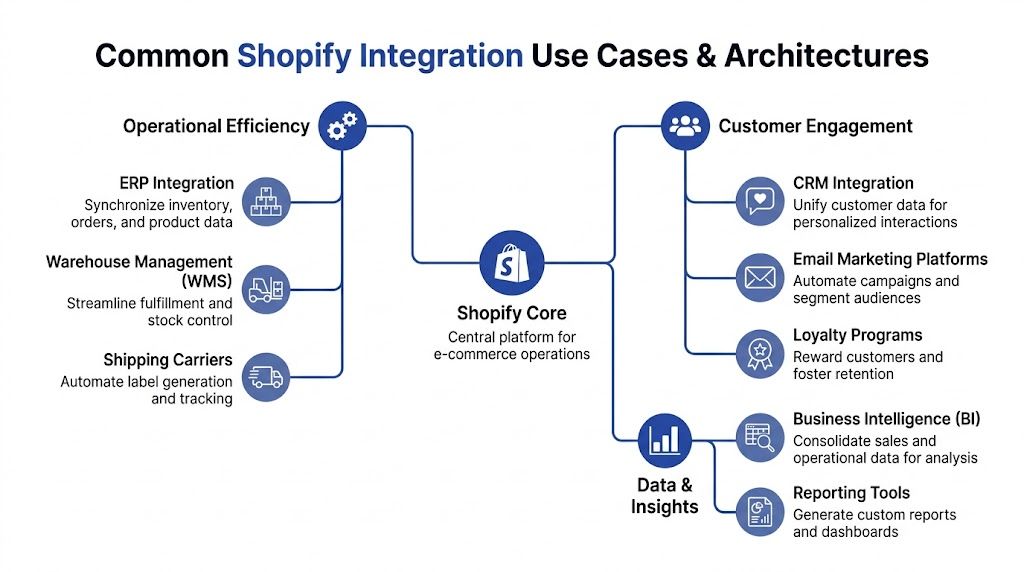
The use cases that matter most
ERP integrations are usually the first serious requirement once complexity rises. A merchant wants Shopify to push orders, products, tax data, and stock movement into NetSuite, SAP, or another finance and operations platform. The business value is simple. Finance stops reconciling chaos after the fact, and operations gets cleaner stock control during peak periods.
CRM integrations solve a different problem. Shopify may hold transaction data, but the customer relationship often lives in systems like Salesforce, HubSpot, or Klaviyo. When the integration is planned properly, support agents, marketers, and account managers all see a more complete customer record.
WMS and 3PL integrations are operationally unforgiving. If warehouse data lags, customers feel it fast through shipping delays, oversells, or poor tracking visibility. Shipping and fulfilment tools are especially important for UK merchants dealing with VAT handling, cross-border workflows, and carrier-specific requirements.
PIM integrations become essential when product data grows messy. If your catalogue includes multiple markets, variants, bundles, channel rules, or regulated attributes, product information shouldn’t be maintained manually in Shopify alone.
A useful companion read for teams looking at workflow redesign more broadly is this guide to business process automation examples. It helps frame integrations as operational design, not just software setup.
The three architecture patterns
Once the use case is clear, the next decision is architectural.
Point-to-point
This is the direct connection model. Shopify talks straight to one external system.
It works well when the flow is narrow and stable. For example, one warehouse platform pushing fulfilment updates back into Shopify, or one ERP receiving sales orders from the storefront.
The downside appears later. Point-to-point is quick to start, but if the merchant adds a second warehouse, a marketplace, or a finance platform with different field rules, the integration map gets messy quickly.
Hub-and-spoke with middleware
This approach uses a central platform between Shopify and the rest of the stack. That middle layer may handle transformation, routing, error logging, and orchestration across several systems.
This model often makes sense when a merchant has multiple endpoints and wants more control without building every connection from scratch. It’s especially useful when different systems use different naming conventions, timing rules, or payload structures.
Middleware adds cost and another dependency, but it can reduce complexity when the stack keeps growing.
Custom-built application logic
Custom development is the right choice when the merchant has bespoke business rules that off-the-shelf connectors can’t handle cleanly.
That might include unusual fulfilment splitting, product logic tied to B2B account structures, region-specific payment workflows, or subscription logic that needs to interact with customer service and finance systems at the same time.
Custom work takes longer to scope and demands stronger governance. But if the process is unique, forcing it into a generic connector usually just relocates the problem.
The architecture should match the operating model. If the process is simple, keep the integration simple. If the process is unusual, standard tools often create silent failure points.
Payments are a distinct architecture decision
Payment integrations deserve separate attention because they directly affect conversion.
UK-focused services often use the Payments Apps API and Checkout API to embed gateways such as Stripe or Adyen. In the verified data, this approach is associated with 28% lower checkout abandonment for GBP transactions by supporting PSD2-compliant flows and wallets like Apple Pay, while also cutting load times to under 2 seconds, as outlined in Shopify payment integration guidance for UK merchants.
That’s not the same as saying every merchant needs a custom payment flow. Many don’t. But merchants with localisation requirements, strict payment routing needs, or a high sensitivity to checkout friction should treat payments as a strategic integration area rather than just a gateway install.
For teams evaluating ERP-led architecture specifically, Shopify ERP integration is usually where the broader system design becomes visible. Once ERP decisions are made, the rest of the integration map often follows.
Choosing Your Integration Strategy A Decision Framework
Most merchants don’t get stuck because there are no options. They get stuck because there are too many.
One vendor recommends a connector app. Another pushes middleware. A developer suggests building custom endpoints. Meanwhile, the internal team is dealing with operational silos, data issues and inefficient manual processes, which is exactly why decision paralysis appears so often in integration projects, as noted in this discussion of Shopify integration planning gaps.
Start with business constraints, not tools
The wrong way to choose an integration approach is to start with whichever platform someone already likes.
The right way is to ask five practical questions:
- How many systems need to exchange data?
- How fast does each type of data need to move?
- Which business rules are non-standard?
- Who will own maintenance after launch?
- What happens when one system changes its schema or API behaviour?
A merchant syncing basic order data into a standard back-office tool has a very different requirement from a merchant orchestrating ERP, CRM, subscriptions, warehouse logic, and custom payment conditions across several markets.
Integration Architecture Decision Matrix
| Factor | Pre-Built Connector (App) | Middleware (iPaaS) | Custom Development |
|---|---|---|---|
| Initial cost | Usually lowest upfront | Moderate, plus platform costs | Highest upfront effort |
| Implementation timeline | Fastest when the use case matches the app | Moderate, depends on mapping and workflow design | Longest, because logic is defined and built from scratch |
| Real-time capability | Varies by app and endpoint support | Often strong for multi-system orchestration | Strong when designed properly |
| Flexibility | Limited to app features and exposed settings | Good for transformation and routing | Highest flexibility |
| Scalability | Fine for simpler stacks | Strong for growing multi-system environments | Strong if governance is disciplined |
| Maintenance burden | Lower at first, but tied to app limitations | Shared between platform and implementation team | Highest internal or agency dependency |
| Best fit | Standard workflows | Expanding operational complexity | Bespoke processes and edge cases |
When each option tends to work
Choose a pre-built connector when the workflow is common and the merchant can adapt process to software. This is often the right decision for straightforward syncs where speed matters more than custom logic.
Choose middleware when multiple systems must stay coordinated and the business needs visibility into transformations, retries, and routing rules. This becomes more attractive as the stack expands.
Choose custom development when your process is commercially important and not negotiable. If the business relies on rules that a generic connector can’t support cleanly, custom work is usually cheaper than years of workarounds.
Cheap implementation can become expensive ownership. That’s the trade-off most teams notice too late.
A practical filter for decision-making
If you’re still unsure, use this sequence:
- List the data objects involved, such as orders, inventory, products, customers, payments, and fulfilments.
- Mark which system owns each object.
- Define timing requirements. Immediate, near real-time, scheduled, or manual review.
- Identify exception paths. Returns, partial fulfilments, bundle logic, B2B pricing, failed payments.
- Assess support reality. Who monitors it, fixes it, documents it, and updates it later?
That process usually eliminates the wrong options quickly. It also stops teams buying software before they’ve defined the operating model.
The Integration Project Lifecycle From Scoping to Support
A lot of merchants still treat integration work like a build-only project. Scope it, connect the systems, launch it, move on.
That assumption is where many problems begin.
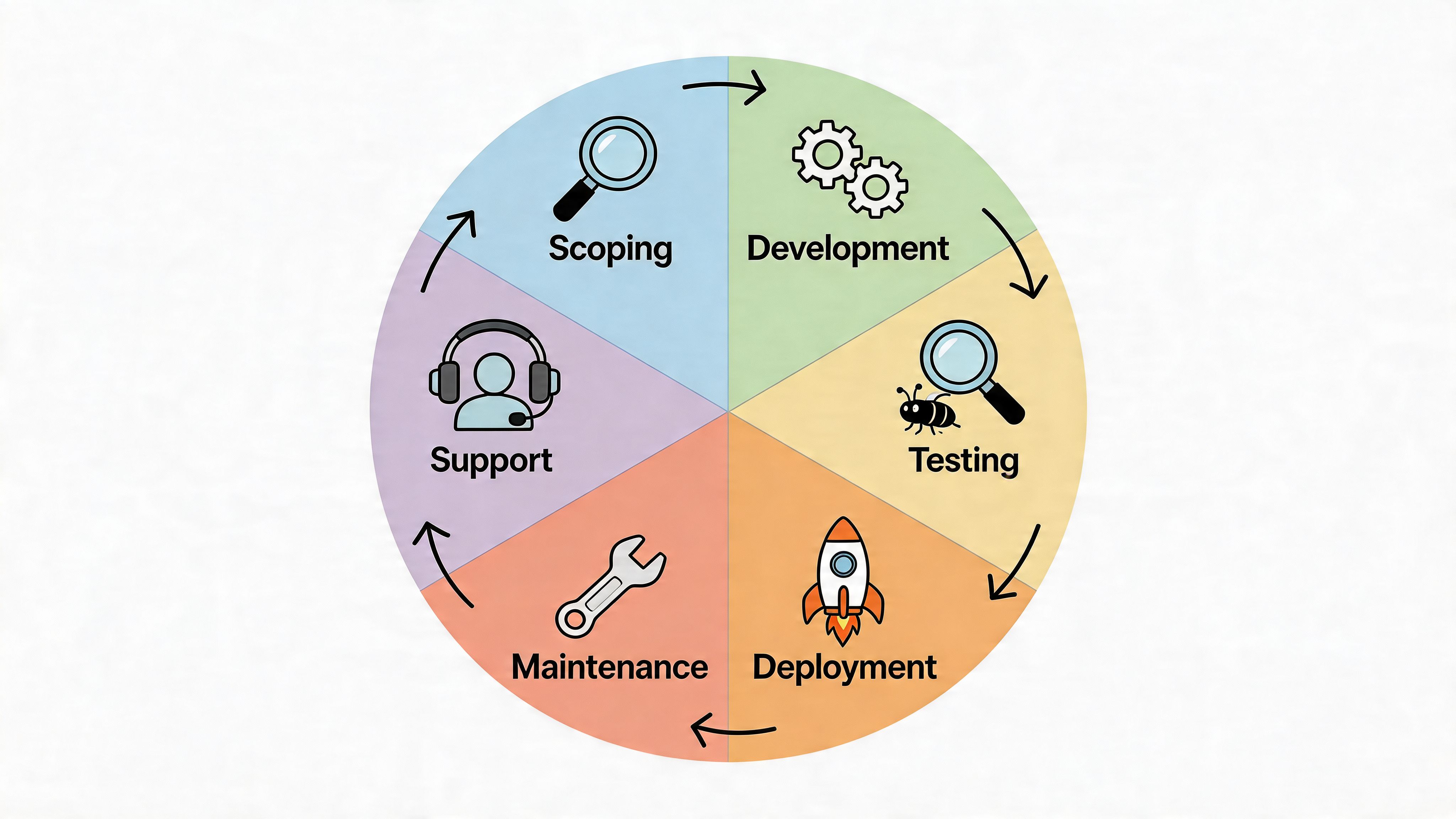
Discovery decides whether the project is safe
The first phase isn’t coding. It’s discovery.
The team maps the systems involved, the required data objects, ownership rules, edge cases, and operational dependencies. If this stage is rushed, the project tends to look cheaper than it really is, because the difficult exceptions stay hidden until testing or go-live.
Good scoping usually includes:
- Field mapping: Which system owns SKU, customer, tax, payment, and fulfilment fields
- Event mapping: What should happen on order creation, cancellation, refund, dispatch, and return
- Failure planning: What the business does when syncs fail or data conflicts appear
- Access planning: Which credentials, permissions, and approval paths are needed
Development and testing are where assumptions break
Development is rarely the hardest part. Testing is.
A technically correct integration can still fail commercially if it mishandles a partial shipment, duplicates a customer, or posts the wrong financial state into the ERP. Real testing means running through actual scenarios, not just proving that an endpoint returns data.
The most useful test plans include:
- Normal flows such as standard order creation and fulfilment
- High-risk exceptions like refunds, cancellations, stock adjustments, and split shipments
- Volume behaviour during periods when systems are under pressure
- Rollback plans if deployment introduces operational errors
Launch isn’t proof that the integration works. It’s proof that production has started testing it.
Go-live is an operational event
Deployment should be treated like an operational change window, not just a release.
That means deciding who monitors the first transactions, who validates the data, how orders are checked across systems, and what threshold triggers rollback or manual intervention. If nobody owns those decisions, issues linger too long and trust in the integration drops quickly.
Support and governance are the real cost centre
This is the part most merchants under-budget.
Existing content often focuses on implementation benefits and skips what happens after launch. But integration maintenance can consume 30% to 40% of post-launch resources, and many guides still don’t address data governance, rollback planning, or the ongoing impact of API changes, according to this analysis of post-launch integration ownership.
In practice, long-term ownership includes:
- Monitoring integration health: Failed jobs, webhook delivery issues, API limits, queue backlogs
- Data reconciliation: Comparing records between systems to catch drift before customers do
- Change management: Updating mappings when ERP fields, app behaviour, or Shopify APIs change
- Documentation: Keeping logic, dependencies, and exception handling written down for future teams
- Audit readiness: Knowing which systems touched customer or payment-adjacent data and why
What merchants should ask before signing off
A vendor might build a working integration and still leave the merchant exposed.
Ask these questions early:
- Who monitors failures after launch?
- What is the rollback process if sync logic causes errors?
- How are mapping changes documented and approved?
- How are webhook failures detected and replayed?
- What happens when Shopify deprecates an API version or an external system changes fields?
If the answers are vague, the project isn’t fully scoped. It’s just partially built on paper.
How Grumspot Delivers Expert Shopify Integration Services
Most integration failures aren’t caused by the API itself. They happen because the build team treats the project like a technical handover instead of a business systems project.
That’s where the delivery model matters. A senior Shopify team should look at data structure, storefront impact, operational ownership, and post-launch support together, not as separate streams.
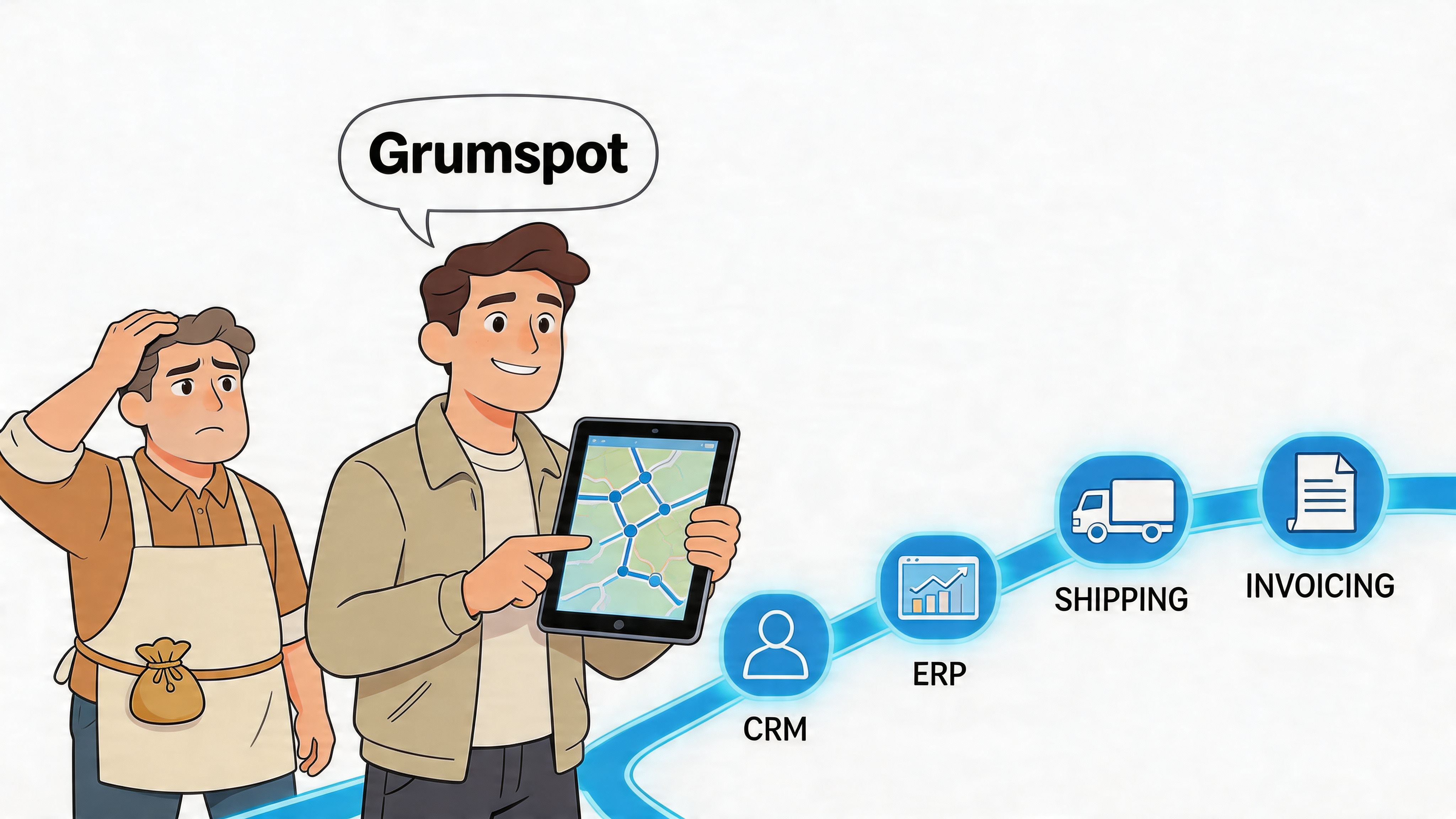
The work usually starts before the integration build
For complex Shopify third-party integration services, the first job is often untangling what already exists.
That can mean auditing installed apps, reviewing data ownership, checking where duplicate logic lives, and identifying whether the store is carrying old workarounds from a previous agency or internal team. If a store has gone through migrations, subscription changes, or market expansion, those legacy decisions usually affect the integration design more than the merchant expects.
In practical terms, delivery often includes:
- Migration-aware planning: Keeping product, order, or customer data consistent when systems are replaced or reconnected
- Custom app engineering: Building controlled logic where public apps don’t reflect the merchant’s operational model
- Storefront awareness: Making sure integrations don’t slow checkout, break merchandising logic, or disrupt conversion-critical journeys
- Support structure: Defining whether the merchant needs a fixed project, ongoing retainer, or a hybrid model
That custom app layer matters for stores with unusual workflows. One option in that space is Shopify custom app development, particularly when the merchant needs customized business logic, internal tooling, or system-specific data handling that standard connectors can’t cover.
What good implementation looks like in practice
A strong integration partner doesn’t just ask what systems you want connected. They ask how the business runs when something goes wrong.
That changes the conversation. Instead of only discussing endpoints and timelines, the focus shifts to stock authority, refund behaviour, carrier event handling, customer identity, and how support teams resolve data conflicts without escalating every issue to engineering.
A useful way to think about it is the same way finance leaders think about external advisory support. The value isn’t in producing activity. It’s in improving business performance and decision quality. That’s why broader resources on marketing consulting services built for your P&L are relevant here too. They reflect the same principle. Specialist support should connect directly to commercial outcomes.
The right implementation partner should be able to explain the operational consequence of every technical choice.
Delivery models that suit real operating teams
Not every merchant needs the same engagement structure.
Some need a one-off project to connect Shopify with an ERP, 3PL, or CRM before a relaunch. Others need retained support because the integration stack keeps evolving through subscriptions, internationalisation, checkout changes, or app consolidation.
The practical difference is ownership. A project model suits a defined scope with stable systems. A retained model suits merchants who know the architecture will keep changing and want continuity in monitoring, iteration, and documentation.
The strongest teams also build with CRO in mind. An integration that technically works but harms page speed, checkout flow, or merchandising flexibility is still a bad outcome. That’s especially true when payment, subscriptions, customer accounts, or dynamic pricing logic are involved.
Unlock Scalable Growth With the Right Partner
Shopify third-party integration services aren’t just an IT line item. They shape how the business runs every day.
Gains arise from choosing the right architecture for your operating model, not from buying the most features or stacking the most apps. A simple connector can be enough for a straightforward workflow. A growing multi-system business usually needs better orchestration. A merchant with bespoke logic often needs custom development and stronger governance from day one.
The hidden part is ownership. Launching an integration is only the start. Monitoring, reconciliation, documentation, rollback planning, and API change management are what keep the system trustworthy once the project is live.
Merchants who scale cleanly usually make one decision earlier than everyone else. They stop treating integration as a technical patch and treat it as operational strategy. When systems, teams, and customer journeys are aligned, growth becomes far easier to manage.
If your store has reached the point where apps are adding complexity instead of removing it, Grumspot can help you assess the architecture, define the right integration path, and build a support model that fits how your business operates.
Let's build something together
If you like what you saw, let's jump on a quick call and discuss your project

Related posts
Check out some similar posts.
- ecommerce erp integration
Master ecommerce erp integration for Shopify and Shopify Plus. Plan, map data, choose middleware and...
Read more
- supply chain visibility
Learn what supply chain visibility means, why it matters for ecommerce, and how to build it with API...
Read more
- marketplace integration
Marketplace integration connects your ecommerce store to Amazon, eBay and more. Covers APIs, connect...
Read more
- customer service automation
Boost your Shopify store with customer service automation. Cut costs, improve support, & increase co...
Read more