Ecommerce ERP Integration for Shopify That Actually Works
- ecommerce erp integration
- Shopify ERP integration
- ERP middleware
- Shopify Plus integration
- ERP data mapping
A Shopify order lands while the warehouse team is still working from yesterday's stock file. Finance sees a different customer address, the ERP has no matching discount rule, and someone copies the order into a spreadsheet before fulfilment can begin. By the time the customer receives a dispatch notification, three systems contain three versions of the transaction.
That isn't an unusual failure of ecommerce. It's usually a failure of ownership, mapping and operational governance. Ecommerce ERP integration succeeds when every team knows which system controls each record, when updates should move, and what happens when a message fails. The connector matters, but it comes after those decisions.
Why Ecommerce ERP Integration Matters for Shopify Brands
A Shopify store can take an order cleanly while the wider business still operates in fragments. Shopify may hold the checkout and payment status, the ERP may control financial posting, the warehouse may maintain available stock, and a separate system may manage product content or customer pricing. Without deliberate integration, staff re-enter data, reconcile conflicting records and respond to exceptions manually.
A well-designed connection creates a defined flow. Product and price data can move from the chosen master system to Shopify, inventory can update from the warehouse or ERP, and orders can return to the back office with the information required for fulfilment, invoicing and reporting. The point isn't to make every platform identical. The point is to give each platform the data it needs, from a recognised source.
The operational cost of disconnected records
The symptoms are familiar:
- Overselling: Shopify shows stock that the warehouse has already allocated elsewhere.
- Manual rekeying: Operations staff copy order, address or payment information between systems.
- Delayed fulfilment: An order waits for someone to notice an import failure.
- Broken reporting: Finance and ecommerce teams calculate revenue, refunds or tax from different datasets.
- Unclear customer service: Agents can't tell whether an order is paid, picked, shipped or partially refunded.
UK adoption research illustrates why this problem remains widespread. In a survey of 3,175 UK firms, 32% had adopted operations-centred platforms and 19% had adopted distribution-centred platforms, yet only 10% and 6% respectively were high-intensity users, according to the UK digital platform adoption research. Larger firms were also more likely to use operations-centred platforms, with adoption reported at 41% among businesses with more than 250 employees, compared with 13% among firms with fewer than 10 employees.
The practical lesson is that buying software doesn't create integration maturity. Many businesses already have platforms but haven't embedded them thoroughly enough into order, inventory and distribution workflows. A useful overview of the wider operational challenge is Grumspot's guide to supply chain visibility.
Practical rule: If a team can't name the master record for a product, order or stock balance, the integration isn't ready to build.
What success looks like
Success means fewer decisions are made in spreadsheets and fewer records are corrected after the fact. A warehouse worker receives an order that contains the correct line items and fulfilment instructions. Finance receives the right tax and payment information. Customer service sees a dependable status. Ecommerce managers can trust availability without asking the warehouse for a manual update.
This is why I treat browse digna integrations as a useful starting point when reviewing the wider integration options. It helps teams think beyond a single Shopify connector and consider how the store fits into the full operational stack.
The commercial expectation also needs to be realistic. A 2026 UK replatforming guide places ERP integration at £15,000 to £60,000, and says the integration layer can double the build cost once PIM, payments, logistics and marketing systems are included. The same guide gives a four- to twelve-month range for a well-scoped mid-market ecommerce migration, while a cited 2026 sample reports a median ERP project length of nine months. These are planning benchmarks, not promises, but they show why ecommerce ERP integration should be managed as a transformation programme rather than installed like a plugin. (UK replatforming and ERP integration guidance)
Planning Your Integration and Defining Data Ownership
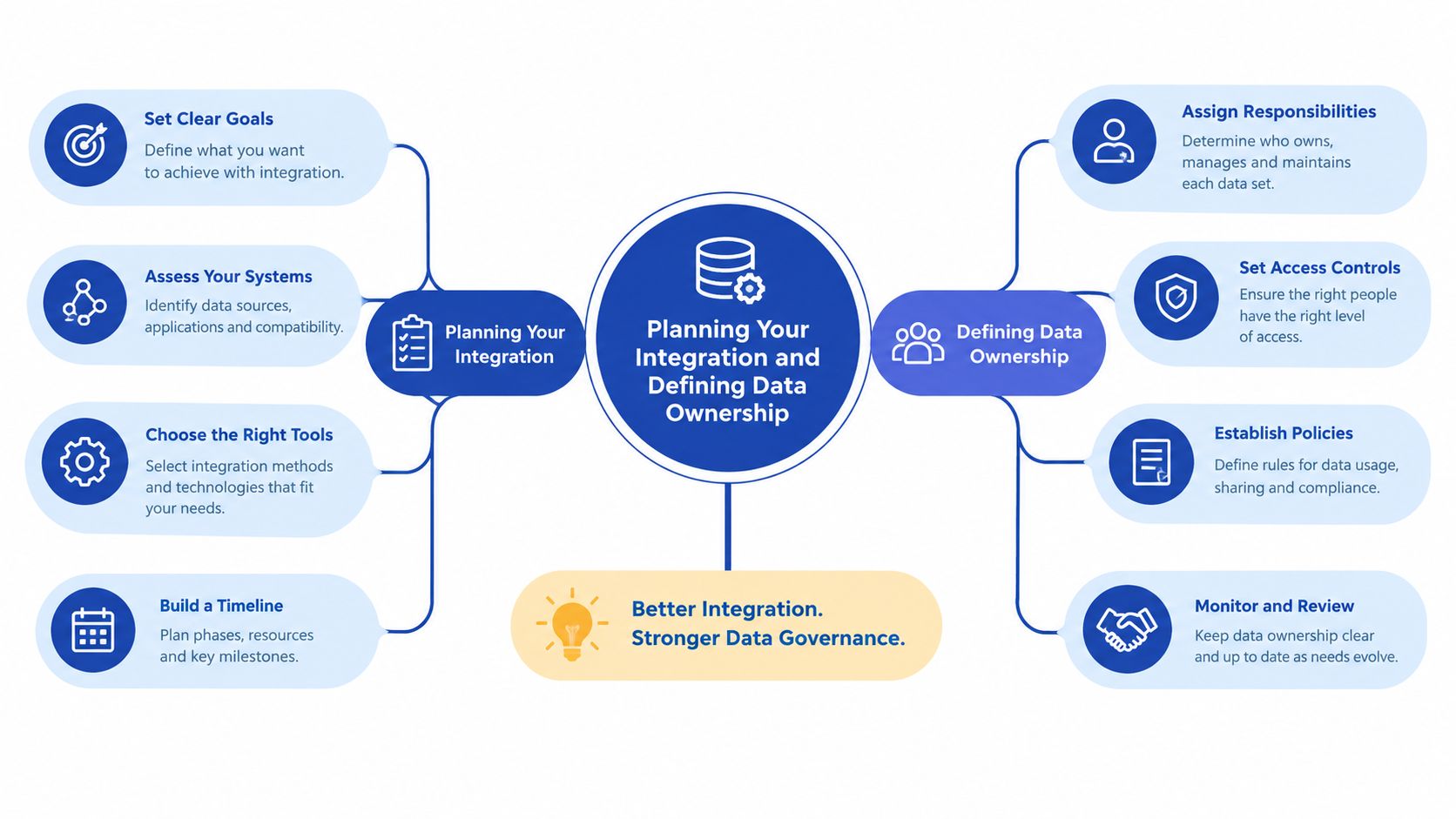
Start with decisions, not APIs. Before anyone configures a connector, document the business flows that must work, the data each flow needs and the person accountable for approving the result.
Define the first release
An integration blueprint should answer five questions for every object:
- What data is moving?
- Which system creates it?
- Which system owns later changes?
- How quickly must the destination receive it?
- Who resolves an exception?
Prioritise the flows that protect trading and fulfilment. Product identifiers, inventory availability and orders usually deserve early attention because errors in those areas affect customers and warehouse operations directly. Customer enrichment, advanced pricing, returns automation, invoices, loyalty data and marketing events may belong in later releases, depending on the business.
A phase-two backlog is useful only if it has an owner and acceptance criteria. “We'll add returns later” creates operational debt if nobody defines which return statuses, refund events and warehouse outcomes later means.
Assign one business owner
Technical ownership and business ownership aren't the same. A developer can maintain the integration, but one accountable business lead should approve the rules for product, inventory, order and customer data. That person should also decide whether a discrepancy represents a system defect, a process defect or a legitimate difference between platforms.
Create a simple ownership register:
- Products: ERP, PIM or Shopify, depending on where merchandising maintains the authoritative record.
- Inventory: The system connected to the warehouse's real allocation and availability process.
- Orders: Shopify for the customer transaction, ERP for operational and financial processing, with clear boundaries between the two.
- Customers: Shopify for account and consent behaviour, CRM or ERP for commercial and financial attributes where appropriate.
- Finance: The finance or ERP platform for tax, settlement and reconciliation records.
Don't assign ownership by habit. Test the proposed master against real workflows, including bundles, substitutions, backorders, cancellations and partial refunds.
Choose the timing deliberately
Real-time isn't automatically better. Inventory reservations and order creation often need event-driven updates because delay can create conflicting availability. Product descriptions, reporting extracts or historical customer enrichment may be perfectly suitable for a scheduled batch.
Shopify webhooks can reduce the lag and error window for important events, but they don't remove the need for retry logic, duplicate protection and monitoring. A webhook tells your integration that something happened. It doesn't guarantee that the receiving system accepted the message.
Write rollback procedures before testing. Specify how to pause fulfilment, replay a failed event, reverse a bad update and identify orders that require manual review. This signed-off blueprint prevents the most expensive form of integration drift, where teams create spreadsheet workarounds because nobody trusts the automated flow.
Choosing the Right Middleware for Shopify and Shopify Plus
There are three sensible patterns for connecting Shopify or Shopify Plus to an ERP. The right choice depends on the ERP's API quality, the number of surrounding systems, the complexity of the data and the team's ability to maintain custom logic.
| Integration Approach | Best For | Trade-offs to Consider |
|---|---|---|
| Native ERP connector | A standard Shopify and ERP pairing with conventional order, product and inventory flows | Fast to start, but unusual tax, warehouse, bundle or pricing rules may require workarounds |
| iPaaS middleware such as Celigo, Patchworks or Dell Boomi | Brands connecting Shopify to ERP, PIM, CRM, fulfilment, marketplaces or finance systems | Provides central monitoring and reusable transformations, but adds platform cost, configuration and another dependency |
| Custom Shopify Admin API build | Businesses needing precise control over complex workflows and with strong engineering capacity | Flexible and tailored, but your team owns API changes, queues, retries, observability and long-term maintenance |
Native connectors
A native connector works well when the business process resembles the connector's assumptions. Standard product records, straightforward inventory locations and ordinary order statuses can make this route efficient. It becomes less attractive when the business sells bundles, uses multiple fulfilment locations, applies account-specific pricing or needs unusual refund and tax handling.
Ask vendors to demonstrate your exceptions, not their happy-path demo. A connector that imports a simple order proves very little if it can't handle a cancelled line, a partial fulfilment or an address correction without duplicating data.
iPaaS middleware
Platforms such as Celigo, Patchworks and Dell Boomi make sense when the Shopify store sits in a wider network. Middleware can centralise transformations, queues, schedules, logs and error handling instead of forcing each system to connect directly to every other system.
The trade-off is governance at platform level. Someone still has to understand the mappings, monitor failures and approve changes. A low-code interface reduces implementation effort, but it doesn't replace business decisions about ownership or reconciliation.
Custom API work
A custom build suits teams with specific requirements and enough engineering capacity to operate the integration after launch. It can model Shopify orders precisely, separate financial and fulfilment states, and handle ERP limitations through queues or transformation services.
It also creates a maintenance obligation. You'll need version control, automated tests, alerting, replay tools and a clear response process when Shopify or the ERP changes. When evaluating engineering vendors, ask who owns production support, how failed events are replayed and whether the vendor documents the data contract rather than only delivering code.
Grumspot is one option for Shopify teams that need custom API connectivity, backend logic, workflow automation and mapping across storefront, ERP, CRM and fulfilment systems. You can also review the practical scope of Shopify third-party integration services before deciding whether a connector, middleware platform or bespoke build fits the programme.
The defensible choice is the one your team can operate. A cheap connector that nobody can debug is expensive in production. A custom platform built without a clear reason is equally wasteful.
Mapping Data and Building the Integration Step by Step
Field mapping is where attractive architecture meets operational reality. Don't map labels alone. Map meaning, ownership, format, validation and failure behaviour for every field that crosses the boundary.
Start with identifiers and product structure
Use a stable key, usually an agreed SKU or external product identifier, to match records. Don't use product titles as identifiers because merchandising changes them. For variants, document the relationship between the parent product, variant SKU, barcode, option values and ERP item code.
Map more than the visible catalogue:
- Product and variant identifiers
- Names, descriptions, images and publication status
- Tax category and tax code
- Cost and selling price
- Product type, brand and merchandising attributes
- Bundle or kit components
- Weight, dimensions and fulfilment restrictions
If the ERP owns price, Shopify should receive an approved price rather than calculate a competing value. If Shopify owns editorial content, the ERP shouldn't overwrite descriptions during an overnight import.
Treat inventory as a business rule
Inventory mapping must identify locations, available quantity, committed quantity, incoming quantity and any safety buffer. A Shopify location may not correspond directly to an ERP warehouse, so document the relationship explicitly.
A stock buffer can protect against timing differences, but it's a commercial rule, not a technical patch. Define which locations contribute to online availability, how reservations affect the quantity and what happens when stock is negative or unavailable. Never hide a broken inventory feed by applying a large arbitrary buffer.
Preserve UK tax logic
Tax mapping needs its own review. UK ecommerce ERP systems may need to preserve VAT codes, Making Tax Digital reporting logic and EU cross-border rules across Shopify, finance and warehouse processes. The 2026 UK VAT registration threshold is £90,000 in rolling 12-month turnover, as noted in UK ecommerce ERP guidance covering VAT and compliance. The integration should preserve the tax decision and its evidence, not merely copy a tax-inclusive total.
For each order, map shipping tax, discounts, refunds, payment fees and country-specific treatment. Finance should reconcile Shopify transactions against ERP postings and payment settlements using stable references.
Build for retries and duplicates
Every event needs an idempotency strategy. Store the source event ID or a stable business key so a retry updates the existing record rather than creating a second order, fulfilment or refund.
Separate statuses carefully. Shopify's payment status, fulfilment status and financial status don't necessarily match the ERP's order lifecycle. Create an explicit translation table, for example:
- Shopify order created, ERP sales order pending
- Payment captured, ERP payment authorised or posted
- Fulfilment created, warehouse task released
- Shipment confirmed, tracking returned to Shopify
- Cancellation or refund, ERP adjustment created and reconciled
Log the original payload, transformation result, destination response and retry count. Give operations a queue that explains what needs attention in plain language. “HTTP error” isn't a useful resolution path. “SKU missing from ERP catalogue” is.
Testing Launching and Stabilising Without Disrupting Peak Trade
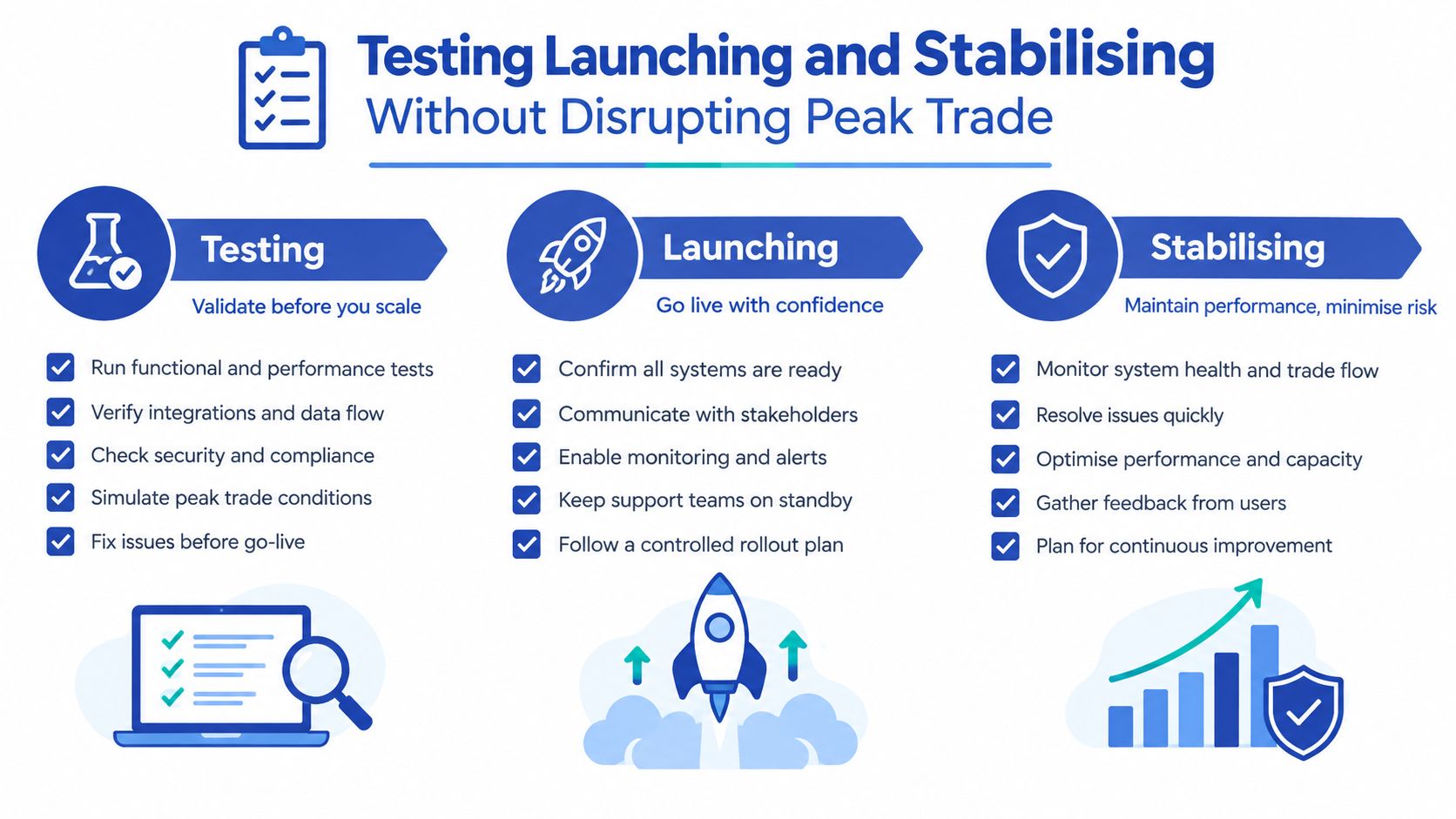
A successful build can still fail at launch if the team tests individual messages but never tests the entire commercial transaction. Shopify ERP integration needs verification from checkout through warehouse, finance, customer notification and reconciliation.
Test in layers
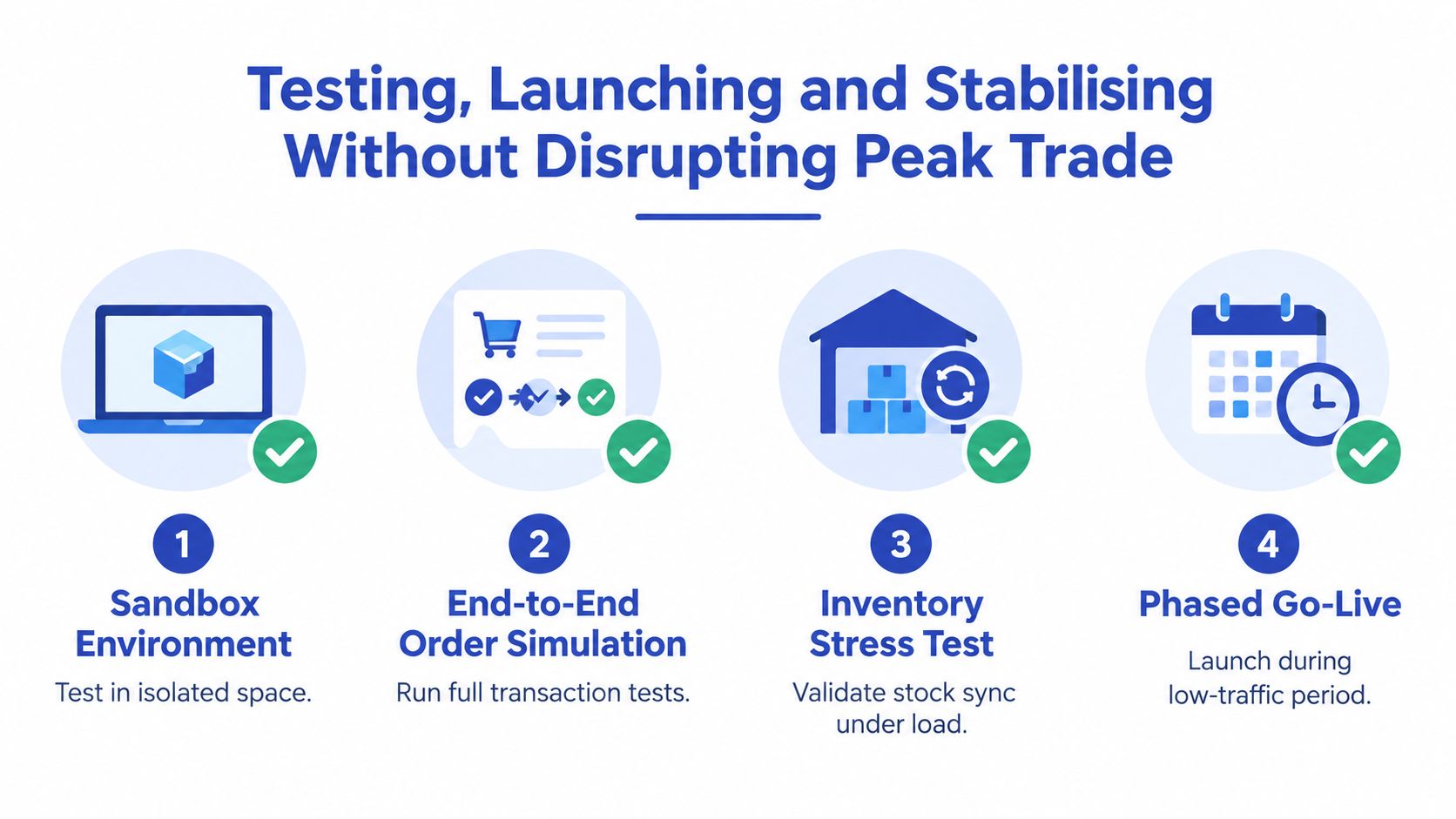
Begin in a sandbox or isolated environment with representative catalogue, customer and order data. Test normal transactions first, then deliberately introduce awkward ones:
- Duplicate webhook delivery
- Missing SKU or invalid tax code
- Partial cancellation
- Split fulfilment
- Refund after dispatch
- Address correction
- Out-of-stock order
- Failed ERP response followed by retry
Run end-to-end order simulations that follow the actual business path. Check whether the ERP creates the right record, whether the warehouse receives the correct instruction, whether Shopify receives the right status and whether finance can reconcile the result.
Inventory requires its own stress testing. Change stock at the warehouse, reserve it against an order, release the reservation and process a return. Watch for race conditions where two updates arrive in the opposite order.
Finance testing should compare source and destination totals, tax treatment, discounts, refunds and payment references. Use the data validation checklist after migration to structure the reconciliation rather than relying on visual sampling.
Sequence the release around trading
A UK retail ERP migration should be planned as a 28- to 40-week programme, from diagnostic work through stabilisation, according to UK retail ERP migration guidance. That guidance also recommends going live 6 to 10 months before Black Friday, giving teams time to stabilise before peak demand.
Use a controlled release:
- Freeze mapping changes before final testing.
- Take an agreed data snapshot and reconcile it.
- Launch during a low-risk trading window.
- Keep the old process available only for approved rollback scenarios.
- Monitor order, inventory, fulfilment and finance queues continuously.
- Hold daily hypercare reviews until exception volumes and ownership are clear.
Before launch, agree rollback triggers. These might include orders failing to reach the ERP, stock updates falling outside the agreed tolerance, duplicate financial postings or tax mismatches. Don't wait for a customer complaint to declare a rollback.
A short lead-in matters before reviewing the launch controls:
Hypercare should have named owners, response priorities, an incident log and a replay procedure. Stabilisation isn't the point at which the project disappears. It's when the business proves that the new operating model works under real conditions.
Common Pitfalls and How to Keep Your Integration Healthy
Most integration failures aren't caused by one dramatic coding mistake. They come from small governance gaps that remain unresolved until trading pressure exposes them.
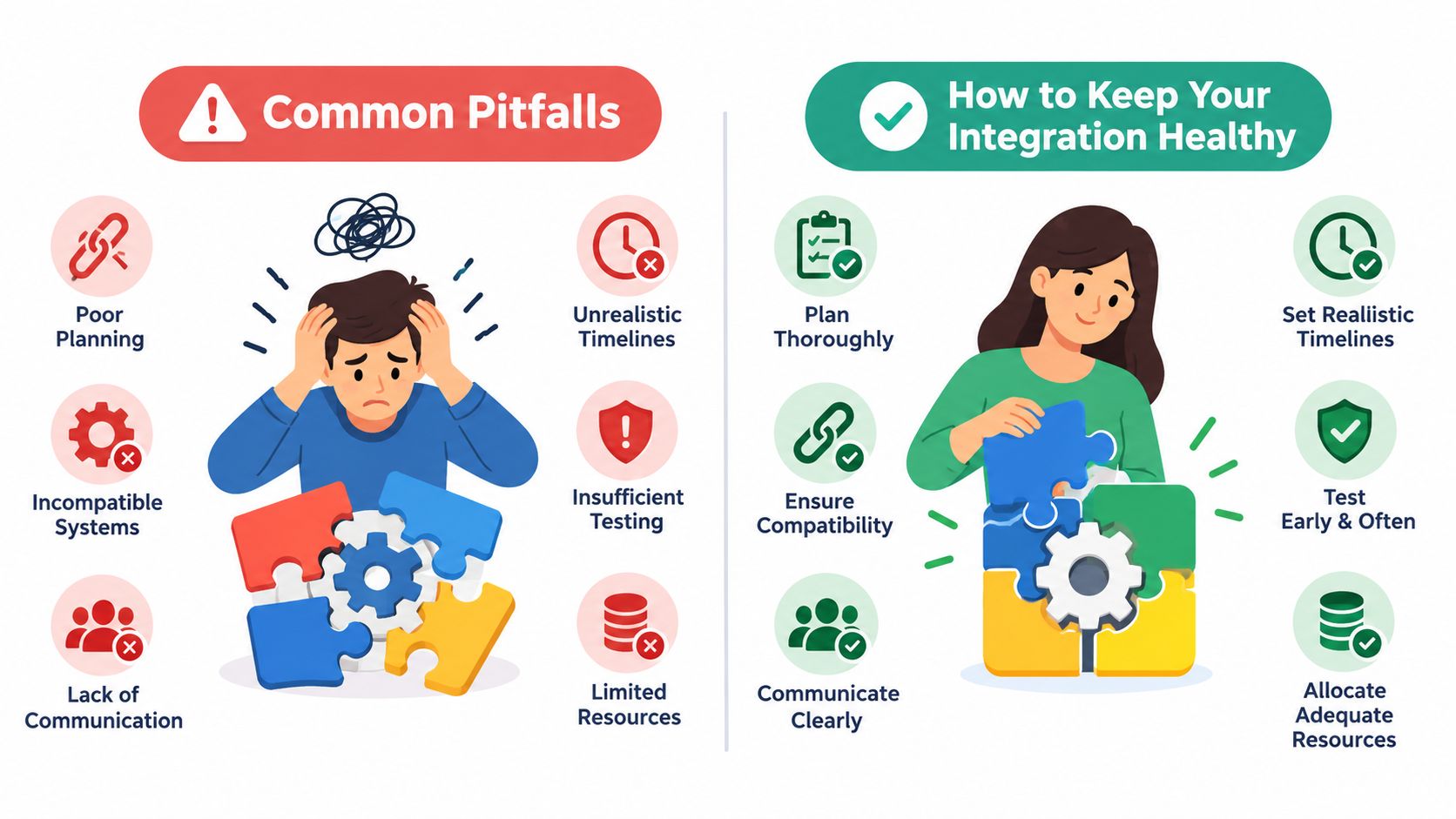
Five recurring causes
- Peak-season sequencing mistakes: Teams launch too close to major trading periods. Set the launch date from the stabilisation requirement backwards, not from a developer's estimated build completion.
- Underestimated data debt: Legacy SKUs, duplicate customers, obsolete tax codes and inconsistent addresses enter the new flow. Profile and clean the source data before migration.
- No single business owner: Technical teams make commercial decisions by default. Give one accountable operator authority to approve mappings and exceptions.
- Partner-led project control: An implementation partner can build the system, but internal teams must own the operating model. Require documentation, training and access to logs.
- Deferred phase-two drift: A feature marked “later” becomes a spreadsheet workaround. Maintain a prioritised backlog with an owner, decision date and measurable acceptance condition.
Monitor the flow, not just the server
Health checks should show whether business events complete. Monitor order creation, inventory freshness, fulfilment updates, refund transmission, tax exceptions and reconciliation status. Alert on meaningful failures, such as a rising queue of unprocessed orders or repeated SKU mismatches, rather than sending a stream of infrastructure noise.
Review data hygiene regularly. Remove obsolete mappings, validate new products before publication and audit location relationships after warehouse changes. A recurring governance review should ask whether ownership has changed, whether a new app has introduced a competing source of truth and whether staff have started bypassing the integration.
Bring in Shopify Plus integration support when the business has multiple fulfilment paths, complex pricing, cross-border tax requirements, a legacy ERP or no internal owner for production operations. The right specialist won't just connect endpoints. They'll help define the rules, test the exceptions and leave the team with a system it can operate.
Grumspot can help Shopify and Shopify Plus teams map ERP, fulfilment, CRM and finance workflows, build custom backend logic and stabilise integrations after launch. Visit Grumspot to discuss your data ownership model, integration scope and practical route to a dependable ecommerce operation.
Want this kind of work on your store?
Send us the URL and what is slowing it down. We look at the store before we reply.
Related posts
Check out some similar posts.
- erp integration with crm
Learn how ERP integration with CRM unifies sales, finance and operations. Explore patterns, APIs, pi...
Read more
- supply chain visibility
Learn what supply chain visibility means, why it matters for ecommerce, and how to build it with API...
Read more
- Shopify integration
Discover how Shopify third-party integration services connect your store to ERPs, CRMs, & more. Guid...
Read more