ERP Integration with CRM Explained for Growth
- erp integration with crm
- ERP CRM integration
- CRM ERP API
- ERP middleware
Your Shopify Plus store is growing, but the systems behind it aren't keeping pace. A sales representative promises availability based on an outdated stock view, the warehouse receives incomplete order information, finance creates an invoice from a different customer record, and support can't see what happened after the order left the storefront. Everyone is busy, yet nobody is working from the same version of the truth.
That is the practical problem ERP integration with CRM is designed to solve. It isn't about forcing two applications to become one. It's about giving each system clear ownership while creating dependable flows between customer, commercial, operational, and financial data. The sections below build that understanding from first principles, then apply it to a Shopify Plus commerce operation such as Grumspot's ecosystem.
Introduction to Connected Business Systems
Disconnected systems create friction long before a team describes it as an integration problem. A customer places an order through Shopify Plus, sales sees the order in a CRM, the warehouse checks an ERP, and finance relies on an accounting record. If those systems exchange information through spreadsheets, manual rekeying, or delayed exports, each department forms its own picture of the transaction.
A support representative might promise an update without seeing the fulfilment status. A sales representative might offer a product without current inventory context. Finance might have the right invoice total, but the CRM still shows an old commercial status. The customer experiences this as slow replies, contradictory answers, or an order that appears to move backwards.

The cost of separate records
Manual entry creates more than extra administration. It creates opportunities for duplicate customer records, inconsistent addresses, incorrect pricing, and missing order context. Delayed synchronisation creates a second problem, because a team can act on information that was accurate when it was exported but is no longer accurate when someone uses it.
UK businesses are already familiar with these platforms, although adoption remains uneven. An ONS analysis documented CRM adoption at 10.1% in one survey band and 15.8% in later observations, while ERP adoption moved from 1.9% to 4.8% in the corresponding bands. The same ONS work associated combined use of ERP, CRM, and SCM with a sample turnover of £795 million and GVA of £216 million, compared with £140 million GVA among firms using none of those systems. The ONS analysis of ICT intensity and productivity provides the relevant context.
Practical rule: Integration should remove avoidable handoffs, not remove human judgement from the business.
For a Shopify Plus operator, the useful mental model is straightforward. Shopify handles the buying experience, the CRM manages relationships and conversations, and the ERP coordinates fulfilment and finance. Integration connects those responsibilities so an order, customer, product, or service issue can travel to the people who need it without creating a second version of the record.
The rest of the process becomes easier once ownership is explicit. Instead of asking whether every field should sync everywhere, ask which team creates the information, which system validates it, and which downstream workflows need to consume it.
How ERP and CRM Work Together
Think of a restaurant. The CRM is the front of house. It records who the customer is, what they asked for, what they may buy next, and how staff handled previous interactions. The ERP is the kitchen and back office. It knows which ingredients are available, what an order costs, how it should be prepared, and whether payment and purchasing records are complete.
The restaurant works when both areas communicate. Front-of-house staff shouldn't promise a dish that the kitchen can't make. The kitchen shouldn't prepare an order without reliable customer and order details. ERP and CRM integration creates that communication channel, while still allowing each system to remain responsible for the work it understands best.
Give each system a clear role
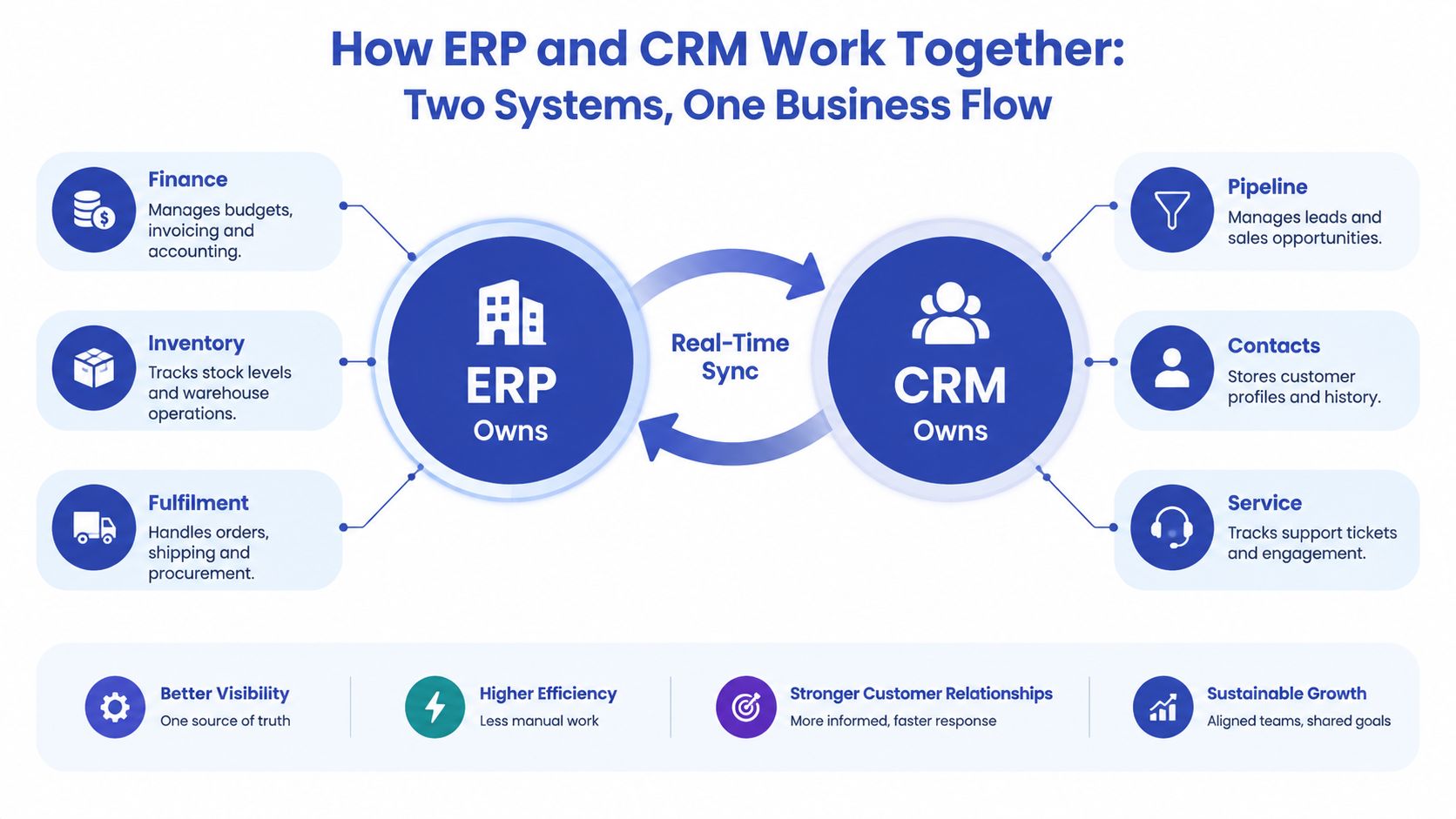
An ERP normally owns operational and financial truth:
- Finance: Invoices, accounting records, payment status, and credit controls.
- Inventory: Stock availability, warehouse movements, and product fulfilment status.
- Fulfilment: Orders, shipping, procurement, and delivery processes.
A CRM normally owns customer-facing and commercial context:
- Pipeline: Leads, opportunities, sales stages, and account activity.
- Contacts: Customer profiles, relationship history, and relevant preferences.
- Service: Support cases, conversations, and engagement history.
The boundary matters. A CRM can display an invoice status, but finance should usually remain the authority that creates and updates the invoice. A CRM can show available stock to a sales representative, but the ERP should normally validate inventory before an order enters fulfilment.
Understand bidirectional synchronisation
A one-way connection sends information from one application to another. A bidirectional connection allows both systems to exchange defined updates. For example, a CRM may send an approved customer and order to the ERP, then receive fulfilment and invoice updates that sales and service teams can see.
This doesn't mean every field should be editable in both places. It means the integration supports controlled movement in both directions. Customer, product, pricing, order, invoice, and service-case records can remain synchronised when the project defines ownership, validation, and conflict rules clearly. NetSuite's ERP and CRM integration guidance describes this API-based pattern and the value of connecting operational and customer records.
Near-real-time API synchronisation is usually more useful for stock availability, billing status, and account changes than a batch export. A scheduled file might leave sales looking at yesterday's inventory or support unaware of a recent invoice update. API-based flows can pass changes into downstream workflows sooner, while logging makes failed messages visible instead of lost.
Choosing Your Integration Pattern and Middleware
The right integration pattern depends on the number of systems, the quality of their APIs, the importance of real-time updates, and the level of operational control your team needs. A small Shopify Plus operation with one ERP and one CRM may start with a direct connection. A larger organisation with multiple channels, warehouses, or business entities may need middleware to coordinate the flows.
Three common approaches
Point-to-point API integration connects the ERP and CRM directly. It can be a sensible choice when the data model is narrow and the team can maintain the connection. The weakness appears when another application enters the picture. Each new connection adds another route to document, monitor, secure, and test.
Middleware or an iPaaS platform places an orchestration layer between applications. It can transform fields, route messages, retry failed requests, record logs, and expose exceptions to an operator. That makes it more suitable when Shopify Plus, an ERP, a CRM, fulfilment software, advertising platforms, and data services all participate in the same commerce flow.
A native connector uses a pre-built application for a recognised ERP and CRM pairing. Deployment can be quicker, but the connector may impose assumptions about objects, field ownership, workflows, or error handling. Check those limits before treating a quick installation as a complete integration strategy.
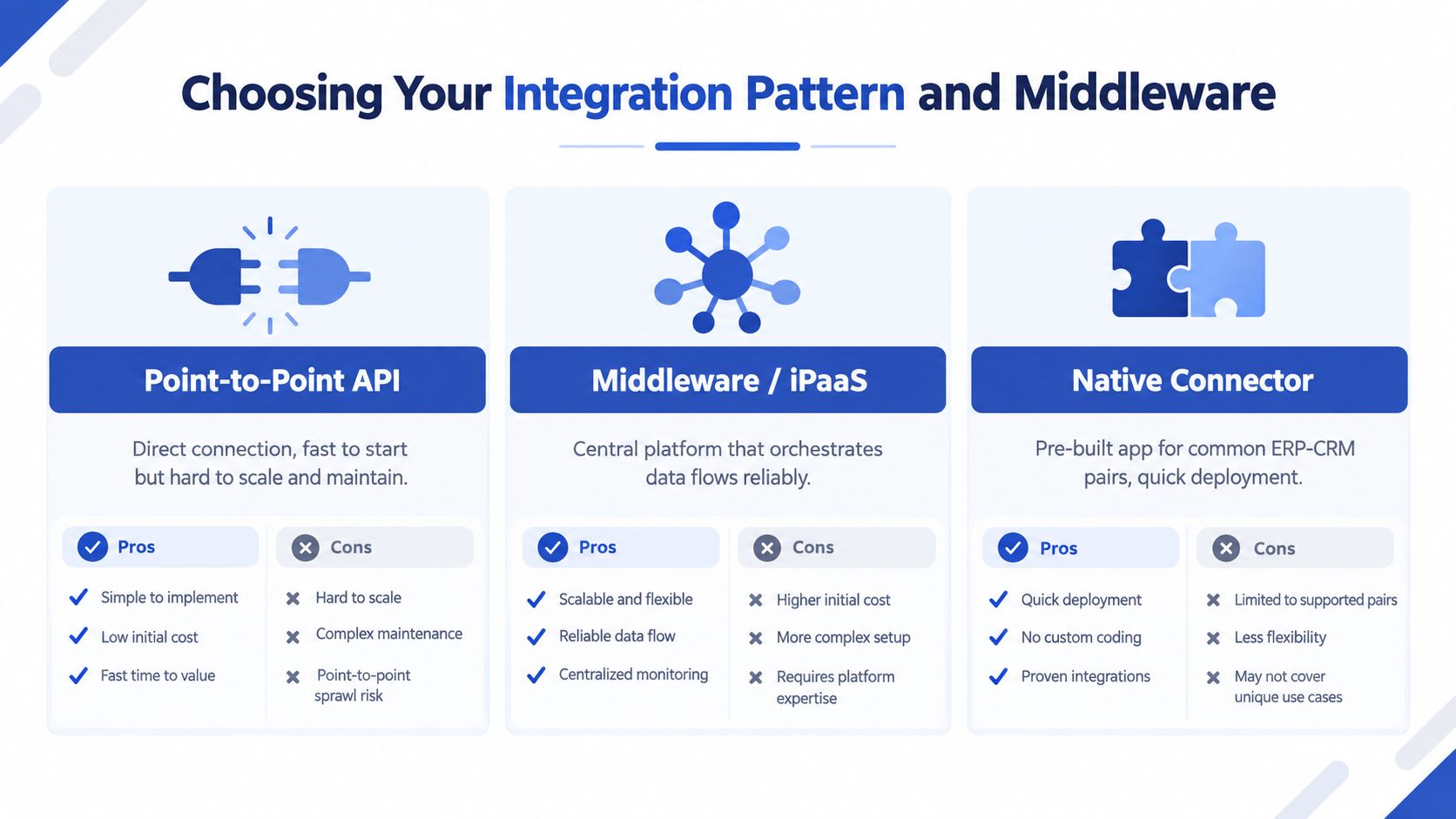
| Pattern | Best for | Pros | Cons |
|---|---|---|---|
| Point-to-point API | A small number of stable systems | Direct control and a focused build | Maintenance becomes harder as connections multiply |
| Middleware or iPaaS | Several applications and complex workflows | Central logging, transformation, routing, and exception handling | Adds platform cost and another service to govern |
| Native connector | Common ERP and CRM combinations | Faster deployment with pre-built behaviour | Custom requirements may need workarounds or extensions |
Match timing to business risk
Use event-driven or near-real-time flows when delay could cause a bad customer or operational decision. Inventory availability, order acceptance, fulfilment status, and invoice state usually deserve prompt updates. Scheduled synchronisation can suit less urgent data, such as historical reporting or periodic catalogue enrichment.
A Shopify Plus team may also need connections beyond ERP and CRM. For example, a business managing campaign data or marketplace activity could review specialist resources for advertising API integrations while keeping commercial and financial ownership separate. For broader implementation context, the Shopify third-party integration services guide can help teams assess how additional services fit into the architecture.
Choose middleware early when you need centralised logs, retry handling, field transformations, and a visible queue of exceptions. Those capabilities turn a failed record from a mystery into a task someone can investigate.
Mapping Data Between ERP and CRM Without Chaos
Most integration problems start before anyone writes an API request. They start when a team says, “Sync the customer data,” without agreeing what customer data means, who owns it, or what should happen when two records disagree.
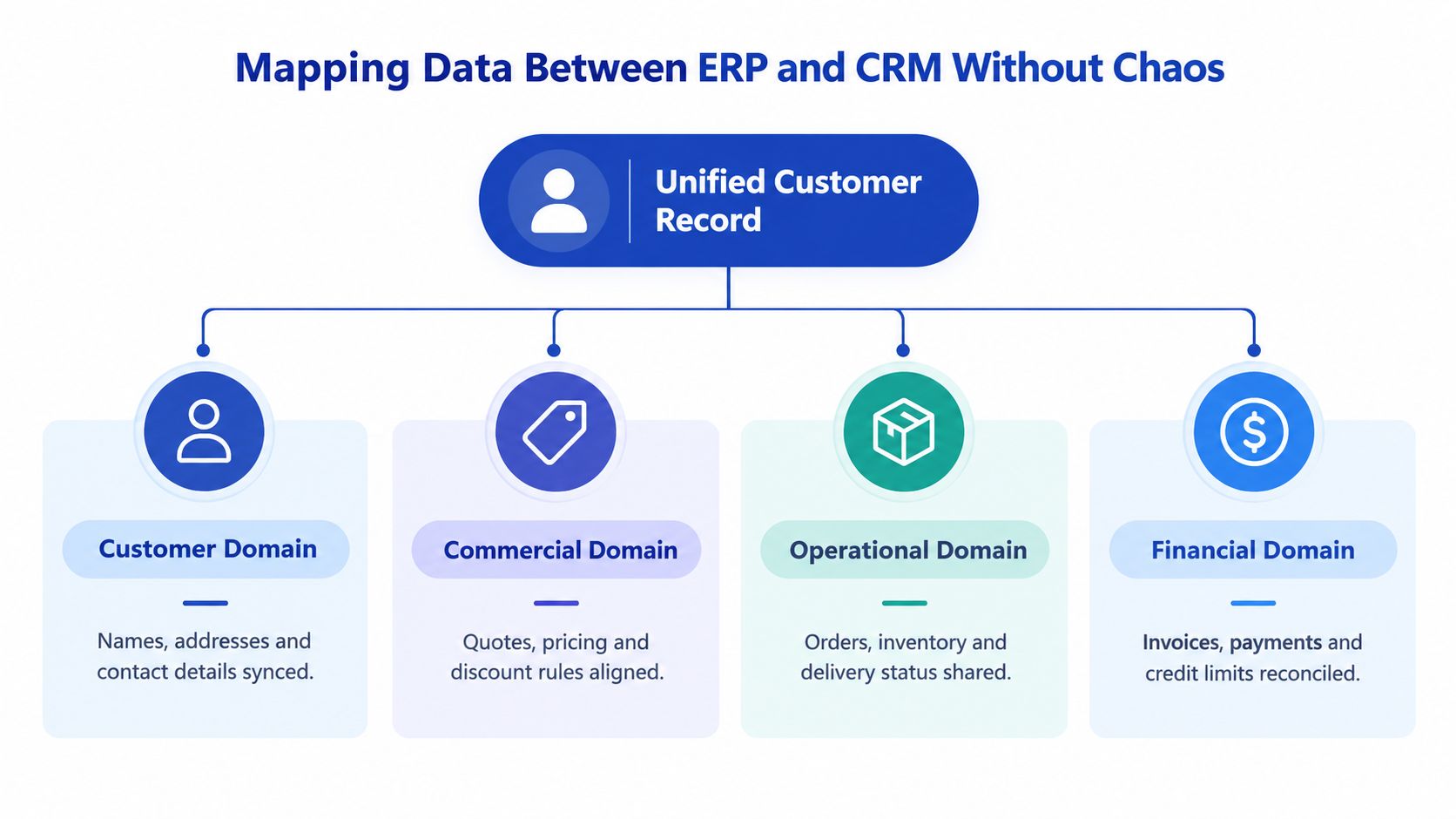
Group the mapping into four domains. This prevents a project from treating every field as equally important and gives each system a defined responsibility.
The four-domain model
Customer data includes names, addresses, contact details, account identifiers, and consent-related attributes. A Shopify Plus customer may begin at checkout, while a B2B account may originate in the CRM. Decide whether the ERP or CRM creates the master record, then use a shared identifier to prevent duplicate accounts.
Commercial data covers opportunities, quotes, price lists, discounts, currencies, and sales terms. The CRM can own the opportunity and sales stage, while the ERP can own approved price books, tax treatment, credit rules, or order validation. A sales representative should be able to prepare a quote without inventing a price that the ERP would reject.
Operational data includes orders, inventory availability, fulfilment status, shipment details, returns, and delivery events. For a Shopify Plus merchant, the storefront can capture the order, but the ERP should generally remain the authority for fulfilment and stock movements.
Financial data includes invoices, payments, credit status, and outstanding balances. The CRM may display these records to give sales or service useful context, but finance should control their creation and reconciliation.
Resolve field differences deliberately
Create a mapping catalogue before development. For each field, record its source, destination, format, required status, transformation, update direction, and failure action. A telephone number may need normalisation. A product identifier may use a Shopify SKU while the ERP expects an item code. A discount may be a percentage in one platform and a calculated price adjustment in another.
Don't sync fields because an endpoint exposes them. Exclude unreliable data, define duplicate rules, and decide whether an update should overwrite, append, or trigger a review. Supplier validation can also require separate checks, especially where legal identifiers must be verified. A resource on TaxID for supplier compliance offers relevant context for that type of validation workflow.
A clean map supports stronger supply chain visibility because teams can trace an order from commercial intent through operational execution without guessing which record is authoritative.
Common Pitfalls That Derail Integration Projects
A connection can be technically live and still fail operationally. The test isn't whether two applications exchange payloads. The test is whether staff can trust what they see and know what to do when a message doesn't process.
Duplicate records and ownership conflicts
Duplicate customers often appear when both systems create accounts independently. An email address may identify a consumer record in Shopify, while an ERP uses an account code and a CRM uses a separate internal identifier. Without matching rules and a shared cross-reference, one buyer can become several records.
Prevent this by defining record creation rules before mapping fields. Decide which application creates the master customer, how a match is found, and whether uncertain matches enter a review queue rather than creating another record.
Conflicting updates create a related problem. If sales changes a customer address in the CRM while finance updates it in the ERP, the integration needs a precedence rule. Otherwise, the latest message may win even when it contains less reliable information.
A reliable integration doesn't hide disagreement. It makes disagreement visible and actionable.
Batch delays and inaccurate stock
Batch exports can create a misleading sense of order. The job may complete successfully, yet the information remains stale between runs. A Shopify Plus customer sees a product as available, sales repeats that promise, and the ERP rejects the order because a different transaction already consumed the stock.
Use faster event or API flows for decisions that depend on current state. Where delay is acceptable, label the data clearly and make the timestamp visible so users understand whether they are seeing current or historical information.
Missing logs and weak ownership
A failed API request without a retained payload, error message, timestamp, and record identifier becomes a support investigation. Teams may retry blindly, creating duplicates or making the underlying issue harder to isolate.
Build observability into the first release. Assign someone to review failures, define retry rules, and separate recoverable errors from data-quality exceptions. Also train the teams who use the new workflow. A technically correct integration won't help if staff continue maintaining shadow spreadsheets because they don't understand which system owns each field.
Security Scaling and Governance Essentials
Security and scalability should be designed alongside the data flows, not added after launch. An ERP-CRM integration moves commercially sensitive records, customer details, invoices, and operational information between services. Each connection therefore needs a clear purpose, a narrow permission set, and a way to prove what happened.
Protect the connection
Use modern API authentication, rotate credentials, and store secrets outside application code. OAuth is one approach worth understanding, particularly when a platform needs delegated access rather than a permanent shared password. Grumspot's guide to OAuth authentication explains the underlying model in accessible terms.
Role-based access should reflect the domain model. Sales may need invoice status and available inventory, but not unrestricted accounting access. Customer service may need order and delivery history, but not permission to alter credit limits. Integration credentials should also be limited to the objects and actions the workflow requires.
Govern the records
Keep an audit trail for material changes. Record the originating system, event time, destination response, transformation outcome, and operator intervention. Encrypt data in transit and at rest where the platform supports it, and review retention policies for customer and financial records.
A useful governance checklist includes:
- Ownership: Document the system of record for every important domain and field.
- Access: Review roles, tokens, permissions, and leaver processes.
- Quality: Monitor duplicates, missing identifiers, invalid addresses, and rejected transformations.
- Resilience: Test retries, queue recovery, partial failures, and replay behaviour.
- Change control: Version mappings and assess API or workflow changes before release.
- Capacity: Test peak order and event volumes, then monitor processing latency and queue depth.
- Expansion: Leave room for new currencies, markets, warehouses, ERPs, CRMs, and sales channels.
Peak trading exposes weak designs quickly. A flow that works during ordinary activity may struggle when order events, stock updates, fulfilment messages, and customer-service actions arrive together. Scaling therefore means more than increasing server capacity. It means controlling concurrency, preventing duplicate processing, and ensuring that a delayed message can't overwrite a newer state.
Real World Examples and Next Steps for Implementation
Consider a Shopify Plus retailer that currently exports orders to an ERP and manually updates the CRM. The first useful release doesn't need to synchronise every object. The team might start with customer identity, product availability, order acceptance, fulfilment status, and invoice state. Shopify captures the purchase, the ERP validates and fulfils it, and the CRM receives enough context for sales and support to respond accurately.
A B2B brand may need a different starting point. Its sales team creates opportunities and quotes in the CRM, while finance and operations manage approved pricing, customer credit, orders, and invoices in the ERP. The integration can pass an approved quote into the operational process, then return order and invoice status to the CRM. The commercial conversation remains in the CRM, while financial control stays with finance.
A practical implementation sequence
- Document the customer journey: Follow a real order from Shopify Plus through payment, ERP fulfilment, delivery, invoice creation, and support.
- Choose the first domains: Start with the flows that remove the most risky manual handoffs, not the largest possible field list.
- Assign ownership: Write down who creates, validates, edits, and approves each record.
- Build a mapping catalogue: Include identifiers, transformations, update direction, error behaviour, and test examples.
- Pilot with controlled records: Test new customers, existing customers, amended orders, stock changes, failed requests, and duplicate matches.
- Measure operational reliability: Review exception queues, reconciliation results, user adoption, and support questions after launch.
Grumspot can work with Shopify Plus teams that need custom API connectivity, backend logic, workflow automation, and data mapping between storefront, ERP, CRM, and fulfilment systems. The appropriate delivery model may be a native connector, middleware, or a bespoke app where standard tools don't represent the required business rules.
The next step isn't to ask for “full integration”. Ask for a domain map, a system-of-record decision, a first workflow, and a failure-handling plan. That gives your team a scope that can be tested, governed, and expanded without recreating the same confusion in a more expensive form.
If your Shopify Plus store needs dependable ERP, CRM, fulfilment, or custom backend connections, visit Grumspot to discuss the data domains and workflows that matter most. Their team can help map the systems, build the required integration logic, and turn disconnected commerce operations into a clearer working process.
Want this kind of work on your store?
Send us the URL and what is slowing it down. We look at the store before we reply.
Related posts
Check out some similar posts.
- ecommerce erp integration
Master ecommerce erp integration for Shopify and Shopify Plus. Plan, map data, choose middleware and...
Read more