Master Google Shopping Optimization: A Practical 2026 Guide
- google shopping optimization
- ecommerce advertising
- performance max
- shopify marketing
- product feed optimisation

Google Shopping takes 85.3% of all retail search clicks in the UK, and optimised campaigns average roughly 8:1 ROAS according to Bind Media's UK Google Shopping benchmarks. That changes the conversation. Google Shopping optimisation isn't a channel tidy-up. It's one of the main profit levers in e-commerce.
Most underperformance doesn't start in bidding. It starts earlier. Weak titles, messy variant logic, stale availability, poor margin segmentation, and campaign structures that force very different products to compete under the same goal will drag down returns. Then advertisers blame Google Ads.
The practical reality is simpler. Your feed tells Google what you sell. Your campaign structure tells Google what matters. When those two systems line up, Google Shopping works far better. When they don't, automation amplifies bad inputs.
Why Google Shopping Optimisation Is Non-Negotiable
Google Shopping captures most retail search click volume in markets like the UK. As noted earlier, that concentration changes the economics of e-commerce acquisition. If product data is weak or campaign structure is blunt, wasted spend shows up fast.
The mistake I see in audits is treating Shopping as two separate jobs: feed management in Merchant Center and bidding in Google Ads. In practice, they are the same system. Feed quality shapes query matching, ad relevance, price perception, and conversion rate. Campaign structure decides how aggressively to bid, where to protect margin, and how much freedom Performance Max gets with the catalogue.
What optimisation means when revenue is the goal
Good Shopping optimisation starts with commercial intent, not field completion. A strong feed makes products understandable to Google and attractive to shoppers. A strong campaign structure uses that clarity to separate products that deserve different targets, budgets, and levels of automation.
That means titles built for search behaviour, not internal naming conventions. It means clean variant handling so sizes and colours do not cannibalise each other or split signal unnecessarily. It means custom labels that group products by margin, seasonality, price band, and stock position, so bidding reflects business reality rather than average account performance.
This is also where Standard Shopping and Performance Max need to be planned together. Standard gives cleaner query control, sharper reporting, and tighter segmentation. Performance Max gives scale and broader inventory access, but it relies heavily on feed quality and clear product grouping. If the catalogue is messy, PMax does not fix it. It spends against it.
Practical rule: Better bidding starts with better product data. If the feed cannot express product value clearly, Smart Bidding and Performance Max make decisions on weak inputs.
Measurement still matters, but revenue teams need measurement that reflects contribution to profit, not just platform efficiency. Mr. Green Marketing's advice on campaign success is useful if the goal is to tie media performance back to business outcomes rather than stop at ROAS screenshots.
Shopping also works in context. Paid visibility can win the click, but weak category pages, thin product content, and poor site architecture still depress conversion after the visit. That is why e-commerce SEO best practices still affect Shopping performance, even in accounts spending heavily on paid acquisition.
The commercial case is straightforward. Better feeds improve matching and click quality. Better structure improves bidding control. Running Standard and PMax as a coordinated system gives both scale and discipline. That combination usually beats treating Shopping as a feed upload plus an automated target.
Mastering Your Google Merchant Center Setup
Most Shopping issues that advertisers call “Google Ads problems” are Merchant Center problems wearing a different shirt. If Merchant Center is misconfigured, the ads account inherits the damage. Products get limited, disapproved, or shown with stale information. Bidding then reacts to bad data.
Merchant Center setup needs to be operationally accurate, not merely complete.
Start with settings that affect trust
Shipping, returns, and tax settings need to match the site. Not roughly. Exactly. If a user sees one promise in Shopping and another on the landing page or at checkout, performance falls off quickly and policy risk rises.
Work through these first:
- Shipping settings: Set up the shipping services, thresholds, and regions you use.
- Return policy: Mirror your site policy. Don't simplify it in Merchant Center if the website says something more restrictive.
- Business information: Keep your brand name, website claim, and contact details clean and current.
When these basics drift out of sync, the account starts leaking efficiency in ways that are hard to diagnose from Google Ads alone.
Use diagnostics like an operator, not a spectator
The Diagnostics tab is one of the most useful parts of Merchant Center, and it's often ignored until a problem becomes expensive. Review it routinely for item-level issues, warnings, and policy flags. Look for patterns rather than isolated errors. If ten products are rejected for identifier issues, assume the source logic is broken.
A useful operating rhythm is to check:
- Item disapprovals for products already intended for promotion
- Warnings that can become larger limitations later
- Price and availability mismatches between the feed and site
- Landing page issues tied to mobile rendering or variant selection
Merchant Center should function as a data quality control layer, not just a place where the feed lands.
Turn on automation where it prevents drift
Automated feed delivery and product synchronisation matter because many catalogues change faster than manual exports can keep up. Price and stock are the two fields most likely to create mismatch problems when operations move quickly.
If you're running Shopify or another modern commerce stack, use direct integrations carefully but don't assume the native sync is enough on its own. The platform connector may send data. It may not send the right structure, custom labels, or variant logic for aggressive campaign management.
That's where a stronger catalogue process helps. A proper product information management approach gives merchandising, operations, and paid media a shared source of truth instead of three competing versions of the same product data.
Build a pre-launch checklist for every feed change
Before major feed edits go live, verify:
| Check | Why it matters |
|---|---|
| Title structure | Affects query matching and click quality |
| Variant mapping | Prevents landing page friction |
| Price sync | Reduces mismatch risk |
| Availability logic | Stops spend on unavailable stock |
| Custom labels | Supports campaign segmentation |
| Image review | Catches weak or inconsistent creatives |
What doesn't work is making feed changes directly in a panic after performance drops. Merchant Center rewards consistency and accuracy. The cleaner the setup, the more reliable every later optimisation becomes.
Optimising Your Product Feed for Clicks and Conversions
Feed optimisation is where most Google Shopping wins are created. Not all at once, and not through cosmetic edits. Through systematic improvements to the fields Google uses to decide relevance and the shopper uses to decide whether to click.
For UK audiences, titles need key details like brand, size, and colour at the front, and they need to align with the landing page. If a mobile shopper has to re-select variants after the click, friction spikes. That's one reason 68% of UK mobile users abandon carts if they must re-select variants post-click, and a repeatable audit process can reduce feed disapprovals by 35%, as noted in Wpromote's feed optimisation guidance.
A useful visual summary sits below.
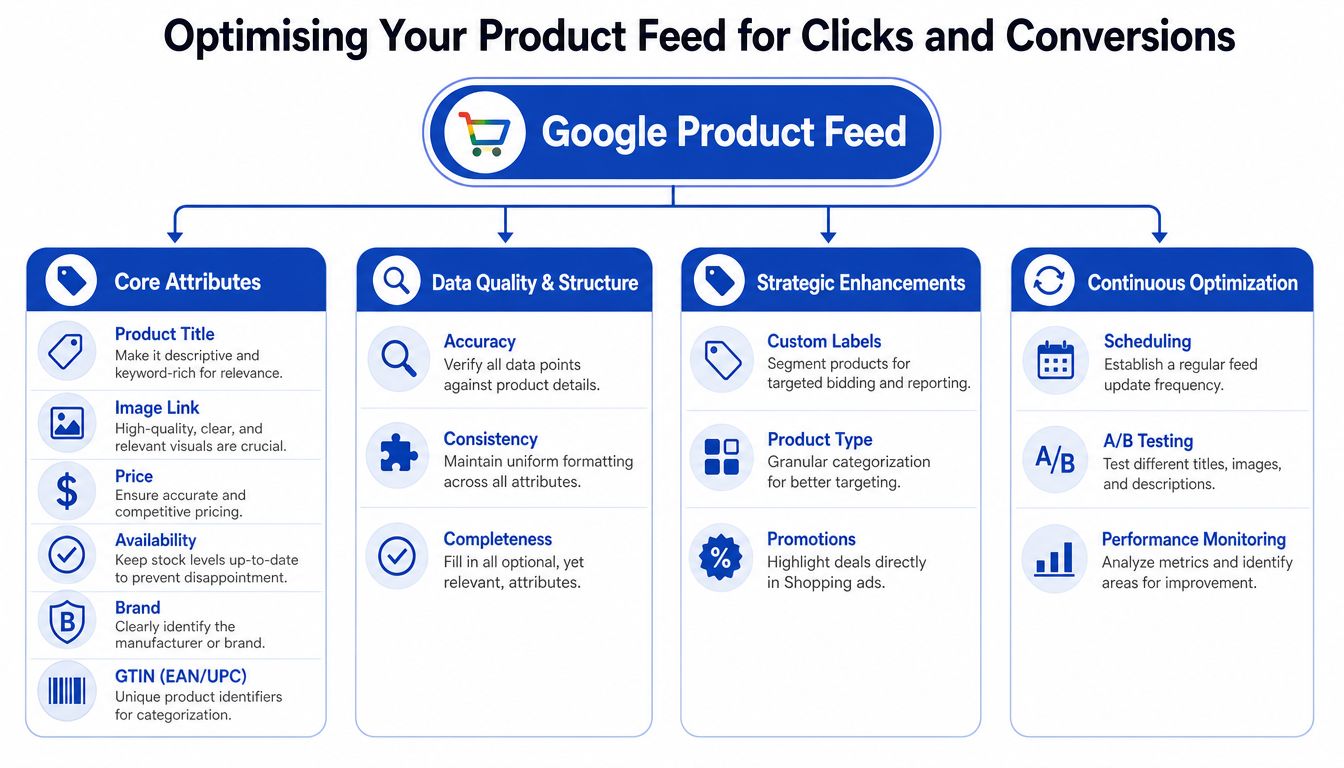
Write titles for retrieval first, persuasion second
Shopping titles aren't ad headlines in the usual sense. Their first job is to help Google understand exactly what the product is. Their second job is to help the shopper pick your result from a crowded comparison surface.
A weak title:
- Too vague: “Men's Trainers”
- Missing buying cues: no brand, size range, colour, or style
- Detached from the landing page: the clicked product page may force the shopper to choose again
A stronger title:
- Specific and front-loaded: “Adidas Men's Running Trainers Black Size 10”
The exact sequence depends on the category, but the rule is stable. Put the details buyers use to filter products at the front. For apparel, that's often brand, gender, product type, colour, and size. For homeware, it may be material, dimensions, or finish. For electronics, model and capacity usually matter more than descriptive flourish.
Descriptions should help Google and the buyer
Descriptions are underused because many advertisers assume Shopping barely reads them. That's a mistake. The feed description helps with context, especially when titles can't hold every relevant detail.
Wpromote recommends product descriptions between 500 and 1,500 characters that highlight key benefits, visual attributes, and clear product details, with proper grammar and without excessive special characters. In practical terms, that means:
- Lead with what the item is
- Cover attributes shoppers care about
- Match the landing page language
- Avoid keyword stuffing that reads like export sludge
If you sell a patterned dress, mention the pattern. If you sell a sofa, include fabric, configuration, and finish. If you sell supplements, state flavour, pack size, and format clearly.
Here's a good companion explainer if you want a visual walkthrough:
The fields that usually decide whether scaling is possible
Three areas repeatedly separate scalable accounts from fragile ones.
Identifiers and structure
GTINs, IDs, and variant relationships need to be clean. Google can classify products better when identifiers are present and correct. Internal IDs also need to remain stable so reporting doesn't become unreliable after merchandising updates.
Images and landing page alignment
Your image is often the first competitive differentiator in Shopping. It should show the actual product clearly and consistently. If the clicked page defaults to a different colour, size, or bundle from the ad, buyers lose confidence immediately.
Availability and price freshness
Feed freshness is operational, not optional. If stock status or price lags behind the website, performance degrades fast because the click expectation and landing-page reality no longer match.
The best feed isn't the one with the most fields filled in. It's the one that makes the product easy for Google to classify and easy for the shopper to buy.
A practical audit routine
A strong feed audit usually includes:
- Export checks: Pull the current feed and scan titles, descriptions, product types, and custom labels in bulk.
- Identifier validation: Confirm GTINs and item IDs are complete and consistent.
- Diagnostics review: Cross-check Merchant Center warnings against the actual CMS or Shopify data.
- Variant testing: Click through top products on mobile and confirm the ad lands on the selected option cleanly.
- Review layer: If your PDPs rely heavily on trust signals, stronger customer review management can improve what happens after the click, especially for products that need reassurance before purchase.
What doesn't work is rewriting a few titles and expecting the whole account to move. Feed optimisation works when you treat it like catalogue engineering. Structured, repeated, and tied to campaign intent.
Advanced Campaign Architecture and Bidding Strategies
A single Shopping campaign for the whole catalogue is easy to launch and hard to run well. It pushes products with very different economics into the same bidding logic. Bestsellers, low-stock lines, discounted variants, and premium-margin products end up competing for budget as if they deserve the same treatment. They don't.
The stronger approach is segmentation by commercial role.
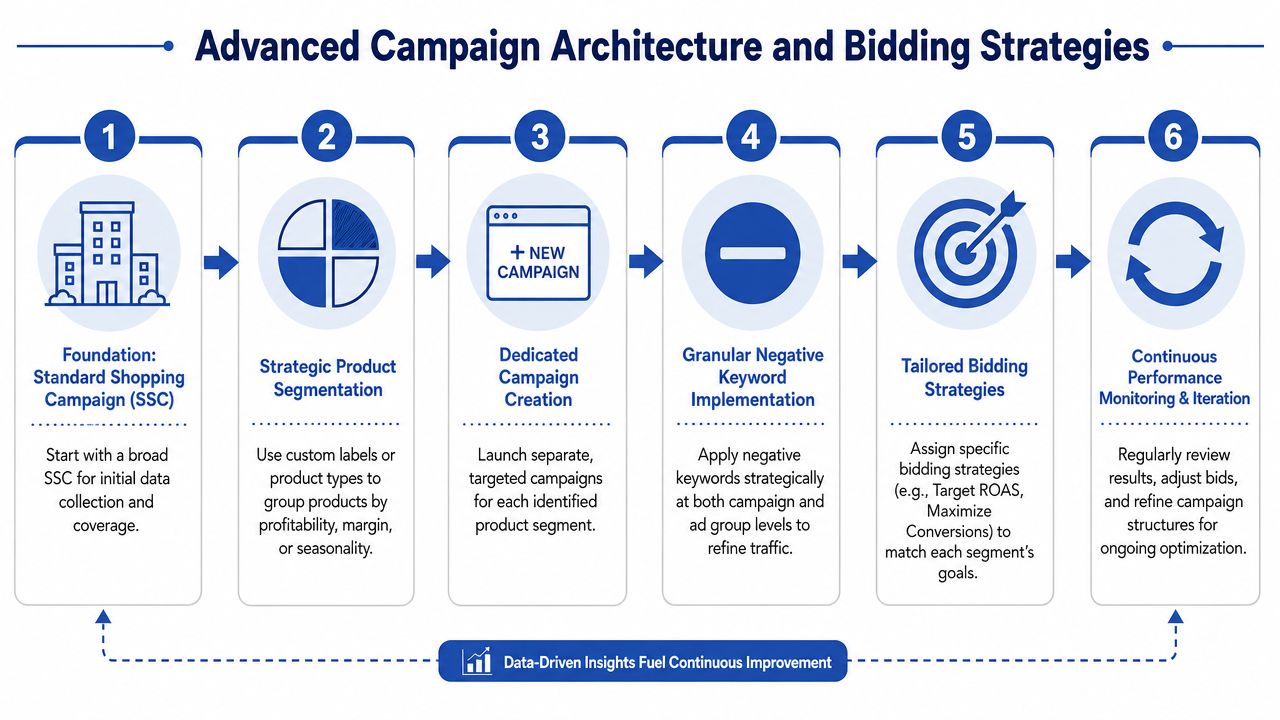
Savvy Revenue outlines a UK methodology built around five campaign categories: bestsellers, items on sale, cheapest SKUs, margin leaders, and new versus old products. That structure supports differentiated bidding and campaign priorities. The same source notes that UK retailers using this method report reducing wasted spend by 25% on average by excluding low-stock variants and using custom labels for clearer reporting, detailed in their advanced Shopping campaign optimisation guide.
Why segmentation beats convenience
Bidding should reflect what the business wants from a product set.
A margin leader can support a more assertive target because each sale carries more contribution. A clearance line may still deserve visibility, but not at the cost of starving stronger products. New products need room to gather signal. Bestsellers usually need protection first.
Here's a straightforward way to consider it:
| Segment | Typical objective | Common mistake |
|---|---|---|
| Bestsellers | Protect volume and share | Letting them compete with the full catalogue |
| Sale items | Convert price-sensitive demand | Mixing them with full-price products |
| Cheapest SKUs | Efficient entry clicks | Expecting them to carry account profitability |
| Margin leaders | Maximise profit density | Bidding them like commodity products |
| New products | Learn fast and validate demand | Judging too early without clean data |
Use custom labels to make the structure operable
Custom labels are what turn feed logic into bid control. If merchandising and paid media don't agree on labels, campaign architecture gets messy fast.
Useful labels often include:
- Commercial role such as bestseller or clearance
- Margin tier
- Seasonality
- Stock position
- Hero SKU status
The point isn't to create endless taxonomies. It's to create enough separation that bidding decisions can follow business reality.
If your campaign structure can't distinguish a hero SKU from a low-margin long-tail variant, the account will eventually waste budget in exactly the places you'd least want it to.
What usually fails
Three patterns show up repeatedly in weak Shopping accounts.
First, advertisers exclude almost nothing. Low-stock products, weak variants, and messy bundles stay eligible because nobody wants to reduce coverage. Coverage then becomes waste.
Second, they use one bidding target across incompatible segments. That creates internal winners and losers for reasons that have little to do with profitability.
Third, they over-trust Google's default recommendations. Those can be useful, but they rarely reflect your gross margin, stock risk, or merchandising priorities.
A better operating model is narrower and more deliberate. Exclude what shouldn't be pushed. Group products by economics. Then let bidding work inside those boundaries instead of hoping automation will infer them.
Integrating Performance Max Without Losing Control
Performance Max is powerful, but it's also opaque. That's the trade-off. It can scale quickly across inventory and placements, yet many advertisers give up too much product-level control when they move everything into one PMax setup.
The better answer for many retailers is hybrid. Use PMax where automation helps most. Keep Standard Shopping where control still matters.
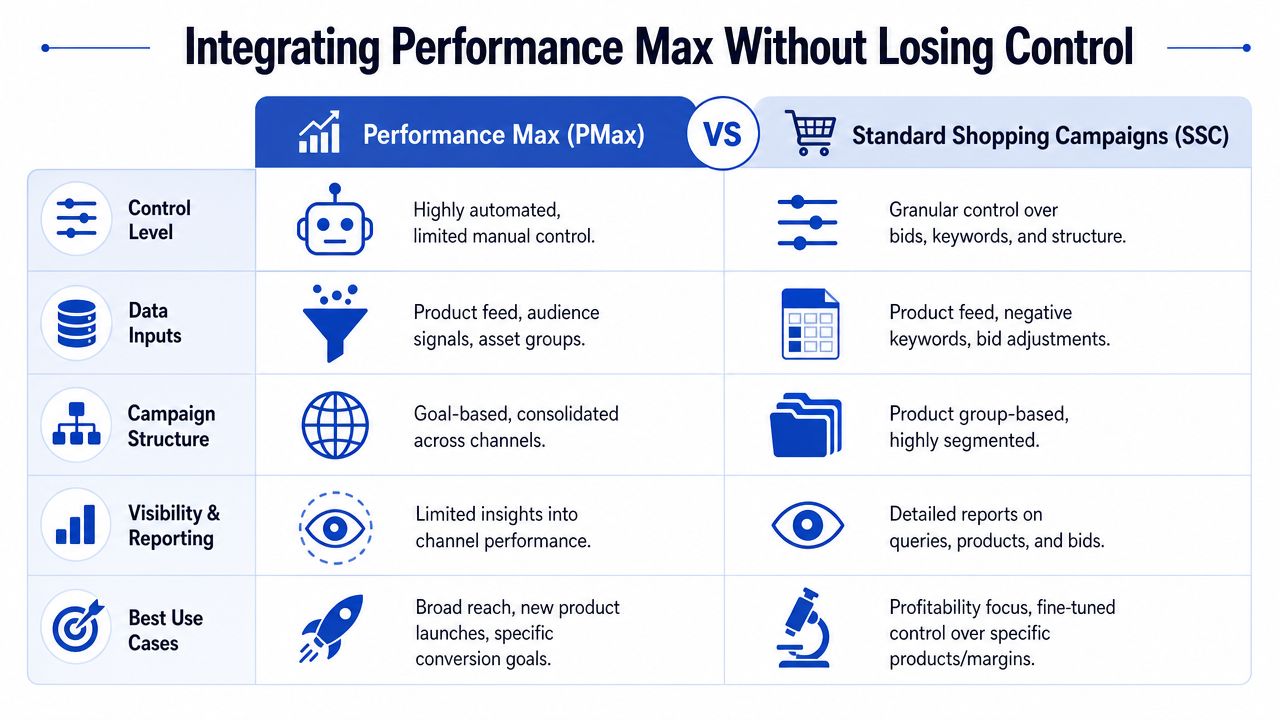
Only 29% of UK merchants run hybrid Standard + PMax campaigns, yet this setup improves impression share by 41% for long-tail products. From January 2025 to June 2026, UK retailers using this hybrid model saw 27% higher conversion rates and 19% lower CPCs compared with PMax-only users, according to Shero Commerce's analysis of Google Shopping optimisation.
Where PMax earns its place
PMax is usually strongest when you already know which products deserve aggressive exposure. Hero SKUs, established winners, and high-intent ranges often benefit because the system can exploit cross-channel inventory and broader signals.
That doesn't mean every product belongs there.
Long-tail products, low-confidence launches, and product groups that require careful query filtering often perform better with Standard Shopping support in the mix. That gives you more visibility into what's happening and more control over how budget is distributed.
A practical hybrid framework
This is the structure that tends to hold up under real account pressure:
Put hero SKUs into dedicated PMax asset groups
These should be products with strong merchandising support, reliable stock, and proven conversion potential. Feed quality matters more here, not less. PMax won't rescue vague titles or broken landing pages.
Keep long-tail catalogues in Standard Shopping
This preserves cleaner control over inventory that needs tighter handling. It also stops broad automation from overcommitting budget to products that haven't proved value density yet.
Separate new product testing from scale campaigns
New launches need signal collection. That's different from scaling known winners. Don't blur the two objectives.
Budget by confidence, not catalogue size
A huge long-tail range can consume attention without producing proportional commercial value. Smaller product groups with stronger unit economics often deserve more budget intensity.
Hybrid works because it gives automation the products it can exploit well, while protecting the rest of the catalogue from black-box decision-making.
What not to hand over
Don't hand over every product category at once. Don't collapse hero, long-tail, and test inventory into one PMax strategy. And don't evaluate PMax in isolation from feed quality. A poor feed limits every automated campaign first, then hides the reason behind aggregate reporting.
Advertisers often frame the decision as Standard Shopping versus PMax. That's the wrong question. The practical question is which products need automation, and which still need manual constraints. Once you answer that, campaign design gets much clearer.
Your Framework for Measurement and Iteration
Good Google Shopping optimisation is never finished. Catalogues change. Margins shift. Stock moves. Search behaviour changes with seasonality, promotions, and competition. The account needs a review rhythm that catches issues early and creates useful tests rather than random edits.
The goal isn't constant motion. It's controlled iteration.
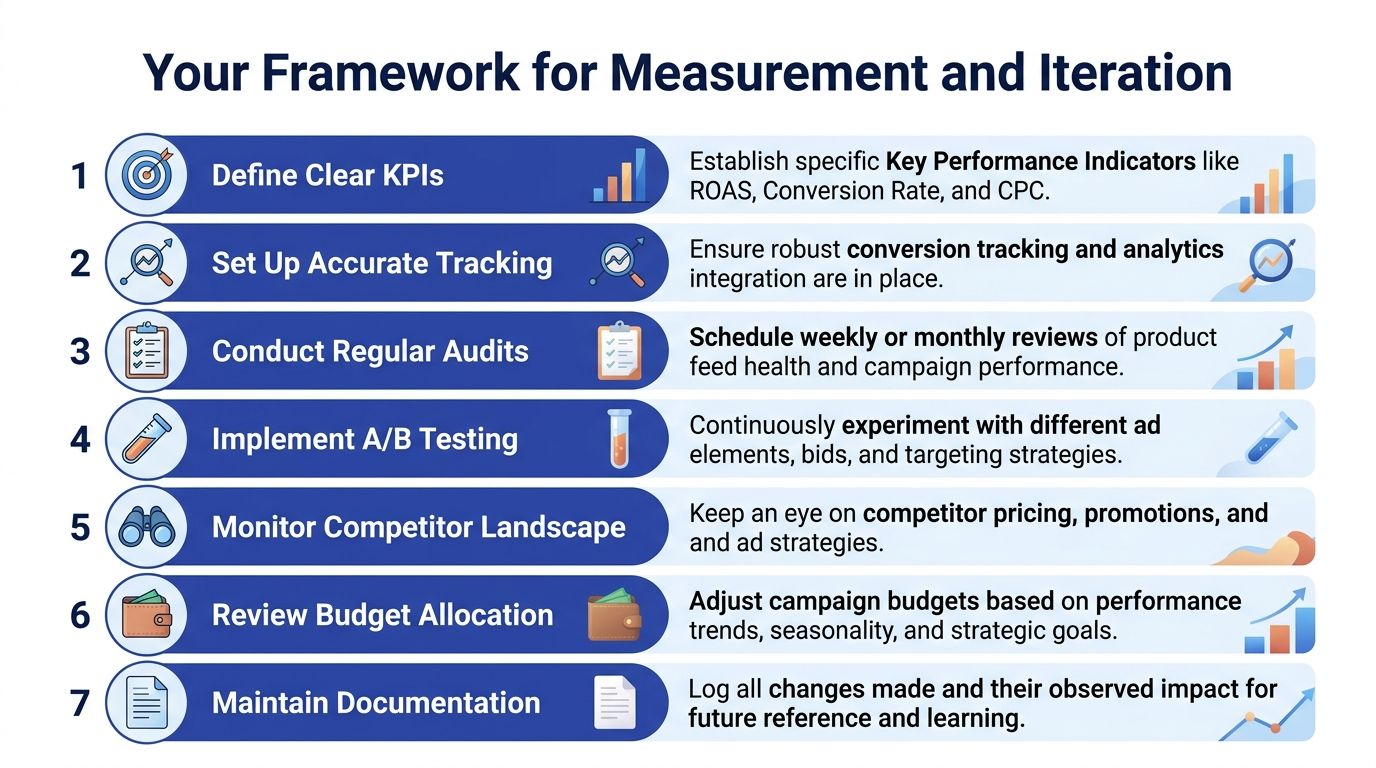
What to monitor every month
A practical monthly review should focus on signals you can act on:
- Merchant Center health: Check diagnostics, feed warnings, and product limitations before looking at campaign narratives.
- Product group performance: Review winners, laggards, and products spending without commercial justification.
- Search term quality: In Standard Shopping, look for irrelevant intent patterns that indicate weak feed clarity or missing exclusions.
- Budget allocation: Confirm that stronger product segments still receive the share they've earned.
- Landing page alignment: Re-test key products on mobile, especially after merchandising or theme changes.
What to review quarterly
Quarterly reviews should be less reactive and more structural.
Consider:
- Feed attribute upgrades such as improved titles, richer descriptions, or cleaner product type taxonomy
- Campaign architecture changes if product economics or category strategy has shifted
- PMax versus Standard role changes based on what product groups have now proved themselves
- Documentation of tests so the team knows what changed, when, and why
A short operating checklist helps keep this disciplined.
| Review area | Monthly | Quarterly |
|---|---|---|
| Merchant Center diagnostics | Yes | Yes |
| Product title testing | Light review | Deeper refresh |
| Campaign segmentation | Spot-check | Structural review |
| Budget shifts | Yes | Yes |
| Landing page QA | Yes | Yes |
| Documentation | Yes | Yes |
The accounts that improve steadily aren't the ones making the most changes. They're the ones making the clearest changes, then measuring the right outcomes.
Google Shopping optimisation works best when feed quality, campaign structure, and measurement all inform each other. If one of those pieces is weak, the rest can only compensate for so long.
If your Shopify store needs sharper feed logic, cleaner product data, or a conversion-focused rebuild that supports better Google Shopping performance, Grumspot can help. They design, develop, and optimise e-commerce experiences that make paid traffic work harder after the click.
Want this kind of work on your store?
Send us the URL and what is slowing it down. We look at the store before we reply.
Related posts
Check out some similar posts.

- lifecycle email marketing
Master lifecycle email marketing for ecommerce. Our guide covers customer stages, automated flows, S...
Read more