Product Information Management (PIM) Guide 2026
- product information management
- pim systems
- ecommerce data
- shopify plus
- data management
Launched
July, 2026
A lot of Shopify Plus teams reach the same breaking point in the same way. The catalogue grows, the channel mix expands, and nobody trusts the product data anymore.
Merchandising has one spreadsheet. Marketing has another. Operations updates dimensions in the ERP. The Shopify storefront still shows an old material, an outdated bundle image, or the wrong variant copy on a collection page. Someone exports a CSV to fix it. Someone else overwrites that fix the next morning. Launches slip because approvals happen in Slack, product assets sit in shared drives, and nobody can say which version is final.
That's the moment when product information management stops being an abstract systems conversation and becomes a trading issue. If your team can't publish accurate product information quickly, every downstream function suffers. Paid traffic lands on weak PDPs. Support handles avoidable questions. Merchants hesitate to expand into new channels because each new feed creates another point of failure.
This is one reason the category keeps growing. The global Product Information Management market was valued at USD 11.49 billion in 2023 and is projected to reach USD 32.84 billion by 2030, with that growth linked to retail expansion and digital adoption, including in the UK, according to Grand View Research's PIM market analysis.
For scaling brands, a PIM isn't just software. It's the operating model that replaces reactive catalogue cleanup with governed, repeatable product data flows. And once you run Shopify Plus with an ERP, marketplaces, feeds, localisation, and multiple internal teams, that distinction matters a lot.
Introduction Beyond the Spreadsheet Nightmare
The spreadsheet problem rarely looks dramatic at first. It looks normal.
A buyer adds new SKUs. A content lead requests imagery. Ecommerce needs metafields populated for Shopify 2.0 templates. Finance updates pricing rules in the ERP. Then the launch date gets close and the work stops being organised. Teams start reconciling mismatched attributes by hand.
One missing field can trigger a chain reaction. A supplier sheet uses one naming convention, the ERP uses another, and Shopify expects a third. The result isn't just messy admin. It's delayed releases, inconsistent product pages, and hard-to-trace errors across feeds and storefront content.
What the chaos usually looks like
A scaling merchant often sees the same symptoms:
- Descriptions drift over time. The product title on Shopify doesn't match marketplace copy or sales collateral.
- Attributes break filtering. Colour, size, material, and compatibility values aren't standardised, so collection filters and search results become unreliable.
- Assets get detached from products. Teams know the image exists, but not which file is approved for which SKU or channel.
- Launches rely on heroic effort. People push products live by chasing edits across spreadsheets, email threads, and exports.
Practical rule: If a product launch depends on one person knowing which spreadsheet is “the real one”, you don't have a process. You have a dependency.
That's where product information management starts to matter. Not as a feature checklist, but as a way to establish one trusted product record, one workflow, and one path out to channels.
For teams dealing with recurring feed issues or unexplained merchandising discrepancies, it also helps to pair governance with monitoring. Tools focused on digna's data anomaly detection are useful when you want another layer that flags unusual data behaviour before it turns into visible storefront errors.
Why brands stop tolerating manual control
Manual work scales badly in ecommerce because every added channel multiplies the maintenance burden. Shopify, Amazon, retail feeds, social commerce, printed collateral, distributor exports, and regional variants all need clean, current product data. If the underlying record is fragmented, the errors spread faster than the fixes.
A PIM gives teams a way to centralise, validate, enrich, and publish product information without turning each launch into a catalogue rescue job. That shift is what separates a merchant who can scale confidently from one who keeps stalling on data operations.
What Is Product Information Management
Product information management is the discipline of collecting, organising, enriching, governing, and distributing product data from a central system. The easiest way to think about it is as a library for every product story your business needs to tell.
The ERP may know the item exists. The PIM knows how it should be presented, completed, approved, localised, and sent to the places customers see it.
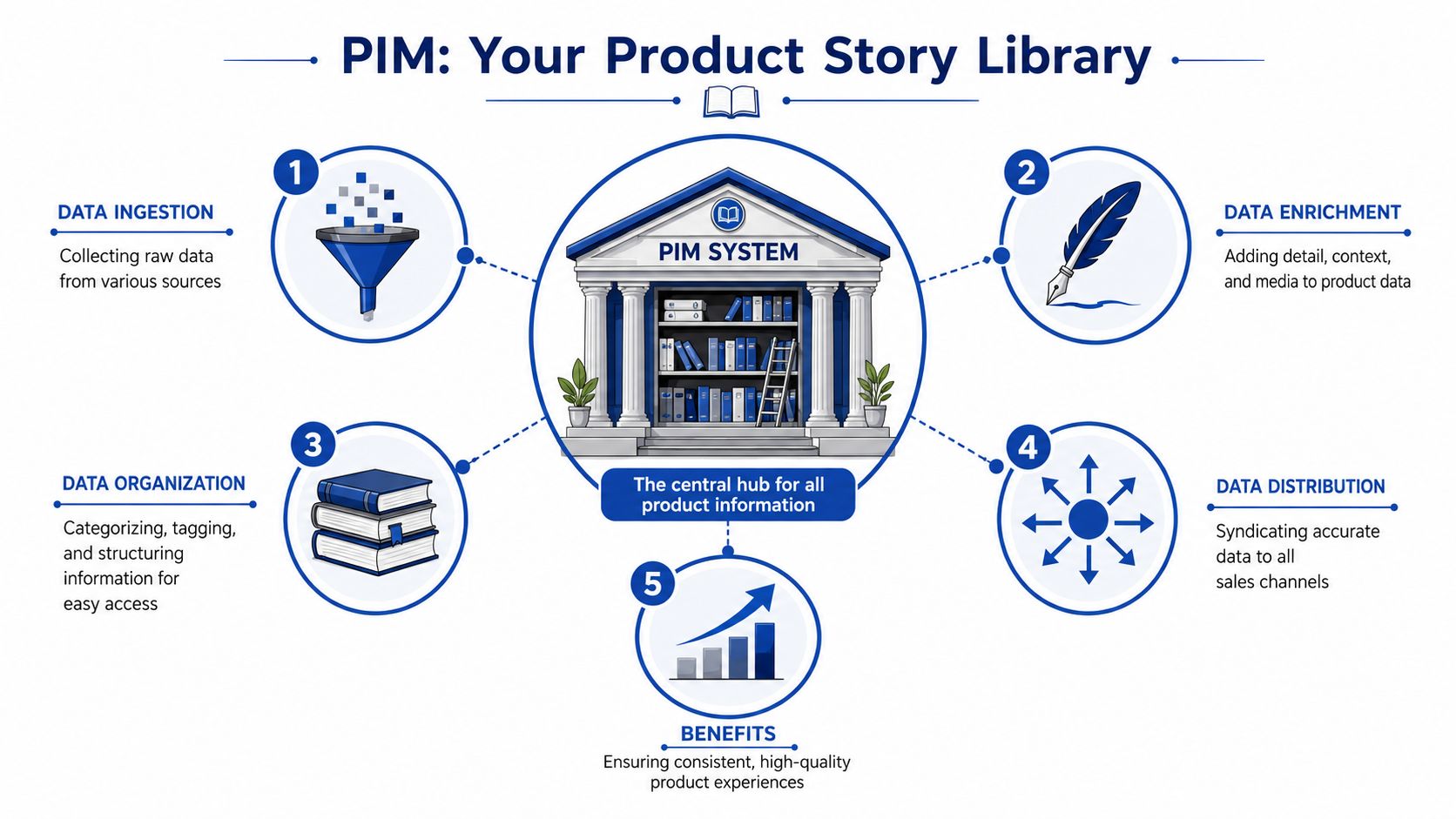
The central library model
In practice, a PIM becomes the home for:
- Structured product facts such as SKUs, dimensions, materials, compatibility, care instructions, and other attributes
- Commercial content including titles, descriptions, bullets, feature copy, SEO fields, and channel-specific messaging
- Media associations such as imagery, videos, manuals, and downloadable files
- Regional variants covering local language, measurement, or market-specific copy requirements
That matters because modern ecommerce doesn't run on raw records alone. Customers buy from presentation, clarity, and consistency as much as from inventory availability.
The category emerged for a reason. The need for PIM appeared in the mid-2000s as businesses moved into multi-channel selling and discovered that traditional ERP systems weren't built to manage rich taxonomies and digital assets for modern commerce, according to Research and Markets' product information management market report.
The three jobs a PIM must do well
A useful PIM does three things in sequence.
First, it collects. It takes in source data from ERP records, supplier files, internal spreadsheets, DAM platforms, or custom systems.
Second, it enriches. Here, product information becomes saleable. Teams add better copy, categorisation, attributes, media links, and channel formatting. For brands preparing for AI-driven discovery, standardisation here also supports work like improving AI search engine recommendations, because recommendation systems depend on structured, consistent product detail.
Third, it distributes. The approved record gets pushed to Shopify, marketplaces, partner feeds, print outputs, or other downstream systems.
A PIM is most valuable when it reduces interpretation. Teams shouldn't need to guess what a field means, which image is approved, or where a product record should be edited.
What a PIM is not
A PIM is not your financial system. It isn't your order management layer. It isn't your source of truth for stock movements. And it shouldn't become a dumping ground for every piece of enterprise data.
The best PIM setups stay opinionated. They focus on the product data required to market and sell effectively, then integrate cleanly with adjacent systems that own other responsibilities.
That division of responsibility is where a lot of implementations succeed or fail.
PIM vs The Acronym Soup MDM PDM and DAM
Confusion around PIM usually starts when teams compare it with every other data platform in the stack. Some overlap is real. Most of the confusion comes from scope.
Here's the cleanest way to separate them.
| System | Primary Focus | Data Type | Primary Users |
|---|---|---|---|
| PIM | Product content for commerce and sales channels | Product attributes, descriptions, taxonomy, channel-ready data | Ecommerce, merchandising, marketing, product teams |
| MDM | Enterprise-wide master data governance | Product, customer, supplier, financial, and other core business records | Data governance, IT, operations, enterprise architecture |
| PDM | Product design and engineering control | Technical design files, versioning, engineering specifications | Engineering, manufacturing, product development |
| DAM | Media storage and asset control | Images, video, documents, creative files | Creative, brand, content, marketing teams |
Where merchants usually choose the wrong thing
A common mistake is expecting an ERP or an MDM platform to do the daily commercial work of a PIM. Those systems may hold authoritative records, but they're often too rigid for catalogue enrichment, merchandising workflows, and channel-specific content operations.
Another mistake goes the other direction. Teams buy a PIM and expect it to solve every data problem in the business. It won't. It shouldn't be asked to unify customer records, supplier hierarchies, and finance data across the organisation.
How the boundaries work in practice
Use a PIM when the main pain is product inconsistency across Shopify, marketplaces, partner feeds, and campaign content.
Use MDM when the business needs broader governance across multiple master data domains, not just product.
Use PDM if engineering owns the product lifecycle and needs version control over design or manufacturing information.
Use DAM when the bottleneck is creative asset management, approvals, rights, and reuse.
Working rule: If the question is “How should this product appear to a customer?”, that usually belongs in or through the PIM. If the question is “What is the official enterprise record across all domains?”, that points closer to MDM.
The combinations that make sense
For Shopify Plus merchants, the most practical combinations are often:
- ERP plus PIM when operational records need to feed enriched commerce data
- PIM plus DAM when rich visual merchandising matters and assets need to stay tied to product records
- MDM plus PIM in larger organisations where enterprise governance and channel execution need separate systems
The useful distinction isn't technical purity. It's whether each platform has a clear owner and a clear job. Once systems start sharing edit rights over the same commercial fields, catalogue quality usually deteriorates.
Core PIM Features and Architecture for Ecommerce
For ecommerce, a PIM only earns its place if it fits the operating reality of the stack. That means product data has to move predictably between source systems, enrichment workflows, and the storefront.
The architecture that works best for most Shopify Plus merchants is simple on paper: ERP to PIM to Shopify. In execution, it needs discipline.
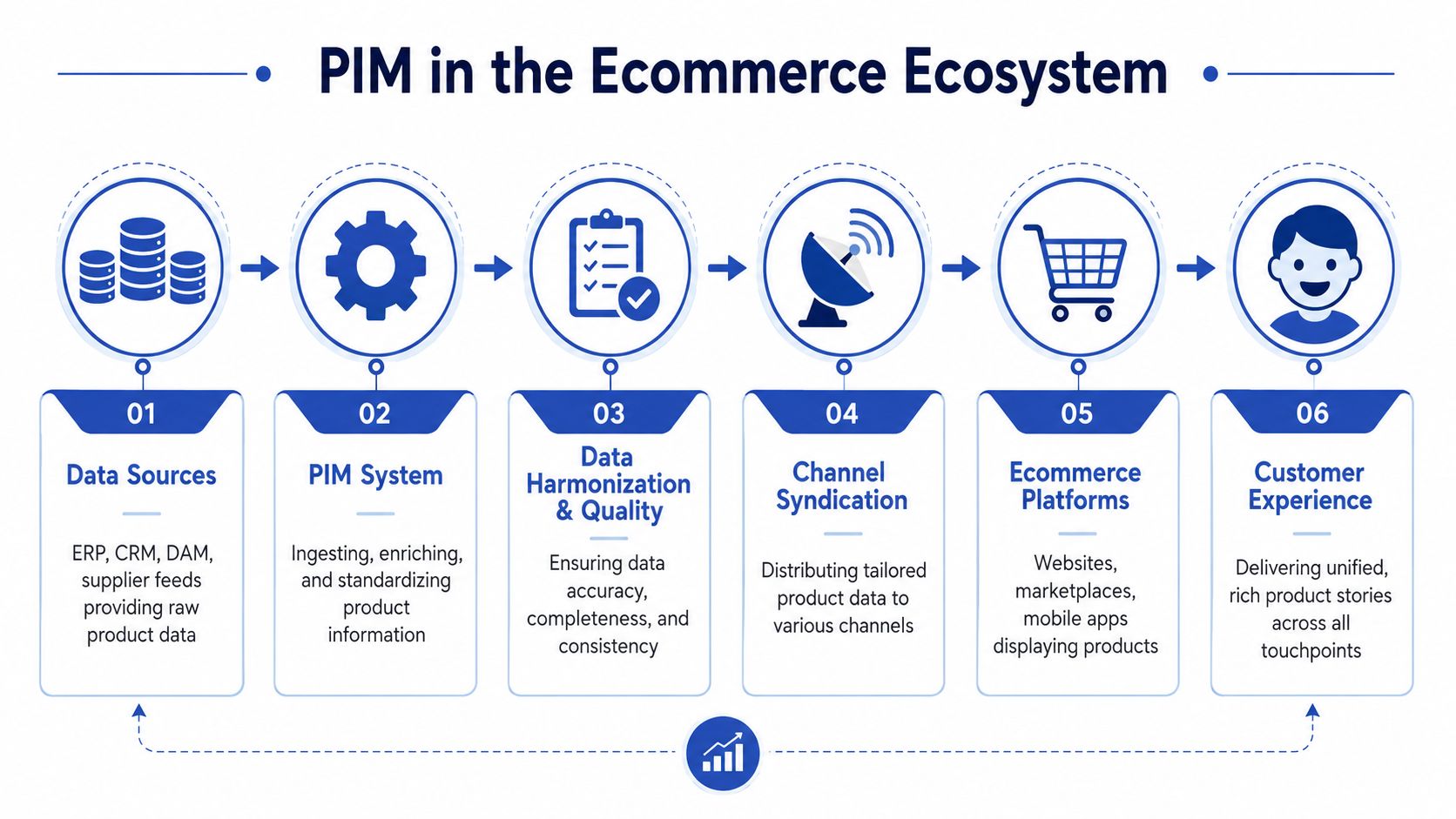
The features that matter most
A serious PIM for ecommerce needs more than a central database.
Flexible data modelling
Your catalogue won't stay simple. Apparel, supplements, electronics, furniture, subscriptions, bundles, and spare parts all structure product data differently. A good PIM handles parent-child relationships, variant logic, category-specific attributes, and custom taxonomies without forcing teams into awkward workarounds.
Validation and completeness rules
Incomplete product records should be blocked before they reach Shopify. Required attributes, approved value lists, naming standards, and format checks matter because they stop bad data upstream instead of creating manual repair work later.
Workflow and permissions
Merchandising, content, compliance, and operations shouldn't overwrite each other casually. The PIM should support approval paths, role-based editing, and status controls so products move from draft to reviewed to publishable without guesswork.
Localisation control
Regional content is where many implementations get sloppy. Teams need support for market-specific copy, units, language variants, and attribute exceptions. That's especially relevant in the UK, where regional language and localisation needs can be more nuanced than generic “English-only” assumptions suggest.
Why Shopify Plus merchants hit integration problems
The hard part isn't understanding the concept. The hard part is deciding which system owns which field and when updates should sync.
Adobe highlights a critical version of this problem in its discussion of PIM and ERP integration for ecommerce brands: UK merchants often need practical guidance on integrating PIM with ERP systems for Shopify Plus without creating duplication in real-time sales environments, and conceptual advice often misses sync failures during high-volume periods, as noted in Adobe's perspective on product information management.
In real projects, the trouble usually looks like this:
- ERP pushes product records directly to Shopify while the PIM also pushes enriched content
- Shopify becomes an editing surface for fields that should be governed upstream
- Apps write to product data without clear field ownership
- Timed jobs collide and overwrite newer values with stale exports
That's how merchants end up with duplicate records, mismatched variant content, and storefront data that reverts after “successful” updates.
The right integration design doesn't ask every system to talk to every other system about everything. It defines one owner for each class of data.
A practical ownership model
A workable model for Shopify Plus usually looks like this:
- ERP owns operational data such as core item identifiers, purchasing context, and stock-related master references
- PIM owns customer-facing product content, taxonomy, attributes used for merchandising, channel mapping, and localisation
- Shopify owns storefront behaviour, merchandising presentation, and transactional context, but not the long-term source record for enriched product data
If the brand is also using headless components, the data flow gets even more important. Teams planning composable storefronts should understand how PIM, CMS, and commerce services separate concerns in a modern stack. A strong companion read is this headless CMS for ecommerce guide, especially when content architecture and product architecture start intersecting.
For a broader view of how these decisions fit into modern commerce systems, an API-first ecommerce architecture approach is often the clearest way to avoid brittle point-to-point integrations.
What works and what doesn't
What works:
- clear field ownership
- publish rules rather than free-form exports
- controlled sync directions
- separate handling for high-frequency stock changes versus lower-frequency content changes
What doesn't:
- editing product truth in multiple systems
- treating Shopify as the master catalogue
- assuming every app respects your data model
- importing supplier data straight to storefront without enrichment
When the architecture is right, the PIM becomes the commercial control layer. When it's wrong, it becomes another source of conflict.
How to Choose and Implement a PIM System
Selecting a PIM is rarely just a software decision. It's a catalogue governance decision with technical consequences. If the team picks a platform without first agreeing how product data should move through the business, the implementation drifts into field mapping debates and endless exceptions.

Questions to ask before choosing a platform
Start with operational fit, not vendor demos.
How well does it integrate with your existing stack
For Shopify Plus merchants, this means more than “does it have an API?”. It means asking whether the platform can support your actual ERP, your product model, your localisation requirements, your app ecosystem, and your publishing cadence without forcing awkward middleware logic.
A merchant with frequent catalogue updates needs different integration behaviour from one with slow, seasonal launches.
Can non-technical teams work in it confidently
If content editors, merchandisers, or ecommerce managers avoid the system, the PIM will become an expensive bottleneck. The interface needs to support bulk editing, approval workflows, filtering, and auditability without requiring constant developer involvement.
Does the data model match how you sell
This matters more than glossy feature lists. Bundles, sets, configurable products, spare parts, restricted products, subscriptions, and regional assortments all stress the data model in different ways.
Can it handle UK localisation properly
One under-discussed issue in PIM planning is UK internal localisation. Practical guidance is often thin on how businesses manage multilingual or regional governance for markets such as Scotland and Wales, despite PIM platforms supporting multilingual data in theory, as discussed in Wikipedia's overview of product information management. If your brand serves regional audiences with distinct language or messaging needs, treat that as a design requirement from day one.
A six-stage implementation path
Choosing is only half the job. Implementation quality decides whether the PIM reduces complexity or adds another layer to it.
Audit the current catalogue
Document every source of product data, every export process, every channel destination, and every recurring error. Don't skip supplier files, metafields, or marketplace-specific attributes.Define field ownership
Decide which system owns each important class of data. If price, title, taxonomy, specifications, media links, and localisation fields all have multiple editors, resolve that before migration starts.Design the target model Build category structures, attribute sets, validation rules, and completeness logic around how the business sells. This process often reveals that many teams have been using product records as a workaround for process gaps.
Map integrations carefully
The ERP and Shopify connections usually carry the most risk. This is also where merchants benefit from reviewing proven approaches to Shopify ERP integration strategy, especially when real-time sync and catalogue governance intersect.
After the core planning is complete, it helps to see one implementation walkthrough before locking the final rollout approach.
Launch in controlled phases
Don't migrate every category, market, and channel at once unless the catalogue is unusually simple. Start with a bounded set of products and a publish process your team can observe closely.Optimise after go-live
The first launch proves connectivity. It doesn't prove maturity. Refine workflows, reduce manual exceptions, tighten validation, and review where teams still edit data outside the approved process.
“A successful PIM implementation usually looks boring after launch. That's the point. Publishing becomes routine instead of fragile.”
Trade-offs to accept early
The strongest implementations make a few decisions that can feel restrictive at first:
- Less editing freedom often means better catalogue quality
- Stricter validation may slow publishing briefly, but prevents repeated cleanup later
- Phased rollout creates less internal excitement than a big-bang launch, but it usually avoids avoidable rework
A PIM should make the business more disciplined, not more complicated. If the setup adds steps without reducing ambiguity, the design needs revisiting.
Measuring Success PIM Best Practices and KPIs
A PIM project shouldn't be judged by whether the platform is live. It should be judged by whether the catalogue is easier to trust, easier to publish, and easier to scale.
The strongest measurement frameworks combine governance metrics with commercial ones. If you only track internal adoption, you miss customer impact. If you only track revenue, you miss the operational reasons the revenue outcome improved.
The KPI set that matters
The most useful benchmarks are the ones tied directly to product operations. In the UK market, organisations implementing PIM systems see a 35% reduction in time-to-market, a 40% reduction in data entry time, and an improvement in channel update accuracy from 68% to 96%, with 22% to 38% ROI gains in the first year, according to Acquia's product information management guide.
Those numbers matter because they connect process discipline to financial and operational outcomes.
A practical KPI dashboard usually includes:
Launch speed
Measure how long it takes to move a product from approved source data to live channel publication.Data completeness
Track whether products meet required content, attribute, and asset thresholds before publication.Channel accuracy
Review whether Shopify, marketplaces, and feeds display the intended product information consistently.Manual intervention rate
Count how often teams still rely on spreadsheet fixes, emergency imports, or post-publish corrections.
Best practices that support those KPIs
Assign real ownership
Someone needs authority over taxonomy, attribute standards, and publish rules. Shared accountability usually turns into no accountability.
Build the model before automating the mess
Automation won't save a chaotic catalogue. If values are inconsistent, categories are unclear, and field definitions are loose, a PIM will only move bad data faster.
Treat inventory and product content differently
Inventory updates often need different timing and logic from content updates. Merchants dealing with catalogue and stock complexity together should keep product governance aligned with broader ecommerce inventory management practices, but not collapse the two into one process.
Key takeaway: Good PIM reporting doesn't stop at “the sync worked”. It asks whether the customer saw better product information, and whether the team spent less time correcting it.
What success looks like operationally
The mature state is easy to recognise. Teams stop asking where to make a change. Product launches stop depending on one experienced operator. Shopify stops being a cleanup layer for upstream data problems.
That's when the PIM stops feeling like a project and starts behaving like infrastructure.
Conclusion From Data Management to Business Growth
Product information management starts as a fix for catalogue disorder, but that's not where its value ends.
For a Shopify Plus merchant, the primary benefit is control. One governed flow for product data. Clear ownership between ERP, PIM, and storefront. Fewer sync conflicts. Better launches. Cleaner localisation. Less manual repair work when the business adds products, markets, channels, or custom experiences.
The brands that get the most from a PIM don't treat it as a database purchase. They treat it as a commercial operating layer. That shift changes how teams launch, merchandise, localise, and scale.
In practical terms, strong product data becomes a growth asset. It supports better customer experience, better internal execution, and more reliable expansion into whatever comes next. For modern ecommerce, that's no longer back-office housekeeping. It's part of the engine.
If your Shopify Plus store is wrestling with messy product data, brittle ERP syncs, or a storefront that keeps exposing upstream catalogue issues, Grumspot can help you design the right architecture, clean up the flow between systems, and turn product operations into something your team can scale.
Let's build something together
If you like what you saw, let's jump on a quick call and discuss your project

Related posts
Check out some similar posts.

- shopify store credit
Learn how to set up Shopify store credit with built-in tools or apps. Covers policy design, refund w...
Read more
- unified commerce platform
Learn how a unified commerce platform connects channels, ERPs, and CRMs to drive growth. Practical g...
Read more
- composable commerce platform
Learn what a composable commerce platform is, how it differs from monoliths, and how UK Shopify Plus...
Read more
- b2b ecommerce platform
Discover how a B2B ecommerce platform helps scaling brands streamline operations, boost sales, and g...
Read more