Your Guide to Custom Shopify App Development in 2026
- custom shopify app development
- shopify plus agency
- shopify app builder
- ecommerce development
- uk ecommerce
Launched
March, 2026

Feeling stuck with a generic app that just doesn't quite get your business? Custom Shopify app development is how you break free, creating specific tools—like a unique product builder or automated UK VAT rules—that solve your exact problems and give you a real competitive edge. This isn't just about bolting on another feature; it's a deliberate investment in measurable growth.
Why Custom Apps Are Your Next Big Move

Sooner or later, most ambitious merchants find that off-the-shelf solutions don't cut it anymore. A public app might solve 80% of your problem, but that last 20% is often where the real money and efficiency gains are hiding. When you invest in a custom app, you stop making compromises and start building tools that are perfectly suited to how you actually operate.
The Shopify App Store is a brilliant starting point, of course. But as brands grow, they naturally develop unique workflows, customer journeys, and logistical headaches that generic apps simply can't handle. We're seeing this a lot in the competitive UK market, where every brand is looking for a way to stand out.
Solving Problems No Public App Can Fix
Think about the specific friction points in your day-to-day. Do you need a complex product bundling system that has to account for inventory in different warehouses? Or maybe a sophisticated product customiser that gives customers a real-time preview of their creation? These are the kinds of scenarios where custom development really comes into its own.
I remember working with a UK-based fashion brand, for instance. They were plagued by high return rates because shoppers couldn't properly visualise how different items would look together. We built them a custom "mix-and-match" tool that not only fixed the returns issue but also drove a 20% increase in average order value (AOV) because upselling became a natural part of the fun.
Automating fiddly backend processes is another huge win. Imagine an app that automatically handles intricate UK VAT calculations for both B2B and B2C orders, then syncs everything perfectly with your accounting software. The amount of time and potential human error this saves is enormous.
A custom app is your competitive moat. It's a proprietary asset that your rivals can't simply download from the App Store, giving you a defensible advantage in the market.
Scaling with a Growing Market
The demand for custom solutions is only getting stronger as the Shopify ecosystem matures, and the UK market is a perfect example. In just the last few years, the number of live Shopify stores in the UK has rocketed to over 208,000. Even more telling is the growth in high-volume merchants, with Shopify Plus stores jumping from around 1,000 to over 5,700.
This explosive growth proves there’s a clear need for more powerful and bespoke tools that go far beyond what standard apps can offer. You can dig deeper into these UK Shopify trends and what they mean for merchants.
By choosing to build a custom Shopify app, you're not just fixing today's problems—you’re laying the groundwork for future growth. A purpose-built app allows you to:
- Improve Operational Efficiency: Automate all those repetitive tasks, streamline your fulfilment process, and lighten the manual load on your team.
- Enhance the Customer Experience: Create unique, engaging features that genuinely impress shoppers and keep them coming back.
- Increase Revenue: Drive a higher AOV with custom bundling, upselling, or subscription models designed specifically for your product catalogue.
- Integrate Seamlessly: Finally connect Shopify to your other critical business systems, like an ERP or CRM, creating a single source of truth.
Ultimately, commissioning a custom app is a major strategic decision. It’s about looking at your business, identifying a core challenge or opportunity, and building the exact tool you need to turn that pain point into a powerful engine for growth.
Building Your App Blueprint for Success
That lightbulb moment for a new Shopify app is exhilarating. But how do you turn that spark into a functional tool that developers can actually build? You need a detailed blueprint.
Think of this planning phase as your insurance policy against the classic project pitfalls: scope creep, blown budgets, and ending up with an app that doesn't quite solve the problem you intended it to. A solid plan gives your project a firm foundation and ensures your investment is aimed at the right target from day one.
Defining Your Objectives with Precision
First things first, we need to get brutally specific about what ‘success’ actually looks like. Vague goals like “improve the customer experience” are impossible to measure and even harder to build for.
Clarity is key. You need to define success with specific, measurable outcomes that will guide every decision and serve as the yardstick for the app's performance after launch.
Take a common goal like "making the returns process better." That could mean anything. A precise objective, on the other hand, sounds like this: "Reduce product returns by 25% within six months by implementing a virtual try-on feature for our top-selling clothing categories." Now, your development team has a clear problem to solve.
Here’s how to spot the difference between a weak goal and a strong one:
- Weak: "Automate our fulfilment."
- Strong: "Reduce manual order processing time by 80% by automating the transfer of order data to our third-party logistics (3PL) partner's system."
- Weak: "Create a better pre-order system."
- Strong: "Capture an additional £50,000 in revenue during new product launches by creating a pre-order system that allocates inventory and communicates shipping estimates automatically."
When you put numbers to your goals, you're not just making a wish list; you're building a solid business case. This precision makes it far easier to justify the investment in custom shopify app development and accurately measure its return.
Mapping Out Detailed User Stories
Once you know what you want to achieve, it's time to figure out how people will actually use the app. This is where user stories come in.
They're just short, simple descriptions of a feature, told from the perspective of the person who needs it—usually a customer or a member of your team. This simple exercise forces you to think through the "who, what, and why" behind every single feature.
You have to consider every interaction from two sides of the coin: the customer on the storefront and your team in the Shopify admin.
Customer User Stories
Let's stick with that pre-order system example. From a customer’s perspective, the user stories might be:
- As a shopper, I want to see a clear "Pre-Order" button on the product page so I know the item isn't in stock yet.
- As a shopper, I want to see an estimated shipping date before I add a pre-order item to my cart.
- As a shopper, I want to receive an email notification when my pre-ordered item has shipped.
Admin User Stories
Now, what does your team need on the back end to manage all this?
- As a store manager, I want to easily designate a product for pre-order and set a maximum pre-order quantity.
- As a customer service representative, I want to view all pre-orders in a separate dashboard to answer customer queries quickly.
- As a fulfilment coordinator, I want pre-orders to be automatically tagged and held until the stock arrives.
This process forces you to sweat the details. For any complex project, documenting every step and interaction is non-negotiable. This means getting into the weeds on things like specific Shopify API calls (e.g., how the app checks inventory) and the front-end design (what the customer sees).
As you define your app's blueprint, a comprehensive Shopify Development Build Scale Guide can be an invaluable resource for ensuring long-term success and scalability. This meticulous documentation becomes the core of your project scope, making sure everyone is on the same page before a single line of code gets written.
Choosing Your App Development Path
Once you have a solid blueprint, you’ve reached a major fork in the road: who is actually going to build this thing? This isn't just about finding the cheapest quote. It’s a strategic decision that will impact your budget, your timeline, and ultimately, whether your app succeeds or fails.
You essentially have three choices. You can hire a freelancer, task your in-house team, or partner with a specialist Shopify agency. Each option has its own set of pros and cons, and understanding them is key to making the right call for your business.
Going the Freelancer Route
Hiring a freelance developer often looks like the quickest and most budget-friendly way forward, especially for smaller, clearly defined projects. A good freelancer brings flexibility and a personal touch you might not get from a bigger team. You get one person to talk to, which can simplify communication.
But be warned, it’s a path filled with potential pitfalls. A solo developer is a single point of failure. If they get sick, take on too much work, or just disappear, your project comes to a dead stop. It's also incredibly difficult to properly vet their specific Shopify knowledge. Someone who doesn't live and breathe the Shopify ecosystem can easily build an app that breaks with the next platform update or leaves you with security holes.
Don’t forget the hidden work, either. You become the project manager, responsible for everything from timelines and deadlines to quality control and testing. That extra work can quickly cancel out any money you thought you were saving.
Using Your In-House Team
If you have developers on staff, keeping the project in-house seems like a no-brainer. They already get your business, your brand, and how your other systems work. Communication should be straightforward, and the app will likely integrate well with your existing workflows.
The biggest question, though, is do they have genuine custom Shopify app development experience? The Shopify platform is its own unique world with specific APIs, quirks, and best practices. Asking a general web developer to build a Shopify app is a bit like asking your brilliant family GP to perform heart surgery—the underlying principles might be similar, but specialised knowledge is what prevents a catastrophe.
There’s also an opportunity cost to consider. Every hour your team spends on this Shopify app is an hour they aren’t spending on other important projects for the business. You need to be sure this is the best use of their valuable time.
Partnering with a Specialist Shopify Agency
For any app that is complex or vital to your business operations, working with a specialist agency is almost always the safest and most reliable choice. These firms are completely immersed in the Shopify world. They provide a full team—developers, project managers, designers, and testers—who all have proven experience building for the platform.
An agency’s deep platform knowledge is a real advantage. They know Shopify’s APIs inside and out, keep on top of every update, and know exactly how to navigate the strict ‘Built for Shopify’ certification process. This all adds up to a more secure, reliable, and future-proof app.
Of course, this expertise comes at a price. For complex projects, UK-based specialist agencies might quote anywhere from £100,000 to £350,000, with timelines of 3 to 9 months. This is especially true if you need deep integrations with a CRM or ERP to manage things like UK VAT and fulfilment. A freelancer might quote between £20,000 and £100,000, but the risk of delays and quality issues is significantly higher. You can find more details on how UK Shopify costs break down and what to expect.
To help you weigh your options, this table breaks down the key differences.
Comparing Custom Shopify App Development Options
| Factor | Freelancer | In-House Team | Specialist Agency (e.g., Grumspot) |
|---|---|---|---|
| Cost | Lowest upfront cost, but high risk of scope creep and hidden management overhead. | No direct hire cost, but high opportunity cost of pulling team from other projects. | Highest initial investment, but provides a fixed, predictable budget for the agreed scope. |
| Shopify Expertise | Varies widely and can be difficult to verify. High risk of inexperience. | Unlikely to have deep, specialised Shopify knowledge unless you've hired for it. | Guaranteed deep expertise across the entire Shopify ecosystem, from APIs to compliance. |
| Speed & Timeline | Can be fast for simple tasks, but highly vulnerable to delays and bottlenecks. | Dependent on internal priorities and team availability; can be slow if pulled in multiple directions. | Structured process with a dedicated team ensures predictable timelines and delivery dates. |
| Risk & Reliability | High risk. A single point of failure with little to no backup or accountability. | Moderate risk. Dependent on your team's ability to learn and adapt to Shopify's nuances. | Low risk. A full team provides redundancy, proven processes, and contractual accountability. |
| Scope of Service | Typically development-only. You manage strategy, design, QA, and project management. | You provide all project management and strategic direction. | A full-service partnership: strategy, UI/UX design, development, QA, and ongoing support. |
| Long-Term Support | Unpredictable. Freelancers may become unavailable for future updates or maintenance. | Reliant on the team members staying with the company. | Guaranteed long-term maintenance, support, and evolution of the app as Shopify changes. |
Ultimately, choosing an agency often provides the most peace of mind and the highest likelihood of a successful, long-lasting app, especially when the stakes are high.
This flowchart illustrates the kind of blueprinting process that should happen before you even approach a developer. It clarifies why having your goals defined is so important.
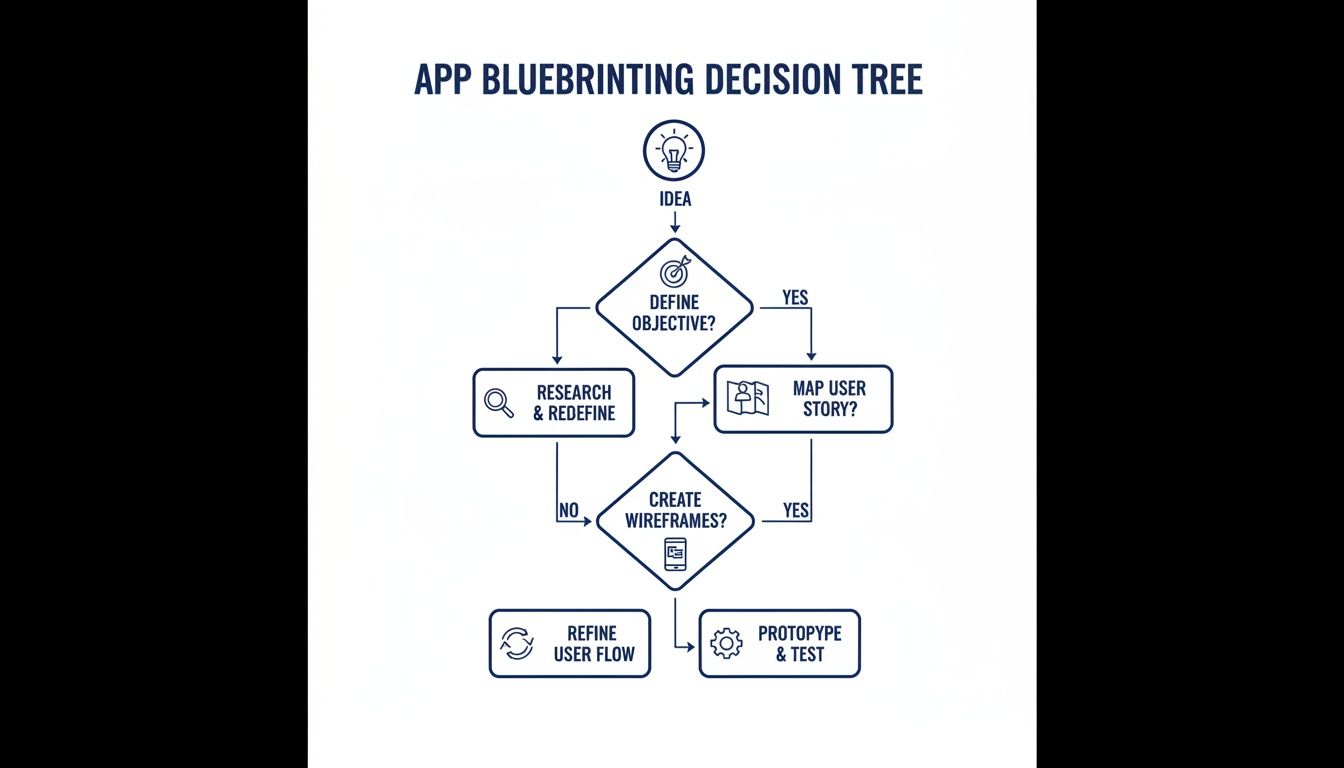
Having clear objectives and user stories from the start helps ensure you get accurate quotes and a final product that truly solves your problem. The right choice really hinges on your project’s complexity, your budget, and how much risk you’re willing to take on yourself. If you need more help figuring out the best fit, our guide on how to hire a Shopify developer is a great next step.
Inside the Build: A Look at the Tech Stack
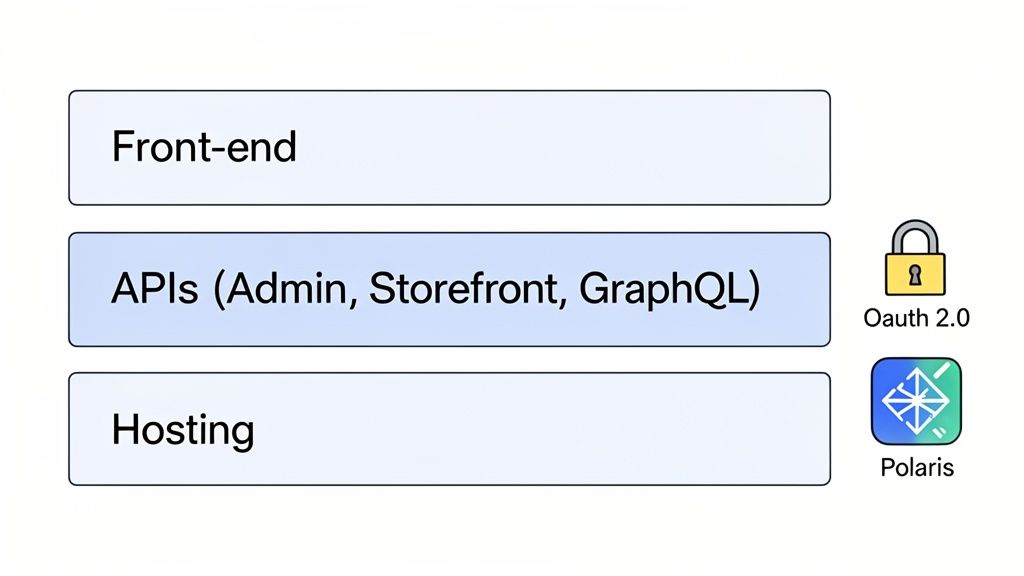
Let's be clear: you don’t need to learn to code to commission a brilliant app. But knowing the language of development is a massive advantage. When you have a basic grasp of the tech stack, you can have much smarter conversations with your agency and understand exactly how their choices impact your app's performance, cost, and user experience.
Think of it like learning the key parts of a car's engine without needing to be a mechanic. Knowing what an API does, or why hosting matters, helps you ask the right questions and ensures the final product is what you actually need for your business.
Where Will Your App Live? Embedded vs. Standalone
One of the first big technical decisions is where the app will physically live. Will it be an embedded app that sits right inside your Shopify admin, or a standalone app that operates on its own? This choice has a huge effect on how your team will use the new tool every day.
Embedded Apps: These are built directly into the Shopify admin dashboard. They feel like a native part of the platform, appearing alongside familiar sections like 'Orders' or 'Products'. For your staff, it’s completely seamless and intuitive. This is the best approach for most custom tools, especially those that help manage store data or processes.
Standalone Apps: These are separate websites that exist outside the Shopify admin. This architecture is usually reserved for very specific use cases, like apps that do extremely heavy data processing, need a completely unique interface, or have to connect with several different platforms beyond Shopify.
For most projects, an embedded app is the way to go. It makes staff training a breeze and keeps all your tools in one place. A standalone app would only really be on the table for something like a complex analytics platform that pulls in data from your warehouse, your marketing tools, and Shopify all at once.
The Language of Shopify: Working with APIs
APIs (Application Programming Interfaces) are the crucial messengers that let your custom app "talk" to the Shopify platform. They're the link that allows your app to read and write data—whether that's creating an order, updating a product, or pulling a customer's history.
Your developers will work with a few key Shopify APIs:
Admin API: This is the workhorse for almost any app that manages your back-end. It allows the app to handle administrative tasks like reading order data, updating inventory, or creating discount codes. An app that automates returns, for example, would depend entirely on the Admin API.
Storefront API: This API is all about the customer-facing side of your shop. It’s used to build unique shopping experiences that go beyond what a standard theme can do. Think of a "quick add-to-cart" button on a blog post or a sophisticated product finder tool.
GraphQL Admin API: A more modern and efficient way to talk to Shopify's back-end. Instead of making multiple requests for different pieces of information, a developer can use GraphQL to grab everything they need in a single, targeted call. This makes your app faster and more responsive.
When you get into more advanced customisation, you’ll likely hear about the Shopify Functions API. This is a powerful tool that lets developers run custom back-end logic directly on Shopify's servers, which is perfect for creating unique discount rules or customising shipping options at checkout.
A great development partner won't just build the app; they'll choose the right API for each specific task. Using GraphQL for complex data queries, for instance, is a sign of an experienced team focused on performance and efficiency.
Security, Hosting, and a Seamless User Experience
Beyond the core structure and APIs, a few other technical pieces are non-negotiable for a professional custom Shopify app development project.
First up is security. Your app will be handling sensitive store and customer data, so it absolutely must be secure. Every legitimate Shopify app uses a protocol called OAuth 2.0 for authentication. This ensures that any data access is always safe, permission-based, and controlled by you.
Next, you have hosting. Your app’s code needs to live on a server somewhere on the internet. Your agency will handle this, almost certainly using a modern, scalable cloud platform like Heroku, Vercel, or AWS. Good hosting keeps your app fast, reliable, and able to handle traffic spikes without a hiccup.
Finally, the app needs to look and feel like it belongs in Shopify. This is done using Shopify Polaris, Shopify’s official design system and library of ready-made components. It provides all the buttons, forms, and layout styles to create a user interface that’s instantly familiar to your team. Insisting on Polaris guarantees a professional, intuitive experience, and it's often what separates an amateur-looking app from a polished, enterprise-ready tool. As our guide on the 5 critical ERP integration steps for Shopify stores shows, getting these core tech choices right is vital for any serious project.
From Launch to Longevity: Your Go-Live Plan
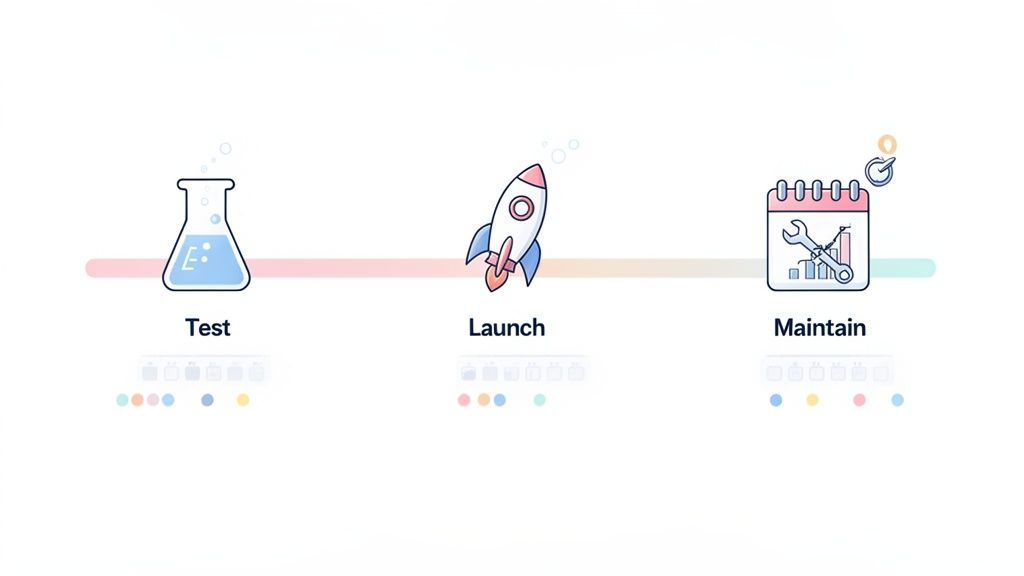
Getting to the end of the build phase for your custom Shopify app development feels like a massive win, but don't pop the champagne just yet. The path from finished code to a reliable business tool involves a crucial sequence: testing, deployment, and planning for what comes next. A solid go-live plan is what ensures your app not only launches without a hitch but continues to perform for years.
Too many merchants get swept up in the excitement of new features and completely overlook the post-build process. A successful launch is so much more than flipping a switch. It’s about making sure your app is bulletproof, meets Shopify’s strict standards, and has a clear roadmap for the future.
Putting Your App Through Its Paces: Why Testing is Non-Negotiable
Before your new app gets anywhere near your live store, it needs to be put through its paces with several layers of testing. This isn't just about squashing bugs; it's about making sure the app does exactly what you need it to do, under all sorts of conditions. Each phase has a specific job, starting with the technical nitty-gritty and ending with real-world user validation.
Any professional development process begins on a Shopify development store. Think of it as a safe, isolated sandbox—a clone of your live environment where developers can push, pull, and try to break things without affecting your customers. This is where they run essential checks:
- Unit Tests: These are tiny, focused checks on the smallest bits of code, confirming each function works perfectly on its own.
- Integration Tests: This is where we see if different parts of your app can talk to each other. For example, does the front-end interface correctly fetch data from the back-end database?
- End-to-End Tests: This simulates a full user journey. A classic example is testing if a customer can use your new product customiser, add the item to their cart, and proceed to checkout without any errors.
Once the app is stable in the development environment, it’s your turn. This stage is called User Acceptance Testing (UAT), and it's where you and your team get hands-on. You’ll run through the daily workflows you’ll actually be using. This is your opportunity to confirm the app isn’t just functional, but genuinely easy to use and actually solves the problem you hired someone to fix.
Meeting the ‘Built for Shopify’ Standard
If you're building a public app for the Shopify App Store, or even if you just want to guarantee your private app is top-tier, aiming for the ‘Built for Shopify’ standard is a smart move. This isn't just a shiny badge; it's a rigorous certification from Shopify themselves, confirming your app meets their highest benchmarks for performance, security, and user experience.
Meeting the Built for Shopify standard is a powerful signal of quality. It tells you the app has been thoroughly vetted for speed, security, and a seamless user experience, making it a trustworthy and future-proof investment for your store.
Getting this certification means your app has passed a demanding review. Shopify’s team inspects everything, from how it handles data and uses APIs to whether its design aligns with the Shopify Polaris framework. Even if your app remains private, asking your agency to build to this standard is a great way to ensure it won’t break with future Shopify platform updates. It's a hallmark of professional custom Shopify app development.
Your Long-Term Maintenance Plan
An app is a living piece of software, not a one-time project. Shopify's platform is in a constant state of evolution, with API versions being updated and new features rolled out all the time. Without a maintenance plan, an app that works flawlessly today could become slow, buggy, or completely unusable in six months.
A solid maintenance plan needs to cover three crucial areas:
- Reactive Bug Fixes: Let's be realistic—no app is ever 100% bug-free. Your plan must have a clear process for reporting problems and a commitment from your developer or agency to fix them promptly.
- Proactive Monitoring: A good development partner will be actively monitoring for upcoming Shopify API changes and platform updates. This ensures your app is made compatible before an update causes it to break.
- Future Feature Releases: Your business will grow and your needs will change. Your app should be able to evolve with you. A proper maintenance agreement should include a framework for scoping and developing new features down the line.
For scaling brands, these custom solutions are becoming mission-critical. For instance, UK agencies report that developing a custom theme can take 10-16 weeks and cost anywhere from £20,000 to £50,000+. Meanwhile, a hybrid approach that blends customisation with existing apps can be completed in 6-12 weeks for £12,000 to £30,000. This shift reflects the growing demand for unique user experiences, as agencies are meeting these unique UX needs for UK brands.
By investing in a proper launch and maintenance strategy, you turn your app from a simple project into a valuable, long-term asset that drives real business growth. Learn more about how our Shopify custom app development services can support your entire app lifecycle, from initial idea to long-term success.
Common Questions About Custom Shopify Apps
If you're thinking about building a custom Shopify app, you've probably got a lot of questions. It's a big investment, so it’s smart to get a clear picture of the costs, timings, and long-term commitments before you dive in. We hear these same questions from UK merchants all the time, so let's get you some straight answers based on our experience.
How Much Does a Custom Shopify App Cost in the UK?
This is always the first question, and the honest answer is: it depends entirely on the app's complexity. There's a huge difference between a small internal tool and a public app for the masses.
A simple private app, built to solve one specific headache—like a custom order tagger for your warehouse team—will typically land in the £8,000 - £15,000 range. These projects have a tight, focused scope and can be turned around relatively quickly.
Things get more involved when your app needs to talk to other systems. If you're looking to integrate with your ERP, a third-party logistics provider, or a unique CRM, you're in a different league. For these, you should realistically budget between £20,000 and £50,000. The cost here is driven by the complexity of the data mapping and the API work required.
At the top end, you have public apps destined for the Shopify App Store. If your goal is to achieve the prestigious ‘Built for Shopify’ status, you’re looking at an enterprise-level project. Costs can easily sail past £100,000, reflecting the rigorous design, security, and performance standards required.
The single biggest factor in your app's cost is its complexity. Always get a detailed quote based on a thorough project scope to prevent budget surprises later on.
How Long Does It Take to Build a Custom App?
Just like cost, the timeline is tied directly to the scope. A simple, well-defined custom app can often go from idea to launch in just 4-6 weeks. This rapid timeline hinges on having crystal-clear requirements from day one.
For a more substantial app—think a custom product builder with live previews or an advanced pre-order system—the timeline naturally extends. These projects usually take 3-6 months to get from the drawing board to a polished, fully-tested tool.
For a large-scale public app with multiple integrations and a rich feature set, you need to be patient. These can take anywhere from 6-12 months or even longer. Working with a seasoned agency can often compress this timeline, as they've got refined processes to navigate common hurdles.
Should I Build a Private or Public Shopify App?
This really boils down to one question: who is this app for? Are you solving an internal problem, or have you spotted a gap in the market that other merchants would pay to fill?
Private App: This is your best bet for solving challenges unique to your business. Private apps are installed via a simple link and are ideal for creating internal workflows, adding a bespoke feature to your storefront, or integrating with your specific back-office software.
Public App: Go public if your idea has commercial potential. Creating an app for the Shopify App Store can open up a fantastic new revenue stream. Just be prepared for a much more demanding development, review, and support process.
Is a Maintenance Plan Really Necessary?
In a word, yes. We can't stress this enough. Your app doesn't exist in a vacuum; it lives on the Shopify platform, which is constantly evolving with new API versions, features, and security updates.
A maintenance plan is your insurance policy. It ensures your app stays compatible, secure, and functional as Shopify changes around it. Without one, a platform update could break your app overnight, potentially halting sales or disrupting your operations.
A good plan from an agency will cover bug fixes, performance monitoring, and all the necessary updates to keep your app in sync with Shopify. It's a small ongoing cost that protects your much larger initial investment.
Ready to turn your idea into a high-performing custom app? Grumspot is a specialist Shopify Plus agency that designs and builds bespoke apps that meet the highest ‘Built for Shopify’ standards. Get in touch today to discuss your project.
Let's build something together
If you like what you saw, let's jump on a quick call and discuss your project

Related posts
Check out some similar posts.

- shopify custom theme development
Unlock your brand's potential with Shopify custom theme development. This guide shows UK brands how ...
Read more
- shopify design agency
Discover how a shopify design agency can transform your store with conversion-focused design, fast p...
Read more
- shopify development agency
Hiring a Shopify development agency? This guide covers how to find, vet, and partner with the right ...
Read more
- shopify plus agency
What is a Shopify Plus agency? Learn what they do, the benefits of partnership, and how to choose th...
Read more