What Is OAuth Authentication: A 2026 Guide
- oauth
- oauth 2.0
- openid connect
- api security
- authentication
Launched
August, 2026
You're setting up a Shopify app, you click Allow on a permissions screen, and a second later the app can read orders or update inventory without ever asking for your password. That's the moment many users first meet OAuth, even if the name isn't on the screen. It feels like login, but its actual function is narrower and more useful: a merchant is handing a third-party app a limited, revocable permission slip.
That distinction matters because OAuth is one of those topics people explain too quickly. If you jump straight to acronyms, you miss the part that keeps the system safe, who owns the data, who asks for access, who approves it, and who serves the API. With a Shopify app as the running example, each actor has a clear place, and the flow stops feeling like magic.
A Familiar Scenario Before the Jargon
A merchant installs a Shopify app that promises to sync orders into a warehouse tool. The app asks for permission to read orders and maybe, later, to update products or fulfilment status. The merchant doesn't type a Shopify password into the app, instead they're sent to Shopify to review what the app wants, then they come back with access granted or denied.
That small scene is the cleanest way to understand what is oauth authentication, because it shows the shape of the problem before the vocabulary gets in the way. The app needs data, but it shouldn't own the merchant's password. The merchant needs control, but they shouldn't have to hand over blanket access just to use one feature.
Four characters keep appearing in real OAuth work, and it helps to name them early. There's the merchant, the app, Shopify's authorization server, and Shopify's resource server. The merchant owns the store data, the app asks for permission, the authorization server checks consent and issues tokens, and the resource server answers API calls with the actual data.
Practical rule: if a guide says OAuth is “just login”, stop there. In a store integration, it's really about delegated access, one app acting with limited permission on behalf of a merchant.
That's why good explanations of OAuth start with a story, not a spec. Once you can point to who is asking, who is approving, and who is serving the data, the rest of the protocol has somewhere to land.
The Four Actors That Make OAuth Work
A Shopify app asking for access looks simple on the surface, but four separate roles are doing the work behind the scenes. If you keep those roles straight, the rest of OAuth stops feeling like a pile of terms and starts looking like a set of clean handoffs.
In a Shopify install, the resource owner is the merchant. They decide whether an app can touch store data, and they can usually revoke that access later. The client is the Shopify app itself, the thing asking for permission.
The authorization server is the part of Shopify that handles sign-in and consent. It is the page where the merchant sees the requested permissions and clicks Allow or Deny. The resource server is the API that holds the data, such as orders, customers, or products, and answers requests only when a valid token arrives.
Keep this picture in mind.
Merchant approves. App requests. Authorization server issues the token. Resource server checks the token.
That separation is the whole trick. The app never needs the merchant's password, and the API never has to trust a random browser form. It trusts a token that came through the right flow, with the right permissions attached.
If you already build Shopify systems around clean service boundaries, this should feel familiar. The same separation that makes an API-first ecommerce architecture easier to maintain also makes OAuth easier to reason about. The app, the login step, and the data API each do one job, and that job stays distinct.
A good way to read any OAuth screen is to ask three questions. Who owns the data, who is asking for access, and which service will answer the API request? Once you can answer those, the screen stops looking mysterious.
Comparing the Main OAuth Flows
OAuth isn't one flow, it's a family of flows for different kinds of apps. That matters in Shopify work because a public app in the browser has very different risks from a backend sync job that runs without a human in the loop.
The safest default for user-facing apps is the authorization code flow, and for public clients it should be paired with PKCE. Microsoft's identity platform notes that the authorization code flow is the standard OAuth 2.0 flow for obtaining an access token, and modern public clients use PKCE to harden the exchange against intercepted codes, which is exactly why browser and mobile apps should avoid older patterns. For a Shopify embedded app, that usually means the merchant signs in, the app gets a code, and the server exchanges that code for tokens without exposing the sensitive part to the browser. For a backend warehouse sync, the shape is different, because there may be no merchant sitting there to approve each run, which is why client credentials is the better fit for pure machine-to-machine jobs.
The implicit flow still appears in older codebases, but it's not what you want to start with in 2026. It pushes too much into the browser and leaves less room for defence in depth, so if you inherit it, treat it as technical debt rather than a model to copy.
If you want a broader Shopify context for app structure, Grumspot's notes on Shopify embedded app development are a useful companion while you map these flows to a real product build.
| Flow | Best For | Key Detail | 2026 Status |
|---|---|---|---|
| Authorisation code | Server-side apps | Code is exchanged server-to-server for tokens | Standard choice |
| Authorisation code with PKCE | Single-page apps and mobile apps | PKCE binds the request to the token exchange | Modern baseline for public clients |
| Client credentials | Server-to-server integrations | No human user, the app authenticates itself | Common for backend jobs |
| Implicit | Older browser-based builds | Tokens land too early in the front end | Deprecated for new builds |
The right flow follows the shape of the client, not developer habit. If a human merchant is present, you usually need consent plus a server-side exchange. If no human is involved, the design should reflect that from the start.
Tokens, Scopes, and Why OAuth Is Not Login
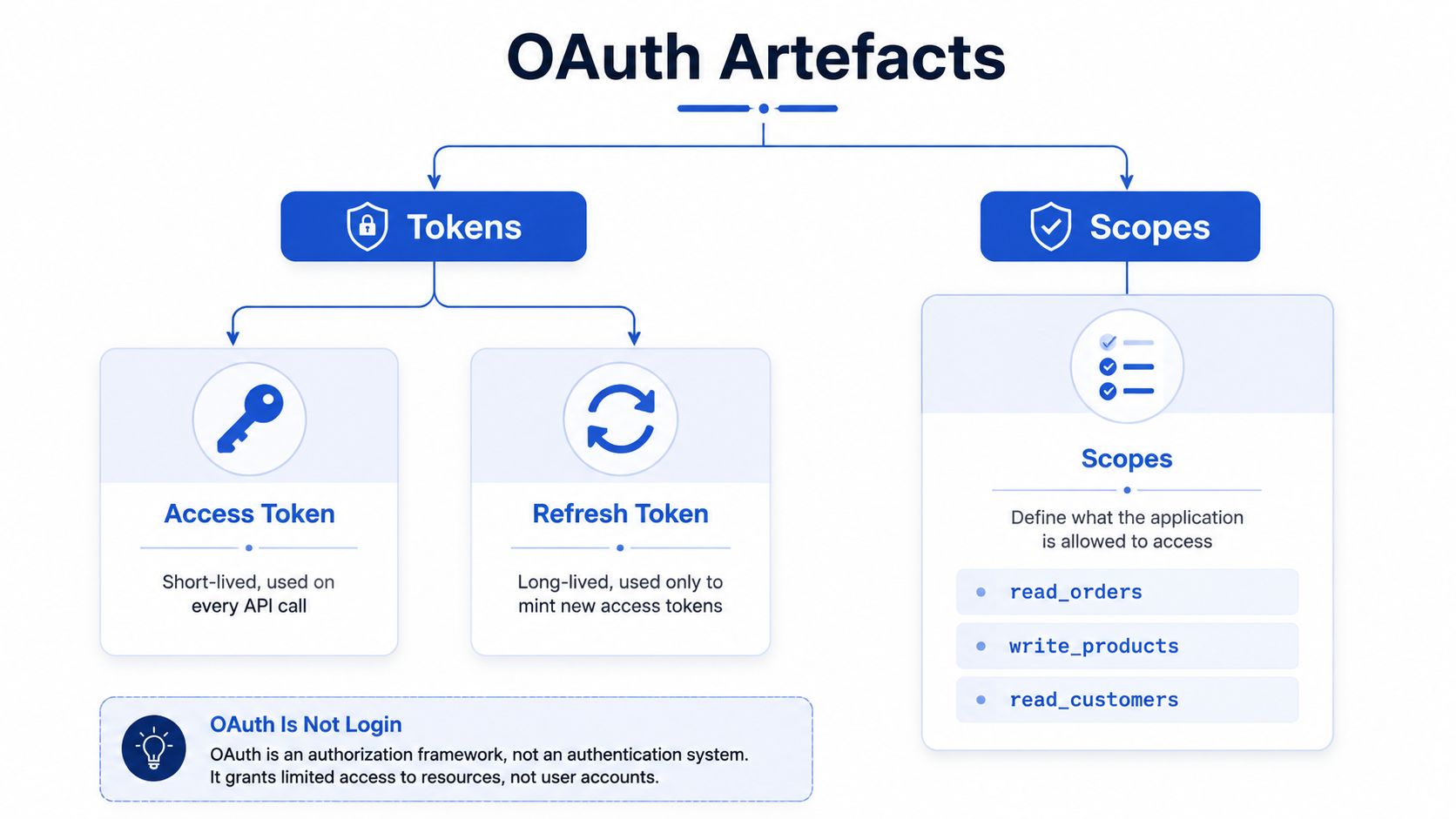
OAuth produces artefacts, and each one has a job. The access token is the thing your app sends on API calls, the refresh token is what you use to get a new access token later, and scopes are the permissions the merchant approved.
In a Shopify app, the merchant might grant permission to read orders but not to write products. That's the point of scopes, they turn access into a contract. The app can only do what the token says it can do, and the API can enforce that boundary on the server side instead of trusting the browser.
| Artefact | Purpose | Typical use |
|---|---|---|
| Access token | Carries delegated permission | Sent with API requests |
| Refresh token | Mints new access tokens | Used when the access token expires |
| Scopes | Define allowed actions | Requested at install or re-consent |
The most common mistake is calling OAuth a login protocol. It isn't. OAuth 2.0 is an authorisation framework, which means it answers the question, “What can this app do on the user's behalf?” It does not, by itself, prove who the user is.
That difference matters because a token can authorise access without identifying the human behind it. If a team builds a “login with X” flow on raw OAuth and stops there, they can end up with permission to call an API but no verified identity claim for the person in the browser. In other words, the app may know what it can do, but not who is doing it.
Practical rule: if you need a logged-in user identity, OAuth alone is the wrong finishing layer. You need OpenID Connect on top of it.
That's the part people skip when they say “OAuth authentication.” The phrase shows up in conversation, but the protocol itself is about delegated access. Authentication needs a separate identity layer.
Common Security Threats and How to Mitigate Them
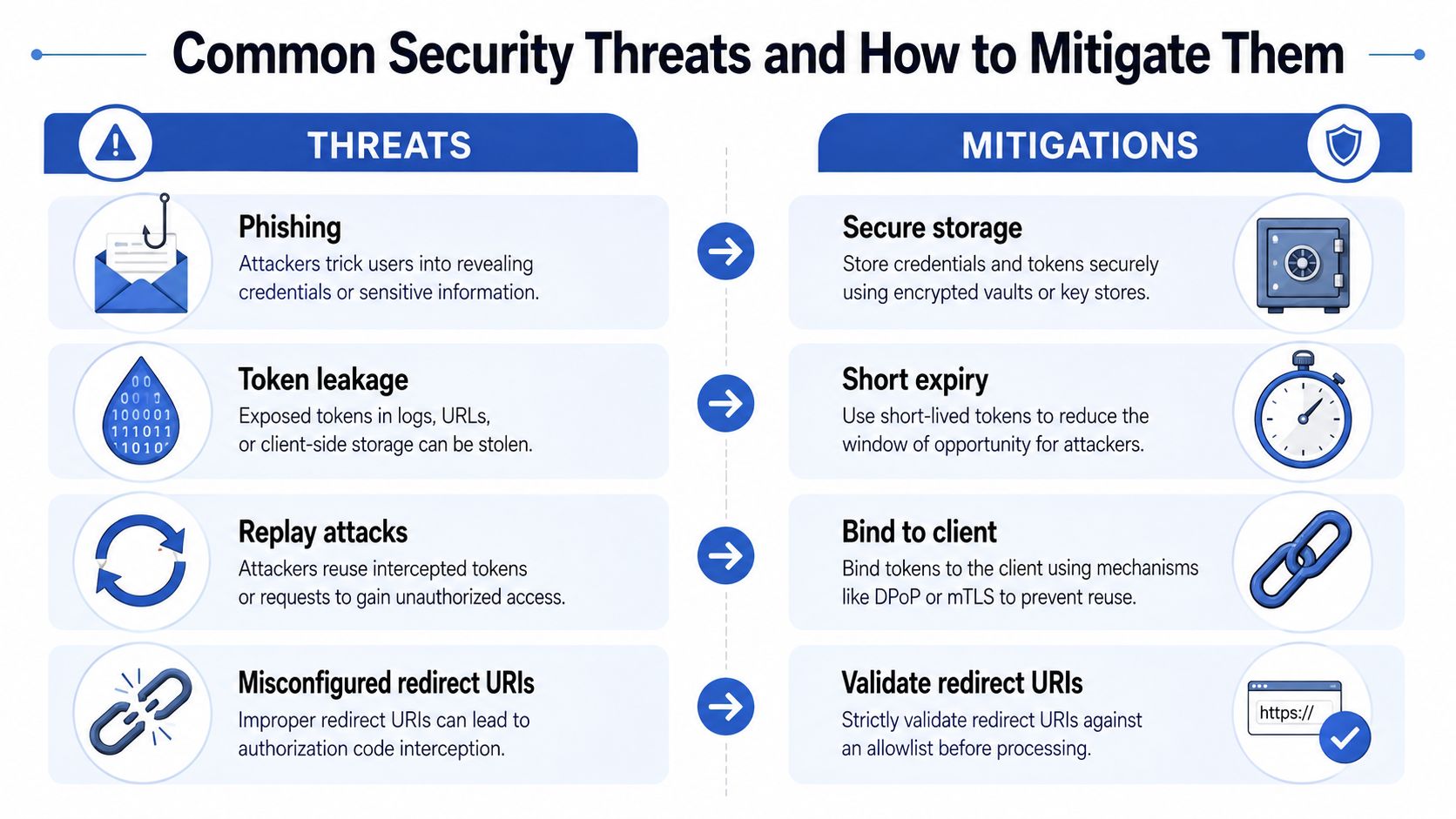
OAuth solves a problem, but it doesn't remove the need for careful implementation. The first risk is authorization code interception, which is why PKCE and exact redirect URI matching matter. If an attacker steals the code before the token exchange, PKCE makes that stolen code far less useful because the exchange is bound to the original request.
The second risk is token leakage. Tokens can end up in logs, browser storage, error reports, or overly chatty debugging tools. The practical fix is boring but effective, keep tokens out of the frontend where possible, store them server-side, and make their lifetime short enough that a leak doesn't become a long-running problem.
The third risk is scope creep. Teams ask for broad permissions during install because it's easier, then forget that permissions should grow with the feature, not with convenience. Request the minimum scope at install time, then ask again only when the merchant enables something that needs more access.
The fourth risk is refresh token theft. If an attacker gets hold of a long-lived token, they may be able to mint fresh access tokens until the session is revoked or rotated. Rotation and sender-constrained tokens, where supported, help reduce the damage, and they're part of the standard hardening mindset for production systems.
UK breach data makes the threat model easier to explain to non-specialists. The 2025 Cyber Security Breaches Survey reported that 43% of UK businesses and 30% of charities experienced a breach or attack in the previous 12 months, and phishing remained the most common attack type at 85% of businesses and 86% of charities that identified an attack, while the average cost of the most disruptive business breach was £1,120. That's why careful token handling matters, and it's also why broader site hardening still belongs in the conversation, especially if you're reviewing a store or app stack and need a practical checklist to secure your website now.
A good implementation doesn't try to make OAuth invincible. It narrows the blast radius, makes token misuse harder, and keeps the dangerous parts off the browser path whenever possible.
How OpenID Connect Adds Real Authentication
OAuth gets the app permission to act. OpenID Connect adds the identity layer that says who the person is. The same redirect-and-consent pattern still applies, but the response now includes an ID token, which is a signed JSON Web Token carrying identity claims.
That's the key split. The access token is for the API, the ID token is for the client. The app uses one to call Shopify-style resources, and the other to confirm the merchant's identity for the login session.
Validation is what makes the ID token trustworthy. The client checks the signature, issuer, audience, expiry, and nonce before treating the token as proof of identity. If any of those checks fail, the token should be rejected, because a token that looks right but can't be verified isn't useful for login.
There's also a userinfo endpoint in many OpenID Connect setups, which can supply extra claims after the identity is established. That's useful when the app needs a bit more context, such as an email address or profile detail, without reworking the whole flow.
By this point the Shopify example is complete. The merchant has signed in, the app has a scoped access token for store data, and the identity layer has confirmed who the merchant is. The app still never sees the password, and that's the design goal.
Practical Implementation Tips for a Shopify App
A real Shopify build lives or dies on the boring details. The client secret belongs on the server, never in frontend code, and the OAuth callback should validate state before exchanging the code server-to-server. If you skip that step, you're asking for confusion when redirects, sessions, or tabs overlap.
At install time, request the smallest scope set that matches the first shipped feature. A read-only install is easier to reason about than a broad one, and it gives you a cleaner permission story when a merchant later asks why the app wants more than it needs. If the product grows, ask for extra scope only when the new feature requires it.
A useful build pattern is to treat tokens as sensitive server assets, not app-side convenience data. Encrypt what you store, log them as redacted, and handle refresh on the backend before expiry where possible. If refresh fails, don't improvise, send the merchant through a clear re-auth flow.
For teams that want a wider integration stack around the app, it can help to compare providers and tooling before wiring up auth-heavy workflows. A practical roundup like best API integration tools for SaaS can help you choose support pieces around sync, monitoring, and orchestration without turning OAuth into a custom snowflake.
If you're building a public app, Grumspot's guidance on Shopify public app development is a useful reference point for how auth fits into the wider app lifecycle.
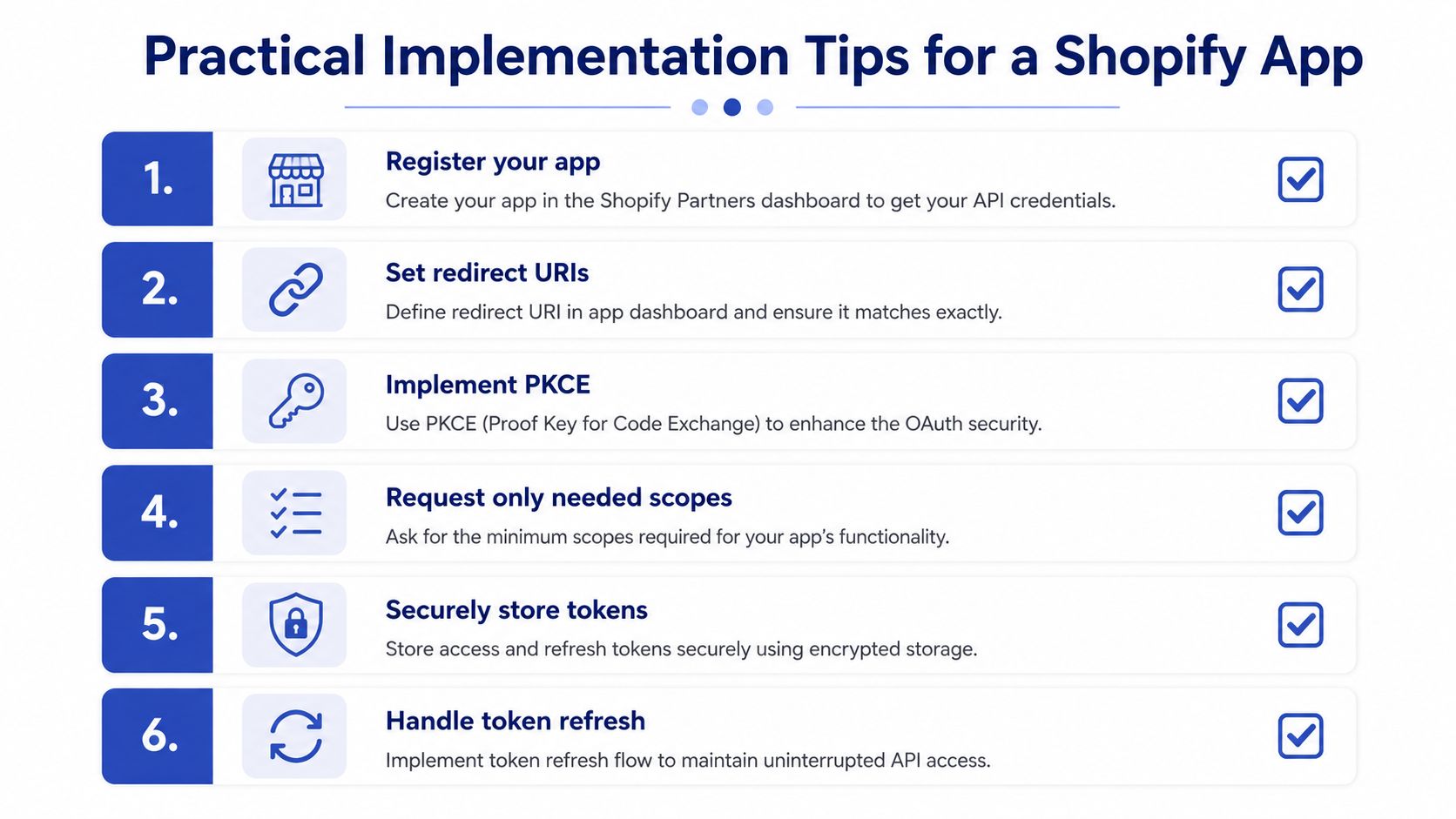
Three habits prevent most production pain. Use PKCE even on web apps for defence in depth, treat scopes as a product decision, and keep token handling on the server. Those choices won't make the app flashy, but they'll make it much harder to break.
Key Takeaways and Where to Go Next
OAuth is not the same thing as login. It's a delegated authorisation framework, and that's why a Shopify app can get limited access to store data without seeing the merchant's password. OpenID Connect adds the identity layer when the app needs sign-in, and PKCE is the baseline for public, user-facing clients.
Three mistakes are worth avoiding. Don't call raw OAuth “authentication” and stop there. Don't use a browser-heavy flow when the app shape calls for a server-side exchange. Don't request more scope than the feature needs.
If you want to go deeper, the most useful next reads are the OAuth 2.0 RFC 6749, Microsoft's authorization code with PKCE guidance, IBM's overview of OAuth vs authentication, and Shopify's own OAuth developer documentation. That combination gives you the standard, the implementation pattern, the conceptual distinction, and the platform-specific details in one place.
For a Shopify team, the safest habit is simple. Build the permission flow carefully, validate identity separately, and make every scope request earn its place.
If you're building a Shopify app, or cleaning up one that already has authentication friction, Grumspot can help with the app architecture around it, from public app development to deeper storefront and integration work. Visit Grumspot to see how the team approaches Shopify builds, audits, and custom app projects with a conversion-focused lens.
Let's build something together
If you like what you saw, let's jump on a quick call and discuss your project

Related posts
Check out some similar posts.