Headless Shopify Plus Implementation: 2026 Guide
- headless shopify plus
- shopify plus development
- headless commerce
- ecommerce architecture
Launched
May, 2026

If you're reading this, you're probably already feeling the friction.
Your team wants a storefront that loads faster, merchandises better, and stops fighting every ambitious design decision. Marketing wants richer landing pages and cleaner campaign workflows. Developers are tired of pushing a Liquid theme past the point where it still feels maintainable. And someone in the room has said, “Should we go headless?”
That question sounds technical. It isn't. A headless Shopify Plus implementation is a business decision first, an architecture decision second, and only then a development project. The brands that get this right usually start with a hard commercial question: what problem are we solving that a strong native Shopify Plus build cannot solve cleanly?
The Strategic Decision When to Go Headless on Shopify Plus
The wrong reason to go headless is simple. You want something “more modern”.
The right reason is narrower. Your current storefront is limiting revenue, operations, or both. That usually shows up in one of three ways: performance work inside the theme has plateaued, the customer experience requires interactions Liquid handles poorly, or the business needs more flexibility across markets, content, and systems than a theme-led setup can comfortably support.

Start with the financial threshold
Headless has a cost profile that many merchants underestimate. Over three years, the total cost of ownership is often 2 to 3 times that of a native Shopify Plus theme, and some agencies use $800K per month in revenue as a practical threshold for starting the headless conversation (BeeCommerce on headless Shopify Plus economics).
That doesn't mean every brand below that line should avoid it, or every brand above it should proceed. It means the margin for error gets much smaller when revenue scale is lower. If your store isn't already generating enough volume for performance, editorial control, or regional complexity to move real commercial outcomes, headless can become an expensive engineering hobby.
Situations where headless usually makes sense
In agency work, headless tends to earn its keep when the storefront is more than a catalogue with content blocks.
Complex product experiences
Configurators, guided bundles, advanced personalisation, or interaction-heavy PDPs often push beyond what feels sane in Liquid.Content-led commerce
If campaigns, storytelling, landing pages, and editorial workflows matter as much as product grids, a decoupled frontend with a proper CMS can remove a lot of day-to-day friction.Multi-region operations
Teams running multiple markets often need tighter control over localisation, content logic, and frontend behaviour than a standard theme stack provides comfortably.Parallel team workflows
Headless is often a better fit when developers, designers, and content teams need to work in parallel instead of competing inside one theme codebase.
Headless works best when the storefront itself is a strategic asset, not just a skin over checkout.
Situations where native Shopify Plus is still the smarter choice
A lot of brands should stay native for longer than they think.
If your main goal is to launch quickly, keep maintenance lean, and preserve broad compatibility with the Shopify app ecosystem, native Shopify Plus is usually the more efficient route. That is especially true if your biggest issue is execution quality rather than platform ceiling. A messy theme rebuild solved badly doesn't become a better business decision just because React is involved.
A practical filter I use looks like this:
| Question | If the answer is yes | If the answer is no |
|---|---|---|
| Is your current storefront holding back revenue or operations in a measurable way? | Keep evaluating headless | Stay native |
| Do you need frontend behaviour that Shopify themes struggle to support cleanly? | Headless may be justified | Stay native |
| Can your business support a higher build and maintenance burden? | Proceed to discovery | Delay headless |
The trade-offs clients need to hear early
The pitch for headless is easy. The maintenance reality is what matters.
A decoupled frontend gives you more freedom, but it also creates more moving parts. Your team now owns application architecture, deployment pipelines, API orchestration, caching strategy, CMS modelling, and a more specialised maintenance burden. Marketing doesn't get drag-and-drop freedom by default. They get whatever editing experience the stack is designed to provide.
Practical rule: If a native Shopify Plus build can deliver the business outcome without awkward workarounds, choose native and spend the saved budget on CRO, content, and operations.
That isn't anti-headless. It's just honest scoping.
For some brands, the best path is staged. Launch on Shopify Plus with a strong native build, validate product-market momentum, then move the frontend headless when the business case is no longer theoretical. That path avoids overcommitting too early and gives the team a cleaner baseline to compare against later.
Designing Your Headless Technology Stack
Once the business case is solid, the next mistake is treating the stack like a framework popularity contest.
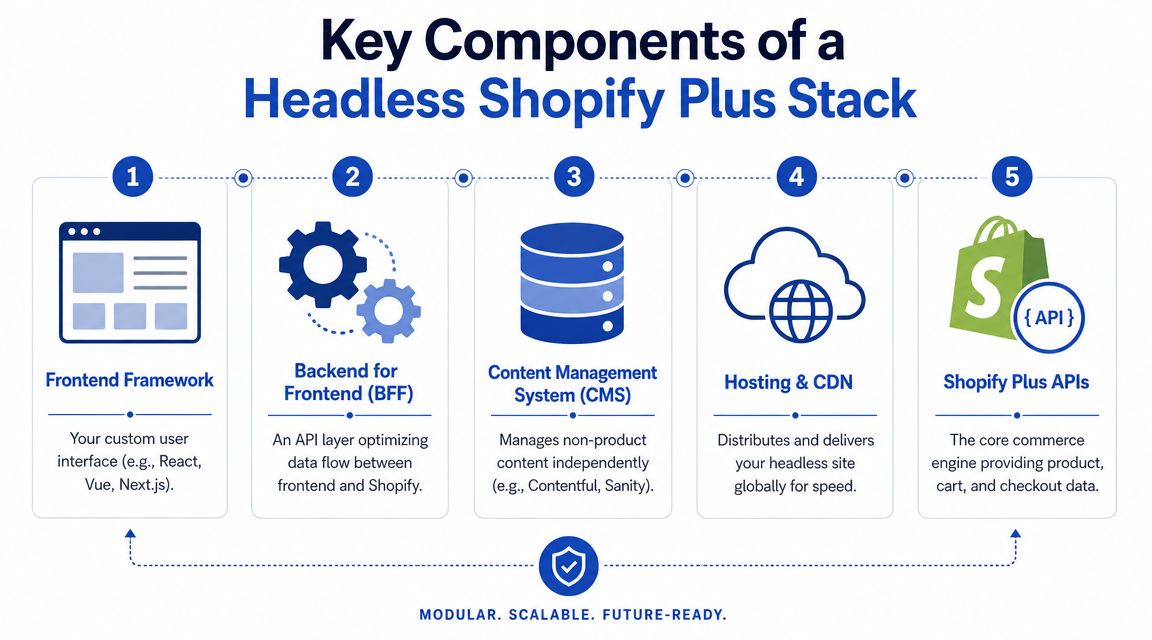
The best stack is the one your team can ship, maintain, and extend without turning every change into a specialist task. In a headless Shopify Plus implementation, the frontend framework gets most of the attention, but the actual architecture includes the frontend, a backend-for-frontend layer, a CMS strategy, hosting, caching, and disciplined API design.
Hydrogen versus Next.js versus the rest
For commerce-first builds, Hydrogen is usually the first framework worth considering because it is designed around Shopify's model. A common implementation path is an 8 to 12 week Hydrogen MVP build on Oxygen, using the Storefront API, which on Shopify Plus supports over 1000 points per second. The catch is query discipline. UK developers have reported 35% performance degradation when GraphQL queries over-fetch (Ask Phill on Hydrogen MVPs and Storefront API performance).
That trade-off matters. Hydrogen gives you a tighter path to a Shopify-native build. Next.js gives you a broader ecosystem, more hiring familiarity in many teams, and a strong fit for content-heavy or multi-system environments. Remix and Nuxt can work too, but they tend to make more sense when your team already has deep familiarity and a clear reason to diverge from the more standard Shopify paths.
Here's the simplest comparison I use with clients:
| Framework | Best For | Hosting Options | Learning Curve |
|---|---|---|---|
| Hydrogen | Commerce-first storefronts tightly aligned to Shopify | Oxygen | Moderate if the team already works in React |
| Next.js | Content-heavy builds and broader composable stacks | Vercel, Netlify, other Node-compatible hosts | Moderate to high depending on architecture |
| Remix | Teams that want fine control over data loading and routing | Multiple modern hosts | Higher for teams without Remix experience |
| Nuxt.js | Vue-led teams building a Shopify frontend | Multiple modern hosts | Moderate for Vue teams |
A lot of teams over-optimise this decision. If your developers are strong in React and the build is commerce-led, Hydrogen is often the shortest path to a maintainable result. If your storefront behaves more like a publishing platform with commerce embedded into it, Next.js often gives you more flexibility.
For a broader view of modular architecture choices, Grumspot has a useful primer on composable commerce on Shopify Plus.
The stack beyond the framework
The frontend is only one layer. The architecture usually needs these parts working together:
Frontend framework
Hydrogen, Next.js, or another framework your team can support long term.BFF layer
A backend-for-frontend helps shape Shopify data for the UI, reduce unnecessary client-side complexity, and coordinate external systems.CMS
Contentful, Sanity, and similar tools make sense when marketing needs structured editorial control beyond Shopify admin patterns.Hosting and CDN
Oxygen is the obvious fit for Hydrogen. Vercel or equivalent can work well for Next.js. What matters is cache behaviour, preview flow, and operational simplicity.Monitoring and deployment
Headless without observability becomes guesswork very quickly.
This walkthrough is a useful visual companion before you decide how opinionated or custom your build should be:
Where performance is actually won
Teams often assume headless will be fast by default. It won't.
Performance comes from how you fetch and cache data. The worst headless storefronts make too many API calls, pull fields they don't need, and hydrate too much on the client. The best ones keep Shopify as the commerce engine, fetch only what's needed per route, prerender where appropriate, and cache aggressively at the edge.
A practical approach looks like this:
Keep product and collection queries lean
Don't ask Shopify for every field because it's available.Separate volatile and stable data
Product descriptions can cache differently from cart state.Use server rendering deliberately
Render the first useful view early, then hydrate only where interaction requires it.Treat third-party scripts like production debt
Marketing tags, reviews, chat, and experimentation tools can erase frontend gains quickly.
If your team is also evaluating operational tooling around merchandising, support, and content generation, this roundup of best AI tools for e-commerce is useful because it frames tooling by workflow rather than hype.
Integrating with the Shopify Ecosystem
Many headless projects stop feeling elegant at this stage.
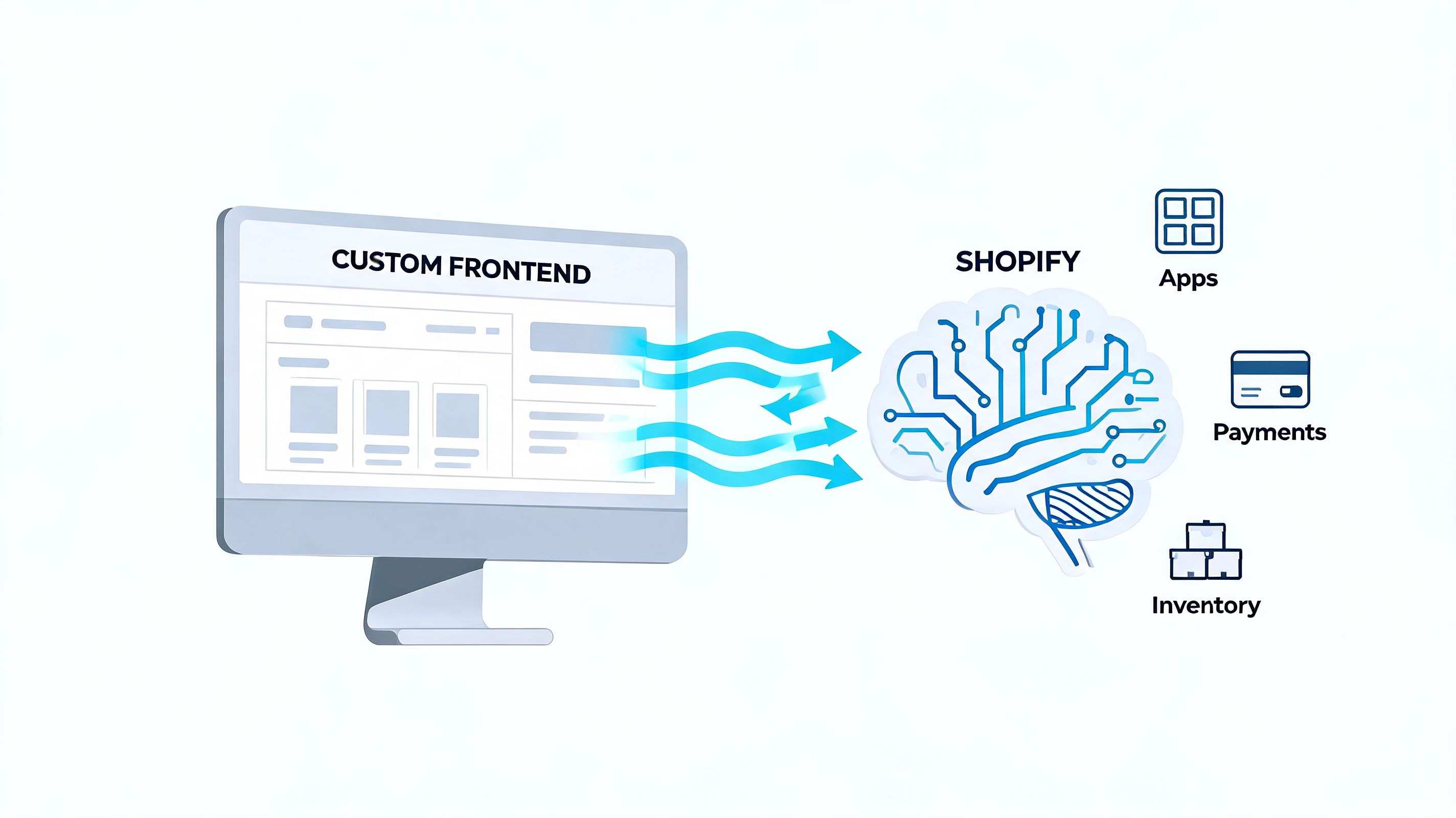
On a whiteboard, the architecture looks clean. In production, you still need Shopify checkout, your ERP, your CRM, subscriptions, reviews, loyalty, search, shipping logic, tax handling, and whatever else the business already relies on. A headless Shopify Plus implementation succeeds or fails on integration planning more than frontend polish.
Understand the checkout boundary
The first rule is simple. Shopify still owns checkout.
That is usually a feature, not a limitation. You want Shopify handling payment flows, order creation, fraud tooling, and operational reliability. But it does mean teams must be precise about what part of the customer journey is custom and what part returns to Shopify's checkout layer.
In practice, that means:
Custom storefront, standard commerce engine
PDPs, collections, landing pages, search, and cart UX can be fully custom.Checkout customisation within Shopify's rules
Use Checkout Extensibility and Functions where they fit, but don't assume every visual or logical idea belongs there.Cart and checkout need handoff discipline
The transition from custom cart experience to Shopify checkout should feel deliberate, not stitched together.
Teams get into trouble when they promise a fully custom end-to-end purchase flow before confirming what Shopify should continue to own.
Audit your apps before you write a line of frontend code
This is one of the biggest failure points in real projects. Around 70% of Shopify apps are theme-dependent, so they don't work out of the box in a headless storefront. UK industry data also shows 52% of struggling headless projects are abandoned because of app incompatibility issues. I'm citing that here because this is the section where it matters operationally.
A proper app audit should classify every installed app into one of four buckets:
| App type | Typical headless outcome |
|---|---|
| Backend operational apps | Usually continue working |
| Checkout-related apps | Must be validated against Shopify's supported checkout model |
| Theme-injected frontend apps | Often need replacement or custom rebuild |
| Hybrid apps | Need case-by-case review |
The painful category is theme-injected functionality. Reviews widgets, upsell overlays, loyalty prompts, store locators, quiz tools, and merchandising widgets often assume Liquid, theme app extensions, or script injection patterns that don't survive the move to headless cleanly.
Use integration patterns that survive scale
The cleanest builds keep Shopify at the centre and use other systems around it with clear responsibilities.
ERP
Treat the ERP as the system of record where appropriate, but don't let it dictate storefront responsiveness. Sync through middleware or event-driven patterns, not direct page-level dependency.CRM and marketing automation
Push customer and event data cleanly. Keep identity, consent, and customer state aligned across systems.Subscriptions and loyalty
Choose tools with explicit headless support. If the vendor can't explain their headless implementation clearly, assume extra work.Custom services
Put a thin orchestration layer between the frontend and external services rather than coupling every API directly into the browser.
If you're mapping ERP data flows in particular, this guide to Shopify ERP integration patterns is a practical reference for scoping what belongs in middleware versus Shopify itself.
For teams still working through API fundamentals with older integrations or migration cleanup, this walkthrough to learn Shopify REST API with RapidNative is useful context, especially when you're documenting legacy dependencies during discovery.
The integration checklist I use in discovery
Before build approval, I want clear answers to these:
- Which apps are storefront-dependent?
- Which customer-facing features need to be rebuilt?
- What data must update in real time, and what can tolerate delay?
- Which systems publish events, and which systems subscribe?
- Who owns data truth for products, content, pricing, and customer state?
If those answers are vague, the project isn't ready.
A Phased Headless Migration and Launch Plan
The safest headless launches don't happen as one dramatic cutover. They happen as controlled phases with hard gates.
Most project pain comes from trying to solve architecture, merchandising, content modelling, integrations, QA, and migration risk all at once. The better approach is to narrow the first release, prove that the stack behaves under real constraints, and keep a rollback path open until the storefront is stable.
Phase one with hard validation
The first phase is discovery, but not the fluffy kind. It should produce decisions.
That means documenting existing storefront issues, clarifying which pages and features belong in the first release, mapping dependencies, and agreeing what success looks like after launch. It should also settle a question many teams avoid: should this brand go headless now, or should it launch on native Shopify Plus first and stage the frontend move later?
For some merchants, that second route is the right one. If speed to market matters more than frontend freedom today, a strong native launch is often the lower-risk path. The later move to headless then starts from a cleaner operational base. Grumspot's work on Shopify Plus store build planning is relevant here because the scoping discipline is similar even when the frontend path differs.
Build the MVP like a production system
An MVP doesn't mean a throwaway build. It means reduced scope with production standards.
I usually want the first release to cover core templates and flows only: homepage, collection, product, cart, content pages, navigation, search behaviour, CMS editing flow, and the full purchase path into Shopify checkout. Fancy edge cases, campaign gimmicks, and low-frequency features can wait if they risk the launch.
The build phase should include:
Design system work
Components, states, spacing, type scales, and responsive rules need to be codified early.Environment setup
Development, staging, and production should behave predictably. Preview workflows matter if content teams are involved.CI/CD pipeline
Every deployment should be repeatable. Manual release rituals create avoidable risk.Integration testing
Cart, pricing, inventory, customer state, and order flow need end-to-end coverage.
A headless build becomes fragile when the team treats launch as the end of development instead of the start of operations.
Plan for search volatility, not just launch day
SEO migration work has to sit inside the launch plan, not beside it.
There is a real possibility of temporary disruption. Early UK adopters using Hydrogen have reported SEO recovery periods of around 12 weeks, even when server-side rendering is implemented correctly, as Google adapts to the new JavaScript-rendered structure (Vocal on Hydrogen migration SEO recovery).
That doesn't mean headless is bad for search. It means you need a migration plan that expects fluctuation and protects crawlability from day one.
My launch checklist usually includes:
- Redirect map approved before code freeze
- Canonical logic validated across templates
- Structured data tested in staging
- XML sitemap behaviour verified
- Log and crawl monitoring in place for the first weeks post-launch
Use controlled rollout, not blind confidence
The launch itself should be boring.
That usually means a staging sign-off, a content freeze window, an agreed rollback plan, and a clear set of owners for launch day. If the business can support it, phased exposure is even better. Route a subset of traffic, validate the storefront under real behaviour, then complete the cutover.
When clients ask what lowers launch stress the most, the answer isn't a more expensive stack. It's disciplined scope control, rehearsed deployment, and a team willing to defer non-critical ideas until after the first stable release.
Optimising for Performance and SEO Post-Launch
Launch proves the store is live. It doesn't prove the build is good.
The value of headless shows up after launch, when the team starts operating the storefront like a product. That means tracking performance regressions, watching search signals, tightening data-fetching patterns, and making sure every new feature doesn't undo the gains that justified the architecture in the first place.
Performance has to be watched continuously
One of the strongest commercial reasons brands choose headless is speed. Headless storefronts typically achieve Largest Contentful Paint of 0.9 to 1.5 seconds, compared with 1.8 to 2.5 seconds for a well-optimised Liquid theme, and every 100ms improvement correlates with a 0.5 to 1% conversion lift (Xaicode on headless LCP and conversion correlation).
Those gains are meaningful. They're also easy to lose.
A few new scripts, a poorly shaped query, an oversized hero asset, or a client-side feature that hydrates too much can drag page speed back down without anyone noticing until conversion starts slipping. The fix is operational, not theoretical.
I recommend setting a lightweight but strict monitoring routine around:
- LCP for perceived loading speed
- INP for interaction quality
- TTFB for backend and edge response
- JS bundle size to catch frontend bloat early
- Error rates across key commerce flows
Performance budgets stop drift
Teams need performance limits the same way finance teams need budget limits.
For each template type, set an agreed threshold for page weight, script cost, and key rendering metrics. Then tie those thresholds into the deployment process. If a release pushes a critical page past budget, someone should have to approve that trade-off consciously.
A good post-launch workflow usually includes:
| Area | What to watch | Why it matters |
|---|---|---|
| Product pages | Render speed, media weight, variant interaction | PDPs drive buying decisions |
| Collection pages | Filter behaviour, pagination, search interactions | Category friction kills discovery |
| Cart flow | API latency, state errors, promo logic | Revenue impact is immediate |
| Content pages | Crawlability, schema, internal linking | SEO health depends on consistency |
Fast launches don't matter if the storefront gets slower every sprint after go-live.
SEO on headless needs operational discipline
Search performance on headless builds depends less on slogans like “SSR-ready” and more on repeatable hygiene.
You need stable metadata rules, reliable canonical handling, valid schema markup, predictable internal linking, and pages that remain crawlable as content teams publish new templates and modules. If the build introduces faceted navigation, localisation layers, or dynamic routes, those need specific search rules, not assumptions.
The biggest post-launch SEO tasks usually include:
Crawl monitoring
Check what search engines are discovering and rendering.Template QA after releases
New modules often break meta tags or structured data in subtle ways.Sitemap integrity
Make sure new content types and market-specific URLs are included correctly.Indexation review
Watch for duplicate routes, thin pages, and parameterised noise.
Keep a rollback path ready
This part gets overlooked because no one likes planning for failure.
Every headless storefront should have a documented rollback procedure for high-risk releases. Not every issue requires a full reversal, but teams need a way to restore the last stable version quickly when a deployment introduces checkout friction, broken rendering, or severe performance regressions. That process should be rehearsed, not improvised during a trading peak.
The brands that get the full return from headless aren't the ones with the flashiest stack. They're the ones that operate it with discipline.
Answering Your Headless Shopify Plus Questions
Is headless Shopify Plus always faster
No. It gives you a higher performance ceiling, not automatic speed.
A weak headless build can be slower than a strong Liquid theme. The difference comes from query design, caching, asset handling, script control, and frontend discipline after launch.
Do you need Shopify Plus to go headless
You can build against Shopify APIs on lower plans, but serious headless commerce projects usually sit on Shopify Plus because the operational and customisation requirements tend to belong there.
If a brand is investing in a custom frontend, it usually also needs the broader control and enterprise features that come with Plus.
Should you choose Hydrogen or Next.js
Choose Hydrogen when the project is commerce-first and you want tighter alignment with Shopify's tooling and hosting model.
Choose Next.js when the storefront has heavier editorial requirements, more custom routing patterns, or deeper non-Shopify system dependencies. The right answer depends more on team capability than internet debate.
Will your existing Shopify apps still work
Some will. Many won't.
Backend and operational apps often continue to function because they don't depend on the storefront theme. Frontend apps are where teams get surprised. If an app relies on theme injection, script blocks, or Liquid-based rendering, it usually needs replacement, custom implementation, or a different integration pattern.
Can marketing teams still edit content without developers
Yes, if the stack is designed for that.
Headless doesn't automatically give non-technical teams a great editing experience. You need a clear CMS model, sane component architecture, preview workflow, and governance around what content editors can change safely.
Is a phased migration better than a full rebuild
Usually, yes.
Phased rollout lowers risk, protects revenue, and gives the team real feedback before every edge case is rebuilt. Full cutovers can work, but they demand stronger discovery, tighter scope control, and more operational confidence.
What is the biggest mistake brands make
They choose headless before proving the business case.
The second biggest mistake is underestimating integration and maintenance work after launch. The frontend may look finished, but the operating model has only just begun.
If you're weighing a headless Shopify Plus implementation and want a practical view of whether it should be Hydrogen, Next.js, or a staged native-first path, Grumspot helps brands scope the architecture, integration workload, and launch plan before expensive decisions get locked in.
Let's build something together
If you like what you saw, let's jump on a quick call and discuss your project

Related posts
Check out some similar posts.

- headless commerce agency
Discover what a headless commerce agency does, when to choose headless over Shopify Plus themes, typ...
Read more
- composable commerce platform
Learn what a composable commerce platform is, how it differs from monoliths, and how UK Shopify Plus...
Read more
- b2b ecommerce platform
Discover how a B2B ecommerce platform helps scaling brands streamline operations, boost sales, and g...
Read more
- shopify bundle builder
Learn how to build a Shopify bundle builder that lifts AOV without breaking inventory. App vs custom...
Read more