Shopify Plus Store Build: Your Expert Guide
- Shopify Plus store build
- Shopify Plus agency
- ecommerce development
- Shopify migration
- Shopify 2.0
Launched
April, 2026

You’re usually looking at a Shopify Plus store build when the current setup has stopped being merely inconvenient and started getting expensive. The site slows down when traffic spikes. Merchandising changes depend on developer workarounds. International selling feels patched together. Checkout limitations are now a commercial problem, not a technical annoyance.
That’s the point where a rebuild deserves proper scrutiny. A Shopify Plus store build isn’t just a theme project or a lift-and-shift migration. It’s a decision about architecture, operations, conversion flow, content governance, and how your team will scale the business after launch. For UK brands, there’s another layer that generic guidance often skips: post-Brexit tax handling, market-specific content, regional pricing logic, and whether a multi-store approach will help or burden the business.
Setting the Stage for Enterprise Growth
Most enterprise teams arrive here after trying to make an earlier platform stretch further than it should. That might be Magento with too much maintenance overhead, BigCommerce with growing checkout constraints, or standard Shopify with processes that have become increasingly manual. The symptoms vary, but the pattern is familiar. Revenue grows, complexity grows faster, and the platform starts dictating the business instead of supporting it.
In the UK, this isn’t a niche move. The United Kingdom is Shopify Plus’s second-largest market globally, with 5,804 live Shopify Plus stores according to Style Factory’s Shopify statistics roundup. That matters because it signals something practical. A large number of UK merchants have already reached the point where enterprise commerce needs a stronger operational and technical foundation.
What usually breaks first
The first cracks often show up in places that customers feel immediately:
- Checkout rigidity: teams want better upsell logic, cleaner discount experiences, or more control over payment and shipping messaging.
- International friction: pricing, content, tax treatment, and catalogue differences end up split across apps, spreadsheets, and manual admin tasks.
- Content bottlenecks: marketing wants landing pages and campaign changes without waiting for code deploys.
- Operational drag: ERP, CRM, WMS, subscriptions, and fulfilment tools don’t sync cleanly, so staff compensate manually.
A standard build can mask these issues for a while. An enterprise build has to remove them.
A good Plus build makes daily operations quieter. Fewer manual fixes, fewer launch-day surprises, fewer “we can’t do that on this platform” conversations.
Why the build matters more than the platform switch
Plenty of merchants assume Shopify Plus itself is the answer. It isn’t. Shopify Plus gives you the capability. The build determines whether you benefit from it.
That distinction is important. A weak implementation produces the same old bottlenecks on a newer platform. A strong one turns Shopify Plus into a commerce operating layer your team can manage without constant developer intervention. That’s the main objective: not just a cleaner storefront, but a store that can handle scale, complexity, and ongoing change without becoming fragile.
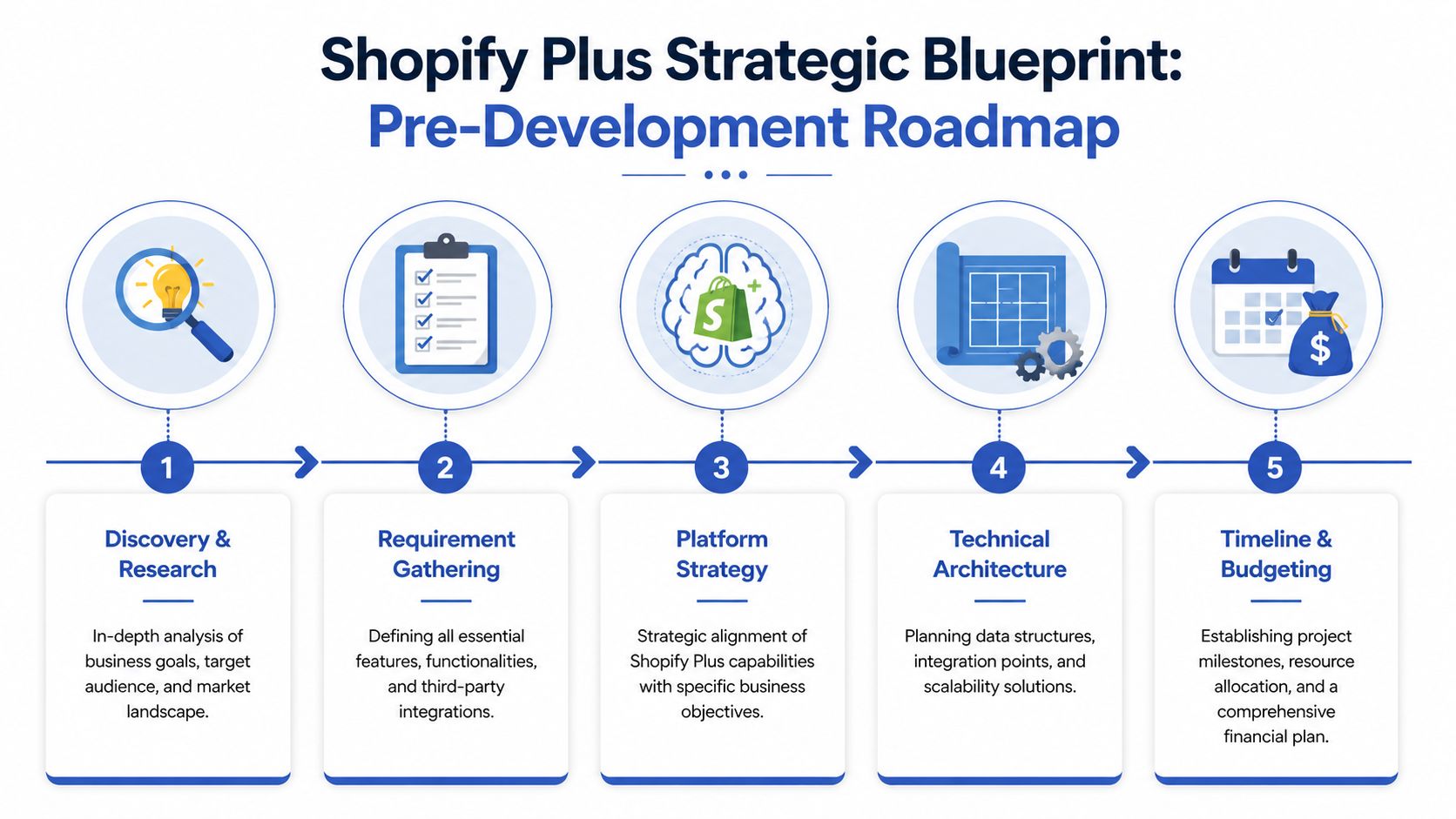
The Strategic Blueprint Before a Single Line of Code
A Shopify Plus build usually goes off course long before anyone opens a code editor. It happens in planning meetings where unresolved commercial decisions get treated as technical details. Tax gets parked for later. Product data quality is assumed. Teams default to a multi-store setup because it feels safer. Integration scope keeps expanding because nobody has ranked what must work on day one and what can wait.
That is how expensive rework starts.
Start with operating rules, not a feature list
Early discovery should answer how the business sells, fulfils, reports, and supports customers. Page templates and app choices come after that.
For UK merchants, this matters even more because the build often has to support domestic trading rules alongside EU and wider international requirements. Post-Brexit VAT handling, duty and tax display, market-specific pricing, returns routing, and who owns those decisions internally all need to be defined early. If they are left vague, developers end up building around assumptions. Those assumptions usually surface later in QA, finance sign-off, or worse, after launch.
The planning questions I want answered are usually these:
What commercial change does the store need to support?
Higher conversion, cleaner subscription logic, stronger B2B flows, better international checkout, or tighter merchandising control.What operational change has to happen with it?
Fewer manual order interventions, clearer stock visibility, cleaner ERP sync, and fewer support tickets caused by account or checkout confusion.What must survive migration intact?
Organic visibility, redirects, customer records, order history access, reporting continuity, and any system dependency the business still relies on.What should the internal team control after launch?
Campaign pages, section-based content, product grouping, region-specific messaging, and promotional updates without developer support.Which parts of the current setup exist for a real business reason, and which are leftovers from platform workarounds?
That distinction shapes architecture more than many expect.
The UK planning gap most generic guides miss
A lot of Shopify Plus advice is written from a US perspective. That usually shows up in the architecture recommendations. Market setup gets discussed as if regional tax, pricing, and legal requirements are mostly interchangeable. For UK brands, they are not.
A merchant trading in the UK and EU needs clear decisions on VAT treatment, invoicing requirements, price display by market, and whether operational differences justify separate storefronts. Those are architecture questions, not admin tasks to sort out late in the project. If VAT logic and market behaviour are only discussed during UAT, the team is already behind.
That same principle applies to international growth. Expanding into Europe or beyond is not just a translation exercise. It affects catalogue structure, fulfilment rules, customer service workflows, and how Shopify Markets or a multi-store model should be configured.
What technical discovery should produce
By the end of discovery, the team should have a build plan that can be costed, sequenced, and challenged. A wishlist is not enough.
That output usually includes:
- System map: ERP, CRM, WMS or 3PL, subscriptions, returns, search, reviews, loyalty, email, analytics.
- Data ownership rules: which platform owns stock, pricing, customer records, tax classes, bundles, refunds, and order status changes.
- Store architecture decision: one store with Shopify Markets and localisation logic, or multiple stores because the business has separate entities, teams, or service models.
- Content model: templates, metafields, reusable sections, campaign page rules, collection logic, and governance for region-specific content.
- Integration priorities: what has to be live at launch, what can run through middleware, and what should be phased into a later release.
- Design system requirements: what the storefront team needs to bake into the build so brand, UX, and content flexibility stay aligned. That is usually easier to define early if the team is already thinking in terms of custom Shopify storefront design systems and reusable content components.
Good discovery also exposes where process, not technology, is causing friction. If a team says product data is hard to manage, it usually means ownership is unclear. If international pricing keeps breaking, the issue is often governance before it is code.
Single-store versus multi-store for UK and international growth
This is one of the most important early decisions because it affects cost, governance, and how quickly the business can roll out new regions.
A multi-store setup can be right when operations are separate. Different legal entities, fulfilment networks, support teams, assortments, or trading terms can justify it. In those cases, forcing everything into one storefront can create awkward workarounds and poor admin control.
But multi-store comes with a real maintenance bill. More themes to manage. More QA. More app duplication. More promotional logic to keep aligned. More room for reporting inconsistencies. For many UK merchants, one store with disciplined market configuration, structured content, and clear integration rules is easier to manage and easier to scale.
The wrong choice rarely causes an immediate failure. It usually creates drag that the team feels every week after launch.
Budget for complexity, not page count
A Plus build estimate based on templates alone is usually misleading. The actual cost sits in the decisions underneath the pages. Migration rules. ERP behaviour. Tax handling. App replacement. Training. Test coverage. Launch support.
Budgeting should reflect those realities early so there is no false confidence in the plan. It should also identify which areas are required for launch, which are sensible phase-two items, and where extra discovery is still needed before the scope is fixed. That is the difference between a project that ships cleanly and one that spends weeks in avoidable revision.
Designing for Conversion Not Just Aesthetics
Plenty of Shopify Plus stores look expensive and still underperform. The problem usually isn’t taste. It’s that the design process focused on brand expression before customer decision-making.
A conversion-first design process starts with friction. Where do users hesitate? What information do they need before adding to basket? What causes them to bounce to search, support, or competitors? If those questions aren’t driving the interface, the visual system is doing too much work and the page is doing too little.
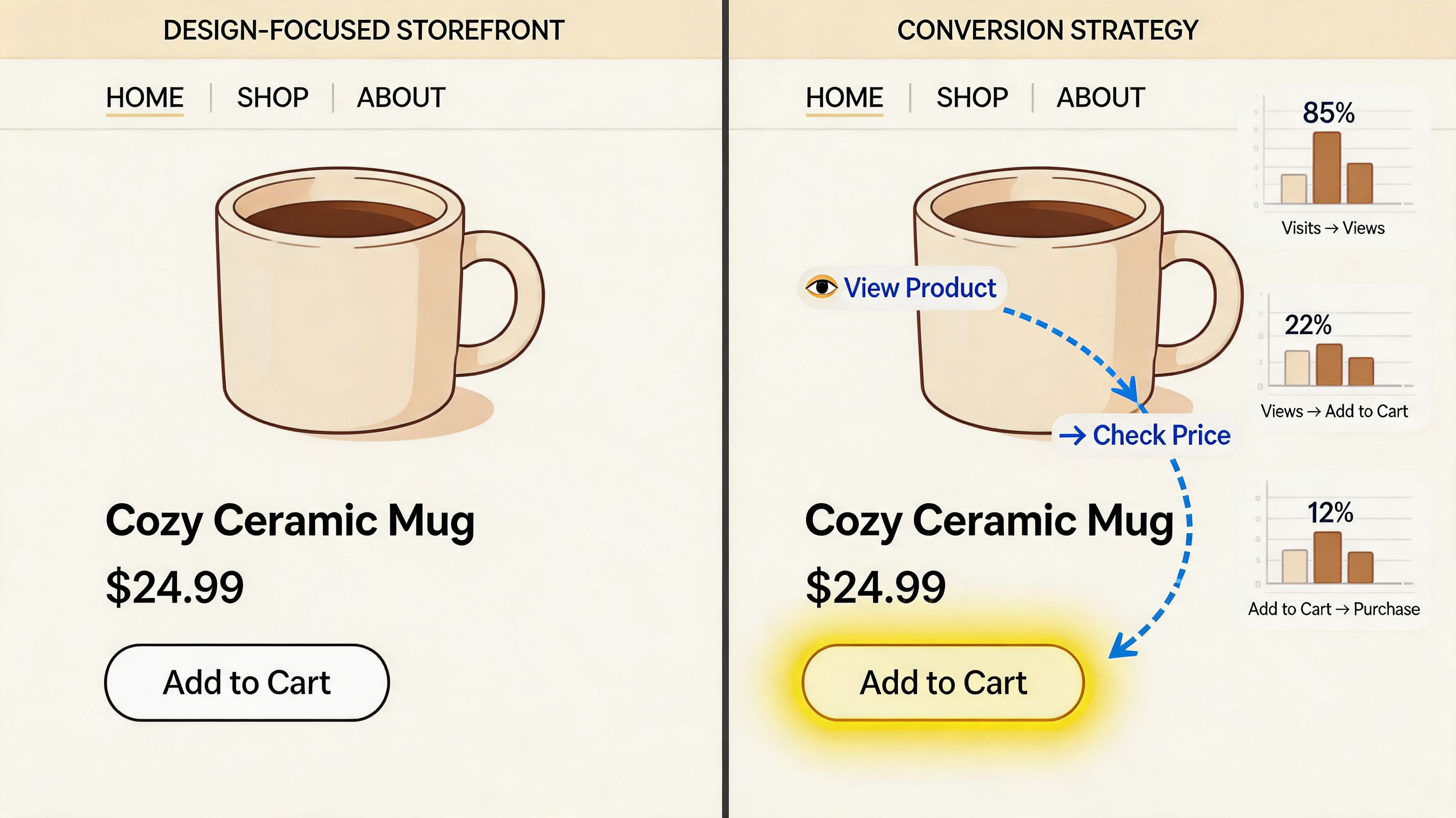
Good ecommerce design reduces decisions
Enterprise teams often ask for more content on product pages because they’re trying to solve genuine customer objections. The better move is usually to organise the page so the customer can process information without hunting for it.
That means:
- Clear variant logic: if size, colour, subscription frequency, or bundle configuration matters, make the selection path obvious.
- Delivery and returns visibility: don’t bury these in accordions if they influence confidence.
- Trust signals in the right place: reviews, guarantees, payment messaging, and stock cues need to support the buying moment, not decorate the page.
- Structured comparison content: when products require education, comparison tables often outperform long blocks of copy.
Designers sometimes worry that wireframes limit creativity. In ecommerce, they usually protect it. Wireframes stop the team from spending weeks polishing a layout that doesn’t resolve the key buying questions.
Prototype the moments that carry risk
Static page comps are useful, but they won’t expose the problems that matter most. Interactive prototypes do.
The most valuable prototype flows tend to be the ones where business logic and customer intent collide:
- bundle builders
- subscription selection
- product discovery across large catalogues
- mobile navigation for multi-category stores
- account areas with reorder or self-service actions
- market-specific landing pages and promotional journeys
Those flows deserve hands-on testing before build. Not because every test needs a formal research programme, but because stakeholders can spot friction faster when they click through the journey themselves.
When a team argues about a design in Figma for too long, it usually means the real issue is behavioural. Put the journey in a prototype and test the task, not the opinion.
Mobile-first means decision-first
Shopify Plus stores often get mobile traffic in volume, but many enterprise builds still treat mobile as a compressed desktop layout. That’s a mistake. Mobile customers don’t browse the same way. They scan, compare, exit, return, and buy in shorter bursts.
So the mobile design has to prioritise speed of understanding:
- concise product messaging above the fold
- sticky purchase actions where appropriate
- thumb-friendly filters and sorting
- accessible bundle or upsell UI
- simpler account and subscription management paths
If you’re exploring how custom interface patterns can support that kind of thinking, Grumspot’s write-up on custom Shopify storefront design is a useful companion resource.
What doesn’t work
A few patterns regularly look impressive in review meetings and perform poorly in production:
| Design choice | Why it fails |
|---|---|
| Oversized hero sections | They delay product discovery and push core value messaging too far down the page |
| Hidden product details | Customers need answers before they commit, especially on mobile |
| App-stacked UI widgets | The page becomes visually noisy and technically heavier |
| Inconsistent templates | Merchandising teams lose control and content quality drifts |
| Novel navigation patterns | Customers already know how ecommerce should behave |
Good Shopify Plus design feels easy because the hard decisions were made earlier.
Development Migration and SEO Preservation
Development is where planning gets tested. Every assumption about data quality, content structure, app dependence, and stakeholder process turns concrete. This is also where a Shopify Plus store build can either become easier to maintain than the old platform, or turn into another custom estate your team has to tiptoe around.
The right build approach aims for controlled flexibility. Marketing should be able to create and update content safely. Merchandising should be able to launch campaigns without developer bottlenecks. Engineering should be able to extend the store without fighting brittle templates.

Build on structures your team can actually use
Shopify Online Store 2.0 changed the shape of theme development for the better. Sections, templates, app blocks, and metafield-driven content make it possible to create flexible storefronts without hard-coding every variation into the theme.
That doesn’t mean “make everything editable”. Over-flexibility causes its own problems. Teams end up with too many section choices, weak consistency, and pages that drift away from tested layouts.
A better pattern is to build a controlled library:
- campaign landing page templates with approved section combinations
- product page blocks for reviews, delivery messaging, and support content
- collection layouts for different merchandising intents
- article and educational content templates that support market-specific requirements
- reusable metafields for specs, badges, compatibility, ingredients, or care information
Migration is more than moving records
Data migration usually sounds straightforward until you inspect the source platform. Product handles are inconsistent. Customer tags are unreliable. Variant images aren’t attached cleanly. Historical redirects live in old plugins. Blogs contain years of campaign pages that no one has audited.
That’s why migration work has to split into two streams: data transfer and data sanitation.
A practical migration sequence usually includes:
Catalogue audit
Identify duplicate SKUs, poor handle structures, broken image references, outdated products, and missing metafield candidates.Customer data review
Check account quality, tags, segmentation logic, newsletter flags, and any edge cases tied to subscriptions or B2B access.Order history decisions
Decide what must be visible in Shopify, what belongs in external systems, and what support teams need easy access to post-launch.Content inventory
Review blogs, landing pages, evergreen guides, and archived campaigns. Don’t migrate everything by default.Dry-run imports
Test imports into staging, validate image mapping, review collections, and confirm front-end rendering before final migration windows.
Migration rule: if a piece of data doesn’t have a clear purpose in the new store, don’t move it until someone justifies it.
SEO is usually lost in the boring places
The most common post-launch SEO failure isn’t dramatic. It’s administrative. Teams map the obvious URLs and miss the long tail. Old blog posts. Discontinued products with backlinks. Campaign landing pages. Collection URLs that changed structure years ago but still receive traffic.
According to 20North Marketing’s Shopify Plus migration guide, the most frequent SEO failure during Shopify Plus migrations is incomplete redirect mapping, and that strategy needs to include every URL, including discontinued products and old blog posts. That matches what technical teams see in real migrations. Search authority is often damaged by omission, not by a single major error.
A strong redirect process includes:
- URL inventory from multiple sources: old sitemap data, analytics landing pages, Search Console exports, crawl tools, and CMS exports
- Intent-based destination mapping: not every retired page should go to the homepage
- Canonical review: especially where collection, filtered, or duplicate content paths changed
- Metadata parity checks: titles, descriptions, structured data, and indexation rules need review before launch
- Post-launch monitoring: 404s, soft redirects, and unexpected crawler behaviour need active follow-up
For a deeper operational checklist, this guide to Shopify migration SEO preservation covers the details that often get missed between staging and launch.
Integration work needs restraint
The temptation in Plus builds is to connect everything at once. ERP, CRM, loyalty, subscriptions, reviews, search, personalisation, customer service platforms, returns, and finance tooling. Sometimes that’s necessary. Often it isn’t.
A better principle is sequence. Connect the systems that directly affect order flow, pricing, stock, customer identity, and reporting first. Leave non-essential experience layers until the store is stable.
Here’s a useful walkthrough before that phase gets too abstract:
Common development mistakes
A lot of avoidable problems come from trying to save time in the wrong place:
- Theme-first thinking: building page visuals before product and content models are defined
- App accumulation: adding tools to solve isolated needs without checking overlap or performance impact
- Weak staging discipline: stakeholders test on incomplete data and approve the wrong things
- No rollback plan: launch becomes an irreversible event instead of a controlled deployment
- Skipping admin UX: internal users inherit a store that technically works but is frustrating to manage
A good migration is almost invisible to customers and search engines. Internally, it should feel like the opposite. Cleaner data, clearer workflows, and fewer hidden dependencies.
Rigorous Testing and a Flawless Launch Sequence
Development finishing doesn’t mean the store is ready. It means the store is ready to be challenged. That distinction matters because enterprise storefronts fail in combinations, not in isolation. A discount behaves differently with subscriptions. A shipping rule clashes with a market setting. A product page works on one device but breaks when a content block is added by marketing.
Testing has to reflect real business usage, not just developer confidence.
QA should mirror production behaviour
The basic checks still matter. Browsers, devices, responsive layouts, navigation, forms, checkout paths, account actions, collection filtering, search, blog rendering, app interactions. But enterprise QA needs another layer. It has to test workflows that involve staff and systems, not just pages.
That usually means validating:
- Promotions: discount combinations, gift logic, exclusions, and messaging
- Operational flows: order routing, fulfilment statuses, cancellations, returns, and customer service handoff
- Market behaviour: pricing display, currency, tax calculation, shipping logic, and content visibility
- Edge cases: out-of-stock states, preorder messaging, invalid coupon behaviour, and partial subscriptions
- Admin controls: who can safely edit what without breaking templates or campaign pages

Performance testing is commercial testing
A fast store is easier to use, but the more important point is that speed directly affects revenue. For Shopify Plus stores, 53% of mobile users will abandon a site if it takes longer than 3 seconds to load, according to Velstar’s guidance on building and scaling a Shopify Plus store. That’s why performance QA belongs in the launch plan, not as an afterthought.
The usual causes of slowdown are familiar:
- oversized media
- too many third-party scripts
- unnecessary app blocks
- inefficient JavaScript loading
- redirects and broken paths
- components that render far more than the user needs
Performance work often looks unglamorous. Compressing assets, removing scripts, trimming apps, rethinking section behaviour. But those decisions shape the customer experience more than a lot of visual polish does.
Load speed problems rarely come from one dramatic mistake. They usually come from small additions that nobody challenged during build.
A launch sequence should be boring
Good launches feel uneventful. That’s the standard. If launch day depends on heroics, the process wasn’t ready.
A dependable launch runbook normally covers three stages.
Before launch
- Freeze content changes: stop uncontrolled edits close to release
- Confirm redirect file and metadata checks: these need final sign-off
- Validate integrations in a production-like environment: especially order, stock, and notification flows
- Review payment and shipping configurations: including market-specific logic
- Prepare support teams: customer service should know what changed and where issues might surface
During launch
A smaller release group should manage the switch. Too many stakeholders in the room slows decisions.
Monitor the essentials first:
| Launch checkpoint | What to verify |
|---|---|
| Homepage and key landing pages | Load correctly and reflect the approved content |
| Product and collection paths | Resolve without errors and preserve expected structure |
| Basket and checkout | Complete cleanly across key devices and payment methods |
| Order creation | Reaches the right downstream systems |
| Customer account actions | Login, reset, order visibility, subscription access if applicable |
After launch
The first days matter more than teams expect. Not because the build is likely to fail, but because real user behaviour always exposes things staging couldn’t fully simulate.
Prioritise:
- 404 and crawl error review
- Checkout monitoring
- Order and fulfilment reconciliation
- Customer support feedback patterns
- Content editing sanity checks for internal teams
Post-launch support is where mature builds separate from rushed ones. The work usually shifts from feature delivery to observation, triage, and refinement. That may mean fixing template edge cases, adjusting merchandising blocks, tuning scripts, or tightening admin permissions so teams can work safely.
Scaling Beyond the Build With Shopify Plus
A Shopify Plus store build is valuable because it creates room to grow without rebuilding the entire operation every time the business changes. That’s the payoff. Once the foundation is sound, Shopify Plus becomes less about launch and more about optimization.
The platform is built for that kind of scale. Shopify Plus can handle up to 10,000 checkouts per minute, and merchants on the platform report an average year-over-year growth of 126%, according to Uptek’s Shopify Plus statistics page. The number alone isn’t the point. The point is that Plus is designed for brands that need headroom.
Where growth usually comes from after launch
Post-launch scaling rarely comes from one dramatic redesign. It usually comes from compounding operational and conversion improvements.
Three areas matter most.
Checkout and automation
The checkout is where enterprise teams start to feel the difference between a standard setup and a Plus build with foresight. That can mean custom logic for promotions, better shipping and tax messaging, or cleaner customer segmentation in the buying journey.
Automation matters just as much. Shopify Flow can reduce repetitive admin tasks and enforce business rules that otherwise rely on staff remembering manual steps. That’s useful in merchandising, customer tagging, fraud workflows, and internal alerts. None of it looks exciting in a homepage review. All of it helps a scaling team move faster.
International expansion with discipline
International selling on Shopify Plus can be elegant or chaotic. It depends on how the build was structured. Market-specific pricing, content visibility, domains, and operational rules need governance. Without it, localisation turns into duplication and admin debt.
For UK merchants, this becomes especially important once tax treatment, regional messaging, and catalogue differences enter the picture. The build should make expansion easier, not create another layer of maintenance each time a new market is added.
A lot of early-stage thinking on promotions, merchandising, and customer retention still applies at scale. If your team wants a grounded refresher on those fundamentals, Cobra DTF’s guide to ecommerce strategies for small businesses is worth reading because the underlying commercial logic carries upward even when the stack gets more complex.
Continuous optimisation beats periodic overhauls
Many brands treat redesigns as rescue projects because the original build didn’t leave room for iteration. That’s avoidable. A strong Plus setup should support an ongoing CRO rhythm. New landing pages, refined PDP modules, adjusted collection logic, better upsells, cleaner account UX, and improved content architecture should be deployable without major replatforming effort.
That’s also why Plus features should be judged by business relevance, not novelty. If a capability doesn’t reduce friction, increase control, or simplify operations, it’s just additional surface area.
The best Shopify Plus builds age well because they were designed for change, not for a single launch moment.
If you’re weighing that longer-term case, Grumspot’s overview of the benefits of Shopify Plus is a useful summary of where the platform creates practical upside after the initial build is complete.
Shopify Plus Build FAQs
Below are the questions that come up most often when teams are deciding whether to move forward with a Shopify Plus store build.
| Question | Answer |
|---|---|
| How long does a Shopify Plus store build take? | It depends on complexity, not just store size. A straightforward build with a clear content model and limited integrations moves much faster than a migration with ERP sync, subscriptions, regional logic, and legacy data cleanup. The biggest timeline risks usually come from unclear requirements, delayed stakeholder feedback, and underestimating migration prep. |
| What affects the cost most? | Integration depth, custom functionality, migration complexity, content volume, and QA scope. A store with bespoke subscription flows, market-specific architecture, and significant backend dependencies will cost more than a clean rebuild with standard Shopify patterns. Ongoing support should also be planned, because launch is rarely the final development moment. |
| Should we choose a freelancer or an agency? | That depends on project risk. A strong freelancer can work well for contained builds with limited integration and a clear brief. A full Shopify Plus implementation usually benefits from an agency setup because design, development, QA, migration, and SEO preservation need to move together. If one person is handling all of that, bottlenecks appear quickly. |
| Is Shopify Plus always better than standard Shopify? | No. It’s better when the business actually needs enterprise capability. If your store doesn’t require deeper checkout control, more complex operations, or international setup beyond simpler configurations, standard Shopify may still be the right fit. Plus makes sense when operational complexity and growth plans justify the build. |
| Do we need to migrate every piece of old data? | Usually not. Migrating everything by default creates clutter and risk. Product data, customer records, order visibility requirements, and SEO-relevant content should be reviewed carefully. Old campaign pages, duplicate assets, and redundant records often belong in archive processes rather than the new storefront. |
| What’s the biggest mistake merchants make before launch? | Treating launch as the finish line. The best teams budget time for post-launch monitoring, issue triage, and early optimisation. Real users always expose something that staging didn’t. Stores that have support in place after launch stabilise faster and improve sooner. |
| How involved does our internal team need to be? | More involved than most merchants expect, especially during discovery, content sign-off, UAT, and launch planning. Your team holds the business rules that developers can’t infer. Fast feedback, clear ownership, and one decision-maker per workstream make the project smoother. |
| What should we prepare before speaking to a build partner? | Bring your current pain points, system list, growth plans, market requirements, and any known migration concerns. It also helps to identify which areas are non-negotiable, such as SEO preservation, account experience, subscriptions, or ERP behaviour. The clearer the operating reality, the better the build plan will be. |
If you’re planning a Shopify Plus rebuild, migration, or international rollout and want a practical view of what the project should involve, Grumspot can help assess the architecture, migration risks, and build scope before development begins.
Let's build something together
If you like what you saw, let's jump on a quick call and discuss your project

Related posts
Check out some similar posts.

- headless commerce agency
Discover what a headless commerce agency does, when to choose headless over Shopify Plus themes, typ...
Read more
- ecommerce replatforming agency
Choosing an ecommerce replatforming agency? Learn what they do, replatforming signs, costs, timeline...
Read more
- data migration
Learn how to validate data after migration with proven reconciliation methods, sample queries, autom...
Read more
- best web design agency london
Searching for the best web design agency London has? Our 2026 guide reviews 7 top agencies for ecomm...
Read more