Custom Shopify Storefront Design: A Complete 2026 Guide
- custom Shopify storefront design
- Shopify 2.0 theme
- headless commerce
- Shopify Plus agency
- ecommerce design UK
Launched
April, 2026

You’re usually in one of two situations when custom Shopify storefront design becomes urgent.
Your current theme looked fine when the catalogue was smaller, the team was smaller, and marketing was simpler. Now every campaign needs a developer, page speed is drifting, apps are fighting each other, and the storefront no longer reflects how the business sells.
Or you’re planning a migration, a rebrand, or a Shopify Plus move, and you already know the default route won’t hold up. You need a storefront that supports growth, not one that creates another rebuild in a year.
That’s where custom work earns its place. Not because bespoke design is fashionable, but because scaling brands hit limits that pre-built themes weren’t designed to solve. Those limits usually show up in three places first: conversion, operations, and maintainability.
A serious custom build isn’t just a prettier homepage. It’s a commercial system. The front end has to convert. The back end has to connect to ERP, CRM, subscriptions, fulfilment, and reporting. The codebase has to stay clean enough that your team can keep shipping without breaking core revenue paths.
The Strategic Blueprint Before You Build
The fastest way to waste money on a custom Shopify storefront is to start with design files.
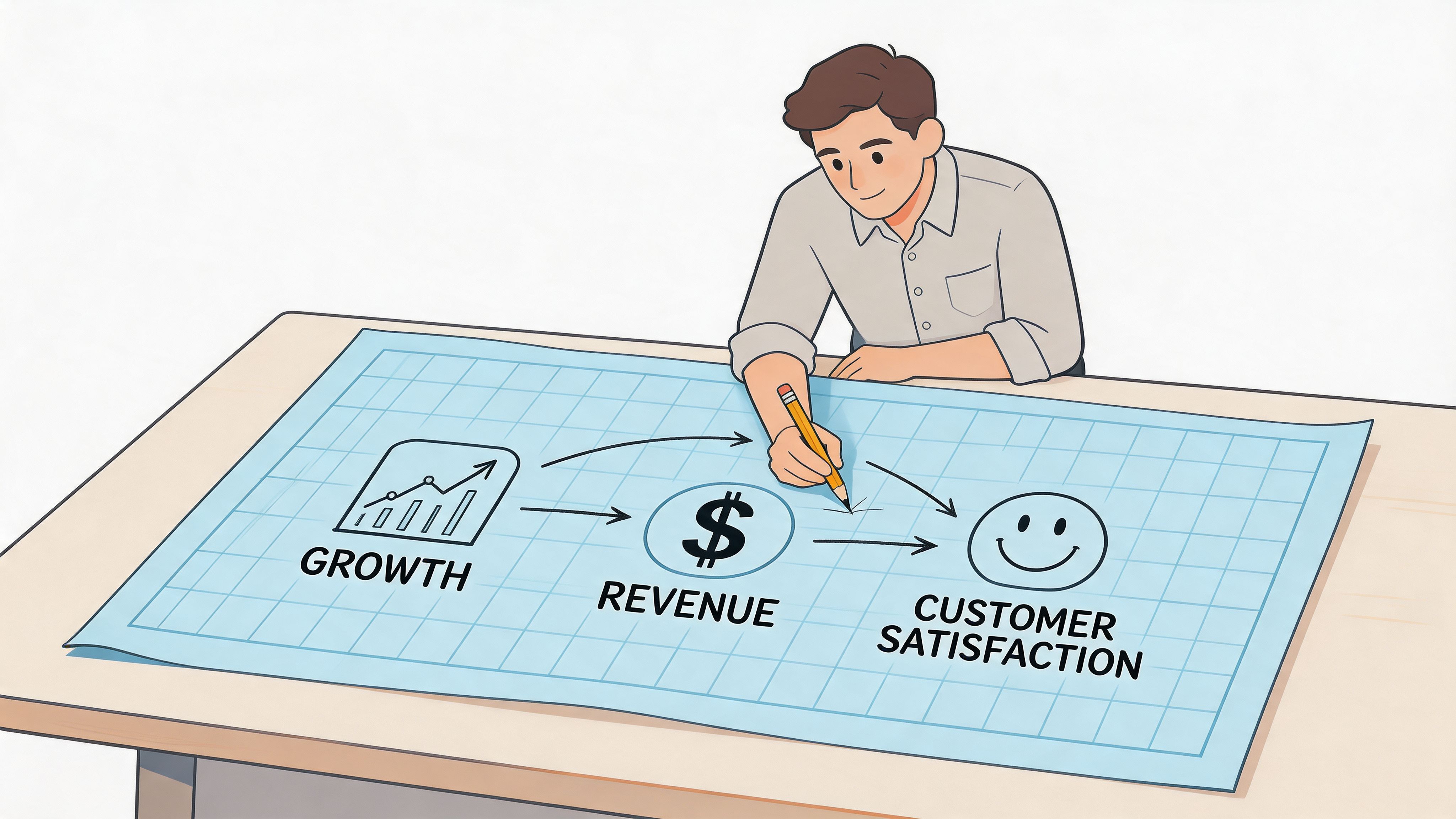
Brands often assume the problem is visual. Usually it isn’t. The underlying issue is that the existing storefront can’t support the customer journey, merchandising model, content workflow, or internal operations the business needs now. A custom build should solve those constraints. If it doesn’t, you’ve bought expensive decoration.
In the UK, custom builds are still a relatively small share of Shopify implementations, but adoption is rising where the commercial stakes are higher. Usage among the top 1 million Shopify sites increased from 1.35% in 2020 to 1.53% in 2024, and 47% of stores earning over $1M annually opt for bespoke builds, according to Uptek’s analysis of Shopify theme usage.
Why pre-built themes fail scaling brands
Pre-built themes are made for averages. They need to work for many merchants, product types, and layouts. That makes them convenient, but it also makes them generic.
The moment a brand needs tighter control over merchandising logic, richer storytelling, customized mobile interactions, or deeper integration with business systems, the compromises start piling up. Teams bolt on apps, add snippets, hide broken UX behind banners, and eventually inherit a storefront nobody fully understands.
Common failure points show up quickly:
- Marketing control gets bottlenecked. The team can’t launch landing pages, campaign-specific PDP variants, or collection storytelling without engineering help.
- Design consistency breaks. New apps introduce clashing UI patterns, spacing rules, and scripts that slow the store down.
- Operations stay disconnected. Inventory, bundles, subscriptions, trade pricing, and fulfilment rules live in separate tools with no coherent front-end logic.
- Technical debt accumulates. Nobody planned the system, so every “small fix” becomes another exception layered onto old code.
Practical rule: If your storefront needs regular workarounds to support normal trading activity, the problem isn’t content discipline. It’s architecture.
Define the commercial job of the storefront
Before a single line of code is written, we map what the storefront must do for the business. That’s different from asking what pages you want.
A useful blueprint defines the commercial model first. Are you selling a narrow hero range or a broad catalogue? Does purchase intent begin on collection pages, landing pages, search, bundles, or subscriptions? Are you trying to increase average order value, improve mobile conversion, reduce support friction, or make international merchandising easier to manage?
That work usually produces a set of decisions, not just ideas:
| Decision area | What to lock down before design |
|---|---|
| Business goals | Revenue priorities, merchandising priorities, operational pain points |
| User journeys | First visit, repeat purchase, bundle path, subscription path, wholesale or trade logic |
| Content ownership | What marketing can edit, what merchandising controls, what still needs developer oversight |
| System dependencies | ERP, CRM, subscriptions, loyalty, search, reviews, fulfilment, custom apps |
| Success criteria | What improved performance looks like after launch |
Scope around constraints, not wish lists
A proper scope names the hard parts early. That includes account flows, subscriptions, product rules, search behaviour, region-specific pricing, returns information, and integration dependencies.
It also needs to reflect the business you run. If you have physical retail, pop-ups, or stockists, the storefront can’t behave like an isolated ecommerce channel. Your pricing, inventory visibility, campaign messaging, and customer experience need to line up across channels. That omnichannel gap is where many projects go wrong. Teams design a polished digital flagship while store teams continue operating on separate logic.
A stronger blueprint aligns digital and physical touchpoints. That can include matching collection pages to in-store campaigns, using QR-driven merchandising, exposing store-specific collection logic, or structuring content so promotional timing stays consistent across channels.
Set KPIs that belong to this project
The wrong KPI turns a custom build into theatre.
If the main issue is page speed, then a visual redesign without performance targets misses the point. If merchandising is the bottleneck, then success depends on how quickly internal teams can launch and manage content. If the core problem is a poor mobile buying flow, then the build has to be judged on that journey, not on how polished the desktop homepage looks.
A few grounded questions usually sharpen the brief:
- What are customers struggling to do today?
- What can’t your team change without developers?
- Which apps or manual processes are covering for structural issues?
- What has to become easier after launch for the project to be worth it?
A custom Shopify storefront design works when the strategy is precise enough to remove ambiguity. That blueprint is what protects budget, controls scope, and keeps the build tied to revenue.
Choosing Your Architectural Path Headless vs Traditional
A lot of custom storefront projects go off course at the architecture stage.
A merchant approves a beautiful design direction, the team starts building, and only then realises the chosen stack cannot support the experience, the content workflow, or the internal operating model. Fixing that later is expensive. In some cases, it means rebuilding templates. In others, it means rebuilding the whole front end.
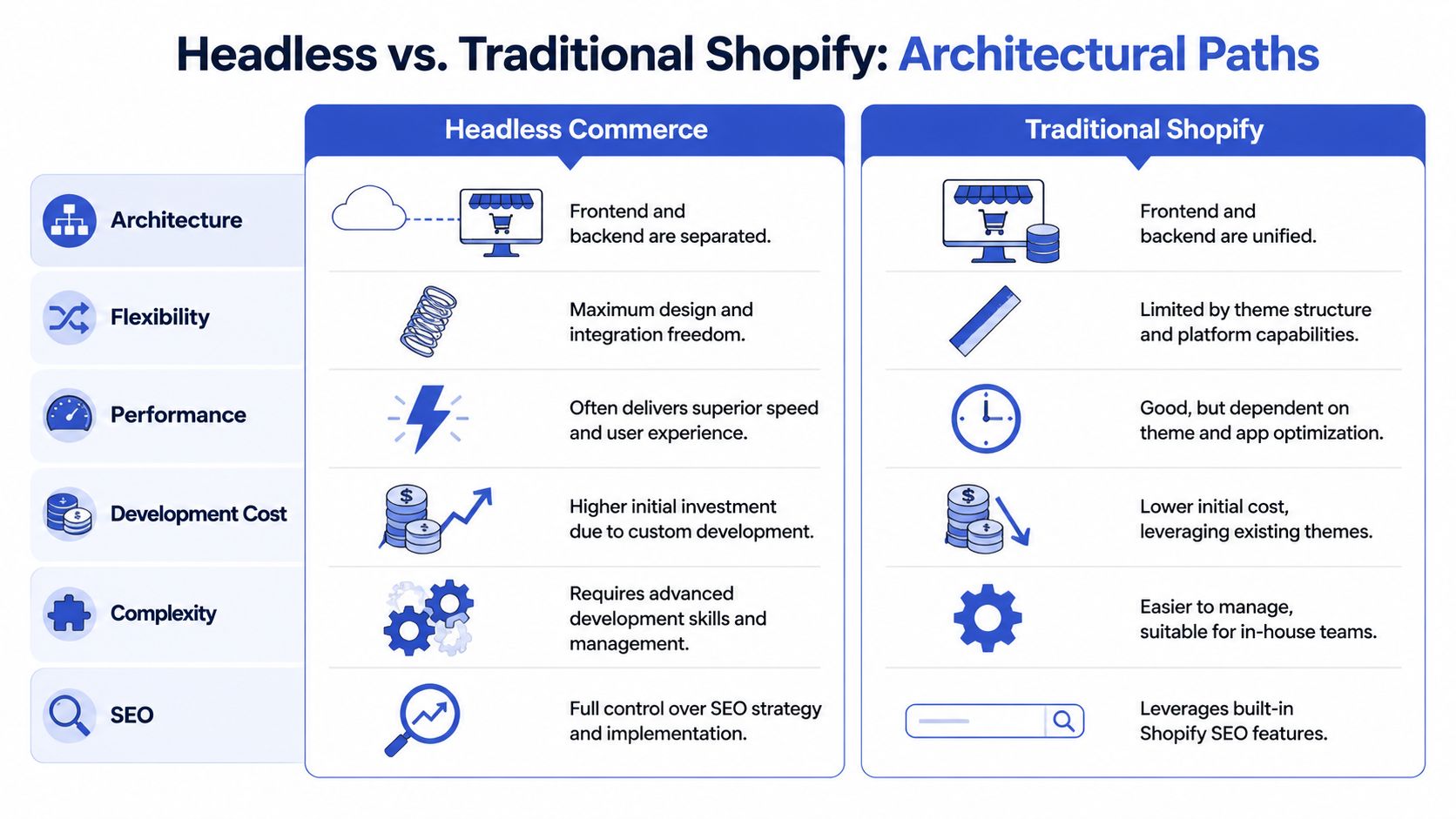
For a custom Shopify storefront design, the architectural choice usually comes down to two options. One is a custom Shopify 2.0 theme built inside Shopify’s native storefront stack. The other is headless commerce, where Shopify handles commerce operations but the customer-facing front end runs as a separate application, often in Hydrogen or another framework.
The wrong way to make this decision is to ask which option is more advanced. The right question is simpler. What does the business need the storefront to do, and what can the team realistically support after launch?
The practical difference
A traditional Shopify build stays inside Shopify’s rendering model. It uses Liquid, Online Store 2.0 sections, templates, metaobjects, and native theme settings. That still allows a high level of customisation, but it works within the platform’s natural boundaries.
A headless build separates presentation from commerce. Shopify still manages products, cart logic, checkout, and core commerce data, but the storefront becomes a custom application with its own codebase, deployment process, caching strategy, and performance rules.
That trade-off matters more than the label.
Traditional Shopify usually suits brands that need speed to market, lower operational complexity, strong merchant usability, and a storefront that internal teams can manage without routing every change through developers. Headless suits brands with front-end requirements that are difficult to deliver cleanly in Liquid, or brands whose wider tech stack already depends on a more composable setup.
Shopify 2.0 vs Headless Commerce A Comparison
| Factor | Custom Shopify 2.0 Theme | Headless Commerce (e.g., Hydrogen) |
|---|---|---|
| Build approach | Uses Shopify’s native theme system | Uses a separate front end connected to Shopify |
| Content editing | Usually easier for in-house teams | Often needs more developer involvement unless content modelling is well planned |
| Performance control | Strong when code and apps are disciplined | Greater control over performance and rendering strategy |
| Design flexibility | High, within platform constraints | Very high, with fewer front-end constraints |
| Integration complexity | Lower for standard commerce flows | Higher, especially when multiple systems drive the experience |
| Time to launch | Usually faster | Usually longer |
| Long-term maintenance | Simpler for many merchants | More demanding across hosting, deployment, monitoring, and releases |
| Best fit | Most brands with strong content and commerce needs | Brands needing advanced UX, custom applications, or tightly engineered performance |
When traditional Shopify is the better choice
For a large share of merchants, a custom Shopify 2.0 theme is the better commercial decision.
It keeps the storefront closer to Shopify’s strengths. Merchandisers can manage sections and templates. Marketing teams can publish campaigns faster. Developers still shape the system, but they do not become a bottleneck for routine content changes.
We usually recommend this path when the brief calls for:
- Flexible content management through sections, templates, and metaobject-driven content
- Lower operational overhead across deployment, QA, and day-to-day maintenance
- Faster delivery because the commercial window matters
- Better merchant usability after launch, especially for lean internal teams
There is also less hidden technical debt. A theme build can still become messy if apps pile up or the codebase is poorly governed, but the maintenance model is usually easier to control. That matters during migration, where many brands are already dealing with redirects, content cleanup, app replacement, and system handoffs.
When headless earns the extra complexity
Headless is powerful, but not always practical.
It starts making sense when the storefront needs behaviour that is awkward, fragile, or inefficient to build inside Shopify’s theme layer. That can include highly dynamic product discovery, rich app-like interactions, custom account experiences, tightly controlled rendering strategies, or complex content and commerce experiences that pull from several systems at once.
The upside is real. The cost is real too.
A headless build gives teams more freedom over the front end, but it also introduces more engineering responsibility. Hosting, deployments, observability, cache invalidation, release discipline, API limits, and failover planning become part of store operations. If the business does not have the internal capability to support that, or an agency partner retained to do it properly, the architecture can create friction instead of growth.
For merchants weighing that route, this guide to headless commerce solutions is a useful starting point for comparing technical and operational trade-offs.
The hidden cost is usually governance
Architecture decisions are rarely just about design freedom. They affect who can change the store, how fast changes go live, how incidents get resolved, and how easily the platform can absorb future requirements.
Traditional Shopify lets more of the business work in familiar tools. Headless shifts more responsibility into engineering and systems design. Neither model is superior on its own. The better model is the one that fits the actual operating reality of the business.
A simple filter helps:
- Choose traditional Shopify if the storefront needs to be custom, commercially effective, and manageable by non-technical teams.
- Choose headless if the customer experience requirements clearly justify a separate application layer, and the business is ready to support the extra engineering load long term.
The strongest architecture is the one that keeps revenue moving without creating avoidable technical debt six months after launch.
The Custom Design and Development Workflow
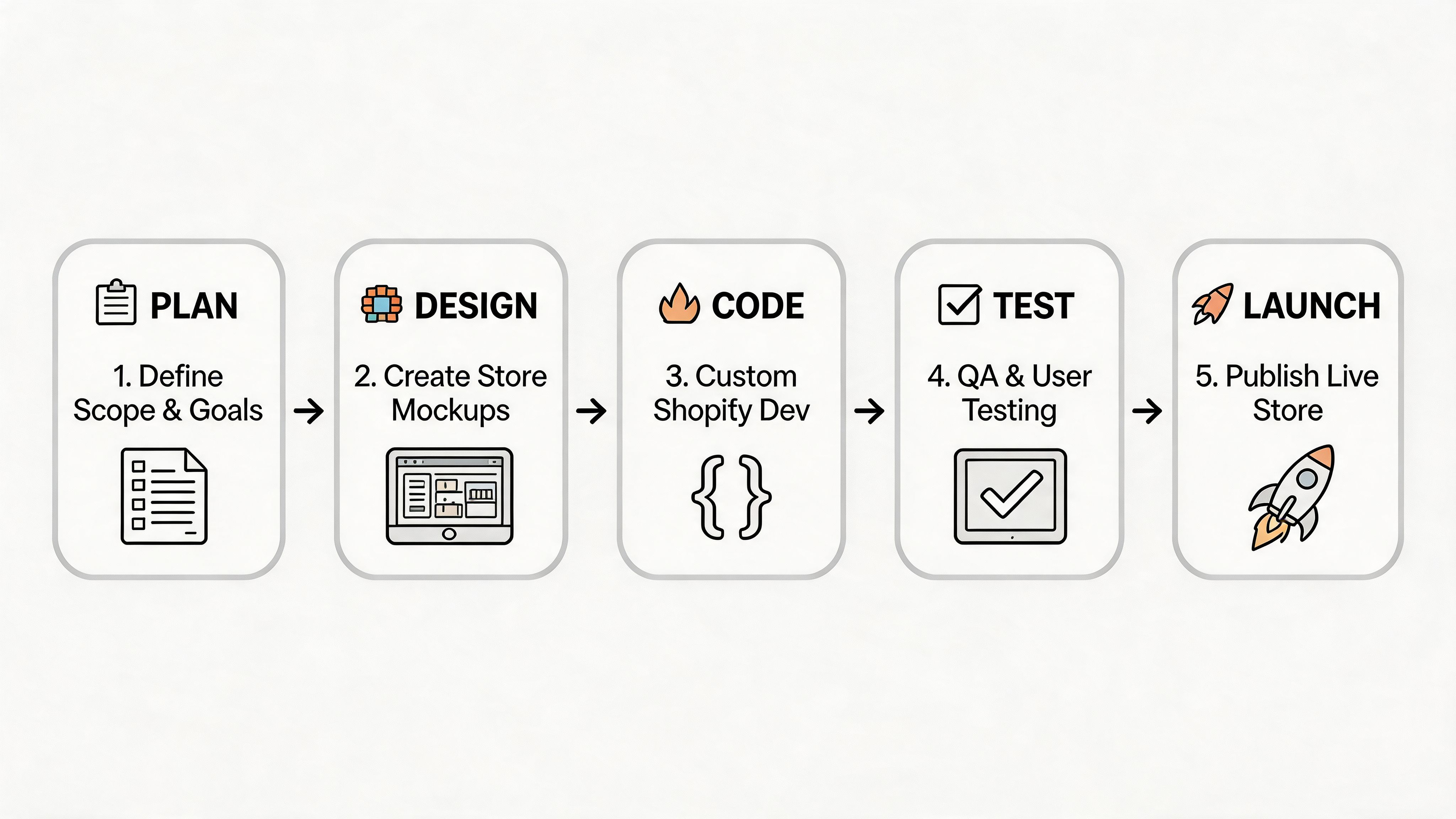
A custom storefront project usually goes off course long before anyone writes bad code. It starts when the team approves polished screens before agreeing on how the store should work. Then development becomes a running negotiation between design, merchandising, and operations. Timelines slip, logic gets patched in late, and the finished store carries unnecessary complexity from day one.
A stronger workflow removes ambiguity early and makes trade-offs visible while they are still cheap to fix.
Start with flow, not fidelity
The first real milestone is a clear model of the buying journey.
That means defining collection behaviour, filtering, product discovery, variant selection, cart logic, bundle flows, account paths, and post-purchase touchpoints before visual design gets too far ahead. We usually begin with low-fidelity wireframes because they expose bad assumptions quickly. Merchants stop debating style and start answering the questions that affect conversion and build cost.
A healthy workflow at this stage includes:
- User journey mapping for key conversion paths
- Wireframes for high-impact templates such as homepage, collection, PDP, cart, and landing pages
- Content modelling so sections, metaobjects, and reusable blocks have a clear job
- Prototype review to resolve interaction questions before development begins
Build principle: If the wireframes do not already improve the buying journey, visual design will not fix the project later.
Design for mobile as the primary storefront
For many Shopify brands, mobile is the main storefront, not the secondary one. That changes design decisions immediately. Navigation has to stay controlled, merchandising has to fit smaller screens, and key actions need to stay obvious without forcing users through stacked content blocks and oversized media.
The practical implications are straightforward:
- Navigation depth should stay disciplined, especially for larger catalogues
- Touch targets need comfortable spacing and clear hierarchy
- Media handling should prioritise compressed formats, lazy loading, and sensible crop rules
- Above-the-fold content has to communicate value quickly without pushing purchase actions too far down
For teams building on Shopify’s native stack, good Shopify 2.0 theme development usually means using sections and metaobjects properly instead of hardcoding one-off layouts that marketing cannot maintain after launch.
Develop reusable systems, not one-off pages
The strongest custom storefronts are assembled as systems. A homepage hero, collection intro, comparison table, product education block, trust module, and testimonial rail should be reusable where that serves the catalogue and campaign plan.
This has a direct commercial effect. Cleaner systems reduce development overhead, and they also let internal teams launch campaigns without asking developers to rebuild templates for every promotion. That is how a custom build stays fast after launch instead of turning into an expensive queue of small requests.
A practical development stack often includes:
| Workflow layer | What good practice looks like |
|---|---|
| Design system | Shared rules for spacing, typography, buttons, form states, and cards |
| Front-end components | Reusable sections and UI elements with predictable settings |
| Content structure | Metaobjects and schema designed around real merchandising needs |
| Performance discipline | Optimised images, restrained scripts, and careful app decisions |
| Accessibility | Keyboard support, semantic structure, contrast, labels, and alt text |
One of the most common problems in rebuild projects is inherited code. Teams keep too much of the old theme, add custom features on top, and call the result bespoke. In practice, they are carrying old assumptions, duplicate logic, and maintenance problems into a more expensive version of the same store.
A short demo can help anchor what this process looks like in practice:
Keep code maintainable from day one
Launch is only the first checkpoint. The ultimate test comes when the business needs a new landing page, a subscription flow, a product bundle, or a shipping rule change six months later.
That is why we push for clear naming, documented component behaviour, restrained app usage, and business logic that lives in the right place. In Liquid builds, forcing every requirement into templates creates brittle code fast. In headless builds, over-engineering the front end can make simple changes slow and risky. The right workflow keeps enough flexibility for growth without creating a codebase only the original developers can safely edit.
Operational details belong here too. Shipping content, delivery expectations, and policy pages are not just legal pages sitting on the edge of the build. They influence conversion, support volume, and customer trust. If customers need to understand our shipping policies, that path should be easy to find from product, cart, and checkout-adjacent content where it helps them decide.
Strong custom Shopify storefront design tends to share the same traits. It is modular, measurable, and built for the people who will run the store after the project team is gone.
Integrating Your Business-Critical Systems
A storefront becomes commercially useful when it stops acting like a standalone website.
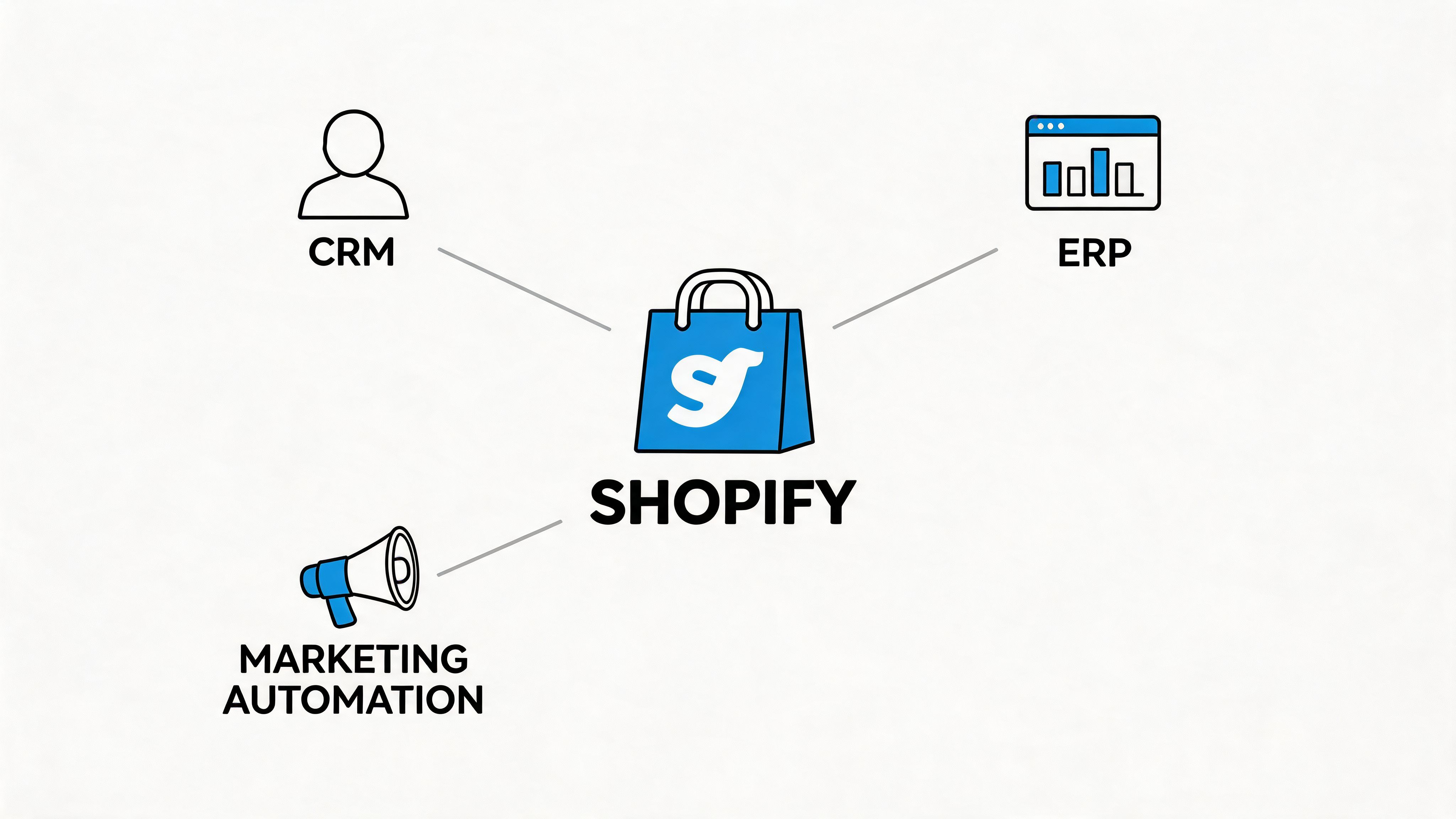
For growing brands, the primary complexity sits behind the interface. Orders need to reach fulfilment systems cleanly. Inventory has to stay accurate. Customer data should move into CRM and retention tools without manual exports. If those systems don’t connect properly, the front end ends up promising experiences the business can’t deliver.
ERP, CRM, and fulfilment are part of the storefront
Amateur builds commonly reveal their limitations: they focus on pages and ignore the systems that make those pages trustworthy.
An ERP integration affects more than stock sync. It can shape product availability messaging, bundle logic, backorder rules, and fulfilment expectations. A CRM integration affects segmentation, customer state, lifecycle campaigns, and the data available for personalisation. A 3PL or fulfilment integration affects delivery messaging, returns flows, and support volume.
When those links are weak, customers feel it quickly:
- Inventory confidence drops when availability is stale or inconsistent
- Promotions break when product or order logic isn’t reflected across systems
- Support tickets rise when shipping expectations aren’t clearly connected to fulfilment realities
- Marketing loses precision when customer data is fragmented
For merchants planning these connections, this guide on Shopify third-party integration services is a useful reference point for deciding whether middleware, native apps, or custom app development makes more sense.
Where off-the-shelf apps stop helping
Apps are useful until they start translating business rules badly.
That usually happens with subscription logic, trade accounts, custom pricing, complex bundles, region-specific fulfilment, or unusual operational workflows. At that point, a custom app or middleware layer often becomes the cleaner choice because it lets the storefront reflect how the business works.
A few integration decisions deserve extra care:
| System | What to verify early |
|---|---|
| ERP | Inventory ownership, SKU hygiene, order status mapping, fulfilment timing |
| CRM | Customer identifiers, consent handling, segmentation logic, event quality |
| Subscriptions | Cancellation flows, account UX, billing edge cases, product compatibility |
| 3PL and shipping | Cut-off times, shipping methods, tracking states, return handling |
| Search and merchandising | Collection rules, ranking logic, filters, data cleanliness |
A custom storefront can only be as reliable as the systems feeding it.
Shipping logic is a trust issue
Shipping information isn’t just operational detail. It affects conversion directly because customers judge reliability before they place an order.
That’s why shipping content should be structured, current, and consistent with actual fulfilment rules. If you want a practical example of how to present customer-facing delivery terms clearly, it’s worth reviewing how some merchants understand our shipping policies in public-facing documentation. Clear expectations reduce confusion before support has to step in.
The right integration approach makes the storefront more than a sales layer. It turns Shopify into an operating surface for the business. That’s the difference between a custom build that looks advanced and one that scales.
Testing Launching and Optimising for Growth
Launch day matters less than the quality of the weeks around it.
A custom Shopify storefront design can be beautifully built and still fail if testing is shallow, redirects are sloppy, tracking is incomplete, or teams rush migration decisions. The most expensive issues usually aren’t visual bugs. They’re hidden in data, SEO, analytics, edge-case checkout behaviour, or system dependencies that no one properly validated.
Test the store the way customers will use it
Basic QA isn’t enough for a serious launch. You need scenario-based testing.
That means checking the full buying journey across devices, browsers, payment methods, discount states, shipping combinations, account states, and app-dependent flows. Subscription products, bundles, dynamic filters, account pages, and promotional landing pages all need to be tested as real customer paths, not just as isolated templates.
A solid pre-launch checklist should cover:
- Functional QA for add-to-cart, checkout paths, account actions, search, filters, and forms
- Content QA for broken links, missing alt text, placeholder copy, incorrect merchandising, and legal content
- Tracking QA for analytics events, ad pixels, attribution logic, and conversion events
- Performance QA for template weight, script behaviour, and image handling on mobile connections
- SEO QA for redirects, canonicals, metadata, structured data, and indexation controls
Migrate carefully or inherit avoidable losses
Migration is where technical debt often surfaces.
Legacy collections may be badly structured. Product data might be inconsistent. Old redirect maps may be incomplete. Apps may have inserted scripts or templates no one remembers relying on. If you move too quickly, those issues don’t disappear. They just arrive in the new build wearing cleaner design.
Verified data from UK-focused Shopify Plus migration guidance notes that a rigorous methodology can yield meaningful commercial gains, with some agencies reporting 61% AOV increases. The same source highlights pre-launch SEO audits, server-side rendering for faster TTFB, and weekly CRO sprints that can result in an 18% uplift in session value, as described in this Shopify migration methodology summary.
Those numbers matter less as promises and more as proof that launch quality depends on process. Good migrations are methodical. They use redirect mapping, staged rollouts, feed validation, crawl checks, and rollback planning. They don’t assume the new build will fix upstream data problems automatically.
Launch is a controlled transfer of risk, not a handover ceremony.
Optimisation starts after stability
Once the store is stable, the work shifts from delivery to improvement.
Heatmaps, session recordings, search analysis, customer support themes, and A/B testing become useful. But optimisation only works if the storefront was built to support iteration. If every test needs template surgery, the team won’t run enough experiments to learn anything meaningful.
Post-launch growth usually comes from a handful of disciplined habits:
- Review customer recordings and search terms weekly
- Identify friction on collection, PDP, cart, and checkout-adjacent pages
- Prioritise tests tied to revenue paths, not aesthetic preferences
- Keep a changelog so wins and regressions are traceable
- Deal with technical debt early, before it calcifies
A custom build should make change easier after launch, not harder. That’s one of the clearest signs the project was planned and engineered properly.
When to Hire a Shopify Agency for Your Custom Build
A common scenario looks like this. The brand has a capable internal team, a redesign brief, and pressure to launch before peak season. Then the full scope appears: ERP data is inconsistent, subscriptions need custom handling, search and filtering logic is brittle, and nobody has made a final call on headless versus a Shopify theme. At that point, this is no longer a design project. It is an architecture and delivery problem with revenue risk attached.
Some brands should build in-house. That works when the team already has experienced Shopify developers, strong UX ownership, disciplined QA, and enough spare capacity to handle integrations, deployment, and post-launch support without disrupting day-to-day trading.
Many teams do not have that margin.
The decision to hire an agency depends on complexity, internal bandwidth, and the cost of getting key technical decisions wrong. We usually advise outside support when the build includes platform migration, multi-system integration, international storefront requirements, Shopify Plus replatforming, or a front end that needs custom application behaviour. Those are the projects where technical debt gets baked in early if nobody is governing architecture properly.
Performance and conversion targets raise the stakes further. Analysts at ecommercetrix found that faster Shopify stores and stronger conversion benchmarks correlate with materially better commercial outcomes, based on their Shopify statistics roundup. Reaching that standard usually depends on implementation quality, front-end discipline, and integration choices. It is rarely solved by visual design alone.
A practical filter looks like this:
- Keep it in-house if the scope is contained, the architecture is clear, and your team can own strategy, design, development, QA, and iteration after launch.
- Hire an agency if the project includes migration risk, custom system logic, unresolved architectural choices, or a launch window the business cannot afford to miss.
- Use a hybrid model if your internal team should keep content and merchandising ownership, but needs senior help on solution design, integrations, code quality, or release management.
Grumspot is one example of an agency working in that category, on bespoke storefronts, Shopify 2.0 migrations, and integration-heavy Shopify Plus builds.
A specialist team's value is judgment. Good agencies do more than add delivery capacity. They help prevent expensive mistakes in architecture, data flow, app selection, and migration planning before those mistakes become hard to unwind.
Frequently Asked Questions
Is custom Shopify storefront design only for Shopify Plus stores
No. Plenty of non-Plus brands benefit from a custom build.
The deciding factor is usually operational and commercial complexity, not plan tier. If your storefront needs stronger UX, cleaner content control, better performance, or integration work that a stock theme can’t support neatly, custom development can make sense before Plus enters the picture.
How do I choose between a custom theme and headless
Start with operational reality.
If your team needs a storefront that marketing and merchandising can manage inside Shopify with less developer support, a custom Shopify 2.0 theme is often the better fit. If the brand needs unusual front-end experiences, deeper application behaviour, or stricter performance engineering, headless may be worth the added complexity.
How long does a custom build take
Timeline depends on scope, dependencies, and how clean your current store data is.
A focused theme rebuild with clear requirements moves faster than a migration involving ERP, subscriptions, and historical technical debt. Most delays come from unclear content ownership, unresolved system requirements, and late changes to business logic.
Can we keep using apps in a custom storefront
Yes, but the app stack should become more intentional.
A custom build isn’t a reason to install more tools. It’s usually a chance to remove overlap, reduce front-end bloat, and decide which functions belong in native Shopify features, which belong in selected apps, and which need custom development.
What usually breaks projects
Three things do most of the damage. Weak scoping, ignored integrations, and poor migration discipline.
If teams don’t define who owns content, how systems connect, and what success looks like, the build drifts. That’s when budgets expand, timelines slip, and the final storefront solves fewer problems than it should.
If you’re weighing a custom Shopify storefront design and need a team that can handle strategy, UX, development, migrations, and integrations without turning the process into guesswork, Grumspot is worth contacting. They work on custom Shopify and Shopify Plus builds with a conversion-first approach, including Shopify 2.0 rebuilds, headless projects, CRO support, and integration-heavy storefronts.
Let's build something together
If you like what you saw, let's jump on a quick call and discuss your project

Related posts
Check out some similar posts.

- headless commerce agency
Discover what a headless commerce agency does, when to choose headless over Shopify Plus themes, typ...
Read more
- composable commerce platform
Learn what a composable commerce platform is, how it differs from monoliths, and how UK Shopify Plus...
Read more
- b2b ecommerce platform
Discover how a B2B ecommerce platform helps scaling brands streamline operations, boost sales, and g...
Read more
- best web design agency london
Searching for the best web design agency London has? Our 2026 guide reviews 7 top agencies for ecomm...
Read more