Mastering PCI Compliance Requirements: A 2026 Guide
- pci compliance
- ecommerce security
- shopify compliance
- data security
- pci dss
Launched
June, 2026
If you run a Shopify store, this probably sounds familiar. You chose a platform that handles a lot of the heavy lifting, added a payment gateway, launched products, and started focusing on fulfilment, ads, and customer service. Then someone asks whether you're PCI compliant, and suddenly a simple payment setup feels like a security audit.
Most merchants don't need a lecture on card security theory. They need to know what applies to their store, what Shopify already helps with, what still sits with them, and how to avoid turning compliance into an expensive side project. That's the practical view that matters.
PCI compliance requirements aren't there to punish small retailers. They exist because card payments create a shared trust model. Your customer enters payment details expecting a safe checkout. Your acquirer expects you to protect that transaction. Your platform and payment providers handle part of the job, but not all of it. The trick is to understand your real scope, keep it small, and build a process you can maintain.
What Is PCI Compliance and Why Does It Matter
PCI compliance means following the Payment Card Industry Data Security Standard, usually called PCI DSS. In business terms, it's the rulebook for any company that stores, processes, or transmits cardholder data. The framework is built around security controls for networks, systems, access, testing, logging, and policy management.
For merchants, the simplest way to think about it is this. If your business accepts card payments, you're responsible for how securely that payment environment is set up and managed. Even when much of the payment flow is outsourced, your store can still affect payment security.
What it means for an ecommerce merchant
PCI DSS is built around protecting card data and the systems that can affect it. Older guidance often made merchants think compliance was mostly an annual form. That's no longer a safe assumption. PCI DSS v4.0 became active in 2024, with stricter controls and more rigorous validation around authentication, logging, and internal vulnerability monitoring according to Secureframe's PCI DSS overview.
That shift matters because it changes the tone of compliance. It's less about proving you were secure once. It's more about showing that your controls keep working over time.
Practical rule: If your checkout works but your admin access, scripts, and change process are sloppy, you don't have a payment security programme. You have a payment page with weak surrounding controls.
For a Shopify merchant, this usually leads to the right next question. Not “How do I handle all of PCI myself?” but “How do I structure my store so less of PCI applies directly to me?” That starts with how your checkout and payment gateway integration are implemented.
Why this matters beyond passing a questionnaire
Compliance affects more than a form sent to your acquirer. It shapes how you choose apps, who gets admin access, how you manage changes, and whether your team stores payment information where it doesn't belong.
If you're still at the stage of setting up your operation, it helps to get the business foundations right early, including payments, access, and platform choices. This guide to setting up an ecommerce business is useful context because PCI problems often start with rushed setup decisions, not with advanced hacking.
A merchant-first view of PCI is simple:
- Protect trust: Customers expect checkout to be safe.
- Protect operations: Weak controls can trigger merchant account issues, rework, and avoidable stress.
- Protect growth: The bigger your store gets, the harder it is to fix messy payment architecture later.
PCI isn't just a security topic. It's part of running a competent online retail operation.
Decoding the 12 Core PCI DSS Requirements
A merchant usually meets PCI DSS when something has already gone wrong. A bank asks questions after a suspicious transaction pattern. A payment partner sends an annual validation notice. An app or agency requests access to systems nobody has reviewed in months. At that point, the 12 requirements stop looking theoretical.
PCI DSS v4.0 still rests on the same 12 core requirements, but the expectation is sharper now. Merchants need to show that controls are being maintained, reviewed, and assigned to real people. For Shopify stores, the practical takeaway is simple. Shopify can remove a large part of the card-data burden from your environment, but it does not cover every admin account, app, laptop, policy, or workflow around the sale.
Here is the framework in merchant terms.
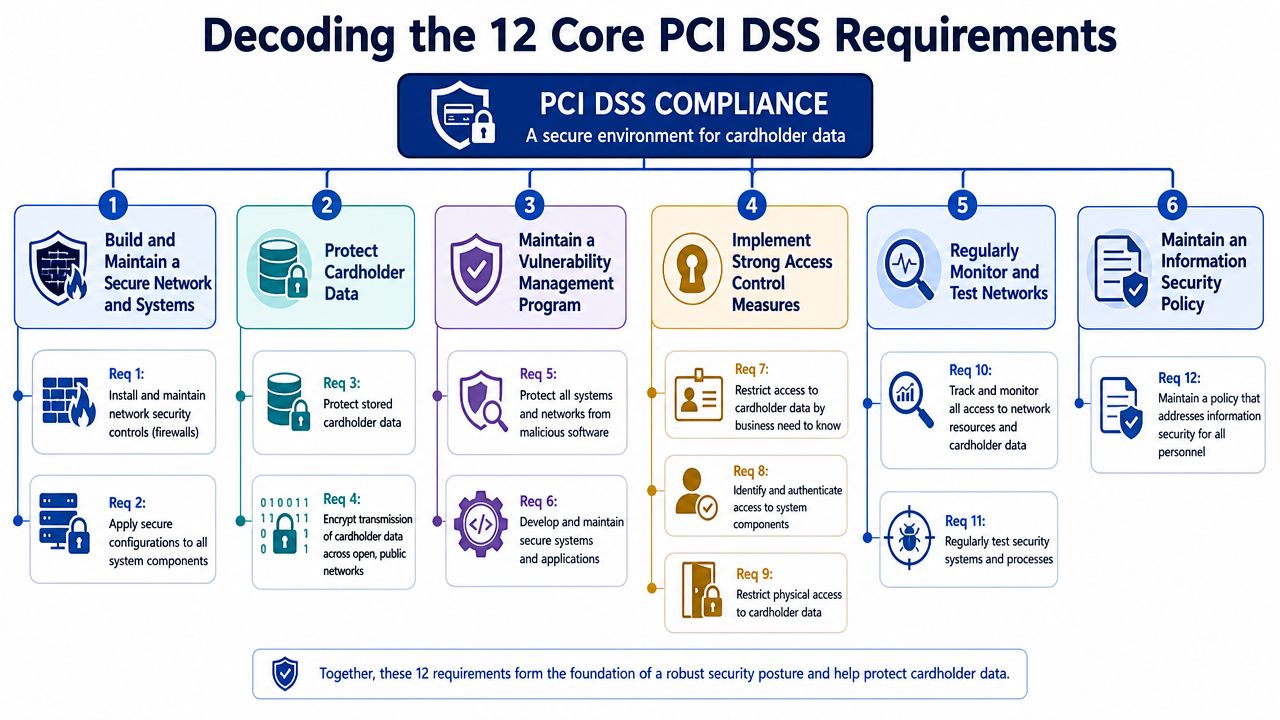
Build and maintain a secure network and systems
This goal covers Requirement 1 and Requirement 2.
| Requirement | Plain-English meaning | Shopify-focused example |
|---|---|---|
| 1. Install and maintain network security controls | Limit what can connect to systems that support payment-related operations. | If you use external hosting for middleware, ERPs, or admin tools connected to order and payment processes, restrict access tightly and remove anything exposed without a business reason. |
| 2. Apply secure configurations to all system components | Set up systems safely from the start instead of fixing weak defaults later. | A private app server, cloud database, or support platform should not run with default passwords, unnecessary services, or open remote access. |
For smaller merchants, scope usually expands through side systems. Order management tools, custom scripts, agency access, and forgotten test environments create more PCI exposure than the storefront itself.
Protect cardholder data
This goal covers Requirement 3 and Requirement 4.
3. Protect stored account data
The cleanest answer is not to store card data at all. For most Shopify merchants, that means using hosted or tokenised payment flows and making sure staff never copy payment details into notes, spreadsheets, or inboxes.4. Protect cardholder data during transmission over open, public networks
Card data must be encrypted in transit and kept out of informal channels. If a customer emails card details, the right process is to delete the message securely and direct them back to the approved payment method.
Scope reduction becomes practical, not academic, when card data never touches your systems. Then, several PCI requirements become much easier to meet because your environment is smaller.
If you are reviewing encryption, certificates, and public-facing controls around checkout and related services, many merchants also assess baseline website security solutions as part of store hardening.
Maintain a vulnerability management programme
This goal covers Requirement 5 and Requirement 6.
5. Protect systems from malicious software
Any device that can reach in-scope systems needs malware protection if it is commonly targeted. That includes staff laptops used for Shopify admin, support work, finance, or app management.6. Develop and maintain secure systems and software
Apply patches on time. Review code changes. Retire old integrations. If you use custom apps, scripts, or middleware around Shopify, those components need a defined owner and a maintenance routine.
This is a common post-build problem. A merchant launches with one checkout setup, then adds a subscription app, a fraud tool, a returns platform, and a custom connector. Each addition may be good for the business, but each one also needs review. PCI v4.0 is less forgiving of informal security habits around these changes.
Implement strong access control measures
This goal covers Requirement 7, Requirement 8, and Requirement 9.
Restrict access by business need to know
Give access based on job role. Customer support, marketing, finance, and developers should not all inherit the same admin rights.Identify users and authenticate access
Every person needs an individual login and strong authentication. Shared accounts make investigations harder and usually hide poor access discipline.Restrict physical access to cardholder data
This matters if your business has paper records, payment terminals, office devices, or other physical assets tied to payment operations. Even ecommerce businesses can drift into scope here if staff print records or handle telephone orders badly.
Regularly monitor and test networks
This goal covers Requirement 10 and Requirement 11.
10. Log and monitor all access
Keep records of who accessed systems, what they did, and when they did it. If there is a dispute, an account takeover, or a suspected breach, logs are how you separate facts from assumptions.11. Test security regularly
Security controls need verification. Depending on your setup, that may include vulnerability scanning, penetration testing, change testing, and follow-up remediation.
For Shopify merchants, this requirement often becomes relevant when the store extends beyond standard platform features. The more custom infrastructure around the store, the more testing discipline matters.
Maintain an information security policy
This goal covers Requirement 12.
Requirement 12 is where many merchants reveal whether security is managed or improvised. A short, usable policy is enough for many smaller businesses if it reflects how the store operates.
It should clearly state:
- Who owns payment security
- How access is approved, reviewed, and removed
- How app installs and system changes are checked
- What staff must never do with card data
- How incidents are reported and escalated
- Which PCI tasks must be completed on a recurring schedule
That last point matters more under PCI DSS v4.0. The standard puts more emphasis on defined responsibilities and ongoing review, not just annual box-ticking.
The 12 requirements matter, but merchants should read them through one practical question. “Does card data touch us directly, or have we set things up so the payment provider and platform handle most of it?” On Shopify, that distinction shapes the amount of work ahead.
Finding Your Merchant Level and Correct SAQ
A Shopify merchant launches a store, adds a few apps, swaps in a custom checkout enhancement, and then gets asked to complete PCI paperwork by the payment provider. The first mistake usually happens here. The team starts hunting for the shortest SAQ before it has confirmed how payments flow through the store.
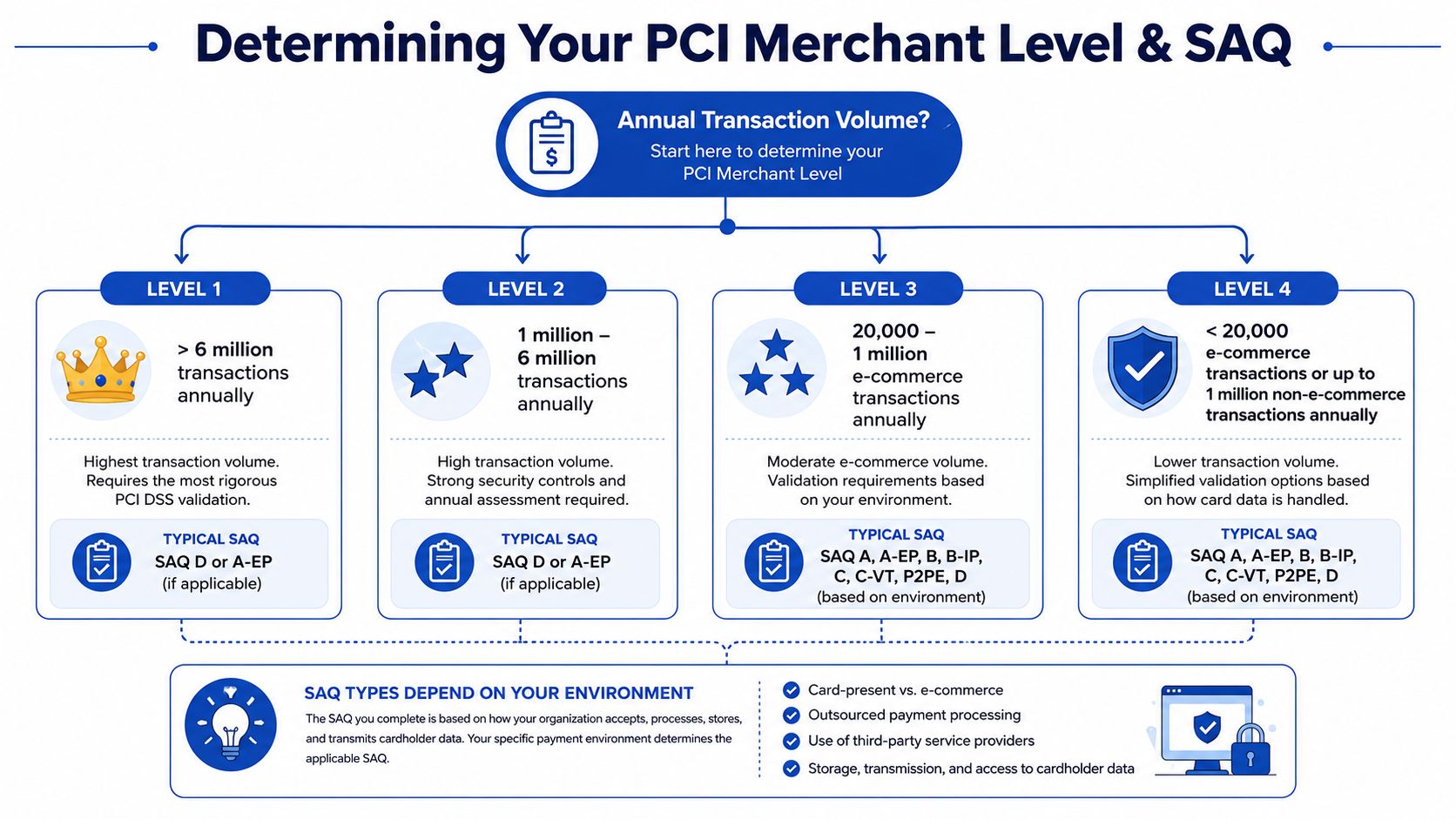
Merchant level and SAQ type answer different questions. Merchant level is mainly about transaction volume and the validation path your acquirer expects. Your SAQ is driven by payment architecture. For a merchant, the practical question is simple: are you only selling through a platform-managed flow, or have you introduced code, integrations, or processes that pull your business closer to card data?
Merchant levels in practical terms
The card brands and acquirers use merchant levels to decide how much formal validation they want from you. Higher transaction volume usually means tighter reporting expectations. Smaller merchants often validate through an SAQ and, in some cases, quarterly scans. Larger merchants can face a Report on Compliance, outside assessors, and more scrutiny from their bank.
The exact thresholds and enforcement can vary by card brand and acquirer. Treat the published level tables as a starting point, then confirm your assigned level with the bank or processor that underwrites your card acceptance.
Use these questions to get oriented:
| Merchant question | Why it matters |
|---|---|
| How many card transactions did we process over the last 12 months? | This helps your acquirer place you in the right merchant level. |
| Does card data ever pass through our site, servers, apps, or support workflows? | This affects PCI scope and usually determines which SAQ fits. |
| Are we using Shopify in a mostly standard way, or have we added custom payment-related functionality? | Customisation often increases scope, even if the store still feels “hosted.” |
Why the SAQ decision causes problems
For Shopify stores, the hard part is rarely the form itself. It is choosing the form that matches reality.
A merchant using Shopify with a standard, platform-managed checkout often has a simpler validation path than a merchant that adds custom payment pages, embedded payment elements, or outside systems that influence payment security. That difference matters more under PCI DSS v4.0, because the standard puts more weight on how controls operate in practice, not just whether a merchant picked a plausible questionnaire once a year.
I tell clients to map the payment journey first. Start at the product page, then follow the customer through cart, checkout, payment submission, order confirmation, fraud tools, support workflows, and any app that touches those steps. If a script, plugin, or external service can affect payment collection, it belongs in the discussion before anyone selects an SAQ.
If you are unsure which SAQ applies, do not guess based on platform marketing. Map the payment flow first, then match the form to the architecture.
A practical rule set looks like this:
- Standard outsourced payment collection usually leads to a narrower SAQ scope.
- Embedded or heavily customised payment experiences often move a merchant into a broader SAQ.
- Any direct handling, storage, or transmission of card data creates the most work, the most evidence gathering, and the most audit risk.
For Shopify merchants, this is also where business teams can create problems by chasing conversion gains without checking compliance impact. A checkout change that improves UX may still increase PCI scope if it changes how payment elements are delivered or controlled. Review payment-related design changes with the same discipline you would use for a security change, especially if your team is also working on Shopify checkout optimization tactics.
This walkthrough gives a decent visual summary before you speak to your acquirer:
Choose your SAQ based on the store you run today. Not the store you intended to build, and not the one a vendor sales page describes. That one decision saves a lot of rework later.
How to Reduce Your PCI Compliance Scope on Shopify
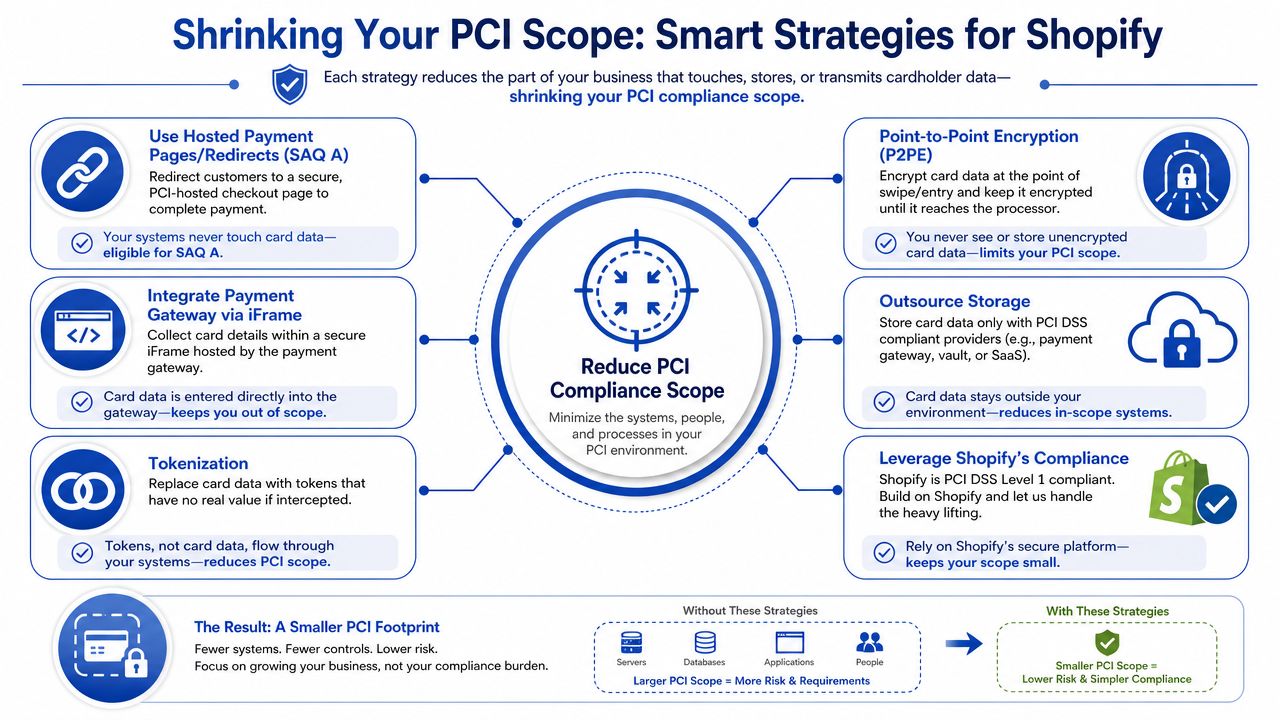
If you remember one principle from this article, make it this one. Scope reduction is the most effective PCI strategy available to a merchant.
PCI applies to every system component included in or connected to the cardholder data environment, or CDE. That includes people, processes, technologies, servers, applications, network devices, and connected components. The larger that environment becomes, the more controls, testing, and evidence you have to maintain. Reducing scope through segmentation, tokenisation, and removing unnecessary storage can materially lower overhead and audit complexity, according to NISC's explanation of PCI scope control.
Think of scope like a spill zone
When card data touches your own environment, the “spill zone” expands. More systems need control. More staff actions matter. More evidence has to be collected.
When your setup keeps card data away from your systems, the spill zone shrinks. That doesn't remove responsibility, but it can make the pci compliance requirements far more manageable.
For Shopify stores, this is why checkout architecture matters so much.
What usually works well on Shopify
Shopify helps because it gives merchants a managed commerce platform rather than asking them to build payment infrastructure from scratch. That's valuable. But the strongest benefit isn't that Shopify “does PCI for you”. It's that Shopify can support a design where less payment data touches your environment.
Here are the tactics that usually move merchants in the right direction:
Use hosted or platform-managed payment flows
If card entry happens in a way that keeps raw payment data away from your own servers, your scope is typically smaller.Lean on tokenisation
Tokens let systems reference a payment method without storing the sensitive card data itself. For subscriptions, saved cards, and repeat purchasing, this is usually the right pattern.Remove unnecessary data storage
If there isn't a business or legal need to retain cardholder data, don't keep it. Retention should be minimal, not treated as an archive.Segment supporting systems
If you do run external services, admin tools, middleware, or support systems, keep them separated from anything payment-related wherever possible.
For merchants focused on conversion as well as compliance, checkout design decisions also affect operational scope. This is why teams often review Shopify checkout optimisation and payment scope together rather than treating them as separate projects.
What quietly expands your scope
The scope problems I see most often on Shopify stores aren't dramatic. They're cumulative.
Third-party scripts
Every extra script on the storefront has to justify its existence. If a script can influence the checkout experience, capture data, or alter page behaviour, it becomes part of the risk conversation.
Custom apps and middleware
The moment you introduce your own app logic, servers, or connectors, you need to ask whether they affect payment security. If they do, they may pull more of your environment into scope.
Staff workarounds
Support teams sometimes ask customers to send card details by email, screenshot, or note. This creates a compliance problem immediately and usually bypasses every sensible control.
Reduce scope before you add controls. It's cheaper to avoid handling sensitive data than to secure more places where it can live.
What Shopify simplifies, and what it doesn't
Shopify simplifies infrastructure, platform maintenance, and parts of secure payment delivery. That's real value.
It doesn't remove your responsibility for:
- Admin access controls
- App and script governance
- Documented processes
- Secure change management
- Training staff not to collect or mishandle card details
That's the merchant-first reality. Use the platform to keep the CDE small, then manage the parts that remain in scope with discipline.
The Annual PCI Compliance Process Step by Step
Most merchants get into trouble when they treat PCI as an annual form-filling task. The process works better when you run it like an operating cycle.
The practical model has three parts. Assess where you are. Fix what's weak. Keep evidence that proves the controls are working. That sounds simple, but it only works when someone owns it internally.
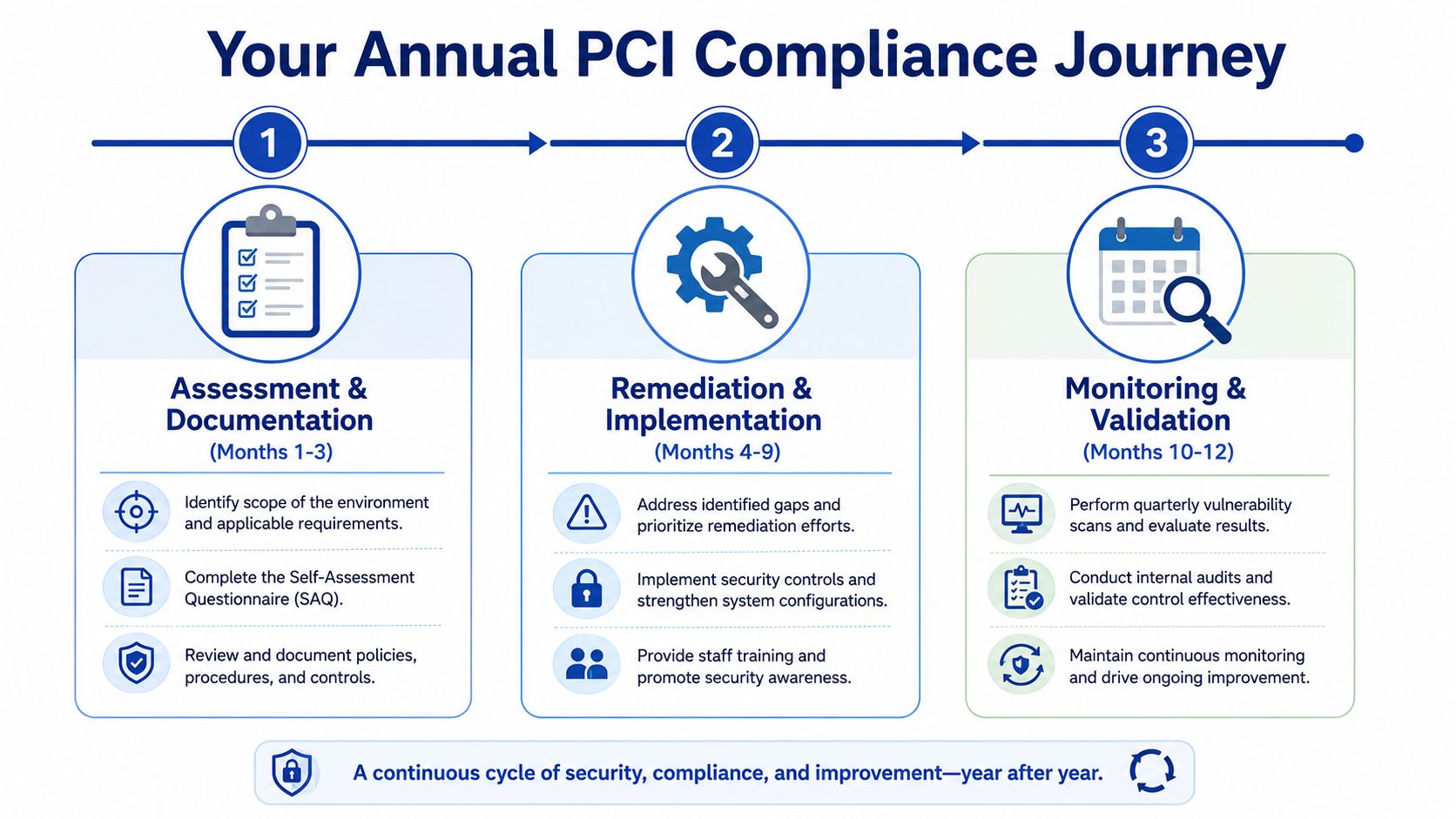
Assessment and documentation
Start with scope. If you don't know which systems, apps, users, and providers can affect payment security, the rest of the exercise won't be reliable.
Then use the relevant SAQ and related requirements as a working checklist, not just a submission form.
What to review first
Payment flow design
Confirm how card data is captured and whether your environment touches it directly.System inventory
List apps, integrations, admin tools, endpoints, and service providers that connect to payment-related processes.Access and authentication
Review who has admin privileges and whether access is still appropriate.Policies and procedures
Check whether your team has usable instructions for access changes, incidents, and payment handling.
A lot of merchants discover gaps at this stage that have nothing to do with firewalls and everything to do with people and process.
Remediation and implementation
Once you identify a gap, fix the root cause, not the symptom.
If an ex-employee still has access, removing that account is only the first step. You also need a proper offboarding process. If an old app is insecure, patching it might not be enough. You may need to replace it or remove it entirely.
In this context, practical prioritisation matters:
| Priority | Typical issue | Better response |
|---|---|---|
| Immediate | Unneeded admin access, weak authentication, unknown scripts | Remove, tighten, document |
| Near-term | Outdated app, poor logging, weak policy coverage | Replace or harden, assign owner |
| Structural | Checkout architecture creates excess scope | Redesign for scope reduction |
Monitoring and validation
Continuous verification is where PCI v4.0 feels different in day-to-day operations. PCI requires quarterly external vulnerability scans by an Approved Scanning Vendor, quarterly internal scans, annual penetration testing, and re-testing after significant changes. Passing scans must occur every 90 days and be submitted to the acquirer as proof of compliance, based on SecureTrust's PCI compliance requirements guide.
That means your compliance process has to stay connected to your release process. If you change store infrastructure, add a script, alter hosting around connected systems, or deploy a major integration, testing and evidence need to keep pace.
Good change management is part of PCI. If your team can't show what changed, when it changed, and how it was rechecked, audit conversations get harder very quickly.
For many merchants, outside technical support proves beneficial. Not because PCI is impossible, but because stores change constantly. A stable release, maintenance, and documentation process makes ongoing validation much easier. If your store evolves frequently, this kind of Shopify maintenance support becomes relevant because compliance gets harder when no one is clearly tracking technical changes.
What to submit and retain
Your acquirer or payment provider will tell you what validation they expect, but merchants generally need to think in terms of:
- Completed assessment records
- Attestation and supporting documentation
- Scan results where required
- Remediation evidence
- Policy and access records
The merchants who handle PCI well don't scramble once a year. They maintain a file of proof as they go.
Common PCI Compliance Pitfalls for Merchants to Avoid
A Shopify merchant launches a new promo, adds a few apps, gives an agency admin access, and assumes the hosted checkout keeps everything covered. Then the annual PCI review starts, and nobody can explain which scripts run on the store, who still has access, or whether support staff ever handled card details outside the approved flow.
That pattern is common because PCI problems usually come from store operations, not from a dramatic technical failure. Shopify, Shopify Payments, and hosted gateways can cut scope down substantially. They do not remove the merchant's responsibility to control the parts of the business that can still affect payment security.
The pitfalls that create trouble fastest
Assuming Shopify handles the whole problem
Shopify simplifies a lot of PCI work, especially when card entry stays inside Shopify-controlled payment pages or approved hosted components. But merchants still own staff access, app choices, theme changes, scripts, connected tools, and internal handling of customer payment information. Post-v4.0, that day-to-day discipline matters even more because PCI expects controls to stay current as the store changes.
Treating scope reduction as full exemption
Scope reduction is the smart goal. Full exemption is usually the wrong assumption.
If the business avoids storing, processing, or transmitting card data directly, the compliance burden becomes much lighter. But the store can still influence payment security through JavaScript, checkout customizations, compromised admin accounts, or sloppy support processes. A merchant using Shopify should aim to keep card data away from its systems entirely, then protect everything that could still interfere with the payment flow.
Letting scripts and apps accumulate without review
This is one of the most common Shopify-specific failures I see.
Marketing pixels, reviews widgets, chat tools, upsell apps, session replay tools, and custom theme code often get added one at a time with no formal review. Each addition may look harmless on its own. Together they create a larger attack surface and make it harder to prove who approved what, why it was added, and whether it still belongs there.
Keeping access long after the need is gone
PCI breaks down quickly when access is treated as permanent. Staff change roles. Freelancers finish projects. Agencies keep credentials after a launch. Former employees still appear on user lists months later.
That creates two problems at once. It raises security risk, and it weakens your audit trail because shared or stale accounts make it harder to show who did what.
Assuming small teams do not need written rules
Small merchants often skip documentation because the team can “just ask each other.” That works until someone is away, a contractor joins, or an assessor asks how card-related issues are handled.
A short policy is enough in many cases. The point is to define how your team approves apps, reviews access, handles customer payment questions, and reports suspicious activity. If the rule only lives in someone's head, it usually fails under pressure.
Habits that create avoidable PCI headaches
These show up repeatedly in merchant environments:
- Shared admin logins because they feel faster
- Card details pasted into helpdesk notes when a customer sends them by email or chat
- App installs without a security or ownership check
- Theme or script changes pushed live without anyone considering PCI scope
- No clear PCI owner inside the business
- Assuming the SAQ answer stays the same after payment flow or store setup changes
What better looks like in practice
Merchants keep PCI manageable when they make a few operating choices early and stick to them.
- Keep checkout and card entry inside Shopify-supported payment flows
- Review every app, script, and integration as a scope decision, not just a feature decision
- Use individual accounts and remove access quickly when roles change
- Train support staff never to collect or store card data in tickets, chats, or spreadsheets
- Document simple procedures for access reviews, app approvals, and incident reporting
- Recheck PCI impact after material changes to payment flow, storefront code, or connected systems
The practical goal is not to memorize all 12 PCI requirements. It is to keep your store out of card-data handling wherever possible, and to run the remaining in-scope parts of the business with enough control that PCI stays routine instead of turning into a yearly scramble.
Your Practical Next Steps for PCI Compliance
If your store is already live, don't start by trying to master every line of the standard. Start by getting clarity on your payment setup, your scope, and your operating habits. Most merchants improve fastest when they simplify first and document second.
A workable checklist for the next few days
Confirm how your payment flow works
Ask your payment provider or acquirer how they classify your environment and what validation they expect from you.Work out your transaction volume
Review your recent processing history so you have a practical view of your likely merchant level.Map your payment-related scope
List the systems, apps, scripts, services, and people that can affect payment security. Don't forget support tools and admin access.Review your Shopify app stack
Remove anything unnecessary. If you can't explain why an app or script is present, it deserves review.Check access controls
Make sure every user has a unique account, permissions match their role, and old access has been removed.Decide what data you do not want touching your business
If you can avoid storing or handling card data directly, do it. This is usually the highest-value decision a merchant can make.Set a repeatable compliance rhythm
PCI works better when it becomes part of store operations. Tie access reviews, change reviews, evidence collection, and required testing into the same routine you already use for platform maintenance.
The merchant mindset that helps
Don't aim for “just enough PCI to get through the form”. Aim for a payment environment that is hard to misuse.
That usually means fewer systems in scope, fewer people with sensitive access, fewer unnecessary integrations, and better records of what changed and why. For Shopify stores, that's the most practical interpretation of PCI compliance requirements in the post-v4.0 environment.
If you need a Shopify team that can clean up complex store setups, reduce technical sprawl, and support a more controlled ecommerce environment, Grumspot helps merchants build and maintain stores with sharper architecture, stronger operational discipline, and fewer avoidable risks.
Let's build something together
If you like what you saw, let's jump on a quick call and discuss your project

Related posts
Check out some similar posts.
- fraud prevention ecommerce
Secure your UK store with this fraud prevention ecommerce guide. Detect threats, manage chargebacks,...
Read more