Hire a Top Shopify Custom App Developer in 2026
- Shopify custom app developer
- Shopify app development
- custom Shopify app
- Shopify agency
- ecommerce development
Launched
April, 2026

You’re usually not looking for a Shopify custom app developer on day one.
You start looking when the store is working, revenue is coming in, and the cracks become expensive. Your team is stitching together app rules, manual exports, awkward workarounds, and admin processes that depend on one operations manager remembering twelve steps in the right order. The store still runs, but it doesn’t run cleanly.
That’s the point where a custom app stops being a developer’s pet project and becomes a business decision. Done well, it can remove recurring friction, replace fragile app stacks, and give you something the App Store can’t. Done badly, it becomes another system your team has to babysit.
When Your Shopify Store Needs More Than an App
A common turning point looks like this. The store is growing, paid traffic is working, and order volume is up. Then the team starts delaying campaign launches because one discount app conflicts with a bundling app, inventory rules break between systems, and support keeps fixing orders that should have flowed through cleanly the first time.
That is usually the point where a merchant asks the wrong question. The question is not whether a developer can build the feature. The question is whether the business should keep paying for friction through app fees, manual work, missed merchandising opportunities, and avoidable operational errors.
Public apps are often the right starting point. They are faster to install, cheaper to test, and good enough for standard use cases. Problems start when the store depends on business rules that are specific to your operation, not generic to Shopify.
The clearest signs you’ve outgrown off-the-shelf apps
A custom build starts to make financial sense when the pain shows up in the day-to-day running of the business:
- Your pricing or promotion logic is too specific: Wholesale tiers, account-based pricing, market-specific bundles, approval flows, or checkout conditions often stretch public apps beyond their intended use.
- Your team is doing manual reconciliation: If staff export CSVs, re-enter order data, or fix inventory mismatches every week, the software gap is already costing money.
- Your systems need to pass data reliably: ERP, PIM, WMS, subscription tools, 3PLs, and CRMs need structured integration. Workarounds fail at higher order volume.
- You are stacking apps to simulate one process: Multiple apps can look cheaper on paper, but overlapping logic creates conflicts, slower storefront performance, and more support overhead.
- Your competitive edge depends on custom buying logic: Product configuration, bundling rules, merchandising controls, or post-purchase workflows can affect conversion and average order value directly.
The strongest reason to build is usually operational, not technical.
A lot of merchants assume custom development is about inventing something unusual. In practice, the better reason is control. One well-scoped app can replace a fragile set of workarounds and give the business a process it can rely on.
That control has a cost, and it should be discussed early. A custom app is not a one-time purchase. Someone has to maintain it when Shopify changes APIs, when your team changes workflows, or when another platform in your stack updates its data model. If an agency builds the app on a development store that cannot be transferred cleanly, ownership and handover can become a commercial issue later. I have seen merchants save money on the initial build, then pay for it again when they need a rebuild, better documentation, or a new partner to take over.
That is why the decision should be tied to ROI, not novelty. If a custom app reduces labour, cuts app subscription bloat, improves data accuracy, or supports a higher-converting buying flow, the investment can be justified. If the same outcome can be achieved with cleaner theme work, Shopify Functions, or a simpler app stack, custom development is often the wrong move.
There is also a storefront consideration. If the limitation sits in the customer experience itself rather than the backend workflow, the better route may be broader architectural work such as headless commerce solutions.
Grumspot’s bundle creator work is a useful reference point because it shows the commercial case clearly. The value came from tailoring the buying logic to the way the brand sold, not from adding another generic feature layer.
A Shopify custom app developer earns their keep when they help you decide what should be built, what should stay standard, and what hidden maintenance burden the business is agreeing to carry.
The Custom App Development Lifecycle from Idea to Launch
A custom app project works like a house build. The expensive mistakes happen before anyone notices them.
If the brief is vague, the architecture will drift. If the architecture drifts, development takes longer. If development takes longer, the team cuts corners in testing. By launch, everyone has an app, but not one the business can rely on.
A solid Shopify custom app developer avoids that chain reaction by treating the process as a sequence of decisions, not just code delivery.
A visual overview helps before getting into the detail.
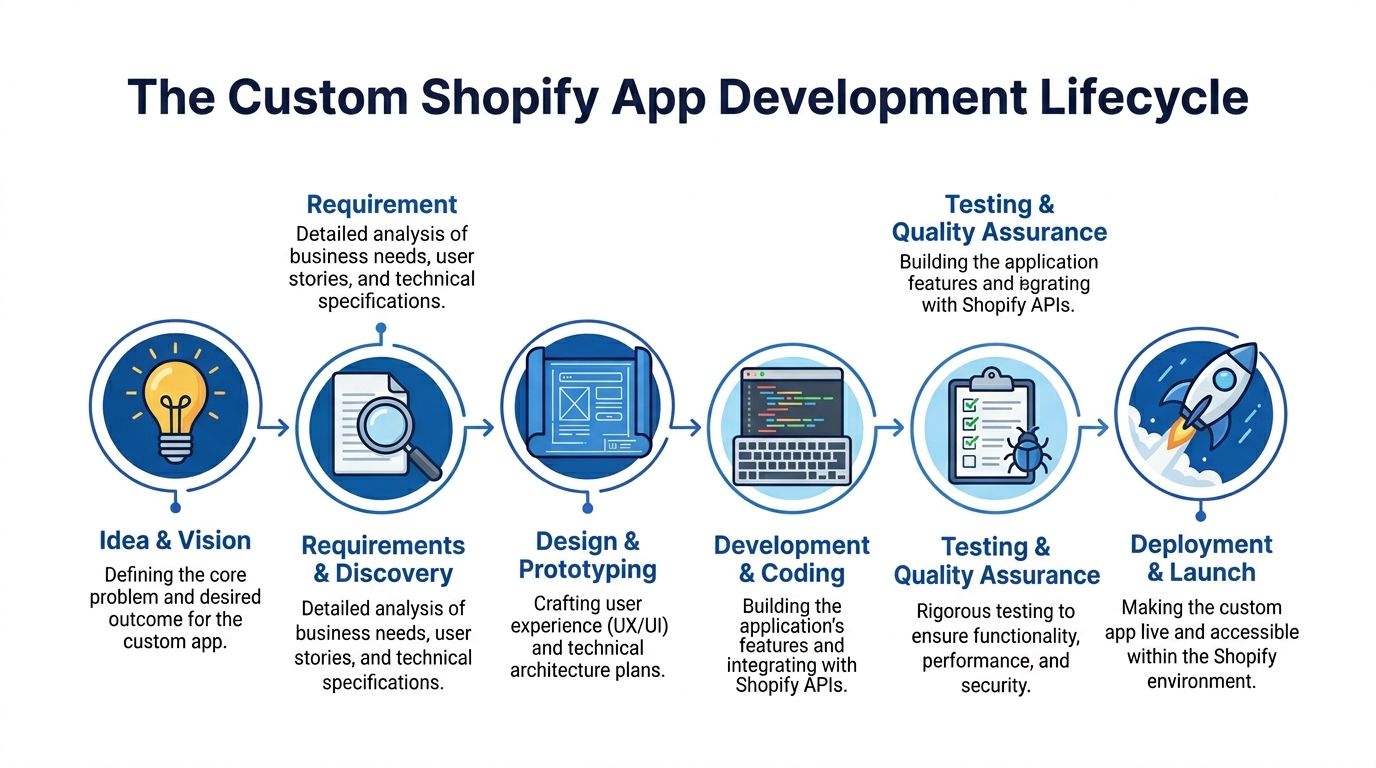
Discovery decides whether the build will work
Good projects stand apart from rushed ones.
The first job isn’t “build an app”. It’s defining the exact business problem, who uses the app, where the data comes from, what success looks like, and what should stay manual. Strong discovery also surfaces dependencies early, especially when the app has to work with ERPs, PIMs, fulfilment platforms, or custom operational workflows.
Useful discovery outputs include:
- User stories: What the merchandiser, operations lead, support team, or customer needs to do.
- Process maps: What happens before and after the app touches the workflow.
- Data rules: Which system owns the truth for inventory, pricing, customer records, or order status.
- Failure handling: What happens when a sync, webhook, or API call fails.
If a developer can’t explain your workflow back to you in plain English, they’re not ready to architect the app.
This stage is also where merchants should ask whether a custom app is the right tool at all. Sometimes the answer is yes. Sometimes the better fix is a theme extension, admin extension, or a narrower internal tool.
Architecture and design need to fit Shopify properly
Embedded apps have to feel native inside Shopify admin. That’s not cosmetic. It affects whether your team adopts the app or avoids it.
For embedded apps, developers need to use Polaris and the GraphQL Admin API. Correct implementation has been linked with a 52% boost in merchant adoption, while poor implementation can lead to 30% higher bounce rates, and 42% of custom apps failed performance or security reviews in 2025 (Shopify custom app standards for Polaris and GraphQL).
That means the design and technical plan should cover:
| Area | What good looks like |
|---|---|
| Admin UI | Polaris components, clear states, consistent navigation |
| Data access | GraphQL Admin API rather than legacy patterns |
| Permissions | Only the scopes the app actually needs |
| Performance | Fast admin rendering, lightweight interactions |
| Error handling | Clear validation and recoverable failure states |
The app shouldn’t feel like a bolted-on dashboard from another platform. It should feel like part of Shopify.
If you want a merchant-focused walkthrough of this process, this custom app development guide for Shopify store owners is a useful companion.
A short video can also make the lifecycle easier to visualise before development starts.
Development is where framework choices matter
Not every app architecture ages well.
A modern Shopify build should account for current platform expectations, especially around embedded app behaviour, authentication, data handling, and API usage. Developers who still treat Shopify apps like generic web apps tend to produce brittle builds.
A practical build phase usually includes:
Scaffolding the app correctly Using Shopify CLI and a structure that aligns with how Shopify expects apps to behave.
Implementing the core workflows This might be product logic, order routing, discount logic, customer account actions, or admin tooling.
Connecting external systems ERP, PIM, CRM, or fulfilment integrations need dependable mapping and retry logic.
Handling events Webhooks need proper verification, idempotency, and a plan for retries if something fails.
Testing has to cover business risk, not just bugs
A custom app can pass functional QA and still fail in practice.
The hard questions are operational. What happens if the ERP is slow? What happens if a staff user enters bad data? What happens if the store theme changes? What happens during a high-order-volume period?
Testing should cover:
- User acceptance: Can the team do their real jobs faster and with fewer mistakes?
- Performance: Does the app stay responsive under expected store activity?
- Security: Are tokens, customer data, and permissions handled safely?
- Regression: Does a new feature break the original workflow?
Launch is the beginning of ownership
A strong launch plan includes deployment, monitoring, documentation, staff training, and a support path when something goes wrong. The ultimate measure of app quality isn’t whether it launches. It’s whether your team still trusts it three months later.
That’s why experienced teams treat custom apps like products, not tickets. The launch matters. The operating model after launch matters more.
Budgeting for Your Custom App Realistic Costs and Timelines
A common scenario looks like this. The merchant asks for a custom app quote on Monday, gets a number on Tuesday, approves it on Friday, and discovers six weeks later that the actual work was never just the app. It was the order rules, the ERP mapping, the exception handling, staff training, and the fact that the first store setup created handoff problems.
That is why custom app budgets miss the mark. The cost sits in the operational detail, not in the label "custom app."
Early estimates still help, but only as a range. A small internal tool for one team can stay relatively contained. An app that touches orders, inventory, customer data, approvals, and external systems carries a very different cost profile. In practice, merchants usually see small builds land in the low thousands and larger integration-heavy projects move well into five figures, as noted earlier in the article.
What actually drives the budget
The fastest way to improve a budget conversation is to break the app into business decisions instead of technical tasks.
| Cost area | What it covers |
|---|---|
| Discovery and scoping | Workflow mapping, requirements, technical planning, solution design |
| Build and launch | UX, development, integrations, QA, deployment, launch support |
| Ongoing ownership | Monitoring, bug fixes, platform updates, support, small improvements |
From there, the main cost drivers become easier to see:
- System count: Every ERP, PIM, CRM, 3PL, subscription platform, or finance tool adds mapping, testing, and failure handling.
- Workflow complexity: Multi-step approvals, role-based permissions, and exception paths add more effort than the happy path usually suggests.
- Risk of mistakes: Pricing, inventory, fulfilment, and discount logic need tighter validation because errors affect revenue and operations immediately.
- Store complexity: International pricing, multiple markets, custom tax rules, and unusual fulfilment models expand QA time.
A quote without this breakdown is hard to trust.
Hidden costs tend to show up after the build starts
The biggest budget misses usually come from issues that were never discussed in the sales process.
One example is development store transferability. Shopify community guidance makes clear that installing a custom or draft app on a development store can block that store from being transferred later, and that restriction is not easily undone (development store transfer restriction for custom apps). That matters because it can force a rebuild on a new store, duplicate setup work, or require a more careful dual-store process from the start.
I bring this up early because it affects cost before a line of production code is written. A developer who ignores this detail may still be capable technically, but they are not budgeting the project the way an operator would.
Team structure affects cost too. Merchants sometimes lower the build rate by using offshore or nearshore talent, but the savings only hold if the developer can work inside a clear scope and communicate around business rules, not just tickets. For brands exploring that route, Hire LATAM developers can be one option to compare against local agency pricing.
Timelines should reflect decision-making and risk
A realistic custom app timeline includes more than coding time. It includes stakeholder review, system access, feedback cycles, test data, integration delays, and launch preparation.
Simple apps can move quickly when one person owns the requirements and the workflow is narrow. Projects slow down when several teams need input, when external systems are involved, or when no one has agreed what version one includes.
Watch for two warning signs:
- Timelines that sound fast because key steps are missing
- Timelines that stay vague because the scope is still unclear
A strong plan usually has a short discovery phase, a defined build scope, review checkpoints, and a clear line between version one and later enhancements. That structure protects ROI better than forcing a fixed number onto an undefined project.
The right budget question is not "What does a Shopify custom app cost?" It is "What business process are we improving, what failure would cost us, and what will it take to run this reliably after launch?" That is the question that keeps app spend tied to return, instead of rework.
Hiring an Agency Versus a Freelance Developer
This decision is less about who writes code better and more about what kind of problem you’re solving.
A freelancer can be the right choice for a narrow app, a clearly defined extension, or a small internal tool. An agency makes more sense when the work touches design, architecture, integrations, QA, launch planning, and long-term support across several stakeholders.
Choose based on project shape, not just day rate
If your app has one user type, one workflow, and light business risk, a strong freelance Shopify custom app developer can be a practical fit. You’ll usually get direct communication and a tighter feedback loop.
If the app affects operations, merchandising, customer experience, and data movement across systems, a team is often safer. That’s where agencies tend to justify the extra cost. You’re not just paying for code. You’re paying for coverage.
Here’s a practical comparison.
Agency vs Freelancer Comparison for Custom App Development
| Criterion | Freelance Developer | Development Agency (e.g., Grumspot) |
|---|---|---|
| Best fit | Smaller, well-defined app builds | Complex projects with multiple workstreams |
| Cost structure | Usually lower upfront | Higher upfront, broader delivery scope |
| Skill coverage | Often strongest in one or two areas | Development, UX, QA, strategy, project management |
| Communication | Direct with the builder | Structured, often with a lead and delivery process |
| Risk if someone is unavailable | Higher | Lower, because work can be reassigned internally |
| Integration projects | Depends heavily on individual experience | Usually easier to staff across backend and frontend needs |
| Ongoing maintenance | Can be excellent if the freelancer stays available | Often more stable for retainers and support continuity |
| Speed on urgent fixes | Fast if they have capacity | Fast if support process is organised |
The real trade-off is resilience
Freelancers can be excellent. Some are better than agencies on pure technical execution. The issue isn’t talent. It’s dependency.
If one person holds the architecture, credentials, release process, and app context, your business depends on their availability. That risk might be acceptable for a simple app. It’s far less comfortable when the app touches order processing or backend operations.
An agency gives you process and redundancy. That matters when you need:
- UX and admin design input
- Integration planning with external systems
- Structured QA
- Project management
- Post-launch support
For merchants trying to balance quality and budget, one practical option is to widen the talent search before deciding on partner type. If you need individual engineering support rather than a full service team, marketplaces that help you Hire LATAM developers can be useful for finding experienced remote talent with stronger timezone overlap than many offshore setups.
Questions that reveal the right partner
Ask these before you choose:
- Who handles discovery? If nobody owns process mapping, scope will drift.
- Who owns design inside Shopify admin? Embedded app UX matters more than most merchants expect.
- Who supports the app after launch? “We can figure that out later” is not a plan.
- What happens if the lead developer is unavailable? You need a continuity answer.
- How are credentials, documentation, and code ownership managed? This affects handover and risk.
The right hire isn’t the cheapest builder. It’s the partner whose operating model matches how critical the app is to your business.
If the app is core to margin, operations, or customer experience, optimise for reliability. If it’s a contained internal tool, a specialist freelancer may be enough.
Your Vetting Checklist and Key Interview Questions
A polished portfolio doesn’t tell you how someone works when Shopify changes an API, a webhook fails, or a launch gets messy.
The vetting process should test judgement. You’re hiring for architecture, operational awareness, and maintenance discipline as much as coding skill.
A useful starting point is this guide on how to hire a Shopify developer, but the interview itself needs sharper questions than most merchants ask.
Vetting checklist
Use this list before you shortlist anyone:
- Review live relevance: Ask for examples of apps or integrations that resemble your workflow, not just attractive storefronts.
- Check Shopify-specific fluency: They should speak comfortably about embedded apps, app scopes, admin UX, GraphQL, webhooks, and deployment.
- Inspect operational thinking: Ask how they handle handover, credentials, environments, monitoring, and rollback plans.
- Test communication: Can they explain trade-offs without hiding behind jargon?
- Clarify ownership: Make sure code access, repositories, credentials, and documentation are addressed before work starts.
Interview questions that reveal real experience
Some questions get rehearsed answers. These don’t.
Describe a time a Shopify platform change forced you to update an app. What broke first, and how did you handle it?
This shows whether they’ve maintained apps in a live ecosystem.How do you stop a custom app from becoming a drag on store performance or admin usability?
Good answers usually cover lean UI, efficient API use, and keeping workflows simple for staff.How do you approach webhook failures and duplicate events?
You want to hear about verification, retries, and protecting against double-processing.What should stay outside the app in version one?
Experienced developers cut scope intelligently. Inexperienced ones promise everything.How do you manage API keys, tokens, and other sensitive credentials across development and production?
This tests security maturity.What would make you advise against a custom app for this project?
A strong candidate should be willing to say no when another solution is better.
Red flags worth taking seriously
| Red flag | Why it matters |
|---|---|
| They talk mostly about code, not workflows | They may miss the business problem |
| They promise a fixed answer too early | They probably haven’t scoped risk |
| They avoid maintenance questions | You’ll own the problem later |
| They can’t explain app ownership clearly | Handover and security may become messy |
“Tell me about the last difficult launch” is often more useful than “What’s your process?”
People who’ve done this work properly will have scars. That’s useful. You want someone who has seen app launches go sideways and built habits that stop it happening again.
Ensuring Security Compliance and Long-Term Maintenance
The launch isn’t the finish line. It’s the point where the app becomes part of your business infrastructure.
That changes how you should think about security, compliance, and maintenance. A custom app that touches customer records, orders, pricing, or internal workflows is not a one-off build. It’s an operating asset.

Security and compliance need clear ownership
For UK merchants, GDPR concerns often sit behind the brief even when nobody says it directly. Where data sits, who can access it, how long it’s retained, and who owns the code all need explicit decisions.
At minimum, your agreement and technical plan should cover:
- Code ownership: Who owns the repository and deployment access.
- Data handling: What customer or operational data the app stores and why.
- Credential management: Who controls tokens, API keys, and production access.
- Incident response: What happens if something fails or access needs to be revoked.
If you want a broader baseline for engineering hygiene beyond Shopify specifics, this guide to software development security best practices is a sensible reference.
Maintenance starts with the app model you choose
There’s also a strategic decision many merchants miss. Not every custom app has the same distribution and licensing model.
Shopify now documents a middle ground in merchant custom apps built with Shopify Remix that use access tokens instead of OAuth. This sits between private-style custom builds and public App Store distribution, and it changes how agencies and merchants should think about scalability, licensing, and long-term support (merchant custom apps with Shopify Remix).
That matters if you operate multiple stores or expect to reuse similar app logic across brands. The cheapest short-term model isn’t always the easiest one to maintain.
A support retainer is risk control
Maintenance work usually includes API updates, compatibility checks, security patches, bug fixes, and incremental improvements based on how staff use the app. Without a plan for that work, even a strong app will drift.
Good retainers aren’t upsells. They’re how you avoid turning a valuable internal system into abandoned software.
Frequently Asked Questions
| Question | Answer |
|---|---|
| Do I need a custom app if a public app already does most of what I need? | Usually not. If the public app covers the core workflow and your team can live with the compromises, keep it simple. A custom app makes sense when the missing parts affect margin, operations, customer experience, or staff efficiency repeatedly. |
| Who should own the code for a custom app? | The merchant should have clear rights to the codebase, repositories, and production access, subject to the agreed contract. Don’t leave this vague. Clarify ownership, licensing, and handover before development starts. |
| Will a theme change break the app? | It depends on how the app is built. Embedded admin apps are less exposed to theme changes than storefront features. If the app injects storefront elements or relies on theme integration, theme updates should be part of maintenance planning. |
| How are updates usually handled? | Most teams handle updates through a support agreement, a maintenance retainer, or scoped follow-on work. The important part is agreeing in advance how bug fixes, platform changes, and feature requests will be prioritised and billed. |
| Can one custom app be reused across multiple stores? | Sometimes, but not automatically. Reuse depends on the app model, licensing, data structure, and how similar the stores really are operationally. A developer should assess reuse at the architecture stage rather than assuming it later. |
| What’s the biggest mistake merchants make when hiring? | Hiring purely on build price. The cheaper option can become expensive if the app is poorly scoped, hard to maintain, or documented badly. Operational fit matters as much as technical skill. |
If your store is at the point where workarounds are costing more than clarity, Grumspot is one option for planning and building Shopify custom apps around real operational needs, from bespoke storefront functionality to deeper system integrations and ongoing support.
Let's build something together
If you like what you saw, let's jump on a quick call and discuss your project

Related posts
Check out some similar posts.
- outsource Shopify development
Ready to outsource Shopify development? Our 2026 playbook covers finding partners, vetting, pricing,...
Read more
- Shopify monthly development plan
Learn how a Shopify monthly development plan works to scale your store. Our 2026 guide covers pricin...
Read more
- Shopify performance optimization
Boost your Shopify store's speed & sales with our Shopify performance optimization guide. Audit, fix...
Read more
- Shopify Plus store build
Get expert guidance for your Shopify Plus store build. Master planning, migration, launch, and scali...
Read more