Shopify Embedded App Development: Build & Deploy
- Shopify embedded app development
- Shopify app development
- Shopify App Bridge
- Shopify Polaris
- Built for Shopify
Launched
April, 2026

You’re probably staring at one of three things right now. A half-built public app that works in your dev store but still feels rough inside Shopify Admin. A blank repo and too many stack decisions. Or an app review checklist that suddenly makes “embedded” feel less like a UI choice and more like a product constraint.
That’s the right way to think about it.
In Shopify embedded app development, the technical decisions that seem small early on usually decide whether merchants trust the app, whether review goes smoothly, and whether installs turn into retained usage. If the app opens fast, respects admin conventions, handles auth cleanly, and asks for sensible permissions, merchants feel that immediately. If it drops sessions, breaks iframe context, or behaves like an external SaaS awkwardly stuffed into Shopify, they feel that too.
It is at the agency level that projects either become commercially viable or expensive to maintain. The build isn’t just about shipping features. It’s about shipping something that behaves like part of Shopify.
Why Embedded Apps Are the Future of Shopify
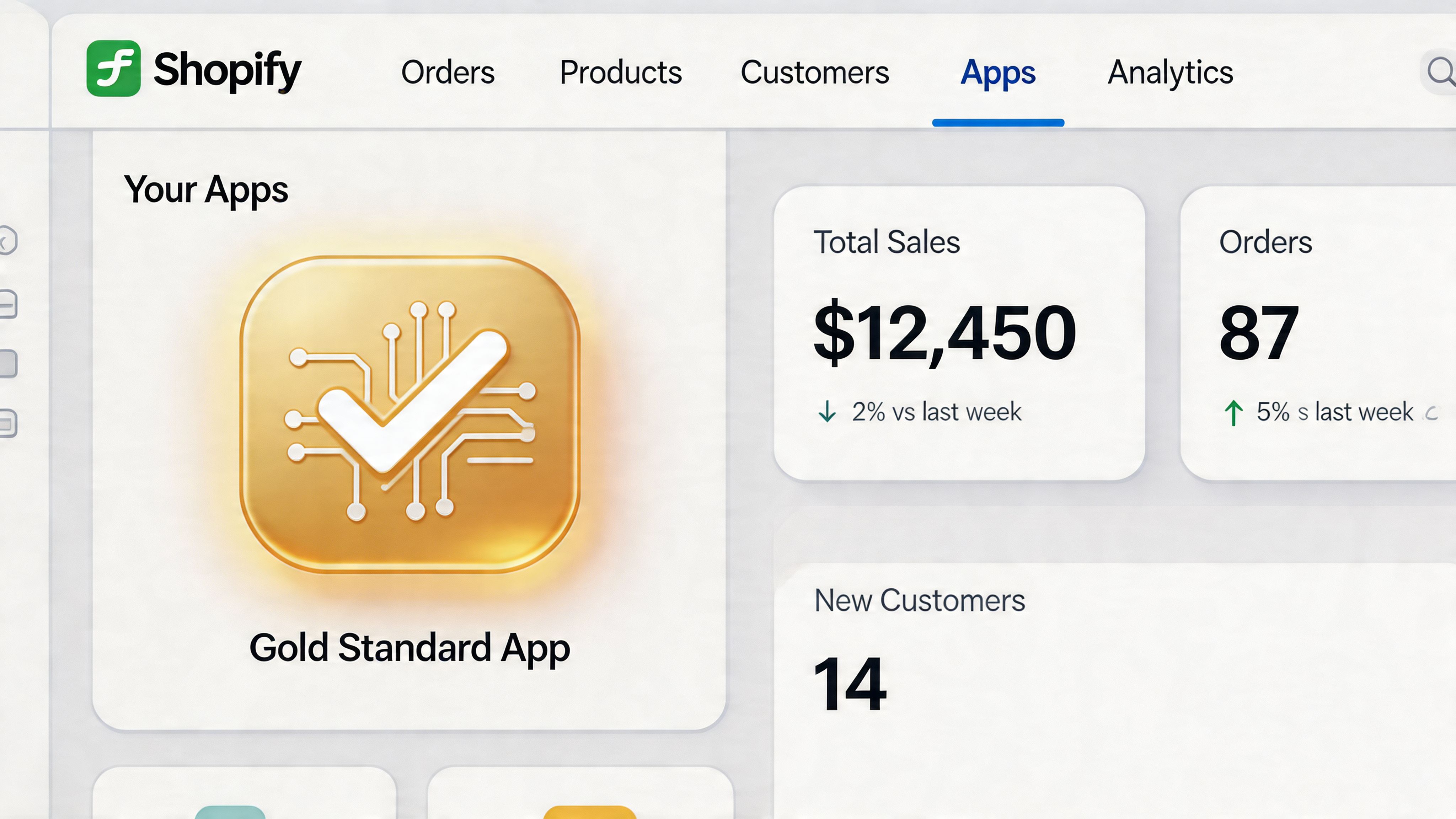
The clearest reason to build embedded is merchant behaviour. Merchants live inside Shopify Admin. They don’t want to bounce between tabs, re-learn navigation, or wonder whether your app is about to send them off-platform for basic tasks. Every extra context switch adds friction.
Embedded apps remove that friction by keeping the experience inside the admin shell, using the same interaction patterns merchants already recognise. That matters for more than aesthetics. It affects trust. A native-feeling app usually gets judged as lower risk than a standalone tool, even before the merchant explores every feature.
The market has already picked a direction
The app ecosystem is crowded enough now that architecture choices have commercial consequences. The Shopify App Store hosted over 11,905 apps by Q4 2024, and it grew from 7,014 apps in 2022 to 10,557 in 2023, while apps meeting Built for Shopify standards saw 49% higher installation rates within 14 days post-certification according to Uptek’s Shopify App Store statistics.
That number matters because it changes how you should scope the product. If certification improves install momentum, then embedded architecture isn’t just an engineering preference. It’s part of distribution.
Embedded changes the product brief
A standalone app can still make sense for some external workflows, especially when most of the product lives outside Shopify. But for admin-facing use cases like merchandising controls, back-office automation, order workflows, CRM sync settings, customer service tools, or reporting surfaces, embedded usually wins.
The trade-off is discipline. Embedded apps force you to care about:
- Admin consistency: Navigation, page layout, buttons, feedback states, and forms have to feel familiar.
- Performance under constraint: You’re working inside an iframe and inside a merchant workflow. Lag feels worse there.
- Auth correctness: Broken sessions inside embedded context are more damaging than in a standalone app.
- Review readiness: Built for Shopify standards push you towards cleaner implementation from day one.
Practical rule: If the merchant needs your app while they’re already managing products, orders, customers, or settings, build embedded first unless you have a strong reason not to.
Why this matters more in the UK
UK merchants don’t have much patience for tools that slow down admin workflows. Competition is heavy, teams are lean, and integrations often need to coexist with ERPs, CRMs, fulfilment systems, subscriptions, and custom reporting. In that environment, an app that “works” but feels bolted on isn’t enough.
The future of Shopify app work isn’t just more apps. It’s better-behaved apps. Embedded is where that standard gets enforced.
Planning and Scaffolding Your Built for Shopify App
Most app problems don’t start in implementation. They start when the team decides the app shape too late.
If you scaffold first and think later, you end up retrofitting embedded behaviour, patching auth, rewriting navigation, and cleaning up scope requests after the product already has momentum. That’s where time disappears.
Start with the app shape
Before touching the Shopify CLI, answer a few blunt questions:
Does the app belong inside Shopify Admin?
If merchants need it while managing their store, embedded is usually the right call.Is this public or merchant-specific?
A public app needs onboarding, safer defaults, cleaner permissions, and review discipline. A merchant-specific build can be narrower.What has to happen in the first session?
Don’t design onboarding around every future feature. Design it around one meaningful outcome.What shouldn’t be in v1?
This matters more than the feature list. Review gets harder when the first release tries to solve five jobs badly.
For teams working through broader platform decisions, a practical reference on custom software development for Shopify can help clarify when a public app product model makes sense versus a bespoke integration build.
Pick a stack that survives real usage
The default path for Shopify embedded app development is still strong for a reason: React on the frontend, Shopify Polaris for UI, and Node.js or another server-side stack that handles webhooks and API orchestration cleanly.
Here’s the practical view:
| Stack choice | Usually works well for | Watch out for |
|---|---|---|
| React + Polaris | Embedded admin UI, predictable components, fast alignment with Shopify patterns | Over-customising and fighting the design system |
| Node.js / Express | Webhook-heavy apps, async processing, event-driven integrations | Weak queueing and retry design |
| Rails | CRUD-heavy internal tools, teams already productive in Ruby | Slower adaptation if event complexity grows |
| Laravel or PHP | Teams with strong existing backend workflows | More care needed to keep embedded conventions tight |
If you’re aiming for Built for Shopify, choose the stack your team can debug quickly and operate cleanly. Fashionable choices don’t rescue sloppy auth or weak UX.
Scaffold with intent
Use Shopify CLI to generate the app, but treat the generated structure as a starting point, not architecture. Pay attention to the files that will shape future maintenance:
shopify.app.tomlcontrols core app configuration and becomes part of your operational discipline.- Extension folders matter early if your roadmap includes theme app extensions or app embeds.
- Environment setup should stay boring. Separate dev and production concerns before anyone starts hard-coding assumptions.
One useful deep dive on this standard is Grumspot’s guide to Built for Shopify app development, especially if you’re pressure-testing whether your app concept fits review expectations.
Build around the review process, not after it
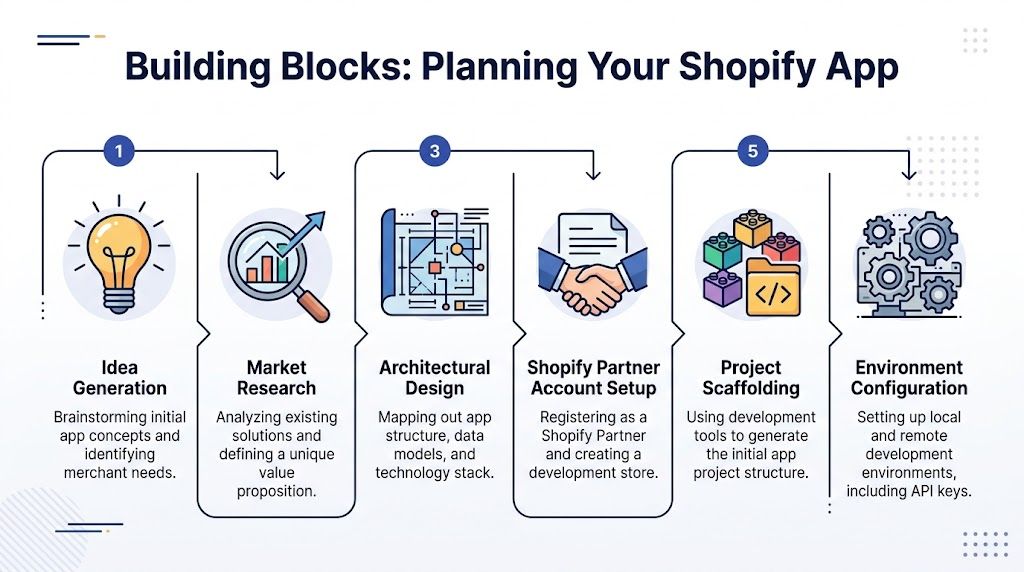
The strongest planning model I’ve seen is the five-step one tied directly to certification requirements. It’s practical because it catches problems before they become rewrites. According to DesignRush’s Shopify app development analysis, 70% of app review rejections stem from authentication or token failures, and apps for UK Plus stores see a 62% first-try pass rate when using Polaris/App Bridge versus 28% without.
That changes what “planning” means. It’s not just project setup. It’s review risk reduction.
Plan around auth, embed context, one core flow, one reliable webhook path, and one supportable dashboard. Everything else can wait.
The questions worth settling early
A short pre-build checklist saves a lot of pain:
- Scopes: Ask for the minimum you can justify.
- Data ownership: Decide what lives in Shopify, what lives in your database, and what must be cached.
- Failure states: Reinstall, expired session token, removed permissions, failed sync, webhook lag.
- Onboarding: What does the merchant see before their first successful action?
- Billing timing: Don’t hide pricing friction until after setup.
Scaffolding is easy. Scaffolding the right app isn’t.
Core Development Authentication App Bridge and Polaris
Embedded apps cross the line from concept to tangible reality. If you get these three parts right, the app feels native. If you get them wrong, everything else feels unstable no matter how good the feature idea is.
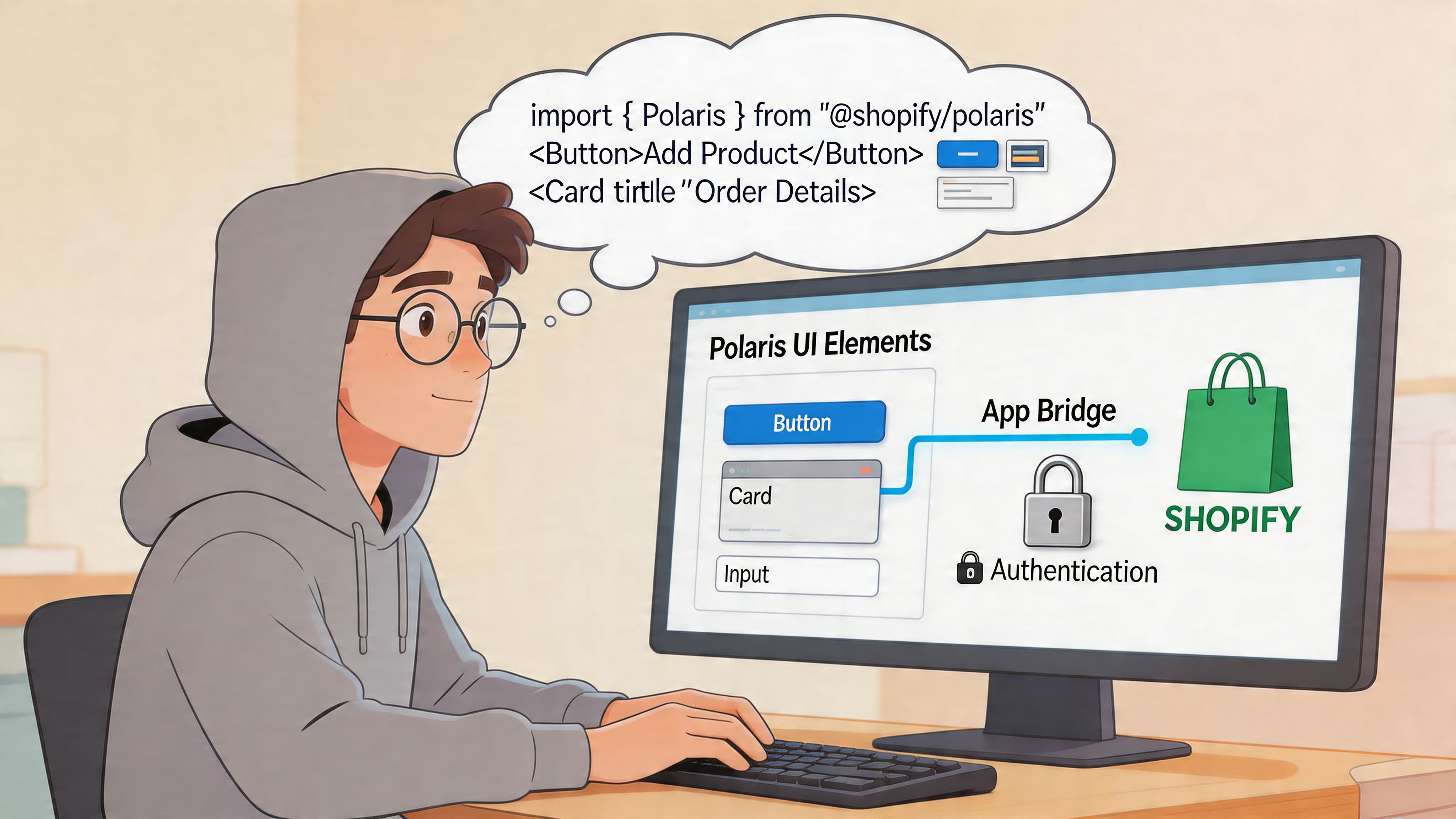
The three pillars are authentication, App Bridge, and Polaris. They aren’t separate concerns in practice. They reinforce each other. Auth keeps the app secure inside embedded context. App Bridge connects your iframe to Shopify Admin behaviour. Polaris makes the UI look and behave like it belongs there.
Authentication has to be boring
If you only remember one thing, remember this: don’t improvise auth in an embedded app.
Session token authentication is the current baseline. Cookie-dependent approaches create avoidable failure modes in iframes, especially when redirects, top-frame behaviour, or browser constraints start interfering with your assumptions. The safer pattern is to request a session token from the client and validate it on the server for each request that needs trust.
According to Ace Infoway’s Shopify app development guide, embedded apps should use session token authentication instead of cookies, which prevents 90% of session drops. The same guide notes that apps built with this modern embedded stack load 65% faster than standalone alternatives, and that React with Polaris can cut development time by 40%.
A simple request pattern looks like this:
import {getSessionToken} from '@shopify/app-bridge-utils';

async function fetchSecureData(app) {
  const token = await getSessionToken(app);

  const res = await fetch('/api/orders', {
    method: 'GET',
    headers: {
      Authorization: `Bearer ${token}`,
      'Content-Type': 'application/json',
    },
  });

  return res.json();
}
On the server side, validate the token, resolve the shop context, and only then call Shopify APIs or your own application services.
What usually goes wrong
The common failures are predictable:
- Token handling in the browser only: The frontend assumes presence equals validity.
- Broken redirects: Query params get dropped and embed context gets lost.
- Cookie fallbacks: They seem fine in local tests and fail in real merchant environments.
- Loose validation: Developers trust incoming identifiers too early.
If auth feels “mostly working”, it probably isn’t ready for review.
App Bridge is not optional glue
App Bridge is what lets your embedded app behave like part of Shopify Admin instead of a website trapped in an iframe. Use it for navigation, redirects, toasts, title bar actions, and embedded-aware behaviour. Without it, your app tends to feel detached and fragile.
A minimal setup in React usually starts like this:
import {Provider} from '@shopify/app-bridge-react';

const config = {
  apiKey: process.env.REACT_APP_SHOPIFY_API_KEY,
  host: new URLSearchParams(window.location.search).get('host'),
  forceRedirect: true,
};

export default function App() {
  return (
    <Provider config={config}>
      <Routes />
    </Provider>
  );
}
From there, App Bridge handles the embedded conversation your app shouldn’t be faking manually.
A practical use case
Let’s say a merchant saves settings for a CRM sync. Don’t render a home-grown notification that behaves differently from Shopify Admin. Use a toast. If you need to move them into a connected setup flow, use embedded-aware navigation. If the app needs to open a modal confirmation, keep it consistent with Shopify’s interaction model.
That consistency does more than tidy the interface. It reduces support confusion because the app responds in ways merchants already understand.
For developers refining this layer, Grumspot’s notes on Shopify Polaris app design are useful because they focus on making embedded interfaces feel native rather than merely styled.
Polaris is a product decision, not just a component library
Polaris saves time, but that’s not the main reason to use it. A key advantage is behavioural consistency. Forms, layouts, spacing, banners, empty states, destructive actions, loading treatments, and accessibility patterns all come with strong defaults.
That doesn’t mean you should blindly import components and assume the work is done. Good Shopify embedded app development still means making disciplined UI decisions.
A sensible page usually includes:
- A clear title and primary action
- An empty state that explains what to do next
- Supportive validation around forms
- Loading states that don’t leave the merchant guessing
- Error feedback tied to the relevant action
Here’s a small example of a Polaris settings form:
import {
  Page,
  Layout,
  Card,
  FormLayout,
  TextField,
  Button,
} from '@shopify/polaris';
import {useState} from 'react';

export default function SettingsPage() {
  const [apiKey, setApiKey] = useState('');

  return (
    <Page title="CRM settings">
      <Layout>
        <Layout.Section>
          <Card sectioned>
            <FormLayout>
              <TextField
                label="External API key"
                value={apiKey}
                onChange={setApiKey}
                autoComplete="off"
              />
              <Button primary>Save settings</Button>
            </FormLayout>
          </Card>
        </Layout.Section>
      </Layout>
    </Page>
  );
}
The code isn’t exciting. That’s the point. Embedded UI should feel dependable before it feels clever.
What native-feeling apps do differently
A lot of first-time teams build technically correct screens that still feel wrong. Usually the problem is one of these:
| Problem | What merchants experience | Better approach |
|---|---|---|
| Custom layout logic everywhere | Screens feel unlike the rest of Shopify | Stick to Polaris page and layout conventions |
| Inconsistent feedback states | Save actions feel uncertain | Use toasts, banners, and clear loading states |
| Deep feature nesting | Navigation gets confusing fast | Surface the main workflow first |
| Overloaded first dashboard | Merchants don’t know where to start | Use one primary action and useful empty states |
This walkthrough is worth watching before polishing your own flow:
Don’t design against merchant attention span
Most merchants won’t admire your architecture. They’ll judge whether the app helps them complete the task they opened it for. That means your first screen matters more than your fifth feature.
A good embedded app usually does less on the first load. It identifies the store context, confirms setup state, and gives the merchant one obvious next action. It doesn’t dump every possible control onto a dashboard because the team worked hard on them.
Native feel comes from restraint. Use the components Shopify expects, wire them up correctly, and remove anything that makes the merchant stop and think about the interface.
Handling Data and Backend Logic
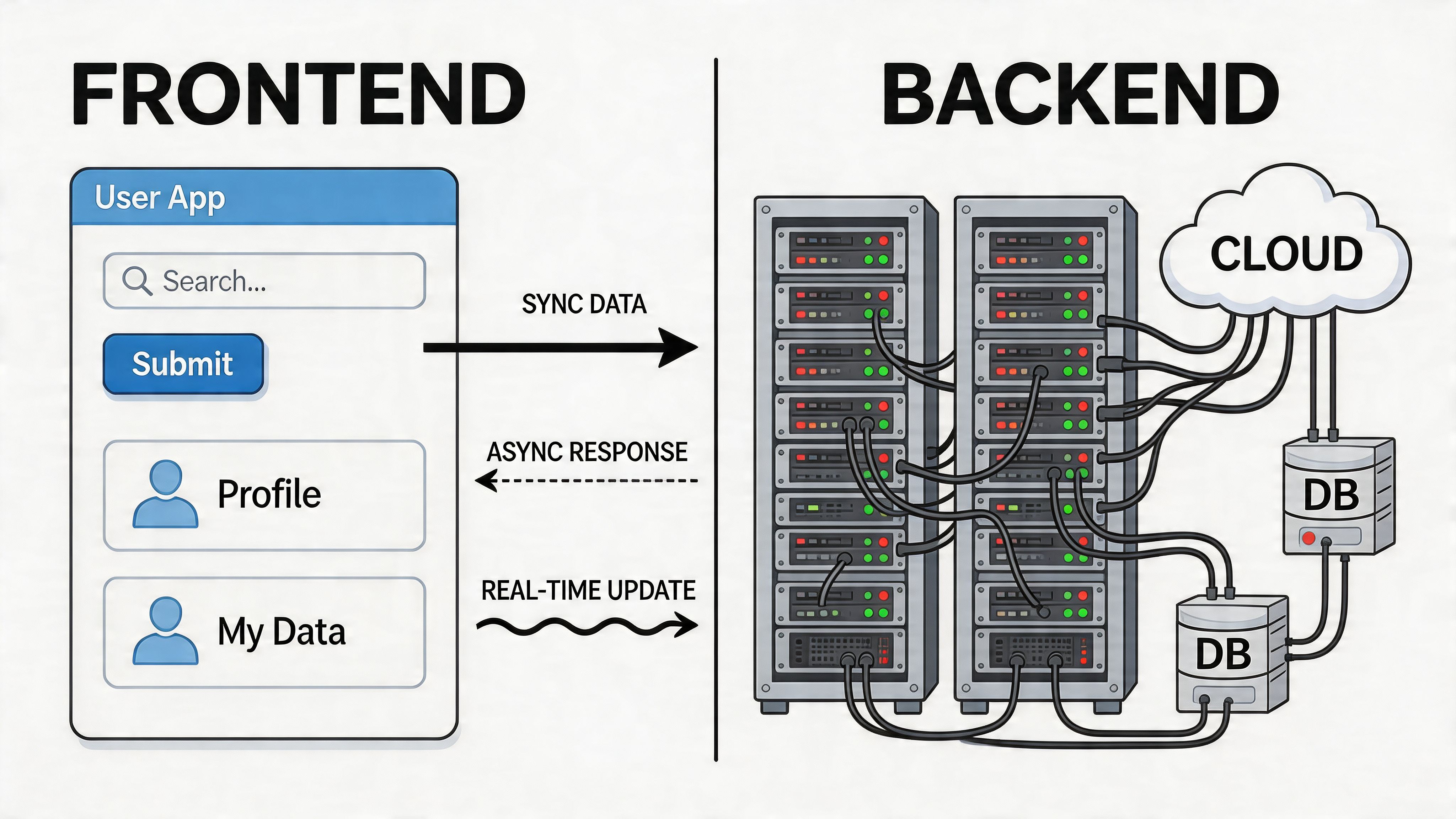
A polished embedded frontend can still fail badly if the backend is doing too much in the wrong place, leading to a lot of early apps becoming unreliable. The UI looks neat, but requests are blocking on third-party APIs, webhooks are being processed inline, and the app depends on the browser staying open to finish important work.
That doesn’t hold up in production.
GraphQL should stay focused
For most Shopify embedded app development work, the GraphQL Admin API is the right default. It gives you tighter control over what you fetch and mutate, which matters when admin screens need to stay responsive.
The mistake is treating GraphQL as permission to request everything in one go. Don’t build giant all-purpose queries because it feels efficient at first. Build narrow queries around the exact merchant action on the page.
For example, if the merchant is configuring order tags, fetch the fields needed for that screen. If they’re reviewing sync status, ask for status data. Avoid broad “dashboard” queries that try to load the entire world up front.
Webhooks do the real work
Anything operationally important should not depend on the current UI request. If your app reacts to order creation, product changes, customer updates, or uninstall events, that belongs in webhooks and background processing.
The clean pattern looks like this:
- Shopify sends the event.
- Your server verifies the webhook.
- You acknowledge quickly.
- A queue or job worker processes the heavier task.
- The app stores status the frontend can read later.
That architecture keeps the admin UI responsive and gives you a path for retries when external services fail.
Events worth isolating early
A lot of apps benefit from treating these as first-class from the start:
- Order events: For fulfilment rules, tagging, downstream syncs, reporting triggers
- Product events: For merchandising tools, feeds, search, bundles, catalogue enrichment
- App uninstall: For clean-up, deactivation, and data handling policy enforcement
- Billing changes: For access control and plan-aware feature availability
If you’re building more complex store operations, Grumspot’s overview of Shopify development services is a decent reference for how these backend concerns fit into wider ecommerce implementation work.
Queue first, then optimise
A lot of performance pain comes from doing expensive work inside the request cycle because it was faster to wire up during development. Generating reports, syncing customer data, pushing inventory to an ERP, or recalculating catalogues shouldn’t block a merchant trying to click Save.
Use a queue. The tool can vary. The principle doesn’t.
Fast apps return control to the merchant quickly and move heavy work into background jobs with visible status.
That also changes how you design the UI. Instead of pretending a long task is synchronous, tell the merchant what’s happening. “Sync started.” “Processing latest orders.” “Last updated recently.” Good status models reduce support tickets because the app explains itself.
Billing needs backend discipline too
The Billing API is often treated like a small setup step. It isn’t. Billing affects entitlement, onboarding, feature access, and trust.
A few rules help:
- Keep plan checks server-side
- Tie feature access to verified billing state
- Handle reinstall and plan changes cleanly
- Explain billing impact in the UI before the merchant approves anything
The fragile pattern is gating features with client-side assumptions and then discovering edge cases when merchants cancel, downgrade, reinstall, or hit a pending state.
A healthy backend split
Here’s the service boundary that tends to stay maintainable:
| Layer | Responsibility |
|---|---|
| Embedded frontend | Merchant actions, status display, settings forms |
| Application server | Auth validation, Shopify API orchestration, billing logic |
| Webhook processor | Event intake, verification, hand-off to background jobs |
| Background workers | Syncs, retries, heavy calculations, third-party calls |
| Database | Shop installs, settings, operational state, logs |
This isn’t over-engineering. It’s the minimum shape that keeps a public app supportable.
What not to push into the browser
There’s always pressure to “just do it client-side” for speed. That’s fine for presentation logic. It’s not fine for anything that needs trust, persistence, or reliable execution.
Keep these on the server:
- Access token use and validation
- Billing state checks
- Webhook verification
- Sensitive integration credentials
- Audit-worthy actions and retry logic
Backend work is where the app becomes operational software rather than a nice admin interface. Treat it that way early.
Advanced Patterns and Pre-Submission Polish
A functional app isn’t automatically a submittable app. The last stretch is where teams either harden the product or convince themselves that “good enough” will survive review and merchant usage.
Usually it doesn’t.
App proxies and storefront-adjacent behaviour
Some apps need to surface data or functionality on the storefront while still being managed from the admin. That’s where app proxies and theme app extensions become useful. They let you expose dynamic functionality without turning the whole product into a storefront script problem.
This is especially relevant when the app combines admin configuration with buyer-facing output, such as custom forms, dynamic content blocks, or interactive buying tools. If your roadmap moves towards more autonomous purchasing experiences, it’s worth understanding related product patterns like an AI shopping agent, because those architectures force you to think carefully about where logic lives, how trust is presented, and how external actions are controlled.
Testing has to reflect the mess of production
Teams often test the happy path in one development store and call it done. Real review and real merchants don’t behave that way.
A stronger test pass checks:
- Fresh install flow: No seeded assumptions, no hidden config
- Reinstall flow: Old state, revoked scopes, changed billing state
- Slow external dependency: CRM, ERP, fulfilment system, reporting source
- Webhook recovery: Delayed jobs, duplicate events, partial third-party failure
- Empty and partial data states: New stores and messy mature stores both matter
A lot of review pain comes from one simple issue. The app only works well when the developers already know what to click.
Reviewers test merchant risk, not your intentions.
Hosting and deployment choices
The platform matters less than the operational model. Whether you deploy on Fly.io, Vercel, a container platform, or a managed cloud service, the key questions are:
| Concern | What to check before launch |
|---|---|
| Request handling | Can the app handle webhook bursts and admin traffic separately? |
| Background jobs | Do workers survive restarts and retries cleanly? |
| Logging | Can support trace a merchant-specific failure quickly? |
| Secrets and tokens | Are they stored and rotated safely? |
| Rollback | Can you reverse a bad deployment without scrambling? |
What fails in practice isn’t usually “the wrong host”. It’s weak operational thinking. No job visibility. No store-specific logging. No safe rollout plan.
UK GDPR changes implementation details
Generic embedded app advice often falls short for UK teams because the product might be technically correct in Shopify terms and still raise problems around data handling, retention, auditability, and merchant confidence.
That gap is real. A discussion cited in the Shopify community highlights the lack of practical guidance for UK developers on UK Data Protection Act 2018 compliance, especially for non-NextJS stacks, and notes that 68% of UK merchants report data privacy concerns with app integrations in a 2025 survey, as referenced in this Shopify community discussion on standalone versus embedded apps.
That should influence architecture decisions early:
- Store only what you need
- Document where merchant data is processed
- Keep token handling auditable
- Design deletion and retention workflows intentionally
- Be explicit about cross-domain behaviour and third-party processors
This is one place where agencies working with Plus merchants feel the pressure first. The merchant’s legal and operations teams will ask where data goes, how it’s stored, and what happens on uninstall or access revocation. If your answer is vague, the app feels risky even if the feature set is strong.
Pre-submission polish is mostly about friction removal
The final quality pass should focus less on adding features and more on removing doubt.
Look closely at:
- Empty states: Do they explain next actions?
- Permissions: Are all scopes still justified?
- Loading behaviour: Does the UI tell the truth about progress?
- Error language: Can a merchant understand what failed and what to do next?
- Support route: Is help visible where setup friction is likely?
The best polish pass usually deletes things. One unnecessary field. One confusing navigation level. One broad scope. One blocking request. One unexplained setting. That’s often what gets the app over the line.
Your Built for Shopify Submission Checklist
App submission gets easier when you stop treating it like a final admin step. Review is where Shopify checks whether your product creates unnecessary risk for merchants. If your app is hard to install, confusing to use, inconsistent in UI, vague in billing, or fragile in auth, review will surface it.
The submission package should be as disciplined as the code. Clean demo data. Clear reviewer notes. A short demo that shows setup and the main merchant outcome. Support documentation that answers the questions merchants will ask in week one, not month six.
The checks that matter before you submit
Use this as a hard gate, not a loose reminder.
| Category | Check | Why It Matters |
|---|---|---|
| Authentication | Session token flow works consistently across install, reauth, and normal usage | Auth failures are one of the fastest ways to fail review |
| Embedded behaviour | Navigation, redirects, and admin context stay intact | The app has to behave like part of Shopify Admin |
| Polaris UI | Core screens use native-feeling components and predictable interaction patterns | Merchants trust interfaces that feel familiar |
| Performance | Key pages load quickly and don’t block on heavy background work | Slow admin tools get abandoned fast |
| Permissions | Requested scopes are limited to what the app actually needs | Broad access creates review scrutiny and merchant hesitation |
| Core workflow | A merchant can install, configure, and reach one meaningful outcome without help | Reviewers test whether the app is usable from a clean start |
| Webhooks and jobs | Async processes verify, queue, retry, and report status safely | Operational reliability matters more than a perfect demo |
| Billing | Charges, plan boundaries, and entitlement checks are clear | Billing confusion breaks trust quickly |
| Data handling | Stored merchant data, tokens, and uninstall behaviour are documented and controlled | Compliance and trust matter, especially for UK merchants |
| Listing assets | Screenshots, copy, and demo video match the actual product | Overpromising creates review issues and later churn |
| Support | Contact path and setup guidance are visible and accurate | Public apps need a support model, not just a codebase |
What reviewers usually notice first
They’ll often find one of these before they find your clever engineering:
- A broken fresh install path
- A dashboard that doesn’t explain the first action
- UI that looks custom in the wrong ways
- Scopes that don’t match the feature set
- Slow or uncertain save behaviour
- Billing that appears before the app proves value
That’s why the best submission strategy is still restraint. Show one polished workflow. Make it easy to test. Don’t bury the reviewer in edge-case complexity unless they need it.
A reviewer should be able to install the app, understand its purpose, complete the main action, and verify that the app behaves safely without guessing.
The finish line is operational, not symbolic
Getting listed matters. But the bigger win is building an app that doesn’t become a support burden the moment merchants start using it. If the app survives review because it’s well-structured, merchants usually feel that quality too.
That’s the ultimate goal. Not just approval. Approval with a product you can maintain confidently.
If you’re building a public app, tightening an embedded app before review, or need another team to pressure-test auth, Polaris, performance, and compliance, Grumspot handles Shopify app planning, design, development, and review preparation with a practical, implementation-first approach.
Let's build something together
If you like what you saw, let's jump on a quick call and discuss your project

Related posts
Check out some similar posts.

- Shopify public app development
Your expert guide to Shopify public app development. Learn to build, secure, and launch a successful...
Read more
- Shopify Polaris app design
Master Shopify Polaris app design with our guide. Build high-quality, review-ready apps using compon...
Read more
- built for Shopify app development
Your complete guide to Built for Shopify app development. Learn to plan, build, test, and launch a c...
Read more
- Shopify custom app developer
Guide to hiring a Shopify custom app developer. Learn about costs, timelines, hiring checklists, and...
Read more