Built for Shopify App Development: The Definitive Guide
- built for Shopify app development
- Shopify app development
- Shopify app store
- ecommerce development
Launched
April, 2026

You’re probably in one of two places right now. You’ve either built a Shopify app that works and want the Built for Shopify badge without getting wrecked in review, or you’re still at the planning stage and trying to work out whether the extra effort is commercially worth it.
It is worth it, but not for the reason most first-time app teams assume.
The badge isn’t a cosmetic upgrade. In practice, it forces better architecture, tighter UX decisions, cleaner API usage, and more disciplined support planning. Those things aren’t separate from revenue. They’re what make a public app installable, usable, and retainable in the first place. That’s the core frame for built for Shopify app development in 2026, especially if you’re building for merchants who already expect native-feeling tools, fast admin experiences, and fewer setup headaches.
Understanding the Built for Shopify Standard
Most developers first meet Built for Shopify as a review target. That’s too narrow.
The standard is better understood as Shopify’s signal for whether your app behaves like part of the platform rather than a bolt-on. Merchants won’t read every technical requirement, but they will feel the result. They notice when an embedded app loads quickly, respects admin conventions, requests sensible scopes, and doesn’t make them second-guess every setting.

That matters because the commercial upside is direct, not abstract. The badge has been awarded to 1,200+ apps since 2022, and badge holders see 49% more installs in the first 14 days. UK developers earned £150 million in 2024 from these apps, and certified apps are also associated with 40% lower churn via Polaris UI compliance, according to Uptek’s Shopify statistics analysis.
The UK backdrop makes that more interesting. You’re not building into a small niche. You’re building inside a market where Shopify adoption is already mature enough that quality signals influence merchant choice faster than feature lists do. If your app competes in a crowded category like subscriptions, SEO, fulfilment, bundles, search, or back-office workflows, merchants often shortlist by trust before they compare depth.
Practical rule: If two apps solve the same problem, the one that feels safer to install usually gets tested first.
That’s why the smartest teams don’t treat Built for Shopify as a last-mile compliance exercise. They use it as a product constraint from day one. It shapes what you build, what you leave out, how you price support, and how aggressively you manage edge cases.
A lot of teams also miss how often Shopify changes the quality bar around the badge. If you’re planning your roadmap this year, Built for Shopify 2025 Changes and their Impact is useful background because it gives context for how app growth and requirements intersect.
For teams deciding whether to go public or stay merchant-specific, public Shopify app development services are a practical reference point because the public app route changes everything from support design to review readiness.
What the badge actually signals
Built for Shopify tells merchants three things quickly:
- This app should feel native. That usually means Shopify Polaris conventions, predictable admin patterns, and fewer UI surprises.
- This app is less likely to create operational drag. Review standards push teams to think harder about permissions, onboarding, and failure states.
- This app is built for long-term use. Merchants read the badge as a quality signal, even if they never say it in those terms.
What it doesn’t forgive
The badge doesn’t rescue a weak product idea. If the core merchant problem is fuzzy, no amount of design-system compliance fixes that.
It also doesn’t reward feature volume. In built for Shopify app development, broad but shallow products often struggle more than focused tools with a narrow, painful use case solved cleanly.
Blueprint Your App for Success
The fastest way to fail a Built for Shopify project is to start coding before the app model is clear.
Most expensive rebuilds come from early planning mistakes, not hard coding problems. Teams choose the wrong app shape, over-scope the first release, or delay decisions about auth, billing, and data ownership until they’re already buried in implementation. By then, every correction costs more.
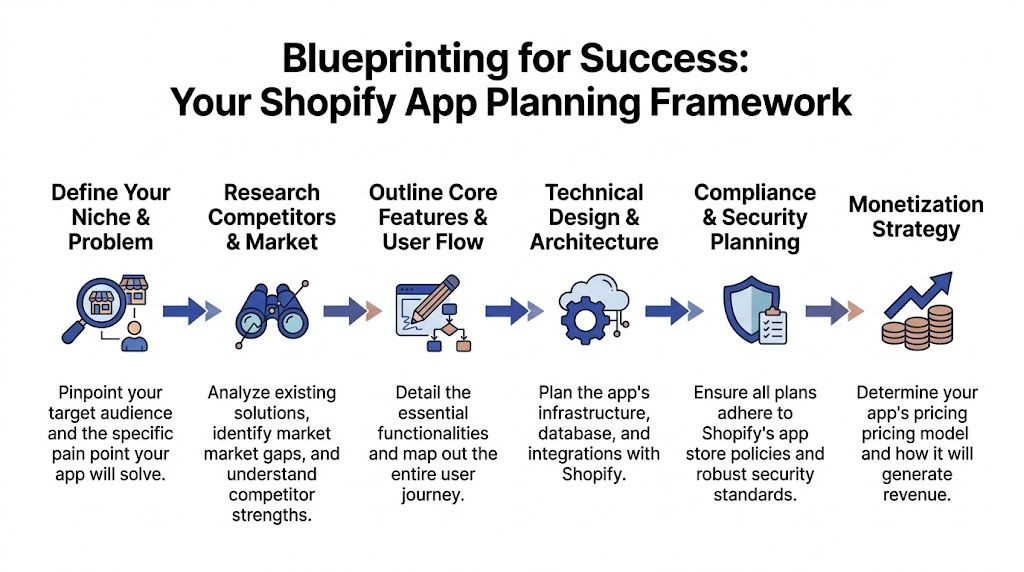
Start with the merchant workflow, not the feature list
If the first document in the project is a feature backlog, you’re already drifting.
The better starting point is a single merchant job to be done. For example:
- Merchandising problem. A merchant needs to bundle products without manual catalogue upkeep.
- Operations problem. A merchant needs ERP or CRM data synced cleanly into Shopify workflows.
- Marketing problem. A merchant needs campaign controls inside admin without relying on fragile theme edits.
That distinction matters because Shopify apps don’t win by having more toggles. They win by reducing friction in a workflow a merchant repeats often.
Decide your app shape early
Some planning decisions lock in months of implementation.
A few that deserve real attention:
Embedded or not
If the app belongs inside Shopify Admin, build for that assumption from the start. Embedded apps usually create less context switching for merchants and align better with a native experience. Standalone surfaces can work for analytics-heavy products or complex external operations, but they often create more session, navigation, and support complexity.
Public app or custom app
Public apps need broader onboarding logic, safer defaults, cleaner permissions, and review discipline. Custom apps can be sharper and narrower because you know the merchant context. Don’t design a custom app and then try to “productise” it at the end. That nearly always produces awkward UX and brittle setup.
Single-store logic or multi-tenant logic
If there’s even a realistic chance the app will serve many merchants, design tenancy properly from the start. Retrofitting tenant boundaries into a working app is ugly work.
For merchants with one-off internal needs, custom Shopify app development is often the cleaner route because it avoids the compromises required for broad App Store distribution.
Pick a stack based on operational load
Stack choice is where teams get tribal. It shouldn’t be.
Use the stack that fits the app’s load profile, internal skill set, and maintenance model. In practice, that usually comes down to how much real-time processing, webhook volume, admin UI work, and third-party integration complexity you expect.
Here’s the trade-off in plain terms:
| Decision area | Better when | Watch out for |
|---|---|---|
| Node.js backend | You expect high webhook throughput or event-heavy processing | Teams sometimes under-spec queueing and retry logic |
| Ruby on Rails backend | You want fast CRUD-heavy development and your team is already productive in Rails | It can become awkward if event architecture grows quickly |
| React with Polaris | You need embedded admin UI that feels native | Don’t customise yourself out of platform conventions |
| GraphQL-first API usage | You need tighter, more efficient data queries | Developers who don’t model queries carefully create debugging pain |
A first-time team often asks which stack Shopify “prefers”. That’s the wrong question. Shopify cares far more about whether your app behaves correctly, performs well, and respects the platform than whether you picked the fashionable backend.
The boring stack your team can debug at speed is usually the right stack.
Map three flows before building anything
Before implementation, sketch these in detail:
- Install and auth flow
- First-run onboarding flow
- Billing and downgrade flow
Most early apps only sketch the happy path. Review problems usually live in the missing states. What happens if permissions change, a token expires, billing is declined, a merchant reinstalls, or an external system returns inconsistent data? If those paths are vague in planning, they’ll still be vague in production.
Define what “v1” will not do
Scope discipline is one of the most practical advantages a senior team brings to built for Shopify app development.
A strong first release usually has:
- One core outcome the merchant can reach quickly
- A short path to value inside the app
- Few configuration branches
- Clear defaults that work for most stores
A weak first release tries to satisfy every segment at once. It ends up harder to review, harder to support, and harder for merchants to understand.
Core Build and Technical Compliance
Once the plan is sound, the build itself becomes much more predictable. Not easy, but predictable.
The technical work for Built for Shopify isn’t just about making features function. It’s about proving that the app can survive real merchant usage without lagging, misusing APIs, or creating trust issues. That’s why so many submissions fail on details that seem minor during development and obvious during review.

A successful build has to hit strict benchmarks. The published thresholds include under 500ms p95 response time for 1000+ requests over 28 days and a CLS score of 0.1 or lower. In the same guidance, 35% of UK app approvals fail on performance alone, and API misuse causes 42% of rejections. The same source also notes that teams should prioritise Node.js for webhook scale and handle token expiry properly to avoid common failures, as outlined in Codersy’s breakdown of Shopify app guideline requirements.
Build the app around a clean service boundary
A lot of first apps become difficult because everything sits in one request path.
The better pattern is to separate concerns early:
- Admin-facing UI layer for merchant interaction
- Application server for auth, API orchestration, billing, and business logic
- Background job layer for webhooks, syncs, retries, and slow external operations
- Persistent storage for merchant settings, install state, and app data
Public apps almost always need to absorb asynchronous events. When your order sync, inventory push, CRM callback, or bundle recalculation all happens inline inside the user request, performance slips quickly.
OAuth and session handling need to be boring
If there’s one place to avoid cleverness, it’s auth.
Use Shopify’s expected OAuth flow cleanly. Validate requests correctly. Keep scopes explicit and minimal. Store tokens securely on the server side. Build reinstall logic deliberately instead of treating it as an edge case. Embedded apps should behave like embedded apps, not like a generic SaaS bolted into an iframe.
Teams often build a good feature set and still fail review because session handling is flaky. Common signs include merchants getting logged out unexpectedly, broken redirects after install, or app screens that depend on stale assumptions about shop state.
A practical auth checklist
- Validate every install request rather than trusting inbound parameters.
- Store access credentials server-side and keep them out of client logic.
- Handle token expiry intentionally instead of surfacing generic failures.
- Keep scopes tight so reviewers and merchants can both see a clear reason for each permission.
If auth feels “mostly fine” in staging, it usually isn’t ready for App Store review.
Use Polaris because it solves more than styling
Plenty of teams still think Polaris is mainly a UI kit. It isn’t.
It’s a behaviour contract between your app and the Shopify admin experience. Polaris helps with consistency, accessibility patterns, layout expectations, and merchant familiarity. That matters commercially as much as technically because merchants judge reliability through interaction quality long before they inspect outcomes.
What doesn’t work is using Polaris superficially while keeping custom interactions that fight admin norms. A page can look Shopify-like and still feel wrong if actions are buried, loading states are inconsistent, or destructive actions aren’t handled cleanly.
Build small feature slices and test them in live-like conditions
Don’t build the entire app and then start validating.
For public app work, develop vertically:
- one feature path
- one UI surface
- one background process
- one error state
- one supportable outcome
That gives you a more honest signal about whether architecture choices are holding up.
A sensible first slice might include:
| Build slice | What to prove |
|---|---|
| Install to dashboard | Merchant can authenticate, land correctly, and see a meaningful empty state |
| Primary configuration flow | The app can save settings reliably and explain what happens next |
| One Shopify data interaction | Reads and writes are scoped correctly and recover from failure |
| One webhook path | Events can be processed asynchronously and retried safely |
Performance work starts in architecture, not optimisation week
Many teams leave performance until the app “works”. By then, they’re trying to patch structural problems with caching and smaller component tweaks.
That usually isn’t enough. Performance issues in built for Shopify app development often come from design choices made early:
- Too many synchronous external calls
- Heavy admin screens fetching broad datasets
- Background work performed in the request cycle
- Repeated API calls instead of event-driven updates
- No queueing strategy for webhooks or retries
A better approach is to treat p95 response time as a product requirement, not an engineering afterthought. If a page can’t load quickly with realistic merchant data, reduce what it does. If a task is slow, move it to a job queue and give the merchant a clear status model.
Billing is part of UX, not just compliance
Billing flows are where trust gets lost quickly.
Make charges understandable. Make plan differences obvious. Show what happens after approval, cancellation, or failed payment. If pricing depends on usage or feature thresholds, surface that early instead of letting merchants discover it in support.
One reason app reviews get messy is that billing, onboarding, and permissions are often designed by different people. The result is a merchant who installs, approves scopes, reaches a half-configured dashboard, then hits an unclear paywall. Reviewers notice that kind of fragmentation immediately.
A short explainer can help developers visualise the standards Shopify expects in modern app builds:
Common technical choices that usually backfire
These come up repeatedly in first public app projects:
- Over-fetching store data because it’s easier than defining narrow queries
- Polling instead of subscribing to events when webhooks would reduce load
- Shipping broad permissions up front rather than introducing them with clear need
- Coupling merchant UI to long-running tasks with no background processing layer
- Ignoring uninstall and reinstall paths until support tickets expose them
What solid apps do differently
The best public apps aren’t necessarily the most complex. They’re the most disciplined.
They do less in the first session. They explain setup clearly. They avoid magical behaviour. They log enough to diagnose failures. They recover well when Shopify, a third-party system, or the merchant gives them imperfect input.
That’s the level of technical maturity Built for Shopify is trying to surface. If you build with that in mind, review becomes easier because the app is already behaving the way the badge expects.
Navigating the App Review Gauntlet
App review feels opaque until you start thinking like a reviewer.
Reviewers aren’t trying to admire your architecture. They’re trying to answer simpler questions. Does the app behave reliably? Is the merchant journey clear? Are permissions justified? Is billing fair and understandable? Does the listing accurately match the product? Most failed submissions trace back to one of those judgments.
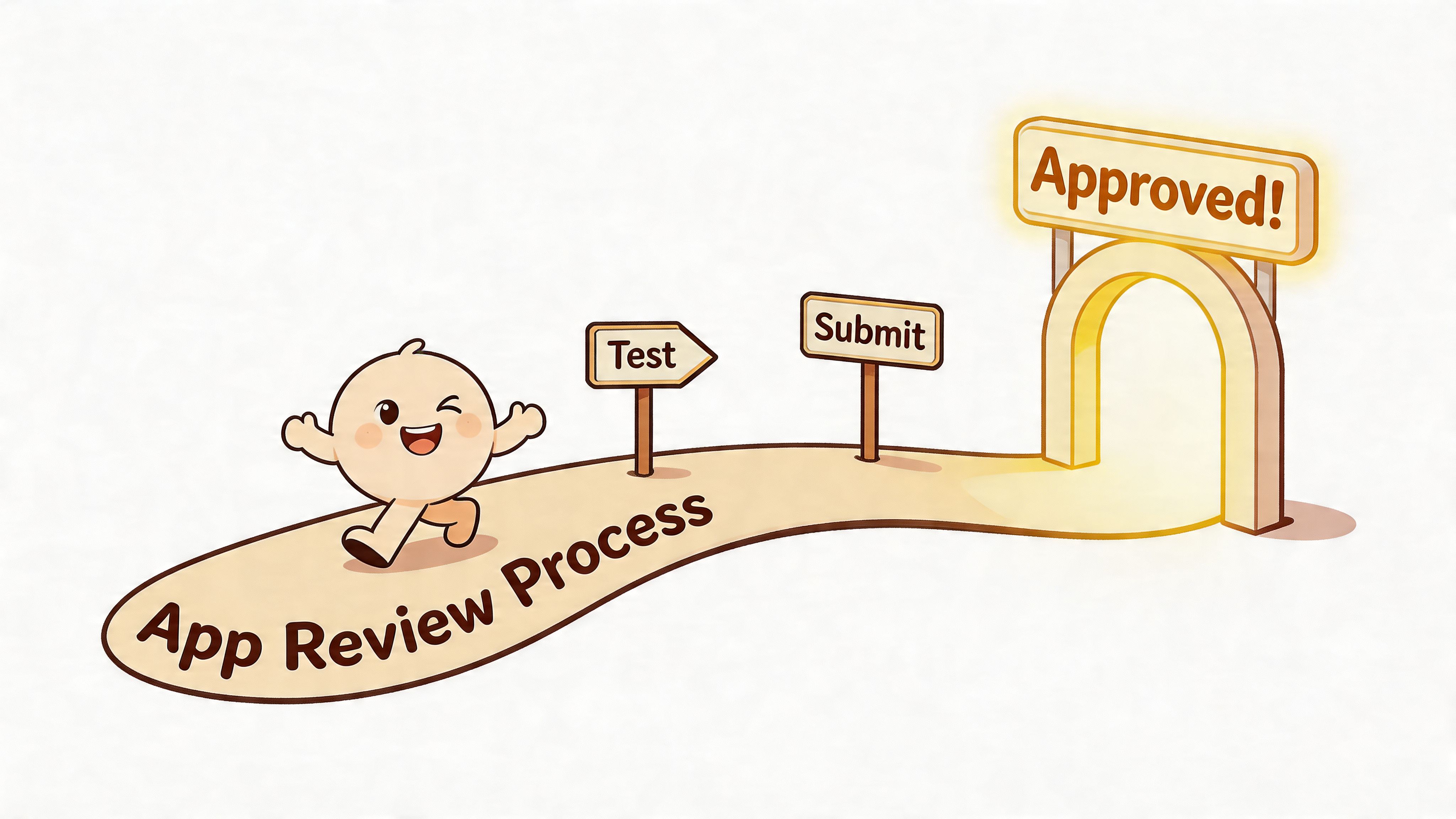
The commercial reason to get this right is straightforward. For apps that achieve certification, the upside goes beyond the early install boost. Badge holders also see churn rates below 5%, which is why the review process is worth treating as part of the product rather than an administrative hurdle, according to Craftberry’s Shopify app store statistics summary.
Reviewers look for merchant risk
A useful mental model is that every review comment is a proxy for merchant risk.
If onboarding is unclear, a merchant may install and abandon. If permissions are broad, a merchant may hesitate. If your app listing promises more than the product delivers, a merchant may churn or complain. Review isn’t only technical policing. It’s merchant trust control.
That means your submission package matters almost as much as your code. Demo stores should be tidy. Test instructions should be explicit. App states should be reachable without guesswork. Reviewers shouldn’t have to infer how value appears.
The checklist you should run before submission
Use a plain pass/fail audit. Don’t rely on “it should be fine”.
| Category | Requirement | Pass/Fail |
|---|---|---|
| Authentication | Install, login, reauth, and reinstall flows work consistently | |
| Permissions | Requested scopes are minimal and clearly justified | |
| User experience | App navigation is clear and follows Shopify admin expectations | |
| Polaris usage | Components, spacing, forms, and feedback patterns feel native | |
| Performance | Key screens and actions remain responsive under realistic data loads | |
| Error handling | Failures show useful messages and recovery options | |
| Billing | Charges, trials, limits, and downgrade paths are understandable | |
| Webhooks and async jobs | Background processes retry safely and don’t block the UI | |
| Data handling | Merchant settings and app data persist correctly across sessions | |
| App listing | Screenshots, copy, and positioning match the actual product | |
| Support readiness | Contact route, help docs, and issue handling are in place | |
| Uninstall behaviour | App disconnects cleanly and expected clean-up actions are handled |
Listing quality changes review outcomes
Developers often treat the App Store listing as marketing polish. Reviewers treat it as part of product clarity.
A weak listing usually has one of these problems:
- Generic copy that doesn’t state the merchant problem clearly
- Screenshots with no narrative about setup or outcomes
- Missing support expectations such as setup help or compatibility notes
- A category mismatch between what the app claims and what it does
A strong listing is literal. It shows the task, the interface, and the likely result. It doesn’t overstate automation. It doesn’t hide limitations. It doesn’t make the merchant decode jargon.
Submission quality often comes down to whether a stranger can install the app and reach value without your team on a call.
Common rejection patterns
From a practitioner’s perspective, these are the categories that waste the most time:
The app works, but not from a fresh install
Existing dev data hides onboarding gaps. Reviewers start clean.
The app depends on undocumented manual steps
If setup requires hidden assumptions, review will stall.
The app asks for too much access
Broad scopes create immediate scrutiny.
The billing flow interrupts trust
If charges appear before merchants understand value, reviewers push back.
The listing and product don’t align
Reviewers will test whether your screenshots and copy reflect reality.
How to respond when review feedback lands
Don’t argue the first response unless the reviewer has clearly misunderstood a behaviour you can demonstrate.
Better response pattern:
- acknowledge the issue plainly
- explain the fix in concrete language
- include exact reproduction steps
- mention where in the app the reviewer should test again
Short, precise replies move things faster than defensive essays.
Sustaining Success After Approval
Approval is not stability. It’s exposure.
Once the app is live, every weakness becomes more expensive. Public merchants install in messier environments than your test stores. They connect stranger systems, create weirder edge cases, ignore setup instructions, and expect support to know what happened immediately. That’s normal. If your operating model assumes disciplined merchants, the app won’t age well.
Maintenance is product work
A public Shopify app isn’t “finished” after launch. It needs routine attention in four areas:
- API change management so platform updates don’t break flows
- Observability so support can trace failures without asking merchants to reproduce everything
- Support operations with documented response paths for install, billing, sync, and UI issues
- UX iteration based on real merchant behaviour rather than internal assumptions
In these situations, weaker teams lose the badge in spirit even if they keep the listing live. The codebase drifts, onboarding gets patchy, and edge cases accumulate until every release feels risky.
UK accessibility can’t stay on the backlog forever
This is the part many developers still underweight.
UK teams often focus on Shopify’s general UX and accessibility expectations but stop short of region-specific compliance. That’s a mistake. In the UK, 22% of online shoppers have disabilities, and lawsuits rose 28% in 2025, which makes accessibility a live product and legal issue rather than a nice-to-have. The same guidance points directly to the importance of ensuring Polaris implementations meet WCAG 2.1 AA levels and to the relevance of the Equality Act 2010, as discussed in Shopify’s partner blog context on building apps.
If your app introduces custom components on top of Polaris, audit them. Don’t assume the design system automatically covers every extension, custom interaction, or embedded workflow you add around it.
A practical maintenance routine should include:
- Keyboard navigation checks across primary app flows
- Colour contrast reviews whenever UI variants are added
- Form and validation audits so errors are announced and understandable
- Screen reader spot checks on install, onboarding, settings, and billing paths
Commercially, retention compounds after trust is earned
Apps that keep doing the basics well tend to earn better reviews, lower support friction, and more stable merchant retention. That doesn’t happen because merchants are sentimental. It happens because they can depend on the app in ordinary daily operations.
That’s also why product teams should study adjacent SaaS and ecosystem thinking, not just Shopify docs. Good writing on marketplace growth strategies is useful here because it reinforces a broader truth. Distribution and retention improve when the product reduces friction for both adoption and continued use.
For teams building a longer roadmap around support, maintenance, and app evolution, working with a Shopify custom app developer can help clarify where public-app discipline and merchant-specific engineering start to diverge.
A durable app is usually the one whose team keeps removing friction after launch, not the one that shipped the most features first.
Frequently Asked Questions
How is Built for Shopify different from a normal Shopify app submission
A normal submission focuses on whether the app can be listed safely and appropriately. Built for Shopify raises the bar on product quality, performance, UX consistency, and technical discipline. In practice, that means you need to think harder about native-feeling admin experiences, performance under real use, permission restraint, and supportable onboarding.
Should I build a custom app first and convert it into a public app later
Sometimes, but usually only if the custom app solves a broadly repeatable problem.
A lot of custom apps contain merchant-specific assumptions that don’t survive App Store distribution. Public apps need cleaner setup logic, safer defaults, broader error handling, and clearer billing. If you know from the start that the product is meant for many merchants, build it that way from the beginning.
What usually causes first-time teams to fail review
The most common causes are uneven onboarding, unclear billing, broad permissions, flaky auth, weak listing materials, and performance gaps that only show up in realistic test conditions. Teams also underestimate reinstall flows and support readiness.
Is Polaris mandatory if I want the badge
If you’re aiming for Built for Shopify quality, you should assume Polaris is part of the expected path for embedded admin experiences. It helps align your app with Shopify conventions and makes accessibility, consistency, and merchant trust easier to maintain.
Should I choose Node.js or Ruby on Rails
Choose based on your team’s real operating model.
If your app depends heavily on webhooks, event processing, and asynchronous workloads, Node.js is often a practical fit. If your team is stronger in Rails and the product is more CRUD-heavy with less event pressure, Rails can still be a sensible choice. What matters is whether the app remains supportable and performant.
How much should I build before seeking review
Build the smallest complete product that a merchant can install, understand, configure, and use without your intervention. Don’t wait for every nice-to-have. Do make sure the install path, one core workflow, error handling, support route, and billing logic are all real and testable.
What should I do if the app is rejected
Treat rejection comments as product feedback, not just gatekeeping.
Reproduce each issue on a clean store. Fix the root cause rather than the narrow symptom. Update your reviewer notes with exact instructions. If the feedback seems ambiguous, respond with a short clarifying explanation and a concrete test path. Keep replies factual and easy to validate.
How do I know if the app is commercially viable after approval
Look for behavioural signals before chasing expansion. Are merchants reaching the core outcome quickly? Are support requests concentrated around setup confusion or around legitimate edge cases? Are uninstall reasons tied to poor fit, or to avoidable UX friction? Those answers tell you more than raw install volume on its own.
If you’re building a public app, rebuilding one that keeps failing review, or trying to turn a merchant-specific tool into a proper App Store product, Grumspot works on Shopify design, development, audits, and app engineering with a conversion-first and compliance-aware approach.
Let's build something together
If you like what you saw, let's jump on a quick call and discuss your project

Related posts
Check out some similar posts.

- outsource Shopify development
Ready to outsource Shopify development? Our 2026 playbook covers finding partners, vetting, pricing,...
Read more
- Shopify monthly development plan
Learn how a Shopify monthly development plan works to scale your store. Our 2026 guide covers pricin...
Read more
- Shopify Plus store build
Get expert guidance for your Shopify Plus store build. Master planning, migration, launch, and scali...
Read more
- Shopify public app development
Your expert guide to Shopify public app development. Learn to build, secure, and launch a successful...
Read more