Shopify SEO Audit: Boost Your Store's Rankings in 2026
- shopify seo audit
- shopify seo
- ecommerce seo
- technical seo
- seo audit guide
Launched
May, 2026

Organic traffic has stalled. Paid spend is doing more of the heavy lifting than it should. New collections are live, products are indexed, and yet rankings refuse to move or have started slipping.
That’s usually the point where a merchant starts tweaking titles, installing another app, or rewriting product copy without a clear diagnosis. It rarely fixes the issue. A proper shopify seo audit does. It shows where visibility is being blocked, where crawl budget is being wasted, and where Shopify’s own structure is creating problems you won’t spot from the front end.
For scaling brands, the audit gets more demanding. Standard Shopify stores already deal with duplicate URLs, collection logic, and app bloat. Shopify Plus adds another layer. Stores often carry custom code, international storefronts, complex filters, and app interactions that generic SEO checklists don’t account for. That’s where many audits fall short.
Your Guide to a Powerful Shopify SEO Audit
A good audit doesn’t start with keywords. It starts with evidence.
If a store’s rankings have flattened, there are usually a few competing explanations. Google may be struggling to crawl key pages. Product variants may be bloating the index. Templates may be generating duplicate metadata. A theme update or app install may have changed how content renders. Without checking the technical foundation first, content work turns into guesswork.
That matters even more on Shopify Plus. A widely overlooked problem is the Shopify Plus complexity blind spot. One industry write-up notes that site structure gets more complex with Shopify Plus, yet audit guides still tend to treat standard Shopify and Shopify Plus as if they have the same requirements. It also highlights extra challenges for UK Shopify Plus merchants operating internationally, including hreflang implementation across multiple regions, duplicate content across localised storefronts, and crawl budget waste from region-specific parameters, while noting that no source addresses how to audit Plus-exclusive features for SEO impact in a meaningful way in this Shopify technical SEO audit discussion.
That gap is real. In practice, the issues that hurt larger stores are rarely isolated. A faceted navigation setup affects crawl paths. A localisation layer creates duplicate pages. A custom app injects markup that conflicts with schema. A migration leaves redirect chains buried deep in old collection URLs. None of these problems get solved by checking a few meta tags.
Practical rule: If your store has custom functionality, multiple regions, heavy app usage, or a large catalogue, a generic ecommerce audit won’t go deep enough.
The useful way to approach a shopify seo audit is to work in layers:
- Foundation first. Can search engines crawl, index, and interpret the site properly?
- Platform second. How is Shopify creating or duplicating URLs, templates, and content?
- Page quality third. Are category and product pages strong enough to compete?
- Priority last. Which fixes matter now, and which can wait?
That sequence keeps teams from wasting time on low-impact tasks while more serious technical faults remain live.
Preparing Your Audit Toolkit and Mindset
A shopify seo audit goes wrong before it starts if the toolset is incomplete. You need platform data, crawler data, search engine data, and commercial context. One dashboard won’t give you all of that.

Use tools that answer different questions
Google Search Console is the closest thing you have to a direct line to Google. It shows indexing status, page coverage problems, performance by query, and which URLs Google is choosing to show. If indexed pages in Search Console don’t match the pages you want ranking, that’s your first warning sign.
A crawler such as Screaming Frog or Sitebulb shows the site as a search engine would encounter it. That matters because a Shopify storefront can look tidy to a merchant while still producing duplicate paths, redirect hops, weak internal links, or canonicals that point somewhere unexpected.
Ahrefs or Semrush adds the external view. You use them to assess backlinks, competing domains, ranking overlap, and pages that should be earning links but aren’t. They’re also useful for spotting when a weaker collection page is outranking a stronger one because internal signals are split.
A speed tool matters too. PageSpeed Insights and Shopify’s own speed reporting help you connect template choices, app scripts, and media handling to real performance bottlenecks.
Set a baseline before touching anything
Most merchants skip this. They jump straight into fixes and then can’t prove what changed.
Before the audit starts, document:
- Current organic landing pages so you can see whether key templates improve or decline.
- Top non-brand queries because brand traffic can hide SEO underperformance.
- Indexed URL patterns such as products, collections, blogs, tag pages, and filtered URLs.
- Known business priorities including product categories, seasonal lines, margin drivers, and international markets.
If you need a simple process to structure that baseline, Grumspot’s guide to how to conduct an SEO audit is one practical starting point.
Adopt the right audit mindset
The audit isn’t a hunt for every flaw. It’s a process for finding the few issues that are suppressing growth.
That means resisting two common mistakes:
| Mistake | What happens instead |
|---|---|
| Auditing every page equally | Important templates get buried under minor fixes |
| Treating tools as verdicts | You end up following software flags without commercial judgement |
A warning from Screaming Frog isn’t automatically a priority. A low score in PageSpeed Insights isn’t automatically your next sprint. Context matters. A collection template that drives revenue deserves more scrutiny than a blog tag page no one visits.
The best audits read the store as a business, not just as a crawl.
For larger Shopify and Shopify Plus builds, I’d also map the stack before crawling. List the theme, major apps, localisation tools, review platform, search and filter layer, and any custom code areas. That simple inventory often explains why a site behaves the way it does.
The Foundational Technical and Indexability Audit
Technical SEO problems don’t always announce themselves. A store can look polished, load products correctly, and still lose visibility because search engines are crawling the wrong pages or getting stuck in avoidable dead ends.
Check what Google can and cannot index
The first task is to confirm whether important pages are indexable and whether unimportant ones are competing for attention. Index bloat appears under these circumstances.
In UK ecommerce, stores often show 20 to 30% index bloat from duplicate product variants, according to Shopify’s enterprise audit guidance. The same source notes that canonical tag misconfigurations on paginated collections affect 40% of audited UK stores, and broken redirect chains appear in 25% of migrations, with those chains capable of dropping organic traffic by 15 to 20% in Shopify’s enterprise SEO audit guidance.
That combination is common on Shopify because the platform naturally creates multiple pathways to similar content. Product URLs, collection paths, variant handling, filter states, and pagination can all create index noise if not tightly controlled.
Audit this in three passes:
- Review indexed pages in Google Search Console and compare them against the pages you want visible.
- Crawl the store and segment URLs by type. Products, collections, blogs, pages, parameters, tags, search results, and redirects should all be isolated.
- Check canonicals, meta robots directives, and status codes across each segment.
Audit robots, canonicals, and XML sitemaps together
Merchants often check these separately. That’s a mistake because they affect the same indexing decision.
A page blocked in robots.txt can still be known to Google. A canonical can point away from the version you want ranked. A sitemap can submit URLs that are redirected, duplicated, or marked noindex. When those signals conflict, Google has to guess. You don’t want that.
Look for:
- Robots rules that block useful sections such as collection paths or content folders.
- Canonical patterns that collapse distinct pages into broader but less relevant URLs.
- Sitemap entries that include redirects or soft duplicates.
- Noindex directives left behind after development or launch work.
If the sitemap says “index this”, the canonical says “index something else”, and the template says “noindex”, the problem isn’t Google. The problem is your stack.
For a deeper technical process specifically on Shopify builds, this Shopify technical audit guide is relevant.
Crawl paths matter more than most stores realise
Once indexability is checked, move to crawlability. Search engines need a clean path through the store. Broken links, redirect chains, and weak internal connections all create friction.
Shopify migrations are especially vulnerable. Old category structures get redirected in bulk, but teams don’t always review whether those redirects go directly to the final destination. A chain that passes through multiple steps slows crawling and weakens the signals passed to the final page.
The pages most likely to cause crawl waste
Some patterns deserve extra scrutiny because they create noise quickly:
- Filtered collection URLs that generate many combinations with little standalone value.
- Tag-based archives that exist but aren’t strategically useful.
- On-site search pages that become crawlable when they shouldn’t.
- Legacy blog or campaign URLs that still attract internal links despite redirects.
A short crawl table helps keep this manageable:
| URL pattern | What to check | Typical risk |
|---|---|---|
/collections/ pages |
Canonicals, pagination, filter states | Duplicate or thin category variants |
| Product URLs | Variant handling, internal links, canonicals | Duplicate product entry points |
| Redirected URLs | Hop count, final destination relevance | Crawl waste and weaker signals |
| Parameter URLs | Indexability, internal links, canonical targets | Index bloat |
Site architecture should support ranking pages
Good architecture isn’t about making the menu look tidy. It’s about helping authority flow to the pages that should rank.
Collection pages usually carry more category intent and broader ranking potential than products. If the site architecture pushes all internal authority to products while collections sit several clicks deep or depend on JavaScript interactions to be discovered, rankings tend to underperform.
Look for orphaned pages, pages with very few internal links, and pages linked only from faceted navigation. If Google can reach a category page only through a filtered path, that page isn’t being supported properly.
What works and what doesn’t
What works is boring but effective. Clean sitemaps, clear canonicals, direct redirects, disciplined index control, and internal links that reinforce commercial priorities.
What doesn’t work is relying on apps to “handle SEO” while the underlying structure remains messy. Apps can help with implementation. They don’t replace technical judgement.
Auditing Shopify-Specific SEO Configurations
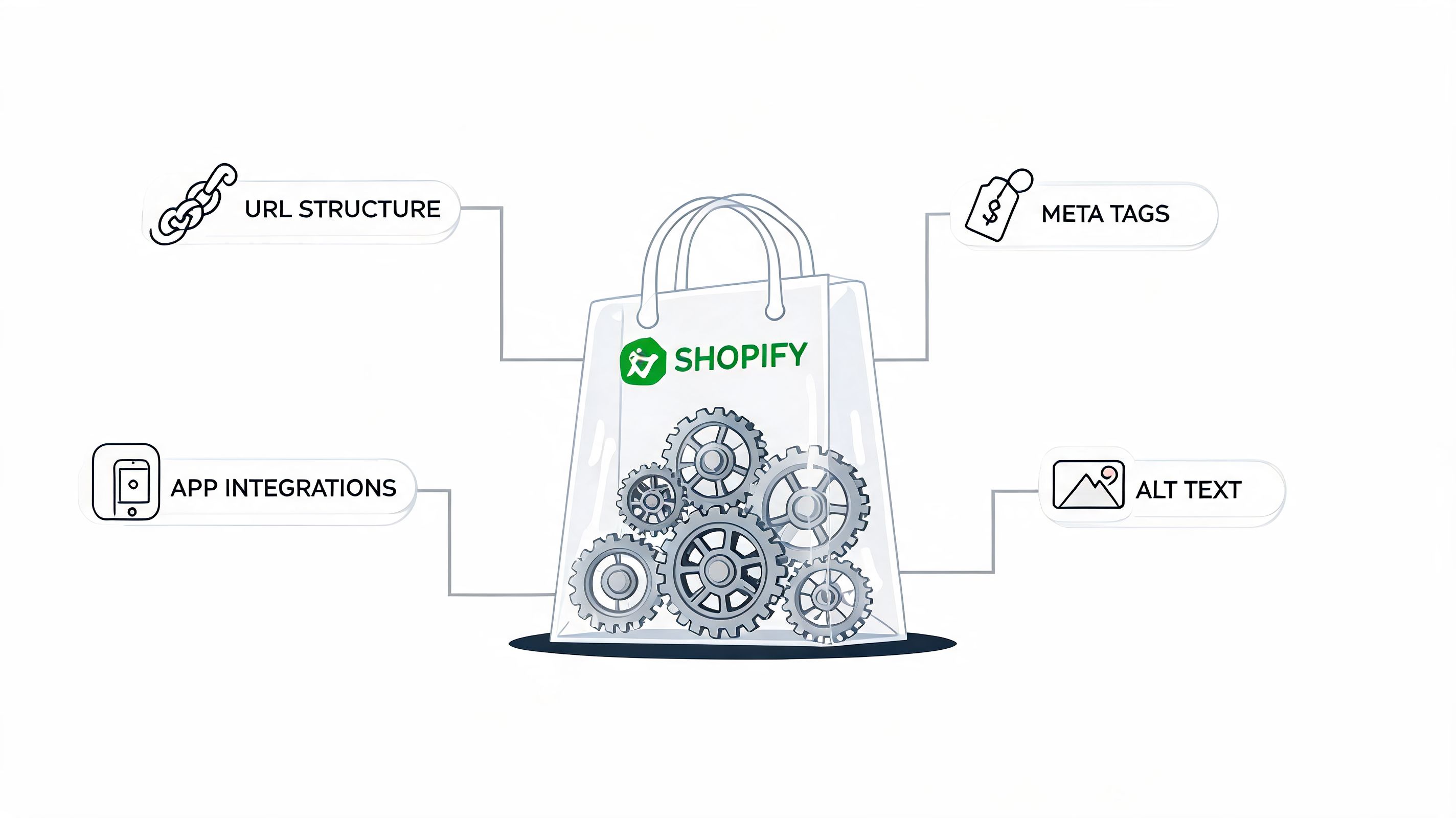
Shopify has predictable SEO strengths and equally predictable SEO traps. The platform handles a lot for you, but it also generates patterns that can dilute relevance if nobody checks them carefully.
Start with Shopify’s URL and template behaviour
Shopify creates consistency, but not always cleanliness. Products can appear in ways that split signals. Collections can become cluttered with low-value filters. Theme templates can apply the same content logic across dozens or hundreds of pages, which means one mistake scales fast.
On a practical audit, I’d inspect these areas first:
- Product templates. Check whether titles, descriptions, schema, and supporting content are unique enough across similar SKUs.
- Collection templates. Review whether copy is thin, duplicated, or hidden behind tabs and accordions that add little ranking value.
- Variant handling. Ensure variants aren’t creating duplicate index issues or weak user journeys.
- Blog and page templates. These often carry inconsistent metadata and internal linking because they receive less attention than revenue pages.
The point isn’t to make every page unique for the sake of it. The point is to stop Shopify’s repeatable structures from generating repeatable SEO problems.
Review apps as part of the SEO system
Many audits mention apps. Few treat them seriously enough.
Apps can inject scripts, markup, widgets, internal links, reviews, pop-ups, faceted navigation, and client-side rendering. Any one of those can change how Google sees the page. On Plus stores, where custom functionality is layered on top, app conflicts become harder to trace.
I’d review each installed app against four questions:
| App area | What to inspect | Risk if ignored |
|---|---|---|
| Reviews and UGC | Schema output, duplicate widgets, crawlable content | Markup conflicts and messy page output |
| Search and filtering | Crawlable facets, parameter handling, canonical behaviour | Index bloat and weak crawl efficiency |
| Translation and localisation | hreflang, duplicated content blocks, URL logic | International duplication and geo confusion |
| Merchandising or bundle apps | Rendered content, hidden links, script load | Thin rendering and slower pages |
A clean-looking front end can hide a lot of injected code. That’s why I prefer checking rendered HTML alongside source and crawl output.
Audit cue: If rankings dropped after an app install, don’t just uninstall it. First identify what it changed in markup, linking, or rendering.
Use schema and duplicate-content fixes where they matter
This is one of the few areas where post-audit implementation can materially improve both visibility and commercial performance. According to Sitebulb’s Shopify SEO auditing guidance, post-audit work such as fixing broken links, optimising robots.txt, and implementing schema markup can lead to meaningful gains. The same source states that audits incorporating schema markup and duplicate content fixes increased conversion rates by 15%, while unique visits rose 25% quarterly for proactive UK merchants in this Shopify SEO auditing guide.
Those gains don’t come from adding schema everywhere without thought. They come from applying it correctly on high-value templates and removing duplication that confuses search engines.
For Shopify, I’d focus schema review on:
- Product pages with consistent product data, availability, and review markup
- Collection and content pages where supporting structured data clarifies page intent
- Conflict checks where multiple apps may be outputting overlapping schema types
Shopify Plus needs a stricter audit standard
Here, generic advice becomes ineffective.
Shopify Plus stores often run multiple markets, custom checkout-adjacent flows, third-party systems, and more advanced front-end logic. That creates SEO issues that don’t always appear in simpler builds. Internationalisation can create overlapping URLs and misaligned hreflang. Custom filters can explode crawl paths. API-driven content can weaken rendered content if key elements don’t appear consistently for crawlers.
Three Plus-specific review areas deserve special attention:
International storefront logic
When one catalogue is adapted for multiple regions, SEO signals can fragment quickly. Audit localised storefronts for duplicated body copy, conflicting canonicals, and hreflang implementation that matches the market setup.
Custom code in theme and app layers
Developers often solve merchandising and UX problems in ways that accidentally affect crawlability. Important content may render late. Internal links may depend on client-side behaviour. Product data may be available to users but inconsistently available to crawlers.
Enterprise redirect governance
Larger stores change category structures more often. Seasonal pages are retired. landing pages are repurposed. Collections merge. Without redirect governance, old URLs linger in chains or redirect to weak substitutes.
What works on Plus is discipline. Change control, documented template rules, app reviews before launch, and regular recrawls after significant releases.
Reviewing On-Page Content and Performance
A Shopify Plus brand can have clean indexation, valid canonicals, and a tidy sitemap, then still underperform because the pages meant to rank do not give Google or shoppers enough to work with. I see this often on scaled stores. Templates are technically functional, but metadata is duplicated across hundreds of URLs, collection copy says very little, and product pages are slowed down by app layers that were added one campaign at a time.
Audit the page elements users and search engines actually read
Start with the templates that matter commercially. Usually that means core collections, top-selling products, key landing pages, and any market-specific variants if the store runs multiple regions.
A Shopify community discussion on the steps to conduct a Shopify SEO audit highlights a familiar problem set. Auto-generated metadata, missing image alt text, and weak page-level differentiation still show up across many stores. On large catalogues, that usually points to template logic, bulk import habits, or app-generated page elements rather than a single content editor making mistakes.
Review each important template for:
- Title tags that are unique and mapped to page intent
- Meta descriptions that describe the page clearly instead of repeating boilerplate
- One H1 with a heading structure that supports scanning and relevance
- Image alt text that describes the product or category in plain language
- Body copy that adds buying context, not filler
- Internal links that help users and crawlers reach related ranges, subcategories, and supporting guides
If you’re refining category and product page standards, Grumspot’s article on ecommerce SEO best practices is a useful reference.
On Shopify Plus builds, check how this content is generated. Merchants often assume the CMS content is the page content. It is not always that simple. Custom metafield rules, dynamic tabs, review widgets, personalisation scripts, and market-specific content conditions can change what is rendered, what is duplicated, and what ends up too thin to rank.
Better content usually means sharper intent, not more words
Padding a collection page with 300 generic words does not fix a weak page. It often makes the page worse.
The job is to make the page more specific. A strong collection page explains the range, materials, use cases, fit, price positioning, or key differences within the category. A strong product page reduces ambiguity. It answers the questions that stop someone from buying and gives search engines clearer topical signals than the manufacturer feed or a near-identical sibling SKU.
Use a blunt test. Remove the product name and brand. If the copy could sit on twenty other pages without anyone noticing, rewrite it.
This matters even more on stores with variant-heavy catalogues. Similar products need clearer differentiation in headings, copy, media, and structured content blocks, or Google has very little reason to rank one URL over another.
Performance belongs in the on-page review
Page quality and page speed affect the same outcome. Rankings are harder to win when important templates are slow, unstable, or bloated with scripts.
Google’s Core Web Vitals are still the clearest shared benchmark for this review. On Shopify stores, the recurring issues are predictable:
- LCP problems caused by oversized hero images, autoplay video, sliders, and app-heavy above-the-fold modules
- INP issues caused by scripts competing for the main thread, often from tracking, personalisation, reviews, and promotional overlays
- CLS issues caused by late-loading banners, injected widgets, and image containers without reserved dimensions
A short explainer is worth watching before you start fixing templates:
What usually slows a Shopify store down
I’d check these first:
| Issue type | Typical cause | Better fix |
|---|---|---|
| Heavy above-the-fold content | Large hero imagery, video, sliders | Simplify layout and optimise media delivery |
| Script overload | Apps adding tracking, pop-ups, widgets | Remove low-value scripts and defer non-critical assets |
| Layout shift | Dynamic elements inserted late | Reserve space and stabilise template components |
| Slow collection pages | Filters, badges, swatches, app blocks | Keep only features that help conversion or discovery |
There are trade-offs here. Some scripts support revenue. Some merchandising features improve conversion. The mistake is keeping every feature on every template without measuring the cost. On Plus stores, app conflicts and custom code often create cumulative drag. One widget is rarely the problem. Ten widgets, layered onto a custom theme with market logic and heavy tracking, usually are.
Audit performance by template, not just at site level. Product pages, collection pages, editorial landing pages, and region-specific versions often behave very differently. That is where useful fixes come from.
Building Your Prioritisation and Reporting Framework
A typical post-audit failure looks like this. The SEO team finds 40 issues, development picks the easiest five, merchandising pushes for title tag edits on top products, and the main blocker stays live for another quarter. On larger Shopify and Shopify Plus stores, that usually means template logic, app conflicts, or international setup keeps creating the same issue faster than the team can patch it.
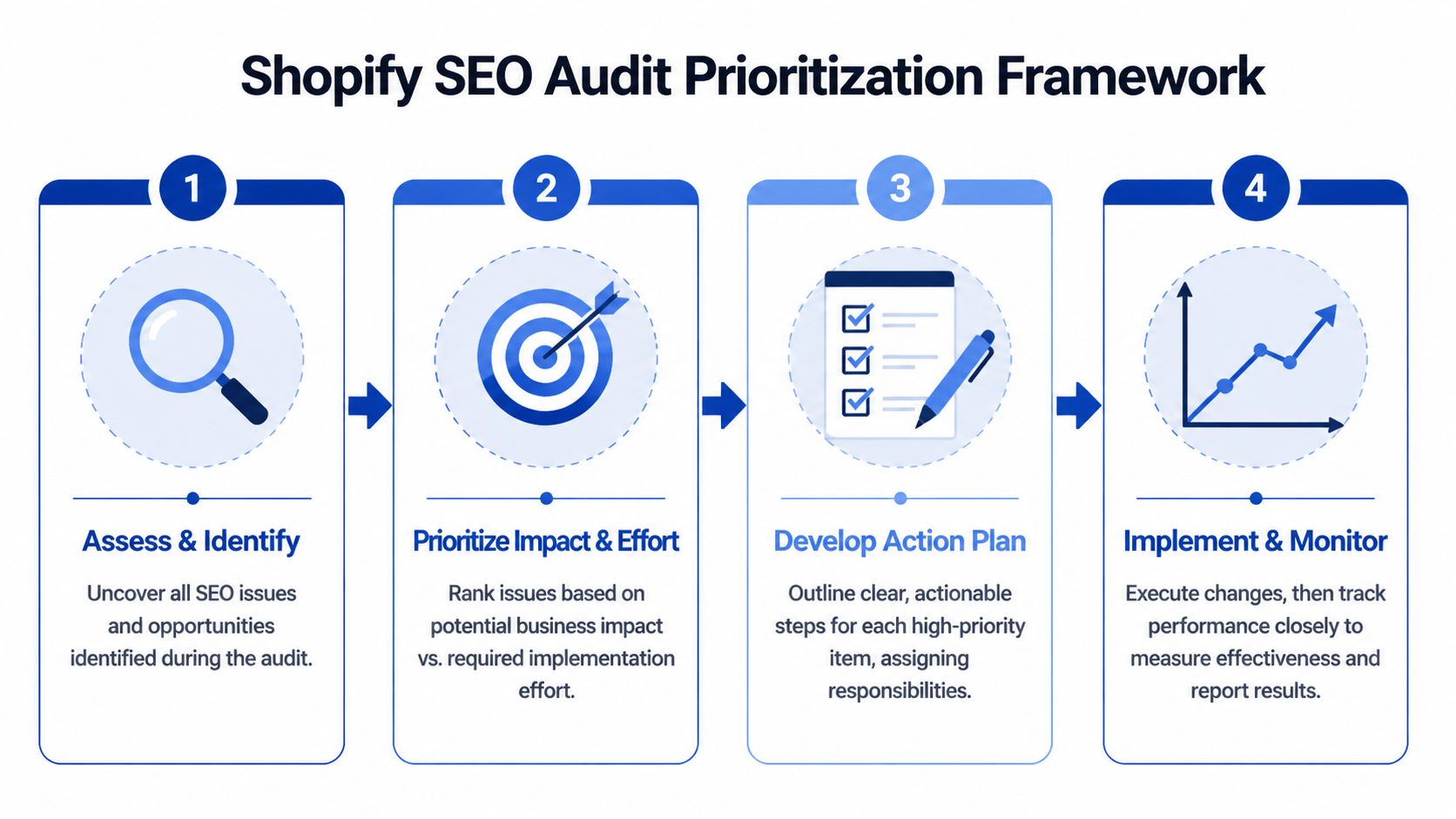
Prioritisation has to reflect business impact, technical risk, and implementation reality.
Use impact and effort, not urgency and noise
The strongest audit findings are not always the loudest ones. A few missing alt attributes can look tidy in a report. A misconfigured canonical pattern across filtered collections, market folders, or product variants will usually matter more.
I use a simple framework:
- High impact, low effort. Fix first.
- High impact, high effort. Scope properly, assign owners, and schedule it into sprint planning.
- Low impact, low effort. Batch into routine maintenance.
- Low impact, high effort. Push back unless there is a clear commercial case.
Three questions usually sort the list quickly:
- Is the issue affecting crawling, indexation, or rankings on important templates?
- Is it hitting revenue-driving page groups such as core collections, top product templates, or country-specific storefronts?
- Can the fix be released safely without breaking tracking, merchandising logic, or app-dependent functionality?
Those questions force trade-offs into the open. Cleaning up redirects on key collection URLs usually matters more than polishing minor metadata gaps. Fixing conflicting schema output on product templates usually matters more than editing copy on low-traffic pages. On Plus builds, the hardest part is often not identifying the issue. It is confirming where the issue is generated: theme code, app injection, search and filter logic, translation tooling, or market-specific customisations.
Report for the people who have to fix it
A useful audit report needs to work for three audiences at once: SEO, development, and the person approving time or budget. If one of those groups cannot tell what should happen next, the report is too vague.
This structure works well:
| Report section | What it should include |
|---|---|
| Executive summary | Main risks, opportunities, and commercial implications |
| Findings by category | Technical, Shopify-specific, content, and performance issues |
| Evidence | Example URLs, screenshots, crawl samples, and affected templates |
| Priority and ownership | Who fixes it, how hard it is, and when it should happen |
| Validation plan | How success will be measured after implementation |
Good reporting removes ambiguity. Every issue should have an owner, a rationale, and a validation method.
The best reports also separate symptoms from root causes. “Duplicate title tags on 600 URLs” is not the full finding. “Collection template pulls H1 into the title tag and appends market modifiers inconsistently across translated versions” is a finding a developer can fix. That level of specificity matters more as stores scale.
A short recommendation is rarely enough. Include the affected template type, a sample URL set, the likely source of the issue, the level of SEO risk, and the QA check needed after release. That is how audit work turns into implementation work.
Monitor after the fixes go live
The report should end with a measurement plan. Otherwise, the team closes tickets without confirming the result.
Track index coverage, rankings by page group, organic landing pages, crawl behaviour, and template-level metrics after deployment. For Shopify stores with frequent releases, check again after theme updates, app changes, international launches, and feed or tracking changes. SEO regressions on Plus stores often come from later releases, not the original fix.
I also recommend assigning a review window for each change. Some fixes can be validated within days, such as canonicals, redirects, or noindex handling. Others need longer, especially content, internal linking, and template changes on pages that are crawled less often. A prioritisation framework is only useful if it survives contact with release cycles, competing teams, and the way Shopify stores change.
Frequently Asked Questions About Shopify SEO Audits
How often should you run a Shopify SEO audit
For most stores, a full audit should happen regularly rather than only when traffic drops. The right cadence depends on how often the site changes.
If your store is relatively stable, schedule deeper reviews around major site updates, theme changes, migrations, international launches, or significant app installs. If you’re on Shopify Plus and release changes often, lighter technical checks between full audits are sensible because custom code and app changes can create SEO regressions quickly.
Can you do a Shopify SEO audit yourself
Yes, if the store is small, the setup is straightforward, and you’re comfortable using tools like Search Console, Screaming Frog, and PageSpeed Insights. A DIY audit can catch obvious issues such as duplicate metadata, broken links, missing canonicals, and weak category copy.
The trade-off is depth. As stores scale, audits become less about finding generic problems and more about diagnosing interactions between templates, apps, localisation, redirects, schema, and custom functionality. That’s where experienced technical review becomes more valuable.
What’s the biggest mistake after an audit
Not implementing the findings in a clear sequence.
A second common mistake is fixing isolated symptoms while leaving the root cause untouched. For example, editing duplicate titles manually won’t solve a template rule that keeps generating them. Removing one redirect won’t fix a migration pattern that keeps creating chains.
The best post-audit approach is simple. Prioritise root-cause fixes, assign ownership, validate after launch, and keep monitoring. That’s how a shopify seo audit turns from a document into actual ranking improvement.
If your store has outgrown generic SEO advice, Grumspot can help with Shopify and Shopify Plus audits that look beyond surface-level checks. The work covers technical SEO, template behaviour, app conflicts, internationalisation, and prioritised fixes so your team knows what to address first.
Let's build something together
If you like what you saw, let's jump on a quick call and discuss your project

Related posts
Check out some similar posts.
- technical seo site audit
Run a technical SEO site audit that finds what matters. A practical ecommerce workflow covering craw...
Read more
- shopify seo
Choosing the right SEO app for Shopify means weighing features against speed, scripts, and plan limi...
Read more
- seo backlink audit
Learn how to perform a complete SEO backlink audit with our step-by-step guide. Identify toxic links...
Read more
- shopify plus seo agency
Learn how to choose the right Shopify Plus SEO agency for your store. Covers evaluation criteria, pr...
Read more