Customer Journey Mapping: Shopify Growth Strategy 2026
- customer journey mapping
- shopify cro
- ecommerce ux
- conversion optimisation
- journey map
Launched
June, 2026
You're probably in a familiar spot. Your Shopify store is getting traffic, your ads are generating clicks, and people are reaching product pages, but conversion still feels inconsistent. One week a product sells well, the next week performance drops, and every team has a different theory about why.
That's usually the point where merchants start changing the wrong things. They tweak the homepage, swap app widgets, rewrite product copy, or redesign the cart drawer without knowing where the actual friction sits. The result isn't a better store. It's a busier one.
Customer journey mapping fixes that problem when it's done properly. Not as a branding workshop. Not as a polished slide deck. As a working model of how customers move from first click to repeat purchase, and where that journey breaks inside a real Shopify setup.
Why Your Shopify Store Needs a Customer Journey Map
A Shopify store rarely fails because of one obvious issue. More often, conversion stalls because several small points of friction stack up across the journey. Paid traffic lands on a collection page that doesn't match ad intent. Product pages answer some questions but not the ones that matter most. Shipping information appears too late. Post-purchase communication creates uncertainty instead of reassurance.
A customer journey map helps you see those issues in sequence. It's a visual representation of the customer experience over time, from first discovery through purchase and post-purchase interaction. In ecommerce, that matters because customers don't judge your store by isolated pages. They judge the full experience.
In the UK, customer experience management software spending was forecast to reach about £1.4 billion in 2024, which shows how mainstream this work has become. The same UK market context also highlights why it matters commercially. 88% of customers consider experience as important as product, and 71% switched brands at least once over the prior year, according to Salesforce's overview of customer journey mapping. If your Shopify journey has avoidable friction, customers won't patiently work around it. They'll leave.
What the map is actually for
A good map answers operational questions:
- Where does intent weaken? Maybe paid visitors arrive with strong buying intent but lose momentum on product pages.
- Where does confidence drop? That often happens around delivery, returns, sizing, subscriptions, or payment options.
- Where do teams work from assumptions? Marketing, design, support, and development often see only their slice of the journey.
Practical rule: If the map doesn't help you decide what to fix next, it isn't useful yet.
For Shopify brands, the value is direct. The map becomes a prioritisation tool for CRO, UX, merchandising, theme improvements, app cleanup, and retention work. It tells you whether the next gain is likely to come from better landing page alignment, stronger product page proof, cleaner checkout handoff, or tighter post-purchase communication.
If you're trying to improve store performance more systematically, this should sit alongside broader ecommerce growth strategies for scaling online stores.
Laying the Foundation with Data and Personas
Most weak journey maps fail before the first sticky note goes on the board. The problem isn't design. It's input quality. If the map is built from internal opinion, it reflects what the team thinks customers do, not what customers do.
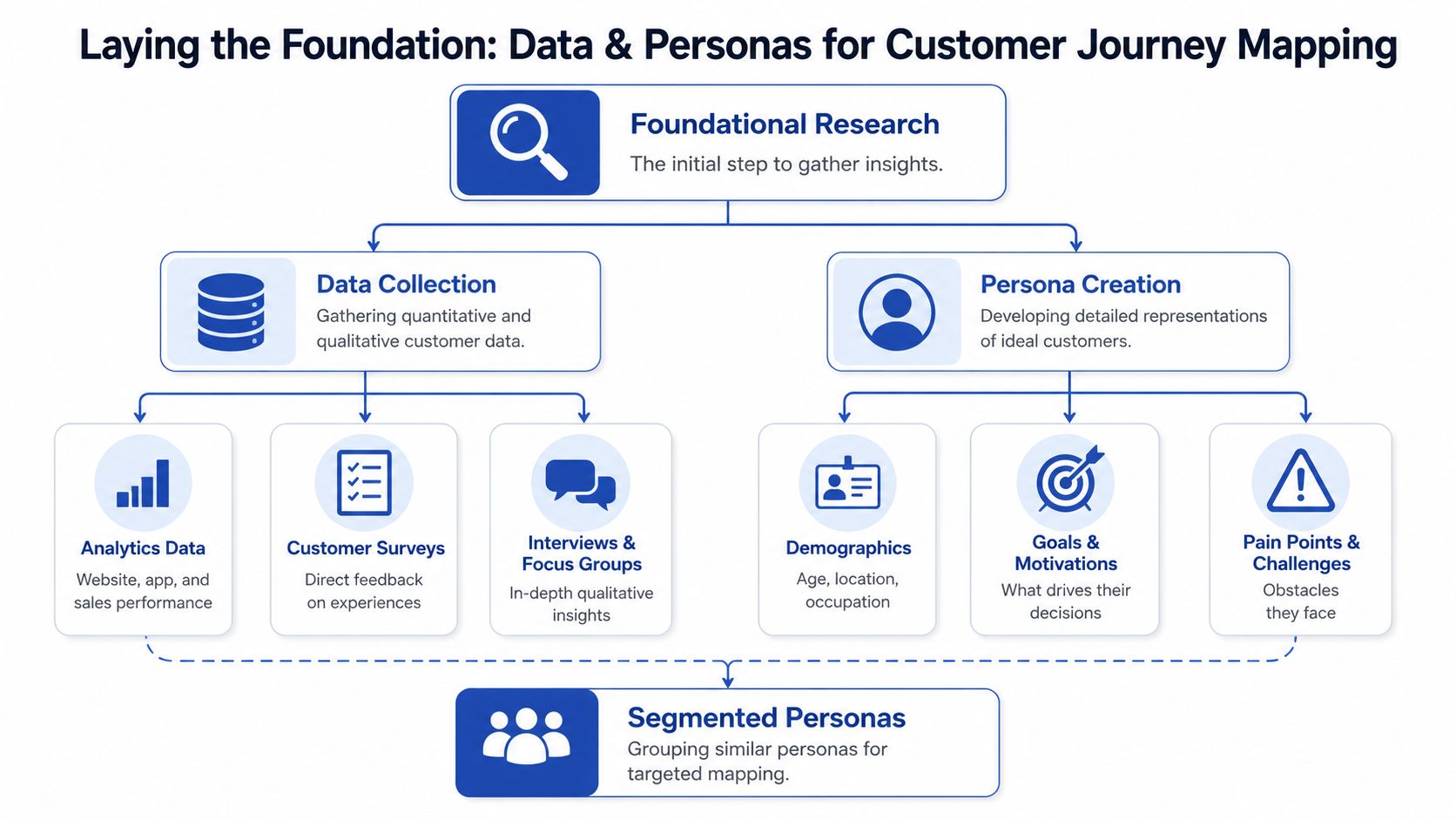
For Shopify work, the foundation should combine behavioural data and direct customer evidence. Think like a detective. You're not looking for a single dramatic clue. You're assembling a pattern from analytics, support conversations, reviews, and interviews.
Start with the evidence you already have
On Shopify projects, the first pass usually pulls from four places:
- Store analytics: Shopify Analytics and GA4 help identify landing pages, exit points, product detail behaviour, cart abandonment patterns, and performance differences by device.
- Support data: Gorgias, Zendesk, live chat transcripts, and inbox tags often reveal friction much faster than dashboards do.
- On-site feedback: Product reviews, returns reasons, quiz responses, and post-purchase survey comments expose language customers use naturally.
- Session observation tools: Heatmaps and recordings can help you see hesitation, rage clicks, dead clicks, or scroll behaviour that doesn't show up clearly in reporting alone.
This mix matters because analytics tells you where people struggle. Conversations tell you why.
Use interviews to validate, not decorate
For a focused mapping project, practitioner guidance suggests that 20 to 30 customer interviews is often enough to uncover stable patterns, according to Harvard Business School Online's guide to customer journey maps. That's a practical number for ecommerce teams because it's large enough to reveal repeated behaviour without turning the research phase into a long academic exercise.
A few interview rules make the output much stronger:
- Ask recent customers and recent non-buyers, not just loyal fans.
- Focus on actions, hesitations, comparisons, and expectations.
- Don't ask what they “would” do. Ask what they did.
- Include customers from different acquisition paths, such as paid social, search, email, and direct.
The most useful interview quote usually isn't dramatic. It's the small repeated complaint that keeps showing up across different customers.
Build personas that are usable
Most ecommerce personas are overbuilt and underused. You don't need fictional life stories. You need decision patterns.
For Shopify CRO, a persona should usually include:
| Persona element | What to capture |
|---|---|
| Core intent | Why they came to the store now |
| Trigger | What pushed them to start shopping |
| Comparison behaviour | Whether they compare heavily or buy quickly |
| Main objections | Delivery, trust, price, fit, ingredients, compatibility, returns |
| Preferred proof | Reviews, UGC, technical specs, guarantees, press mentions |
That's enough to map a real journey.
A skincare store, for example, might have one persona that arrives from TikTok with curiosity but low trust, and another that arrives from search with an active problem to solve. Both can land on the same product page and need completely different reassurance.
For brands working on deeper segmentation, hyper-personalisation in ecommerce becomes relevant. The map gets sharper when personas reflect actual buying context, not broad demographics.
Keep the scope tight
Don't map “all customers”. Pick one high-value journey first. A common starting point is:
- first-time mobile buyer
- returning customer buying a replenishable item
- international visitor evaluating delivery and duties
- subscription prospect comparing one-off versus recurring purchase
That focus gives the map enough detail to drive action. Broad maps usually become vague. Vague maps don't improve conversion.
How to Visualise the Customer Path
Once the research is in place, the map itself should be simple enough to use in a working session and detailed enough to support decisions. The version that works best for Shopify stores isn't complicated. It usually has rows for stages, touchpoints, customer actions, thoughts, emotions, pain points, and opportunities.
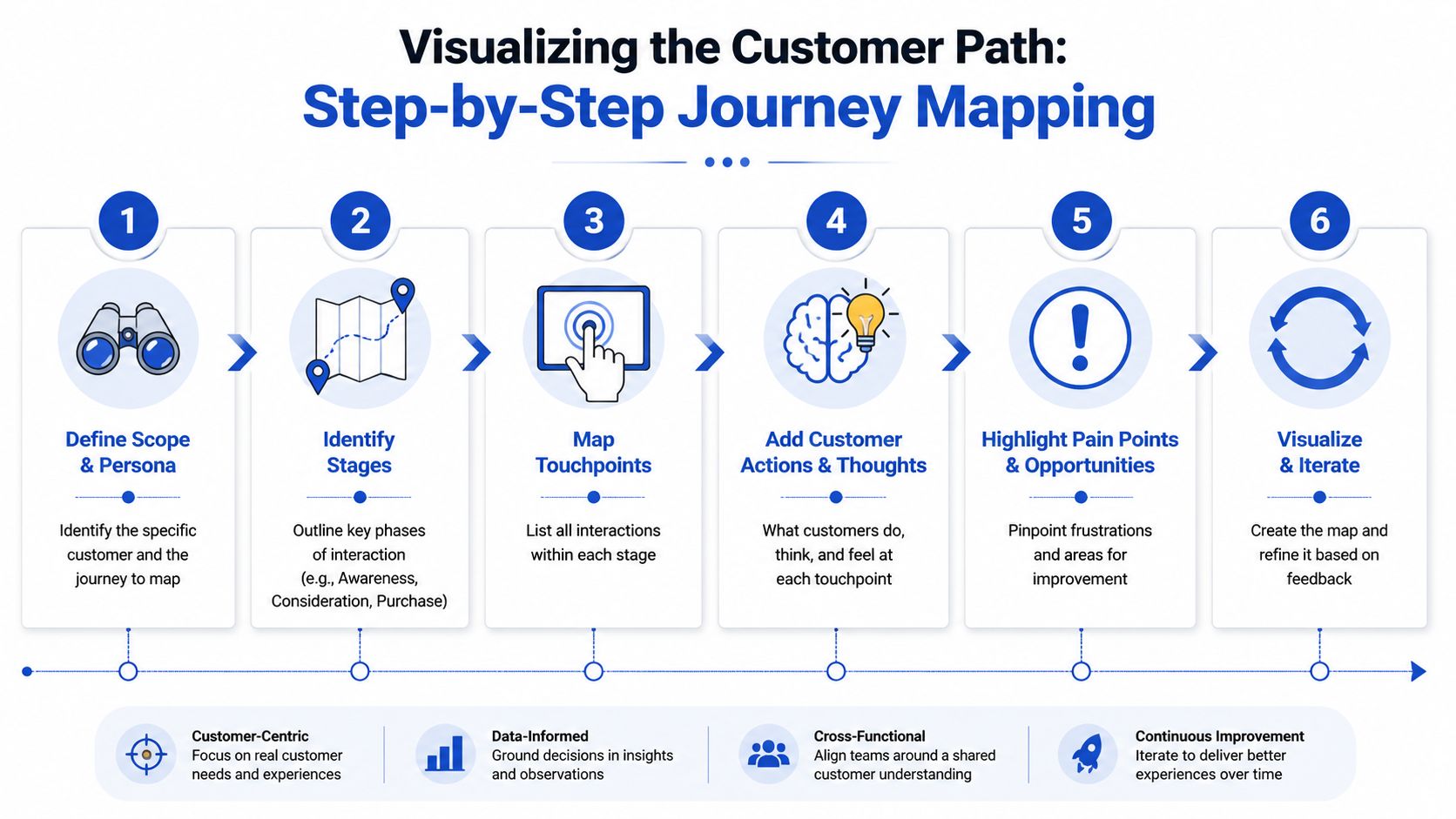
A useful way to visualise it is to map one current-state journey for one persona. Take a fictional Shopify brand selling sustainable fashion. The customer is a first-time buyer who discovers the brand through Instagram, compares options on mobile, buys one item, then decides whether the experience was good enough to justify a second purchase.
Use stages that match ecommerce reality
For most Shopify stores, these stages work well:
- Awareness
- Consideration
- Purchase
- Delivery
- Retention and advocacy
That structure is broad enough to show the full experience and narrow enough to keep the team focused.
Fill in touchpoints with specifics
At each stage, list the actual touchpoints the customer sees. Don't write “marketing” or “website”. Write the thing.
| Stage | Example Shopify touchpoints |
|---|---|
| Awareness | Meta ad, Google Shopping listing, influencer mention, organic search result |
| Consideration | Collection page, product page, size guide, reviews app, FAQ, chat widget |
| Purchase | Cart drawer, discount field, shipping estimator, Shop Pay, checkout |
| Delivery | Order confirmation email, tracking page, dispatch email, packaging insert |
| Retention and advocacy | Review request email, reorder reminder, loyalty flow, support follow-up |
During journey mapping, many teams realise the journey is less linear than they assumed. A customer might move from Instagram to product page, leave, come back through branded search on desktop, open a review email later, then purchase from a mobile cart reminder.
That's why customer journey mapping should be treated as a measurable operating discipline, not a static workshop deliverable. UK-focused guidance describes it as a visual representation of customer experiences built from research and data, then refined through KPI tracking as behaviours change, as outlined in GWI's customer journey mapping guidance.
Add what customers do, think, and feel
This layer turns a process map into a conversion tool.
For the sustainable fashion example:
Awareness
- Action: taps an ad featuring “organic cotton essentials”
- Thought: “Looks good, but I've seen this claim before”
- Emotion: mild interest, some scepticism
Consideration
- Action: checks price, materials, reviews, shipping, and returns
- Thought: “I like the style, but I'm not sure about sizing”
- Emotion: curiosity mixed with hesitation
Purchase
- Action: adds to cart, pauses at shipping step
- Thought: “Why didn't I know delivery cost earlier?”
- Emotion: friction, caution
Delivery
- Action: opens tracking email twice
- Thought: “Has this shipped yet?”
- Emotion: uncertainty
Retention
- Action: receives review request before item has fully arrived in routine use
- Thought: “Too early”
- Emotion: indifference
A map gets useful when you can point to an emotional drop and name the exact page, message, or handoff causing it.
Here's a quick visual explainer if you want a second frame of reference before building your own map:
Don't chase perfect completeness
The strongest maps are readable. If your team needs ten minutes to interpret the layout, it's too dense. Include the customer signals that help you act: touchpoints, friction, emotion, ownership, and the KPI each pain point affects.
A polished diagram with no operational use is worse than a rough working map in a spreadsheet or whiteboard. The store doesn't improve because the map looks impressive. It improves because the map makes weak parts of the journey visible.
Turning Your Map into Actionable CRO Insights
Once the map exists, the actual work begins. Every pain point should become a hypothesis, a test, or a production task. If that handoff never happens, customer journey mapping becomes theatre.
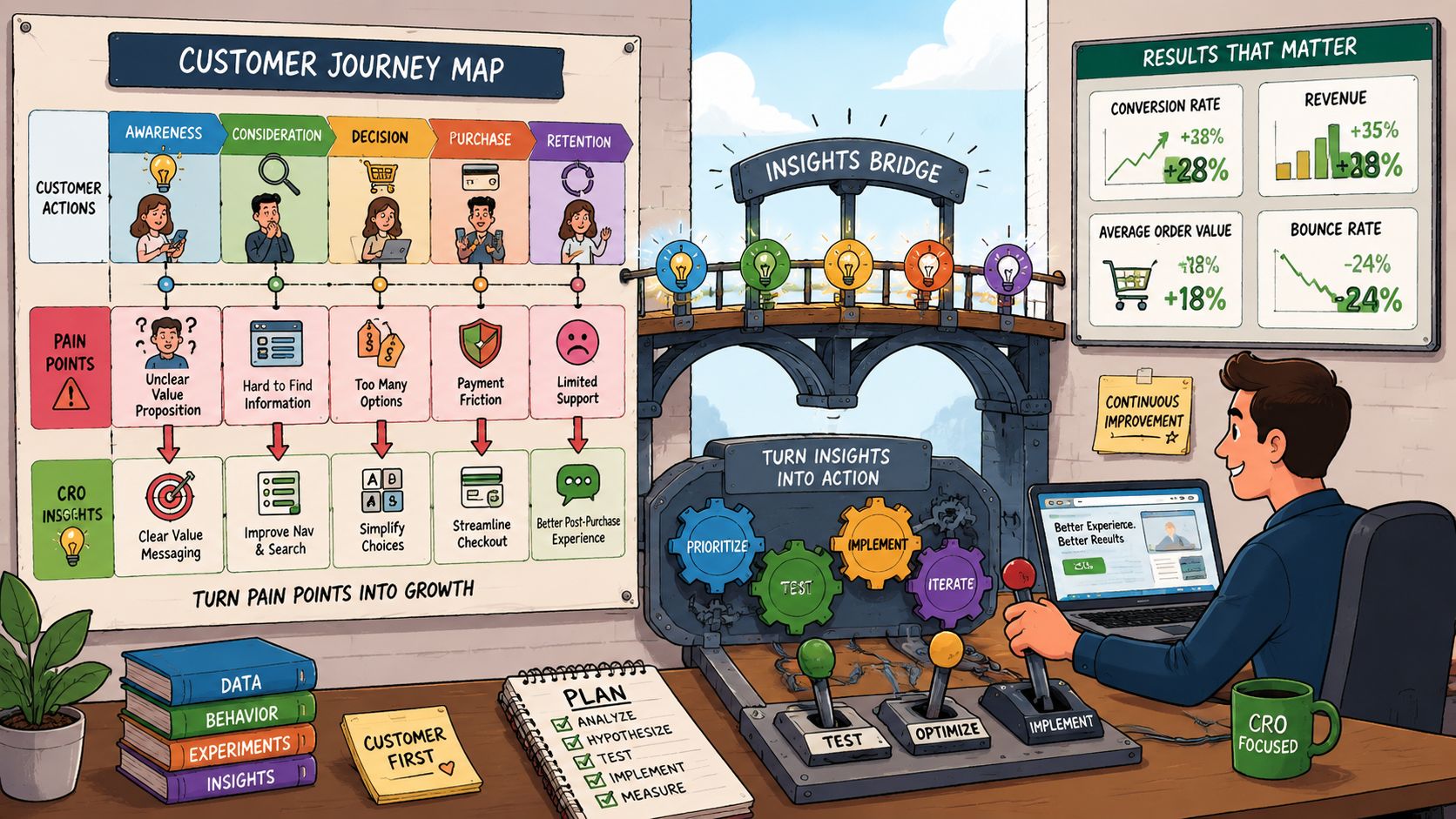
The practical question is simple: what does this friction suggest we should change on Shopify?
Translate friction into hypotheses
If the map shows a problem in consideration, the solution usually sits in content, merchandising, or trust-building.
Examples:
- Customers hesitate because product benefits aren't obvious. Test tighter product page hierarchy, stronger above-the-fold messaging, clearer variant labels, or comparison content.
- Customers don't trust quality claims. Add UGC, review highlights, product-specific FAQs, material details, or short demo video.
- Customers struggle to choose. Introduce quiz-led routing, better collection filters, bundled recommendations, or fit guidance.
If the pain point appears during purchase, the fix tends to be more operational:
- simplify shipping communication
- surface returns information earlier
- reduce cart distraction
- prioritise faster payment methods such as Shop Pay
- remove duplicate reassurance blocks that clutter checkout intent
Focus on breaks between channels
A major issue in ecommerce is that the journey isn't a tidy funnel. Customers switch devices, pause, compare, return, and restart. NN/g's guidance is especially useful here. It recommends analysing channel transitions, unnecessary steps, and time spent, because the value often comes from diagnosing where the journey breaks rather than polishing the map itself, as explained in NN/g's article on analysing customer journey maps.
That matters a lot on Shopify. Some of the highest-friction moments happen in transitions:
| Journey break | Common Shopify issue | CRO response |
|---|---|---|
| Ad to landing page | Message mismatch | Build campaign-specific landing experiences |
| Product page to cart | Missing confidence | Surface delivery, returns, and proof earlier |
| Cart to checkout | Surprise or distraction | Reduce uncertainty, simplify options |
| Post-purchase to repeat visit | Weak follow-up | Improve delivery comms and lifecycle timing |
What works: fixing the handoff between steps.
What doesn't: redesigning a single page while the real friction sits in the transition before or after it.
Prioritise by impact and effort
Not every pain point deserves the same urgency. Some issues are annoying but low-impact. Others subtly suppress conversion across large parts of the store.
A simple priority filter works well:
- High impact, low effort: ship quickly
- High impact, high effort: scope as roadmap work
- Low impact, low effort: include when bundled with other changes
- Low impact, high effort: usually leave it alone
For Shopify teams, this often produces a backlog across three lanes:
- CRO tests such as layout changes, copy changes, social proof placement, and sticky CTA treatment
- UX fixes such as navigation clarity, filter logic, mobile readability, and error-state handling
- Platform and theme tasks such as app cleanup, section restructuring, page speed work, and template consistency
If you want to connect this directly to store experimentation, the next step is a disciplined Shopify conversion rate optimisation process.
Assign owners immediately
Most maps typically lose value at this point. The insight is clear, everyone agrees, but then nobody owns the fix.
A useful map should show:
- the pain point
- the likely cause
- the KPI affected
- the owner
- the next action
Without those fields, the map stays descriptive. With them, it becomes an execution document.
Choosing the Right Tools and Templates
The best tool for customer journey mapping is the one your team will update. Fancy software doesn't rescue weak research, and simple tools don't limit strong thinking.
This is also where many teams overcomplicate the process. They spend too long choosing software, then rush the research and action stages. That's backwards.
Physical tools versus digital whiteboards
If your team is in one room, a wall, sticky notes, and printed screenshots still work well. They're fast, collaborative, and hard to over-engineer. The downside is maintenance. Once the session ends, the map often gets photographed and ignored.
Digital whiteboards are the most practical option for most ecommerce teams. Miro and FigJam are usually enough. They let marketing, design, development, support, and operations contribute in one place, and they're flexible enough to hold comments, screenshots, links, and prioritisation tags.
Here's a simple comparison:
| Tool category | Best for | Main limitation |
|---|---|---|
| Physical workshop tools | Fast team alignment in live sessions | Hard to maintain and share |
| Digital whiteboards | Ongoing collaboration and iteration | Can become messy without structure |
| Specialised journey mapping software | Larger CX programmes with governance needs | More overhead than many Shopify teams need |
| Spreadsheets or slides | Lightweight first pass | Limited visual clarity for complex journeys |
What to include in the template
Whatever tool you use, the template should be built around decisions, not decoration.
At minimum, include:
- persona
- goal of the journey
- stages
- touchpoints
- actions
- thoughts and emotions
- pain points
- opportunities
- KPI
- owner
If the template doesn't have a place for KPI and owner, I'd change it before anyone starts filling it in.
A journey map should behave like a backlog with context, not a poster with labels.
Don't mistake sophistication for usefulness
One of the most important benchmarks in this whole discipline is also the most sobering. Independent commentary citing Qualtrics research reports that 67% of customer journey maps fail to drive any change, as discussed in this analysis of journey mapping pitfalls. That failure rate doesn't come from teams lacking templates. It comes from treating the map as an endpoint.
So choose tools based on operating reality:
- A lean DTC team often does well with FigJam plus a test backlog in Notion or Asana.
- A larger Shopify Plus brand may prefer Miro for the map and Jira or ClickUp for implementation.
- If the store is in redesign or migration, Figma can help tie mapped pain points directly to wireframes and component changes.
What matters isn't visual polish. What matters is whether the team revisits the map when priorities change, experiments run, or the store experience shifts.
Testing and Evolving Your Journey Map for Growth
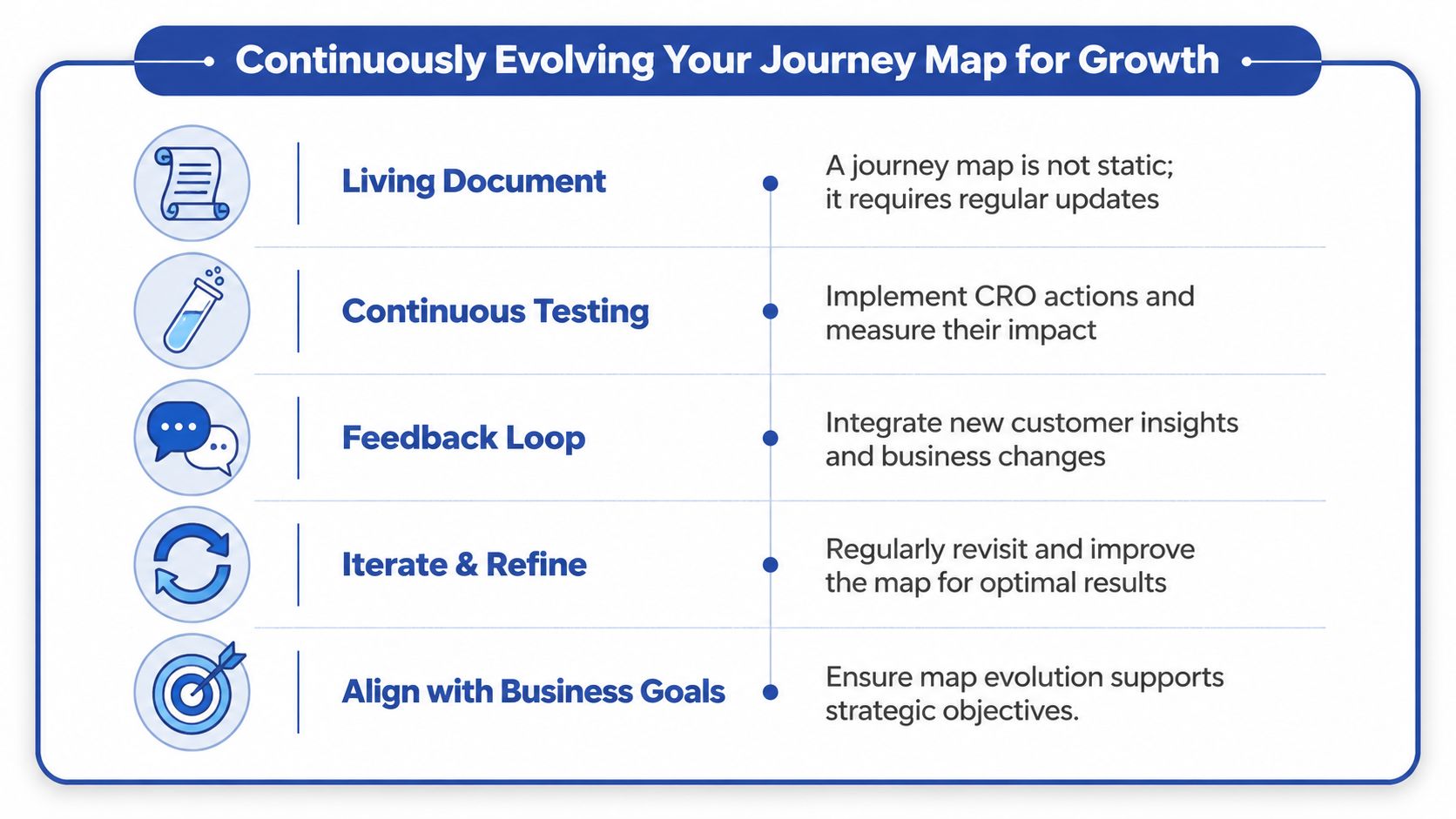
A journey map is only current for a short window. Customer expectations move, merchandising changes, channels shift, apps get added, theme logic changes, and support patterns evolve. If the map stays untouched, it turns into historical documentation.
That's why the useful model isn't “create the map”. It's test from the map, then update the map.
Tie every mapped issue to a business KPI
If a mapped problem leads to an action, that action needs a measure. Otherwise, the team can't tell whether the fix worked.
Typical links look like this:
- product page clarity to conversion rate
- cart friction to checkout progression
- delivery uncertainty to support ticket themes
- post-purchase communication to repeat purchase behaviour
- merchandising confusion to bounce and exit behaviour on key templates
You don't need dozens of metrics. You need the right one attached to each important moment.
Know when to refresh the map
Some changes justify a full remap. Others only need a light review.
A full refresh usually makes sense after:
- a theme redesign
- a migration to Shopify 2.0
- major changes in channel mix
- a subscription launch
- a new market or fulfilment model
- a meaningful shift in support or returns themes
A lighter optimisation cycle is often enough when you're improving one stage, such as product page consideration or cart-to-checkout flow.
Adobe's guidance on effective journey maps points to the right mindset here. When customer behaviour changes quickly, the map should be treated as a dynamic model. Focus on the few moments of truth that most affect conversion and retention, and use shifts such as AI-assisted service or new channel handoffs as triggers to remap those critical paths, as outlined in Adobe's customer journey mapping guidance.
Don't try to document everything. Keep the map sharp around the moments that decide whether the customer moves forward, hesitates, or leaves.
Build a review rhythm
For active ecommerce stores, a recurring review cadence keeps the map useful. The format can be simple:
- Review KPI movement on mapped friction points
- Check whether customer feedback has changed
- Confirm which fixes shipped
- Identify new journey breaks
- Update ownership and next actions
That discipline is what turns customer journey mapping into a growth system instead of a one-off workshop.
If your Shopify store has traffic but conversion still feels uneven, Grumspot can help you turn journey friction into a clear CRO roadmap. From UX audits and Shopify 2.0 rebuilds to conversion-first design and testing, the team works on the parts of the customer journey that move revenue. Explore Grumspot to see how that process works in practice.
Let's build something together
If you like what you saw, let's jump on a quick call and discuss your project

Related posts
Check out some similar posts.

- social proof examples
Examples of social proof for ecommerce brands: case studies, client testimonials, Shopify badges and...
Read more
- cro best practices
Apply cro best practices to Shopify stores with 10 actionable tactics for testing, product pages, ch...
Read more
- ecommerce ab testing
Master ecommerce AB testing with a revenue-first playbook. Learn to build hypotheses, calculate samp...
Read more
- shopify plus stores
Explore 7 Shopify Plus stores, from Gymshark to Huel, and uncover design, UX, conversion and integra...
Read more