Shopify 2.0 Theme Development: Build Better Stores
- Shopify 2.0 theme development
- Shopify development
- Online Store 2.0
- Shopify themes
- Shopify CLI
Launched
April, 2026
You’re probably in one of two situations right now. You’ve inherited a Shopify store that fights you every time you need to change a layout, or you’re planning a new build and you don’t want to saddle the merchant with another rigid theme that needs developer help for every merchandising tweak.
That’s where Shopify 2.0 theme development changes the job. The shift isn’t just technical. It changes who controls the storefront day to day, how fast teams launch campaigns, how safely developers ship code, and how well a store holds up when traffic, catalogue complexity, and app usage all grow.
From an agency perspective, the best OS 2.0 projects don’t start with “let’s make the theme editable”. They start with a stricter question. Can this theme become a dependable revenue engine, one that stays fast, gives merchandising teams room to work, and doesn’t collapse under the weight of custom code six months after launch? That’s the standard worth building to.
The End of Inflexible Themes Why Shopify 2.0 Matters
A merchant plans a product launch for Friday. By Tuesday, they realise the product page needs review content, delivery messaging, and a campaign block tied to the launch. On a legacy Shopify theme, that request lands in the dev queue because the template is hard-coded. The work itself may be small. The delay is not.
That is the key break point Shopify addressed with Online Store 2.0. Older themes often gave merchants limited control over the homepage while locking product, collection, and standard content templates behind Liquid edits. Every merchandising change became a developer task, which slows testing, campaign execution, and routine trading decisions.
Shopify introduced OS 2.0 in June 2021 and changed that model with JSON templates and sections across more page types. According to Braincuber’s Shopify 2.0 theme development guide, merchants can handle a large share of layout changes themselves, reducing the steady stream of small paid edits that used to pile up on legacy builds. For a merchant, that means faster launches. For an agency team, it means spending time on work that drives revenue, such as template strategy, performance, search visibility, and app integration quality.
The architecture shift also improves how a store performs under real trading conditions. A good OS 2.0 theme is not just easier to edit. It is easier to keep clean. Sections are more modular, templates are more consistent, and developers have a clearer path to remove dead code, control app bloat, and protect Core Web Vitals while the store evolves.
That affects merchants because storefront speed is tied to conversion, crawl efficiency, and campaign performance. At Grumspot, we do not treat OS 2.0 as a nicer editing experience. We treat it as the baseline for a theme that can support merchandising velocity without sacrificing load time, indexability, or deployment discipline. If the store needs more custom storefront logic than a theme should reasonably carry, that is usually the point to assess whether a headless ecommerce architecture makes more sense.
Practical rule: If a merchant still needs a developer to rearrange common page content, the theme is not production-ready.
OS 2.0 works best when the split of responsibility is clear. Merchants control content and layout within defined guardrails. Developers own the system underneath, including section architecture, schema design, performance budgets, and release quality. That is what turns a theme from a one-off build into a store asset that can keep shipping.
Your Modern Development Toolkit Setting Up the Environment
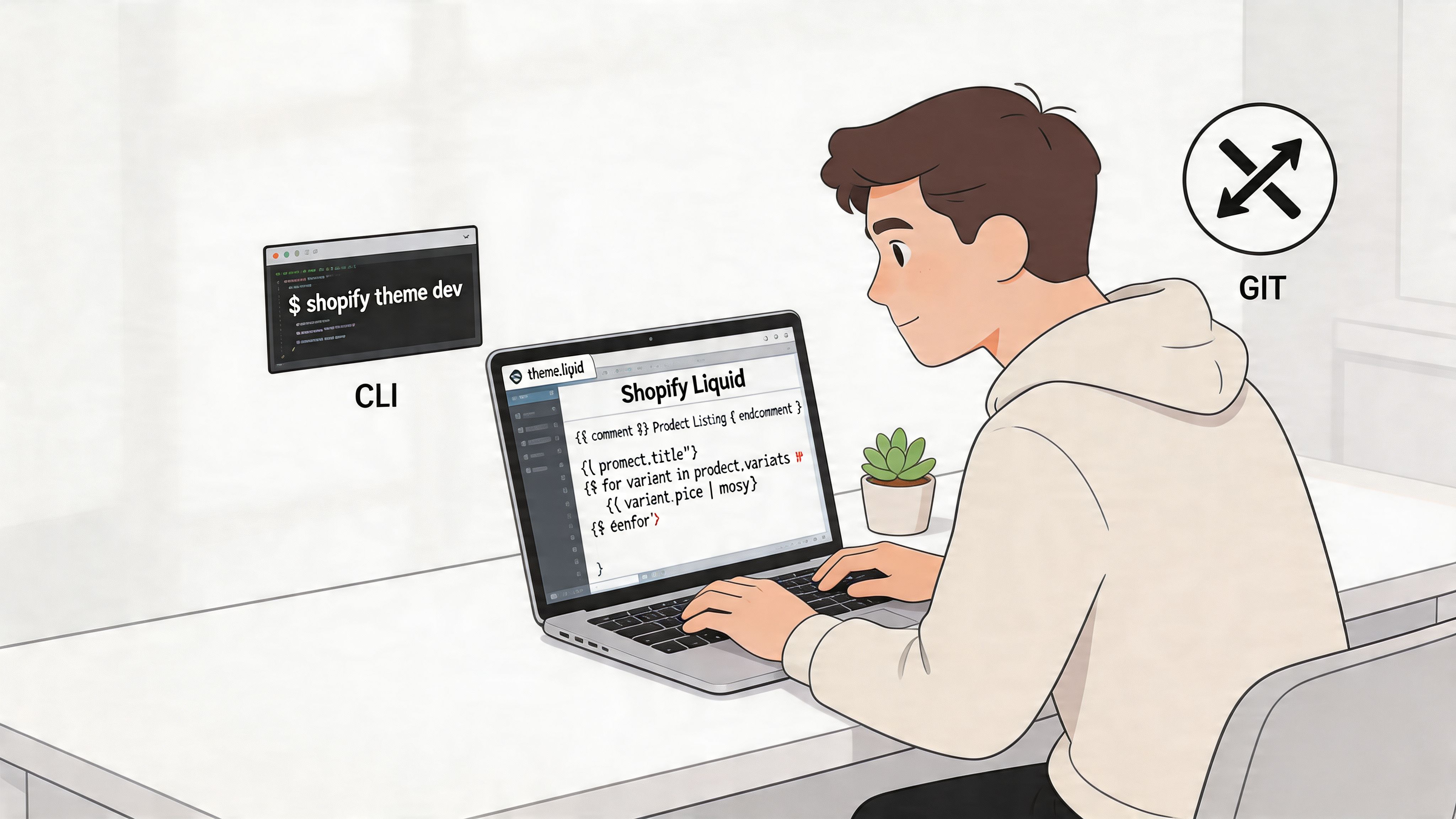
If you’re still editing a live theme, zipping files manually, or relying on old workflows, stop there. The modern baseline is Shopify CLI, local development, version control, and staged pushes. Anything else creates avoidable risk.
Start from a clean base
For a first major OS 2.0 build, use the CLI to initialise a theme locally. A common starting point is Shopify’s reference structure, then adapting from Dawn patterns where needed. The command flow matters less than the discipline behind it: initialise properly, run a local dev server, and keep changes out of the live store until they’ve been reviewed.
According to Bizspice’s Shopify theme development workflow guide, expert workflows begin with shopify theme init, then use shopify theme dev for real-time testing. That CLI-based approach has an 88% success rate versus 62% for manual uploads, and it helps developers avoid schema mismatches, which cause 67% of failed visual edits in UK agency audits.
That lines up with what happens on projects. Most first-build problems aren’t complicated Liquid bugs. They’re structural mistakes. A section schema doesn’t match the intended editor controls. A block setting is named inconsistently. A template assignment is missing. Manual uploads hide those issues until somebody opens the customiser and finds a broken interface.
The commands that matter
At a minimum, your working loop should look like this:
- Initialise the theme locally with
shopify theme init. - Run a development server with
shopify theme dev. - Edit Liquid, JSON, CSS, and JavaScript locally with instant preview feedback.
- Push to an unpublished theme for shared QA before anything is published.
That local preview cycle is where junior developers usually improve fastest. They can see exactly how section schema changes affect the editor, how JSON templates map to the page, and where a block breaks when content gets messy.
A hot-reloading local environment doesn’t just save time. It changes how confidently you refactor.
Use Git from day one
Even on a small build, set up Git immediately. Don’t wait until the theme gets complicated. A proper branch workflow makes reviews easier, keeps experimentation contained, and gives you a clean history when a feature introduces regressions.
If you’re weighing architecture choices beyond a standard theme build, this breakdown of headless ecommerce trade-offs is useful context. Most stores don’t need headless. They need a well-built OS 2.0 theme with disciplined code and a faster release process.
What not to do
A lot of early mistakes come from mixing old habits with new tooling. Avoid these:
- Editing on the live theme: Fast for one minute, expensive for the next.
- Uploading files manually: You lose consistency, reviewability, and rollback confidence.
- Skipping schema planning: The section may render fine but fail in the editor.
- Starting from a bloated premium theme without audit: You inherit someone else’s abstractions before you understand them.
A modern environment isn’t overhead. It’s the foundation that lets the rest of the project stay calm.
The New Architecture JSON Templates and Sections Everywhere
Most confusion around Shopify 2.0 theme development comes from carrying a Shopify 1.0 mental model into a 2.0 codebase. If you still think in terms of one rigid Liquid template per resource type, the architecture feels messy. Once you switch to JSON-driven layout control, it becomes much cleaner.
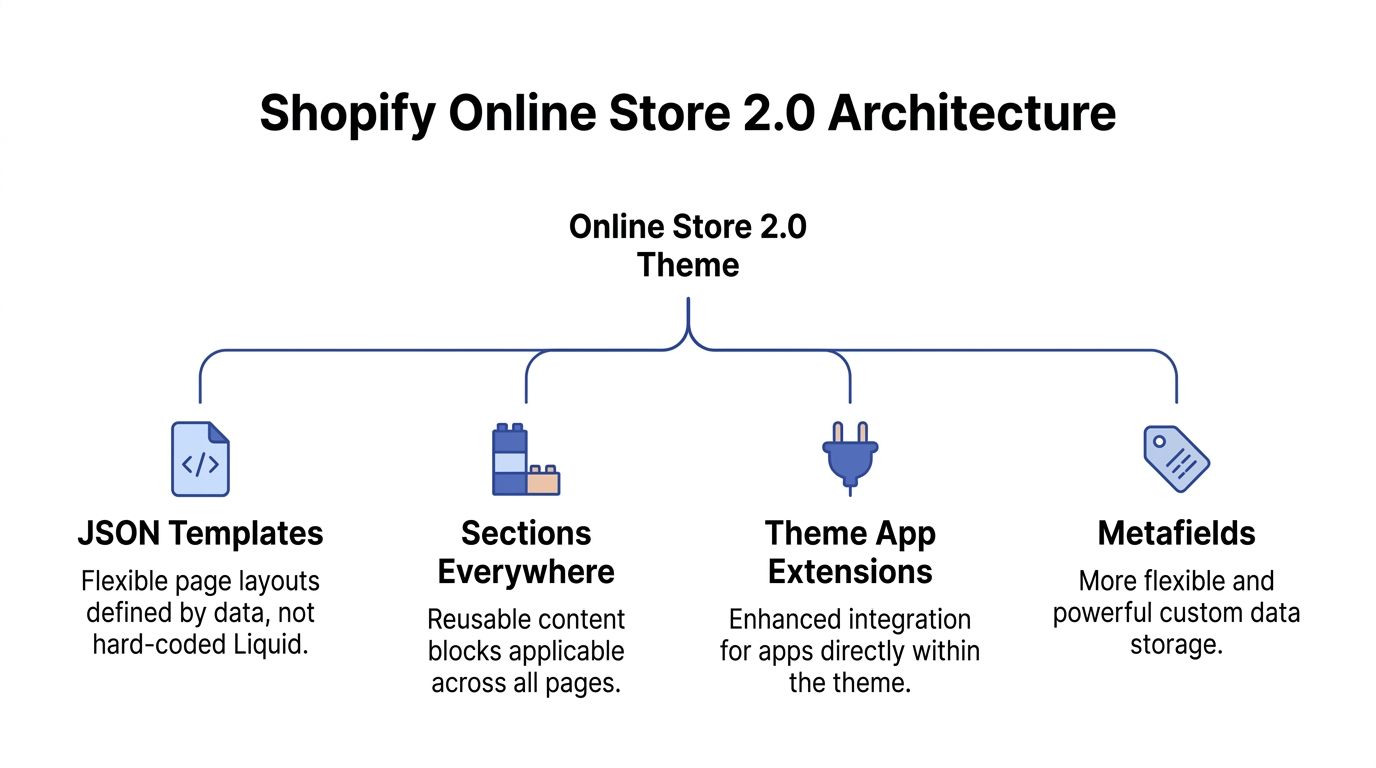
The core idea is simple. In OS 2.0, the template defines structure through JSON, while sections handle the actual rendering and configuration. That split gives merchants far more control without asking them to touch code.
JSON templates control page composition
In older themes, a file like product.liquid often carried too much responsibility. Layout, content order, hard-coded logic, and presentation got bundled together. That made product pages harder to vary and harder to maintain.
With a file like product.json, the template becomes a configuration layer. It decides which sections appear on the page, in what order, and with what settings. The actual markup stays in section files.
That’s a much better separation of concerns for commerce work. Merchants get control over composition. Developers keep control over implementation.
Sections now belong everywhere
The phrase sections everywhere is more than a feature label. It’s the reason OS 2.0 themes feel usable to non-developers. The merchant can add, remove, reorder, and configure sections across far more of the storefront, not just the homepage.
In practice, that means:
- Product pages become modular: Add trust content, icon rows, FAQs, comparison tables, or editorial content without hard-coding every variation.
- Collection templates become purposeful: Different merchandising structures can support different collection types.
- Content teams move faster: Landing pages stop competing with development tickets for every campaign change.
The difference is operational. A store can run more tests and launch more pages because the layout system isn’t trapped in code.
This video gives a useful visual walkthrough of the architecture in action.
App blocks are the cleaner way to extend themes
App integrations used to be one of the messiest parts of Shopify theme work. Snippets were injected into templates, assets were added in ways nobody documented, and theme updates became awkward because the codebase no longer had clear boundaries.
OS 2.0 improves that with theme app extensions and app blocks. Instead of forcing merchants or developers to splice app code into template files manually, apps can expose modular blocks that fit inside the theme editor.
That changes the trade-off. You still need to assess whether the app itself is good, but the method of integration is cleaner and usually easier to maintain.
If an app can only work by scattering edits through core theme files, treat that as a maintenance warning.
Metafields finally fit the theme properly
Metafields aren’t new, but OS 2.0 makes them much more useful in day-to-day builds. They now fit naturally into section settings, dynamic sources, and structured content output.
That matters because a lot of good ecommerce content isn’t universal. Product specifications, care details, material callouts, warranty notes, and region-specific notices often belong in data, not in pasted rich text. Once you build sections to consume metafields cleanly, the store gets easier to scale.
The architecture only works well if you keep the responsibility split clear:
| Layer | What it should do |
|---|---|
| JSON template | Define which sections appear and in what order |
| Section file | Render content and expose settings |
| Block schema | Allow modular content inside sections |
| Metafields | Store repeatable structured data |
| App block | Inject app-driven functionality without direct theme edits |
That’s the OS 2.0 mental model worth keeping. Build with those boundaries in mind and the theme stays flexible. Ignore them and you’ll recreate the same rigidity that 2.0 was meant to replace.
A Practical Guide to Building and Migrating Themes
A merchant approves a redesign, the new theme goes live, and two weeks later the team is back in Slack because product pages need one more content block, collection pages break when merchandising changes, and an app update has touched files nobody wants to own. That is usually not a Shopify problem. It is a theme design problem.
OS 2.0 gives you better building blocks, but the commercial result still depends on how you model sections, data, and deployment from day one. At Grumspot, we treat the theme as a revenue system. The markup, schema, metafields, app strategy, and release workflow all affect how fast the team can launch campaigns, test landing pages, and keep organic traffic stable during change.
Build one section that can survive real store use
Start with a section the merchant will touch every week. Product support content is a good first candidate because it affects conversion and post-purchase confidence. Delivery notes, returns, warranty messaging, and feature highlights all belong there.
The first pass is simple enough:
- Create the section file and write the markup around real content patterns.
- Add a
{% schema %}that exposes only the settings and blocks the merchant needs. - Name settings and blocks in plain language, not developer shorthand.
- Add the section to the correct JSON template.
- Test it with messy content, long headings, empty fields, and bad image crops.
The Liquid is rarely the hard part. The hard part is deciding what should be editable, what should stay fixed, and what belongs in metafields instead of section settings. A section can look fine in a demo store and still fail the first time a merchandising team uses it at speed.
When you split out subcomponents, use render rather than include. Shopify recommends modern theme patterns such as render in its theme creation documentation. In practice, the bigger gain is maintainability. Snippets become easier to reason about, and template behaviour gets less fragile as the store grows.
Make the section hard to misuse
New OS 2.0 builds often fail in the editor, not in code review. Developers expose every option they can think of, then hand the merchant a control panel that nobody wants to use.
A better rule is restraint.
- Expose content controls the team will change often, such as headings, body copy, image pickers, and block order.
- Keep visual controls narrow. A few approved layout and colour choices beat fifty combinations that break brand consistency.
- Set defaults that look production-ready.
- Support dynamic sources where they reduce manual work, especially on product templates.
Build for the person updating the store between meetings, not for the developer who knows the schema by memory.
I have seen more projects slowed down by over-configured sections than by missing flexibility. If every section becomes a mini page builder, the merchant gets freedom at the cost of speed, consistency, and QA risk.
Accessibility usually breaks during customisation
Base themes do not protect a project once custom sections, app blocks, and brand styling start stacking up. Heading levels drift. Contrast gets weaker. Click targets shrink. The store still looks polished in a static review, but it becomes harder to use.
Treat accessibility as part of section acceptance criteria. Check keyboard flow. Check focus states. Check that heading structure still makes sense when optional blocks are hidden. Check whether the section works when the merchant enters longer copy than the design comp allowed.
This matters for conversion too. A section that is hard to read or hard to interact with does not just create compliance risk. It creates friction on high-intent pages.
Decide early whether the job is a migration or a rebuild
Some legacy themes are worth migrating. Others should be retired before they cost more time.
Migrate when the existing theme has reusable patterns, sensible naming, and business logic that is still correct. Rebuild when the store is held together by old app edits, duplicated snippets, hard-coded content, and template logic that nobody can safely change. If a product template has become the dumping ground for six years of quick fixes, wrapping it in JSON templates will not solve the actual problem.
The business context matters as much as the code. A Plus merchant with active CRO work, multiple markets, and heavy merchandising needs usually benefits from a cleaner system faster than a low-change store. If you are weighing those trade-offs, our guide to Shopify custom theme development decisions covers when a bespoke build makes sense.
Use a migration checklist that catches ugly details
Theme migrations usually fail on small omissions. Missing redirects. Forgotten metafields. App dependencies nobody documented. Sections that work with sample content but collapse with real catalogue data.
Use a checklist that forces those conversations early:
| Phase | Task | Done |
|---|---|---|
| Audit | Review current templates, snippets, sections, and app dependencies | [ ] |
| Audit | Identify hard-coded merchant content that should become settings or metafields | [ ] |
| Audit | Flag duplicate logic, dead code, and legacy assets | [ ] |
| Planning | Map each old template to a new JSON template strategy | [ ] |
| Planning | Decide which sections become global, reusable, or template-specific | [ ] |
| Planning | Define metafield requirements for structured content | [ ] |
| Build | Recreate priority templates in OS 2.0 architecture | [ ] |
| Build | Replace include patterns with render where appropriate |
[ ] |
| Build | Test section schema thoroughly in the theme editor | [ ] |
| QA | Check mobile layouts, app blocks, and edge-case content | [ ] |
| QA | Run accessibility checks on contrast, headings, and interaction states | [ ] |
| Deployment | Push to unpublished theme for review and sign-off | [ ] |
That checklist should also include content ownership. Decide who is populating metafields, who signs off template parity, and which apps are being replaced by native theme features. A migration goes faster when those answers are settled before development starts.
Development quality shows up at deployment
Good deployment habits start in the build, not at release time. Branch cleanly. Review schema changes with the same care as Liquid changes. Test in an unpublished theme that mirrors real merchant workflows, not just happy-path browsing.
A strong migration does not aim for pixel-perfect nostalgia. It keeps the parts of the old store that still earn their place, removes the brittle parts, and gives the merchant a theme that can support faster launches without reopening core files every month.
Advanced Optimisation for Performance and SEO
A Shopify theme can be editable, modular, and still perform badly. That’s common. Teams adopt OS 2.0 architecture, then ruin the gains with oversized media, lazy JavaScript decisions, weak content structure, or too many app-sidefront features competing for the same page load.
Performance and SEO should be built into the theme at section level. If a section is allowed into the design system, it should already have sensible loading behaviour, clean markup, and content patterns that won’t undermine crawlability or speed.
Build for mobile first because that’s where the pressure is
Theme Store standards already force a baseline. Shopify 2.0 themes must achieve a minimum average Lighthouse score of 60, according to Craftberry’s Shopify theme statistics analysis. That requirement matters, but it’s only the floor.
The more useful signal is real-world competitiveness. Craftberry notes that themes such as Dawn and Impulse achieve over 86% pass rates for all Core Web Vitals, while the median OS 2.0 theme shows a 93.9% LCP pass rate. In the same analysis, UK mobile commerce accounts for 66% of orders, and 70% of UK shoppers abandon slow sites. Those numbers explain why theme performance isn’t a developer vanity metric. It affects the majority of buying sessions.
If you’re working through practical fixes, this Shopify store speed optimisation checklist is a useful companion to the development workflow.
The biggest wins are usually the least glamorous
The best-performing theme work is rarely flashy. It’s disciplined implementation.
Focus on these areas:
- Images with explicit dimensions: This helps prevent layout shift before media loads.
- Lazy loading where it makes sense: Good for below-the-fold assets, unhelpful when abused on critical content.
- Conditional JavaScript loading: Don’t load a whole feature bundle on templates that never use it.
- Lean section assets: If a section needs its own script, scope it tightly and load it thoughtfully.
- Simple DOM structure: Over-nested wrappers increase complexity without adding value.
A section should earn its footprint. If a carousel, animation package, or review widget adds heavy scripts and weak commercial value, remove it.
Fast stores rarely come from one dramatic optimisation. They come from dozens of small decisions that avoid waste.
SEO gets stronger when the theme respects content structure
OS 2.0 gives developers a better way to support SEO because content can be made more structured and repeatable. Metafields are a big part of that. Instead of pasting product details into inconsistent rich text fields, you can surface specifications, ingredients, compatibility notes, or shipping details from structured data.
That helps in two ways. Search engines get cleaner, more specific content. Merchants get a repeatable publishing process that doesn’t rely on one person formatting content manually every time.
A practical theme setup usually includes:
| Theme area | SEO-focused implementation |
|---|---|
| Product template | Structured content sections powered by metafields |
| Collection template | Clear heading hierarchy and descriptive intro content |
| Article template | Reusable content modules without breaking semantics |
| Global theme code | Clean schema markup implementation and metadata support |
What usually hurts SEO in real projects
The problems are often self-inflicted:
- Using headings for styling instead of structure
- Hiding important copy inside tabs without considering usability
- Duplicating thin blocks across templates with no content strategy
- Letting apps inject noisy markup into key templates
- Treating category intros and product support content as optional
The fix isn’t to stuff more keywords into the page. It’s to make the theme better at presenting useful, structured information without degrading speed.
A strong OS 2.0 theme does both jobs. It gives the merchant editing freedom, while keeping the page technically disciplined enough to stay fast and discoverable.
Professional Deployment and Maintenance Workflows
A stable theme doesn’t come from a careful developer alone. It comes from a release process that assumes mistakes will happen and plans for them. That’s the difference between hobbyist theme work and production theme work.
Stage every release before publishing
The safe pattern is simple. Build locally. Review in Git. Push to an unpublished theme. Test there. Publish only when that version has passed checks from both development and the merchant side.
For staging, shopify theme push --unpublished is the right habit. It gives the team a clean environment for QA without risking the live storefront. From there, publication becomes a controlled release instead of a nervous last-minute file sync.
Theme Check should be part of the workflow, not an afterthought
Run Theme Check before every meaningful push. It catches Liquid issues, schema problems, and other errors early enough to fix them cheaply. That matters most on team projects, where one developer can introduce a pattern another developer wouldn’t spot until review.
A practical release sequence usually looks like this:
- Create a branch for the feature or fix.
- Develop locally with the CLI preview running.
- Run Theme Check and fix warnings that matter to stability or maintainability.
- Push to an unpublished theme for stakeholder QA.
- Test editor behaviour, not just storefront output.
- Publish only after sign-off.
This sounds basic, but many failed releases happen because teams test the storefront and forget the customiser. A section that renders correctly can still break merchant editing if the schema is wrong or a block setting doesn’t behave as expected.
Use Git history as your rollback plan
Rollback should be boring. If a deployment introduces a bug, you should be able to identify the change, revert it, and push a stable version without improvising.
That only works when your Git history is clean and your releases are intentional. If developers mix unrelated changes in the same branch, rollback gets messy. If they make direct edits in the Shopify admin, rollback becomes guesswork.
The best deployment process isn’t the one that never fails. It’s the one that lets you recover quickly when something does.
Maintenance is mostly restraint
Once the theme is live, the main maintenance challenge is preventing drift. New apps, campaign sections, temporary code, and urgent fixes can slowly turn a clean OS 2.0 build into another legacy theme.
Keep a few maintenance rules in place:
- Review app impact before installation
- Retire dead sections and snippets
- Document custom logic that isn’t obvious
- Prefer additive extensions over core theme hacks
- Audit performance and accessibility after major merchandising changes
A professional workflow protects the store after launch, not just on launch day.
Shopify 2.0 Development Frequently Asked Questions
Should you always migrate a legacy theme instead of rebuilding?
Choose based on what is worth keeping.
A migration makes sense when the existing theme has tested business logic, clean naming, and snippets or sections that can survive in an OS 2.0 structure without dragging old problems along with them. Rebuild when the theme is full of hard-coded templates, conflicting app code, duplicated Liquid, or layout rules that only one developer understands.
On Plus projects, rebuilds often ship faster than expected because the team stops spending hours preserving brittle decisions from a theme that already lost its shape.
Is Dawn always the right starting point?
Dawn is a strong reference theme, not an automatic production choice.
It shows how Shopify currently expects sections, templates, settings, and frontend patterns to work. That makes it useful for architecture decisions and for checking whether a custom approach is still aligned with the platform. But a live store with complex merchandising, custom content modules, international requirements, or stricter performance budgets often needs a more opinionated system than Dawn gives out of the box.
Use Dawn to validate patterns. Do not inherit every implementation detail without checking the trade-off.
What’s the difference between app blocks and app embeds?
The difference affects merchant control, performance, and support load.
App blocks belong inside the page composition. Merchants place them within sections and move them around in the customiser. They work well for reviews, badges, upsells, or any feature that should sit with the content.
App embeds are better for global behaviour or UI that should not depend on section placement. Common examples include chat widgets, consent tools, and sitewide scripts.
If the merchant needs positional control, use a block. If the feature is global or utility-driven, use an embed. Picking the wrong one usually shows up later as editor confusion, layout conflicts, or extra JavaScript running where it adds no value.
How should you handle UK GDPR requirements in OS 2.0 themes?
Build for compliance at the theme level.
Consent messaging, script loading rules, and region-specific privacy content should be part of the storefront architecture from the start. Leaving it to scattered snippets or app defaults usually creates inconsistent behaviour between templates, poor editor control, and avoidable QA issues.
For current builds, the practical approach is:
- Model compliance content deliberately
- Use metafields for structured regional content
- Test consent behaviour in the storefront flow
- Prevent non-essential scripts from loading before consent
- Avoid hard-coded assumptions about one market’s rules
This work matters for revenue as much as compliance. If consent logic blocks analytics, tags fire in the wrong order, or checkout-related messaging appears inconsistently, the store loses data quality and creates avoidable friction.
How much flexibility should you give merchants in the customiser?
Give merchants room to run the store without giving them tools to break it.
That usually means flexible content inputs, a controlled set of layout options, and guardrails around spacing, typography, media ratios, and section combinations. Merchants need to launch campaigns quickly. They do not need fifty switches that create inconsistent pages, CLS issues, or brand drift.
A good OS 2.0 theme behaves like a revenue system. It makes high-frequency changes easy and low-risk, while reserving structural decisions for development.
What’s the quickest way to tell whether a section is production-ready?
Try to break it with real content.
Use bad crops, long headings, empty optional fields, one-block and max-block states, awkward product titles, missing metafields, and mobile screens where spacing problems show up fast. Then check keyboard use, focus order, and whether the merchant can understand the settings without asking for a walkthrough.
A section is production-ready when it survives real merchandising, not just a clean demo in a dev store.
If your store needs more than a basic theme setup, Grumspot helps brands build, migrate, and optimise Shopify storefronts that stay fast, scalable, and commercially useful. Whether you’re planning an OS 2.0 rebuild, fixing a sluggish theme, or need a senior team for ongoing CRO, design, and development support, Grumspot works like a hands-on Shopify Plus partner without the usual agency drag.
Let's build something together
If you like what you saw, let's jump on a quick call and discuss your project

Related posts
Check out some similar posts.
- project scope definition
Master project scope definition with clear deliverables, boundaries, and change control. Includes Sh...
Read more
- Shopify developer on demand
Find your Shopify developer on demand. This guide compares freelancers, agencies & retainers, covers...
Read more
- Shopify Plus custom bundle app
Build a Shopify Plus custom bundle app that drives revenue. Our end-to-end guide covers technical ar...
Read more