Master Warehouse Management System Integration for Shopify
- warehouse management system integration
- shopify wms
- erp integration
- ecommerce fulfilment
- logistics technology
Launched
July, 2026
Your Shopify orders are climbing, which should feel like progress. Instead, it's turned into late warehouse nights, manual exports, stock mismatches, and customer service messages asking why an item that looked available is suddenly out of stock.
That's the point where manual fulfilment stops being scrappy and starts being expensive. The issue usually isn't effort. It's that Shopify, your warehouse process, your shipping tools, and often your finance systems are all doing part of the job, but none of them are operating from the same live picture.
A good warehouse management system integration fixes that. Not by adding another dashboard, but by giving operations one dependable flow of data from order capture through picking, packing, dispatch, and stock updates. For Shopify-led businesses, that means connecting commercial reality on the storefront with physical reality on the warehouse floor.
When Manual Fulfilment Reaches Its Breaking Point
The warning signs are rarely dramatic at first. A picker asks which order version is correct. Customer support spots that tracking hasn't been pushed back to Shopify. Someone in operations holds orders because stock counts don't match what the store says. Finance wants a cleaner audit trail, and the warehouse team wants fewer spreadsheets.
These aren't isolated annoyances. They usually point to one core problem. Your systems aren't integrated tightly enough to support the volume and pace your store now generates.
The tipping points that matter
Many organizations ask about warehouse management system integration too late. They wait until fulfilment feels chaotic every day, rather than treating the first repeatable failures as the signal. In practice, the tipping point often shows up in a few places:
- Inventory drift becomes normal: Shopify shows sellable stock, but the warehouse knows some of it is damaged, quarantined, reserved, or counted incorrectly.
- Orders need human intervention: Staff export CSVs, rekey addresses, split orders manually, or chase missing SKU mappings.
- Carrier workflows live outside the main process: Labels, manifests, and dispatch confirmations happen in separate tools with no dependable feedback loop.
- Returns create noise: Returned stock doesn't move cleanly back into available, damaged, or inspection states.
- Decision-making slows down: Teams stop trusting dashboards because each system reports a different version of stock and order status.
At that stage, you're not choosing between simple and advanced operations. You're choosing between controlled scale and messy scale.
The wider market reflects that urgency. The UK WMS market was valued at USD 179.9 million in 2024 and is projected to reach USD 448.4 million by 2030, with a 16.4% CAGR, driven by ecommerce integration needs and the need to maintain competitive fulfilment speeds for digital sales channels (UK WMS market analysis).
What changes after integration
A proper integration doesn't make warehouse work easy. It makes it governable.
Instead of relying on staff memory, side notes, and workarounds, you define clear system behaviour. New Shopify orders create fulfilment records in the right format. Inventory adjustments move in the right direction. Shipment confirmations return to the storefront. Exceptions get surfaced instead of buried.
The strongest integrations don't remove operational complexity. They put it where it can be managed, tested, and monitored.
For a Head of Operations, that's the key shift. You stop asking whether the team can keep up this week and start asking whether the process can support the next phase of growth without adding friction at every handoff.
Your Pre-Integration Blueprint for Success
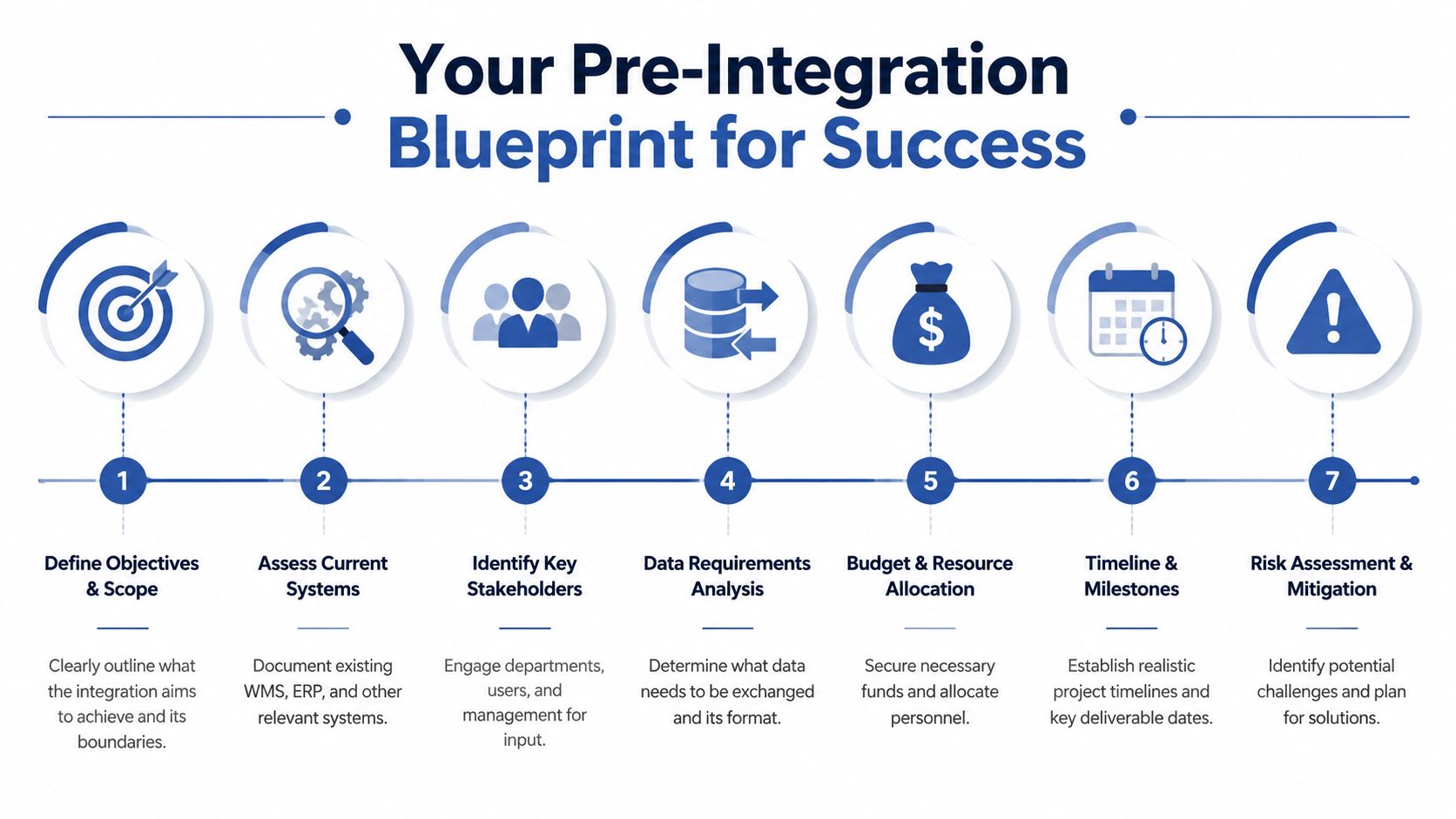
The fastest way to create a weak integration is to rush straight into connector setup. Teams often start with APIs, middleware demos, or vendor promises before they've documented how orders, stock, exceptions, and people move through the business.
That's how companies end up technically connected but operationally fragmented. Only 23% of operations report fully integrated warehouse systems, while 62% remain partially integrated, with software complexity and skills shortages acting as major barriers. The same source notes that achieving full integration is key to reducing picking errors by up to 50% within the first quarter (integrated warehouse system statistics from Kardex).
Start with process, not software
Before anyone talks implementation, document your current state in plain language. Follow one order from Shopify checkout to warehouse pick, pack, carrier handoff, dispatch confirmation, and customer notification. Then do the same for a return, a stock adjustment, and a cancelled order.
That exercise usually reveals the true project scope. Not the scope written in a proposal. The actual scope.
Use questions like these:
- Where is data re-entered: If staff copy order notes, SKUs, or shipping details between systems, that handoff needs explicit design.
- Who owns exceptions: Backorders, partial shipments, substitute items, and address issues need named owners and system rules.
- Which system is authoritative: Decide whether Shopify, the WMS, ERP, or another system is the source of truth for stock, order status, and product records.
- What must happen in real time: Inventory availability often needs fast synchronisation. Other records can move on a timed schedule without causing harm.
A lot of planning problems are really ownership problems. If nobody can answer who decides stock truth or fulfilment status, the integration won't fix that by itself.
Build the project team around operations reality
This isn't an IT-only project. If operations isn't leading requirements, the build will look tidy in a diagram and fail under live warehouse pressure.
At minimum, involve:
| Role | What they need to define |
|---|---|
| Operations lead | Picking logic, wave rules, exceptions, warehouse constraints |
| Ecommerce lead | Shopify order flows, storefront promises, customer communications |
| Finance or ERP owner | SKU governance, tax handling, reporting dependencies |
| Warehouse supervisor | Device use, barcode workflows, shift-level practical issues |
| Technical lead or partner | API behaviour, middleware logic, monitoring, deployment plan |
If transport is handled across multiple carriers or external partners, include that stream early. Teams comparing providers often find Haulier.AI's selection of management companies useful because it helps frame the transport side of the operating model, not just the warehouse side.
Practical rule: If the warehouse supervisor only sees the project during UAT, you've involved them too late.
Define outcomes that can be tested
“Integrate Shopify with the WMS” isn't an outcome. It's a task. Strong discovery turns vague ambitions into testable operational behaviours.
Examples of better outcome definitions:
- Order creation logic: Every paid Shopify order should appear in the WMS with the correct line items, tags, notes, and fulfilment priority.
- Inventory synchronisation: Stock changes in the warehouse should update the storefront according to clearly defined rules for available, reserved, and non-sellable stock.
- Shipping confirmation flow: Tracking details should return to Shopify in a consistent format that customer service can trust.
- Exception handling: Failed syncs should generate visible alerts, not silent errors.
Keep timelines realistic. A first major integration usually takes longer than internal stakeholders expect, especially when product data, warehouse processes, and shipping logic all need standardising. If you need a sense of how broader Shopify integration work is typically scoped, this guide to Shopify third-party integration services is a useful reference point.
Choosing the Right Integration Architecture
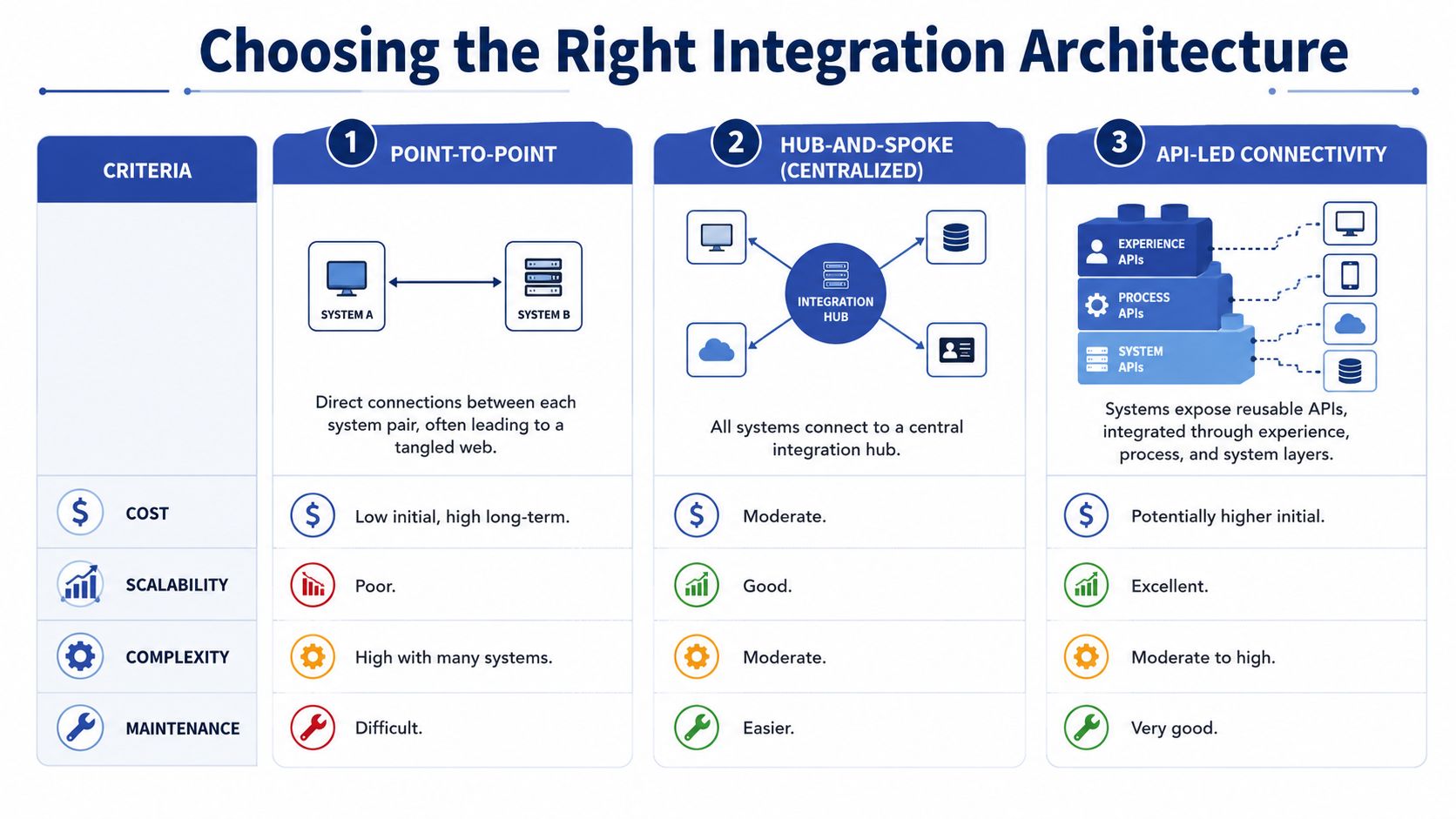
Architecture decisions made early tend to stay with you for years. That matters because the cheapest route into production often becomes the most expensive route to maintain once the business adds a second warehouse, another sales channel, or more operational rules.
The right model depends on your stack, your team, and how much change you expect over the next few years.
Point-to-point works, until it doesn't
A direct API connection between Shopify and a modern WMS can be the right choice when the process is relatively clean. One store. One warehouse. Limited custom logic. A small number of fulfilment states.
That setup has clear advantages. It's simpler to explain, usually faster to launch, and avoids introducing another platform into the stack. For a business using Shopify and a single 3PL with a mature API, that's often perfectly reasonable.
The weakness appears when logic grows. Add an ERP, a returns platform, multiple carrier services, or channel-specific order rules, and direct connections start multiplying. Then every change creates knock-on work elsewhere.
Middleware earns its keep in multi-system environments
Once Shopify sits alongside an ERP, WMS, returns tool, and shipping stack, middleware often becomes the safer pattern. Platforms such as Celigo, Boomi, or MuleSoft can act as the control layer where you handle transformations, routing, retries, and error visibility.
This is usually the better choice when:
- Business rules vary by channel: For example, Amazon orders need different fulfilment treatment from Shopify orders.
- Data formats don't align cleanly: SKU rules, status models, and address structures often need translation.
- You need operational resilience: Retries, logging, and exception queues matter once order volume rises.
- The stack will evolve: Middleware makes it easier to replace one downstream system without rebuilding everything around it.
There's a trade-off. Middleware gives you flexibility, but it also introduces another product to configure, govern, and support. If your internal team doesn't have integration experience, complexity can move rather than disappear.
Here's a useful walkthrough before deciding on tooling:
Webhooks, EDI, and event design
Webhooks are often misunderstood. They're not a complete architecture by themselves. They're a trigger mechanism. In Shopify-led environments, they're excellent for event-driven actions such as notifying the integration layer that a new order was placed, an order was edited, or a fulfilment event changed.
Used properly, webhooks reduce lag and make workflows more responsive. Used carelessly, they create brittle flows where one missed event causes downstream confusion.
EDI sits in a different category. If you also supply major retail partners, they may still require structured document exchange rather than modern APIs. In that case, your warehouse management system integration may need to support both API-based ecommerce workflows and EDI-based wholesale processes at the same time.
If your architecture diagram already looks crowded during discovery, don't bet on point-to-point simplicity lasting long in production.
For teams extending warehouse data into transport and dispatch systems, reviewing an open API for smart fleet integration can help clarify what a well-documented downstream API should look like. And if you're weighing WMS platform considerations alongside architecture, this overview of warehouse management systems is a practical companion.
Mastering Data Mapping and Security Protocols
Most failed integrations don't fail because the API exists. They fail because the data model was treated as an afterthought.
A warehouse management system integration only works when both systems agree on what a product is, what an available quantity means, what status should trigger a pick, and how exceptions get represented. If those definitions are loose, the build may pass technical testing and still cause warehouse confusion on day one.
Clean the data before you connect the systems
This is the step teams underestimate most often. The UK-specific data cleansing gap is real. Uncleaned inventory records from legacy systems cause 30-40% of initial WMS integration failures for UK merchants moving to platforms like Shopify Plus before HMRC-compliant reporting can begin (warehouse management systems in the UK and the data cleansing gap).
In practical terms, that usually means:
- Duplicate SKUs: The same physical item exists under slightly different codes.
- Inconsistent units: Cases, singles, bundles, and inner packs aren't represented consistently.
- Broken location data: Bin or aisle values exist in one system but not another.
- Retired products still appearing live: Old records interfere with mapping and validation.
- Ambiguous stock states: Damaged, reserved, and available inventory are mixed together.
Do the audit first. A week spent cleaning records is cheaper than trying to debug a live sync contaminated by poor master data.
Map business objects, not just fields
Field mapping alone isn't enough. You need business object mapping. Shopify and your WMS may both have products, orders, locations, and fulfilments, but they won't necessarily model them the same way.
A useful mapping workshop should cover at least these objects:
| Business object | Questions to settle |
|---|---|
| Product | Which SKU is canonical, and how are variants represented |
| Inventory | What counts as available to sell versus held, damaged, or incoming |
| Order | Which statuses should create warehouse work, and which should not |
| Customer and address | What is required for pick, pack, label, and compliance workflows |
| Fulfilment | When is an order picked, packed, dispatched, partially shipped, or complete |
| Return | How are returned goods classified and put back into stock or quarantine |
Transformation rules are critical. A Shopify tag might drive a warehouse priority. A gift note might need to become a printable packing instruction. A bundle sold on the storefront may need to explode into component SKUs in the WMS.
Operational warning: If one team says “that field isn't important”, test what process breaks when it's blank.
Secure the flow and define failure behaviour
Security work shouldn't be bolted on after the payloads are flowing. Decide early how systems authenticate, who can access what, how logs are stored, and which events require an alert.
For most projects, the core controls include:
- API authentication: Use the vendor-supported method, often API keys or OAuth 2.0, and keep permissions narrow.
- Access control: Separate admin-level configuration rights from day-to-day operational access.
- Network restrictions: Apply vendor-supported restrictions such as IP allowlisting where appropriate.
- Auditability: Keep logs that show what changed, when it changed, and which system initiated the event.
- Error handling: Define retries, dead-letter handling, and escalation paths for failed transactions.
You also need service expectations in writing. If a vendor or partner system is part of the flow, define support hours, response expectations, and what counts as a critical issue. Integrations don't break only during office hours.
For businesses whose warehouse project also touches finance and master data governance, this guide to Shopify ERP integration helps frame the upstream dependencies that often affect mapping decisions.
The Go-Live Checklist and Rollout Strategy
Go-live is where planning gets tested against real behaviour. Staff are moving fast, customers are ordering, and edge cases appear immediately. If you launch with unclear ownership or weak rollback thinking, small issues become operational incidents.
The safest launches are the boring ones. Orders flow, the warehouse team follows the new process, and support only deals with planned questions.
Test the process the way the warehouse will use it
Technical teams usually complete unit and integration testing first. That's necessary, but it isn't enough. A warehouse launch succeeds or fails in scenario testing.
Run realistic cases such as:
- A straightforward single-line order: Confirm the expected happy path from Shopify through picking to dispatch confirmation.
- A multi-line order with one unavailable item: Check how partial fulfilment or hold logic behaves.
- An edited order: Make sure post-purchase changes don't create duplicate work.
- A return and restock decision: Test both resale and quarantine paths.
- Carrier exceptions: Confirm what happens when a label request or shipment update fails.
User Acceptance Testing should happen with the people who will perform the work. Give them scanners, packing stations, and realistic timing pressure. If the process only works during a calm conference-room demo, it isn't ready.
Prefer phased rollout over a big bang
A full cutover can work, but it concentrates risk. For a first major warehouse management system integration, a phased approach is usually the better operational choice.
You can phase by:
- Sales channel such as Shopify first, marketplaces later.
- Warehouse location if you operate more than one site.
- Product group starting with a simpler range before moving to kits, bundles, or regulated items.
- Order type such as standard domestic orders before more complex fulfilment flows.
A phased launch limits blast radius. It also gives your team room to validate real behaviour without every exception landing at once.
Launch plans need a rollback plan that people can execute under pressure, not just approve in a meeting.
Prepare support before the first live order
Most launch problems aren't code defects. They're unanswered operational questions. Who checks the exception queue? Who can pause order release? Who decides whether to reprocess or fulfil manually?
Make sure the first week has:
- Named owners for technical issues, operational issues, and vendor escalations
- A live communication channel used by warehouse, ecommerce, and technical teams
- A cutover checklist with timestamps and sign-offs
- A short decision log for handling edge cases consistently
- Hypercare coverage for the periods when order volume is highest
If support is vague, teams invent workarounds. Those workarounds can linger long after launch and subtly undermine the value of the integration.
Post-Launch Monitoring and Continuous Optimisation
A warehouse management system integration isn't finished when the first orders ship successfully. That's just the point where you move from implementation risk to operational discipline.
The teams that get long-term value from integration don't treat monitoring as technical housekeeping. They treat it as part of warehouse control. If an order fails to sync, if stock updates lag, or if fulfilment confirmations stop returning to Shopify, the issue needs to be visible before customers or pickers discover it.
Monitor the workflow, not just the server
Many teams log API activity but fail to monitor business outcomes. Those aren't the same thing. A successful API response doesn't guarantee the order was usable in the warehouse.
Monitor practical events such as:
- Order ingestion: Did a valid Shopify order create the right warehouse task?
- Inventory updates: Did stock changes flow back with the expected status and timing?
- Shipment confirmations: Did tracking return to Shopify in a format that triggers customer-facing updates correctly?
- Exception queues: Are failed transactions visible, triaged, and resolved within agreed operational windows?
Silent failures are the expensive ones. A visible error creates work. An invisible one creates customer complaints, manual reconciliation, and loss of trust.
Build a backlog before problems pile up
Post-launch optimisation should run as a standing operational rhythm. Review integration behaviour regularly with operations, ecommerce, and technical owners in the same conversation.
That backlog usually includes items like:
| Priority area | Typical follow-up work |
|---|---|
| Error reduction | Tighten mappings, improve validation, add better alerts |
| Warehouse usability | Refine pick paths, label logic, packing instructions |
| Data quality | Fix recurring SKU, bundle, or location issues at source |
| Process automation | Reduce manual interventions for holds, returns, or order edits |
| Scalability | Prepare the integration for new channels, sites, or service partners |
Don't wait for a large redesign to make these improvements. Small adjustments made consistently are what keep the integration useful as the business changes.
A stable integration is not one that never fails. It's one where failures are easy to spot, easy to understand, and easy to recover from.
Treat ownership as permanent
Someone should own the integration after launch. Not just the codebase, but the operating outcomes. That owner needs to know which issues are technical defects, which are data issues, and which come from process drift inside the warehouse.
Without that ownership, teams fall back into the same habits that made integration necessary in the first place. Manual exports return. Side spreadsheets reappear. Staff work around the system rather than through it.
That's why the best warehouse integrations are maintained like products. They have feedback loops, a backlog, release discipline, and operational accountability.
If your Shopify operation has outgrown manual fulfilment and you need a partner who can translate warehouse requirements into a practical integration plan, Grumspot can help. They build and support complex Shopify integrations across fulfilment, ERP, and custom workflows, with the technical depth to handle architecture and the ecommerce focus to keep the solution usable for real teams.
Let's build something together
If you like what you saw, let's jump on a quick call and discuss your project

Related posts
Check out some similar posts.
- multi-channel inventory management
Master multi-channel inventory management for Shopify. Learn sync methods, ERP integrations & a road...
Read more
- warehouse management systems
Discover warehouse management systems (WMS) in our 2026 guide. Learn features, benefits, and how to ...
Read more
- inventory management ecommerce
Master inventory management ecommerce in the UK. Our 2026 guide covers forecasting, KPIs, Shopify in...
Read more
- shopify erp integration
Unlock efficiency with our 2026 Shopify ERP integration guide. Covers benefits, data flows, implemen...
Read more