Multi-Channel Inventory Management: Shopify Guide 2026
- multi-channel inventory management
- shopify inventory
- ecommerce operations
- erp integration
- stock management
You launch a campaign that finally lands. Shopify orders jump first, Amazon follows, TikTok Shop starts moving faster than expected, and your retail team sells through more stock at a weekend event than anyone forecast. By Monday morning, customer support is apologising for cancelled orders, the warehouse is chasing quantities in three different systems, and finance is asking why available stock doesn't match what the ERP says is on hand.
That's the moment most brands realise multi-channel inventory management isn't an operations side topic. It's the system that decides whether growth feels controlled or chaotic.
For scaling Shopify brands, the problem gets harder fast. A simple store with one warehouse can survive on light tooling for a while. Once you add an ERP, a 3PL, marketplace listings, retail POS, bundles, and stock transfers, manual fixes stop being fixes. They become the source of the damage.
The Reality of Selling on Multiple Fronts
The usual failure pattern looks boring at first. Stock is “mostly right” across Shopify, Amazon, eBay, and the warehouse system. Someone trusts the numbers because they were right yesterday. Then a promotion hits, order velocity changes, one connector lags, and the same units get sold twice.
The operational mess spreads quickly. Customer service has to explain delays. The warehouse gets pick lists for items that aren't there. Finance sees one stock figure in the ERP and another in Shopify. The ecommerce team starts creating workarounds in spreadsheets, which only makes the next mismatch harder to trace.
That's what multi-channel inventory management is really solving. Not a software category. Not a dashboard. It's the discipline of making sure every channel, system, and fulfilment partner works from the same stock truth.
What breaks first
In practice, the first breakage usually shows up in one of these places:
- Shared stock pools: The same SKU is sold on Shopify and a marketplace, but each channel behaves as if it owns the last units.
- Manual adjustments: Staff correct stock directly in one system and forget the others.
- Transfers in motion: Inventory leaves one warehouse, hasn't arrived at the next, and sits in limbo with no clear ownership.
- Bundle logic: A bundle sells on the storefront, but the underlying component SKUs don't decrement properly.
- Returns handling: Returned stock is marked received somewhere, but not made available in the right system.
The brands that struggle most aren't always the ones with weak sales. They're often the ones growing into more channels before their stock model is ready.
The fix starts with a single source of truth. That usually means one system owns inventory logic, one mapping structure defines products, and every other system consumes or updates that truth through clearly defined workflows. Without that discipline, adding channels doesn't create scale. It multiplies failure points.
Why Centralised Inventory Is Non-Negotiable
A brand adds a new marketplace, keeps Shopify as the storefront, and assumes inventory will stay manageable for another quarter. Then a promotion hits, the ERP updates on one schedule, Shopify updates on another, and the warehouse team starts holding orders because sellable stock no longer matches physical stock. That is usually the point where centralisation stops being a nice-to-have and becomes an operating requirement.
Analysts at McKinsey explain in their omnichannel retail coverage that customers now move across channels as a normal buying behaviour, not an exception. For scaling Shopify brands, that changes the inventory problem. Stock is no longer just a storefront number. It affects fulfilment priority, channel allocation, returns handling, purchasing, and customer promise dates across the whole stack.
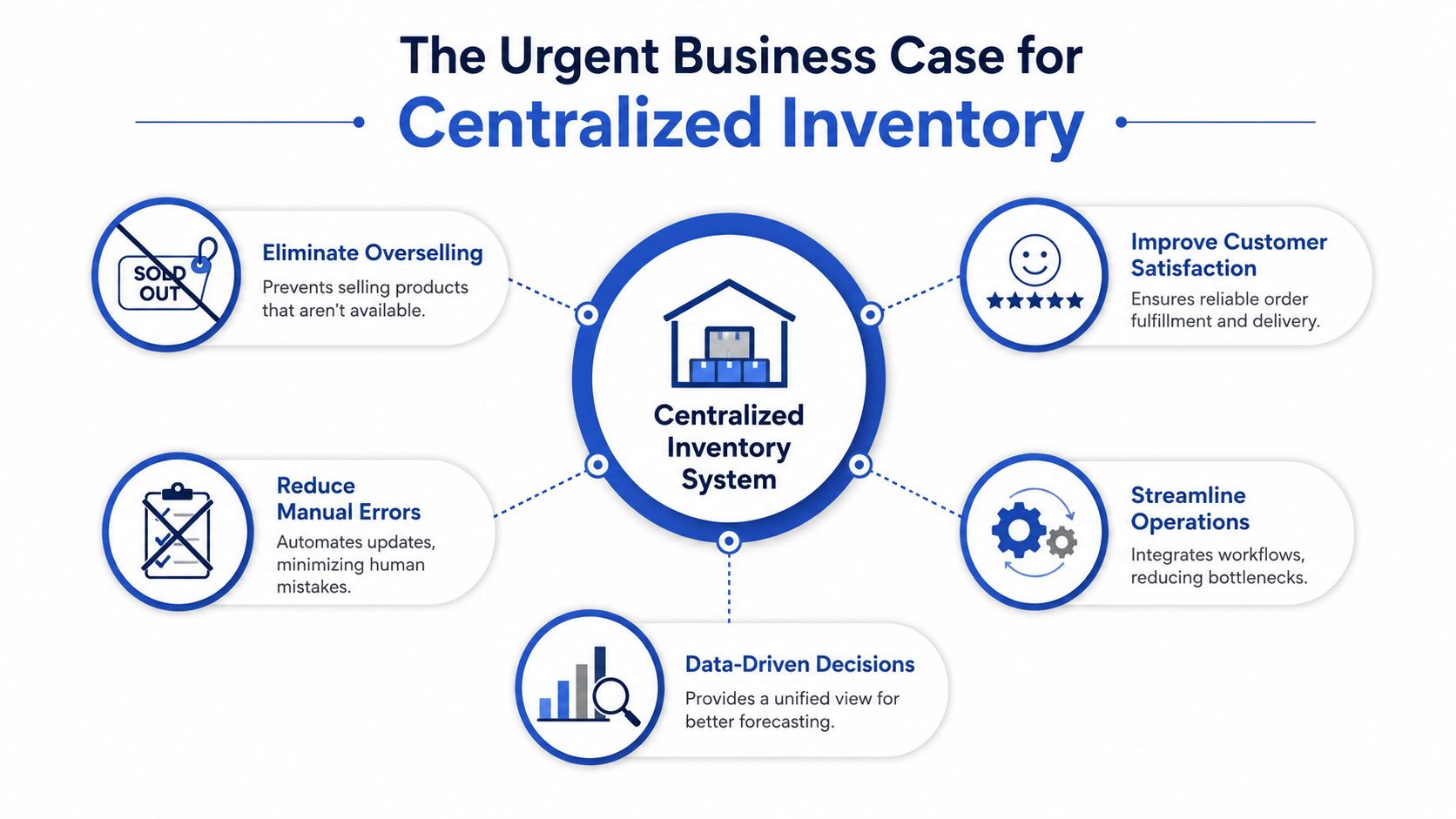
Centralisation improves control, not just visibility
Disconnected systems do more than create reporting noise. They change behaviour inside the business.
The ecommerce team merchandises based on Shopify availability. Operations works from the ERP or WMS. Finance relies on a different inventory status for valuation. Each team can be acting rationally and still create bad outcomes because the underlying stock rules are inconsistent. I see this most often when brands let Shopify, an ERP, and a 3PL all influence available quantity without deciding which system owns the truth.
A centralised model fixes that by making a few rules explicit:
- One system owns sellable stock: Other platforms consume or update that figure through defined workflows.
- Reservations are separated from on-hand units: Allocated stock does not get mistaken for free-to-sell inventory.
- Inbound inventory follows status rules: Purchase orders, transfers, and ASN data do not inflate availability before receipt.
- Channel allocation is intentional: Margin-rich channels can be protected instead of competing blindly for the same units.
For consumer brands selling through wholesale, DTC, marketplaces, and retail partners, the operational side of optimizing multi-channel CPG inventory gets easier once inventory ownership is centralised. The principle is the same even if the systems differ. One stock truth, clear reservation logic, and controlled updates.
What usually fails in growing stacks
Early workarounds rarely survive scale.
Spreadsheet reconciliation can help diagnose a mismatch, but it fails as a live operating model. Editing quantities channel by channel breaks as soon as order volume spikes or multiple warehouses come online. Letting each app maintain its own quantity sounds safer, yet it usually creates conflicting edits and timing gaps. Delaying ERP integration is another common mistake. If purchasing, transfers, landed cost, or inventory valuation sit in the ERP, leaving commerce systems disconnected creates blind spots that get expensive fast.
That is why a proper Shopify ERP integration strategy matters early for brands with multi-location stock or more than one fulfilment partner. The trade-off is real. Setup takes longer, mapping takes discipline, and exception handling must be documented. But the alternative is worse. Manual overrides, oversells, held orders, and month-end reconciliation work that nobody trusts.
Practical rule: If two systems can both overwrite sellable stock without strict rules, the business has a race condition.
What a centralised model actually gives you
A primary benefit is better decisions under pressure.
Teams can release stock with confidence during promotions. Customer support can trust availability before making a promise. Replenishment planning improves because committed, in-transit, quarantined, and sellable stock are not blended into one misleading number. Returns can be routed back into available inventory only when they pass the right checks.
For Shopify brands scaling into ERP, 3PL, and marketplace complexity, centralisation is less about software preference and more about operational discipline. Without it, every new channel adds another place for stock to drift. With it, growth becomes much easier to control.
Understanding Core Sync Methods and Workflows
Inventory sync is often discussed as if there's one “real-time” option and one inferior option. In reality, most setups blend methods depending on channel behaviour, API limits, order velocity, and how much risk the business can tolerate.
The easiest way to think about it is air traffic control. Every plane can't decide its own runway. One control layer has to know what's landing, what's taking off, and what's already committed. Inventory works the same way. If every channel updates stock on its own schedule without a controlling system, collisions happen.
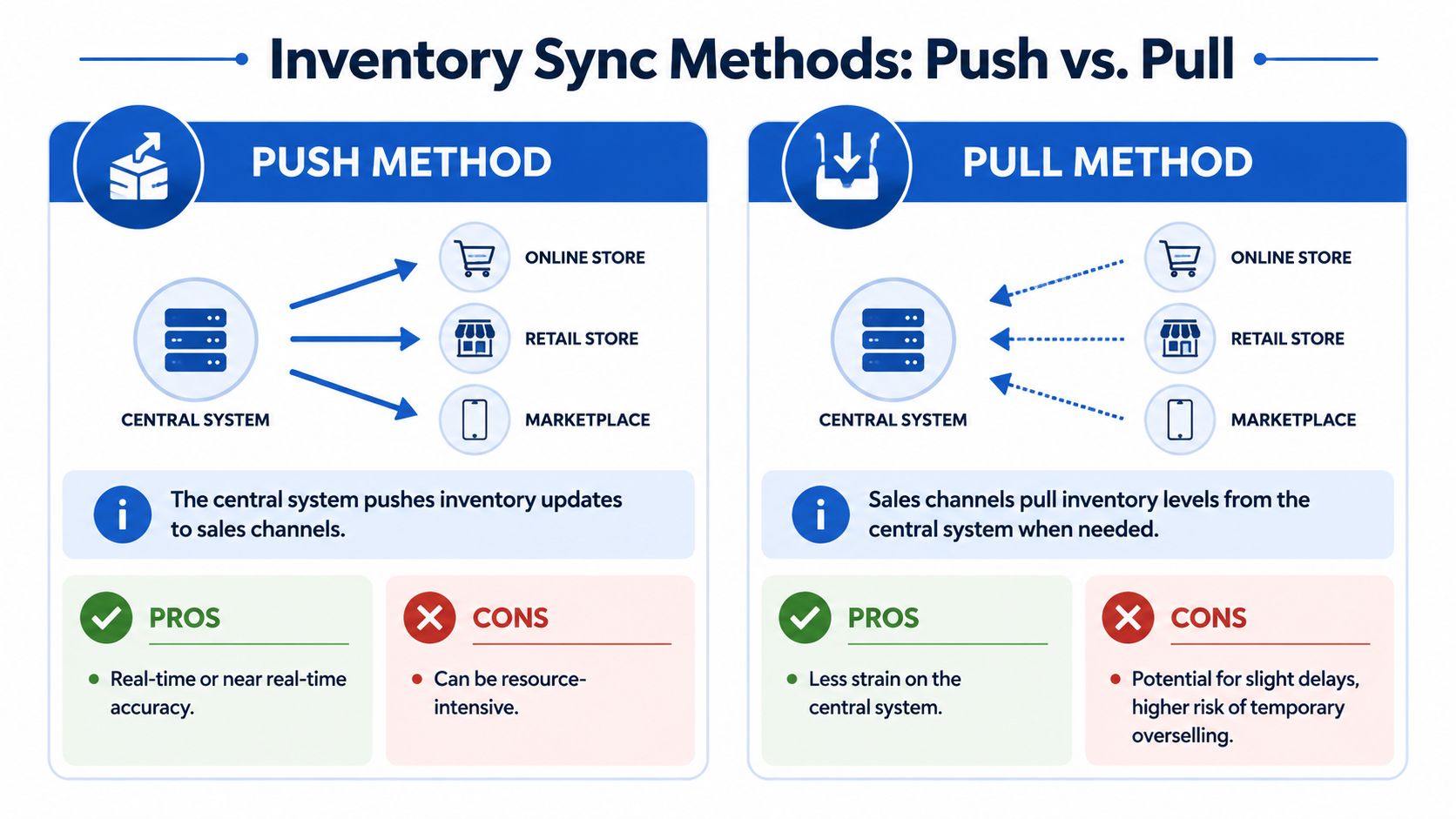
Push and pull are not the same risk
A push model means the central system sends inventory updates out to channels after a stock event. A pull model means a channel asks for stock levels from the central system when needed or on a schedule.
Push is usually better when you need tighter control. Pull can work in lower-risk environments, but it creates more room for timing gaps.
| Feature | Real-Time Sync (Event-Driven) | Batch Sync (Scheduled) | Best For |
|---|---|---|---|
| Update trigger | Stock changes trigger immediate updates | Updates run on a timed schedule | Depends on order velocity and system constraints |
| Accuracy | Higher during active trading | Lower during gaps between runs | Real-time for fast-moving SKUs |
| Operational load | Higher integration and monitoring burden | Simpler to maintain | Batch for slower-moving catalogues |
| Overselling risk | Lower if workflows are designed well | Higher during sync gaps | Real-time for flash sales and launches |
| Failure handling | Needs robust retry logic and queue management | Needs clear reconciliation routines | Both need exception reporting |
Sync delay is where overselling starts
A critical failure point in UK multi-channel setups is sync delay, which directly causes overselling. According to Ecomsource's guide to multi-channel inventory management, UK systems mitigate this with a Safety Stock Buffer, typically holding back 5% to 10% of stock to account for latency during peak events like Black Friday. The same source notes that delays of even minutes can be disastrous, and event-driven architectures should push updates to all channels within a 15-minute window for moderate-velocity products.
That matters because many teams still assume a successful sync means a safe sync. It doesn't. A connector can technically work and still be too slow for your sales pattern.
The workflow that usually holds up best
For Shopify-led brands, the most resilient flow tends to look like this:
A sale happens on a channel The order creates an inventory event immediately, not at the end of the hour.
Stock is reserved first Reservation should happen before downstream fulfilment steps, so sellable quantity drops early.
The central system updates available quantity During this update, safety stock and channel allocation rules are applied.
Other channels receive the revised quantity Push updates go out fast, with retries if a channel doesn't respond.
Exceptions are logged visibly Failed syncs, rejected updates, and quantity mismatches go to a monitored queue.
For brands still comparing apps and workflows, it helps to review both enterprise tooling and lighter SMB stock management solutions so you can see where complexity starts to demand stronger orchestration. And if Shopify is the front-end driver of your stack, a proper Shopify ERP integration approach matters more than shaving costs off connector licences.
Scheduled sync can work. Scheduled sync with high-velocity products, multiple channels, and no safety buffer usually doesn't.
What teams often miss
They focus on whether stock updates are “real-time” and ignore workflow behaviour under failure.
Ask harder questions:
- What happens if one marketplace rejects an update?
- How are retries handled?
- What gets reserved during payment processing?
- Can the system continue during a partial outage?
- Who can manually override stock, and where is that logged?
Those answers tell you far more than a feature list.
Integrating Your Shopify and ERP Tech Stack
The hardest part of multi-channel inventory management usually isn't Shopify itself. It's getting Shopify, the ERP, the 3PL, marketplaces, and POS to agree on what a product is, where its stock lives, and which system owns each decision.
That's why projects fail before the API work even gets difficult. The integration team starts wiring systems together while the product data is still inconsistent.
Here's the flow most brands are trying to build:
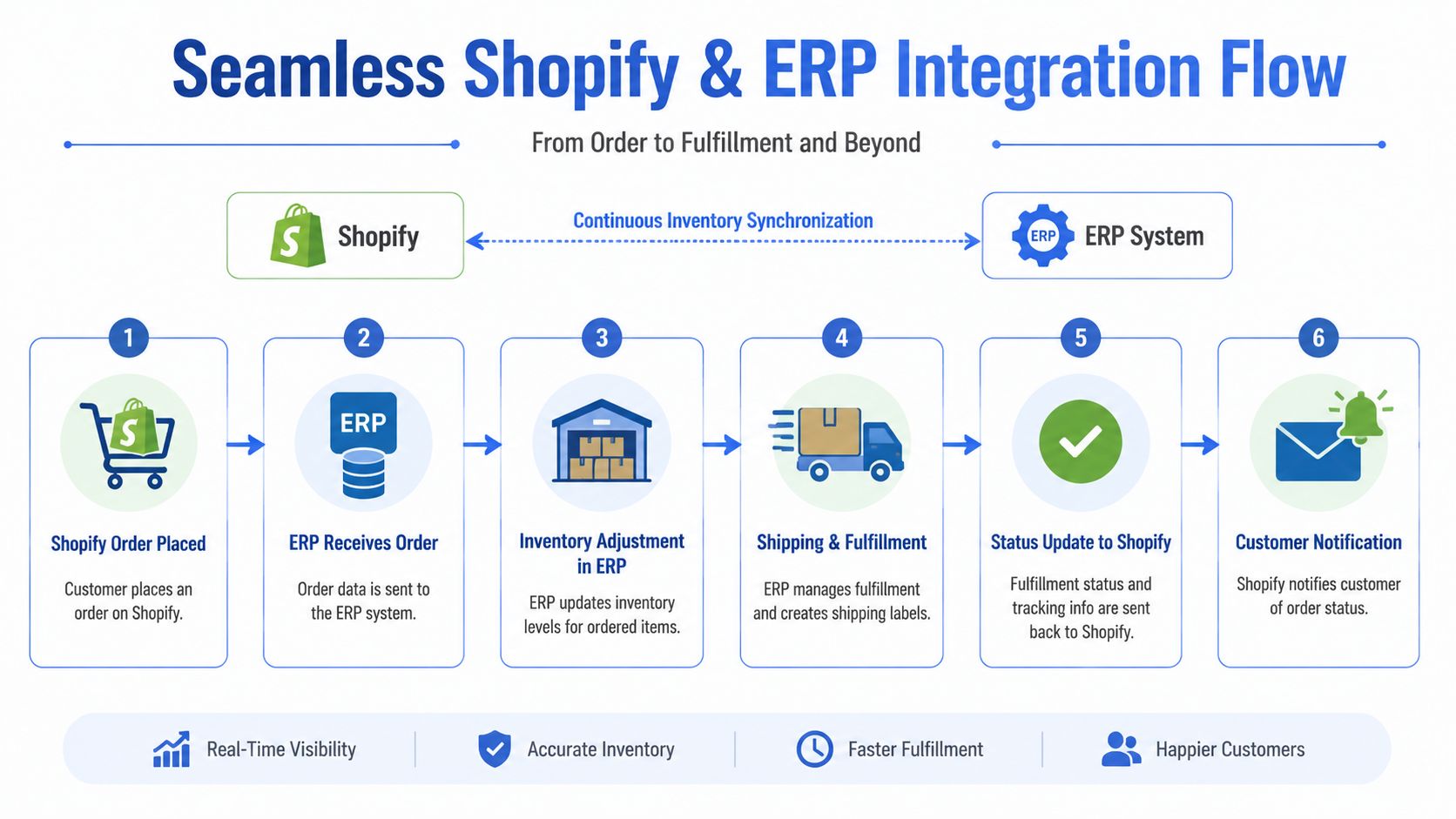
Start with product identity
For Shopify Plus brands, a unified SKU mapping layer linking marketplace IDs to a universal UPC is critical, according to Airwallex's guide to multi-store inventory management. The same source warns that failure to standardise data across 3PLs, FBA sites, and POS systems before rollout leads to stock-in-transit valuation discrepancies and degrades operational efficiency by 20% to 30%.
That mapping layer does more than tidy data. It prevents duplicate records, mismatched variants, and bad allocation logic.
What the mapping layer needs to handle
A proper mapping structure should account for:
- One internal product ID: This becomes the anchor across systems.
- Channel-specific identifiers: Amazon ASINs, eBay item IDs, POS codes, and external warehouse references.
- Variant rules: Size, colour, pack size, and naming conventions must match predictably.
- Bundle relationships: Parent bundle SKUs need links to component SKUs and quantities.
- Unit consistency: Each, case, inner pack, and pallet units must be translated cleanly.
If those rules aren't locked down before build, the integration ends up preserving bad data at scale.
Field note: SKU clean-up done after middleware goes live is slower, more expensive, and far riskier than doing it before launch.
Later in the project, teams also need to understand the warehouse communication layer. If you're mapping order flow, status events, and fulfilment data between systems, this warehouse management system integration guide is the kind of reference worth reviewing before requirements are finalised.
Decide which system owns what
The next mistake is shared ownership. Shopify shouldn't own every inventory rule just because it's where the sale happens. The ERP shouldn't own every customer-facing status just because it controls purchasing and finance.
A clean integration defines ownership by function.
| Function | Typical System Owner |
|---|---|
| Product merchandising | Shopify |
| Inventory valuation and purchasing | ERP |
| Pick, pack, and dispatch execution | 3PL or WMS |
| Marketplace quantity distribution | Inventory layer or ERP, depending on architecture |
| Customer order status communication | Shopify |
That ownership model keeps each system in its lane.
A short explainer can also help align internal teams before implementation gets too deep:
The gotchas that derail launches
The technical issues that create the most pain are rarely glamorous:
- Bundles and kits: If a bundle sells in Shopify, component inventory must decrement correctly in the stock-owning system.
- Stock in transit: Inventory transferred between sites needs a distinct status, not a guess.
- Returns: Returned units should pass through a condition workflow before becoming sellable again.
- Partial outages: One connector failing shouldn't stop the warehouse from shipping everything else.
- Rate limits and queueing: During peaks, connectors need sensible retry logic and visibility.
For teams dealing with EDI flows, retail partner routing, or transport visibility as part of the wider stack, a practical Essential guide for modern logistics can help frame how tracking and system handoffs affect the broader operation beyond the storefront.
The strongest integrations are usually boring from the outside. Orders pass cleanly. Stock updates are predictable. Exceptions are visible. Nobody is “just checking” three systems before releasing an order.
Key Performance Indicators You Must Track
A multi-channel inventory setup isn't successful because the integration launched. It's successful when the data tells you where stock is moving well, where margin is slipping, and where replenishment decisions need to change.
That's why software evaluation shouldn't stop at features. According to Keel's review of multi-channel inventory software, operational factors such as sync reliability, integration breadth, and bundle support outweigh price, and performance metrics tracking across every channel is essential for seeing which channels sell fastest and where margin is lost.
Four KPIs that matter in practice
These are the numbers most operators use to manage inventory decisions.
Inventory turnover rate
This tells you how often inventory is sold and replaced over a given period. A higher turnover can indicate efficient stock movement. A low turnover often points to overbuying, weak merchandising, or a channel mismatch.
Use it to ask: are we holding too much stock for the demand we really have?
Sell-through rate
This shows how much of received stock sells within a defined period. It's especially useful for seasonal lines, campaign products, and new launches.
Use it to ask: did we buy the right amount, and did the right channels get enough stock?
Stock-to-sales ratio
This compares current inventory to current sales pace. It's a useful planning tool when deciding whether to reorder, pause purchasing, or shift stock to a stronger channel.
Use it to ask: are we carrying too much relative to current demand?
Carrying costs
This captures the cost of holding stock, including storage, handling, tied-up cash, and markdown risk. Even without a perfect finance model, brands should estimate carrying pressure by category or channel.
Use it to ask: which stock is draining working capital without supporting growth?
What good operators do with KPI data
They don't look at these metrics in isolation. They compare them by channel, by warehouse, and by SKU group.
- Fast turnover with weak margin: Reassess channel allocation or fulfilment cost.
- Strong sell-through in one channel only: Move stock, don't just reorder more.
- Low stock-to-sales on bestsellers: Tighten purchasing and forecasting.
- High carrying pressure on slow movers: Bundle, remarket, or reduce future buys.
Tracking stock metrics without action rules turns reporting into theatre.
For brands that want cleaner replenishment decisions, this guide to ecommerce demand forecasting is useful because it connects inventory data to purchasing timing rather than treating forecasting as a separate discipline.
One warning on KPI design
Avoid vanity dashboards. A beautiful chart that combines all channels into one blended number can hide the exact problem you need to solve. The point of multi-channel inventory management is visibility with context, not just more reporting.
A Practical Roadmap for Implementation
Most inventory projects fail because the business tries to “switch systems” before it has defined process ownership, cleaned product data, or tested real-world exceptions. The safer path is phased implementation with controlled scope.
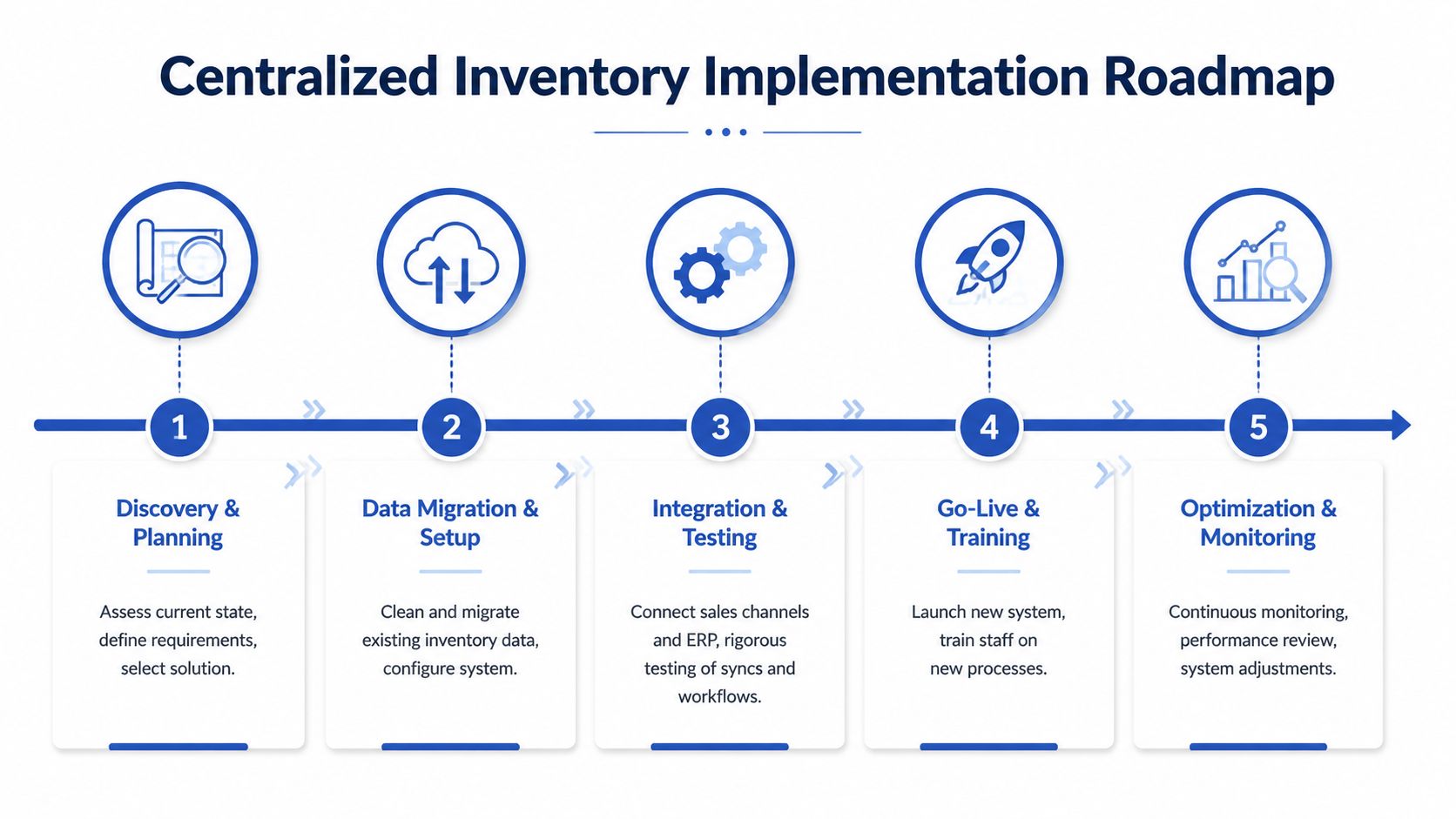
According to Knack's multi-channel inventory management analysis, following the implementation of unified omnichannel systems, UK businesses reported a 66.7% reduction in out-of-stock frequency, dropping from 12 occurrences to 4 in three months, while improving stock accuracy from a 15-unit discrepancy per SKU down to 5 units. That kind of operational improvement doesn't come from buying software alone. It comes from disciplined rollout.
Phase 1 discovery and process audit
Start by mapping current reality, not ideal future state.
Document:
- Where stock is created and updated
- Which system currently acts as the stock reference
- How orders move from sale to fulfilment
- Where manual edits happen
- What exception cases already cause pain
This stage usually exposes hidden workflows no one wrote down, especially around returns, transfers, and bundles.
Phase 2 data clean-up and structure
Before any rollout, standardise product and location data. Product titles, SKUs, units of measure, barcode usage, warehouse naming, and channel identifiers need consistent rules.
Don't skip this because the software vendor says mapping can be fixed later. It can. But later is when you've already attached live orders and financial workflows to bad data.
Phase 3 choose the right rollout shape
The best rollout usually isn't all channels at once. Starting with highest-performing channels first is a proven strategy for UK brands, and real-time inventory tracking is the foundation of effective multi-channel inventory management according to Cin7's multichannel inventory guide.
A sensible pattern is:
- Launch the central inventory logic
- Connect Shopify first
- Add one marketplace
- Then connect ERP-driven purchasing and warehouse workflows
- Bring in lower-priority channels last
That sequence reduces risk while proving the model on the channels that matter most.
The first go-live should prove control, not prove bravery.
Phase 4 testing that reflects real trading
Basic happy-path testing isn't enough. Test edge cases that mirror actual operations:
- Simultaneous orders across channels
- Order cancellation after reservation
- Partial fulfilment
- Bundle sale with low component stock
- Transfer in transit
- Return to available and return to quarantine
- Connector failure and retry behaviour
If the team hasn't tested a scenario, the live business will.
Phase 5 training and post-launch monitoring
Go-live is where process discipline matters most. Staff need to know where stock can be edited, who owns escalation, and how discrepancies are resolved.
Monitor exceptions aggressively in the early period. Most launches don't fail because the architecture is impossible. They fail because no one owns the first layer of operational follow-through after the switch.
The Future of Unified Commerce
A brand adds a new marketplace, switches 3PLs, and rolls out an ERP integration in the same quarter. Orders keep flowing, but stock confidence drops fast. The issue usually is not channel growth itself. It is a stack that was never designed to keep Shopify, the ERP, warehouse logic, and channel listings aligned under load.
Unified commerce is often described as a customer experience idea. In practice, it is an inventory control problem first. Customers see the symptom. Late shipments, cancelled orders, split fulfilments, and inconsistent availability across channels. Operations teams live with the cause, which is poor system coordination behind the scenes.
The next phase will put more pressure on data quality, not less. Forecasting tools are getting better, including systems that use machine learning to improve replenishment and demand planning, as outlined in IBM's overview of AI inventory management. But better forecasting does not rescue a weak operating model. If SKU mapping is inconsistent, if reservation logic differs by channel, or if the ERP receives delayed updates, the forecast may be advanced and still produce bad buying decisions.
That is the trade-off scaling Shopify brands need to understand. More automation can improve planning and reduce manual work. It also makes bad process design harder to spot until the cost shows up in overstocks, stockouts, and fulfilment exceptions.
The brands that scale cleanly treat unified commerce as system discipline. One source of truth for inventory. Clear ownership of stock adjustments. Defined sync rules between Shopify, ERP, WMS, and 3PL partners. Exception reporting that someone consistently reviews.
Get that right, and adding channels becomes an expansion project instead of an operational risk.
Want this kind of work on your store?
Send us the URL and what is slowing it down. We look at the store before we reply.
Related posts
Check out some similar posts.

- knowledge transfer process
Master the knowledge transfer process with a step-by-step framework, real-world examples, and metric...
Read more
- warehouse management system integration
Optimize your Shopify operations with seamless warehouse management system integration. Learn to pla...
Read more
- seasonal demand forecasting
Master seasonal demand forecasting with our guide. Source data, select models, & integrate with Shop...
Read more
- inventory management ecommerce
Master inventory management ecommerce in the UK. Our 2026 guide covers forecasting, KPIs, Shopify in...
Read more