XML Sitemap Best Practices: The 2026 SEO Guide
- xml sitemap best practices
- shopify seo
- technical seo
- sitemap guide
- search engine optimisation
Launched
June, 2026

You launch a new collection, push it live, submit it internally for QA, and wait for organic traffic to pick it up. A week later, the category pages still aren't showing. Some products are indexed, some aren't, and a few high-margin pages seem invisible unless you search the exact URL.
That usually isn't a content problem. It's often a sitemap problem.
On small sites, weak sitemap setup can go unnoticed for a long time. On ecommerce stores with fast stock changes, seasonal drops, faceted navigation, regional storefronts, and app-generated URLs, the sitemap becomes operational SEO infrastructure. If it's inaccurate, stale, bloated, or too dependent on platform defaults, search engines get a distorted view of the site.
Why Your Sitemap is More Than Just a File
A lot of teams treat the sitemap as a box-ticking task. Generate /sitemap.xml, submit it in Search Console, move on. That mindset is exactly why important pages get missed.
An XML sitemap is a curated discovery layer. It tells search engines which URLs matter, which ones changed, and how your content is organised. On a dynamic store, that matters every day, not just at launch.
Consider a common ecommerce scenario. A merchant adds a new product line, updates several collection pages, retires old stock, and rolls out a new landing page for paid and organic search. The frontend looks right. Internal links exist. But crawling and discovery still lag because search engines are seeing mixed signals. Old URLs remain listed. New URLs aren't surfaced quickly enough. Collection pages compete with filtered URLs that should never have been exposed.
Practical rule: A sitemap should reflect the version of the site you want search engines to trust, not every URL your platform can generate.
That's the shift that matters. The sitemap isn't a passive export. It's a strategic handoff.
What search engines actually use it for
Search engines don't use a sitemap as a ranking boost. They use it as a discovery and validation aid. A clean sitemap helps them:
- Find important pages faster when inventory or content changes frequently
- Confirm canonical intent by reinforcing the preferred version of a URL
- Prioritise crawl effort toward URLs that deserve indexing
- Spot change patterns through reliable modification signals
On enterprise and Shopify Plus builds, I've seen the difference between “sitemap exists” and “sitemap is managed properly” play out in launch windows, migration recovery, and seasonal releases. One gets you basic coverage. The other gets your commercial pages discovered with less friction.
Why this matters more on ecommerce sites
Ecommerce stores create mess by default. Tags, filters, sorting parameters, collection pagination, product variants, app pages, and temporary campaign URLs all increase URL volume. If the sitemap includes too much noise, it stops acting like a roadmap and starts behaving like a distraction.
That's why strong XML sitemap best practices are less about generation and more about editorial control. The best sitemap is rarely the biggest one. It's the one that gives Google and Bing the cleanest possible picture of what should be crawled and indexed.
The Anatomy of a Perfect XML Sitemap
A good sitemap is simple to read and strict in what it allows. Consider its similarity to a library catalogue. The catalogue doesn't store the book itself. It stores the record that tells you what exists, where it lives, and whether it's worth retrieving.
Your sitemap does the same job for search engines.
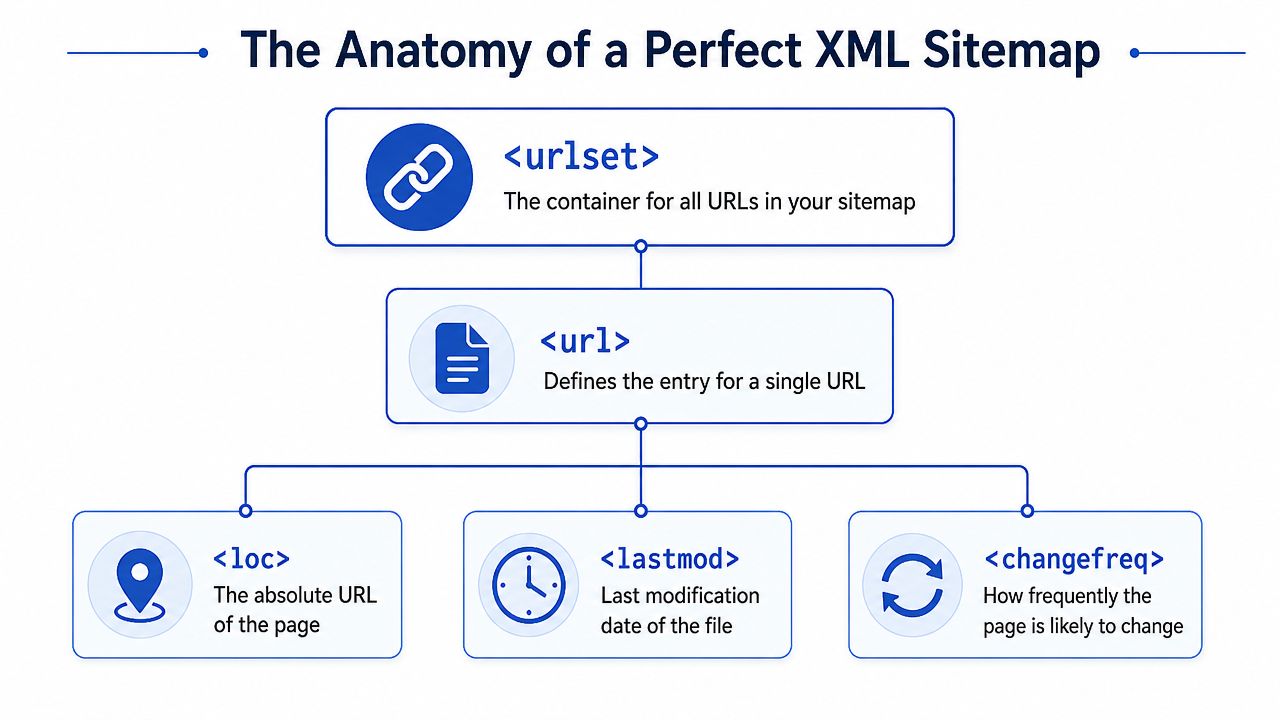
The essential tags that matter
At minimum, you're working with a small set of XML elements:
<urlset>wraps the whole file and defines the sitemap namespace.<url>contains one URL entry.<loc>holds the absolute canonical URL.<lastmod>signals when that page changed meaningfully.<changefreq>suggests how often the page is likely to change.<priority>suggests relative importance within the site.
A stripped-back example looks like this:
<?xml version="1.0" encoding="UTF-8"?>
<urlset xmlns="http://www.sitemaps.org/schemas/sitemap/0.9">
  <url>
    <loc>https://www.example.com/products/wool-coat</loc>
    <lastmod>2026-01-12T09:15:00+00:00</lastmod>
    <changefreq>weekly</changefreq>
    <priority>0.8</priority>
  </url>
</urlset>
The common mistake isn't malformed XML. It's bad metadata.
What works and what quietly breaks trust
<loc> is straightforward. Use the fully qualified canonical URL. No relative paths. No redirected URLs. No parameter-heavy alternatives when a clean canonical exists.
<lastmod> is where stores often go wrong. If your generator stamps every URL with the current server time whenever the file is rebuilt, you're telling search engines that everything changed, all the time. That signal becomes useless.
If every page changed today, then from Google's perspective, none of your change data is trustworthy.
<changefreq> and <priority> are only helpful when used with restraint. A news section might be daily. A static returns policy probably isn't. Likewise, a homepage or top collection may deserve a higher priority value than an archive page, but if every entry is set to 1.0, the field carries no meaning at all.
The file limits you have to design around
There's one constraint that isn't optional. A single sitemap file is limited to 50,000 URLs and 50MB uncompressed, and URLs beyond that limit can be ignored according to the Sitemaps.org protocol specification.
That's why large stores shouldn't rely on one giant sitemap. Split files logically. Product URLs in one file. Collections in another. Blog and content sections separately. Then use a sitemap index to group them cleanly.
Here's the practical test. If your store can expand quickly, don't build a sitemap architecture for today's catalogue. Build it for the next migration, the next country launch, and the next inventory sync issue. That's where structure starts paying off.
For teams auditing this properly, a technical review usually surfaces sitemap quality issues alongside canonical, crawl, and rendering problems. A solid Shopify technical audit workflow should treat the sitemap as a core diagnostic artefact, not a side note.
What to Include and What to Leave Out
The strongest sitemaps are selective.
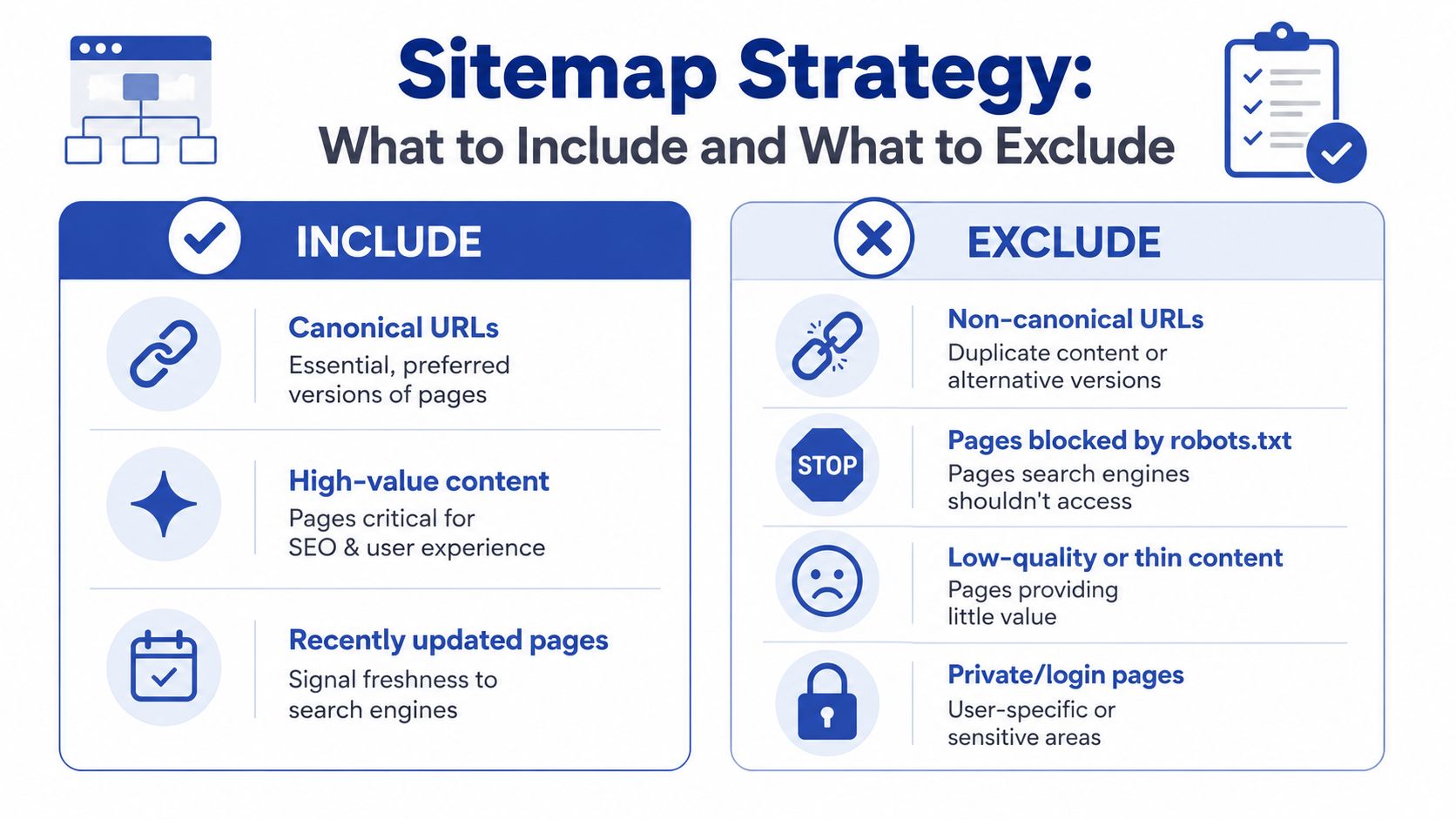
A common instinct is to include everything, because more URLs feels like more coverage. In practice, broad inclusion weakens the sitemap. It mixes your best pages with redirects, blocked paths, duplicate variants, empty collections, filtered URLs, and pages that were never meant to rank.
That's backwards. The sitemap should be a shortlist of index-worthy URLs.
The inclusion rule that keeps things clean
Google's guidance is clear. Include only canonical URLs that return a 200 status code, and leave out blocked or non-indexable pages, as covered in the Google Search Central sitemap basics documentation.
That one rule filters out most sitemap bloat.
Use this as your working standard:
| URL type | Include in sitemap | Reason |
|---|---|---|
| Canonical product page with 200 status | Yes | Intended for indexing |
| Redirected URL | No | Not the final destination |
| 404 or 5xx page | No | Wastes crawl attention |
| No-index URL | No | Contradicts indexing intent |
| Robots.txt blocked URL | No | Sends mixed signals |
| Parameter-based duplicate URL | No | Usually not the preferred version |
The pages that usually need exclusion
On ecommerce builds, these are the biggest offenders:
- Filtered collection URLs. Colour, size, price, and sort parameters often explode into duplicate combinations.
- Internal search results. They can generate indexable-looking URLs with very little standalone value.
- Tagged or faceted archives. Useful for users, risky for search if left unmanaged.
- App and account paths. Login, cart, wishlists, and customer-specific endpoints don't belong in a discovery file.
- Thin campaign pages. If a page is temporary, near-duplicate, or not intended for sustained indexing, keep it out.
For faceted navigation in particular, this gets messy fast. If your collections can be filtered into dozens or hundreds of crawlable combinations, it's worth reviewing this practical guide on fixing faceted navigation duplicate content. It's a useful companion to sitemap work because duplicate URL control and sitemap quality are tightly linked.
Product variants need judgment, not dogma
Generic advice often falls short.
Not every variant deserves a sitemap entry. If variant URLs create unique, indexable pages with distinct search demand and proper canonicals, include them deliberately. If they're just alternate states of the same product with no standalone SEO value, keep the canonical parent in the sitemap and let the variants stay out.
Audit lens: Don't ask “Can this URL exist?” Ask “Should this URL be discovered and indexed as a landing page?”
That same logic applies to pagination and collection pages. A paginated sequence can be crawlable and still not belong in the sitemap. A collection page with strong internal links, unique merchandising copy, and search intent usually does belong.
The goal isn't completeness. It's signal quality. A smaller sitemap with clean commercial URLs usually outperforms a giant export stuffed with technical debris.
Advanced Sitemaps for Images Video and International SEO
Once the core sitemap is stable, richer sitemap formats become useful. They help search engines understand assets and market targeting that ordinary crawling may miss or interpret slowly.

Image and video extensions
Image-heavy stores often rely on product imagery to rank in visual search, but standard page crawling doesn't always expose image relationships as clearly as you'd like. An image sitemap extension lets you associate media directly with the URL where it matters.
A simplified pattern looks like this:
<url>
  <loc>https://www.example.com/products/leather-boots</loc>
  <image:image>
    <image:loc>https://www.example.com/cdn/images/leather-boots.jpg</image:loc>
  </image:image>
</url>
Video follows the same principle. If you host product demos, explainers, fit guides, or landing page videos, a video sitemap can provide clearer metadata than relying on crawl discovery alone.
International and regional targeting
For multi-market ecommerce, sitemap-level hreflang support is often cleaner than trying to manage every relationship only in the HTML. The important part is accuracy. Alternate URLs need to point to valid equivalent pages across language or regional versions.
A basic pattern looks like this:
<url>
  <loc>https://www.example.com/uk/products/trainers</loc>
  <xhtml:link rel="alternate" hreflang="en-gb" href="https://www.example.com/uk/products/trainers"/>
  <xhtml:link rel="alternate" hreflang="en-us" href="https://www.example.com/us/products/sneakers"/>
</url>
The lastmod value should still represent a meaningful content update, not the time the sitemap was regenerated. That same Google documentation noted earlier also supports using xhtml:link entries with hreflang in sitemaps for international discovery.
Regional SEO breaks when alternates are technically present but operationally inconsistent.
That inconsistency usually appears during catalogue expansion, translation workflows, or market-specific merchandising. A product exists in one country, is unpublished in another, but the alternate relationship is still emitted. Search engines then get a broken map of equivalence.
A short walkthrough can help if you need a visual refresher before implementing richer media markup:
When advanced sitemap work is worth it
Use advanced sitemap formats when the content justifies the maintenance burden:
- Image sitemaps suit catalogue-led stores where visual search matters.
- Video sitemaps make sense when videos are core to product education or conversion.
- Hreflang sitemap annotations help when managing multiple regional storefronts at scale.
If your foundation is weak, fix that first. Advanced sitemap features don't rescue a sitemap filled with the wrong URLs.
Submission Monitoring and Troubleshooting
Submitting a sitemap is easy. Learning from it is where the value sits.
After the sitemap is published, declare it in robots.txt, submit the sitemap index in Google Search Console, and do the same in Bing Webmaster Tools. On large stores, always submit the index rather than chasing individual child sitemaps manually unless you're diagnosing a specific file.
What to watch in Search Console
The sitemap report isn't just a receipt. It's a diagnostic view.
Look for three things first:
- Submission status. If the file can't be fetched or parsed, fix that before touching anything else.
- Discovered URL count. Sudden drops often point to truncation, generation bugs, or missing sitemap sections.
- Indexed versus submitted patterns. A large gap means the sitemap may be listing URLs that search engines don't accept as index-worthy.
The cleaner the sitemap, the better this data becomes. Google Search reporting from recent years showed that sitemaps containing only canonical URLs with 200 status codes can produce a 25% faster indexing rate, as noted in the Google Search blog reference.
Common failure patterns
When debugging, don't start by editing tags. Start by comparing the sitemap to reality.
| Symptom | Likely cause | What to check |
|---|---|---|
| Sitemap could not be read | Invalid XML, server issue, or bad compression | Fetch response, XML validity, file headers |
| Submitted count dropped | Missing child sitemap or generation error | Sitemap index references and deployment logs |
| URLs not indexed | Weak canonical signals or low-value pages | Canonical tags, status codes, content quality |
| Old URLs still submitted | Stale generation process | Cache layer, export timing, automation logic |
A sitemap report becomes useful only when the sitemap reflects your actual indexation strategy.
A practical review loop
For stores that change often, build a recurring check into technical SEO operations:
- Export the submitted URLs and sample them against canonical tags, status codes, and indexability.
- Compare changed pages from your CMS, PIM, or ERP against
lastmodoutput. - Review sudden count changes after deployments, migrations, or app installs.
- Track sections separately if products, collections, blogs, and markets live in different sitemap files.
If your team needs a benchmark for what a structured review looks like, this SEO audit example is a useful reference point for the kinds of issues that usually surface around crawl and indexation.
The Shopify Sitemap Challenge and How to Win
A Shopify store can look healthy on the surface while its sitemap falls behind reality.
That usually shows up after a migration, a market expansion, a merchandising app rollout, or an inventory sync change. Products are live, collections have shifted, filters generate new paths, and Google is still being pointed at an outdated version of the site. On ecommerce stores, that gap creates orphaned pages, weakens crawl paths to revenue-driving URLs, and slows recovery when rankings drop.
Where Shopify defaults fall short
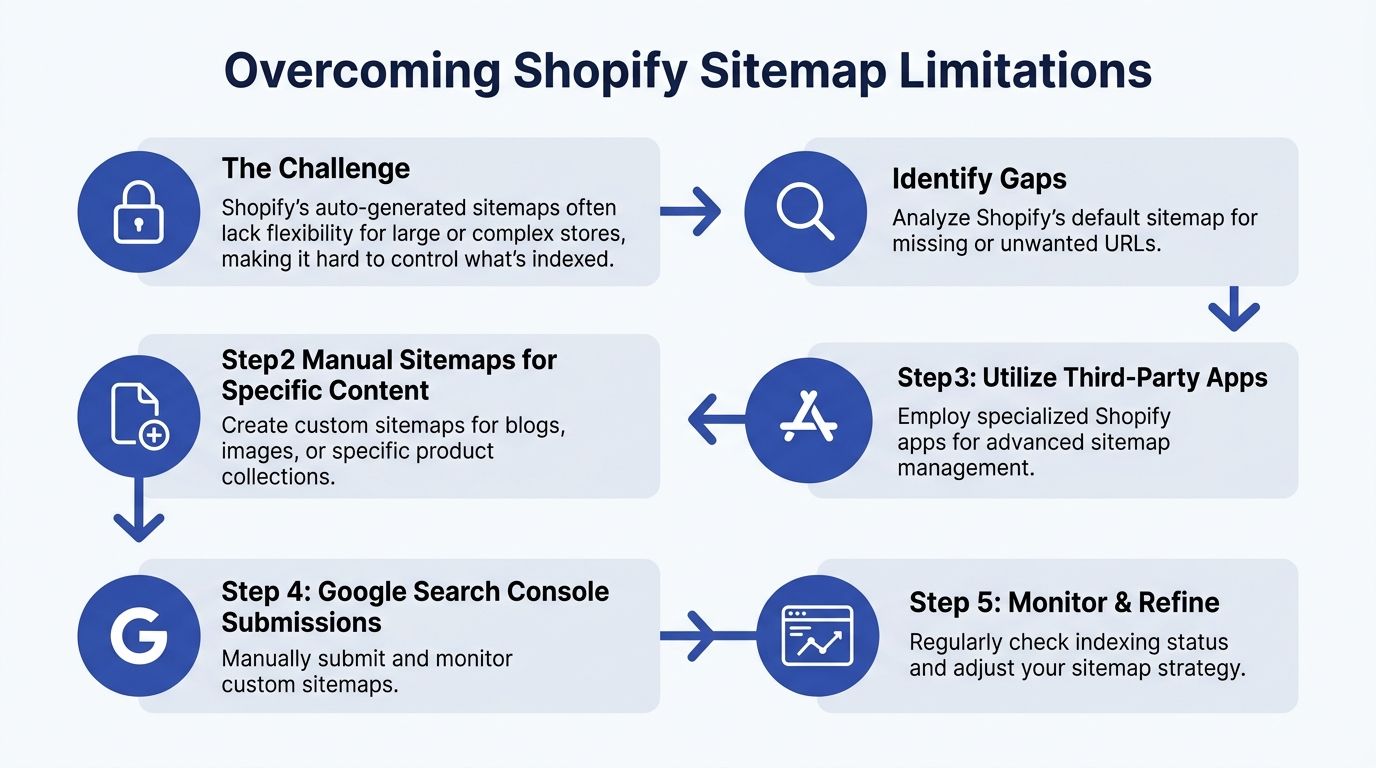
Shopify's native sitemap works for simple catalogues. It does not give enough control for stores with layered collection logic, multiple markets, aggressive app usage, or frequent catalogue changes.
Standard sitemap advice misses that problem. It focuses on valid XML, file size limits, and submission. On Shopify, the harder question is whether the sitemap reflects the URLs you want crawled and indexed after merchandising, template, and publishing logic start changing every week.
I see the same failure pattern on larger stores. The platform outputs URLs based on system state. SEO needs URLs based on business intent.
Those are not the same thing.
A product can exist in Shopify and still be the wrong URL to push into discovery. A collection can be technically live but commercially useless in search. A market-specific page can be indexable in theory and still stay buried because the sitemap never surfaces it cleanly.
The decision framework that works
The right setup depends on how much your store changes and how tightly search visibility is tied to merchandising operations.
- Use Shopify's default sitemap if the catalogue is stable, canonical rules are simple, and the store does not rely on custom landing pages, market-specific content, or unusual product states.
- Add supplemental sitemap generation if SEO landing pages, blogs, images, or international content matter, but the core product and collection logic can still stay on Shopify's native output.
- Build custom sitemap logic if ERP syncs, webhook-based publishing, variant handling, regional indexing rules, or fast inventory turnover affect which URLs should appear in search.
For growing stores, the winning model is usually hybrid. Leave Shopify to handle the predictable URL sets. Then add custom logic for the pages Shopify does not prioritize well enough.
That is often the difference between a sitemap that exists and a sitemap that protects revenue.
Migration and variant audits are required
Shopify 2.0 migrations, theme rebuilds, and app replacements create the highest sitemap risk. Internal links change. Collection templates change. Legacy URLs stay live longer than expected. New URLs go indexable before they are fully connected. That is how orphaned pages appear even though nothing looks obviously broken in the frontend.
A useful audit checks four things:
- Variant discoverability against canonical and noindex rules
- Collection coverage after navigation, filter, and template changes
- Legacy versus new URL inclusion during migration and recrawl periods
- Sitemap lag when pages are published before they appear in XML output
Generic app advice often proves inadequate. Some stores only need tighter configuration. Others need middleware, scheduled reconciliation jobs, or webhook-driven sitemap updates tied to publication status, market rules, and canonical logic.
For teams building a larger organic growth system, our ecommerce SEO best practices for Shopify stores covers how sitemap decisions connect to site architecture, collection strategy, and crawl efficiency. If you want a second perspective focused on growth and store scale, this guide to scaling Shopify SEO is a useful companion read.
The stores that win here do not treat the sitemap as a background file. They treat it as production SEO infrastructure.
Your Sitemap as a Strategic SEO Asset
The strongest sitemap strategy is disciplined, not flashy.
A lot of sitemap advice stays stuck at technical compliance. Valid XML. Correct tags. Submitted in Search Console. Those basics matter, but they don't solve the bigger problem. Search engines need a clean, current, intentional view of the pages you intend to be discovered and indexed.
That's why the best XML sitemap best practices come down to three habits.
Accuracy beats volume
A good sitemap is selective. It contains canonical, indexable, commercially relevant URLs, and it leaves out technical clutter. That single discipline improves crawl focus, makes reporting cleaner, and reduces self-inflicted confusion.
Freshness must be earned
If lastmod is false, the signal is noise. If automation lags behind catalogue changes, the sitemap becomes stale. The fix isn't more frequent regeneration. The fix is tying updates to meaningful content changes and publication state.
Monitoring turns the sitemap into a feedback loop
Once you stop treating the sitemap as a static file, it becomes useful beyond discovery. It helps diagnose indexation gaps, catch migration mistakes, validate canonical logic, and spot rollout problems after releases.
Here's the broader point. Your sitemap is one of the few places where you can communicate site intent to search engines in a structured way. That makes it operational SEO infrastructure, especially on ecommerce stores where URLs change constantly and platform defaults don't always reflect business priorities.
For teams treating technical SEO seriously, sitemap management should sit alongside internal linking, canonical control, rendering checks, and crawl diagnostics. If you're building that wider system, this ecommerce SEO best practices guide is a useful next read.
Get the sitemap right, and search engines spend more time on the pages that matter. Get it wrong, and even strong content can stay buried.
If your Shopify store has indexing gaps, migration issues, or a sitemap that no longer reflects how the catalogue works, Grumspot can help audit the setup, fix the technical bottlenecks, and build a sitemap strategy that supports real ecommerce growth.
Let's build something together
If you like what you saw, let's jump on a quick call and discuss your project

Related posts
Check out some similar posts.
- seo and subdomains
Learn how SEO and subdomains interact, from indexing and authority to internationalisation. A practi...
Read more
- technical seo audit
What Is Technical SEO Audit. Learn what a technical SEO audit is, its core components, and how it dr...
Read more
- help center shopify
Learn how to build a help center Shopify merchants trust. Covers native pages vs apps, article struc...
Read more
- shopify seo
Choosing the right SEO app for Shopify means weighing features against speed, scripts, and plan limi...
Read more