Shopify SEO Audit Example: Complete Guide 2026
- seo audit example
- ecommerce seo
- shopify seo
- technical audit
- seo report
Launched
June, 2026

You're probably here because the store looks healthy on the surface, but the numbers don't feel right. Products are live, ads may be running, some organic traffic is coming in, and yet growth has flattened. Or worse, your best collection pages aren't getting seen often enough, and product pages that should convert well are buried, slow, or duplicated.
That's where a proper Shopify SEO audit earns its keep. Not as a giant spreadsheet nobody implements, but as a commercial diagnosis. A good audit shows which issues are blocking traffic, which pages are wasting intent, and which fixes are most likely to improve revenue.
For Shopify stores, that matters even more because many SEO problems aren't obvious in the admin. Collection filters create duplicate URLs. Apps inject scripts that slow key templates. Variant handling, canonicals, stock status, and internal links all affect whether high-intent pages rank and convert. A useful SEO audit example isn't just a list of errors. It ties each finding to business impact and gives you a realistic order of attack.
Why Your Shopify Store Needs an SEO Audit
Most store owners don't need more SEO theory. They need to know why traffic stalls when the catalogue keeps growing, or why product launches don't translate into sustained organic sales.
A Shopify SEO audit answers that by replacing guesswork with evidence. It checks whether search engines can crawl the right pages, whether the right URLs are indexed, and whether shoppers land on pages that match what they were searching for. If any of those break, rankings suffer first and conversions follow.
In the UK, that's especially important because Google dominates search. StatCounter's UK data shows Google holding roughly 90%+ of the market across recent 2025 to 2026 measurements, which is why audit priorities usually focus on Google-first essentials like crawlability, indexation, and mobile usability, as outlined in this SEO audit report template. When one platform controls discovery at that level, small technical faults can suppress most of your organic opportunity.
What an audit actually does for a Shopify store
A strong audit helps you answer practical questions such as:
- Why are collection pages underperforming when the products are relevant and priced competitively?
- Why are product pages indexed inconsistently even though they're linked in navigation?
- Why is mobile traffic weak at conversion stage even when impressions look healthy?
- Why did traffic plateau after adding apps or filters that seemed harmless at the time?
Those aren't abstract SEO issues. They affect product visibility, paid efficiency, and revenue per landing session.
Practical rule: If a page can't be crawled properly, can't be indexed cleanly, or loads poorly on mobile, it won't matter how good the product is.
Audit before platform blame
Sometimes merchants assume the platform is the problem when the actual issue is execution. Shopify can rank very well, but it has known patterns that need managing. If you're still deciding on platform fit, it's worth reviewing how different systems handle catalogues, customisation, and growth paths before making bigger structural changes. This comparison of compare B2B e-commerce platforms is useful if platform limitations are part of the discussion.
An audit also stops teams from fixing the wrong things first. Rewriting homepage copy won't help much if Google is crawling duplicate filtered URLs and skipping your core collection pages. Chasing backlinks won't help much if product templates fail on mobile.
That's why the audit comes first. It shows what's broken, what's merely untidy, and what has a direct line to revenue.
The Five Pillars of an Ecommerce SEO Audit
Think of an ecommerce audit like a car inspection. If the engine misfires, repainting the doors won't help. If the tyres are bald, a better stereo won't make it safe. Shopify SEO works the same way. You need to separate structural issues from page-level issues and from commercial content gaps.
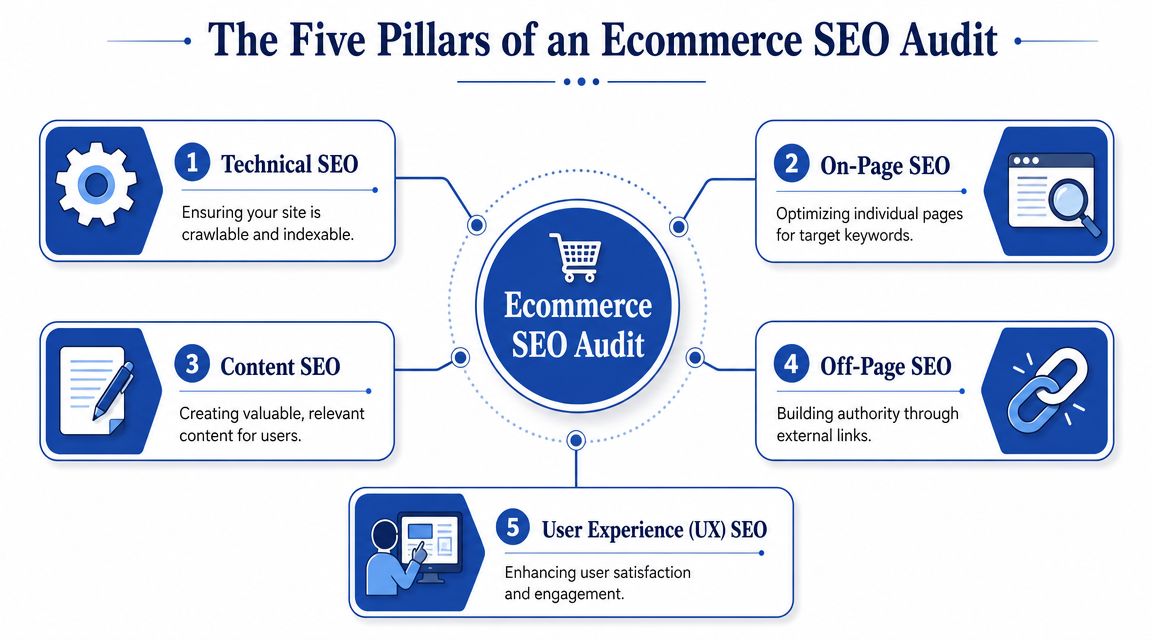
Technical SEO
This is the engine, brakes, and wiring. If search engines can't access key pages, or if the store generates duplicates and crawl waste, everything else weakens.
For Shopify, this usually means checking canonicals, robots handling, sitemap quality, pagination, duplicate collection paths, parameter URLs, and script-heavy templates. If the store uses a content delivery network, that also affects how quickly assets are served and how stable templates feel on mobile.
On-page SEO
This is your dashboard, mirrors, and controls. The vehicle may run, but if the signals are unclear, you create friction.
On-page auditing covers title tags, headings, internal anchor text, image alt text, product copy, collection intros, and schema alignment. For ecommerce, the core question is simple. Does each important page clearly signal what it should rank for and what the user should do next?
Content SEO
This is what's in the boot. If it's empty, the trip has limited value.
A Shopify store often has decent product pages but weak category context and almost no supporting content. Content auditing identifies thin collection pages, missing buying guides, underdeveloped FAQs, and blog posts that attract the wrong intent. Good content doesn't just pull visitors in. It helps collections rank, improves trust, and supports higher-value purchases.
Off-page SEO
This is your reputation on the road. A solid car still benefits when others recommend it.
Off-page review looks at backlinks, brand mentions, and where authority is coming from. For most Shopify stores, this isn't the first fix, but it becomes important once technical and page-level issues are under control. External authority helps competitive commercial pages break through.
User experience and conversion signals
This is the actual driving experience. If the car jerks, stalls, or feels unsafe, people stop using it.
UX in an SEO audit means mobile usability, page speed, layout stability, navigation clarity, filtering logic, and template consistency. SEO traffic only matters if users can browse, trust, and buy. That's why an ecommerce audit can't stop at rankings.
| Pillar | What you inspect | Business outcome |
|---|---|---|
| Technical | Crawlability, indexation, duplication, speed | Better visibility for key pages |
| On-page | Titles, headings, copy, schema, links | Stronger relevance and click quality |
| Content | Collection depth, guides, FAQs, blog topics | More discoverable entry points |
| Off-page | Backlinks, mentions, authority gaps | Greater ability to compete |
| UX | Mobile usability, navigation, template friction | Better conversion from organic visits |
If one pillar is weak, the others carry less weight. That's why a real SEO audit example for Shopify needs to cover all five, but not treat them as equally urgent.
Your Complete Shopify SEO Audit Checklist
This is the part most store owners need. Not a generic audit checklist copied from a SaaS blog, but a Shopify-specific review you can act on.
If you're documenting findings formally, keep each issue tied to a page type, the likely cause, and the commercial effect. If you want a broader walkthrough of process and tooling, this guide on how to conduct an SEO audit is a useful companion.
Crawlability and indexation
Start by crawling the full site, then compare what the crawl finds against what Google is indexing. For Shopify, this step matters because collection filters, tag URLs, search pages, and app-generated URLs can bloat the crawl.
A technical SEO audit for a Shopify site should test crawlability and indexation by crawling the full site and using Search Console. This helps identify pages blocked by robots.txt, duplicate parameter URLs, and thin-content pages. These issues are common with faceted navigation and can waste crawl budget, harming the site's ability to rank for commercial queries without proper canonical tags and sitemap hygiene, as noted in this Shopify-focused audit workflow.
Check for:
- Important pages blocked accidentally such as high-value collections or seasonal landing pages
- Duplicate filtered URLs generated by collection tags, sorting, or faceted navigation
- Thin pages in the index including low-value search results or near-empty filtered collections
- Sitemap noise where non-indexable or duplicate URLs appear in XML sitemaps
Shopify canonicals and URL handling
Shopify creates predictable URL structures, but stores still get into trouble when themes, apps, or customisations interfere.
Review:
- Product canonical tags to confirm variants don't compete unnecessarily
- Collection-product URL paths to make sure linked product versions resolve consistently
- Pagination and filtered paths so Google sees a clean primary version of each commercial page
- Out-of-stock products to confirm they don't become soft 404-style dead ends without context or alternatives
If a collection can be accessed through multiple crawlable paths and none is clearly consolidated, Google has to guess which version matters. That guess is often expensive.
Site speed and template performance
Shopify stores often slow down over time, not because Shopify is slow in itself, but because the store accumulates apps, scripts, sliders, popups, review widgets, and tracking layers.
Audit these areas:
- Product templates for app-injected JavaScript, review widgets, and gallery weight
- Collection templates for filter logic, image loading, and excessive script execution
- Homepage hero sections for oversized media and layout shifts
- Third-party apps that load globally even when only needed on a few templates
A theme can look clean in the customiser and still perform badly in real use. Measure the page types that matter commercially, not just the homepage.
On-page SEO for products and collections
Collection pages usually drive category intent. Product pages usually capture more specific commercial intent. Audit them differently.
For collections, review:
- Title tags and H1s that match the collection's actual search intent
- Intro copy that adds useful context without burying products
- Internal links to related collections, guides, and top-selling products
- Faceted experiences that help users without creating crawl chaos
For product pages, review:
- Product titles for clarity and search relevance
- Descriptions that go beyond manufacturer copy
- Image alt text where images communicate material, colour, fit, or product use
- Schema presence and accuracy for product detail, availability, and review visibility
Internal linking and architecture
Many Shopify stores rely too heavily on top navigation and not enough on contextual linking. That leaves profitable pages under-supported.
Audit internal links between:
- Collections to products with sensible merchandising logic
- Products to related collections so users and crawlers can move up a category layer
- Blog guides to collections where informational content should support buying journeys
- Seasonal pages to evergreen pages so temporary campaigns don't become isolated assets
A useful rule is that money pages shouldn't depend only on menu links. They need contextual links from relevant content and nearby commercial pages.
Content quality and intent gaps
Many stores underinvest. They upload products, write minimal collection text, and wonder why visibility tops out.
Review content for:
- Thin collection pages with little unique value
- Cannibalisation where blog posts and collections target the same intent poorly
- Missing support content such as sizing, care, material, comparison, or gifting guides
- Weak FAQ coverage on pages where buyers have obvious objections
Not every collection needs a long essay. But high-value categories usually need more than a heading and a product grid.
An SEO Audit Example with Annotated Findings
A useful SEO audit example should feel like a real store review, not a checklist with no stakes. So let's use a fictional Shopify brand, RetroVibe Apparel, which sells vintage-inspired streetwear in the UK. The store has strong products, good photography, and a decent returning customer base, but organic growth has stalled.
The audit doesn't start with every issue. It starts with the issues that block the largest commercial upside.
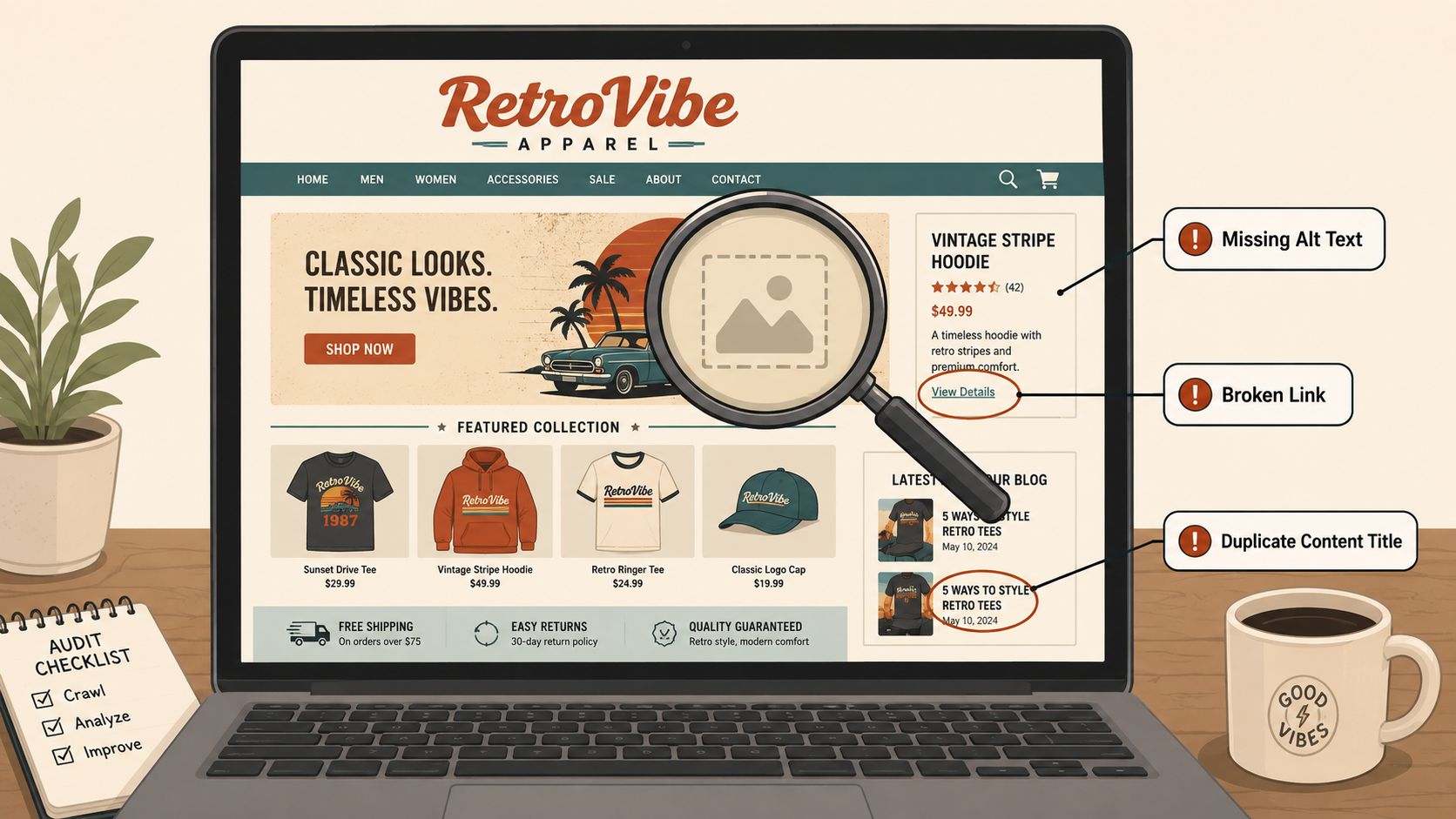
Finding one high LCP on product templates
The issue
RetroVibe's product pages feel slow on mobile. The hero gallery loads late, review widgets shift the layout, and app scripts delay interaction.
The evidence
For performance-focused SEO audits, Core Web Vitals should be treated as hard thresholds. Largest Contentful Paint should be 2.5 seconds or better, First Input Delay 100 milliseconds or faster, and Cumulative Layout Shift 0.1 or less, according to this technical SEO site audit checklist. Product templates on this fictional store fail that standard, especially on mobile.
The impact
This is not just a speed issue. It affects mobile search visibility and buyer confidence. On a product page, every delay before the main image, title, and add-to-cart area stabilises increases the chance that a user exits before comparing variants or reading key product details.
What caused it
The likely causes are familiar on Shopify: heavy app scripts, oversized imagery, delayed rendering of critical content, and too many third-party elements loading before the main product content.
Recommended fix
Profile the worst templates in Lighthouse and PageSpeed Insights. Remove or defer non-essential app code, compress and properly serve above-the-fold imagery, and stabilise the layout before secondary elements load.
Audit note: Fix the template, not just one URL. If the problem lives in the product template, every high-intent landing page inherits it.
Finding two duplicate collection URLs from filters and tags
The issue
RetroVibe has indexable filtered collection URLs generated by tag combinations and sort states. Several are near-duplicates of the main collection pages.
The evidence
The crawl shows multiple paths for the same product groups, all with very similar content and weak distinguishing value. Search Console also shows mixed indexing patterns between primary collection pages and parameter-like variants.
The impact
This splits ranking signals, wastes crawl attention, and increases the chance that Google indexes weaker versions of commercially important category pages. It also muddies reporting because impressions and clicks spread across versions of the same intent.
What caused it
A faceted navigation setup that helps users browse, but wasn't controlled well enough for search. Canonical signals and sitemap inclusion weren't tightened around the indexable core.
Recommended fix
Keep the browsing functionality for users, but consolidate search-facing signals. Canonicalise duplicates to the primary collection URLs, remove non-indexable variants from XML sitemaps, and review internal links so the store consistently points crawlers to the right version.
Finding three weak product schema coverage
The issue
A set of high-margin product pages has inconsistent structured data. Some pages expose useful product details clearly, others are incomplete or rely on app output that doesn't align well with visible content.
The evidence
Manual checks show uneven schema implementation across product templates. Rich result eligibility is therefore less reliable than it should be. This often happens after theme edits, app changes, or partial schema installs.
The impact
Search engines have less structured clarity about what each product is, whether it is available, and how it should be understood as a commercial entity. That can reduce the consistency of enhanced search presentation and make product pages less competitive.
Recommended fix
Audit schema at the template level and validate representative product URLs. If you need a walkthrough for implementation logic on Shopify, this guide to Shopify structured data setup covers the practical side.
A short walkthrough helps when you're checking pages manually before writing the final report.
Finding four blog and collection cannibalisation
The issue
RetroVibe has a buying guide article targeting a topic that overlaps too closely with a commercial collection page. Both pages compete for similar intent, but neither owns it clearly.
The evidence
The blog article ranks intermittently for commercial terms, while the collection page underperforms for the same theme. Internal linking doesn't make the hierarchy clear, and the copy overlap is high.
The impact
The store weakens its own commercial page. Users may land on an informational page when they're ready to browse products, or land on a collection page with too little context when they still need guidance.
Recommended fix
Differentiate intent. Let the guide educate and compare. Let the collection page sell. Tighten internal links so the guide funnels users into the category, and remove any overlap that makes the pages compete directly.
That's what a real Shopify SEO audit should surface. Clear issues, observable evidence, and fixes tied to traffic quality, conversion path, and revenue potential.
Prioritising Fixes with an Impact and Effort Matrix
Most audits fail at this stage. The findings are fine, but the action plan is weak. A merchant gets a long list, a developer gets overwhelmed, and nothing meaningful ships for weeks.
The way around that is an Impact and Effort matrix. Not because it looks tidy in a deck, but because it forces decisions. Some fixes move rankings and revenue quickly. Others matter, but should wait until the foundation is stable.
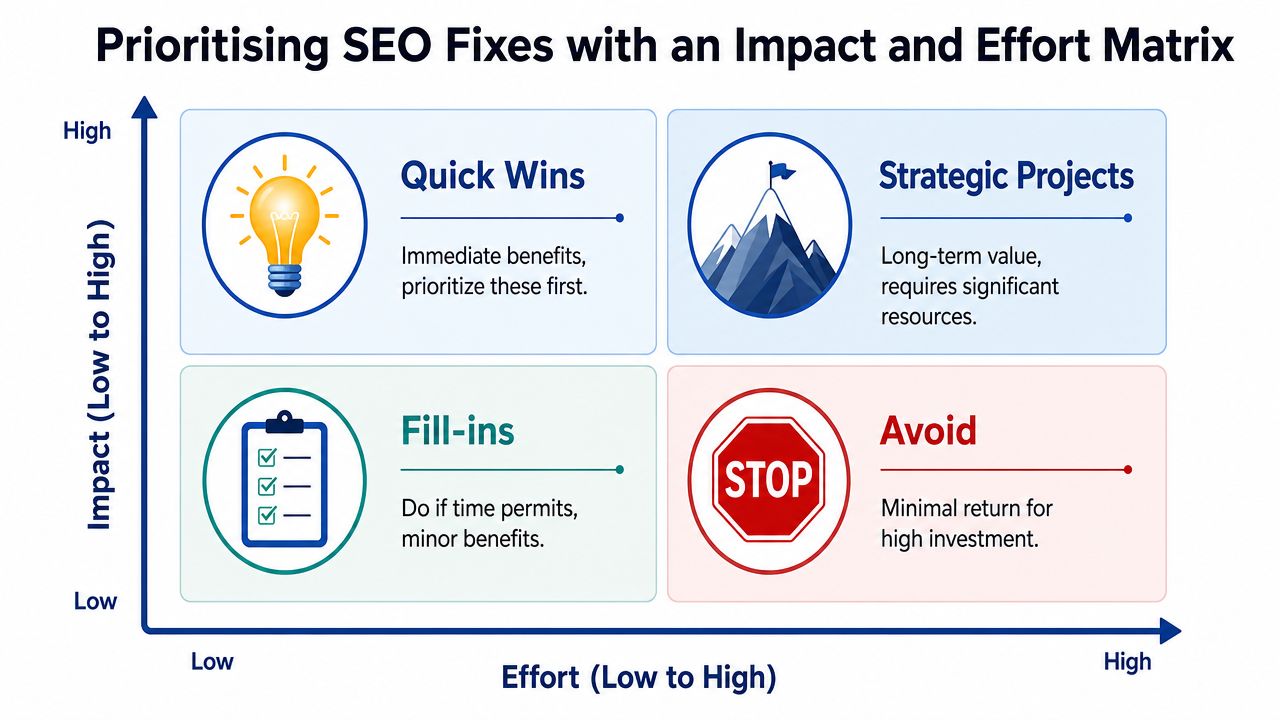
A useful way to frame it is this:
| Quadrant | What belongs here | How to treat it |
|---|---|---|
| Quick Wins | High impact, low effort | Do these first |
| Strategic Projects | High impact, high effort | Scope and phase them |
| Fill-ins | Low impact, low effort | Batch them |
| Avoid | Low impact, high effort | Defer unless required |
Quick Wins
For RetroVibe Apparel, quick wins would include:
- Fixing title and heading mismatches on key collection pages
- Cleaning up internal links that point to the wrong collection variants
- Removing low-value URLs from sitemaps
- Correcting schema inconsistencies where the template fix is straightforward
These aren't glamorous, but they tighten relevance fast. That matters because ranking position has a steep effect on click opportunity. In audit guidance grounded in page experience and prioritisation, the #1 organic desktop result can capture about 34% CTR while page-two visibility can fall to around 0.78%, which is why technical fixes that improve rankings deserve priority, as explained in this SEO audit example resource.
Strategic Projects
Here, teams often get the biggest upside, but only if they commit properly.
For our fictional store, major projects would include:
- Rebuilding slow product templates to improve Core Web Vitals
- Refactoring faceted navigation controls to reduce duplicate crawl paths
- Reworking collection page content design so copy supports ranking without harming merchandising
- Consolidating overlapping content across guides and commercial pages
These tasks usually require design, development, and SEO working together. They can't be squeezed in between app installs and campaign launches.
The worst prioritisation mistake is treating all findings as equal. They aren't. One template-level issue can outweigh twenty minor metadata clean-ups.
Fill-ins
These are useful, but not urgent:
- Alt text improvements on lower-priority images
- Meta description rewrites on pages with little visibility
- Minor blog formatting improvements
- Low-traffic FAQ enhancements
Do them when the team has spare capacity or bundle them into a content sprint.
Avoid or defer
This bucket matters more than people think. Some tasks are technically valid but commercially weak.
Examples:
- Rewriting low-value archive pages no customer lands on
- Expanding content on marginal collections with weak demand or little stock depth
- Chasing edge-case template issues that don't affect major landing pages
A real agency presentation should leave some tasks intentionally unscheduled. That's discipline, not neglect.
How I'd rank the RetroVibe findings
- Duplicate collection URL control. High impact, moderate effort. It affects crawl efficiency, index clarity, and category rankings.
- Product template performance fixes. High impact, high effort. Harder to implement, but the upside touches every commercial landing page.
- Schema consistency on product pages. Medium to high impact, lower effort if done at template level.
- Cannibalisation between guide and collection content. Medium impact, moderate effort. Important once technical issues stop dragging the site down.
That's how an audit becomes a roadmap instead of a backlog.
Your Downloadable SEO Audit Report Template
Most store owners don't struggle because they can't spot a few SEO issues. They struggle because the findings end up scattered across notes, exports, screenshots, and Slack messages. That makes implementation messy, and messy work rarely gets finished.
A proper report template fixes that. It gives every issue a place, a priority, an owner, and a commercial rationale.
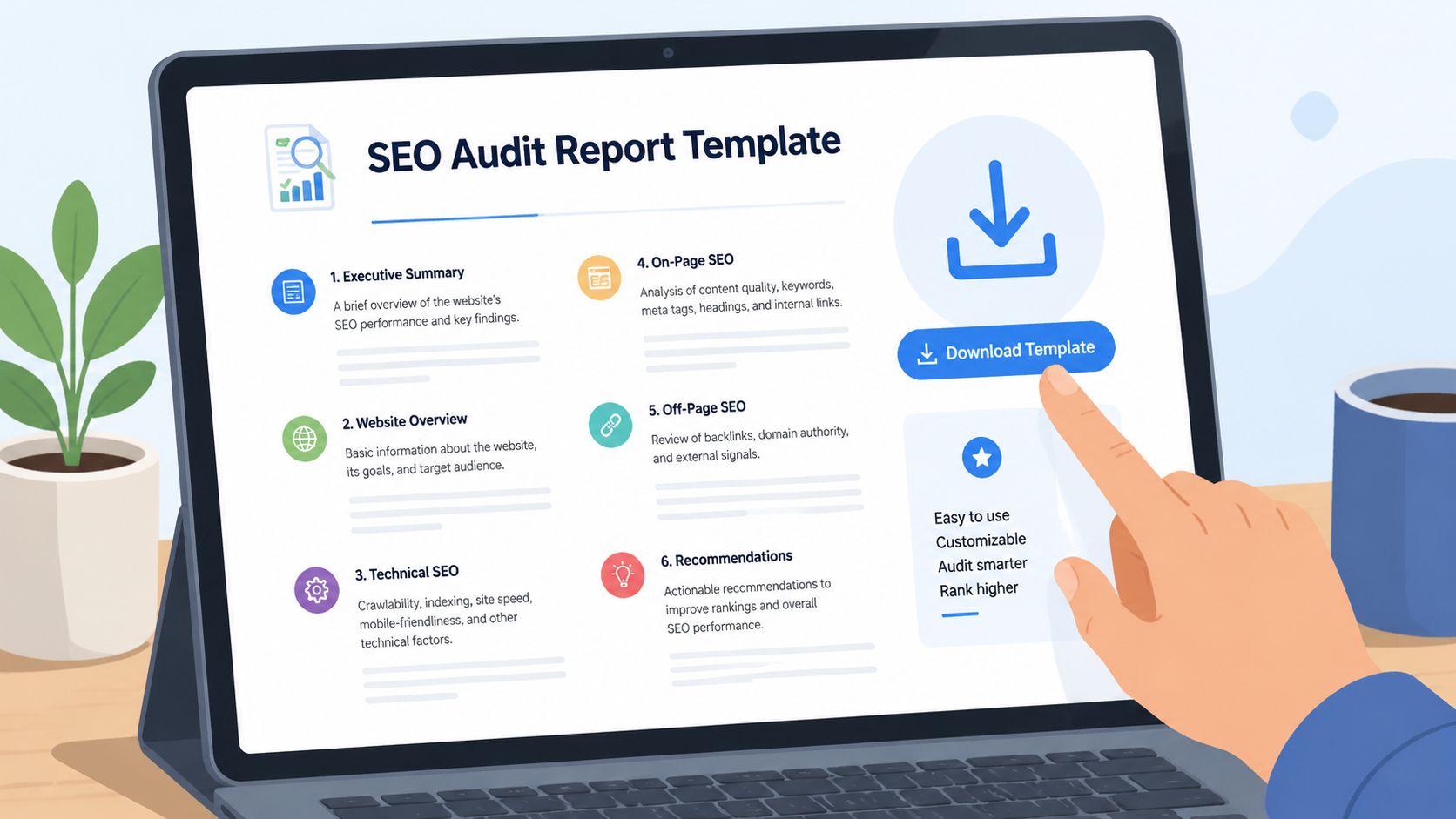
What the template should include
A useful Shopify audit report isn't just a document with headings. It should include:
- An executive summary that explains what is affecting growth most
- A five-pillar structure so findings are grouped logically
- A page-type view that separates homepage, collection, product, blog, and support templates
- An impact and effort matrix to force prioritisation
- A recommendation field that states the fix in plain English
- A business outcome field linking each issue to traffic quality, conversion, or revenue potential
That structure saves time because you aren't rewriting the same explanation every time a duplicate URL issue appears on another collection.
Why templates matter in real audit work
They also make stakeholder conversations easier. A founder wants to know what affects revenue. A developer wants to know what needs changing. A content lead wants to know which pages require rewrites. One report format should support all three.
For teams that want external support rather than building the framework from scratch, Grumspot offers Shopify store audit services centred on technical review, content evaluation, and an actionable roadmap. That's one option if your bottleneck isn't diagnosis, but implementation capacity.
Useful filter: If a report can't help a developer build the fix and can't help a decision-maker approve the work, it isn't finished yet.
What not to put in the template
Avoid three common mistakes:
- Huge issue lists with no ranking of importance
- Tool exports pasted in without interpretation
- Recommendations that describe symptoms instead of actions
“Collection pages have duplicate signals” is not enough. “Canonicalise filtered collection variants to the primary collection URL and remove non-indexable variants from the XML sitemap” is actionable.
That's the difference between a report that gets filed away and one that drives change.
From Audit to Action Continuous SEO Growth
A Shopify SEO audit is a starting point, not a victory lap. Stores don't grow because someone identified duplicate URLs once. They grow because the team fixes the right issues, measures the result, and keeps improving the parts of the store that drive revenue.
That matters because ecommerce SEO is never static. Products change. Collections expand. apps get installed. themes are edited. Seasonal pages come and go. Every one of those decisions can help or hurt visibility. Without a repeatable audit process, small problems build up unnoticed until growth slows and nobody can see why.
The operating rhythm that works
The stores that handle SEO well usually follow a simple cycle:
- Audit the site to find structural, content, and UX issues
- Prioritise the fixes based on impact and effort
- Implement changes on the highest-value templates and pages first
- Measure performance in Search Console, analytics, and page-level testing tools
- Repeat regularly so new issues don't sit for months
That rhythm keeps SEO tied to commercial outcomes instead of vanity tasks.
What actually moves the needle
In practice, the biggest gains usually come from a short list of improvements:
- Cleaning up indexation so Google focuses on the right URLs
- Improving collection and product templates so key pages load and convert better
- Strengthening commercial page relevance through better on-page signals and internal links
- Building support content that feeds qualified traffic into category and product journeys
Everything else sits behind those priorities.
If you take one thing from this SEO audit example, make it this. Don't aim for a perfect audit. Aim for a useful one. The best audit is the one your team can turn into shipped work.
If your Shopify store needs a clearer roadmap, Grumspot can help with audits, technical fixes, and conversion-focused implementation across theme, UX, and SEO work.
Let's build something together
If you like what you saw, let's jump on a quick call and discuss your project

Related posts
Check out some similar posts.
- seo and subdomains
Learn how SEO and subdomains interact, from indexing and authority to internationalisation. A practi...
Read more
- technical seo audit
What Is Technical SEO Audit. Learn what a technical SEO audit is, its core components, and how it dr...
Read more
- help center shopify
Learn how to build a help center Shopify merchants trust. Covers native pages vs apps, article struc...
Read more
- shopify seo
Choosing the right SEO app for Shopify means weighing features against speed, scripts, and plan limi...
Read more