Knowledge Transfer Process: A Practical Guide for Teams
- knowledge transfer process
- knowledge management
- team onboarding
- succession planning
- ecommerce operations
Launched
August, 2026
You already know the feeling. A critical person is leaving, a migration is mid-flight, and the only place the process lives is in one Slack thread, one senior developer's head, and a folder nobody's opened in months. The team says the handover is “mostly done”, then the first production issue lands and everyone realises the transfer covered documents, not judgement.
A good knowledge transfer process is how you stop that pattern repeating. It moves know-how, context, decision logic, and operational cues from one person or team to another so work can keep moving without betting everything on memory. For ecommerce and agency teams, that usually means the difference between a clean cutover and a week of avoidable fire-fighting.
What the Knowledge Transfer Process Actually Is
A handover can look complete on paper and still fail in practice. I've seen teams send over a tidy folder of notes, then discover the new owner can't answer the first five real-world questions, because the notes never explained why the old team made specific choices. That gap is exactly where the knowledge transfer process earns its keep.
More than passing over files
At its simplest, the process is a structured way to move know-how, context, and decision logic from one person or team to another. It covers the explicit material, like runbooks, architecture notes, and migration checklists, but it also captures the tacit part, the judgement calls, workarounds, and warning signs that only surface under pressure. That's why ad-hoc handovers often fall apart, while repeatable transfer keeps working across people, projects, and deadlines.
A practical transfer process doesn't end when someone sends a document or runs through a slide deck. It ends when the receiver can perform the work with confidence, ask better questions, and spot the situations where the old approach no longer fits.
Practical rule: if the new owner still needs the previous person on standby for routine decisions, the transfer isn't finished.
Why operations teams care
For dev, ops, and ecommerce teams, this is not a paperwork exercise. It's the control that keeps platform changes, store launches, and supplier integrations from depending on one specialist who might be on leave, in another timezone, or already gone.
The process also gives leaders a cleaner way to separate “knowledge that must move now” from “knowledge that can wait”. That distinction matters during migrations, incident recovery, and agency offboarding, because trying to transfer everything at once just creates noise. A good transfer process is selective, structured, and repeatable, not enthusiastic and vague.
Why the Knowledge Transfer Process Matters for Modern Teams
Knowledge loss rarely announces itself with a dramatic failure. It shows up as a delayed launch, a brittle handover, or a support queue that suddenly becomes someone else's problem because the one person who understood the integration has left the business. In ecommerce, that kind of fragility can hit product launches, fulfilment flows, and platform changes all at once.
Treat it as continuity control, not admin
The UK National Audit Office reported around £2 billion in estimated knowledge-related risks in central government departments in 2018 to 19, tied to weak capability, succession gaps, and the loss of specialist staff, which is a useful reminder that this is a continuity issue, not a filing issue. The lesson transfers directly into commercial teams, because the same failure pattern appears when a store relies on one developer, one operations lead, or one account manager who knows where every exception lives. The knowledge-transfer manager guidance makes the same point in practical terms, identify the highest-risk knowledge first, capture it in a structured format, then transfer and store it so replacement staff can operate without depending on informal memory.
That framing matters for stakeholders. A formal process reduces exposure in the places that hurt most, platform cutovers, client onboarding, ERP changes, and fast-moving support operations. It also makes the risk visible before it turns into downtime or missed revenue.
Why ecommerce and agency teams feel it fastest
Fast-moving teams tend to optimise for speed, then discover they've built too much dependence on a few experts. That's common in agencies where client knowledge sits with account leads, or in ecommerce teams where the person who built the Shopify customisation also owns the deployment rhythm, the rollback logic, and the weird edge cases.
If a handover can't survive a holiday, a resignation, or a timezone shift, it's not a process yet.
Stages and Roles in a Structured Knowledge Transfer Process
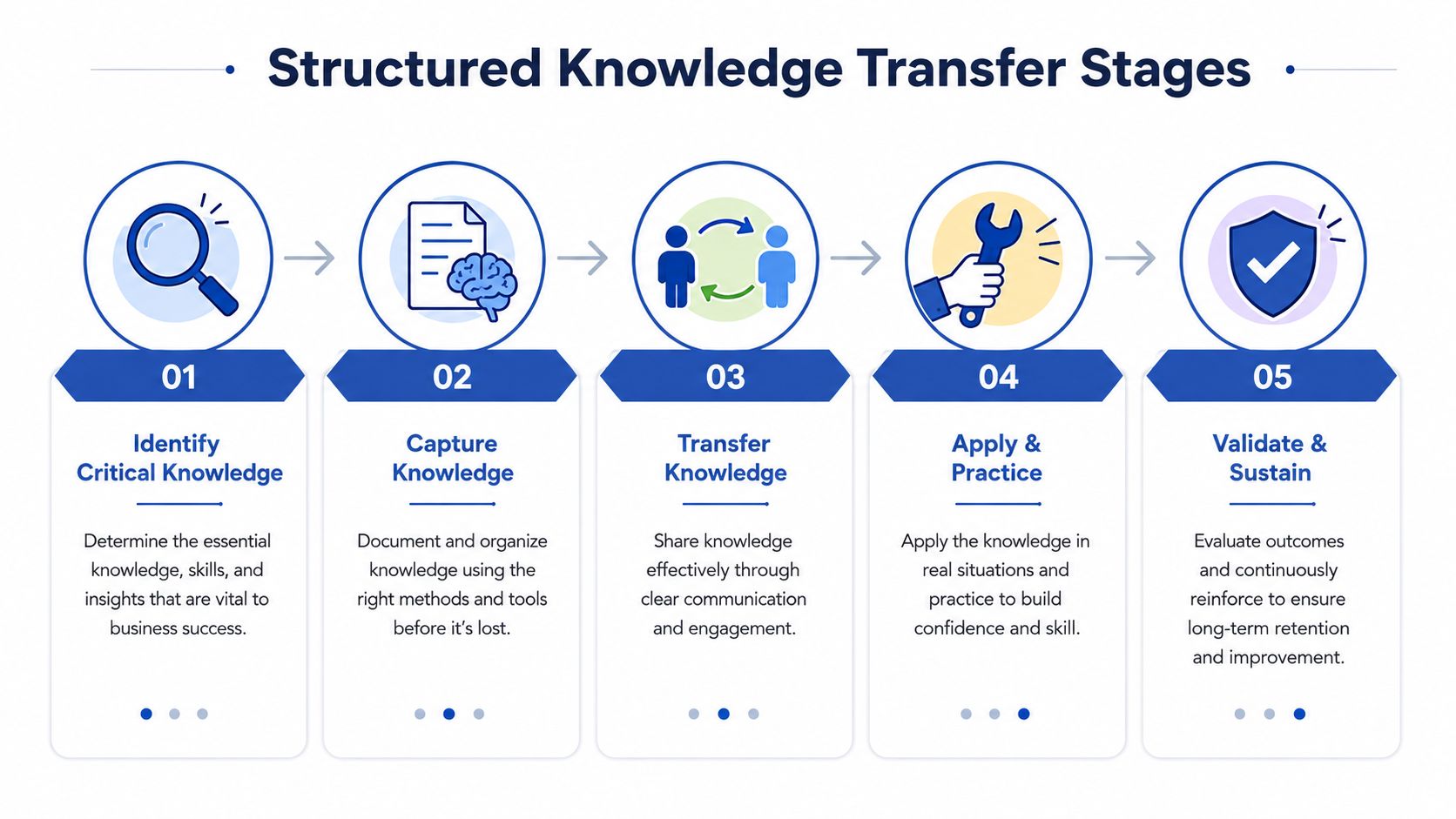
The cleanest model I've seen borrows from technology transfer thinking used in the UK IP world, where the journey moves from disclosure and IP assessment to de-risking, commercialisation strategy, deal negotiation, and post-deal monitoring as described by the World Intellectual Property Organization. That sequence maps well to operations because it forces you to ask not just, “Was information handed over?”, but “Can the recipient use it safely?”
The core stages
First, identify critical knowledge. Don't start with everything, start with what breaks the business if it disappears. In practice, that's the fragile integration, the client-specific workaround, the fulfilment exception, or the undocumented deployment step that only one person knows.
Next, capture it in forms people can use. That means mixing artefacts, not over-relying on one format. A runbook helps, but so does a decision log, an architecture note, a migration playbook, or a short screen recording that shows the sequence in action.
Then comes transfer and share. Here the old owner explains context, answers questions, and walks the recipient through the scenarios, not just the happy path. If you're running an incident-heavy environment, pair this with a structured incident response process like Grumspot's incident response planning guide, because handover quality and response quality usually fail in the same places.
The roles that matter
The owner decides what matters and signs off on completeness. The sender supplies the knowledge and demonstrates how it's used. The receiver absorbs it and starts applying it in live work. A validator checks whether the receiver can operate independently and whether the documentation matches reality.
Useful check: transfer is complete only when the receiver can explain the “why” behind the “what”.
The final stage is apply and sustain. That means the new owner uses the knowledge in production work, then the team updates the artefacts when reality changes. Once the process starts living inside daily work, it stops being a handover event and becomes an operating discipline.
How to Implement the Knowledge Transfer Process Step by Step
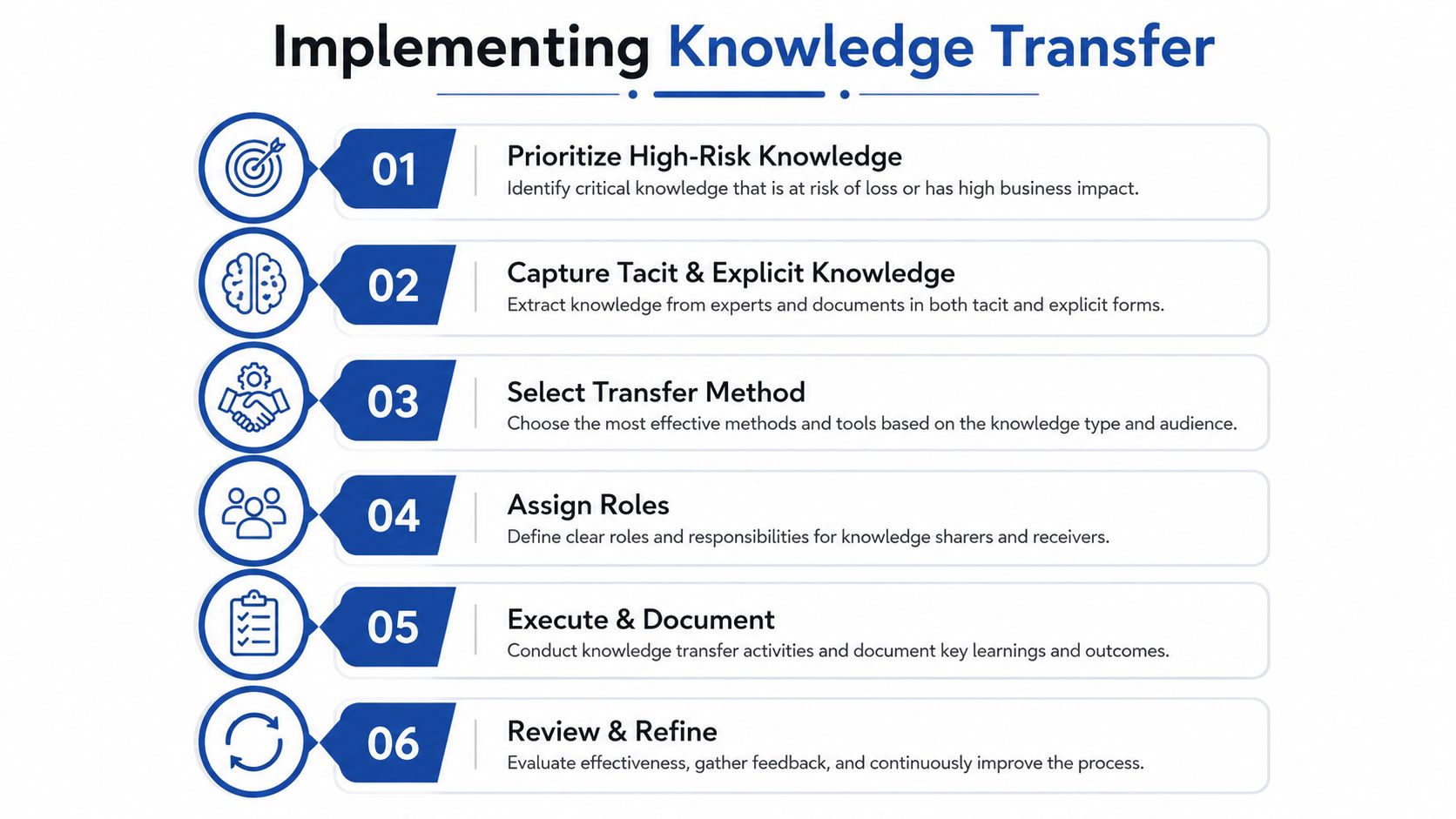
Start by deciding what's most likely to hurt you if it vanishes. That usually means looking at high-risk roles, business-critical workflows, and tasks that depend on tacit judgement rather than written procedure. The goal isn't to document the whole company, it's to protect continuity where the business is most exposed.
Build the transfer around the risk
A lightweight priority list works better than a grand knowledge inventory. I've found it useful to separate knowledge into three buckets, critical, important, and nice to have, then move only the first bucket into active transfer work. That prevents teams from wasting time documenting low-value material while the fragile parts of the operation stay untouched.
For capture, use artefacts that match the type of knowledge. Runbooks work for repeatable tasks, decision logs work for rationale, architecture notes work for system dependencies, and migration playbooks work for sequence and rollback. For a practical overview of structuring this kind of system, the knowledge management systems guide from MyCulture.ai is a useful reference point because it shows how tools, content, and access need to fit together.
Make sessions short, real, and scheduled
Avoid the all-day handover workshop. It feels thorough and produces fatigue, not retention. Short transfer sessions, tied to real tickets or real client issues, work better because the receiver sees the knowledge in context and can test it against active work.
The cadence should be predictable. I like a simple rhythm, one capture session, one working session, one validation checkpoint, then a review after the receiver has used the knowledge in live delivery. That review is where the hard truth surfaces: the documentation looked fine, but the process didn't survive first contact with the actual system.
Practical rule: if the receiver hasn't used the knowledge in a live task, the transfer is still theoretical.
Use roles and governance without making it heavy
Keep ownership obvious. One person owns the content, one owns the transfer session, and one confirms operational readiness. That's enough governance, especially when the work is moving quickly.
If the team is distributed, write down the timing, the expected output, and where the artefacts live. If the team is in-office, still write it down. Proximity makes communication easier, but it also makes bad habits harder to spot because everyone assumes someone else heard it. For implementation in a service-heavy setting, the Shopify developer on demand model is a good example of how flexible expertise still needs a formal transfer structure to avoid dependency on one person.
Validate, then refine
Validation should be practical. Ask the receiver to perform the task, explain the failure modes, and show where they'd look for the next answer. If they can do that without prompting, the transfer is working. If not, tighten the artefact, add a walkthrough, or split the task into smaller parts.
The YouTube resource embedded above is useful for teams that learn better from a mixed format of explanation and demonstration. The format matters less than the outcome, which is whether the next person can operate without hand-holding.
Real-World Examples Across Dev, Ops, and Ecommerce Teams
A custom Shopify app handover fails in a predictable way when the original developer only passes over code and ignores the reasons behind architecture choices. The new developer can read the repository, but doesn't know which third-party app is safe to replace, which webhook is brittle, or why a specific workaround exists in production. The handover works when the transfer includes the deployment path, the failure points, and the trade-offs that shaped the build.
Dev team handover of a custom app
In a dev team, the key artefacts are usually the repository notes, dependency map, webhook list, and release process. What often gets missed is the operational context, who gets alerted, which environment is the source of truth, and which parts of the code were added to support a temporary business rule that later became permanent.
The strongest handovers I've seen include a live walkthrough of a recent change, not a generic code tour. That's because real changes expose the hidden logic, especially when a feature touches checkout, fulfilment, or customer data.
Ops team transfer during an ERP cutover
For ops teams, the failure point is usually integration knowledge. An ERP cutover looks tidy in the project plan, but risk sits in the exceptions, such as supplier mappings, order routing rules, and the fallback path when an integration misses a field.
A structured transfer here focuses on the business rules as much as the systems. The receiving team needs to know what has to happen, what can wait, and what breaks the fulfilment chain if it's ignored. That knowledge usually lives in people's heads until the week before cutover, which is exactly when you don't want to discover it.
The best ops handovers I've run always included the awkward cases, not just the clean process flow.
Ecommerce migration where design, CRO, and SEO have to move together
A Shopify 2.0 migration is a good test because the knowledge isn't purely technical. Design systems, conversion decisions, structured content, redirects, and SEO assumptions all need to move together or the new store launches with hidden regressions. The team that only transfers the theme config usually finds out too late that the conversion logic and content rules never made it across.
That's where the process helps. Design needs to explain component intent, CRO needs to explain why a page exists in its current form, and SEO needs to explain how templates, metadata, and redirects were handled. The handover succeeds when the next team can make changes without breaking the logic underneath.
Knowledge Transfer in Hybrid and AI-Assisted Workplaces
A lot of advice still assumes people sit together, overhear everything, and pick up knowledge by osmosis. That's not how many teams work now. Hybrid working stays structurally important in the UK, and the ICO keeps stressing data minimisation and governance when internal information moves across digital tools, so the transfer process has to be designed for distributed, asynchronous work and tighter information controls.
What can be codified, and what should stay human
Routine procedures, decision trees, and reference material can be codified. Judgement under pressure, conflict resolution, and exception handling usually need live discussion, because those are the areas where context matters more than the written step list. If you try to force every bit of expertise into a document, you end up with a bloated knowledge base that nobody trusts.
AI can help with capture, summarisation, and retrieval, but it can also blur the boundary between useful recall and unsafe exposure. Before AI is used to recommend or extract internal know-how, teams need clear rules on confidentiality, access, retention, and what data should never enter a tool in the first place.
Build controls before you automate the handover
A practical approach is to decide which content is safe for AI assistance, which content stays in controlled human review, and which content should never leave the internal system. That's especially important for customer details, supplier terms, incident notes, and internal operational exceptions.
For teams thinking about automation in support or service workflows, the same logic applies to customer service automation, because the gains only hold if the underlying knowledge is curated and the escalation path is clear. AI doesn't replace the process, it exposes whether the process was disciplined enough to begin with.
Watch-out: if no one can explain where an AI-suggested answer came from, don't let it become the source of truth.
The shift is this: knowledge transfer now includes tool governance, not just human onboarding. Teams that ignore that change end up with more content, less certainty, and a bigger gap between what the system says and what the operation can support.
Best Practices, Metrics, and Common Pitfalls to Avoid
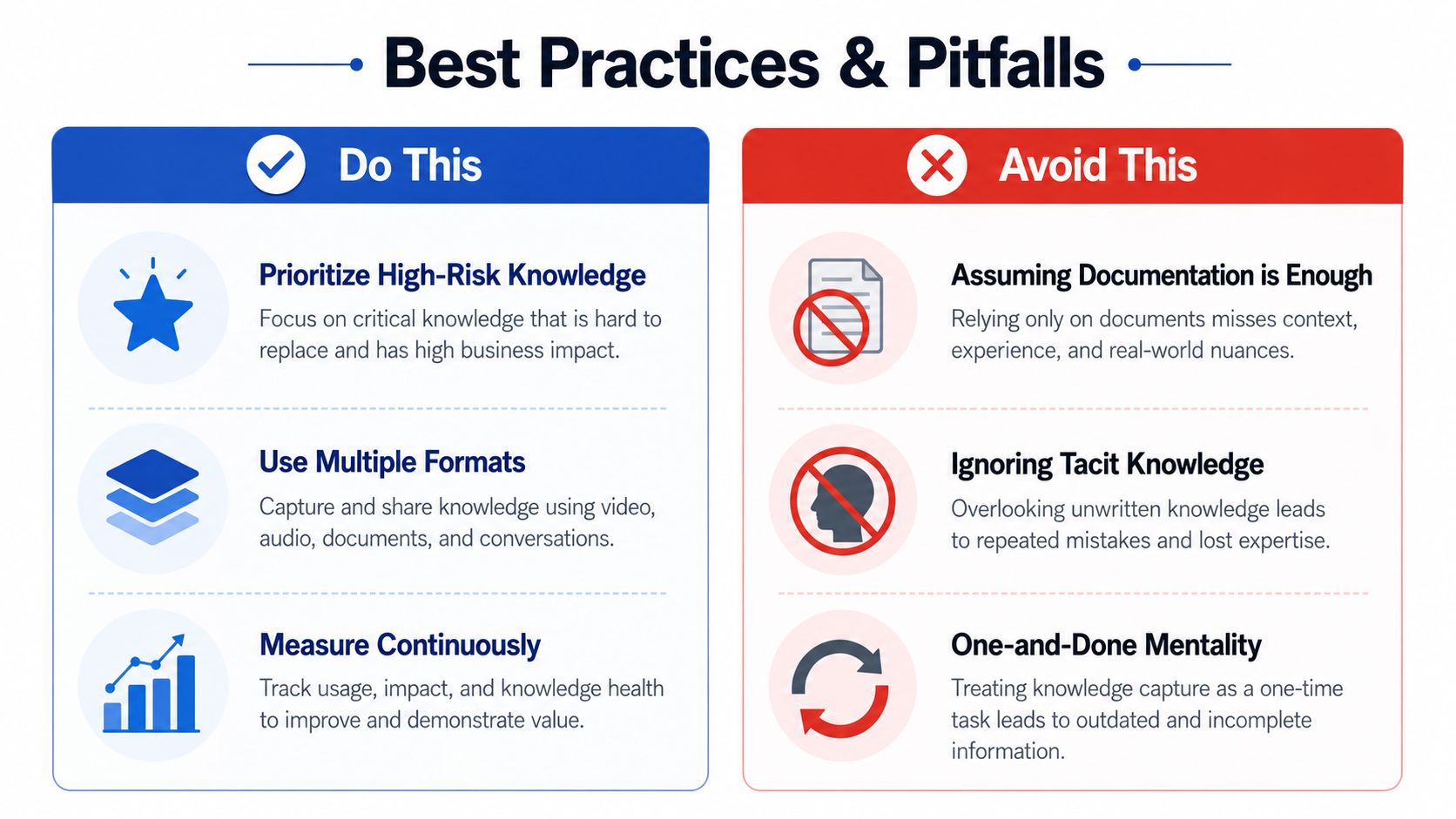
The strongest teams keep the process simple enough to use under pressure. They prioritise the riskiest knowledge, validate that the receiver can perform the work, and treat transfer as ongoing, not as a one-off event after someone has already left.
What to do, what to watch, what to measure
Good practice starts with priority-based capture, then moves to multi-format artefacts, then finishes with live validation. The easiest mistake is to confuse documentation volume with operational readiness. Another common failure is relying on a single expert to “just know” how things work, which creates a hidden dependency that will surface at the worst possible time.
Measure time to independence, the number of errors or escalations after handover, and how much of the critical process has a named owner and current artefact. If those indicators are weak, the process is still cosmetic.
The do this column in the infographic is the right basic checklist. The avoid this column is just as important, especially the temptation to stop once the files are written.
Grumspot helps ecommerce teams move store knowledge, platform changes, and technical context without losing continuity in the handover. If you need a practical partner for migrations, custom Shopify builds, or structured support around a complex transfer, visit Grumspot and see how they approach delivery with the same discipline this process needs.
Let's build something together
If you like what you saw, let's jump on a quick call and discuss your project

Related posts
Check out some similar posts.
- multi-channel inventory management
Master multi-channel inventory management for Shopify. Learn sync methods, ERP integrations & a road...
Read more