Website Conversion Rate Optimisation: Your 2026 Playbook
- website conversion rate optimisation
- cro guide
- ecommerce optimisation
- shopify cro
Launched
June, 2026
Traffic is coming in. Paid campaigns are live, SEO is starting to pull its weight, and your Shopify store looks decent on the surface. Yet revenue feels capped because too many visitors browse, hesitate, and leave.
That's the point where website conversion rate optimisation stops being a nice-to-have and becomes an operating discipline. Most stores don't have a traffic problem. They have a clarity problem, a friction problem, or a measurement problem. The hard part isn't finding advice. It's turning messy analytics, contradictory stakeholder opinions, and live-store constraints into a repeatable system that improves revenue without breaking what already works.
The strongest CRO programmes don't rely on isolated “best practices”. They run on evidence, prioritisation, clean test design, and disciplined implementation. On Shopify, that usually means balancing merchandising goals, theme limitations, app bloat, mobile UX, page speed, and the reality that every change touches both conversion and operations.
Foundations of an Effective CRO Audit
A proper audit starts with context. In the UK, the average ecommerce website converts at 2.9%, while the average Shopify store converts at 1.4%. There's also a device gap: desktop converts at 3.2% versus mobile at 2.8% according to UK conversion benchmarks. That gap matters because many Shopify stores are designed on desktop and merely compressed for mobile, not optimised for it.
Those benchmarks should change how you read your own data. If a store is sitting near the broader market average, that may still hide underperformance for a Shopify business with expensive acquisition costs or a weak mobile checkout journey. If your mobile traffic dominates but desktop carries the revenue, the audit needs to focus on mobile friction before anything else.
Start with the numbers
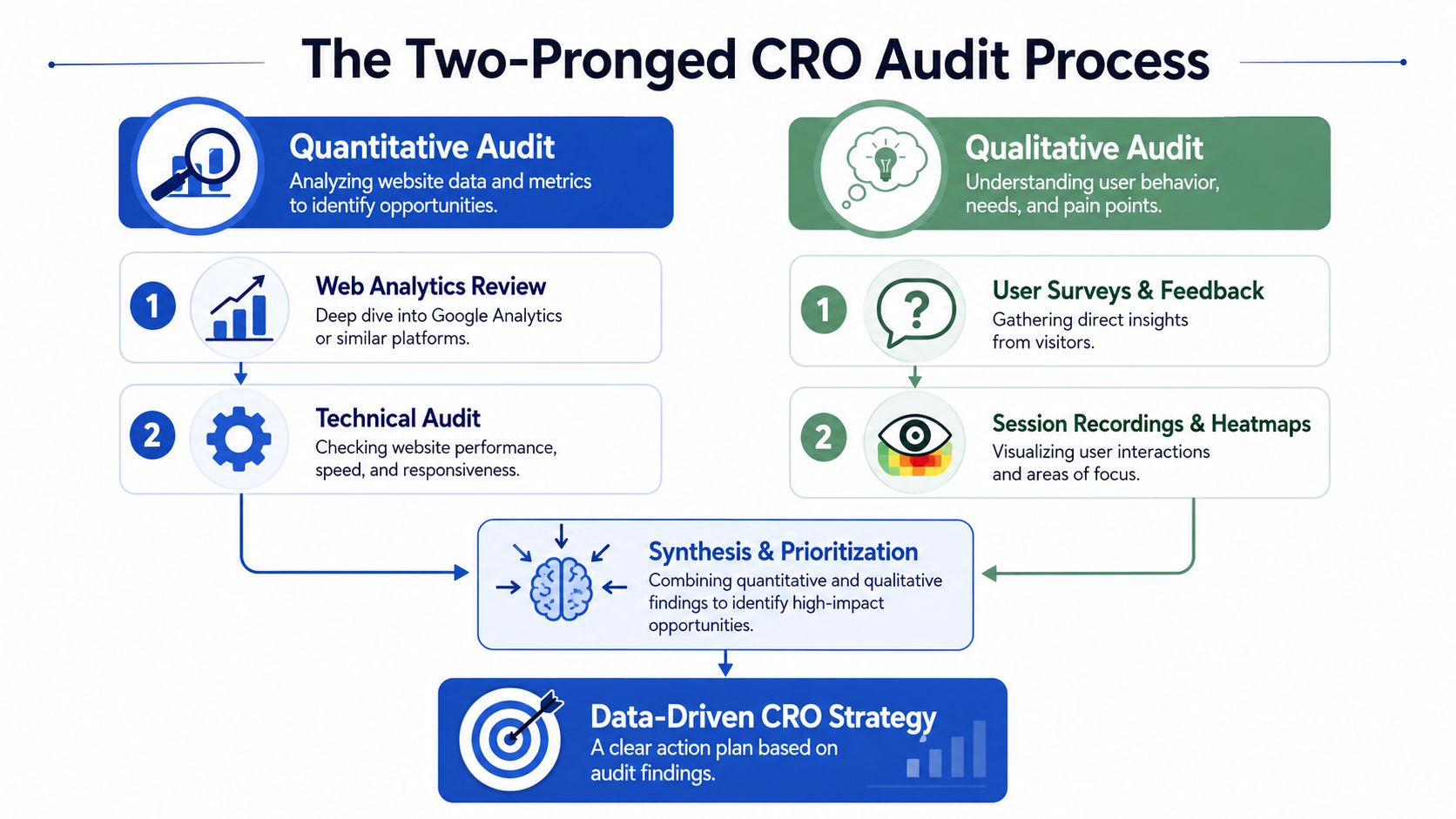
The first pass is quantitative. Open GA4, your Shopify analytics, and any reporting layer you trust enough to make decisions from. Then work down the funnel instead of page by page.
I look for a few things first:
- Step-by-step drop-offs between product view, add to cart, checkout start, payment step, and purchase
- Landing pages with high exits that attract meaningful traffic but don't move people forward
- Device splits that reveal whether mobile users are stalling earlier than desktop users
- Source-level differences so you don't mistake low-intent traffic for a page problem
Many teams often get stuck at this point. They jump from “bounce rate looks high” to redesigning the homepage. That usually wastes time. The audit has to isolate where the leak is happening before anyone proposes a fix.
A useful framework is to treat analytics as evidence of where the problem lives, not why it exists. If the product page leaks, that's your location. It doesn't yet tell you whether the issue is weak trust, poor CTA visibility, confusing variant selection, or slow rendering on mobile.
For a more structured checklist, this kind of Shopify CRO audit process is a good reference point, especially if your store has grown messy through repeated app installs and quick fixes. If you want a broader strategic view of how strong teams optimize for conversions, it helps to compare your audit habits against a more disciplined conversion model.
Then watch what users actually do
Quantitative analysis tells you where to look. Qualitative work tells you what people are experiencing.
Practical rule: If analytics and session evidence disagree, keep digging. One of them is incomplete, and acting too early usually creates a worse test backlog.
Use heatmaps, scroll maps, session recordings, on-site surveys, support transcripts, and search logs. Don't review them randomly. Filter for sessions where users dropped at the stage you've already identified as weak.
Look for patterns such as:
- Repeated hesitation around size selectors, delivery details, returns information, or promo code fields
- Dead clicks on images, badges, accordions, or text that users expect to be interactive
- Navigation loops where visitors bounce between collection pages, product pages, and policy pages before abandoning
- Form friction during account creation, shipping entry, or checkout progression
A strong audit ends with synthesis, not a pile of screenshots. You should leave with a short list of specific problems, the likely reason behind each one, and the user segment affected. That's the raw material for serious website conversion rate optimisation.
Crafting and Prioritising Test Hypotheses
Raw findings are not hypotheses. “Mobile users aren't converting” isn't testable. “Visitors don't trust the product page” isn't testable either. A good hypothesis links one observed problem to one proposed change and one expected outcome.
The structure I use is simple: because we observed a specific behaviour or friction point, we believe changing a defined element for a defined audience will improve a defined business metric. That sounds basic, but it forces discipline. It stops teams from piling three ideas into one test and then arguing about what caused the result.
Turn friction into testable ideas
Common friction points often produce the best first tests because they're visible and commercially meaningful. Data shows that every 1-second delay in mobile page load time can cut conversions by up to 20%, while moving a key CTA above the fold can increase conversions by as much as 317% according to Tenet's CRO statistics roundup. Those aren't instructions to blindly copy a tactic. They're reminders that speed and CTA visibility often deserve a place near the top of the backlog.
Here's what stronger hypotheses look like in practice:
Product page speed issue
Because mobile visitors abandon before meaningful engagement and the product template loads too slowly, we believe reducing heavy third-party scripts and image payload on product pages will improve add-to-cart rate for mobile users.CTA visibility problem
Because session recordings show users scrolling past merchandising content without acting, we believe moving the primary purchase CTA higher and making it persist during scroll will increase product page progression.Checkout confidence issue
Because users repeatedly leave checkout to re-check shipping and returns policies, we believe surfacing those details closer to commitment points will reduce abandonment.
A weak hypothesis says “let's test a new design”. A strong one says what changed, for whom, and why it should matter.
Use a scoring model before design starts
Once the audit is done properly, you'll usually have too many ideas. That's where prioritisation frameworks earn their keep. PIE and ICE are both useful because they force teams to compare ideas on the same basis rather than backing the loudest opinion in the room.
A practical way to use them is:
| Framework | What it helps judge | Good fit |
|---|---|---|
| PIE | Potential, Importance, Ease | Backlogs with many page-level opportunities |
| ICE | Impact, Confidence, Ease | Experiment pipelines where evidence strength varies |
I tend to use ICE when the backlog includes both technical fixes and merchandising tests. Confidence matters a lot when stakeholders want to jump straight to broad creative changes. An idea based on repeated user evidence should outrank a clever redesign with no supporting signal.
What usually rises to the top
High-priority hypotheses often share three traits:
- They target an existing bottleneck rather than a vanity page
- They affect a meaningful audience segment such as mobile product page visitors or high-intent traffic
- They're implementable without destabilising the store during a busy trading period
What doesn't work is treating prioritisation like a branding discussion. If the proposed test can't be tied back to observed behaviour, it belongs in the ideas parking lot, not the experiment queue.
Designing and Running Valid Conversion Experiments
A strong hypothesis still fails if the test design is sloppy. As a result, many ecommerce teams lose trust in CRO. They run overlapping experiments, stop as soon as a tool flashes green, or compare versions that differ in too many ways to interpret cleanly.
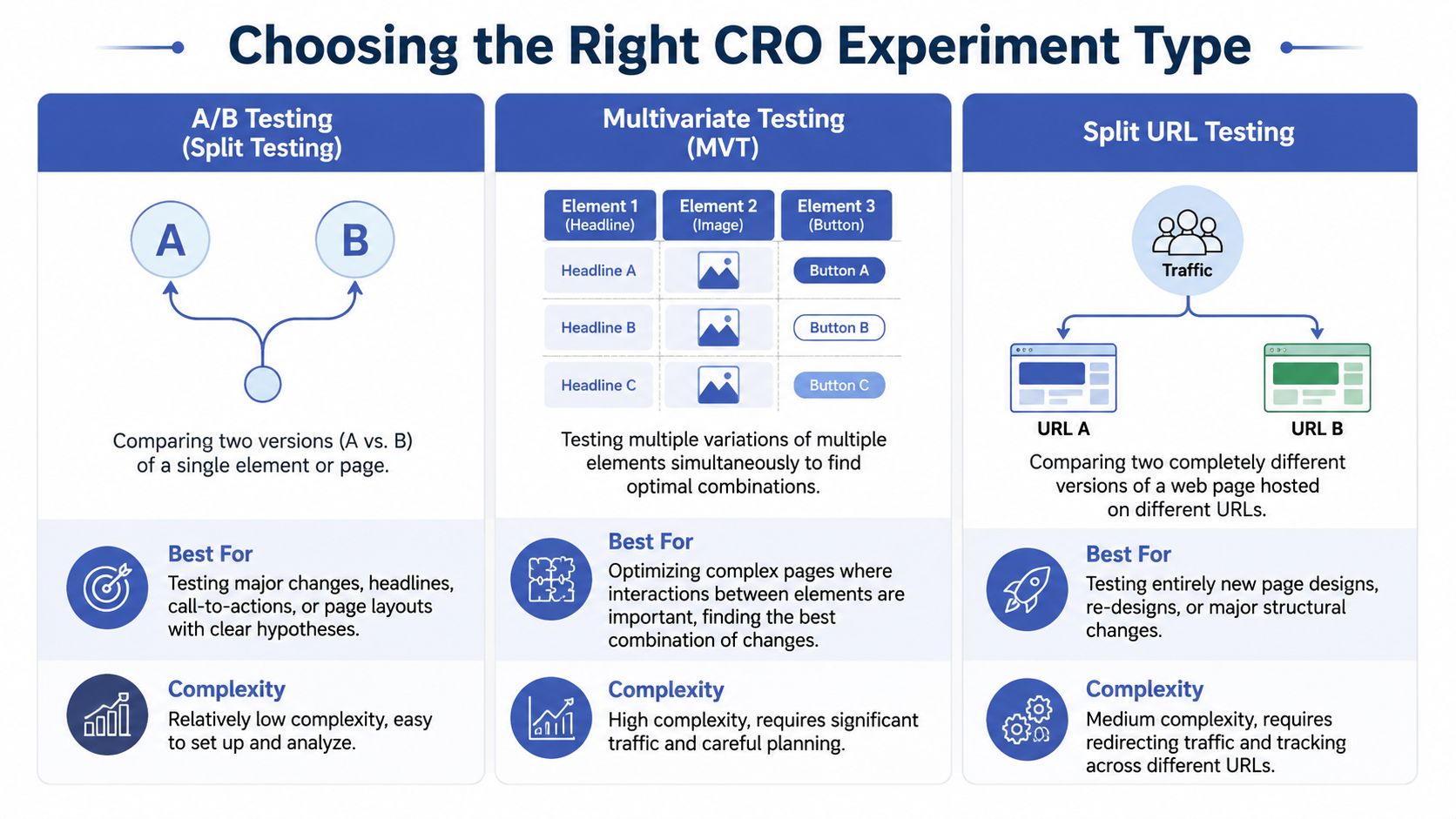
The test method has to match the question you're asking. Some changes need a straightforward A/B test. Others need a full page alternative on a separate URL. And some shouldn't be tested as a multivariate setup unless the store has enough traffic to support it.
Choose the method that fits the change
Here's the practical comparison needed:
| Test Type | Description | Best For |
|---|---|---|
| A/B testing | Compares one version against another for a single page or experience | CTA changes, trust modules, layout shifts, copy adjustments |
| Multivariate testing | Tests combinations of multiple elements on the same page | High-traffic pages where element interaction matters |
| Split URL testing | Sends users to two substantially different page versions on separate URLs | Full product page redesigns, rebuilt landing pages, major structural changes |
A/B testing is usually the default because it's easier to control and easier to interpret. If you're changing headline, CTA treatment, review placement, and media hierarchy all at once, that's often still fine in an A/B test if the hypothesis is about the whole experience. Multivariate testing only makes sense when you specifically need to understand how separate elements interact and the store has enough volume to support the extra complexity.
Split URL tests are useful when a new page architecture can't be created safely inside the current template or when the engineering approach differs substantially between versions.
Use realistic ecommerce test ideas
One of the best high-impact test categories is user-generated content. Websites with UGC show a 3.2% conversion rate baseline, and that rises by another 3.8% when visitors actively interact with it. Visitors who interact with UGC are 102.4% more likely to convert according to WordStream's CRO statistics. That doesn't mean “add reviews somewhere”. It means design the UGC block so people can engage with it.
Examples that tend to produce clearer learnings:
- Static reviews vs interactive review module with filters, photo content, and relevance sorting
- UGC near the CTA vs buried lower on the page
- Customer photos in-gallery vs isolated in a review tab
- Review summary language for first-time visitors vs returning visitors
Don't test decoration. Test decision support. The best variants reduce uncertainty at the exact moment a shopper is deciding whether to commit.
Protect the validity of the result
A trustworthy experiment has a few essential requirements:
- One primary success metric so the team knows what defines a win
- Random assignment so one variant doesn't get a skewed audience
- A stable test environment with no mid-flight edits to copy, pricing, or logic
- Enough time to cover a normal trading cycle rather than a short burst of noisy data
If your team needs a refresher on why early calls create false confidence, this guide to statistical significance testing is worth keeping close when results start looking tempting before the data is mature.
Analysing Results and Measuring Business Impact
Declaring a winner is the easy part. Knowing whether the winner improved the business is harder.
That distinction matters because a variant can lift one visible conversion metric while damaging order quality, margin, or downstream retention. A seasoned CRO team doesn't ask only, “Did conversion rate go up?” It asks, “What kind of conversion went up, from which audience, and at what cost?”
Read results like an analyst, not a dashboard
A testing platform might surface a “winner”, but that label is only the start of analysis. You still need to examine segment performance, implementation conditions, and secondary effects.
Review the result through a few lenses:
- Primary outcome such as purchase completion or checkout progression
- Segment performance by device, landing page group, campaign source, and user type
- Commercial health including average order value, discount usage patterns, and cancellation or return signals
- Behavioural quality such as whether the variant attracted more decisive shoppers or just more accidental clicks
This matters even more as personalisation becomes standard. 68% of UK retailers use AI for personalisation, but only 22% track conversion quality by traffic source. Businesses using source-scoring systems improve conversion quality by 34% according to Baymard's ecommerce CRO guidance. If you're not separating high-quality organic or email conversions from weaker traffic, optimisation decisions get distorted fast.
Measure quality, not just volume
A practical approach is to give conversions context. A purchase from a returning email subscriber often means something different from a low-intent click through a broad paid campaign. The same goes for leads, sign-ups, or quiz completions if you run those as part of your funnel.
A basic source-scoring model in GA4, paired with session context from Hotjar or Microsoft Clarity, helps answer better questions:
- Which channels produced the strongest post-click behaviour?
- Did the variant improve intent-rich visits or just increase weak entries into checkout?
- Did one audience segment improve while another declined?
If a variant lifts raw conversions but pulls in lower-quality orders, it hasn't won. It has shifted the problem further downstream.
That's the gap between vanity metrics and operating metrics. Good website conversion rate optimisation pushes on profitable behaviour, not just button clicks.
Document what the result actually means
Results need interpretation, not just reporting. A concise analysis note should capture:
- What changed in plain language
- Who saw the strongest response
- What secondary metrics moved
- What the team believes caused the outcome
- What follow-up tests now make sense
A short walkthrough can help teams align on how to think about experiment outcomes before rollout:
That final point is easy to miss. Some tests produce a win worth deploying immediately. Others produce a directional learning that should be narrowed into a better second test. Both are useful. The mistake is treating every result as either a triumph or a failure.
Implementing Wins and Scaling Your Programme
A winning variant sitting in a slide deck has no value. The gain only becomes real when the store ships the change cleanly, quality checks it, and monitors live performance after rollout.
Weak CRO programmes often stall. They run a handful of tests, celebrate a result, then move on without operationalising what they learned. Mature teams do the opposite. They treat every test as a contribution to a larger system.
Roll out without breaking the live experience
Implementation needs a clear owner and a clean handoff. On Shopify, that usually means translating the test variant into theme code, app logic, or content operations with enough QA across templates, devices, and browsers before it reaches all traffic.
The rollout checklist is simple but important:
- Deploy the winning version permanently rather than leaving the change inside a testing layer
- Check analytics and event tracking so reporting remains consistent after launch
- Review edge cases including bundles, subscriptions, variant selectors, discount logic, and international storefront behaviour
- Monitor post-launch performance to make sure the production build matches test conditions
A win in a controlled environment can underperform in production if scripts load differently, merchandising rules change, or the team accidentally alters a supporting element during implementation.
Build a knowledge bank that compounds
The stores that improve fastest don't just test more. They remember more. Every experiment should be logged in a way that makes future decisions easier.
Useful fields include:
| Record | Why it matters |
|---|---|
| Hypothesis | Shows the logic behind the test |
| Evidence used | Captures the audit signals that justified it |
| Variant details | Prevents fuzzy recollection later |
| Result summary | Clarifies what happened |
| Learning | Turns one test into future direction |
CRO teams often revisit the same ideas months later. If no one documented why a trust test failed or why a mobile layout change worked only for returning visitors, the team wastes time relearning old lessons.
The point of a CRO programme isn't to run more tests. It's to reduce uncertainty faster than the rest of the market.
Treat CRO as an operating rhythm
A systematic optimisation cycle is what separates average stores from elite ones. Top-performing ecommerce sites that follow a rigorous cycle of testing, refining, and implementing achieve conversion rates of 11% or higher according to Loop Digital's CRO guide. Most brands won't jump to that level overnight, but the principle holds. Consistency beats occasional redesigns.
The cadence that works is straightforward. Audit continuously. Prioritise ruthlessly. Test valid ideas. Ship what wins. Record what you learned. Then repeat.
That turns website conversion rate optimisation from a side project into a durable growth function.
Essential Tools for Your Ecommerce CRO Stack
Tool choice matters less than is commonly believed, but stack design matters a lot. You don't need the biggest platform list. You need coverage across measurement, behaviour analysis, experimentation, and feedback, with enough integration to keep decisions grounded in the same customer journey.
The fastest-growing ecommerce teams usually keep the stack lean. Too many overlapping tools create duplicate data, extra script weight, and reporting arguments.
Analytics and behavioural visibility
Start with your measurement layer.
- Google Analytics 4 is still the default for funnel reporting, event analysis, and channel segmentation. It's useful when the account structure is clean and event naming is disciplined.
- Matomo is a sensible option for teams that want stronger privacy control and more ownership over analytics setup.
- Hotjar is useful for heatmaps, recordings, and quick survey prompts in one place.
- Microsoft Clarity gives you session recordings and click behaviour with a low-friction setup, which makes it useful for teams that need broad visibility quickly.
The key is pairing quantitative and qualitative evidence. GA4 can show you that users drop on product pages. Hotjar or Clarity can show you the hesitation, dead clicks, and confusion behind that drop.
Testing and personalisation tools
This is the layer where teams often overspend. Pick based on your store's complexity, internal resources, and how much control you need over targeting and experiment design.
A practical shortlist:
- VWO for teams that want experimentation, insights, and personalisation in one platform
- Optimizely for larger programmes with more mature experimentation needs and stronger internal process
- Shopify-focused apps when you need quicker deployment for storefront tests without a heavier enterprise setup
If you're reviewing your broader app mix, this list of Shopify apps for higher conversion rates is a useful place to compare what belongs in the stack versus what adds more frontend clutter.
Feedback and execution support
Behavioural tools tell you what users do. Feedback tools help you capture what they were missing or questioning.
Good options include:
- Typeform for post-purchase surveys, onboarding flows, and structured research
- Survicate for on-site feedback prompts and customer sentiment capture
- User interviews and support logs for richer qualitative context when a high-value page keeps underperforming
A lean CRO stack should answer four questions well:
- Where are users dropping off?
- What are they doing before they leave?
- Can we test a cleaner alternative safely?
- Can we capture and remember the learning?
If the answer is yes, the stack is good enough. More tools won't fix a weak process.
If your Shopify store is getting traffic but not turning enough of it into revenue, Grumspot can help you tighten the funnel, run sharper experiments, and build a CRO system that scales with the business instead of relying on one-off fixes.
Let's build something together
If you like what you saw, let's jump on a quick call and discuss your project

Related posts
Check out some similar posts.

- ecommerce ab testing
Master ecommerce AB testing with a revenue-first playbook. Learn to build hypotheses, calculate samp...
Read more
- conversion rate optimisation australia
Boost sales in 2026 with our definitive guide to conversion rate optimisation australia. Learn local...
Read more
- customer review management
Master customer review management on Shopify with our UK playbook. Get step-by-step workflows for co...
Read more
- customer journey mapping
Master customer journey mapping for your Shopify store. Research touchpoints, use insights for CRO &...
Read more