B2B Ecommerce Platform: A Guide for Scaling Brands
- b2b ecommerce platform
- b2b ecommerce
- shopify plus
- ecommerce migration
- headless commerce
A wholesale customer emails a purchase order, a sales rep checks a spreadsheet, finance confirms credit terms, and someone forwards the details to the warehouse. Meanwhile, your Shopify storefront shows a different price, NetSuite holds the stock position, and the buyer still can't see whether the order has shipped. The business is growing, but every new account adds another manual exception.
That's the point at which a B2B ecommerce platform stops being a website project and becomes an operating decision. UK online commerce is already mainstream, with ecommerce forecast to represent 38.1% of total retail sales in 2025 and revenue projected to reach $185.97 billion by 2029, according to the United States International Trade Administration's UK ecommerce guide. Buyers now expect suppliers to offer the same speed and clarity they experience elsewhere, while still supporting negotiated pricing, purchase orders, credit terms, and procurement controls.
The practical question isn't which platform has the longest feature list. It's which system removes friction from the buyer's order and gives your commercial team reliable control behind it.
What a B2B Ecommerce Platform Actually Is
A founder running both a Shopify DTC storefront and a wholesale operation often starts with a familiar patchwork. The retail site handles consumer checkout, while wholesale orders arrive as PO PDFs, pricing lives in spreadsheets, account notes sit in NetSuite emails, and sales staff manually confirm delivery rules. A wholesale app may display a different price after login, but it rarely replaces the operational work around the order.
A genuine B2B ecommerce platform brings those workflows into a buyer-facing commerce layer. It can show a customer the catalogue they're authorised to buy, apply account-specific pricing, expose agreed payment terms, route an order for approval, and pass clean order data to the systems that fulfil it. The buyer gets self-service. Your team gets fewer rekeyed orders and fewer arguments about which price was agreed.
Define it by the work it replaces
Use the following test before discussing vendors. Write down every activity that happens between a buyer deciding to order and your warehouse receiving an approved instruction.
- Manual order entry: A buyer enters the order directly rather than emailing a spreadsheet for someone else to retype.
- Off-platform quotes: A quote can become an order without copying lines, prices, addresses, and terms between systems.
- Disconnected shipping rules: Delivery options reflect the account, warehouse, destination, and order contents rather than a generic storefront rule.
- Unclear account access: A parent company can manage locations, roles, permissions, and approval limits from a controlled structure.
- Invisible order status: Buyers can check confirmations, fulfilment progress, invoices, and shipment information without calling support.
If the platform only changes the front end while your staff still maintain the same spreadsheets and email chains, you've bought a presentation layer, not a complete B2B solution. That can still be useful, but you should price and govern it as a partial intervention.
Don't confuse a wholesale add-on with B2B commerce
A B2C platform plus a wholesale app can work for a small catalogue, simple customer groups, and card payment at checkout. It becomes fragile when different subsidiaries need different catalogues, when buyers need approval, or when finance must enforce credit limits and terms.
Before demos, document account structures, price rules, quote handling, payment methods, and fulfilment exceptions. A practical guide to how to choose B2B ecommerce software is useful at this stage because it encourages teams to map operational requirements before they get distracted by storefront design.
Treat the platform as a buyer-experience layer first and a back-office tool second. Integrations matter because they make the promise accurate. The buyer only experiences the outcome, whether the price is correct, stock is trustworthy, checkout is secure, and the order remains visible after payment.
How B2B Ecommerce Platforms Differ From B2C
A B2C checkout usually serves one person buying for personal use, with a public price and an immediate card payment. B2B commerce serves a buying group operating within company rules. Several people can influence one order, the price may depend on a contract, and the person placing the order may not be authorised to approve the spend.
That changes the platform's information architecture, checkout logic, and data model. Adding a “wholesale customer” tag to a retail account does not create those capabilities.
| Capability | B2C Platform | B2B Platform |
|---|---|---|
| Account structure | One customer profile and login | Company accounts, locations, buyers, approvers, and administrators |
| Pricing | Public product price and promotional discounts | Account-specific price lists, contract terms, volume breaks, and restricted products |
| Checkout | Immediate payment, usually by card | Purchase orders, credit terms, invoice workflows, approvals, and account limits |
| Ordering pattern | Individual products and modest baskets | Bulk lines, repeat orders, recurring needs, and negotiated quantities |
| Product access | One public catalogue | Customer, market, role, or contract-specific catalogues |
| Reordering | Search, browsing, and order history | Quick order, SKU entry, CSV upload, saved lists, punchout, and reorder by history |
| After purchase | Basic confirmation and delivery updates | Order status, invoices, shipment splits, returns, credit notes, and account reporting |
Account hierarchy changes the buying journey
A procurement manager may order for one site, while a finance manager approves spending across several locations. A sales director may need visibility across the parent account without permission to edit payment settings. The platform must represent these relationships, permissions, and reporting boundaries instead of treating every login as an isolated customer.
Pricing follows the same structure. A product page may need to show a negotiated rate for one company, a different rate for a subsidiary, or no product at all because it falls outside the contract. Product visibility, price lists, quantity breaks, and minimum order rules should respond to account context.
Showing the wrong price creates more than a conversion problem. It produces a support request, forces manual correction, and weakens confidence in the stock, delivery, and invoice information shown elsewhere.
Checkout must follow procurement rules
A buyer who normally submits a purchase order should not be pushed into card payment because the storefront was built around consumer transactions. The workflow may require an internal reference, delivery instructions, an approval stage, an agreed payment term, or a credit-limit check before the order can proceed.
The ordering pattern also differs. B2B buyers often work from SKUs, saved lists, repeat orders, CSV files, punchout catalogues, or negotiated quantities rather than browsing each product individually. A platform that handles the first order but makes replenishment slow has solved the storefront problem only partly.
The after-purchase experience carries operational weight. Buyers may need split-shipment updates, invoices, credit notes, returns information, and account-level reporting without asking support to assemble each answer.
Practical rule: If a buyer must leave the platform to complete a normal procurement step, the workflow is not self-service yet.
Core Features That Matter in a B2B Ecommerce Platform
A buyer reaches checkout with a contract price, an approved payment method, and a delivery expectation. If any of those changes without explanation, the platform has created work rather than removed it. The strongest features prevent specific buyer failures and keep product, price, payment, and order status accurate for each account.
Model the customer, not just the customer login
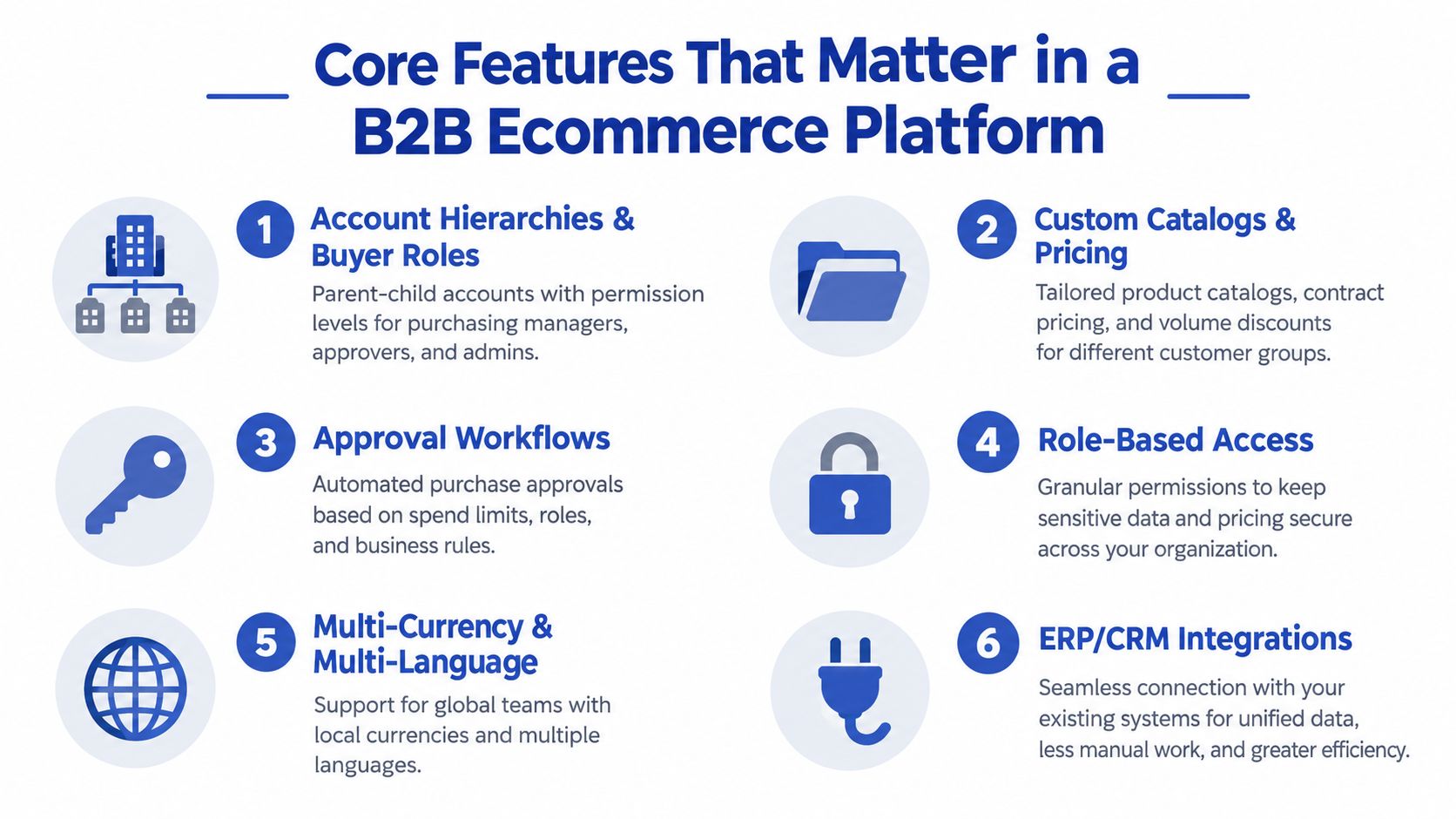
Account hierarchies and buyer roles should support parent companies, branches, ship-to locations, purchasing users, approvers, and administrators. Set clear permissions for what each role can view, edit, order, approve, and export. Without this structure, businesses either expose confidential account information or send routine purchasing tasks back to sales.
Custom catalogues and price lists should be governed by account rules. Product visibility, minimum order quantities, contract pricing, and quantity breaks need to calculate consistently across the storefront and checkout.
A buyer sees a contract price of £42 per unit, then checkout recalculates it to £48 because a volume break was configured as a promotion instead of a price-list rule. The order is abandoned, support investigates the discrepancy, and finance may need to issue a credit note. That is a feature failure with a direct operational cost.
Quote and approval workflows matter when a buyer needs a negotiated price or internal authorisation. Test whether a quote retains its products, quantities, terms, and expiry conditions when it becomes an order. If staff must rebuild those details manually, the platform has digitised only half the process.
Remove payment and procurement friction
Payment terms, credit checks, tax exemption handling, and PO references belong in the buying journey. Finance should control who can buy on account, while approved buyers should see their available terms clearly. Hiding those conditions until checkout creates uncertainty for procurement teams working to a fixed process.
Enterprise customers may require punchout through OCI or cXML, EDI, or procurement-suite connections. These routes let buyers start in their own purchasing environment, access an approved catalogue, and return the basket for internal approval. If the platform cannot support the required route, an interested account may remain dependent on email.
Quick-order tools serve experienced buyers better than forced browsing. SKU search, CSV upload, saved lists, order-history reordering, and quantity editing make repeat purchasing faster across a large catalogue. The interface should behave like a reliable order desk, with useful validation rather than unnecessary discovery steps.
Make operational truth visible
Stock by warehouse, allocation rules, split shipments, backorders, and delivery estimates need defined ownership. Showing “in stock” when the item is available only at a distant warehouse creates the transparency failure that drove the buyer online in the first place.
The platform should also handle tax, duty, multi-currency, audit trails, and approval thresholds. Teams comparing architectural options can review API-first ecommerce architecture to understand how the experience layer can remain separate from commerce and operational services. That separation supports multiple touchpoints, but it does not decide which system owns each value.
A buyer should be able to verify the price, payment route, stock position, and order status without contacting support. Those checks are the practical standard for a B2B platform, and they matter more than adding another promotional widget.
Integrations, Pricing Models, and Multi-Market Operations
The platform licence is only part of the decision. In a serious B2B build, integration design determines whether the buyer sees a trustworthy answer or a stale one.
Start with the ERP as the system of record for the values it owns. NetSuite, SAP, and Microsoft Dynamics may hold inventory, customer accounts, price tiers, credit limits, tax details, and financial status. Decide whether the platform reads these values in real time, receives events, or works from a synchronised cache. Each choice affects speed, resilience, and what happens when an API is unavailable.
Your CRM, such as HubSpot or Salesforce, should provide account context without becoming a second pricing engine. An OMS needs to understand split fulfilment across warehouses, while a PIM should govern product attributes, technical content, pack sizes, and market-specific data. A large catalogue magnifies every inconsistency, so product ownership must be agreed before the build starts.
Map the failure mode beside every integration
- ERP unavailable: Buyers may see stale prices, incorrect stock, or an order that can't be financially approved.
- CRM disconnected: Sales staff lose account context and may contact buyers with outdated information.
- OMS delayed: The storefront promises delivery without knowing which warehouse can fulfil the line.
- PIM incomplete: Search, filters, product specifications, and customer-specific catalogues become unreliable.
- API throttled: Synchronisation queues grow, and the business needs a defined fallback rather than silent failure.
An integration diagram isn't enough. For every data flow, document the owner, refresh expectation, retry behaviour, monitoring, and manual recovery process. The ecommerce ERP integration guide is a useful reference when turning that map into an implementation plan.
Pricing architecture should match commercial reality
| Pricing Model | Native in Shopify Plus B2B | Typical Bolt-On or Custom Build |
|---|---|---|
| Company-specific catalogues and prices | Supported for configured B2B use cases | Advanced inheritance, exceptions, or external contract engines |
| Volume breaks | Supported through configured price rules | Complex ladders, product combinations, or quote-specific calculations |
| Contract pricing | Suitable for defined company pricing | External CPQ, ERP calculation, or custom middleware for complex agreements |
| Quote-to-order | Available for supported B2B workflows | Advanced negotiation, approvals, and CPQ often require extensions |
| Credit terms and payment rules | Supported in appropriate B2B configurations | Credit scoring, bespoke limits, and finance reconciliation may need custom work |
| Market-specific tax and currency | Supported through market configuration | Complex landed-cost, duty, or jurisdiction logic may require specialist services |
The right answer depends on where commercial truth lives. Don't force Shopify Plus to become an ERP, and don't make sales teams compensate for a commerce platform that can't express your pricing model.
International operations add further detail. VAT registration logic, currency rounding, landed-cost transparency, delivery restrictions, and local payment terms all need explicit rules. A UK buyer may work on agreed invoice terms, while another market may expect proforma payment or prepayment. Finance should validate these flows early, and teams that need specialist outsourced ecommerce accounting help can use that support to reconcile platform, ERP, and marketplace data before launch.
Migrating to a B2B Ecommerce Platform Without Burning the Business
Migration is its own programme. Treating it as the final technical task after platform selection is how teams discover that their customer records, prices, redirects, payment terms, and fulfilment rules don't line up.
For UK brands moving from Magento or WooCommerce to Shopify Plus, integration depth drives the timeline and budget. Independent UK agency guidance places straightforward WooCommerce or Shopify migrations at roughly £8,000 to £18,500 and 8 to 16 weeks, while Magento or Adobe Commerce B2B migrations with ERP rewiring can reach £60,000 to £150,000 or more and 6 to 12 months, according to Webdigita's UK ecommerce migration guidance. Those figures aren't a quote for your project. They show why a storefront move and a B2B replatform shouldn't share the same brief.
Sequence the work around risk
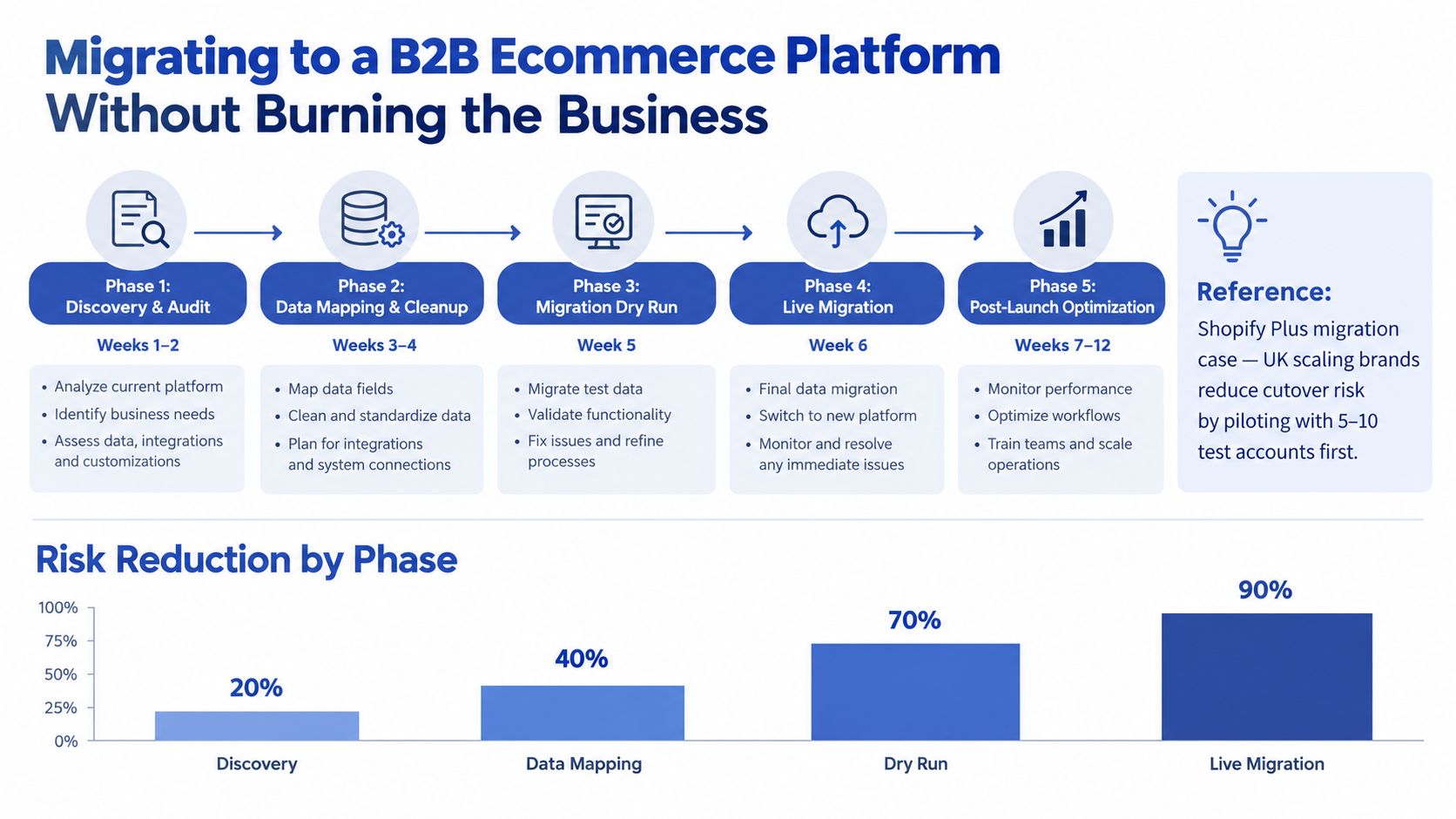
Discovery and audit should identify every sales channel, account type, payment term, catalogue rule, ERP dependency, redirect requirement, and report that the current business relies on. Don't limit the audit to pages. A logged-in buyer's URL, price response, and approval path can be more commercially important than a public landing page.
Data mapping and clean-up comes next. Standardise customer identifiers, parent-child relationships, addresses, SKUs, units of measure, price lists, and historical order references before importing anything. Migrating dirty data moves the problem into a faster system.
Dry runs should test real account scenarios, not only sample products. Use representative buyers with different permissions, terms, warehouses, and pricing. Test quote conversion, PO checkout, tax handling, order edits, cancellations, refunds, fulfilment updates, and ERP reconciliation.
The pre-uploaded migration visual includes a claim about piloting with specific account counts and a risk-reduction chart. Those figures aren't part of the verified data for this article, so use the process as a planning model rather than treating the annotations as measured outcomes.
A separate video can help teams visualise the operational sequence before workshops begin:
Protect revenue at cutover
Build redirects for product, category, content, and account-relevant URLs. Agree the freeze window for new pricing, catalogue changes, and customer amendments. Keep a rollback condition in writing, including who can call it and what evidence triggers that decision.
A parallel run is valuable for commercially important accounts, but don't create two sources of truth. Choose which system owns orders during the overlap, reconcile differences daily, and give sales and support a clear script for handling discrepancies. For a practical view of the platform-specific work, use this Shopify migration guide alongside your technical discovery.
Choosing the Right B2B Ecommerce Platform for a Scaling Brand
Shortlists usually include Shopify Plus, BigCommerce Enterprise, Adobe Commerce, and a headless build using Shopify Hydrogen or commercetools. None is automatically right. The useful distinction is whether the platform solves your buyer's main obstacle without creating a larger operational burden elsewhere.
Score each option using evidence from your own workflows. Ask vendors to demonstrate a real account, price list, approval path, payment term, warehouse scenario, and failed integration response. A polished demo account tells you very little.
| Dimension | Buyer Question It Answers | Weight |
|---|---|---|
| Account hierarchy depth | Can each person see and do only what their organisation allows? | High |
| Payment terms | Can approved buyers use agreed terms without finance workarounds? | High |
| ERP integration maturity | Are price, stock, credit, and order values accurate at the point of purchase? | High |
| Multi-warehouse stock | Can the buyer understand availability and delivery by location? | High |
| Quote-to-order speed | Can a negotiated deal become an order without rekeying? | Medium |
| Self-service coverage | Can buyers reorder, track, invoice, and manage accounts without calling? | High |
| Tax and duty handling | Will international buyers see a commercially accurate landed cost? | Medium |
| Three-year TCO | Does the total cost include apps, custom work, agencies, support, and upgrades? | High |
| Partner ecosystem | Can you recruit help for design, integration, migration, and ongoing optimisation? | Medium |
When headless earns its complexity
A headless or composable architecture makes sense when you need distinct experiences across channels, markets, portals, or applications and have the engineering capability to operate the front end independently. Shopify's headless commerce overview for enterprise teams describes the value of decoupling the front end from commerce back-end logic, allowing teams to change the experience without disrupting inventory, checkout, or operational workflows.
It also creates more responsibility. Your team owns deployment pipelines, preview environments, front-end performance, accessibility, analytics consistency, checkout constraints, and the contract between front-end services and commerce APIs. If the main need is reliable account pricing, straightforward wholesale ordering, and a strong shared DTC and B2B operation, a configured Shopify Plus implementation may be the more rational choice.
Score the boring details
Ask how the platform handles permission audits, price expiry, API failure, catalogue publishing, reporting, search quality, and support escalation. Those details decide whether a buyer can complete an order on a busy Monday morning. Vendor flexibility matters, but predictable operations matter more than theoretical extensibility.
Implementation Best Practices and What Comes Next
Launch day is only the visible point of a larger operating change. The platform can be technically live while buyers still email orders, sales reps maintain shadow pricing files, and finance manually reconciles payment terms. The implementation succeeds when the new workflow becomes easier than the old one.
Roll out in controlled stages
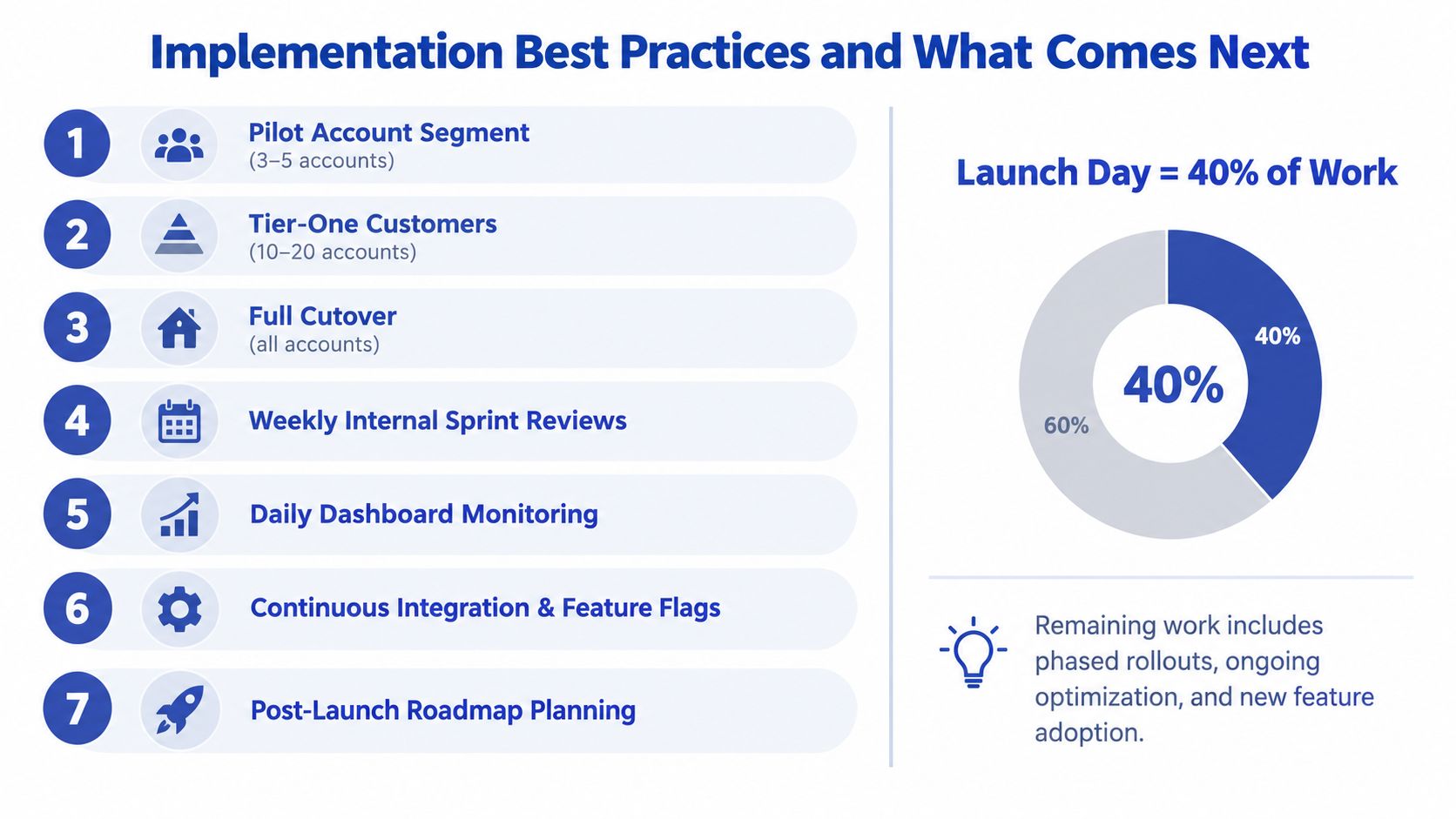
Start with a defined account segment that represents complexity of the business. Include different roles, pricing conditions, payment methods, delivery addresses, and product requirements. A pilot that only includes friendly internal users won't expose the failures that matter.
Move to tier-one customers after the team has fixed the obvious problems, then complete the wider cutover. During the early operating period, run weekly stand-ups with commercial, operations, finance, support, and development. After the process stabilises, a fortnightly cadence can maintain ownership without turning every improvement into a project meeting.
- Catalogues: Assign one accountable owner for product data, taxonomy, attributes, and publication rules.
- Permissions: Review company roles, approval thresholds, delegated access, and administrator accounts on a recurring basis.
- Payment terms: Reconcile platform terms against ERP and finance records instead of allowing manual exceptions to become permanent.
- Monitoring: Track failed integrations, rejected orders, stock discrepancies, checkout errors, search issues, and support contacts in one dashboard.
- Roadmap control: Use feature flags and staged releases so a new workflow doesn't disrupt every account at once.
The UK market's continued expansion supports investment in automation and multi-market infrastructure, but growth won't compensate for an unreliable buying experience. The UK B2B ecommerce market was valued at USD 304.86 billion in 2025 and is projected to reach USD 1,214.32 billion by 2034, implying a 16.60% compound annual growth rate from 2026 to 2034, according to IMARC's UK B2B ecommerce market analysis. That opportunity favours platforms that make ordering accurate, transparent, and repeatable.
Take three actions before another demo
First, audit your current B2B order-to-cash cycle. Record where buyers wait, where staff rekey data, where prices are checked, and where order status becomes invisible.
Second, shortlist two platforms and score them against the buyer questions above. Require each vendor to demonstrate your account hierarchy, negotiated pricing, payment terms, approval path, stock scenario, and integration failure response.
Third, book a reference call with at least one merchant on each shortlist that already operates internationally. Ask what broke after launch, which customisations they regret, how finance handles reconciliation, and what they still can't self-serve.
The platform decision is important, but disciplined ownership determines whether buyers adopt it. Choose the system that removes work from the order, then build the operating habits that keep its answers accurate.
Grumspot helps scaling brands design, migrate, audit, and extend Shopify and Shopify Plus stores, including B2B storefronts with ERP, CRM, fulfilment, and custom app requirements. If your current platform is hiding buyer friction or creating migration risk, visit Grumspot to discuss a practical audit or replatforming plan.
Want this kind of work on your store?
Send us the URL and what is slowing it down. We look at the store before we reply.
Related posts
Check out some similar posts.
- shopify store credit
Learn how to set up Shopify store credit with built-in tools or apps. Covers policy design, refund w...
Read more
- unified commerce platform
Learn how a unified commerce platform connects channels, ERPs, and CRMs to drive growth. Practical g...
Read more
- composable commerce platform
Learn what a composable commerce platform is, how it differs from monoliths, and how UK Shopify Plus...
Read more
- shopify subscription theme
Choose and implement the right Shopify subscription theme for your UK store. Covers OS 2.0, app inte...
Read more