Shopify Migration Guide: Plan, Launch and Win
- shopify migration guide
- shopify replatforming
- ecommerce migration
- shopify seo checklist
- shopify plus
Launched
August, 2026

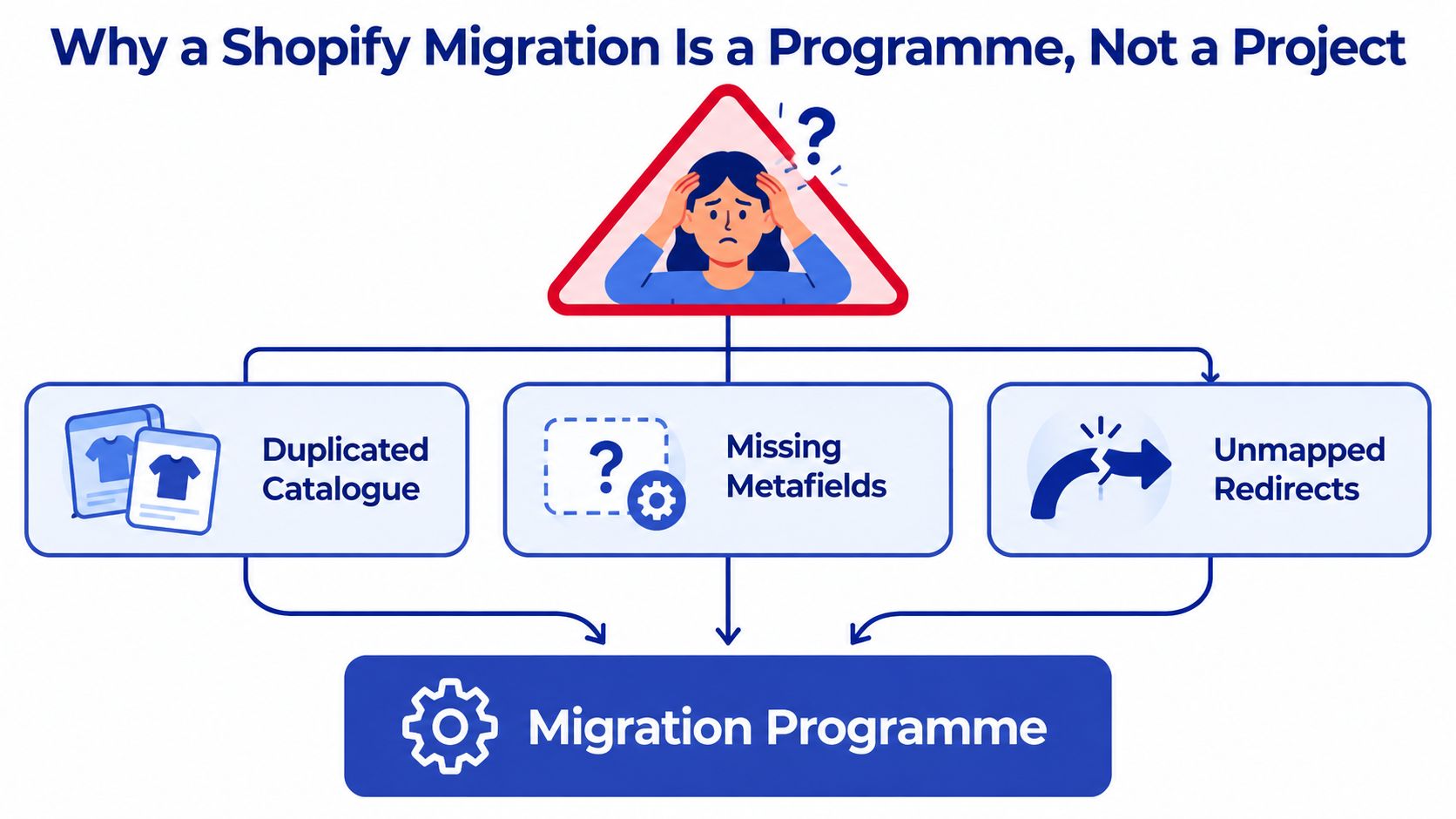
Three weeks before cutover, a UK retailer discovers that its product catalogue contains duplicates, key metafields are missing, and nobody has mapped the old URLs. The theme is nearly ready, but the migration itself isn't. That's the point at which a seemingly tidy Shopify build turns into an operational risk involving revenue, search visibility, customer records, tax, payments and fulfilment.
A reliable Shopify migration guide must therefore cover more than theme configuration. UK merchants need governance, data controls, SEO preservation and commercial sign-off working together. The platform shift is substantial, with more than 208,000 Shopify stores operating in the UK, according to UK Shopify migration market data, but adoption doesn't remove the need for disciplined execution.
Why a Shopify Migration Is a Programme, Not a Project
A project has a defined deliverable. A migration programme has several connected outcomes that must land together. The new storefront can look excellent while stock synchronisation fails, customer accounts import incorrectly, or search engines encounter thousands of broken URLs.
That's why the retailer facing duplicated products and absent metafields shouldn't respond by asking the development team to work faster. The business needs a steering group, named workstream owners, a RAID log covering risks, assumptions, issues and dependencies, and a launch window with explicit entry and exit criteria.
The commercial case for this level of control is clear. One UK replatforming analysis reports that only 14% of businesses are satisfied with their current ecommerce platform, while 77% feel urgency to migrate within the next year. It also reports that 90% of businesses completing a platform migration saw sales and revenue improvements afterwards, but those outcomes depend on the migration being treated as a business change rather than a cosmetic rebuild. The same UK analysis estimates a mid-market replatforming budget of £150,000 to £500,000 for manufacturers or retailers generating £20 million to £50 million in revenue, and states that 83% of data migration projects fail or exceed budget.
Four workstreams need owners
Run these workstreams in parallel:
- Commercial setup: GBP pricing, VAT, payment providers, shipping rules and customer communications.
- Data migration: Products, variants, customers, orders, metafields, inventory and content.
- Integrations: ERP, CRM, email automation, reviews, subscriptions, loyalty and fulfilment.
- SEO continuity: URL mapping, metadata, canonicals, internal links, structured data and monitoring.
Each owner should demonstrate progress in a weekly show-and-tell, maintain an issue log and define what “done” means. Sign-off should come from the person accountable for the business outcome, not from an assumption that a ticket being marked complete means the requirement works in production.
Practical rule: A migration isn't ready because the theme is ready. It's ready when commercial, data, integration and SEO owners can prove their acceptance criteria.
The risk is measurable. UK migration guidance identifies a 15 to 30% organic traffic drop when redirect mapping is incomplete or poorly managed, as documented in UK ecommerce migration agency guidance. That exposure makes redirect governance a board-level concern, not a final technical task.
Pre-Migration Planning and the SEO Checklist That Stops Traffic Loss
A Shopify migration can lose organic traffic before the new theme goes live. If the team rebuilds the information architecture first, high-value category pages, editorial content and product URLs may end up without relevant destinations. Treat the work as a controlled cutover, with SEO evidence, commercial requirements and reconciliation built into the plan.
Start with a full crawl of the current store using Screaming Frog or Sitebulb. Export indexable URLs, status codes, canonicals, titles, meta descriptions, headings, internal links and page types. Combine that baseline with Google Analytics 4 and Google Search Console data. This identifies URLs that attract organic sessions, generate revenue or hold important rankings, then links SEO decisions to the UK setup for GBP pricing, VAT, payment providers and shipping rules.
Build the URL map from evidence
The redirect spreadsheet should include the old URL, proposed Shopify URL, page type, owner, redirect status and QA result. Prioritise product, collection and editorial URLs with commercial or search value. Review thin, duplicate and cannibalised pages separately. An irrelevant page should not be redirected to the homepage just to clear a spreadsheet row.
Use a one-to-one redirect when the new page serves the same search intent. A discontinued product can point to its closest active replacement or relevant collection. Content without a genuine equivalent needs a recorded decision, not an automatic rule.
A UK migration benchmark puts the potential organic traffic decline at 15 to 30% when redirect planning is incomplete. Redirect QA therefore belongs in the launch critical path. A detailed Shopify SEO preservation guide covering URL mapping, metadata preservation, and post-launch monitoring provides a practical structure for this work.
Use a formal pre-cutover gate
Complete these checks before launch:
- Crawl the current store: Keep the raw export, crawl date and configuration as the baseline.
- Export priority URLs: Reconcile organic landing pages, revenue pages and ranking URLs with that crawl.
- Map destinations: Match old URLs to relevant Shopify products, collections, pages or blog posts.
- Preserve intent: Carry across titles, descriptions, headings, copy, structured data requirements and internal-link purpose.
- Test technical signals: Check canonicals, robots directives, pagination, structured data and internal links.
- Validate the sitemap: Confirm the Shopify sitemap contains the intended indexable pages.
- Mirror analytics: Reproduce GA4 ecommerce events and confirm Search Console access.
Add a reconciliation layer that many migration plans omit. Store signed snapshots of source totals, Shopify totals and key SEO exports. Compare product counts, variant counts, inventory totals, order values and priority URL coverage. Produce an exception report for every mismatch, assign an owner and record the resolution before approval.
Load the redirect file into the password-protected development store and test representative URL groups. Check direct resolution, redirect status, destination relevance, canonical output and the absence of chains. Shopify guidance stresses cataloguing site elements before moving content, while UK Shopify SEO migration guidance recommends crawling the existing site, exporting ranking and revenue URLs, creating a one-to-one redirect map, submitting the new sitemap and monitoring errors after launch.
The launch gate requires signed approval from SEO, ecommerce and technology owners. If the redirect map or reconciliation report is incomplete, the store is not ready, even if checkout passes.
Migrating Data, Themes and Apps Without Breaking the Store
Data, theme and app migration are separate decisions. Combining them into one “build” workstream hides risk, makes ownership unclear and leaves defects difficult to trace.
For data, a manual CSV route offers control and a low direct cost, but it requires careful handling of variants, images, inventory, customer tags, order history and metafields. Shopify's native importer can suit straightforward stores, while tools such as Matrixify or Cart2Cart can reduce repetitive mapping work. Automation doesn't remove accountability. The data lead still needs to reconcile the result against the source.
Themes deserve a separate choice. Reusing an old Liquid theme may appear faster, but it often carries obsolete assumptions, tangled templates and design decisions that don't fit Online Store 2.0. A clean Dawn-based or custom Online Store 2.0 build usually creates a better foundation, with sections, JSON templates and metafields treated as a reusable design system rather than rebuilt page by page.
Apps are where many quiet failures appear. Review the legacy stack function by function, then confirm the Shopify replacement and its data-transfer path. Pay particular attention to ERP inventory sync, Klaviyo flows, reviews, subscriptions, gift cards, loyalty balances and private applications.
Compare the migration choices
| Workstream | Option A | Option B | Recommended For |
|---|---|---|---|
| Data | Manual CSV exports and Shopify imports, maximum spreadsheet control but heavy reconciliation | Matrixify, Cart2Cart or another migration tool, faster transfer with mapping dependency | Manual handling for smaller, clean datasets. Automated tooling for complex catalogues, customers or orders |
| Theme | Adapt the legacy Liquid theme, quicker visual continuity but may preserve technical debt | Build a clean Online Store 2.0 theme, more deliberate effort with stronger long-term structure | Clean rebuild when the existing theme is heavily customised or slow to maintain |
| Apps | Recreate functionality with Shopify App Store equivalents | Build or retain custom integrations where the business process is genuinely unique | Use standard apps for common needs and custom integration only where requirements justify it |
A migration guide should be explicit about dependency mapping and user impact. For a broader perspective on documenting changes so users aren't surprised by the transition, GitDocAI's migration guide is a useful resource, particularly for teams managing operational communication alongside technical delivery.
Add reconciliation before production
Take a signed source snapshot before each migration wave. Record control totals for products, SKUs, variants, customers and orders, then compare the imported records against those totals. The data lead should produce an exception report showing missing records, duplicates, malformed values and unmapped relationships.
Review that report daily during migration. A business owner should sign off exceptions that affect fulfilment, finance or customer service. Shopify's enterprise data migration guidance highlights controls such as signed snapshots, control totals, exception reporting and business-owner approval, a layer many migration checklists omit.
For theme architecture and implementation detail, teams can also use this guide to Shopify 2.0 theme development. The important distinction is that design quality and data integrity need separate acceptance criteria.
UK-Specific Setup for Payments, VAT and Shipping Zones
UK commercial configuration is a launch blocker. A store can have accurate products and perfect redirects, yet still fail commercially if GBP prices, VAT treatment, payment settlement or delivery zones haven't been tested.
Start with pricing. Confirm that the primary catalogue uses GBP, market rules display prices consistently and rounding behaviour is understood across products, variants, discounts and checkout. B2B buyers need particular attention where VAT-inclusive and VAT-exclusive presentation differ by customer type or catalogue.
VAT configuration should be reviewed by the finance or tax owner, not left solely to the developer. Confirm registration details, product tax treatment, invoice requirements and record-keeping processes. If the merchant sells to customers outside the UK, review the operational consequences of EU shipping and tax arrangements separately rather than assuming domestic settings will carry across.
Payments need a complete customer journey test. Verify the chosen provider's GBP settlement, card authentication, Apple Pay availability, refunds, partial refunds, failed payments and order notifications. For a useful background on understanding payment gateway costs, Arlo Inc. provides a practical commercial overview, but the migration team still needs provider-specific testing in the actual Shopify store.
Shipping configuration should reflect how the warehouse works, not just how the carrier is named. Map UK zones, postcodes, service levels, cut-off times, free-delivery thresholds and fulfilment exclusions for carriers such as Royal Mail, DPD, Evri and DHL. Test remote areas, mixed baskets and orders that cross dispatch windows.
Make ownership visible
| Pillar | Owner | Sign-off date | Acceptance criterion |
|---|---|---|---|
| GBP pricing and markets | Ecommerce and finance | Before UAT | Product, discount and checkout prices display as approved |
| VAT and records | Finance or tax lead | Before launch approval | Tax treatment, invoices and records match the approved policy |
| Payments | Payments owner | Before live order test | Successful, failed, authenticated and refunded payments behave correctly |
| Shipping zones | Operations lead | Before fulfilment test | Rates, cut-offs, exclusions and carrier services match warehouse rules |
UK Shopify migration guidance places GBP pricing, VAT, UK payment providers and shipping zones alongside product, customer and order checks. That pairing matters. Commercial readiness and SEO continuity are both launch deliverables, not sequential tasks.
Testing, Launch Day and the First 90 Days
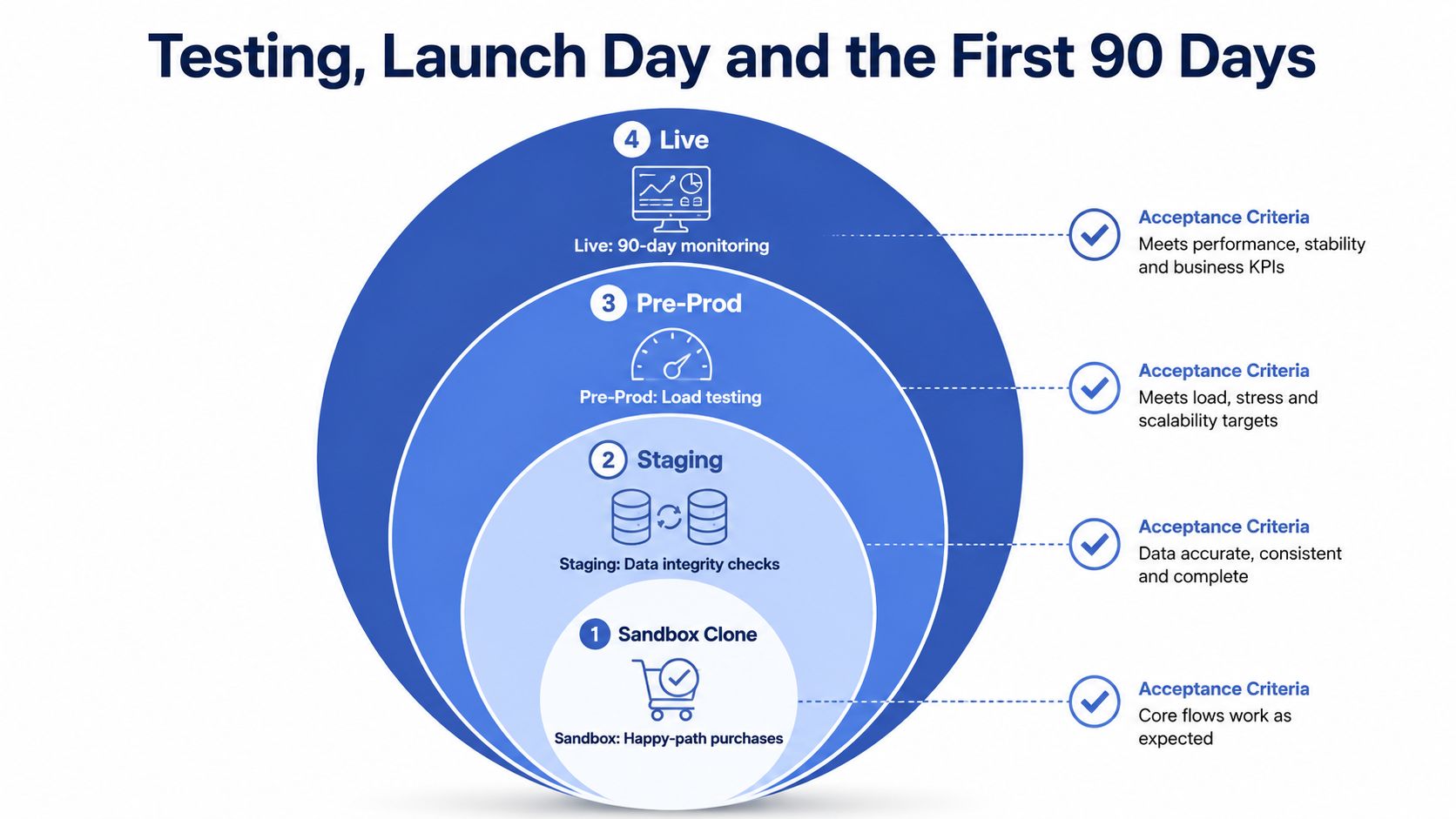
A generic QA pass isn't enough for a platform migration. Test in rings, with each environment answering a different question and each stage carrying explicit acceptance criteria.
The sandbox clone should prove that the happy path works, from product discovery through checkout and fulfilment hand-off. Staging should use representative product and customer data so the team can test edge cases such as subscriptions, pre-orders, gift cards and partial refunds without risking production records.
Use four testing rings
- Sandbox: Confirm basic browsing, cart, checkout, payment and notification flows.
- Staging: Test data integrity, variants, inventory, customer records, discounts and app behaviour.
- Pre-production: Run load tests against realistic peak demand and validate operational integrations.
- Live monitoring: Watch real transactions, crawl signals, order flow and customer support issues after release.
The silent failures deserve more attention than obvious broken buttons. ERP stock synchronisation can stop updating without making the storefront look broken. Klaviyo flows may reference old product handles. Loyalty balances can disappear from customer accounts, and search relevance can change when collection logic or product attributes are remodelled.
Use the merchant's highest-value products for user acceptance testing, including key variants and fulfilment combinations. A test isn't complete when a page loads. It's complete when the correct stock, price, tax, payment status, email, fulfilment record and analytics event all appear in the right systems.
Run launch day by the clock
Before the cutover window, freeze catalogue and content changes, take the final signed data snapshot and confirm the rollback decision-maker is available. During the switch, the launch lead should coordinate the domain change, password removal, analytics validation, live order and redirect checks rather than allowing each team to work independently.
Immediately after launch, test the homepage, priority collections, high-value products, search, cart, checkout, payment capture, confirmation email and fulfilment hand-off. The SEO owner should inspect canonical tags, robots directives, sitemap availability, redirect responses and Search Console access.
For the first 90 days, use a fixed rhythm:
- Daily: Review 404s, crawl errors, redirect failures, order exceptions, payment errors and stock mismatches.
- Weekly: Compare conversion rate, revenue, organic sessions and landing-page performance with the pre-migration baseline.
- Monthly: Audit redirect chains, structured data, internal links, indexation and Core Web Vitals.
This guide to 301 redirects during a Shopify migration is useful when the post-launch crawl identifies destinations that resolve technically but no longer preserve the original page intent.
The first 90 days reveal whether the migration was engineered as a live operating system or merely presented as a finished storefront.
Rollback Plans, Common Failures and a Realistic Budget
A rollback plan needs defined triggers, owners and evidence. Once customers, orders, inventory and campaigns run through Shopify, reverting can create reconciliation problems of its own. Decide before launch which failures justify reverting, which can be corrected live, and who has authority to make that call.
Common UK replatforming failures include redirect chains longer than three hops, variant URL drift between Magento layered navigation and Shopify collections, payment settings that prevent GBP settlement, and theme changes that reduce mobile performance. Track each issue with an owner, severity, deadline and decision threshold.
Decide with evidence
| Situation | Revert or fix forward | Reason |
|---|---|---|
| Checkout cannot capture valid payments | Revert if the issue is broad and unresolved | Revenue collection is a launch-critical dependency |
| A small number of redirects miss their destinations | Fix forward | Add and test targeted redirects while monitoring impact |
| ERP inventory is stale across key products | Revert or pause trading if stock accuracy is compromised | Overselling creates operational and customer-service risk |
| Mobile templates perform poorly but checkout works | Fix forward with a prioritised performance release | Preserve transaction continuity while addressing templates |
Use a signed pre-launch snapshot, control totals for orders, products, customers and inventory, and an exception report after cutover. Reconciliation should show what imported, what failed, and what requires manual correction. Without that record, a rollback can restore the platform while leaving commercial data inconsistent.
Budgeting needs the same discipline. A UK-focused analysis puts realistic total replatforming spend for a mid-market manufacturer or retailer with £20 million to £50 million in revenue at £150,000 to £500,000, as noted in the UK replatforming economics analysis. The range reflects integrations, data quality, content, markets and operational rules, not only the Shopify subscription.
| Workstream | Indicative GBP range | Notes |
|---|---|---|
| Platform fees | Qualitative planning item | Confirm the Shopify plan, payment model and required Plus capabilities |
| Theme build | Qualitative planning item | Budget for design system, templates, accessibility and responsive QA |
| Integration work | Qualitative planning item | Include ERP, CRM, fulfilment, email, reviews, subscriptions and loyalty |
| Data migration | Qualitative planning item | Include mapping, snapshots, imports, reconciliation and exception handling |
| SEO and redirects | Qualitative planning item | Include crawl, URL map, metadata, canonicals, internal links and monitoring |
| Contingency | Planning allowance | Set an agreed allowance for defects, rework and delayed dependencies rather than treating a fixed percentage as a universal fact |
The expensive omissions are often operational: VAT compliance review, customs and EU shipping setup, historical-record reconciliation, and post-launch support while search engines recrawl the site. Protect these workstreams before allocating the remaining budget to visual polish.
Keep the old platform available under the agreed retention plan. Preserve source-data snapshots, approvals, redirect decisions and reconciliation reports. A Shopify migration is complete only when commercial, operational and search signals remain stable, not when the new storefront first appears.
Grumspot helps UK retailers plan and deliver Shopify migrations across data, themes, integrations, SEO preservation and post-launch monitoring. If you're moving from Magento, WooCommerce or BigCommerce and need a controlled migration programme rather than a theme swap, visit Grumspot to discuss the scope, risks and next steps.
Let's build something together
If you like what you saw, let's jump on a quick call and discuss your project

Related posts
Check out some similar posts.

- shopify store credit
Learn how to set up Shopify store credit with built-in tools or apps. Covers policy design, refund w...
Read more
- unified commerce platform
Learn how a unified commerce platform connects channels, ERPs, and CRMs to drive growth. Practical g...
Read more
- composable commerce platform
Learn what a composable commerce platform is, how it differs from monoliths, and how UK Shopify Plus...
Read more
- b2b ecommerce platform
Discover how a B2B ecommerce platform helps scaling brands streamline operations, boost sales, and g...
Read more