How to Clean an Email List Under UK Privacy Rules
- email list cleaning
- clean email list
- email list hygiene
- UK email compliance
- email deliverability
Your Shopify audience still looks big on the dashboard, yet the last few campaigns reached fewer inboxes, and someone who opted out months ago just received another offer after a CSV sync. That is the usual point where a UK ecommerce list needs a proper clean, not a purge of anyone who looks quiet.
To clean an email list under UK rules you do two jobs at once. You stop sending to addresses that cannot be delivered, and you keep a lasting record of people who must never get marketing again. Delete the opt-out and the next popup export, marketplace file or CRM sync can put that person straight back into a promotion.
I would start with the measures, not the delete button. Bounces, complaints, unsubscribes and real engagement show whether the file is failing. The subscriber total does not.
Email List Health Benchmarks to Measure Against
A list can look healthy in the admin while inbox placement slips. Track hard bounces, complaints, unsubscribes and delivery together; a single metric rarely explains the whole picture.
Treat a sustained hard-bounce rate above 2% as a prompt to check address quality and sending practices. The email blacklist checker can help identify whether a sending domain appears on a blacklist. A clean address file will not resolve a domain-level block.
Unsubscribe rate is more useful as a trend than as a pass-or-fail number. Shopify UK, citing MailerLite, reports an average of 0.22% in 2025, up from 0.08% in 2024. A single increase may reflect a particular offer; a rise across two sends of the same campaign type calls for a review of frequency or audience fit.
Why the subscriber total misleads
A large contact count says little about how many records are deliverable, permissioned or still engaged. Job changes, abandoned accounts and outdated addresses can make a list less useful over time. Treat any contact total as a starting point, not proof of list health.
Record hard bounces, delivery, complaints and unsubscribes before making changes, then compare the same measures afterward. Keep opt-outs and records without valid marketing consent on a suppression list, so imports and migrations cannot return them to campaign audiences.
| Metric | Reference value | Act when |
|---|---|---|
| Hard bounce rate | Below 2% | Above 2% on a sustained basis; suppress each hard bounce immediately |
| Unsubscribe rate | 0.22% average in 2025; 0.08% in 2024 | Rising after the same campaign type two sends running |
| Delivery rate | No universal benchmark stated here | Drops from your established baseline |
| Contact decay | No single rate applies to every list | Review records regularly, especially after imports or migrations |
| Complaint rate | No safe average to rely on | Any spike after a send |
Practical rule: Validate new sign-ups, suppress hard bounces promptly, stop repeat attempts to persistent soft bounces, and process unsubscribes and complaints as they arrive.
Sorting Contacts Into Three Groups
Deleting every quiet address feels tidy and it is the wrong UK test. Under the Privacy and Electronic Communications Regulations (PECR), the Information Commissioner's Office says organisations will normally need consent before unsolicited electronic-mail marketing to individual subscribers. Valid consent is freely given, specific, informed and shown by a clear positive action, such as ticking an unticked box. Pre-ticked boxes do not qualify, and a publicly available address is not permission to market.
A clean file is therefore deliverable and permissioned. Keep a defensible status, the date and method of opt-in, the organisation named, and the channel covered. Offer an easy withdrawal and suppress unsubscribes promptly. Pair that legal sort with how you already group buyers in a customer segmentation strategy, so promotional segments only ever pull from people you can mail.
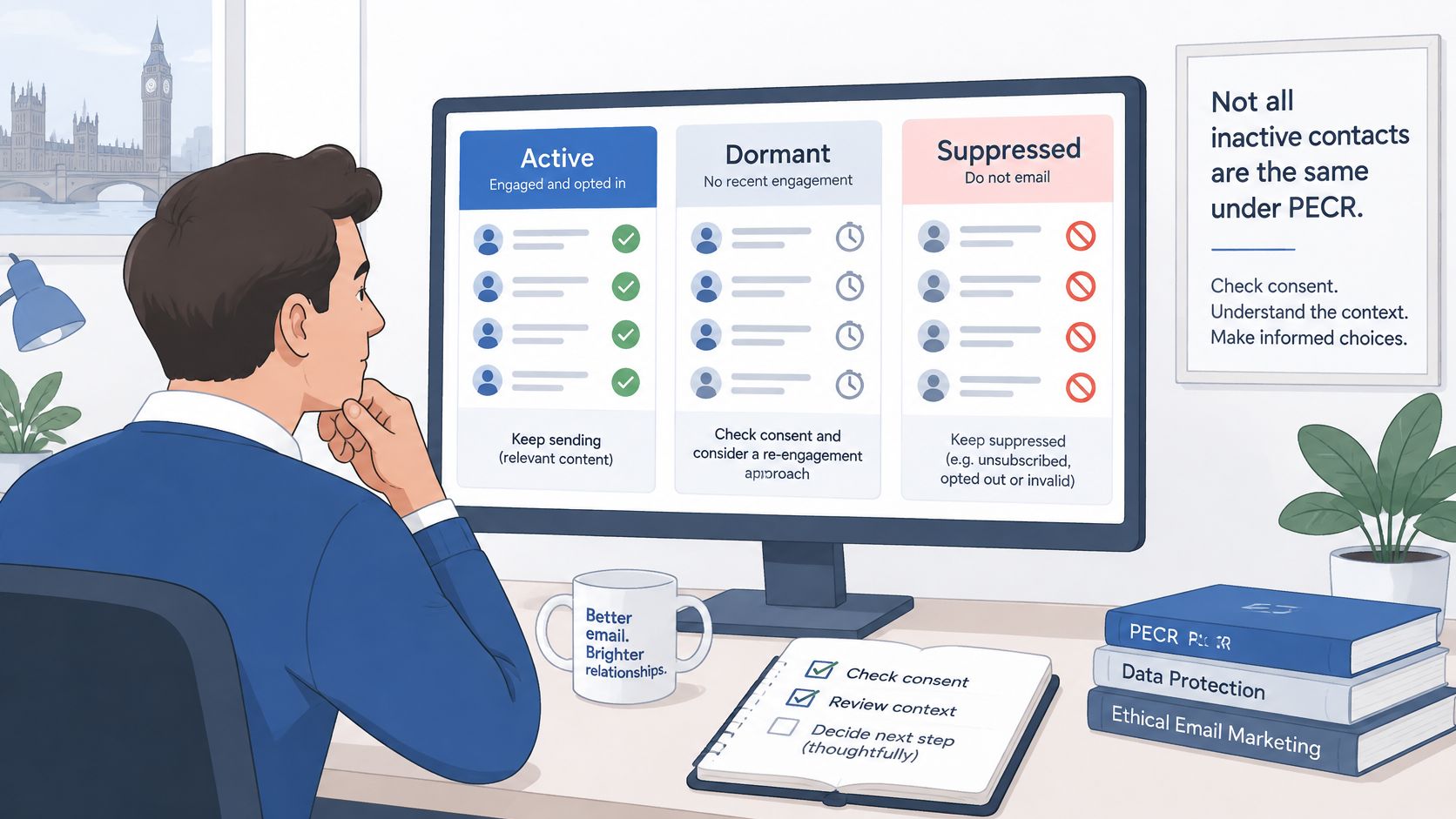
Three states, not one delete pile
Deliverable and consented contacts have a valid address and a clear email opt-in. They stay in regular and promotional segments, with the opt-in date, method and wording stored beside them.
Deliverable but not marketable is a group many teams throw away. It holds people who opted out, objected, withdrew consent, or never gave marketing permission you can prove. Take them off every promotion. Keep them on a do-not-contact list so a later import cannot recreate them. Service messages stay possible only where a separate lawful reason exists.
Undeliverable covers hard bounces, malformed addresses and confirmed invalid mailboxes. Stop sending immediately and still write a suppression entry. Without that entry, the same bad address returns with the next customer export.
PECR generally does not require consent to email corporate subscribers such as limited companies and limited liability partnerships. Data-protection duties still apply where you use personal data, including a named employee's address. A vendor's claim that a purchased or inherited file is "permissioned" is not evidence. Quarantine those rows until you can show consent for that person, that channel and your organisation.
| Group | Who belongs here | Action | Record to keep |
|---|---|---|---|
| Deliverable and consented | Valid address with a clear opt-in for email marketing | Keep in regular and promotional segments | Opt-in date, method and wording |
| Deliverable but not marketable | Opted out, objected, withdrew consent, or no proven marketing consent | Exclude from all marketing; send service messages only where lawful | Suppression entry on the do-not-contact list |
| Undeliverable | Hard bounces, malformed or invalid addresses | Stop sending immediately | Suppression entry so imports do not recreate it |
| Corporate subscribers | Limited companies and LLPs using business addresses | Check data-protection basis before marketing to named employees | Source and any objection on file |
| Purchased or inherited lists | Bought-in or migrated data with no contact-specific consent evidence | Quarantine from marketing and invite a fresh opt-in | Provenance gap and date identified |
A smaller promotional audience is safer only if the people you removed are still on the suppression file.
Validating Addresses and Choosing Bounce Tools
Run validation in three layers so bad addresses never reach a campaign.
At capture, check syntax, that the domain exists, and whether the mailbox looks real before you store the sign-up. Reject role addresses such as info@ and obvious typos such as gmial.com. A double opt-in confirmation filters bots that a syntax check will miss.
On the export, before the first send, push the full CSV through a bulk validator and sort results into valid, risky and invalid. Risky usually means a catch-all domain or a full mailbox. Invalid addresses go straight to suppression. Risky addresses stay in quarantine and only receive a message if that person engaged within the last 90 days.
Say a 50,000-row export flags 1,200 invalid addresses. That share is already past a healthy hard-bounce line, so those 1,200 are suppressed before anyone is mailed. The row count is an illustration, not a benchmark.
On write-back, confirm Klaviyo, or whichever platform you send from, records hard bounces and complaints against the suppression list on its own. After every CSV, open the import log and check skipped rows, not just the success total.
What the tool must return
- Bulk and API: You can validate a full export and new sign-ups without a manual upload each time.
- A status on every row: Valid, risky and invalid are labelled, not buried in a score you cannot explain.
- Your customer ID intact: Suppression matching fails if the output only returns the email.
- Retention you control: Deletion or hashing follows your policy, with UK GDPR data-processing terms in the contract.
How to Clean an Email List Step by Step
Work in a fixed order. Each step exists because the next decision is indefensible without it.
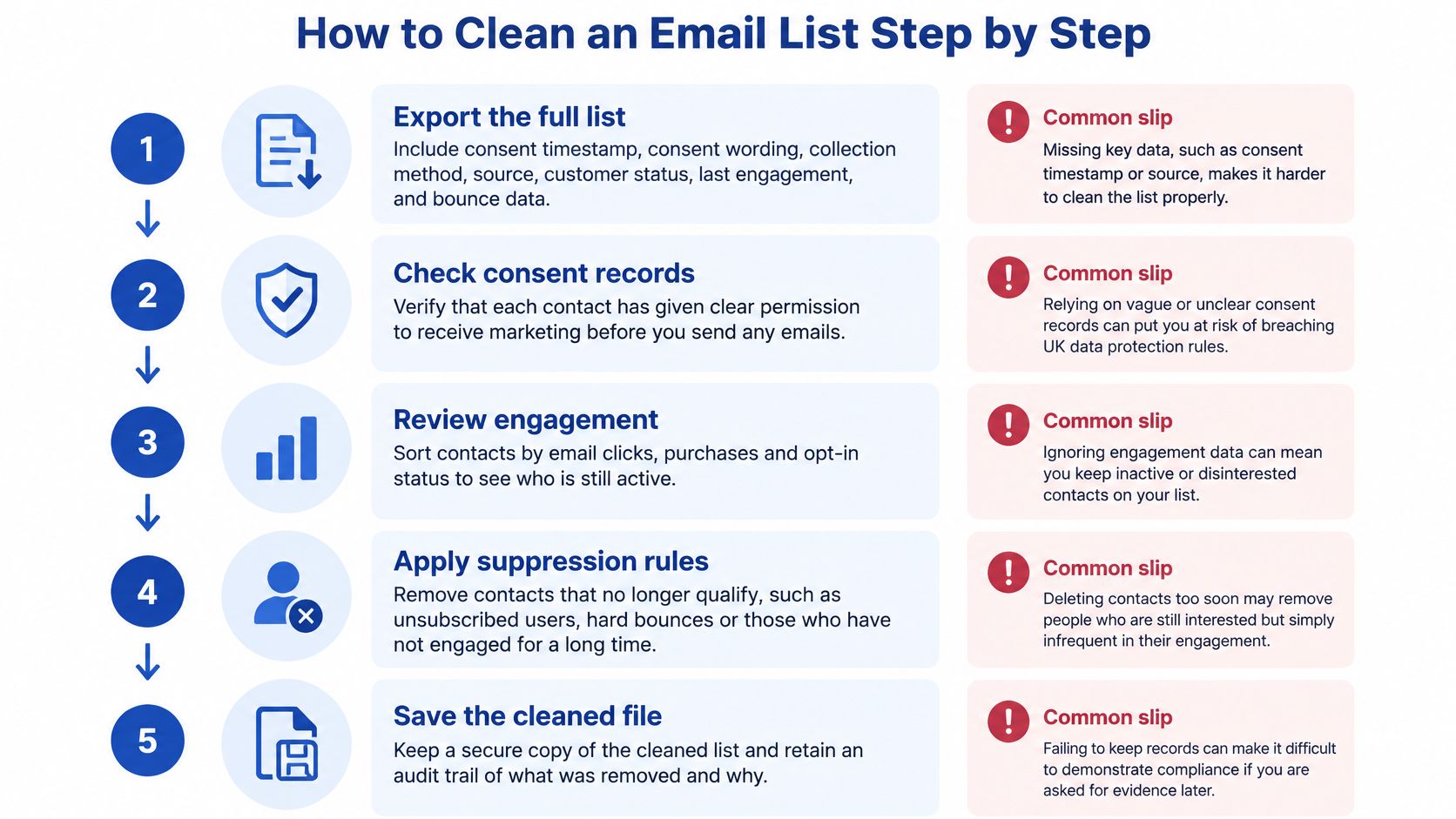
- Export the full list. Pull consent timestamp, consent wording, collection method, source, customer status, last engagement, bounce history and unsubscribe state. The common slip is exporting emails only, then guessing permission later.
- Remove malformed and duplicate addresses. Merge duplicate customers so one person gets one campaign. The slip is keeping two records that carry different consent answers and mailing the looser one.
- Suppress hard bounces at once. Stop further attempts on persistent soft bounces rather than retrying them on every flow. The slip is treating a temporary full inbox as a dead address on the first failure, or the reverse, retrying a dead domain for weeks.
- Sort every remaining record into deliverable and consented, deliverable but not marketable, or undeliverable, and tag the consent basis on the row. The slip is using "customer" as a stand-in for "may receive offers".
- Segment by recency of the last click, purchase or confirmed opt-in before any reactivation. The slip is dropping the whole dormant file into tomorrow's newsletter.
- Screen the audience against the do-not-contact list before every send. Keep opted-out records on that list. The slip, and the one that undoes the clean, is deleting the unsubscribe so you "don't store people who left".
- Log each decision and the evidence behind it, then re-measure after one full send cycle. The slip is cleaning in a spreadsheet that nobody can audit after an ESP change.
What a healthy result looks like
Bounces fall, complaints stay flat, and click-to-delivery rises. Open rate can move for reasons that have nothing to do with the clean, so don't treat it as the score.
If step 1 is missing fields, stop. No later rule can repair a file that never recorded how the address was collected or whether the person said yes to email.
Re-engaging Dormant Subscribers Before You Suppress Them
A subscriber who clicked last month and one who last engaged over a year ago should not receive the same treatment. Use recency to set the next step, while keeping opted-out and non-consented records off marketing sends.
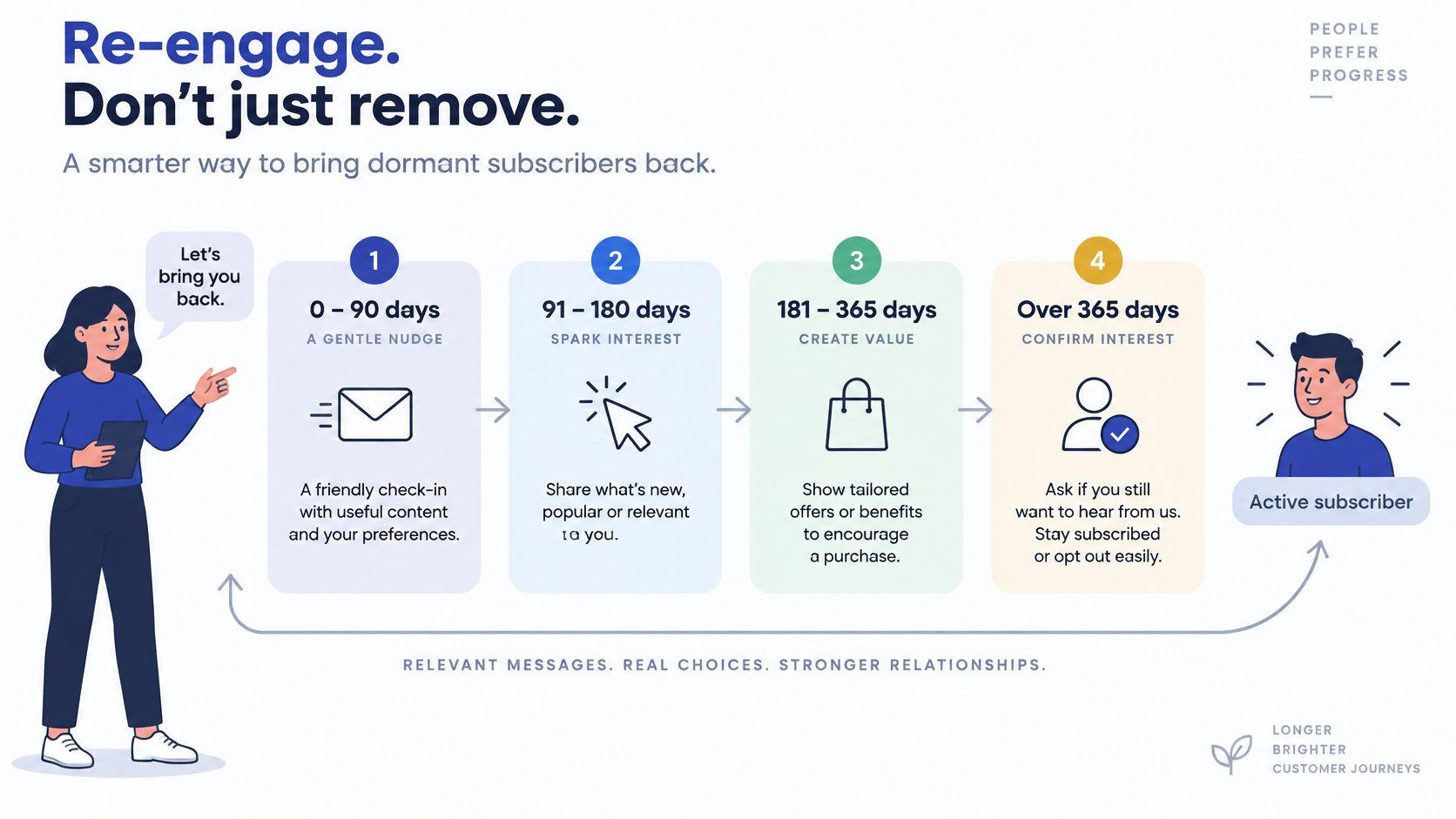
Consent has to match the type of electronic marketing, and a withdrawal or objection must stop that marketing as soon as possible. For subscribers who remain eligible to receive marketing, split by days since the last click, purchase or confirmed opt-in. These bands are a practical way to choose a re-engagement action, not a substitute for checking consent.
| Days since last click, purchase or opt-in | Segment action | Repermission message | Final suppression trigger |
|---|---|---|---|
| 0–90 days | Keep in regular campaigns | Test here first | Hard bounce or complaint |
| 91–180 days | Move to a lower-frequency flow | Yes, after the 0–90 test shows healthy results | Persistent soft bounces |
| 181–365 days | Repermission segment only | Yes, a single message | No click or reply after repermission |
| Over 365 days | Remove from promotions | Final attempt only if the other bands are healthy | No response; keep on the suppression list |
How to move through the bands
Start with the 0–90 day band. Test the repermission message with these recently active subscribers before contacting older groups. Check unique clicks, complaints, unsubscribes, hard bounces and conversions before moving to the next band.
If results are healthy, move 91–180 day contacts to a lower-frequency flow within your lifecycle email marketing. Keep the message direct, with one clear question. Send the 181–365 day band a single repermission message rather than the full campaign calendar. Remove contacts over 365 days from promotions; consider one final attempt only if the newer bands performed well. No response means suppression, not another reminder.
Long-term non-clickers in the 91–365 day bands can receive lower-frequency or repermission messages, depending on their recency. Contacts over 365 days stay out of promotions after any final attempt.
Check the source, not only the date
On Shopify, assess engagement separately by source, such as checkout, newsletter popup, lead magnet, marketplace import and legacy migration. An aggregate rate can hide differences between audiences. A checkout opt-in and a lead magnet signup may have different consent records, so confirm the basis before choosing a campaign.
Keep opted-out and non-consented records on a suppression list rather than deleting them. If marketing fields are removed, retain a hashed or access-controlled suppression key so future imports can be screened without restoring a full profile. Judge the re-engagement by clicks, complaints, hard bounces and revenue per delivered email. Open rate alone is a poor measure because privacy protections can distort it. Review the bands after platform changes and regularly as the list grows.
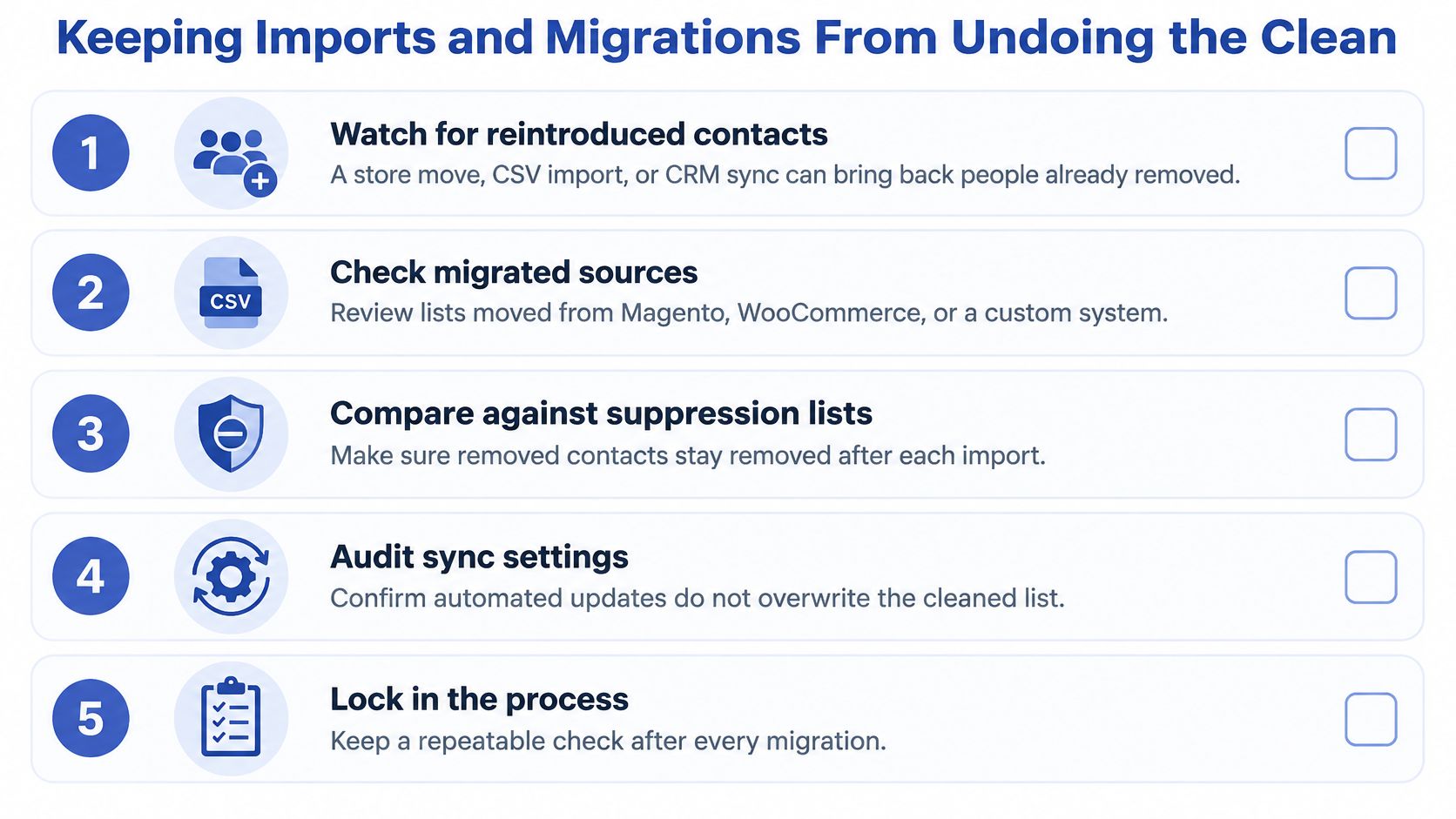
Keeping Imports and Migrations From Undoing the Clean
A store move, a CSV import or a CRM sync is how most cleaned lists get dirty again within months. The address still delivers. The permission does not travel with it.
PECR requires specific consent for marketing email to individual subscribers unless a narrowly defined soft opt-in applies. The ICO's direct marketing guidance states that generic third-party permission is not enough for bought-in lists. Consent has to cover the type of message and, where it applies, the organisation sending it. A Magento, WooCommerce or custom-platform export can be full of valid mailboxes you still cannot use for UK marketing. Build the replacement capture on first-party data collection so the next opt-in names email as the channel.
What to do when consent cannot be proved
Deleting the row can wipe order and service history you still need. Continuing to promote can breach PECR. Keep the customer record for operational purposes, quarantine it from promotional segments, log the provenance gap, and invite a fresh explicit opt-in through a preference centre. The ICO expects a clear record of when and how consent was obtained, and opt-in boxes that name the marketing channel.
Shopify Plus brands merging several storefronts, countries and legacy consent fields have to merge the evidence with the customers. We migrate products, collections, customer accounts, orders, blog posts and images, and we verify that data through multiple rounds of testing before go-live. On subscription moves we keep customer data, subscription schedules and billing history, and the same care applies to marketing status. A technically valid address with a blank consent field stays out of promotions.
Four mistakes that put people back on the list
- Treating a valid address as consent. Deliverability is not permission.
- Importing popup CSVs without a suppression screen. The opt-out from last year is often in that file.
- Trusting opens in the weeks after a move. Privacy tools and a new sending setup both distort them.
- Merging storefronts without merging consent evidence. One audience with three different "yes" fields will mail the weakest one.
Pre-Send Checklist and Decision Rule
Run this before the next campaign, not after the complaint report.
- Check the last send's hard-bounce rate against the healthy line in your benchmark log. If it sits outside that line, pause and re-validate before you schedule anything.
- Confirm every promotional record has consent evidence, or already sits in the not-marketable group. Customers with only a checkout account are not automatically on the offer list.
- Screen the full audience against the do-not-contact list, including the imports from this week. A screen that ran last month does not cover today's CSV.
- Send a seed test to internal addresses and a handful of consented customers before the full audience. Read bounces and rendering there, not in the live report.
Decision rule: if consent evidence is missing for a large share of a migrated list, pause promotions to that group and collect a fresh opt-in before you send again. Schedule a monthly clean while the list grows, and a full re-run after any platform move.
This week, pick the segment with the thinnest consent evidence and quarantine it. If the file is too tangled to untangle in-house, we set up welcome series, upcoming order reminders, re-engagement for at-risk subscribers and win-back flows, and you can scope that at hello@grumspot.com.
Grumspot helps Shopify and Shopify Plus brands keep promotional email inside consented, deliverable audiences, including welcome series, re-engagement and win-back flows that respect suppression. If your list, consent fields or store migration need that work built into the sending setup, talk to Grumspot about a scoped clean before the next campaign goes out.
Want this kind of work on your store?
Send us the URL and what is slowing it down. We look at the store before we reply.
Related posts
Check out some similar posts.