Migrate to Shopify · from WooCommerce
WooCommerce to Shopify migration, with every URL and order accounted for
WooCommerce stores leave because of plugin conflicts, hosting bills and the hours a maintenance update costs. We move the catalogue, the customers, the order history and every ranking URL to Shopify, test it on a staging store, and switch over on a day you choose.
Stores we have moved and builtAll case studies
Happy clients













01Why merchants leave WooCommerce
What WooCommerce costs you that Shopify does not
- 01Plugins that break each otherA typical WooCommerce store runs 20 to 40 plugins from different authors. One update to WordPress or WooCommerce can break checkout. On Shopify, checkout, payments and hosting are one platform with one release cycle.
- 02Hosting, security and PCI are your problemServer sizing, SSL renewals, backups, malware scans and PCI compliance all sit with you or your host. Shopify handles them and takes the Black Friday traffic spike without a server upgrade.
- 03Speed that depends on your theme and your hostPage-builder themes and image plugins push WooCommerce product pages past three seconds on mobile. Shopify’s CDN, image resizing and Online Store 2.0 themes get the same page under two.
- 04A checkout you cannot fully controlCheckout conversion on WooCommerce depends on which gateway plugin you installed. Shopify’s checkout, Shop Pay and one-page checkout are maintained by Shopify and convert higher out of the box.
02What moves
Everything that comes across, and the catch for each
A WooCommerce store is more than its products. This is the list we check off, record by record, before launch.
- Products and variationsVariable products become Shopify variants; attributes become options or metafields. Products with more than 100 variants are split and linked.
- Categories and tagsCategories become collections, including nested ones. Tags carry over and feed Shopify filters.
- CustomersAccounts, addresses and marketing consent. Passwords cannot move between platforms, so customers get an invite to set a new one.
- OrdersFull order history with line items, totals, statuses and dates, so customer service and returns keep working.
- ReviewsWooCommerce native reviews or plugin reviews (Yotpo, Judge.me, WP Review) exported and imported with ratings, names and dates.
- Blog posts and pagesWordPress posts become Shopify blog articles; static pages are rebuilt in the theme. Internal links are rewritten.
- Discount codes and gift cardsCoupons are recreated as Shopify discounts. Outstanding gift card balances are migrated on Shopify Plus.
- SubscriptionsWooCommerce Subscriptions records move to Shopify Subscriptions or Recharge, with the next billing date preserved.
03Feature mapping
Where each WooCommerce feature lands on Shopify
WooCommerceShopify
WooCommerce SubscriptionsShopify Subscriptions or Recharge
WPML / PolylangShopify Markets with Translate & Adapt
Yoast SEONative Shopify SEO fields and JSON-LD in the theme
Elementor / DiviOnline Store 2.0 sections your team edits in the theme editor
WooCommerce BookingsSesami or a custom app
Product Add-OnsLine item properties and Shopify Functions
WPForms / Gravity FormsShopify Forms or Klaviyo forms
Stripe / PayPal pluginsShopify Payments, PayPal, Klarna
04How the migration runs
Five steps, with the old store trading the whole time
- 01Audit and planWe export the plugin list, the URL list from Search Console and the data counts, and give you a written migration plan with a fixed price and a launch date.
- 02Build the Shopify storeTheme design and build on a staging store, with your existing design recreated or improved. Apps are chosen to replace each plugin that mattered.
- 03Migrate and verify dataProducts, customers, orders, reviews and content are imported, then checked record by record against the WooCommerce exports.
- 04Redirects and SEOA full redirect map from old to new URLs, meta titles and descriptions carried across, structured data rebuilt, and the sitemap ready for Search Console.
- 05Launch and watchDNS switches on the day you choose. We watch Search Console, orders and error logs for the first weeks and fix anything the data flags.
05WooCommerce traps
The things that go wrong when this migration is rushed
- 01URL structure changesWooCommerce lets you put products at /shop/product-name or /product-name; Shopify uses /products/product-name. Every old URL gets a 301 to the new one, and we test the top 500 pages from Search Console by hand.
- 02Variant limitsShopify allows 100 variants per product (2,048 on Plus). WooCommerce stores with large attribute sets need products restructured before import, not after.
- 03Customer passwordsPasswords are hashed differently and do not transfer. We time the account-invite email with your launch announcement so customers see it as a new store, not a reset.
- 04Hidden custom codeYears of functions.php snippets and custom plugins do things nobody remembers. We audit the theme and plugin list first and write down what each one does, so nothing silently disappears.
Stores we moved onto Shopify, with the product open so you can judge the result yourself.
Stores we have moved and built
 01€10,000+MRR in the first monthFerma GorataFarm-to-door meat boxes, moved to Shopify with subscriptions straight from the cart. €10,000+ in monthly recurring revenue in the first month.MigrationSubscriptions
 025,000products out of a platform with no exportFluxStoreA Bulgarian footwear retailer moved off CloudCart, a platform with no product export: the catalogue scraped, converted and imported with every size and stock level.MigrationFootwear
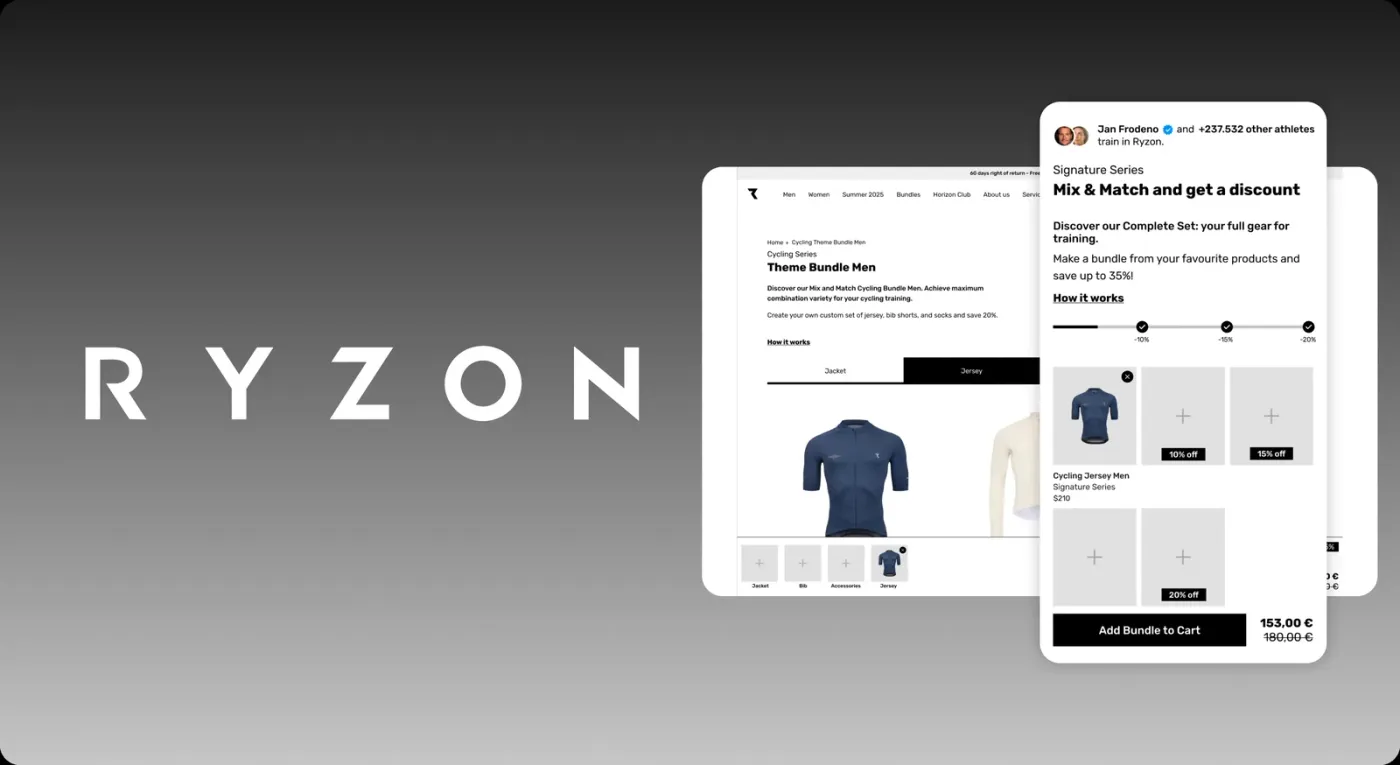 03>80%of orders through the bundle builderRyzonA custom bundle app on Shopify Plus that works like a fitting room: pick the pieces, see the kit, one add to cart.Custom appShopify Plus
They said it on camera
Press play to hear themFounders and managers we worked with, in their own words.

Laura SchlaphorstProduct Owner eShop, Ryzon

Hassan FarhatFounder & CEO, Krafted
Grumspot's team successfully revamped the SEO ReRank app. The team made sure I'm kept up to date on the progress of the project at all times and were very quick to adapt any requested changes.

Mladen GrozevFounder, Meliora Web

Irakli LobjanidzeFounder & CEO, ABsolutely

Michael FenlonCMO, Nutri-Genetix
Very competent team who do the work diligently and professionally while still maintainting an agile approach to accomodating changing business needs.

Matthew WebbCTO, Top Screen Media

Andreas MüllerE-Commerce Manager, Emma & Noah

Martin HanewaldCTO, Simply Legal GmbH
We're impressed with their professionalism and quick reaction times to issues and requests.

Miroslav AntonovCo-Founder, Spoon

Danny ShislerCTO, The Floorr

Divyansh OjhaFounder & CEO, Odd Bunch
We loved working with Grumspot! They created a custom app for our Shopify checkout that fixed our address issue perfectly. Their quick and effective solution made a big difference for us. Highly recommend!

Andreas MüllerE-Commerce Manager, Emma & Noah
Grumspot were exceptionally great to work with. They always offered their best advice and were readily available. I thoroughly enjoyed working with them and highly recommend them.

Yash RanadiveFounder, RealityShop
It has been a pleasure working with Grumspot, and we are extremely satisfied with their services. Their communication was exceptional, and their meticulous attention to detail in data gathering stood out. Grumspot consistently exceeded expectations in their deliverables, completing the project on time and providing unwavering support for any questions our team had. We highly recommend Grumspot for any Shopify Plus projects and look forward to collaborating with them again in the future.

Sam CutroniCEO, DataTools
Working with Grumspot was a pleasure. They were highly professional in their communications and the final work product, even under a tight deadline.

Adam BrecklerCo-Founder and Head of Product @ Better Health
07Testimonials
What it is like to work with us, in their words
Reviews on Clutch and in writing from the founders and managers we worked with.
08Questions
Questions about moving from WooCommerce
Tell us about your WooCommerce store.
Get in touch
Send the URL and the rough size of the catalogue. We will come back with a migration plan, a fixed price and a launch date.