Order Management System Guide for Shopify Brands
- order management system
- Shopify fulfilment
- ecommerce OMS
- returns workflow
- inventory sync
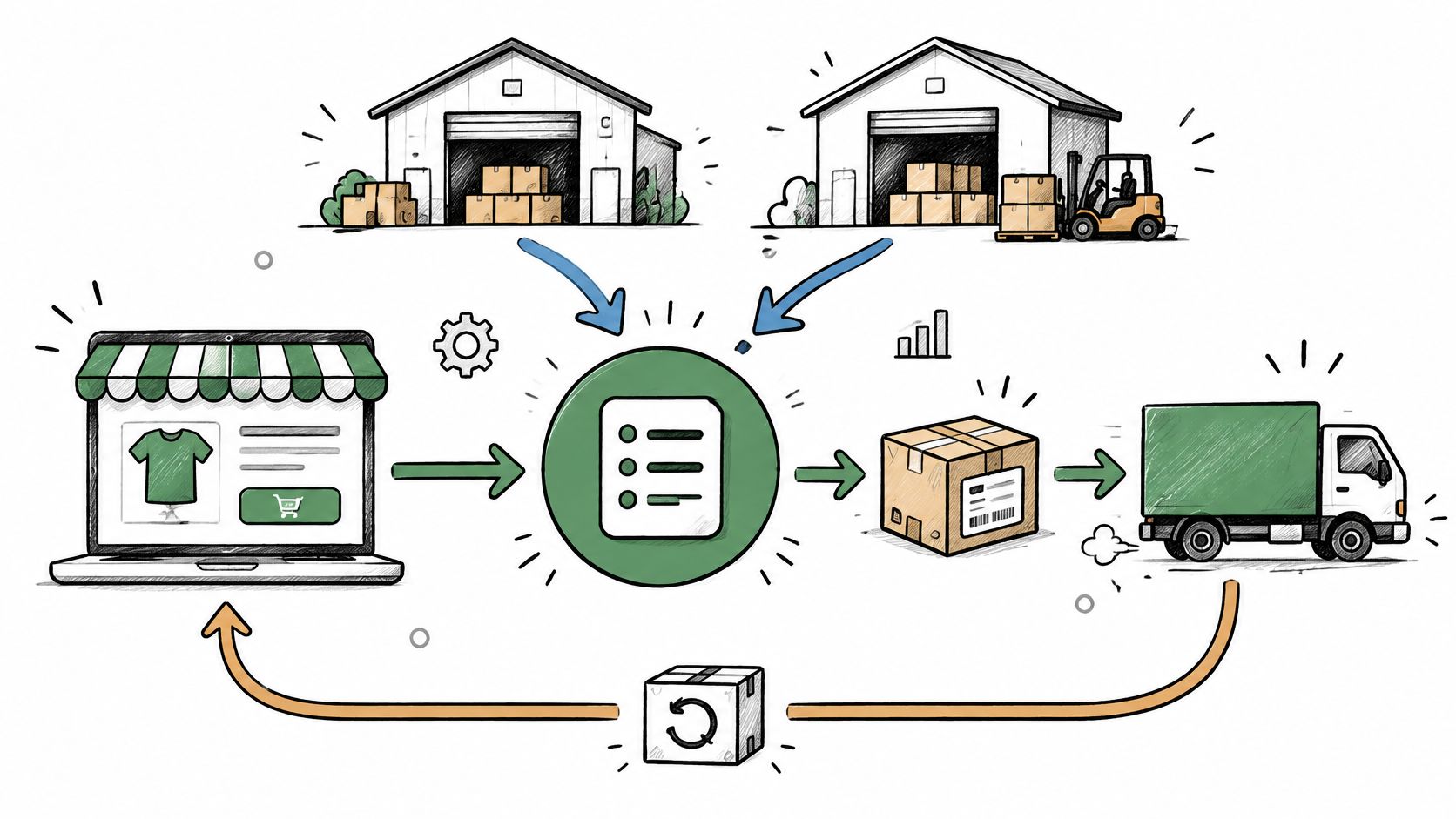
Online orders can have return rates of approximately 30%, compared with less than 10% for in-store purchases, according to the Metapack E-commerce Benchmark report. That changes what an order management system needs to do. Sending a paid order to a warehouse is only part of the job. Keeping the delivery promise, offering a workable exchange and returning inspected stock to sale matter just as much.
For Shopify brands, the useful question isn't whether another dashboard would help. It's whether your team can control what happens when stock, payments, parcels and returns stop moving neatly together.
Table of Contents
- What an Order Management System Actually Controls
- The Order Lifecycle from Payment to Restock
- Capabilities That Keep Stock and Promises Honest
- Running Warehouse Picking and Order Routing in Boostmyshop
- How Shopify Connects to Fulfilment Tools
- Turning Returns into Kept Revenue
- When the Fastest Shipment Is the Wrong Choice
- Assess Your Order Gaps before You Buy
What an Order Management System Actually Controls
In June 2026, online sales represented 29.4% of retail sales in Great Britain, the highest share since April 2021, while online sales values were 14.4% higher than in June 2025, according to the Office for National Statistics retail sales bulletin. Digital orders need operational control, not just a record that somebody has paid.
An order management system, or OMS, coordinates an order's progress across stock, payment, fulfilment and after-sales activity. It decides whether the business can fulfil the promise, where the goods should come from and what should happen when something changes.
Think of a high-street shop. Shopify is the shop window and the till. The OMS is the colleague who checks the stockroom, confirms which branch has the item and establishes a realistic collection or delivery date.
The diagram shows the records that need to work together.
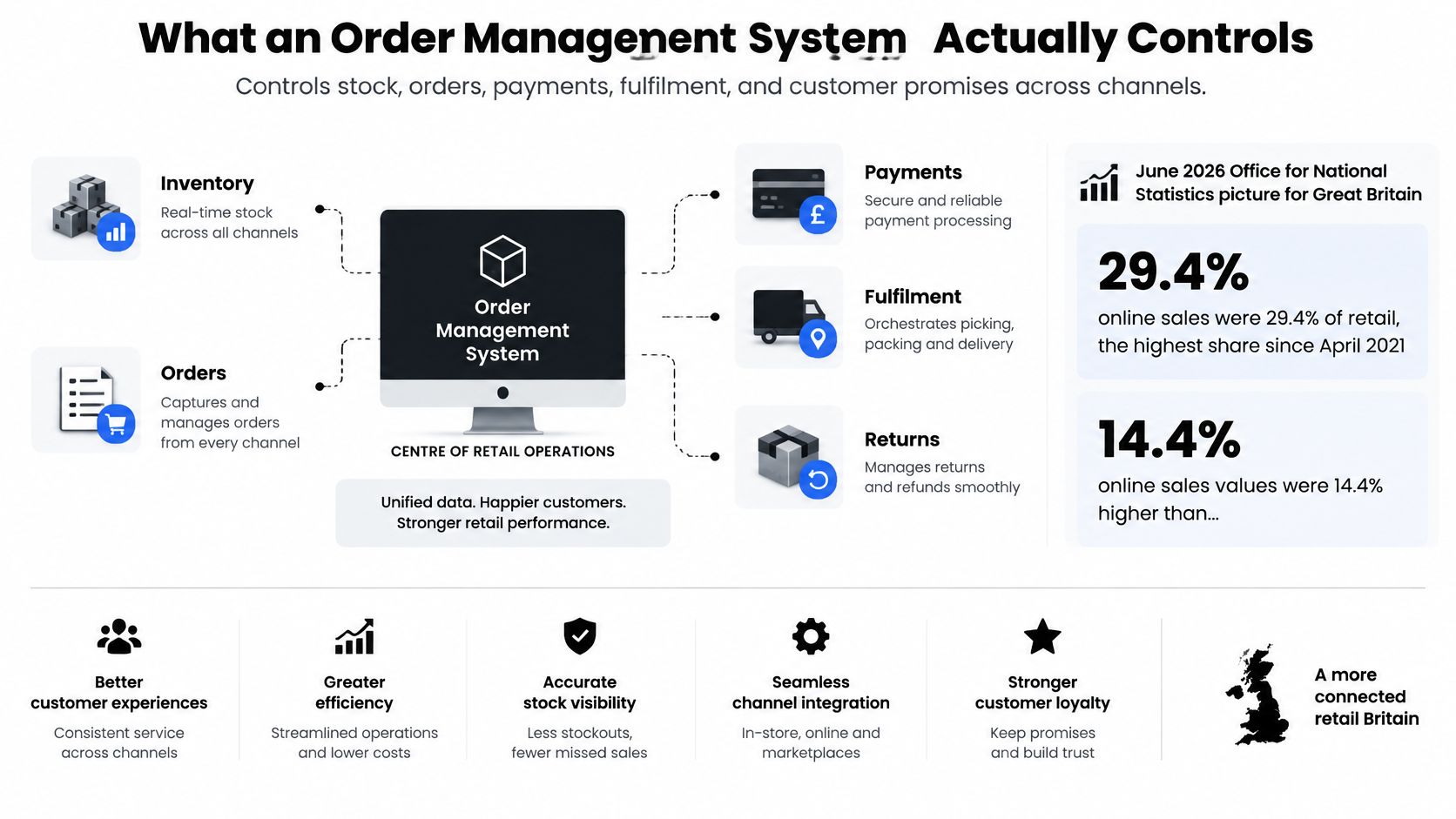
Recording an order isn't controlling it
Say your brand sells the same jacket through separate Shopify storefronts. Each storefront can record a successful checkout, yet both might be relying on the same remaining jacket. A payment record doesn't establish which customer owns the stock reservation.
The OMS needs to see the relevant objects together:
- Demand: Storefront and marketplace orders, including their individual order lines.
- Commercial state: Payment authorisation, capture, cancellation and refund status.
- Stock commitments: Reservations, safety stock and the warehouse or third-party location holding the goods.
- Execution: Fulfilment instructions, carrier choice, dispatch progress and return events.
These aren't interchangeable records. A warehouse may hold an item physically while another order already has a claim on it. Likewise, a paid order may still be waiting for a fulfilment decision.
When Shopify Admin is enough
A brand with a straightforward stock location and uncomplicated fulfilment can often work effectively inside Shopify Admin. Adding separate software without a clear operational gap can give staff another place to check rather than remove work.
Complexity changes the decision. Shared stock, outsourced warehouses and exchanges introduce decisions that must remain consistent across systems, even when staff aren't watching.
Trouble finding an order is an admin problem. Trouble keeping stock, delivery and refunds consistent is an orchestration problem.
The Order Lifecycle from Payment to Restock
Order states an OMS must own
| Stage | Record the system keeps | Failure if missing |
|---|---|---|
| Authorisation | Payment approved, not yet promised | Stock promised before payment clears |
| Allocation | Reserved unit, location and available-to-promise | Same unit sold on two channels |
| Pick and pack | Picker, parcel contents and exceptions | Short picks discovered only after dispatch |
| Dispatch | Carrier, tracking identity and ship time | Customer sees paid but no movement |
| Delivery | Attempt, collection or failure | Failed drops stay invisible until a complaint |
| Return | Original line, reason and item condition | Refunds and exchanges cannot be told apart |
| Refund and restock | Money outcome and sellable or quarantine decision | Returned stock stays unsellable or faulty units go live |
Read this as a map of evidence, not just a list of labels. Staff should be able to establish what happened, which item it affected and what the system is allowed to do next.
Payment authorisation generally confirms that a payment can proceed; it isn't necessarily capture or settlement. The order still needs a valid allocation before the business treats the goods as promised. For allocation, available-to-promise means stock remaining after existing commitments and exclusions have been accounted for.
Keep state at order-line level
An order doesn't always have a single useful status. Say a basket contains a coat and a scarf, but they leave from different locations. The coat can be dispatched while the scarf is still awaiting a pick.
If the OMS marks the whole basket as shipped, the customer may reasonably assume both items are coming together. Store line-level quantities and shipment identities, then calculate the overall order status from those records.
The same discipline matters for a partial refund. Keep the original order-line identifier attached to the return so staff don't have to infer which product, discount or tax amount belongs to it.
Handle changes before releasing stock
A cancellation after picking requires more than changing the order label. The warehouse must stop the parcel, confirm where the item is and release its reservation before another channel can sell it. If the parcel has already left, the workflow needs interception or a return, not a fictional cancellation.
Use these checks when reviewing your current process:
- At dispatch: Confirm that the tracking record belongs to the parcel handed over, not merely a label somebody printed.
- At receipt: Record the returned item's condition before making it sellable.
- At refund: Preserve the money outcome separately from the physical stock outcome. Refunding a customer doesn't prove that the item is back in the warehouse.
Mark the first stage your team currently tracks in a spreadsheet or inbox. That's the first gap to investigate, because every later status relies on the accuracy of what happened before it.
Capabilities That Keep Stock and Promises Honest
Automation isn't the same as visibility. Only about one-third of surveyed retailers reported excellent visibility across channels and warehouses, while 64.8% described their operations as mostly or highly automated, according to Ecommerce News UK's coverage of the Linnworks report.
An automated workflow can accept orders against an outdated stock feed just as efficiently as a correct one. The priority is a trustworthy shared figure, supported by the controls described in multi-channel inventory management.
Calculate what customers may actually buy
Available-to-promise is the number a storefront is allowed to show: on-hand stock minus reservations, safety stock, damaged units and quantities already moving between sites. Define these buckets carefully so a transfer or damaged unit isn't deducted twice.
This model separates physical stock from stock the business can safely promise.
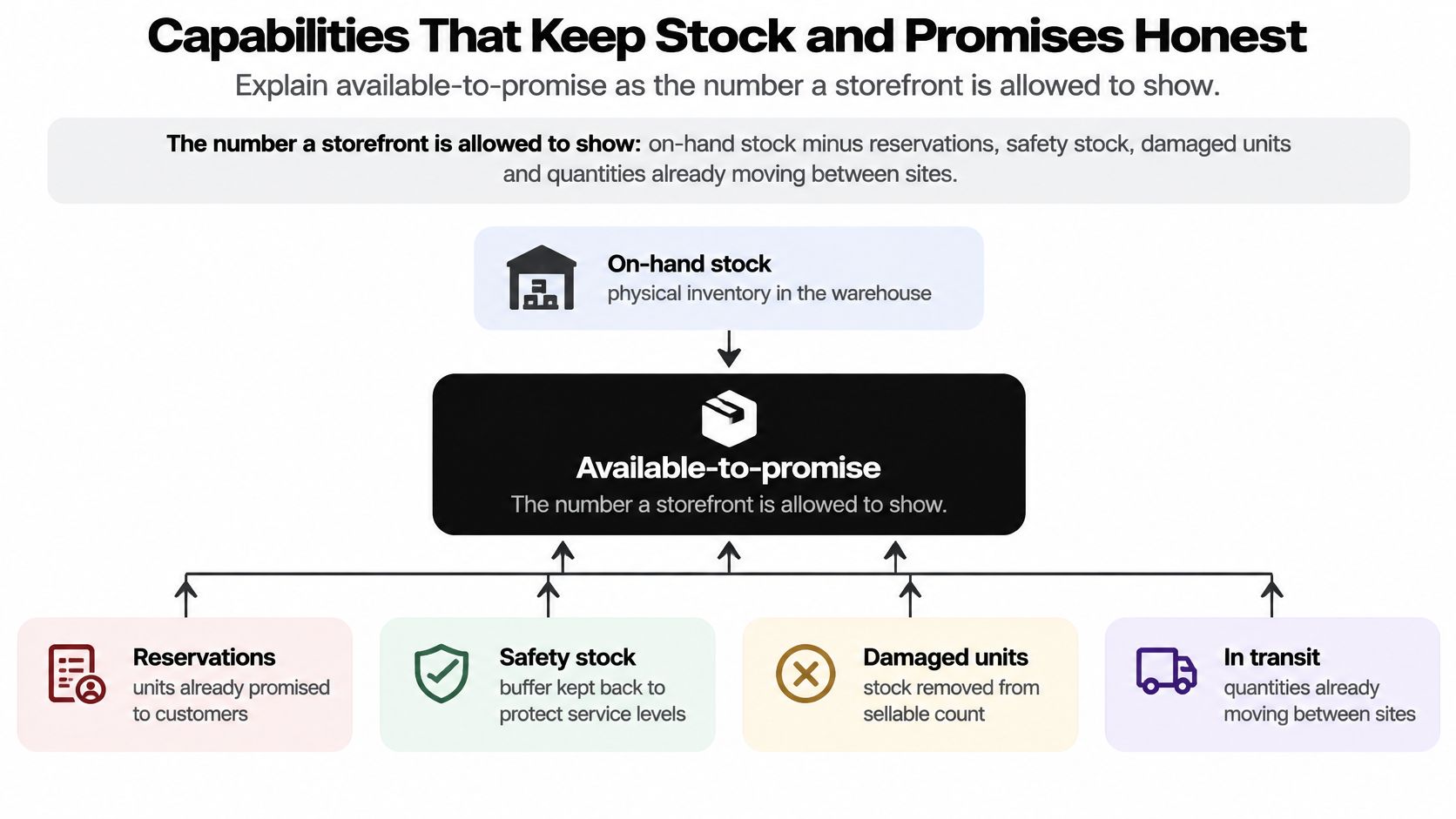
For example, a London order might be allocated to a distant warehouse because the nearer location's feed hasn't refreshed. If the basket then needs separate dispatches, the customer gets an unwanted split even though suitable stock was nearby.
Allocation should weigh warehouse proximity, the promised service deadline, shipping cost, inventory risk and basket completeness. Don't let the system choose a location solely because that location returned a positive stock count.
Core OMS capabilities and the monitor each needs
| Capability | Core control | Monitor to watch |
|---|---|---|
| Available-to-promise | On-hand stock minus reservations, safety stock, damaged units and open transfers | Inventory-feed age |
| Allocation | Node choice by proximity, deadline, shipping cost, inventory risk and basket completeness | Allocation-failure rate |
| Order release | Recheck of available-to-promise before release to a location | Order-release latency |
| Split handling | Keeps a basket together or splits it on purpose | Split-order percentage |
| Exception handling | Cancellations, short picks and failed drops routed to a named owner | Exception backlog by channel and warehouse |
| Integration safety | Idempotent APIs, webhook retries, reconciliation and audit log | Oversell rate and duplicate-order count |
Make integration failures recoverable
Idempotent APIs allow a repeated request to produce the intended result without creating another order. Webhook retries recover missed messages; reconciliation jobs compare records across systems; an audit log shows what changed and why.
Set a fallback for stale inventory too. That might mean withholding the affected location from allocation until its feed recovers, rather than continuing to promise uncertain stock.
Use the accompanying video alongside your workflow review.
Practical check: Write down the age of your current inventory feed. If nobody can establish it, adding more automation won't make the stock promise trustworthy.
Running Warehouse Picking and Order Routing in Boostmyshop
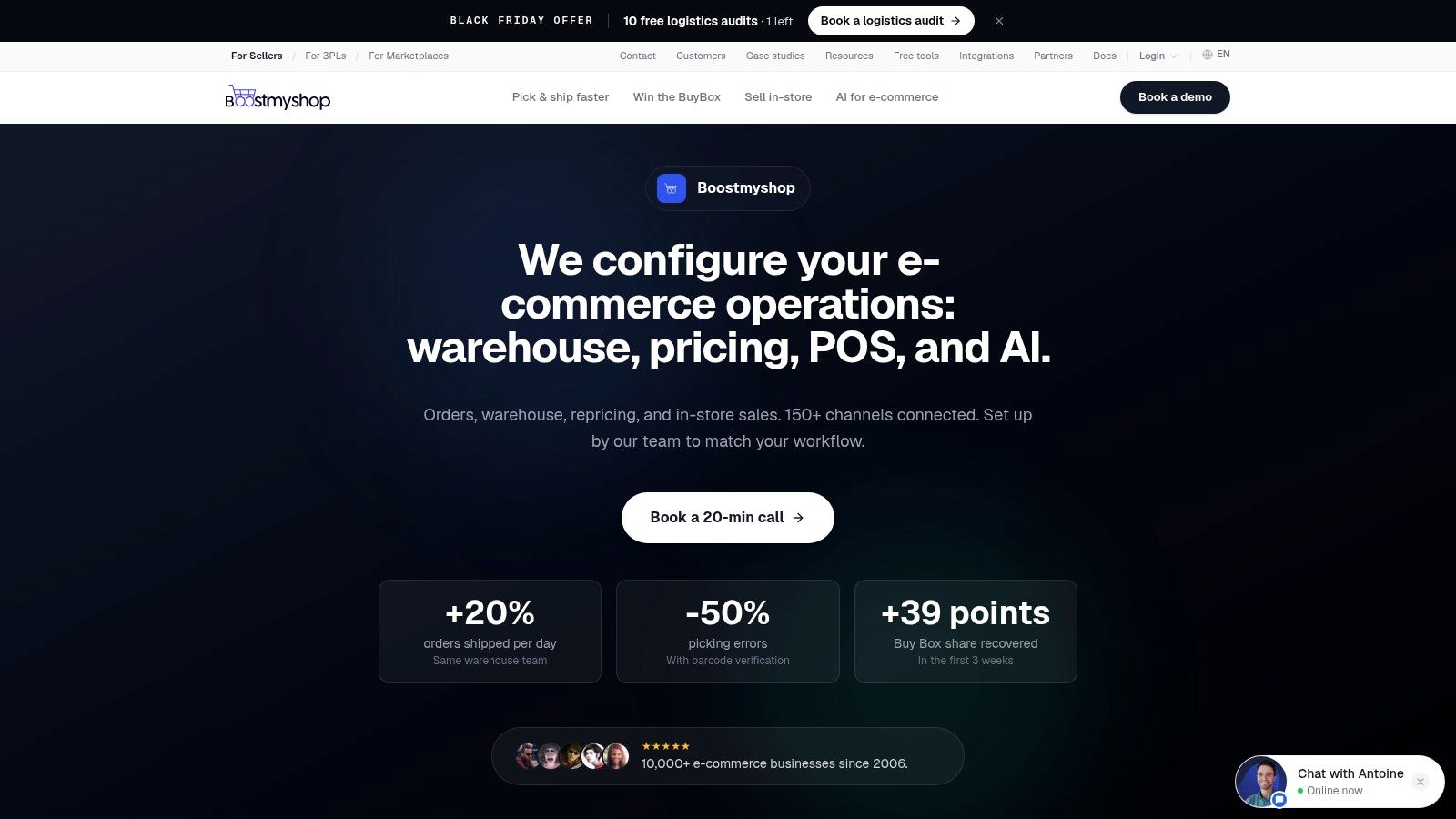
Boostmyshop combines warehouse and order management through myFulfillment, alongside myPricing for repricing, myWebPOS for connected point of sale and AICommerce for AI workflows. Its OMS e-commerce guide is useful context for assessing how centralised order control relates to warehouse execution.
For a Shopify operator, the important question is whether the platform closes a specific handoff, rather than whether every module is relevant. The interface provides a starting point for reviewing that operational scope.
Match the tool to warehouse work
Walk through the handoffs with a representative order:
- Storefront capture belongs to Shopify. Preserve the customer's order and payment context.
- Order control belongs to the OMS. Review whether the order can be released and which location should fulfil it.
- Picking belongs to myFulfillment. Barcode-verified wave and batch picking help staff check physical items against the requested goods.
- Shipping belongs to the configured dispatch workflow. Carrier rules and label generation should follow the parcel's actual contents and service requirements.
- Shop availability belongs to connected inventory. If using myWebPOS, test how counter sales and collection reservations affect the same stock.
- Accounting belongs to the finance system. Establish which shipment, return and adjustment records it receives, and how exceptions are reconciled.
The platform is most relevant when staff need structured warehouse execution as well as order routing. Batch picking, barcode checks and connected store stock address different problems from displaying orders together.
Make the demonstration prove the fit
Ask for a short pick, a cancelled picked order and a stock discrepancy to be demonstrated. Inspect what the operator sees, who owns the exception and what gets written back to Shopify.
Don't treat repricing or AI features as reasons to replace a warehouse workflow that already works. Assess implementation support, staff training and integration responsibilities against your actual process, without assuming a particular payback or a guaranteed elimination of overselling.
How Shopify Connects to Fulfilment Tools
A paid Shopify order needs a reliable path through the systems that act on it. Installing an app doesn't, by itself, establish who owns each decision or whether every downstream record receives the same update.
The distinction between an OMS and a warehouse management system, or WMS, helps. The OMS decides what should be fulfilled and where. The WMS directs the physical work of locating, picking and packing it; some platforms combine both roles.
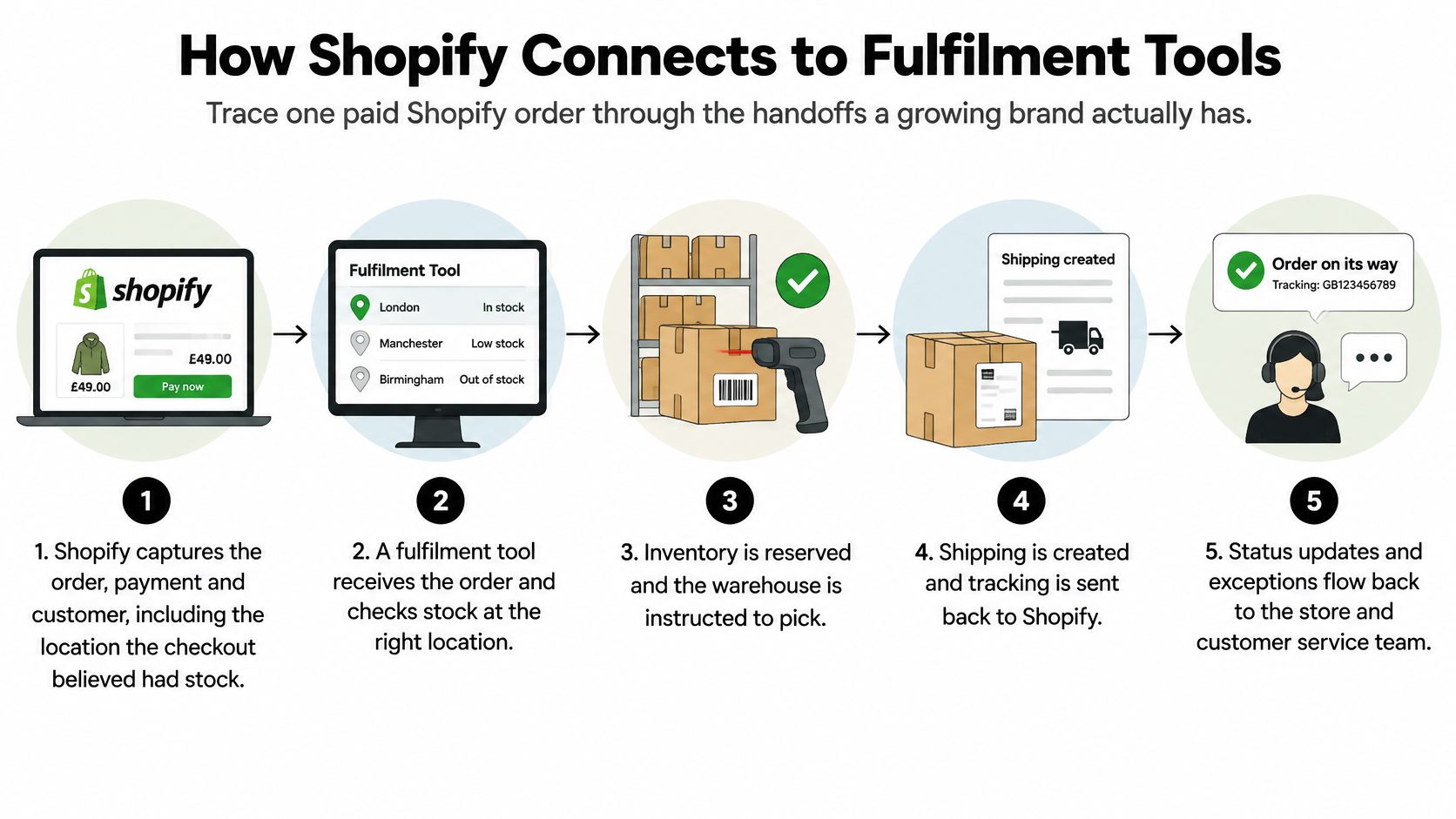
This flow illustrates the main operational handoffs.
Follow the order rather than the app list
Shopify captures the products, customer and payment context, including the location information used during checkout. A webhook, which is an event notification, or a scheduled synchronisation passes the relevant order details to the OMS.
The OMS validates the order for release and sends a fulfilment request to the selected Shopify location, retail back room or third-party logistics provider, usually called a 3PL. The warehouse then returns execution events, including picking exceptions, packing completion and tracking details.
Those events must reach Shopify and the customer-facing account or tracking view. Finance also requires the corresponding shipment and refund events so its stock valuation and cash records do not depend on an unrelated export. Deliberate ecommerce ERP integration matters more than just connecting another app.
Test shared stock and inconsistent updates
Say a UK Shopify store and a separate market store sell from the same pool. A sale through either storefront must affect the shared reservation record before the other storefront accepts a conflicting promise. Marketplace orders are another inlet to that pool, not a separate stock reality.
Look for these brittle connections:
- CSV by email: A fulfilment app sends an export, but nobody can establish whether the warehouse accepted every row.
- Unreconciled 3PL portal: Staff check a separate portal when customers complain, rather than receiving exceptions automatically.
- Partial status updates: Shopify shows dispatch, but the customer email or account still shows processing.
- Disconnected finance export: A shipment adjustment reaches operations but never reaches the ledger.
Record the event owner, receiving system and failure route for each connection. A successful API response isn't enough if the receiving system hasn't accepted the business action.
Sketch your current path on a page and circle every place a person retypes an order number. Those circles identify manual handoffs worth testing before you consider a broader platform change.
Turning Returns into Kept Revenue
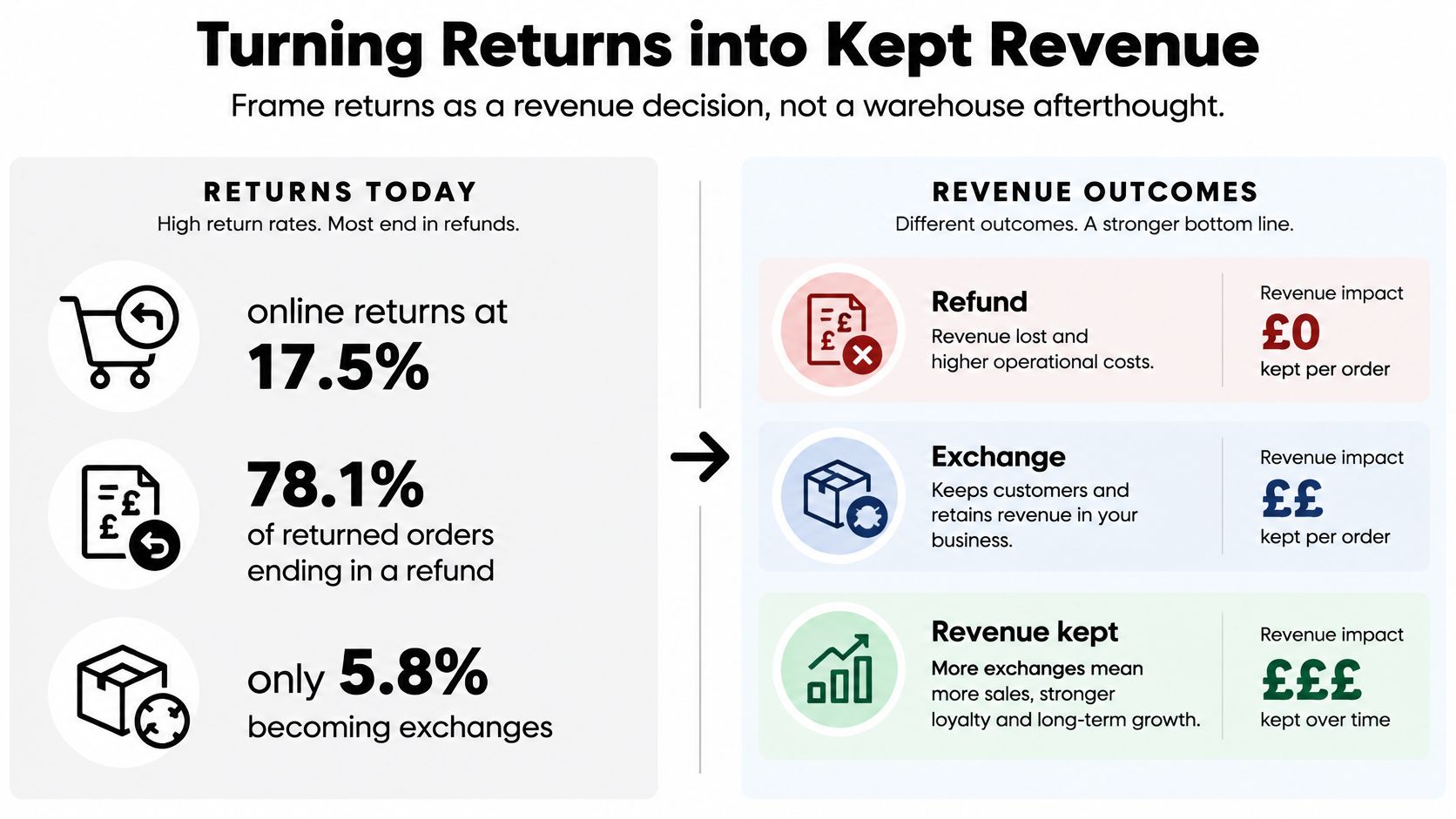
A return isn't automatically a lost sale. The UK pattern described by NetSuite's retail returns guide includes 78.1% of returned orders ending in refunds and only 5.8% becoming exchanges, the lowest exchange rate among the regions studied.
That makes exchange conversion an operational question, not just a customer-service script. Staff can't offer a credible replacement if they can't reserve it, establish eligibility or explain what happens to the original payment.
The comparison below captures the commercial choice without treating every return as suitable for an exchange.
Run decisions in a deliberate order
Start with eligibility and fraud signals, applying the retailer's policy and applicable consumer rights. A fraud flag should route a case for appropriate review, not block a legitimate refund.
Then assess the item's reported condition and confirm its condition on receipt. Check whether a suitable exchange is available before presenting it as a firm option.
A workable decision sequence is:
- Eligibility and review: Identify the original purchase, requested resolution and any exception requiring a person.
- Condition: Distinguish an unworn item from a damaged, used or incomplete one.
- Exchange availability: Reserve the replacement across channels when the customer chooses it.
- Refund timing: Apply the appropriate refund trigger and communicate it clearly.
- Physical disposition: Route the received item to sellable stock, repair, resale assessment or quarantine.
Good ecommerce returns management connects these decisions rather than treating a returns portal as the whole solution.
Compare recovery with automatic refunds
Say a customer returns an unworn medium jumper because they need a large. If they want an exchange, the OMS should secure the large before completing that exchange promise. Offering it without a reservation creates another potential disappointment.
A damaged jumper needs a different path. Staff may arrange a replacement or refund, but the received unit must remain outside sellable inventory until inspection establishes an appropriate disposition.
For a basket containing several products, keep the return attached to the affected line. Refunding the jumper shouldn't cancel the remaining items, erase their fulfilment history or reverse unrelated stock movements.
Fewer service tickets aren't proof of a better returns process. Automatic refunds can reduce handling while removing a viable exchange opportunity.
Measure return-cycle time, refund latency, restock accuracy, the share of returned units recovered for resale and stock availability after receipt. Review recent returns and identify cases where the customer wanted another size or colour but staff couldn't secure it.
Keep the customer's choice explicit. Revenue recovery works when the replacement solves their problem, not when the workflow makes a refund unnecessarily difficult.
When the Fastest Shipment Is the Wrong Choice
The best fulfilment choice is the one your team can honour, not automatically the fastest service name at checkout. UK delivery failures cost retailers approximately £1.6 billion annually, with an average failed-attempt cost of £11.60, according to Carriyo's UK ecommerce delivery overview.
A customer who can't receive a parcel during the offered window may prefer collection or a later date. Your OMS needs enough context to support that choice and recover when the original plan fails.
Fulfilment choices when speed is not the goal
| Choice | Best when | Trade-off to show |
|---|---|---|
| Ship from store | Nearby stock can hit the promised window | Store staff time and lower shop availability |
| Split shipment | A line sits in another node and the date matters | Extra carrier cost and separate delivery experiences |
| Click and collect | The customer wants a place more than a van | Unit must be reserved so the shop cannot sell it |
| Consolidate and delay | Combined shipping protects margin | Promise date must be rewritten before the customer chases |
| Carrier reroute | The first attempt failed | Failed-attempt cost plus a new slot |
A split can protect a promise or waste margin
During a hypothetical peak week, a customer orders a gift and a household item. The gift is available locally, while the household item is elsewhere. If the customer agrees, separate dispatches can preserve the gift deadline without pretending that the whole basket will arrive together.
Now consider a low-margin basket with no urgent deadline. Splitting it purely because the routing software found separate stock locations can add handling and carrier charges without improving the customer's outcome. Holding the basket for consolidation may be the better decision, provided the revised date is accepted and visible.
Neither response is universally correct. The system needs to expose the trade-off before staff release the order.
Give exceptions a decision owner
Each option needs live inventory, the promised-delivery timestamp, margin by fulfilment option, customer priority and an exception threshold. Store labour capacity matters too when the proposed fulfilment location is a shop rather than a dedicated warehouse.
Assign a named owner when the threshold is breached. For example, a missed carrier collection should create a task to review the affected promises, not merely add another tracking event.
- For collection: Confirm that the item is physically ready before telling the customer to travel.
- For a revised date: Update the operational record and customer communication together.
- For rerouting: Keep the original order and shipment relationship intact rather than creating a replacement sale to hide the failed attempt.
Delivery certainty also requires consistent answers across the website, shop and phone team. A customer shouldn't receive a different promise because they asked through another channel.
Which of these fulfilment choices can your team execute today without opening a side spreadsheet?
Assess Your Order Gaps before You Buy
Stay in Shopify Admin, add a focused app or build connected order logic. Choose according to the operational gap, not the length of a vendor's feature list.
Shopify Admin can remain enough when stock is straightforward, returns are manageable and staff can explain an order without opening another file. A focused app makes sense when a single problem dominates, such as tracking communications, and the underlying inventory is already trustworthy.
Score the missing controls
Use this as an operational triage checklist, not a universal buying threshold:
- Unknown feed age: Nobody can establish how current the stock figure is.
- No exchange path: Staff can refund but can't reliably reserve a replacement.
- Spreadsheet promises: Delivery changes aren't recorded where fulfilment decisions happen.
- Delayed finance records: Shipments and refunds reach finance through manually handled files.
Several serious gaps point towards integration design rather than another dashboard. Write a short brief covering order sources, stock locations, permitted fulfilment routes, return decisions and the statuses customers need to see.
Test that brief against actual orders. Establish whether staff can trace payment, fulfilment and any refund without retyping identifiers or reconstructing events from emails.
Bring that brief and a representative problem order to a working session with Grumspot. We've built ERP, fulfilment and CRM integrations with automated tagging, real-time syncing and custom backend logic; we can also synchronise inventory across stores or tailor availability by market, and connect real-time shipping rates and tracking updates to the customer dashboard. Start with the broken handoff, then define the connected workflow before choosing the software.
Want this kind of work on your store?
Send us the URL and what is slowing it down. We look at the store before we reply.
Related posts
Check out some similar posts.
- ecommerce returns management
Master ecommerce returns management with a step-by-step playbook covering policies, tech stacks, wor...
Read more