Shopify for Blogs: Pros, Cons and When to Choose It
- shopify for blogs
- Shopify blogging
- WordPress vs Shopify
- headless blog setup
- Shopify Plus SEO
Launched
October, 2026

The usual advice about Shopify for blogs starts in the wrong place: choose a theme, publish regularly and add product links. None of that tells you whether the article template is slow, whether readers can use its forms or whether anyone can connect editorial visits to purchases. A Shopify blog deserves the same scrutiny as a product page, because it's part of the same buying journey.
Why Shopify Is Now a Serious Blogging Option
Calling a Shopify blog a home for company news understates its commercial role. A buying guide can help someone choose between materials, understand compatibility or decide whether a premium product suits their needs. Those are purchase decisions, not mere awareness activities.
The commercial context matters. Online spending represented 25.7% of Great Britain's retail sales in February 2024, with online spending values 2.2% higher year on year, according to the ONS retail sales bulletin. That doesn't prove blogging generates sales. It establishes a substantial online-shopping environment in which useful editorial content can support product discovery and evaluation.
Start with the purchase question
A useful brief begins with a customer's uncertainty rather than a publishing target. For a homeware retailer, that might mean explaining how to choose a dining-table finish. For a skincare brand, it might mean clarifying the differences between product textures without making unsupported health claims.
The commercial destination should follow naturally from the answer:
- Comparison content should direct readers towards the relevant alternatives, not the entire catalogue.
- Care guides should explain ownership clearly, with accessories included only where they genuinely help.
- Selection guides should connect buying criteria to an appropriate collection or product.
Practical rule: If the only route from an article to a relevant product is the main navigation, the editorial journey isn't finished.
Define success before commissioning content
Pageviews alone can't tell an ecommerce manager whether the blog deserves further investment. Set up a measurement plan around article landing sessions, product engagement, email capture and commercial outcomes, with clear definitions for each.
Keep attribution honest. An article read before a purchase may have helped, but an assisted conversion isn't proof that the article caused the sale. Compare content performance by intent and acquisition channel rather than treating every visit as equally valuable.
The strongest case for Shopify is therefore operational: editorial content belongs close to the products it explains. Whether the native blog is the right implementation depends on the publishing requirements, template quality and people available to maintain it.
How Shopify Blogging Works Out of the Box
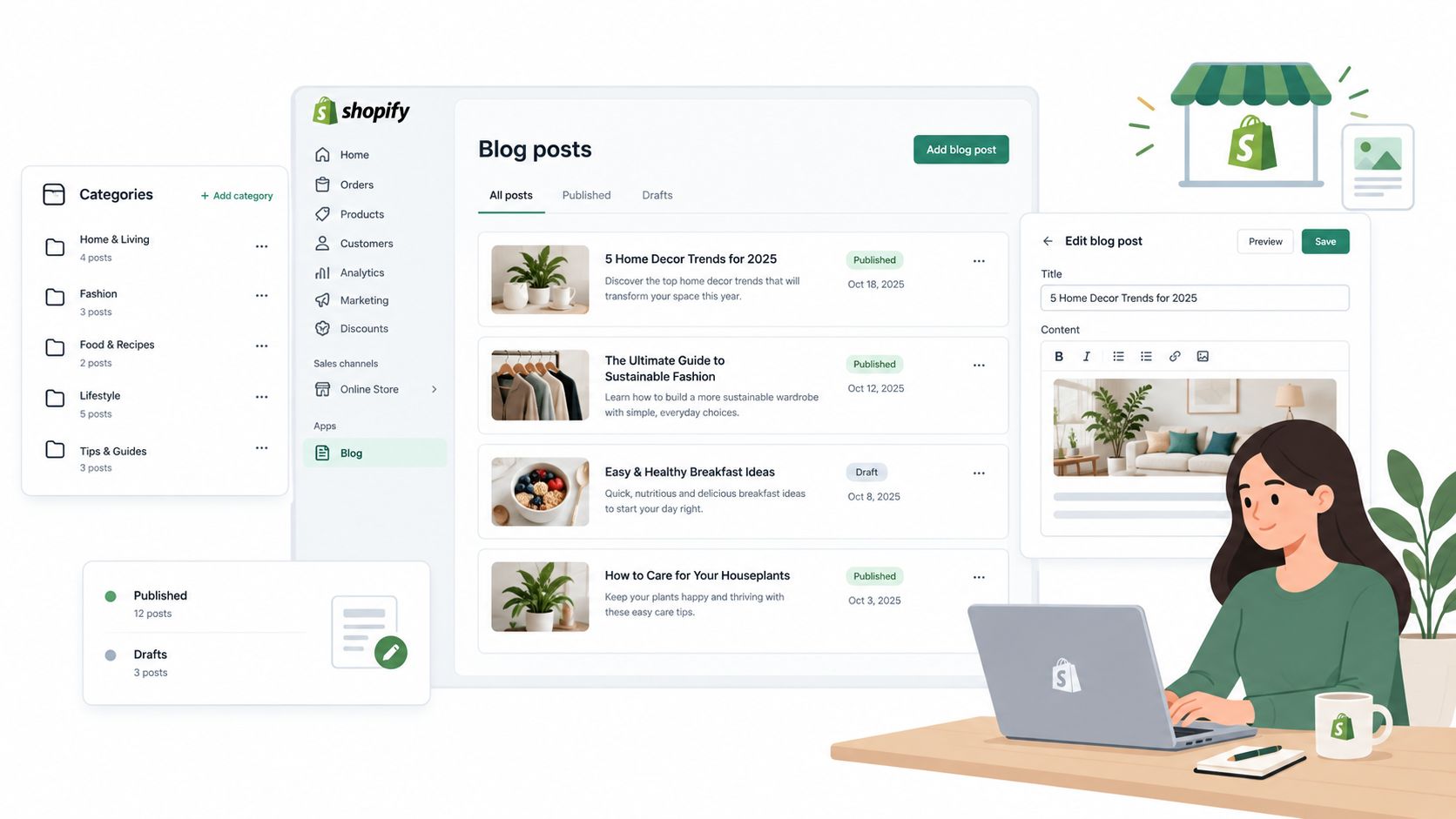
Start with the distinction between a blog and an article. The blog groups related posts; the article is the individual page someone reads. Treat those as separate design tasks, because a useful archive and a useful reading experience need different layouts.
The publishing workspace is only part of that system.
Separate article content from template design
A merchant can handle routine drafting, headings, imagery, excerpts and search listing copy through the admin. The theme determines how that content appears, including the reading width, title treatment, author information and surrounding merchandising.
Keep this separation deliberate. Writers shouldn't need to paste layout code into an article to achieve a standard design. Equally, a designer shouldn't need to change the shared template whenever an editor wants to replace a paragraph.
Use a straightforward publishing sequence:
- Create the article around a defined customer question and choose its appropriate blog grouping.
- Structure the content with descriptive headings, relevant imagery and meaningful link text.
- Select the template that fits the article's purpose, then preview the actual storefront presentation.
- Check the next action so readers can continue to a useful collection, product or related guide.
Know where theme work begins
With Shopify 2.0, reusable sections and templates provide a practical foundation, but the available controls depend on the theme implementation. Don't assume a theme's flexible homepage means its article template offers equally useful editing options.
An editor can usually work within existing controls. Custom author components, specialised comparison layouts, structured product references and changes to structured data are better treated as development work.
For product-led articles, favour reusable merchandising blocks over manually styled product cards pasted into the body. Where appropriate, store product references as structured fields so the template can render them consistently. A developer should define what happens when a referenced product becomes unavailable.
A good article template gives editors useful choices without asking them to become front-end developers.
Avoid building a separate layout for every campaign. Maintain a small set of purposeful templates, such as buying guides and instructional articles, and document when to use each.
The native starting point is suitable for straightforward commerce publishing. More demanding editorial requirements should be written down before adding apps or commissioning custom components, otherwise the team risks solving the same layout problem repeatedly.
Shopify Compared with WordPress and Headless Setups
Choose an architecture against actual editorial requirements, not a general claim that one platform is better for SEO. A DTC brand publishing product advice has different needs from a publication managing complex contributor workflows.
Shopify, WordPress and headless blogging compared
| Criterion | Shopify blog | WordPress blog | Headless blog |
|---|---|---|---|
| Editorial flexibility | Suits commerce-led articles | Strong candidate for publication-led workflows | Can support bespoke content models |
| Template control | Theme and Liquid development | Theme and plugin development | Front-end engineering |
| SEO configuration | Storefront configuration and theme work | Configuration across themes and plugins | Implementation owned by developers |
| Commerce data | Close to the store catalogue | Requires deliberate commerce integration | Requires API and data-model planning |
| Performance budget | Govern theme code and apps | Govern themes, plugins and hosting | Govern rendering, scripts and delivery |
| Maintenance | Relatively contained storefront responsibility | Additional publishing-stack responsibility | Ongoing engineering responsibility |
| Team fit | Ecommerce team with theme support | Dedicated editorial and technical owners | Product team with engineering capacity |
Where the native blog makes sense
For a merchant whose articles primarily explain products, Shopify is a sensible default. The team can design editorial experiences within the storefront rather than manage a separate publishing environment.
The trade-off is editorial freedom. Bespoke approval flows, elaborate contributor profiles and complex relationships between content types may require custom work. Before commissioning that work, ask whether those requirements improve the customer experience or merely reproduce a familiar publishing interface.
Don't confuse fewer configuration options with weaker content. A clear buying guide in a restrained template can serve shoppers better than an elaborate editorial layout with distracting widgets.
When a separate stack earns its complexity
WordPress deserves consideration when publishing is a substantial operation in its own right. Its editorial flexibility can be valuable, but the team must own plugin selection, compatibility, security and the connection back to commerce. It shouldn't be introduced just because the writer prefers its editor.
A headless setup is more appropriate when the business needs a custom content model or coordinated publishing across distinct experiences. A headless CMS architecture separates content management from presentation, which creates flexibility but also makes the integration an explicit engineering responsibility.
That responsibility includes previews, search, product references, localisation and deployment. Specify who fixes each part when it fails, not just who builds the launch version.
A useful procurement test is to ask each proposed supplier to demonstrate an ordinary editorial change, a discontinued-product update and a template adjustment. Compare the people and systems involved.
Choose Shopify when publishing supports commerce. Choose a separate editorial stack when documented publishing requirements justify the additional ownership. Headless isn't an automatic upgrade, and WordPress isn't automatically necessary for serious content.
SEO and Core Web Vitals for Blog Templates
A fast homepage doesn't establish that the blog is fast. Article pages may load a different combination of hero imagery, embedded media, newsletter tools and recommendation components. Test the template readers encounter.
For field data at the 75th percentile, the supplied benchmarks are LCP at or below 2.5 seconds, INP below 200 milliseconds and CLS below 0.1; Shopify's website benchmarking guidance also describes real-user performance reporting by device, page type and URL. Use those views to examine article performance rather than relying on an isolated Lighthouse result.
Diagnose the component, not just the score
An oversized lead image can delay Largest Contentful Paint. Heavy JavaScript from embeds or recommendation tools can delay interactions. Images, forms or promotional components without reserved space can shift the page while someone reads.
The following checklist brings the template's search presentation and loading behaviour together.
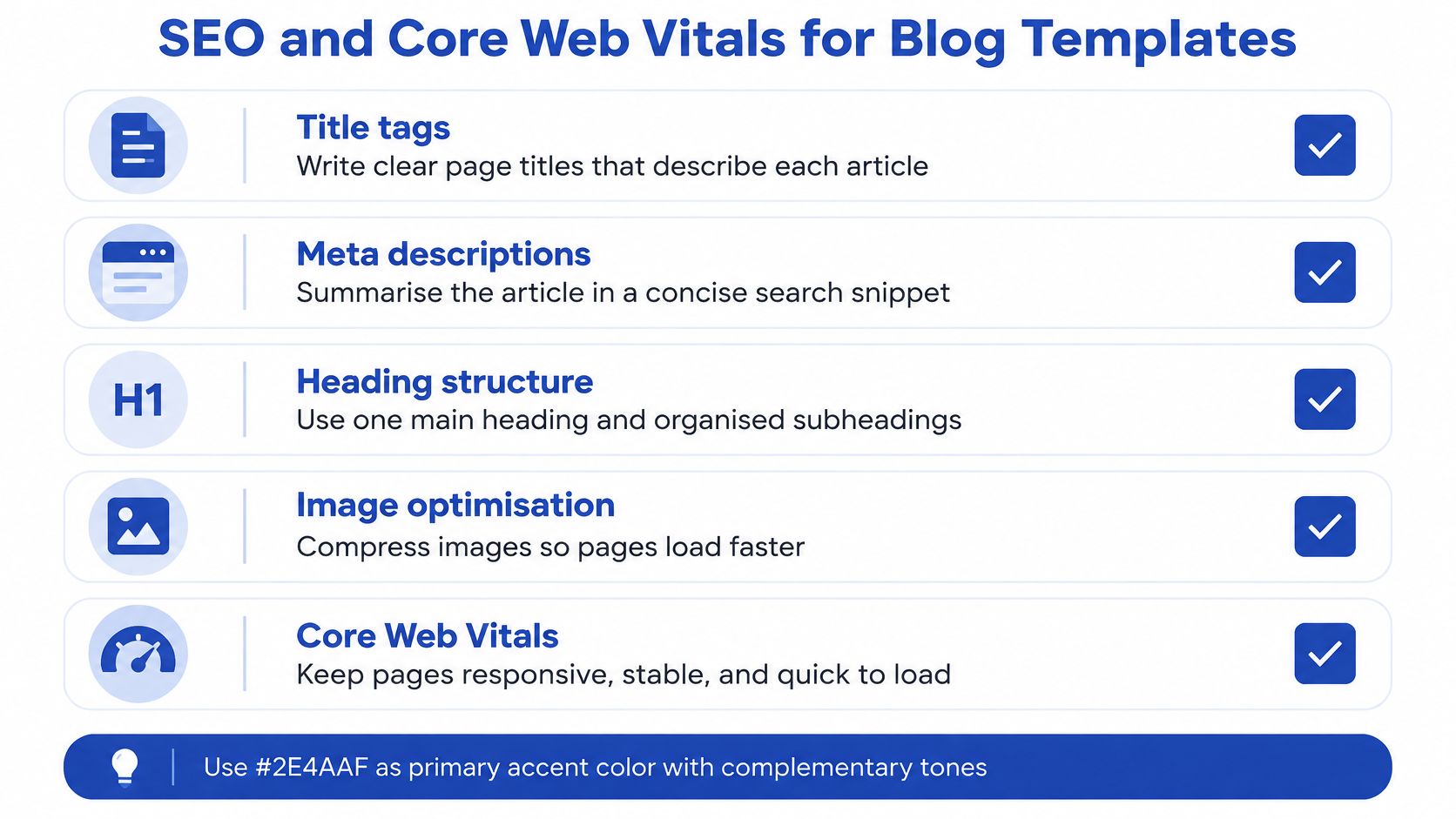
- Serve appropriate images with responsive sizing and compression. Don't send an unnecessarily large desktop image to a narrow screen.
- Reserve media space so images, video and promotional slots don't displace surrounding content.
- Defer non-critical scripts and test whether third-party tools need to run on articles at all.
- Review loading priority so the lead visual isn't delayed by lower-priority components.
- Check UK mobile visits separately because a desktop result can hide a poor smartphone experience.
Keep technical SEO attached to the template
Write descriptive title tags and useful meta descriptions, then check the rendered page rather than assuming the editor's fields tell the whole story. Inspect heading hierarchy, internal links, canonical output and article structured data after theme changes.
Avoid generating overlapping structured data from both theme code and an app without reviewing the result. More markup isn't a substitute for accurate, consistent information.
A Core Web Vitals optimisation review should identify the responsible component and a testable fix. Replacing an image won't resolve an interaction problem caused by an unrelated script.
Release gate: Treat a new article widget as a storefront change, not a harmless editorial addition.
Use field data to validate improvements after release, with lab testing supporting diagnosis during development. The operational benchmark is the share of UK mobile article visits meeting the full set of thresholds over the reporting period, not a favourable screenshot from a single test.
Building an Editorial Workflow That Holds Up
A template audit won't prevent a writer from uploading an image without useful alternative text or publishing a comparison table that's difficult to scan. Accessibility needs recurring ownership, not a sign-off that expires as soon as publishing resumes.
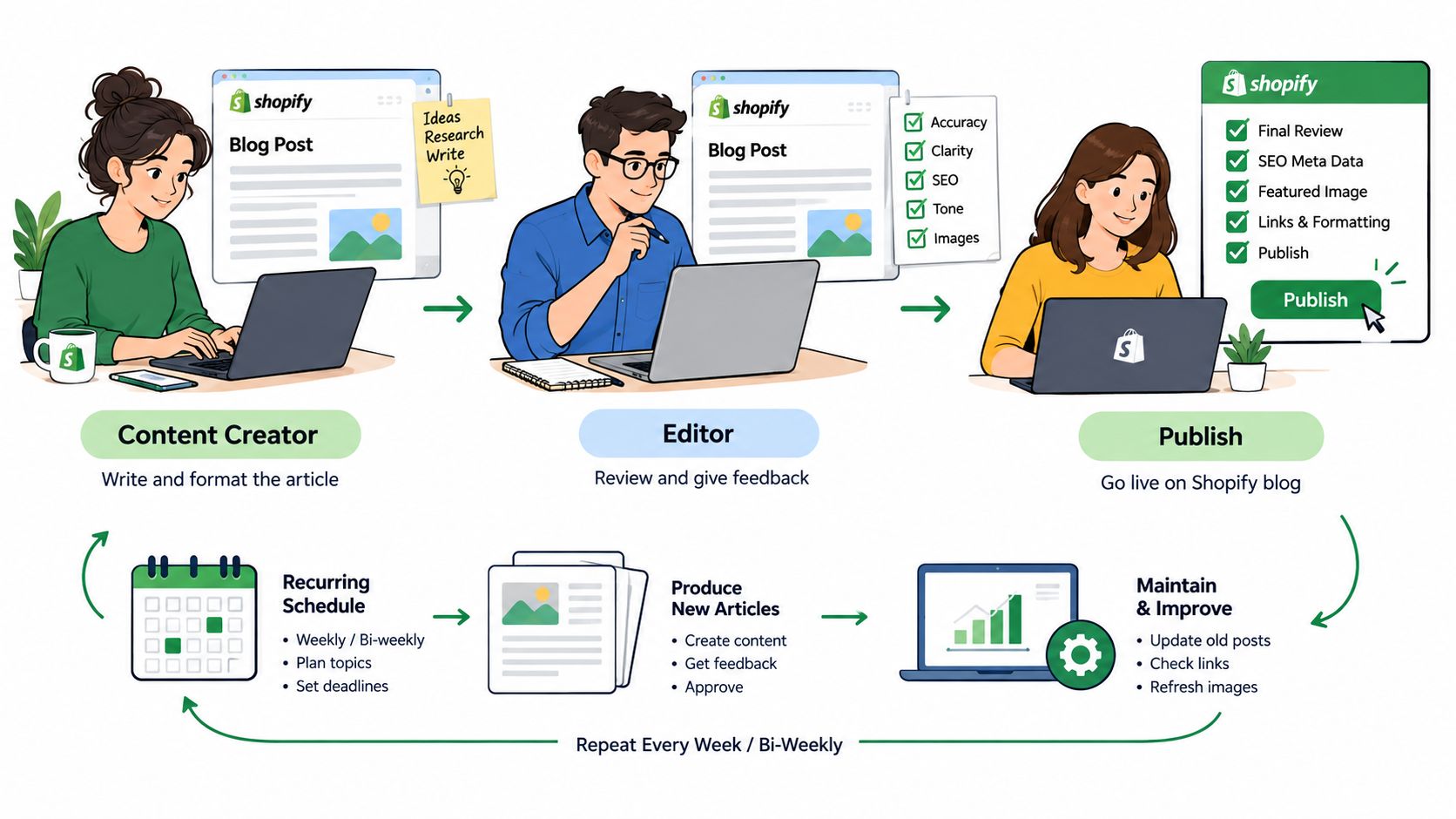
Make those responsibilities visible in the workflow.
Assign checks to people
The writer should own factual support, descriptive headings, meaningful links and draft alternative text. The merchandiser should verify product suitability and destinations. Designers and developers should own component behaviour, contrast, focus states and technical defects.
The scale of the underlying issue warrants attention. A 2025 analysis of one million homepages reported an ecommerce average of 71 automated accessibility issues per page, while missing image alternative text affected 55.5% of homepages and low-contrast text affected 79.1%, as discussed in Nexer Digital's accessibility analysis. The dataset isn't specific to Shopify, UK stores or article pages, so it shouldn't be presented as a Shopify blog failure rate.
Use a publishing checklist with named owners:
- Content review verifies claims, product terminology and the distinction between advice and promotion.
- Image review checks whether alternative text conveys the image's relevant meaning, rather than repeating a filename.
- Interaction review tests newsletter forms, embedded controls and links with a keyboard.
- Presentation review checks comparison tables, captions, heading order and mobile readability.
- Maintenance review assigns responsibility for outdated recommendations and broken destinations.
Combine automated and manual testing
Automated scans are useful for detecting repeatable technical problems. They can't reliably decide whether alternative text explains the product detail a shopper needs to understand, or whether a comparison makes sense without its visual styling.
For video, decide how captions and transcripts will be supplied before publication. The embedded walkthrough should be reviewed with the same editorial checks as the surrounding article.
Small teams can combine roles, but they shouldn't leave checks unassigned. Record exceptions and give unresolved template defects to a named technical owner.
Useful publishing governance also supports discovery beyond conventional search. Keep author expertise clear, substantiate product statements, and maintain consistent terminology across articles, product feeds and social content. Extract useful answers for other channels without stripping away qualifications or presenting unsupported claims as evidence.
Recommended Setups and Migration Paths for Plus Stores
Consider a single-market DTC brand whose editorial programme centres on product selection and care. A lean native blog is a reasonable starting point, even if the transactional store has complex requirements. Shopify Plus doesn't create an editorial need for headless architecture.
Keep article presentation in reusable theme sections and make specialised components available only where editors need them. Scale publishing through consistent content models and trained editors rather than installing another app for each campaign request.
A multi-market retailer
A retailer serving different regions needs an editorial localisation policy, not merely duplicated articles. Decide which advice is universal and which content genuinely changes because of delivery availability, product ranges, terminology or customer needs.
A third-party compilation estimates 184,825 Shopify stores in England, 10,308 in Scotland and 5,698 in Wales; these are industry estimates rather than official government or platform counts, as reported in The Social Shepherd's Shopify statistics compilation. They provide context, not a reason to create regional pages automatically.
Create localised content when it answers a distinct question. A regional delivery guide may be useful; changing place names in otherwise identical buying advice isn't a strong editorial strategy.
Give each local version an owner. Without that responsibility, product recommendations and delivery statements can diverge while the shared design still looks consistent.
A retailer moving from a legacy platform
For a hypothetical merchant migrating from Magento, WooCommerce or a custom platform, begin with the existing article inventory. Record URLs, content purpose, internal links, embedded assets and the destinations that will change.
A practical migration plan should include:
- Content mapping that assigns each retained article to an appropriate new template.
- Redirect planning for changed URLs, with checks against chains and irrelevant destinations.
- Asset review for media or scripts that depend on the old platform.
- Post-launch validation of important articles, links and measurement events.
Treat SEO preservation during a Shopify migration as part of the migration scope, not an optional clean-up after launch.
For measurement, define events consistently across article, product, cart and checkout transitions. Shopify's website performance guidance identifies commercial measures including conversion rate, traffic sources and email opt-in rate; use that commercial framework to specify your article-to-commerce reporting.
Test consent handling and event continuity before and after the move. Don't promise complete attribution: privacy choices and cross-device behaviour can leave gaps. Document those limitations so the team doesn't mistake missing tracking for missing influence.
Choosing Your Setup and Taking the Next Step
For a commerce-led brand, start with the native Shopify blog unless a documented requirement rules it out. That keeps the initial decision proportionate to the job: helping shoppers understand products and make informed choices.
A growing editorial team should improve its content model and working practices before assuming it needs another platform. A publication-led business with demanding contributor workflows or cross-channel delivery requirements has a stronger reason to consider a separate stack.
Make the decision against operating capacity
Ask the team to answer these questions plainly:
- What must readers accomplish? Define the buying or ownership question the content resolves.
- Who maintains the experience? Name the person responsible for templates, integrations and defects.
- Which requirement needs another system? Separate essential capabilities from interface preferences.
- What can the team test? Include commercial measurement, accessibility and field performance in release acceptance.
If no one can maintain a custom publishing stack, its flexibility has limited practical value. Equally, forcing a genuinely complex editorial operation into an unsuitable workflow can create ongoing manual work.
Fix or rebuild based on evidence
Before commissioning a rebuild, inspect representative articles and the components they share. A constrained reading width, unreliable product block or heavy embed may justify a targeted repair rather than replacement of the entire blog.
A rebuild becomes more reasonable when editors repeatedly work around the template, shared components can't be maintained safely, or the content model no longer fits the publishing operation. Write those failures into acceptance criteria so the replacement can be assessed objectively.
Start with a field-data performance check on UK mobile article visits. Pair it with an accessibility review and a test of the path from article to purchase, then use the findings to choose between repairing the current template and planning a rebuild.
Grumspot builds Shopify 2.0 blog templates and provides Core Web Vitals, SEO, editorial UX and CRO support through one-off projects or monthly retainers with a senior team, flat pricing and weekly strategy calls. Visit Grumspot to discuss an audit of your article templates and a practical plan to fix the existing experience or rebuild it around your commercial goals.
Let's build something together
If you like what you saw, let's jump on a quick call and discuss your project
Related posts
Check out some similar posts.