On Page SEO Services: What You Get and What to Expect
- on page SEO
- Shopify Plus SEO
- technical SEO audit
- ecommerce SEO agency
- Shopify SEO
Launched
October, 2026

Your collection pages look polished, the products are in stock, and you've filled in the SEO fields. Yet organic clicks are weak, and the visitors who do arrive don't reliably add anything to their basket. Another round of keyword changes doesn't feel like a convincing answer.
Good on page SEO services address what shoppers and search engines encounter inside your store. For Shopify brands, that means content and metadata, but also the templates, app scripts and accessibility problems that can undermine an otherwise relevant page. The useful question isn't how many fields an agency will edit. It's what they'll change, how they'll test it and whether the work improves commercial outcomes.
What On Page SEO Services Include
Say you run a store with 2,000 products, but your collection pages earn few clicks despite looking fine. Treat on-page SEO as the shelf labelling, signage and product display inside a shop. Technical SEO is closer to the wiring and plumbing behind the walls, although template work often crosses that boundary.
The service should make each page easier to understand, find and buy from. This visual summarises the relationship between the main elements.
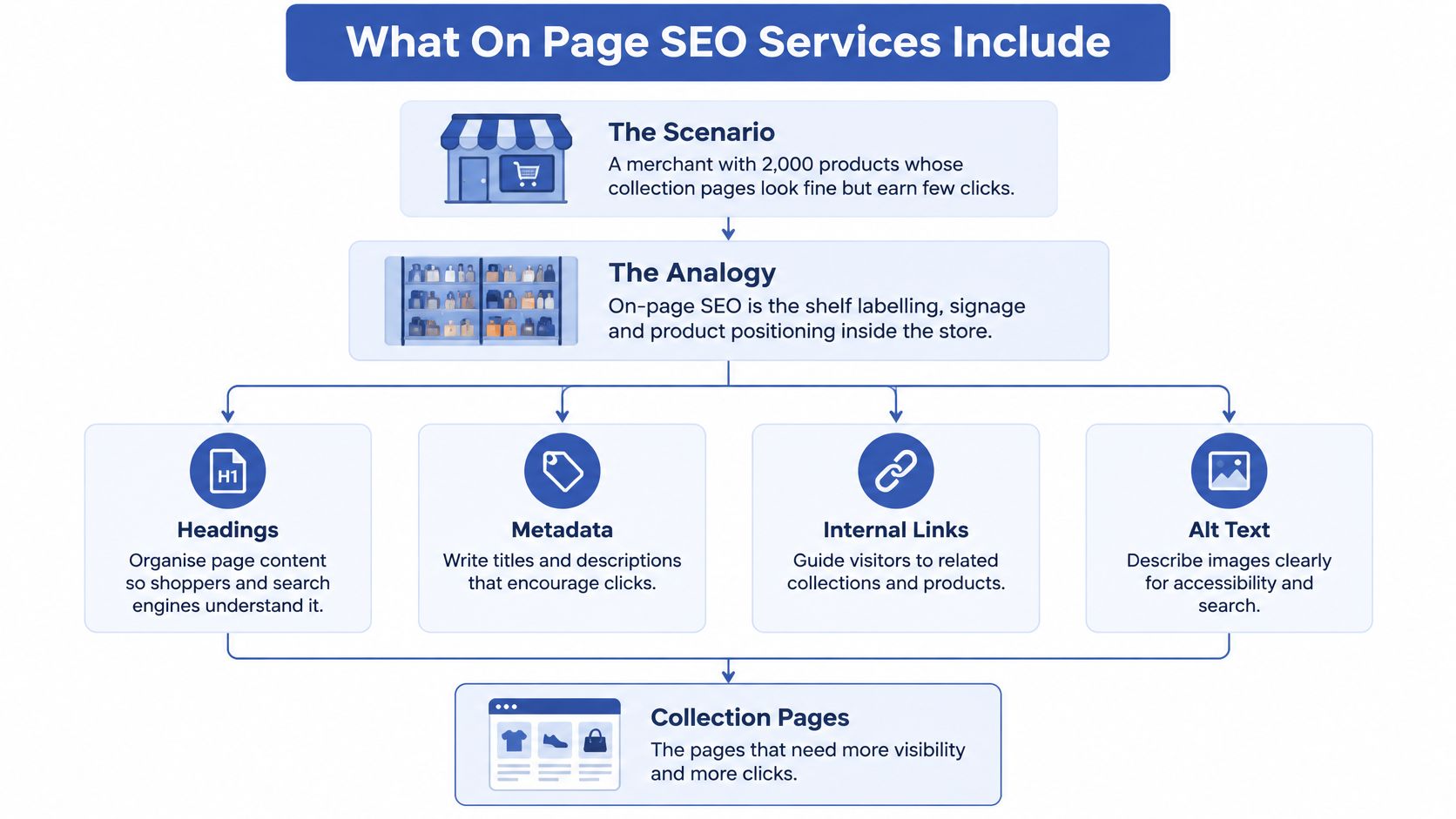
On-page elements, what the service changes and where they live in Shopify
| Element | What the service changes | Where it lives in Shopify | Typical output |
|---|---|---|---|
| Title tag | Rewrites titles to match search intent and fit search-result displays | SEO title fields on products, collections and pages, plus theme logic | Title pattern per template and priority-page rewrites |
| Meta description | Writes unique, persuasive summaries for key URLs | SEO description fields and template fallbacks | Description rules and a priority-page rewrite list |
| Headings | Sets a clear H1 and logical H2 and H3 structure | Theme section settings and Liquid templates | Heading audit with template-level fixes |
| Body copy | Adds buying answers, specifications, sizing, materials and delivery information | Product descriptions, collection blocks and metafields | Copy briefs and rewritten product and collection text |
| Internal links | Connects relevant collections, guides and products | Navigation, related-product blocks and editorial content | Internal link map with anchor text guidance |
| Image alt text | Describes products and relevant variant details accurately | Media settings and theme image output | Alt text rules by product type and variant |
| Structured data | Adds Product, Offer, BreadcrumbList and eligible review markup matching visible content | Theme JSON-LD or a schema app | Validated markup and documented exceptions |
| URL and canonical handling | Consolidates duplicates without suppressing useful landing pages | Canonical logic, robots rules and redirects | Canonical and redirect map with implementation notes |
Titles and descriptions establish the search-result message. Headings and body copy explain the offer once someone arrives, while links create useful routes through the catalogue.
Alt text describes meaningful images. Structured data makes product information machine-readable, and URL handling clarifies which version of a page should be indexed. These are connected changes, not independent checklist ticks.
Buy improvements by template
A strong title won't compensate for a slow collection hero or uncontrolled duplicate URLs. A provider should inspect the shared template before charging to fix the same underlying problem across individual pages.
Expect a template-level audit, rewrites or briefs for priority pages, and technical changes ranked by effort and impact. Confirm whether implementation is included. A spreadsheet of recommendations isn't the same deliverable as a tested theme release.
How an On Page SEO Engagement Runs Step by Step
Start with commercial priorities rather than a crawl export. At Grumspot, we offer a free discovery call to discuss the project, your goals and the best approach.
The workflow below gives you a useful overview of the engagement.
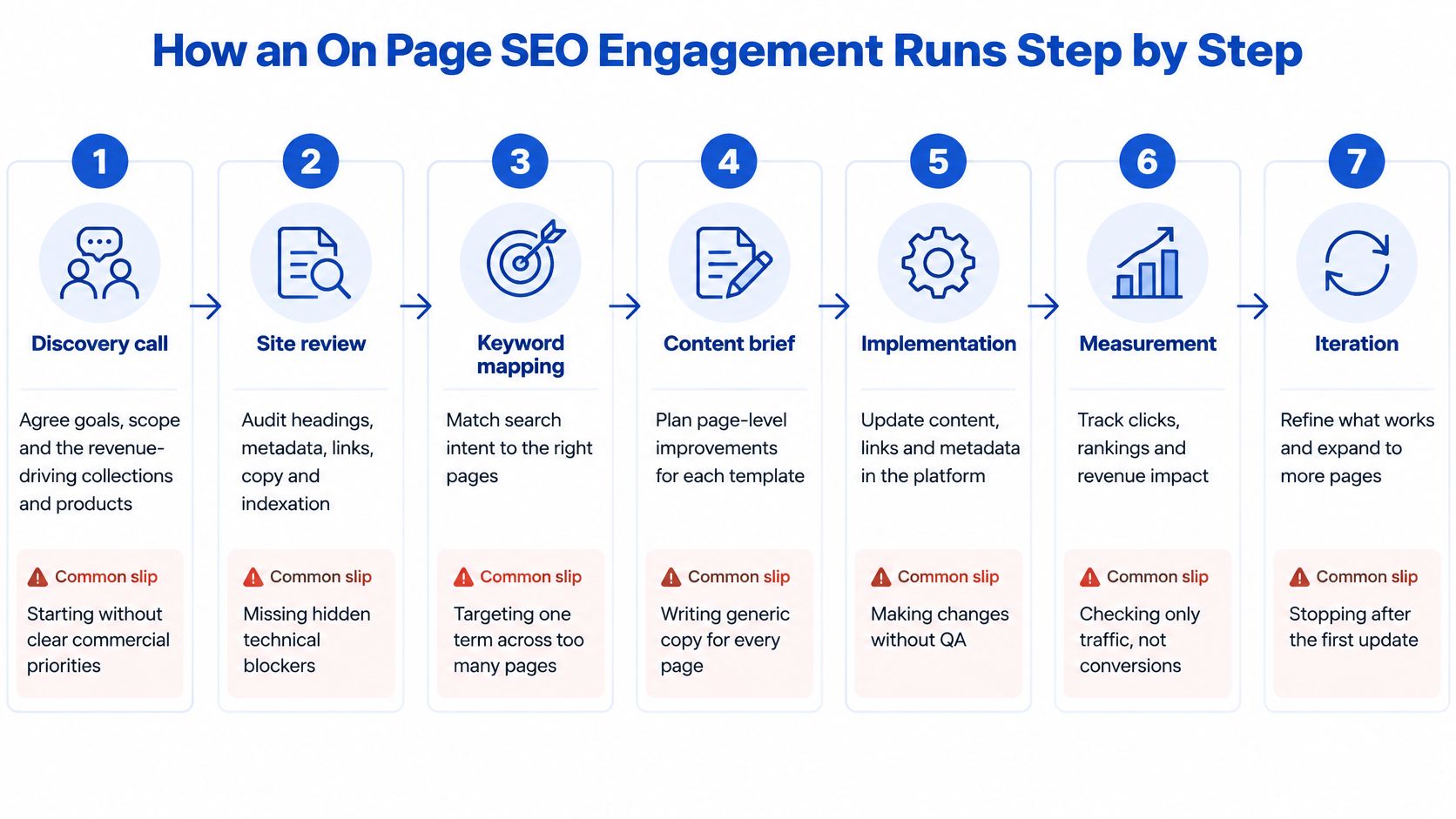
Agree goals and scope. Identify the collections and products that matter commercially, accounting for margin, stock and merchandising priorities. The common slip is treating every URL as equally valuable.
Audit pages and templates. Our SEO health check reviews metadata, headings, URL structure, sitemap and structured data, alongside the wider audit's performance and conversion findings. Sampling only the homepage misses problems in collection grids, product forms and app-dependent templates.
Build the prioritised backlog. Map search intent to the appropriate pages, then rank fixes by likely commercial impact, effort and implementation risk. Group shared template changes together rather than filling the backlog with repeated page-level tickets.
Optimise content in batches. Rewrite titles, descriptions, headings and product copy for a defined group of landing pages, with merchant approval of product claims. Publishing everything together makes it harder to isolate mistakes or interpret Search Console changes.
Implement and test safely. Build schema and theme fixes on an unpublished staging theme, checking representative products, variants and collections. A clean code preview isn't enough if filters, tracking or add-to-basket interactions stop working.
Validate the release. Use the Rich Results Test, Lighthouse or PageSpeed Insights, and Search Console indexing reports to check the live output. Don't assume the published theme behaves exactly like the preview, especially when apps inject content.
Review and iterate monthly. Compare search visibility with landing-page engagement and purchasing behaviour, then update the backlog. The common failure is reporting activity completed without deciding what the results justify doing next.
Assign implementation ownership
Our One-Off Project service includes a dedicated Shopify Partner who handles the project end to end. A store's timeline still rests on its template count, app dependencies, content approvals and the amount of custom code involved.
Use this accompanying video as another reference when discussing the workflow with your team.
Approval checkpoint: By the end of the backlog stage, you should hold a ranked list you can approve, cut or defer, with an owner and acceptance criteria for each change.
Technical Fixes That Improve Shopify Template Speed
Speed work belongs in the commercial scope. Google's UK-focused Milliseconds Make Millions report associated a 0.1-second improvement across four site-speed metrics with an 8.4% increase in transactions and a 9.2% increase in average order value.
That's evidence for investigating performance, not a forecast for your store. Audit collection and product templates separately, because an image-heavy collection and an app-heavy product page need different fixes.
Template symptoms, likely causes and fixes
| Symptom | Likely cause | Fix |
|---|---|---|
| Slow largest contentful paint on collections | Oversized hero image or late-loading slider | Resize and compress the hero, preload it when appropriate, and remove unused slider code |
| Layout shifts after first paint | App widgets and banners injected without reserved space | Reserve space in the theme and load non-critical widgets after main content |
| Thousands of near-duplicate collection URLs | Indexable filter and sort parameters | Consolidate duplicate filtered URLs to the base collection and retain only useful filter landing pages |
| Redirect chains after a URL change | Old URLs point to intermediate redirects | Map each old URL directly to its final destination with a permanent redirect |
| Product pages missing rich results | Missing or invalid Product or Offer markup | Add validated Product and Offer JSON-LD and use the Rich Results Test |
| Heavy scripts on every template | Third-party apps loaded site-wide | Remove unused apps and restrict scripts to templates that need them |
Prioritise what shoppers see first
Identify the largest contentful element, usually a product image or collection hero. Serve appropriately sized responsive images, preserve their dimensions and avoid lazy-loading the main above-the-fold image. Preloading every image isn't a fix, it can make important resources compete for bandwidth.
Then inspect render-blocking scripts and app loading. Don't remove a review widget because it's heavy without assessing its buying value. Test a lighter integration or delayed loading first.
Use mobile LCP below 2.5 seconds as an acceptance target, consistent with the good LCP threshold described in Koozai's UK ecommerce speed analysis. Validate with lab tests and real-user field data, since a fast development laptop can conceal poor customer experiences.
Our Core Web Vitals optimisation guide provides a practical reference for planning those checks. In our fashion retailer audit, resolving theme code inefficiencies and critical SEO mistakes was followed by faster page loads and improved search visibility, without implying a universal performance lift.
Before migration go-live, verify URL mapping, redirects and analytics events. We set up permanent redirects when migration URLs change and keep Google Analytics tracking running without interruption.
Test these changes first on the staging theme:
- Main image delivery: Correct sizing, compression and loading priority.
- App loading: Remove unused scripts and conditionally load necessary integrations.
- Layout stability: Reserve space for banners, reviews and embedded widgets.
Content and Schema Work for Product and Collection Pages
Start with the product template and a real buying question. A shopper considering a waterproof jacket needs fit, fabric, care and delivery information, not another paragraph repeating waterproof jacket.
Build a title pattern around product type, distinguishing attribute and brand, adjusting the order to match how customers search. The meta description should communicate the benefit and an accurate delivery promise. Don't hard-code a shipping claim that becomes false for particular destinations.
Product detail should resolve uncertainty
Use descriptions and metafields for sizing, materials, compatibility, returns and delivery. Keep essential information close to the buying controls, with longer detail organised into accessible sections.
For variants, describe meaningful differences in the copy and image alternatives. A navy jacket image should describe the navy version, but don't claim a photograph communicates a size difference that isn't visible. Variant URLs shouldn't compete with the parent product unless there's a deliberate, supported reason to create separate landing pages.
Collection copy has a different job. Put a short, indexable introduction above the grid explaining who the range serves, supported by a descriptive H1. Don't push products far down the screen with an essay written mainly to accommodate keywords.
A walking-shoe buying guide could link naturally to waterproof walking shoes, wide-fit walking shoes and lightweight walking shoes. Those descriptive links help shoppers choose their next step more effectively than repeated shop now anchors.
Mark up what the page actually says
Implement structured data from reliable product fields rather than maintaining a disconnected copy of prices and stock statuses.
- Product and Offer: Describe the item, current price and availability accurately.
- BreadcrumbList: Reflect a meaningful navigation hierarchy.
- Review markup: Use genuine reviews that shoppers can see, subject to eligibility requirements.
- FAQPage and Organization: Keep markup consistent with relevant visible content and business information.
Our structured data implementation guide explains the implementation considerations. Check whether the theme and apps already output schema before adding another source of JSON-LD.
Run representative URLs from each template through the Rich Results Test and review Search Console enhancement reports monthly. Valid markup supports eligibility, not guaranteed rich results. Keyword-stuffed titles, invented reviews and repetitive alt text aren't shortcuts to better product information.
Accessibility as an On Page SEO Requirement
Standard SEO advice often treats headings, links and alt text as ranking tasks. Those same elements determine whether a disabled shopper can understand the catalogue and complete a purchase.
An analysis reported by Level Access found that 84% of the 100 most popular UK retail brands had homepage issues capable of creating critical barriers, and every homepage tested had at least one WCAG 2.1 AA violation. That's a homepage benchmark, not a diagnosis of your store, but it gives accessibility a clear place in an audit.
These shared design elements affect both understanding and usability.
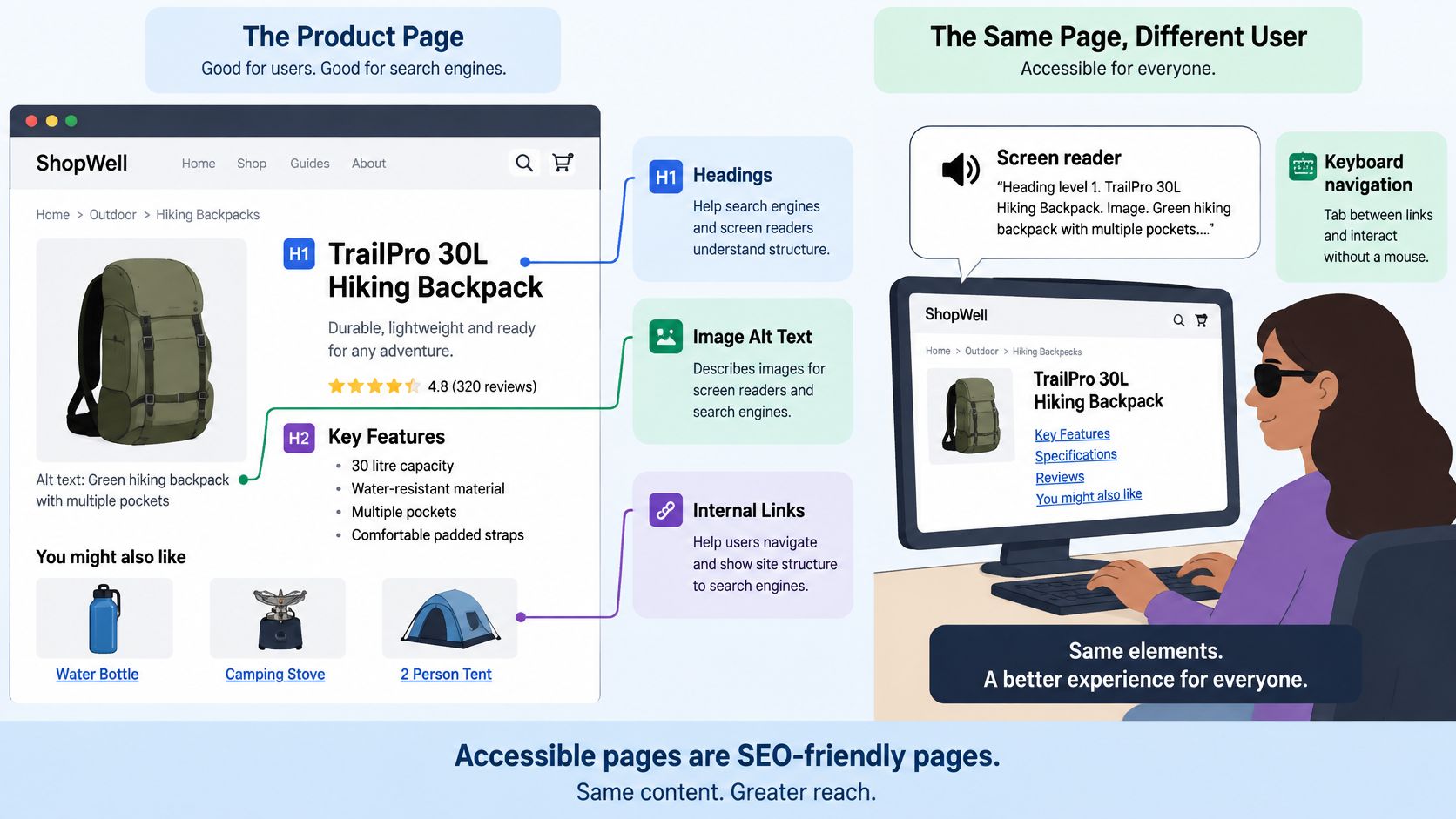
Fix the shared barriers first
What should product alt text say? Describe meaningful visual information, such as a burgundy backpack with reflective trim. Don't append a list of search terms, and leave purely decorative images with an empty alternative.
How do headings and filters affect shopping? Semantic headings organise the category content, while labelled filters and visible keyboard focus let shoppers operate the interface. Crawlable copy doesn't compensate for a filter drawer that traps keyboard users.
Which fixes belong in templates? Heading output, form labels, focus styling and filter behaviour usually need theme or component changes. Product-specific image descriptions and missing specifications belong in the catalogue content.
Our audit identifies navigation problems, checkout friction, poor mobile experience, problematic apps and broken code alongside SEO issues. Use the Shopify accessibility audit guide to connect automated checks with manual keyboard and assistive-technology testing.
A page can pass an SEO checklist and still prevent someone from buying. Improving apparent SEO hygiene isn't the same as improving access or sales.
What ROI to Expect and How to Measure It
Search visibility doesn't always produce a visit. UK-focused coverage from Charle reports zero-click rates of about 64.8% for Google searches, roughly 83% when an AI Overview appears, and about 38% for ecommerce queries. Treat these as contextual estimates from secondary coverage, not a forecast for your catalogue.
No credible provider can guarantee a revenue figure. Establish a baseline before implementation, then assess organic landing-page conversion, revenue per session and assisted revenue alongside search performance.
On-page SEO metrics, where to read them and what to look for
| Metric | Where to read it | What to look for |
|---|---|---|
| Largest contentful paint by template | PageSpeed Insights and real-user field data | Mobile field performance meeting the agreed acceptance target on changed templates |
| Organic landing-page sessions | Analytics, with Search Console for search clicks | Sustained improvement on priority pages rather than an isolated spike |
| Impressions against clicks on product pages | Search Console performance report | Rising impressions with flat clicks may warrant a title, snippet or query-mix review |
| Add-to-cart rate from organic visits | Analytics segmented by source and landing page | Improvement against that page's baseline, not the site average |
| Checkout starts and revenue per session | Analytics funnel and revenue reports | Higher revenue per organic session on optimised templates |
| Branded versus non-branded demand | Search Console query filters | Non-branded performance tracked separately from brand terms |
Match the measure to the page's job
Judge transactional pages primarily on qualified visits and purchasing behaviour. For buying guides, include impressions, relevant query coverage and assisted conversions. Branded demand is useful context, but a rise doesn't prove a particular guide caused it.
Separate brand queries using filters, compare periods with similar trading conditions and annotate releases, promotions and stock changes. Allow for recrawling before drawing conclusions, and compare changed templates with suitable unchanged pages where possible.
For reporting organisation, Keyword Kick's discussion of choosing an SEO reporting tool is a useful resource. Whatever dashboard you choose, preserve the distinction between Search Console clicks and analytics sessions.
We offer Conversion Rate Optimisation with growth-focused strategies, because attracting a visitor doesn't resolve problems in the purchase journey. Calculate return using incremental gross profit against the full cost of the work, not revenue alone.
Reporting standard: Require measured outcomes, acknowledged attribution limits and a clear next action. An AI optimisation label isn't evidence of incremental visibility or sales.
How to Evaluate an On Page SEO Agency for Shopify Plus
Compare proposals on implementation competence and accountability, not the volume of recommendations. A provider who identifies a Liquid problem but can't safely resolve it leaves your team carrying the difficult part.
Agency Evaluation Criteria at a Glance
| Criterion | Test question | Red flag |
|---|---|---|
| Shopify depth | Can the agency read and edit Liquid and justify which apps it would remove? | Advice given without reading theme code |
| Evidence | Can they show before-and-after results at template level? | Ranking screenshots without speed or conversion context |
| Migration safety | How do they map old URLs, carry metadata, configure redirects and preserve tracking? | No URL map or redirect plan before go-live |
| Accessibility and UX | Does the audit cover WCAG issues and checkout friction? | A metadata-only audit |
| Team and pricing | Who does the work, and is the price flat for a defined scope? | Unnamed team or monthly fees without deliverables |
| Ownership | Who keeps theme access, the redirect map and reporting? | Access held by the agency alone |
| Guarantees | Does the proposal promise rankings or AI optimisation results? | Guaranteed rankings or AI packages without Search Console evidence |
Test the quality of the explanation
Ask the technical lead to explain how a template change would be built, tested and rolled back. They should distinguish theme capabilities from Shopify Plus checkout extension constraints, and explain app dependencies before recommending removals. An agency shouldn't promise unrestricted checkout edits because you're on Plus.
Evidence needs context. A template-level comparison should identify what changed, which pages were affected and whether promotions, stock or tracking changes complicate interpretation. A ranking screenshot alone can't establish commercial value.
Migration proposals deserve particular scrutiny. Our migration process covers URL and metadata preservation, redirects, structured data, canonical tags and sitemap updates to preserve search rankings. The important distinction is a documented preservation process, rather than a promise that search performance cannot fluctuate.
Compare delivery arrangements, not package names
Our One-Off Shopify Projects have flat pricing with no hidden fees, and each engagement has a dedicated squad comprising a senior developer, specialist UX designer and CRO expert. Compare that defined delivery capability with proposals that name only an account manager.
Merchandising judgement matters too. Ask why a proposed collection deserves investment when its products are frequently unavailable, or how the agency will handle overlapping collections targeting the same buying need. A clear content process should include briefs, factual checks and approval ownership.
Keep store administration under merchant control, with appropriate collaborator permissions for the agency. Confirm that code changes, content files, redirect maps and reporting remain available after the engagement ends.
Use this checklist alongside the proposal, not as a substitute for a technical discussion.
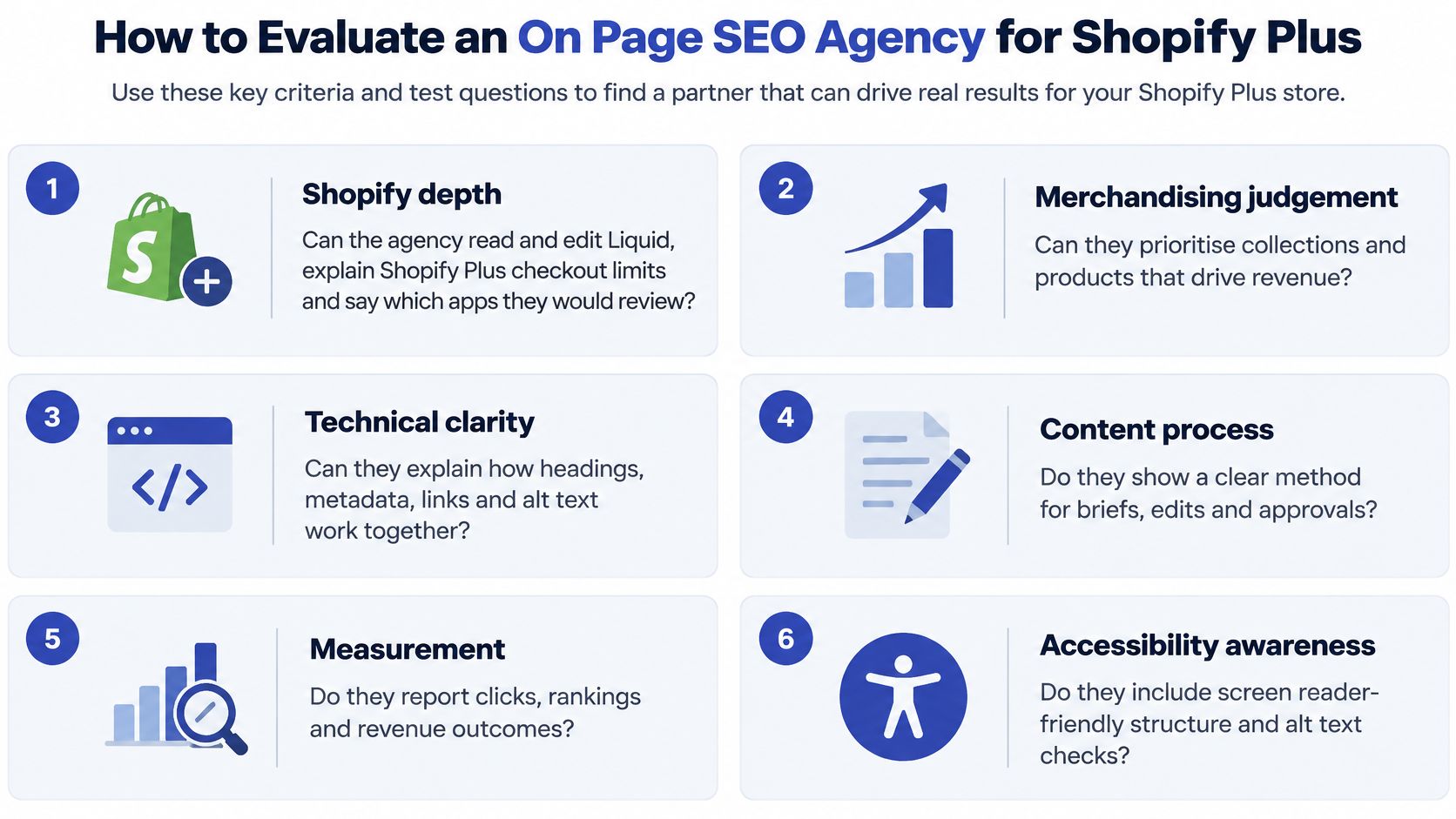
Confirm the Scope Before You Sign
If your store's technical condition is unknown, start with an audit. Our Shopify Audits cover design, technical and SEO, giving you the basis for a ranked fix list rather than committing development budget before the problems are understood.
If the store is stable and the backlog is clear, choose a defined project or ongoing delivery arrangement. A project suits a bounded set of template and content changes. A retainer suits continuing releases, provided the capacity, deliverables and review process are explicit.
Make the commercial terms comparable
Request a fixed price against named templates and page batches, rather than an undefined store optimisation package. For ongoing work, record the roles available, included deliverables, approval responsibilities and notice period. Our Monthly Shopify Development plan provides access to a UX designer, senior Shopify developer and CRO specialist.
Design approvals also affect cost and delivery. PinDrop's guidance on how to manage client design feedback is useful when agreeing how stakeholders will consolidate comments and sign off changes.
Confirm these points in writing:
- Templates in scope: Name the product, collection and supporting templates included.
- Page batches: Specify which pages will receive individual edits and the batch size.
- Schema coverage: Identify the markup types, source fields and validation responsibility.
- Speed acceptance: Record the performance target, test conditions and field-data checks.
- URL changes: Document redirect ownership, destination mapping and tracking validation.
- Reporting: Agree the metrics, reporting cadence and responsibility for the next backlog.
A provider who can't resolve these points hasn't finished scoping the work. Leave room for audit discoveries, but require approval before those discoveries become additional charges.
This week, book a discovery call and send your current audit or a relevant Search Console export. Request a written scope addressing these points before authorising implementation.
Grumspot offers Shopify audits, defined one-off projects and ongoing development support for content, template performance and conversion improvements. Visit Grumspot to book a free discovery call, discuss your priority landing pages and agree what your on-page SEO work should deliver.
Let's build something together
If you like what you saw, let's jump on a quick call and discuss your project
Related posts
Check out some similar posts.
- shopify for blogs
Weigh Shopify for blogs against WordPress and headless setups on SEO, editing workflow, Core Web Vit...
Read more
- what is seo audit
What is SEO audit? Learn how technical, on-page and content checks uncover issues hurting your Shopi...
Read more
- seo technical audit checklist
Use this SEO technical audit checklist to find and fix 10 ecommerce issues across crawling, speed, i...
Read more
- internal linking strategy
Build a high-impact internal linking strategy that boosts rankings and conversions. Learn auditing, ...
Read more