Shopify Payments Plans: UK Fees and Which Plan Suits You
- shopify payments plans
- Shopify Payments UK
- Shopify Plus payments
- Shopify payment fees
- Shopify Payments rates

Upgrading your Shopify plan to cut card fees can leave you worse off. The subscription rises every month, while the rate saving only applies to orders you take, so the right choice depends on card volume, payment method mix and payout currency, not the plan name. This guide models Shopify Payments plans for UK merchants in pounds, so you can see where each upgrade pays, where it doesn't, and which costs sit outside the headline rate.
Shopify Payments Rates for Each Plan at a Glance
| Plan | Subscription per month | Online card rate | In-person card rate | American Express online | Third-party gateway fee |
|---|---|---|---|---|---|
| Basic | £25 | 2.0% + £0.25 | 1.7% | 3.1% + £0.25 | 2.0% |
| Grow | £65 | 1.7% + £0.25 | 1.6% | 2.7% + £0.25 | 1.0% |
| Advanced | £344 | 1.5% + £0.25 | 1.5% | 2.5% + £0.25 | 0.6% |
| Plus | Quote from Shopify | 1.3% + £0.25 | Set in Plus quote | 2.3% + £0.25 | 0.2% |
Read each online rate as a percentage of the order plus a fixed £0.25 per transaction. The fixed part doesn't change between plans, so it never justifies an upgrade on its own. Only the percentage moves, and that movement is smaller than most merchants expect when they first compare plan pages.
Shopify's UK payment options guide lists standard online card rates of 2.0% plus £0.25 per transaction on Basic, 1.7% plus £0.25 on Grow, 1.5% plus £0.25 on Advanced, and 1.3% plus £0.25 on Plus. The same source puts published UK plan prices at £25 per month for Basic, £65 for Grow, and £344 for Advanced after promotional pricing, with in-person rates starting lower than online rates on each tier.
What a £100 Order Costs
On a £100 online order, the percentage and fixed fee component is £2.25 on Basic, £1.95 on Grow, £1.75 on Advanced and £1.55 on Plus, before refunds, currency conversion or other applicable charges. That's the cleanest way to feel the gap. Basic to Grow saves 30p on that order. Grow to Advanced saves another 20p, even though the subscription jump is far larger.
American Express widens the spread. The table shows online Amex falling from Basic to Plus across every tier, so a store with heavy Amex use shouldn't judge an upgrade on standard cards alone. The same applies in person, where the percentage is lower and the plan gaps compress. A retailer taking most revenue through a physical till works from a different row than a pure online brand, even on the same plan.
The final column matters if you're not using Shopify Payments. A third-party gateway can add a separate Shopify transaction fee on top of that gateway's own charges, and the fee falls as the plan rises. That penalty often costs more than the difference between two card rates.
Find your current plan row and note the rate for your main sales channel. These published rates apply to UK stores, so if you trade from another region, check that region's Shopify Payments rates and availability before using this table for a decision.
Break-Even Card Volume for Each Plan Upgrade
Basic to Grow is the clearest upgrade in the range, and it's the one most UK stores should test first. Shopify's UK pricing page lists online rates of 2.0% + £0.25 on Basic and 1.7% + £0.25 on Grow, a saving of 0.3 percentage points, against subscriptions of about £25 and £65 per month. Divide the £40 monthly difference by that saving and Grow pays for itself at roughly £13,333 in monthly card volume.
The chart below puts each upgrade threshold side by side.
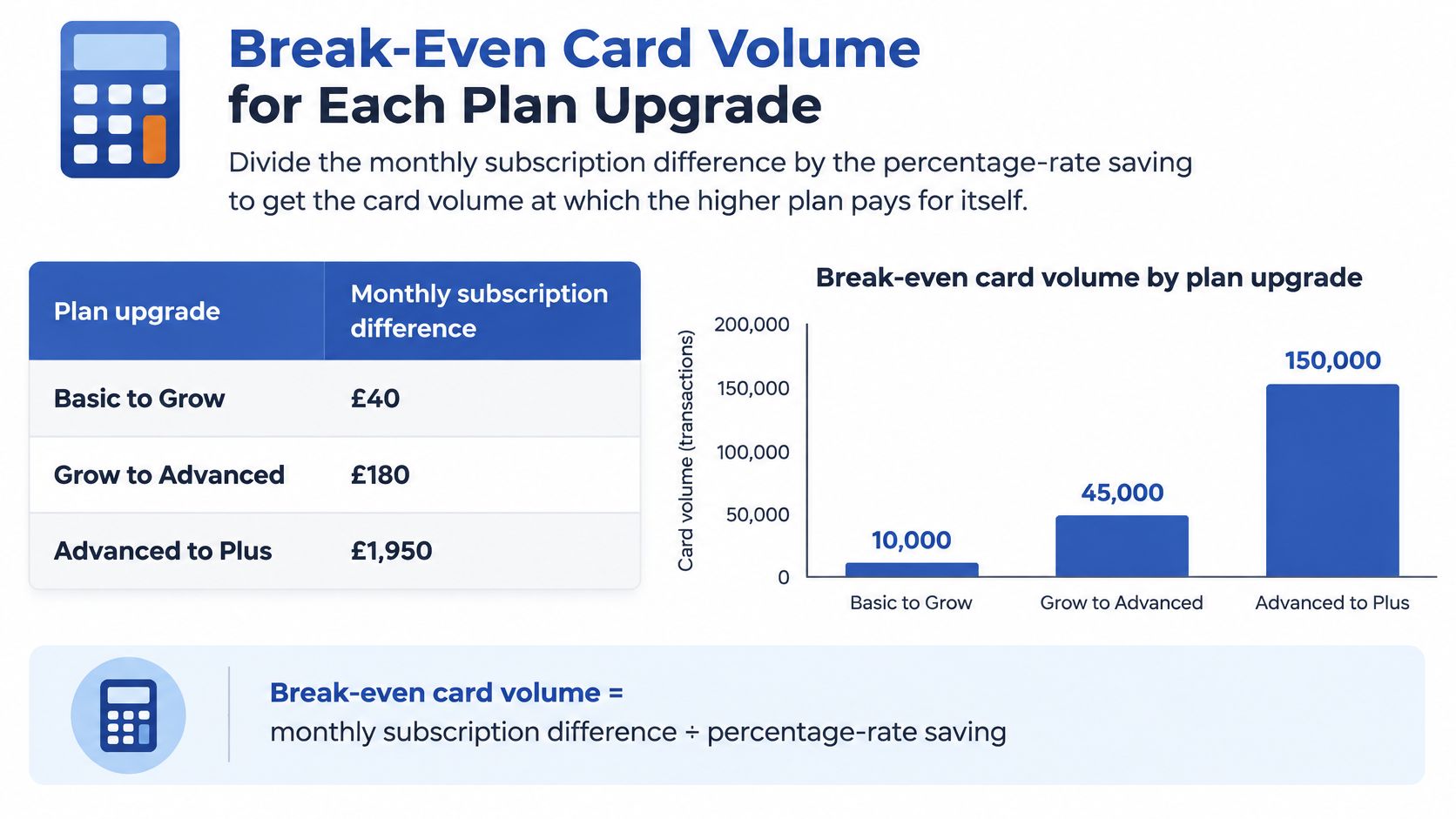
Break-even formula: monthly subscription difference ÷ percentage rate saving = monthly card volume needed.
| Upgrade | Subscription difference per month | Online rate saving | Break-even monthly card volume |
|---|---|---|---|
| Basic to Grow | £40 | 0.3 points | about £13,333 |
| Grow to Advanced | £279 | 0.2 points | about £139,500 |
| Basic to Advanced | £319 | 0.5 points | about £63,800 |
| Grow to Plus | Plus quote less £65 | 0.4 points | Quote difference ÷ 0.004 |
Why Advanced Rarely Wins on Fees Alone
Grow to Advanced saves only 0.2 percentage points, so recovering the £279 subscription difference needs approximately £139,500 in monthly volume. That's more than ten times the Basic to Grow threshold for a smaller rate cut. For most UK direct to consumer brands, Advanced is therefore a scale or feature decision rather than a pure processing cost upgrade.
Basic to Advanced looks more reasonable at about £63,800, because you're combining both rate steps. But that comparison skips the sensible middle option. If you're already past the Grow threshold, you should already be on Grow, and the relevant question becomes the much higher Advanced threshold.
Say a Grow store takes £60,000 of online card volume a month instead of staying on Basic. The 0.3 point saving is worth £180, against £40 of extra subscription, leaving a net gain of £140 a month. Flip the volume down and the same maths turns negative quickly, which is why a quiet quarter matters.
The fixed £0.25 fee is identical on every plan, so it cancels out of every break-even figure above. Total your last three months of online card volume, average it, and test it against the table. Then check in-person and American Express volume separately, because those rows use different rates and can move the answer.
Hidden Costs Beyond the Headline Card Rate
The cost most merchants miss isn't in the Shopify Payments rate at all. Stay on a third-party gateway and Shopify adds its own transaction fee on top of that gateway's charges. Shopify's UK point of sale payments page lists a 2% third-party transaction fee, falling to 1% on Grow and 0.6% on Advanced, with Klarna priced separately at 4.99% + 30p and international cards at 3.1% + 25p.
That structure changes any provider comparison. A gateway that looks cheaper on its own rate card may lose once Shopify's fee is layered on. Orders through Shopify Payments avoid those additional third-party transaction fees, including Shop Pay and manual payment methods, so you need to compare total cost per order, not one quoted percentage.
If you're weighing an external provider, work through our guide to choosing a payment gateway for Shopify with your own order data beside it. Bring the gateway fee, its fixed fee and any refund terms into the same calculation.
A Blended Rate Example
Say you're on Grow with a £60 average order value. This illustrative example uses the published method pricing and excludes currency conversion, so rerun it on current terms before deciding.
- Domestic cards: 1.7% of £60 plus 25p costs £1.27 per order.
- Klarna: 4.99% of £60 plus 30p costs £3.29 per order.
- International cards: 3.1% of £60 plus 25p costs £2.11 per order.
Now apply a 70/20/10 split across domestic cards, Klarna and international cards. The blended cost is about £1.76 per order, roughly 2.9% of order value. That's well above the headline domestic rate, even though most orders use the cheapest method. A fifth of orders going through Klarna does most of the damage.
Your own model needs five inputs: monthly orders, average order value, domestic and international mix, Klarna share and channel split. Order value matters because fixed fees bite harder on small baskets. Channel split matters because in-person rates sit below online rates.
A low-volume brand may pay more in subscription than it saves in card fees. A high-volume brand using expensive payment methods may benefit earlier than a simple volume threshold suggests, because its blended rate is higher to begin with.
Features That Depend on Advanced and Plus
| Capability | Basic and Grow | Advanced | Plus |
|---|---|---|---|
| Payouts in GBP | Yes | Yes | Yes |
| Multi-currency payouts | No | Yes | Yes |
| Custom checkout flows with custom fields or upsells | No | No | Yes |
A plan change is also a capability decision. Every tier handles straightforward GBP trading, so a UK-only store with a standard checkout has no feature reason to climb. The pressure to upgrade usually arrives with international sales or checkout changes, not with ordinary domestic growth.
Many expansion features work on standard Shopify plans, while custom checkout flows and wholesale portals require Shopify Plus. Don't assume every new capability forces a Plus move. Merchants regularly budget for Plus to access something their current plan already supports, then discover the main blocker was theme code or an app setting.
The Two Triggers That Force the Issue
The first trigger is currency. If you sell in euros or dollars and want payouts in those currencies rather than converting everything into pounds, you need Advanced or Plus. That requirement can justify Advanced long before card volume reaches the processing break-even point, because the benefit sits in treasury control rather than in the card rate.
The second trigger is checkout control. Custom fields, bespoke upsells and checkout logic that standard plans can't express push you towards Plus. Our breakdown of Shopify checkout optimisation helps you separate improvements available today from changes that need a higher tier. That distinction saves money, because plenty of checkout friction comes from layout, copy and payment method ordering rather than plan limits.
List the features you need before you price the plan that carries them. A rate saving can't compensate for a checkout you can't build.
Coverage here is limited to UK plan rates and the feature tiers shown in the table. For any other capability you rely on, such as multi-store setup, discount logic or workflow automation, check the plan feature list in your Shopify admin before deciding. Confirm integrations with third-party apps, checkouts and gateways in the admin too, since compatibility can change independently of plan pricing.
Run this test now. Write down the three features your store depends on today and the two you plan to launch within twelve months. If any of them sit in the Plus column, the rate saving stops being the deciding factor and the conversation becomes about timing.
Payouts, Currency Conversion and Fraud Exposure
Currency conversion can cost more than a plan upgrade saves on card processing. For UK stores, Shopify's UK payouts guidance for Shopify Payments says payouts are available in GBP on all subscription plans, while multi-currency payouts require Advanced or Shopify Plus. Shopify's stated UK conversion fee is 2% per transaction.
That fee applies when a customer's currency differs from the payout currency. A merchant selling in euros or US dollars but receiving all funds in pounds pays the conversion cost on those orders. If foreign sales are a large share of turnover, the conversion fee can outweigh the card-rate saving from a higher plan. The effective cost depends on both payment volume and how much revenue is converted.
Supported payout currencies include EUR, USD, CAD and AUD. Non-domestic payout accounts can incur multi-currency payout fees, so receiving sales in a local currency does not automatically remove every cost. The relevant comparison is the fee avoided on converted sales against the cost of holding and paying out in that currency.
Three Ways to Handle Foreign Sales
- Convert everything to GBP: simpler reconciliation, with conversion costs on affected orders and less control over when conversion occurs.
- Hold revenue in local currency: useful when the business also has expenses in that currency, but it requires an eligible plan and the right payout setup.
- Add payout accounts: consider this when foreign sales and foreign-currency costs are both material, then compare the fee implications with the conversion avoided.
Assess the whole cash cycle, not just incoming sales. Supplier invoices, advertising spend and refunds may also be in foreign currencies. For example, euro revenue can cover a euro-denominated supplier invoice without first converting the funds into pounds. Checkout methods matter too: Shopify payment methods provides a reference for mapping the options customers expect in each market.
Fraud exposure also belongs in the plan economics. Payment fraud losses remain substantial, and refunds, reserves and reconciliation can put pressure on cash flow. A low processing rate does not account for the operational cost of investigating disputed payments or waiting for funds to settle.
The plan decision is therefore partly about treasury workload. If your finance team spends significant time reconciling converted payouts, that work has a cost alongside subscription fees and transaction charges. Compare the total effect of plan price, conversion and payout fees, foreign-currency spending, and the time spent managing cash.
Choosing a Plan by Merchant Type
| Merchant profile | Likely plan | Why it fits |
|---|---|---|
| Single-market UK brand below about £13,333 monthly online card volume | Basic | The subscription difference outweighs the rate saving at this volume |
| UK brand above about £13,333 monthly online card volume, domestic sales only | Grow | The 0.3-point saving covers the £40 subscription difference |
| Brand selling in euros or dollars that needs multi-currency payouts | Advanced | Multi-currency payouts require Advanced or Plus |
| Brand above about £139,500 monthly online card volume | Advanced or Plus | The 0.2-point gain over Grow covers the £279 difference; Plus depends on the quote |
| Plus merchant with custom checkout, upsells or multi-store operations | Plus | Checkout and payout control matter more than the lower rate |
These profiles are starting points, not rules. Two stores with identical revenue can land on different plans once you look at how customers pay. Volume sets the frame, then payment mix and feature needs adjust the answer.
A Basic store with heavy American Express volume may benefit earlier than the standard threshold suggests. Amex carries a higher rate on every tier and the gap between plans is wider there, so the saving per pound of volume is larger. Run Amex volume through its own break-even calculation instead of blending it into total card sales.
A store with heavy Klarna use needs the blended rate model before deciding anything. Expensive methods raise your effective rate regardless of plan, and they can make a subscription increase look pointless or essential depending on share. Seasonal stores should also test their quietest quarter, not their peak. A plan that pays back in December may lose money from February to April.
The subscription is paid every month, but the rate saving only counts on orders you actually take, so model on volume rather than plan name.
Physical retailers should weight the in-person column more heavily than online-only brands do. The gaps between plans are narrower in person, which pushes break-even volumes higher and makes feature needs relatively more important. Conversely, a store planning European expansion within the year may accept a plan that doesn't pay back on fees today because payout structure will matter soon.
Plus pricing is quoted rather than published, so the Plus row gives direction until a quote arrives. Once you have that figure, drop it into the same formula used for the other upgrades. If the quote only makes sense with checkout control or multi-store operations included, say so plainly in your business case rather than stretching the fee maths to fit.
Confirm Your Plan Before You Switch
Run this checklist before any plan change or checkout migration.
- Export orders: Pull the last 90 days, split by channel, currency, payment method and average order value.
- Test volume: Calculate monthly online card volume and compare it with the break-even thresholds.
- Build a blended rate: Add Klarna, international card and American Express shares, then rerun on current Shopify terms.
- List capabilities: Note everything you depend on, such as multi-currency payouts or custom checkout, and confirm which plan includes each one.
- Request a Plus quote: Do this if volume or features point that way, since Plus pricing isn't published.
Once the figures are confirmed, decide whether to change plan. If the numbers are unclear, we can help scope a plan review and any checkout or gateway work from these figures. Our Monthly Shopify Development plan has flat pricing with zero hidden fees and gives access to a UX designer, a senior Shopify developer and a CRO specialist. We also offer a free Shopify store UX audit worth $1,500 when a client books a one-off project or monthly retainer service. Book that review, confirm the numbers, then follow the migration sequence below if a Plus move is agreed.
How to Plan a Plus Checkout and Payments Migration
Treat a Plus move as a payments project first and a design project second. The flow below summarises the order of work.
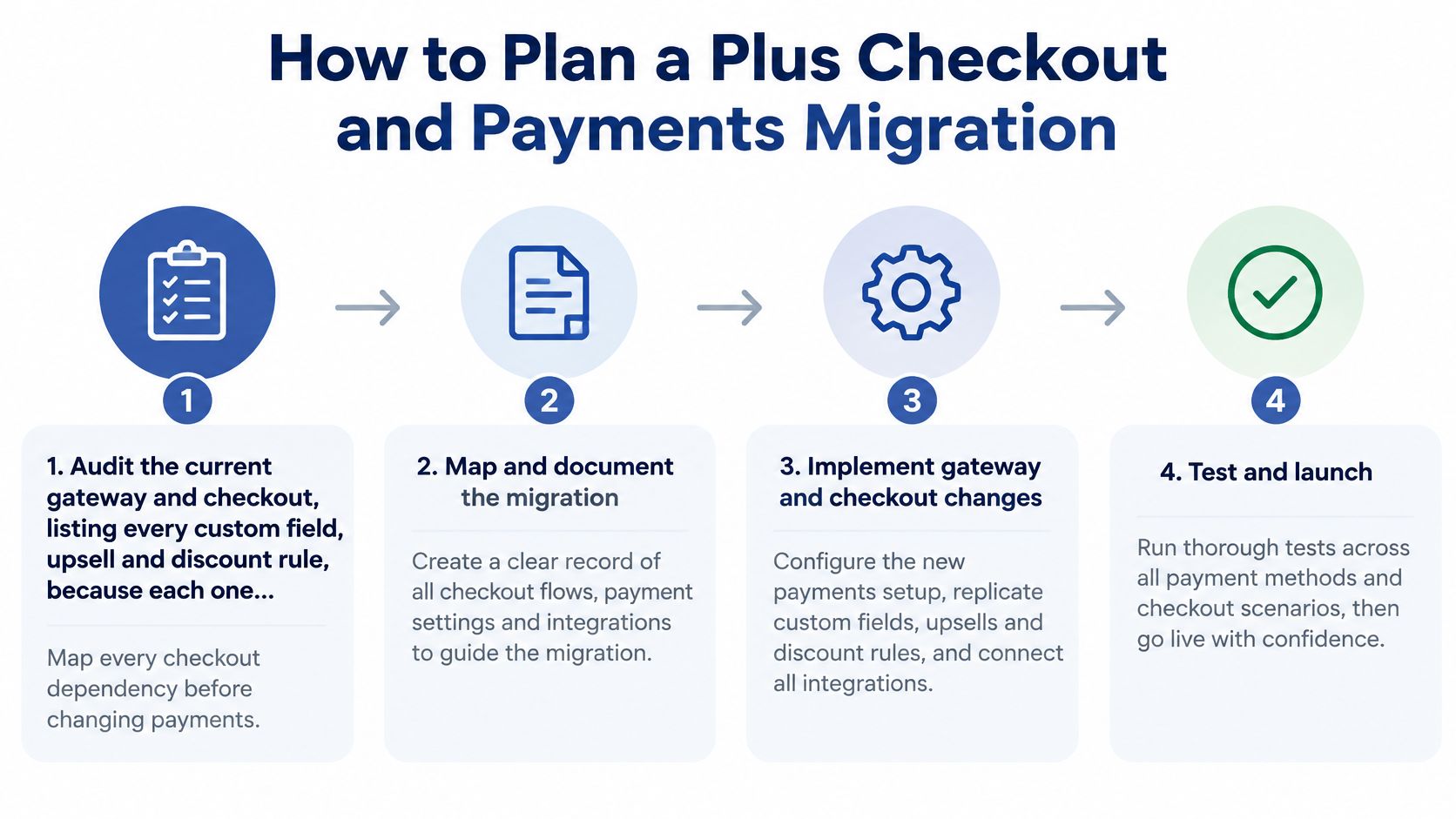
- Audit the gateway and checkout. List every custom field, upsell and discount rule, because each one must be rebuilt or confirmed on Plus, where custom checkout flows are available. Merchants often discover rules nobody remembers adding, and those are the ones that break after launch.
- Map methods to gateways. Confirm which payment methods you offer and which gateway sits behind each one, since gateways must be reconnected and reconfigured on Shopify after migration. Include wallets and manual methods, not just cards.
- Reconnect and configure each gateway. Confirm payment processing works before launch, because a store can go live without a working card path. We handle the technical setup of payment gateways and ensure payment processing works before launch, though gateways must be reconnected and reconfigured on Shopify.
- Run test orders end to end. Test every payment method and currency, including a refund, since a method that approves in testing can still fail on a live order. Test a partial refund too, because refund behaviour differs from full refunds.
- Check payout settings per market. Confirm multi-currency and payout settings so money lands in the right currency and account. A misrouted payout is easy to miss for days.
- Retire the old gateway last. Switch it off only after a live day reconciliation, because running both can leave duplicate fees and split reporting.
- Reconcile the first week. Match orders, payouts and refunds against the gateway report daily until the numbers align.
The walkthrough below shows how a live checkout behaves once these pieces are connected, which helps non-technical stakeholders see what they're approving.
Signs the Checkout Is Healthy
Every method completes a test payment without manual intervention. Payouts match orders minus refunds, currency by currency, and your finance team can trace any single order from checkout to bank account. Discount rules apply once, upsells fire on the intended products only, and failed payments produce a clear customer message rather than a dead end.
If any of those checks fail, pause before switching off the old setup. Fixing a payment path while customers are mid-checkout costs far more than a short delay. Document the final configuration too, so the next plan or gateway change starts from evidence instead of memory.
If your break-even maths points to a plan change, or your checkout needs rebuilding on Plus, we can scope the payment setup, gateway reconnection and testing before you commit. Visit Grumspot to book a plan and checkout review and get a clear, costed route from your current tier to the right one.
Want this kind of work on your store?
Send us the URL and what is slowing it down. We look at the store before we reply.
Related posts
Check out some similar posts.