Shopify Premium Themes: A UK Buyer's Guide for 2026
- shopify premium themes
- shopify theme buyer guide
- shopify theme performance
- shopify theme accessibility
- shopify theme migration
Critical accessibility issues affected 84% of homepages in automated testing of the UK's most popular retail brands, according to Level Access. That's a better starting point for buying Shopify premium themes than a gallery of attractive storefronts.
A paid theme should make your store easier to shop, maintain and improve. Judge it on mobile performance, app dependence and accessibility after customisation, not how impressive its demo looks. Buy the design you can operate reliably, not the one with the longest feature list.
What Makes a Shopify Theme Premium and What It Costs
Think of Shopify as your shop lease and the theme as your fit-out. You pay regularly for the platform; you generally buy the theme once. A poor fit-out creates ongoing work through awkward merchandising, custom code and apps installed to patch missing functionality.
A premium Shopify theme is a paid design and functionality layer controlling how products, collections, navigation and checkout entry points look and behave. It doesn't buy unrestricted control over checkout itself. That remains a separate question of platform capabilities and your Shopify plan.
Premium options commonly provide more layout variations, configurable sections and merchandising tools than free alternatives. However, payment alone doesn't establish quality. Check the actual theme's documentation, support terms and implementation.
Shopify platform fees against premium theme costs
Shopify's UK pricing lists Basic at £25, Grow at £65 and Advanced at £344 per month when paid monthly, with Plus starting at £1,800 per month. The premium-theme ranges below distinguish the UK guide estimate from the separate US-dollar Theme Store snapshot.
| Item | Typical Cost | Billing | What It Covers |
|---|---|---|---|
| Shopify Basic | £25 per month | Recurring | Platform subscription when paid monthly |
| Shopify Grow | £65 per month | Recurring | Platform subscription when paid monthly |
| Shopify Advanced | £344 per month | Recurring | Platform subscription when paid monthly |
| Shopify Plus | From £1,800 per month | Recurring | Enterprise platform tier |
| Premium theme (UK guide) | About £150 to £350 | One-off | Theme purchase |
| Premium theme (Theme Store snapshot) | US$150 to US$500 | One-off | Theme purchase, priced by features and design variations |
The US-dollar snapshot isn't a UK quotation. Confirm the current purchase price and applicable tax before approving your budget.
For a Basic merchant, the theme can be a substantial upfront expense relative to the platform subscription. For a larger operation, implementation and maintenance deserve more scrutiny than the licence price. Neither merchant should confuse a cheap purchase with a low total cost.
Include configuration, content preparation, app integration, developer changes and acceptance testing in your budget. A theme that looks affordable can become expensive when your team needs code changes for routine campaigns.
Buying rule: A premium theme earns its price when it removes custom fixes, unnecessary apps and support gaps.
Pros and Cons of Premium Themes
A premium theme can buy you a more complete starting point: richer product layouts, editorial sections, quick-buy controls and an identifiable developer to contact. That's valuable when the built-in approach matches how your customers shop.
The drawback is excess. Features you don't need can complicate the editor, add JavaScript and make faults harder to isolate. Treat the following comparison as buying guidance, not a promise that every paid or free theme behaves alike.
Premium theme pros and cons against free themes
| Factor | Premium Theme | Free Theme |
|---|---|---|
| Upfront cost | Paid, one-off theme licence | Free |
| Layout and sections | Usually broader layout variations and sections | Usually fewer starting layouts |
| Conversion features | May include sticky add-to-cart and quick buy | Verify native features; extend only where needed |
| Support | Check for a named support route and changelog | Check the available support scope |
| Custom fixes | Fewer fixes when the native design fits your store | May need extensions for specialist requirements |
| Updates | Check release history and custom-code compatibility | Also needs compatibility checks after customisation |
Choose for your operating model
A premium theme suits a merchandising-led store whose team needs to launch different page layouts without commissioning development each time. It also makes sense when its native product options, navigation and promotional components replace separate tools.
A free theme can be enough for a straightforward catalogue with simple navigation and a clear content hierarchy. Don't pay for lookbooks, elaborate menus or promotional modules your team won't use.
Neither route eliminates maintenance. When you modify theme code, future updates can conflict with those changes or require manual merging. Keep a change log and test updates on an unpublished copy rather than applying them directly to production.
Support deserves particular scrutiny. Ask whether the developer covers configuration questions, reproducible bugs and app conflicts, and distinguish theme support from bespoke development.
The commercial advantage only counts if the finished storefront passes your performance and accessibility checks. A smaller feature set that works cleanly is preferable to a richer one that needs constant repair.
How to Score a Premium Theme Before You Buy
A polished demo proves little about how a theme will perform with your catalogue, apps and content. Score each criterion as pass, conditional or fail, and record what you observed. Prioritise speed, app weight and accessibility over visual features: those are harder to repair after launch.
Premium theme scorecard checks, pass signals and red flags
| Criterion | How to Check | Pass Signal | Red Flag |
|---|---|---|---|
| Mobile layout | Test on a mid-range Android and an iPhone with one thumb | Products, filters and cart are comfortably usable | Horizontal scrolling or awkward tap targets |
| Page speed | Run Lighthouse mobile and inspect PageSpeed field data | Primary content appears promptly without app-related regression | Oversized hero media or deterioration after apps |
| Interaction responsiveness | Tap filters and variant selectors during loading | Controls respond promptly and consistently | Delayed taps or repeated input |
| Layout stability | Watch banners and product images load | Space is reserved and controls stay in place | Content moves beneath the pointer |
| Accessibility | Tab through header, drawer and cart | Visible focus, labelled forms and an accessible purchase path | Hover-only menus or unlabelled buttons |
| Section system | Map required homepage and product sections | Native sections cover real content needs | Unused blocks load assets across unrelated pages |
| App dependence | Inventory app embeds and inspect network requests | Core merchandising works without overlapping tools | Basic functions require several competing integrations |
| Shopify 2.0 and Plus fit | Check sections, metafields and checkout integration requirements | Supports the intended content model and checkout plan | Legacy dependencies or unsupported assumptions |
| Support and updates | Read release notes and support terms | Maintained releases and a clear contact route | Unexplained maintenance gaps or unclear ownership |
Build a representative test store
Use the theme trial, if available, to build out the homepage, collection and product templates with your own content. Include long product names, sale prices, unavailable variants and realistic photography. A sparse demo can hide problems that appear once the catalogue is in place.
Test the buying journey on physical phones. Open filters, change variants, inspect delivery information and reach the cart. Then use desktop keyboard navigation to check that shoppers can complete the same journey without a mouse.
Before measuring speed, inventory app embeds and note which scripts belong to the theme and which come from apps. In Chrome DevTools, inspect the Network and Performance panels to see which integrations add requests or occupy the main thread. That distinction helps you identify whether a slowdown comes from the theme or an app.
Ask a merchandiser to build a campaign page in the theme editor without developer help. Check that metafields populate correctly and that campaign content does not appear on unrelated products. The guide to Shopify 2.0 theme development explains how editable sections and structured content support this kind of setup.
Separate technical acceptance from commercial comparison
Keep price, licence scope, support and likely implementation work in a separate comparison sheet. Product Metrics' competitor pricing analysis template offers a structure you can adapt to compare theme vendors.
Give every conditional result a named owner and an agreed remedy. A failed purchase control, inaccessible menu or persistent performance regression needs fixing before launch, regardless of how good the homepage looks.
Reject a theme when repairing its foundations would become the main development project.
Mobile Experience, Speed and Core Web Vitals
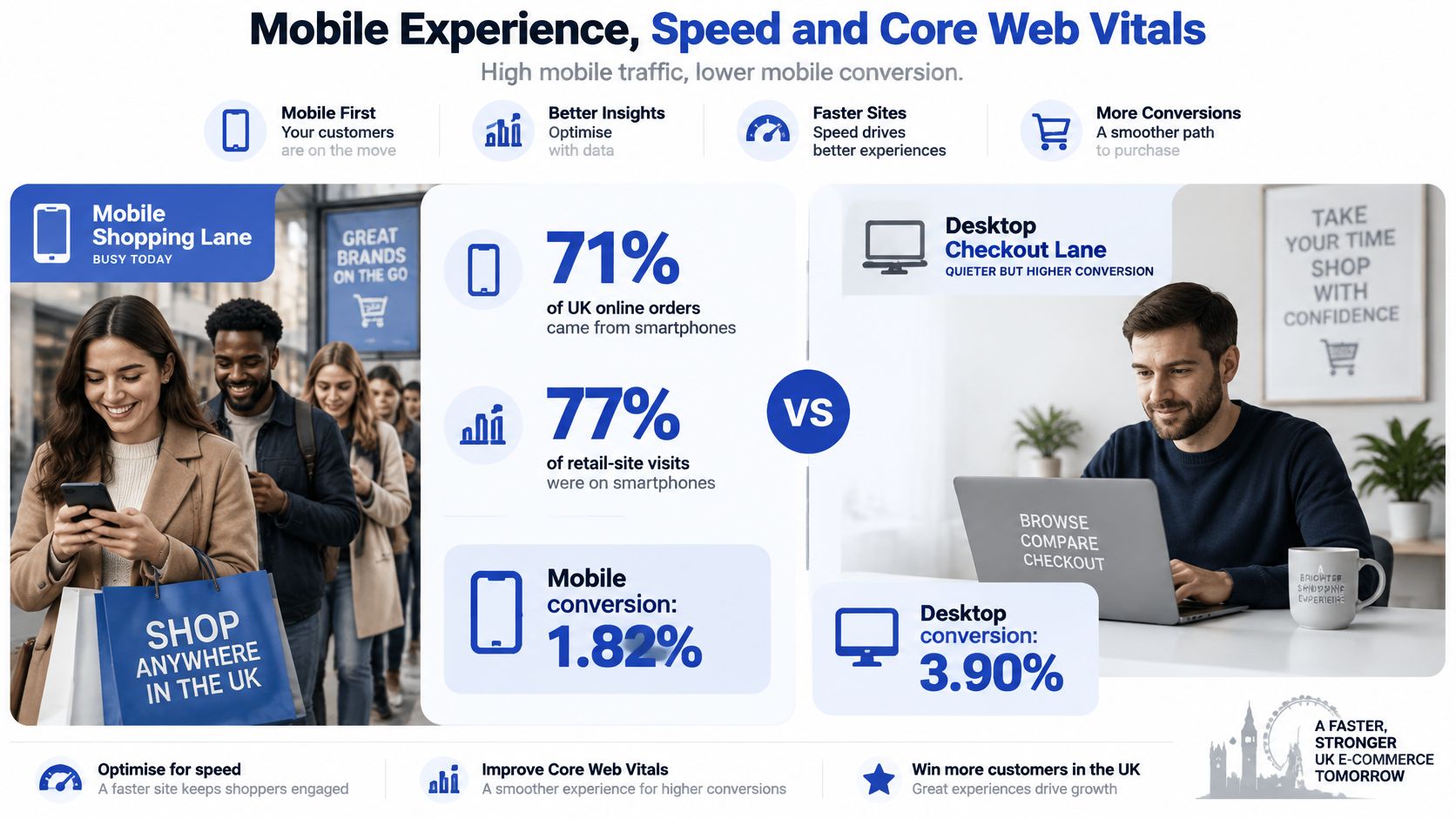
Smartphones completed 71% of UK online orders and accounted for 77% of retail-site visits in the second quarter of 2024, according to Salesforce figures reported by ProfileTree's mobile commerce guidance. The same guidance cites separate average conversion figures of 1.82% on mobile versus 3.90% on desktop. These aren't a single matched experiment, but they establish why mobile usability deserves priority.
The contrast is a busy front door with a narrower route to the till. Use it to prioritise testing, not to assume a paid theme will increase conversion.
The mobile shopping imbalance is illustrated below.
Test the purchase journey on mobile data
Open a product page without Wi-Fi. Check whether shoppers can identify the product, price and available options without waiting for decorative content. Filters should be easy to find, and cart access shouldn't disappear beneath promotional overlays.
A sticky add-to-cart can help on long product pages, but only if it reflects the selected variant and doesn't obscure important information. Test it with the cookie banner visible, the keyboard open and an unavailable option selected.
- Browse deliberately: Move from a campaign landing page into a collection and then a product.
- Change your mind: Remove filters, switch variants and edit the basket.
- Reach checkout: Look for unnecessary steps, confusing drawers and controls hidden behind overlays.
Don't enforce identical tap counts across devices. Judge whether each step helps the shopper or merely compensates for a poor mobile layout.
Measure the live stack, not the demo
Historical InternetRetailing research found that fewer than half of leading UK retail mobile pages fully loaded within 10 seconds. That's context for disciplined testing, not a current benchmark or an acceptable target.
Run Lighthouse against a clean theme configuration, repeat with your real apps, and test again with campaign content enabled. Keep the device profile, network settings and page content consistent so that comparisons mean something.
Inspect Largest Contentful Paint, Interaction to Next Paint and Cumulative Layout Shift alongside real-user field data. Lab tests help diagnose problems; field measurements show what actual customers experience. Where a preview has no field history, don't mistake that absence for a pass.
Look for:
- Efficient primary imagery: Responsive image sizes and sensible prioritisation for the main product image.
- Reserved media space: Image and banner dimensions that prevent surrounding content from jumping.
- Deferred secondary tools: Reviews, chat and recommendations that don't obstruct initial shopping.
- Selective assets: Section code that loads where it's used rather than across the entire storefront.
Our Core Web Vitals optimisation guide provides a technical route for investigating these issues.
Use the accompanying video as a practical supplement while reviewing storefront behaviour.
Finally, compare mobile collection-to-product progression, add-to-cart behaviour and checkout progression after launch. Segment by device, landing page and consent state so a tracking change doesn't masquerade as a usability improvement.
Accessibility Checks to Run After Customisation
Buying a reputable premium theme doesn't transfer accessibility responsibility to its creator. Your colour choices, custom sections, product options and app integrations can change how the storefront works for keyboard and assistive-technology users.
Use WCAG 2.2 AA as a technical acceptance baseline. UK government accessibility guidance identifies that standard for covered public-sector digital services and organises accessibility around perceivable, operable, understandable, and reliable content. Commercial ecommerce obligations differ by circumstance, so don't treat this as a blanket legal determination for your business.
Build accessibility checks into the customisation workflow rather than leaving them until launch.
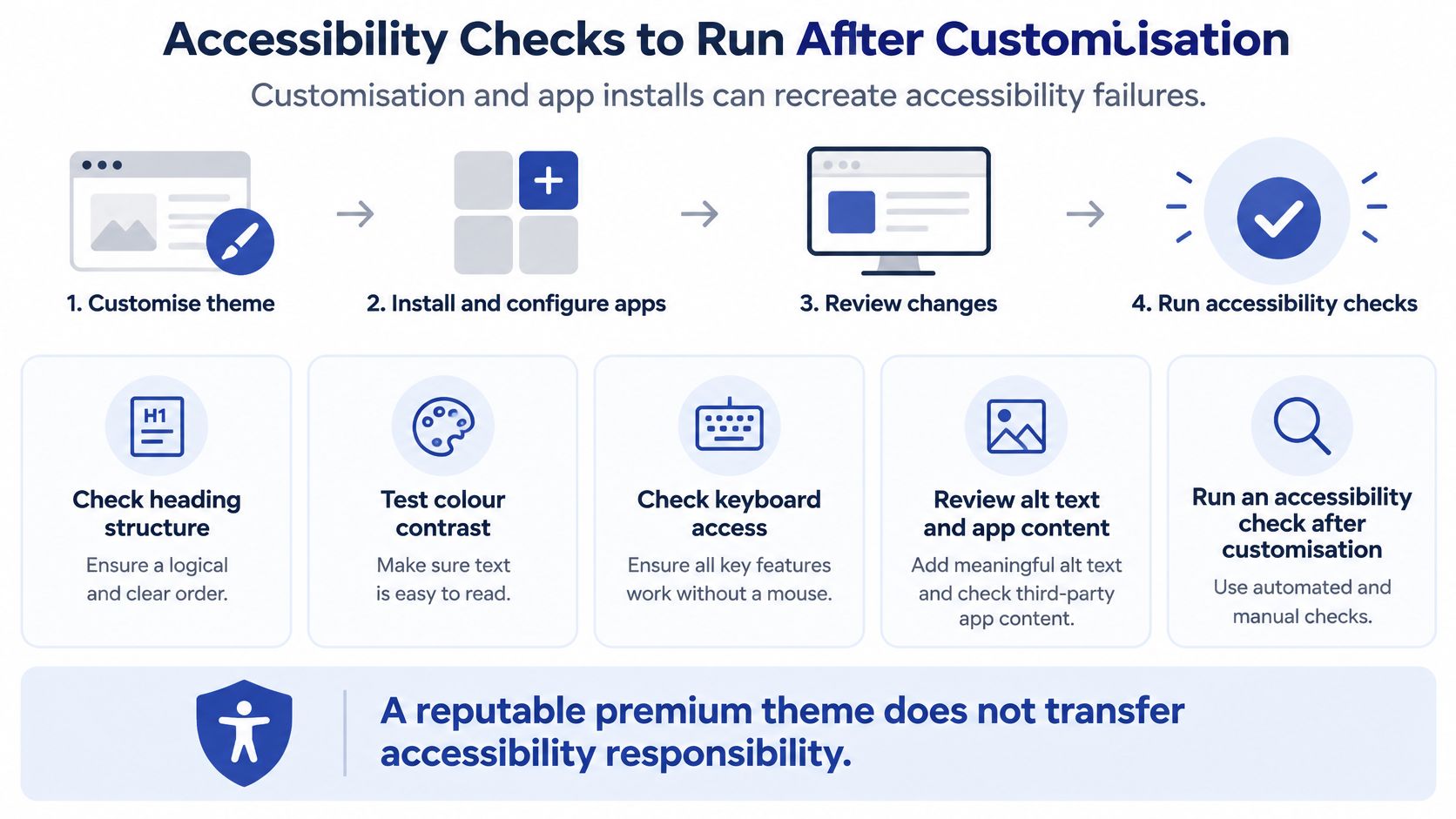
Check the complete shopping journey
Run an automated tool such as axe or Lighthouse first. Then close the mouse-driven workflow and test manually, because a scanner can't establish whether a shopper can understand and complete a purchase.
- Keyboard navigation: Tab through the header, mega menu, search, product options and cart. Check that focus order follows the visual journey.
- Visible focus: Confirm that links and buttons retain a clearly visible focus indicator against your chosen backgrounds.
- Forms and errors: Inspect account, newsletter and checkout fields for associated labels and useful error messages.
- Headings and contrast: Check heading hierarchy, button text, sale prices and promotional badges after applying brand styling.
- Drawers and modals: Ensure focus enters the component, stays within an active modal and returns to the trigger when closed.
- Dynamic controls: Give quantity buttons meaningful accessible names and verify that cart and variant changes are announced.
Use VoiceOver or NVDA to follow representative templates. Listen for the product name, price, selected options, availability and purchase controls in a sensible order. Review image descriptions as content, not as populated fields.
Make regression testing routine
Retest the affected journey whenever you introduce a pop-up, reviews widget, subscription selector or new section. Check both the default state and errors, empty results, unavailable products and expanded controls.
Our Shopify accessibility audit guide gives teams a structure for recording issues and verifying fixes.
Acceptance principle: A visually polished component isn't finished until people can operate and understand it without relying on its appearance.
Keep the regression checklist with the theme's release documentation. That makes accessibility part of routine delivery rather than a separate clean-up exercise.
Migrating a Live Store to a Premium Theme
Treat a theme migration as a controlled release, not a cosmetic switch. Product records may remain intact while templates, app placements, navigation behaviour and tracking change around them.
Shopify's 2024 UK State of Commerce Report states that ecommerce sites launch 90% faster and at 10% of the cost on Shopify. Those are Shopify's platform-level figures, not a delivery estimate for your particular theme migration.
Prepare an unpublished release
- Back up the current storefront. Download the theme and document settings, templates, custom code and integrations. Inventory important products, collections, pages and existing redirects.
- Duplicate the live theme for rollback, then add the new theme separately as an unpublished theme. The duplicate preserves your existing implementation; it doesn't convert it into the new design.
- Rebuild the content model. Recreate navigation, template assignments, metafield connections and key landing pages. Map each old custom section to a replacement or explicitly retire it.
- Test the purchase journey through checkout, including discounts, shipping, taxes and market-specific behaviour. Checkout is separate from the theme, so verify integrations without assuming the theme controls them.
- Preserve URLs wherever possible. A theme switch doesn't require URL changes. Where a URL changes, create the appropriate permanent redirect and update internal links.
- Run acceptance checks against the configured unpublished store, not the vendor demo. Include tracking, consent behaviour, structured content and app interactions.
- Publish during a quieter trading period. Assign someone to monitor orders, errors and customer reports, and keep a clear rollback decision ready.
Scope the work by dependencies
Say a UK skincare brand has a compact catalogue, conventional product variants and no specialist purchase flows. Its migration work centres on template mapping, content and app placement.
A Plus merchant operating regional storefronts needs a broader test matrix. Pricing, currencies, translated content, subscriptions and checkout integrations require market-specific acceptance. Don't attach a generic completion promise to either scenario before checking dependencies.
Keep custom changes in version control and document why each exists. When a theme update arrives, compare the changed files and test the merged result before publishing.
Also record app ownership: who supplies the widget, who maintains the integration and who verifies it after release. A storefront can look correct while an app stops sending events or updating the cart.
Launch approval should come from evidence, including successful purchase tests and verified merchandising workflows, rather than a deadline alone.
Confirm Your Shortlist Before You Buy
For a small brand on Basic, favour restraint. Choose a theme that handles your catalogue natively, lets customers shop comfortably on mobile and doesn't require a collection of supporting apps.
For a growing brand on Advanced, favour operational flexibility. Your merchandising team should be able to assemble useful pages, reuse structured content and manage promotions without creating a developer ticket for every change.
For a multi-store Plus business, favour integration fit. Regional merchandising, pricing presentation and the hand-off into checkout matter more than another homepage preset.
Turn preference into a purchase decision
- Build an evidence-led shortlist: Keep only candidates that fit your actual catalogue and content workflow. Save screenshots, test notes and unresolved questions beside each score.
- Validate the configured favourite: Demo checks are useful for elimination, but purchase approval needs representative content, required apps and realistic buying scenarios.
- Review the remaining risks: Assign an owner to every conditional result and distinguish a configuration fix from architectural work.
We offer Shopify Audits covering design, technical and SEO, so theme selection can be evaluated as a storefront decision rather than an isolated design purchase.
Don't average away a serious failure. A theme shouldn't win because attractive layouts compensate numerically for an inaccessible cart or unreliable product controls.
Choose the candidate with the least unresolved operational risk, not the highest count of optional features.
This week, put your preferred themes into the scorecard and record what you can verify. Eliminate unsuitable candidates, configure the strongest option with representative content, and resolve its remaining risks before buying. If the fundamentals fail, drop it regardless of how closely the demo matches your brand.
We can help assess your theme choice and implement the customisation it needs, with custom quotes and flat-rate pricing without hidden fees. When you book a one-off project or monthly retainer, we include a free Shopify store UX audit worth $1,500. Visit Grumspot to discuss your shortlist, current apps and migration requirements before committing to a theme.
Want this kind of work on your store?
Send us the URL and what is slowing it down. We look at the store before we reply.
Related posts
Check out some similar posts.