Shopify to Magento 2 Migration: A Complete Guide
- shopify to magento 2 migration
- ecommerce replatforming
- magento 2 data migration
- 301 redirects ecommerce
- migration testing checklist
Your Shopify store still takes orders, but the workarounds are getting harder to defend. Wholesale pricing lives in an app, warehouse updates need manual checks, and every checkout change starts with a discussion about what the platform will allow. Someone has suggested Magento 2, and now you need to establish whether moving will solve those problems without creating bigger ones.
A Shopify to Magento 2 migration should protect how the business trades, not just reproduce its storefront. Products and redirects matter, but so do VAT calculations, refunds against historical orders, accessible checkout components, and the support team's ability to help returning customers. The safest approach starts with a commercial decision, then turns every important dependency into something you can test before launch.
Decide If Migrating From Shopify to Magento 2 Is the Right Move
Don't migrate because your current implementation is frustrating. First establish whether the constraint comes from Shopify itself, an unsuitable app, or decisions made during the original build. Moving a poorly understood process to another platform usually makes it more expensive to maintain.
The commercial stakes are substantial. UK online retail reached approximately £127.41 billion in 2024, growing about 3.4% year on year, according to Retail Gazette's analysis of online retail sales. Treat the platform decision as an investment in an established revenue channel, not a technology refresh.
Separate platform constraints from implementation problems
Write requirements as observable business outcomes. “More flexibility” isn't testable; “wholesale customers must receive contracted prices throughout checkout and refunds” is.
| Business requirement | Evidence to gather before choosing |
|---|---|
| Complex catalogue | Attribute relationships, configurable products, bundles, and merchandising rules |
| Bespoke pricing | Contract pricing, customer groups, quantity breaks, and approval workflows |
| Warehouse operations | Stock ownership, reservation rules, routing, and fulfilment exceptions |
| Code control | Changes that genuinely require ownership of the application, rather than configuration |
Use Wonderment Apps' resource to compare top ecommerce platforms as a starting point for the shortlist, then evaluate your actual workflows against each candidate. A feature checklist alone won't reveal whether a solution is maintainable.
Model the operating commitment
Ask development to estimate hosting, deployment, security patching, upgrades, monitoring, extension maintenance, and incident support. Finance should add implementation costs, parallel operation, staff training, and the commercial exposure of an interrupted launch.
Compare that commitment with fixing the existing Shopify implementation. Shopify Plus, Functions, apps, or a targeted custom service may address the requirement without transferring infrastructure responsibility to your team.
Decision rule: Choose Magento when the business needs its operating model, not simply because the development team prefers its freedom.
Finish with a go-or-no-go memo signed off by finance, operations, and development. Record the requirements driving the decision, rejected alternatives, ongoing ownership, and acceptance criteria. If nobody can explain what Magento must deliver commercially, you're not ready to export.
Audit Your Store and Build the Migration Inventory
Start discovery with the people who handle exceptions. Customer service knows which historical orders need special treatment; finance knows where refund totals disagree; warehouse staff know which inventory updates arrive late. Their workflows belong in the inventory alongside the data.
Don't limit the audit to what appears in Shopify's admin. Record app-owned data, external systems, scheduled jobs, webhook consumers, and spreadsheets that staff still rely on. An export that contains every product can still omit the rules that make those products sellable.
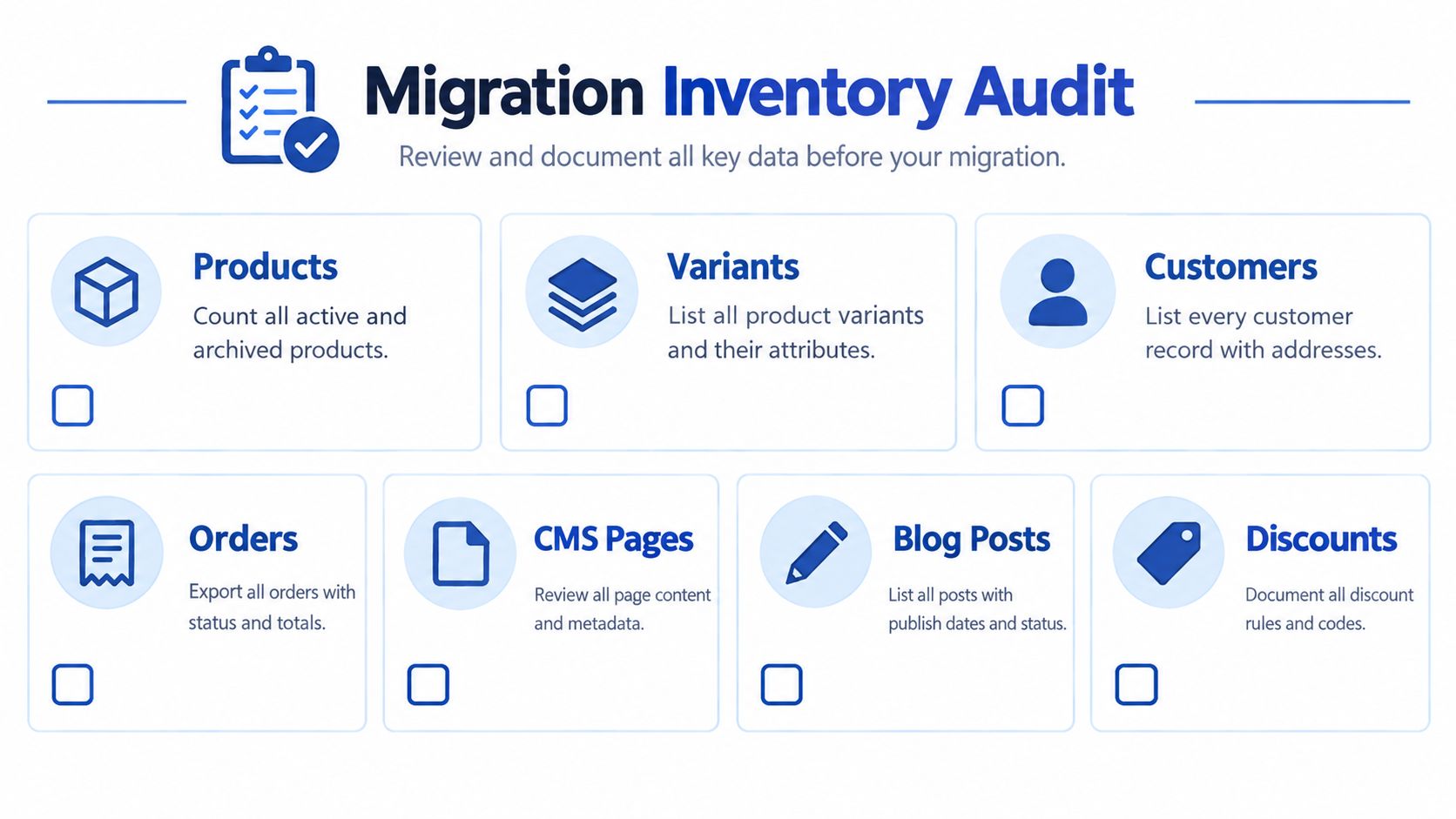
Use the inventory as a sign-off document, not a private development worksheet.
Record ownership and relationships
Capture products, variants, customers, addresses, orders, CMS pages, blog posts, discounts, gift cards, tax rules, and media. Include archived records where they support reporting, customer service, returns, or external references.
Build the field mapping before writing transformation scripts:
| Mapping field | What to document |
|---|---|
| Source object and field | Shopify identifier, metafield definition, or app-owned property |
| Destination entity | Magento product, attribute, customer, address, or historical-order record |
| Transformation | Type conversion, normalisation, lookup, or business-rule change |
| Validation | Required value, relationship check, financial comparison, or approved exception |
| Owner | Person responsible for resolving ambiguous records |
For variants, document the parent relationship, option values, SKU uniqueness, images, and inventory ownership. Separate genuine product options from personalisation data that belongs to an order line.
Classify dependencies before pricing the build
Mark each app replace, rebuild, integrate, or retire, and name the workflow affected by that decision. Document ERP, PIM, CRM, payment, tax, fulfilment, subscription, and marketplace dependencies, including who controls credentials and where failures are handled.
Budget risk deserves attention here: a Right Partners replatforming report states that 83% of data-migration projects fail to meet budget or schedule, and gives planning benchmarks around £18,500 for mid-complexity work and £150,000 or more for enterprise migrations. Those are benchmarks, not quotes for your store.
- Reconciliation rules: Define acceptable differences for counts, inventory, order totals, VAT, and refunds. Financial discrepancies need documented explanations.
- Discovery deliverables: Produce the inventory, field mapping, dependency register, exception log, and scope exclusions.
A partner can price those artefacts far more reliably than “move everything across”.
Export Products, Customers, and Orders the Right Way
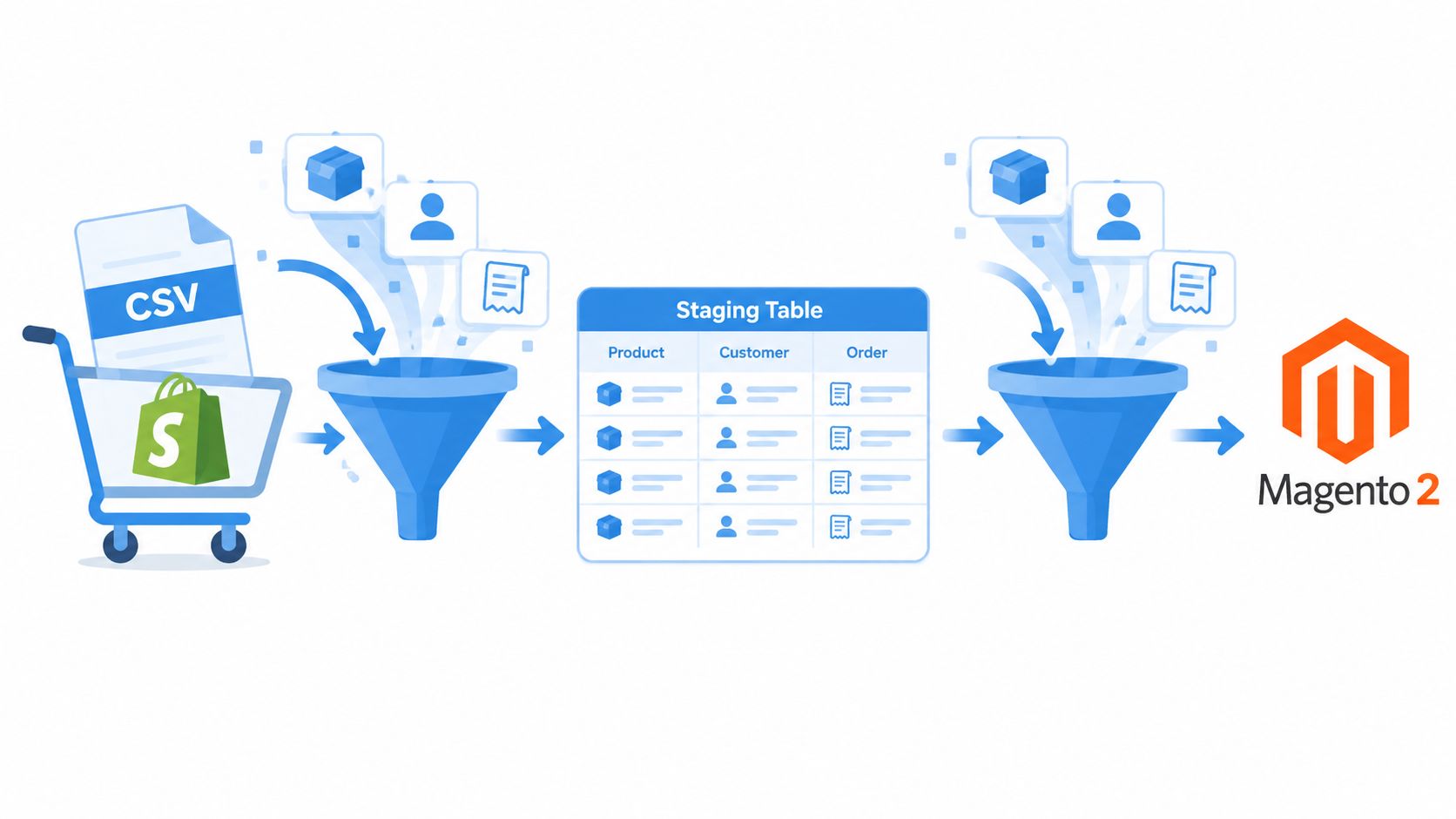
A product CSV is an input, not a migration strategy. Keep an untouched source export, load a working copy into a staging database, and transform it through version-controlled scripts. That gives you a repeatable process when merchandising changes the catalogue before launch.
Export catalogue data first, then customers and addresses, then orders and their dependent records. Preserve source identifiers throughout so later imports can resolve relationships without guessing from email addresses or product names.
The transformation layer should make every mapping and rejected record visible.
Transform the catalogue deliberately
Use Shopify CSV exports for the fields they contain, then obtain missing metafields, app-owned records, and supporting data through appropriate exports or APIs. Don't assume the spreadsheet represents the complete store.
- Variants and swatches: Design configurable-product relationships and attribute values before import. Normalise inconsistent option labels rather than creating competing attributes.
- Custom options: Decide which selections change stock and which only describe personalisation. Preserve historical selections independently of the new catalogue.
- Bundles and pricing: Specify component relationships, stock behaviour, discount allocation, and quantity pricing. Treat customer groups as a possible pricing mechanism, not an automatic substitute for every contract.
- Media and content: Retain image associations, alternative text, filenames where useful, and a record of missing assets.
For a simple catalogue, CSV transformation may be sufficient. For more involved relationships, use a staging database and controlled import jobs. Evaluate Matrixify or LitExtension against your mapping and exception cases rather than accepting a successful demo import as proof of completeness.
Preserve the financial record
Order history is a financial artefact. Keep original payment references, discounts, tax amounts, shipping charges, partial refunds, gift returns, split shipments, return reasons, and accounting references together.
Decide whether historical orders belong in Magento's operational workflow or a clearly labelled read-only archive. Avoid reconstructing old orders through processes that could trigger emails, reserve inventory, or request payment again.
Don't promise password continuity until you've verified the available authentication data and a supported migration path. Prepare an account activation or reset journey where required.
Automate comparisons with SQL or Python: record counts, parent-child relationships, monetary totals by currency, and exception reports. Keep currency amounts in exact decimal representations, and investigate mismatches rather than rounding them away.
Preserve SEO With URL Redirects That Actually Work
The most dangerous redirect file is one that looks complete because every old URL returns somewhere. A homepage response doesn't establish relevance, and a domain-wide fallback can conceal missing mappings until search traffic changes.
UK migration guidance associates incomplete mapping with a 15–30% organic-traffic decline during the first 90 days, and describes a retail consolidation where wildcard redirects were associated with approximately 80% search-visibility loss, as reported in Webdigita's ecommerce migration guidance. Those figures aren't a forecast for your store, but they support treating URL mapping as launch-critical work.
Build from real source URLs
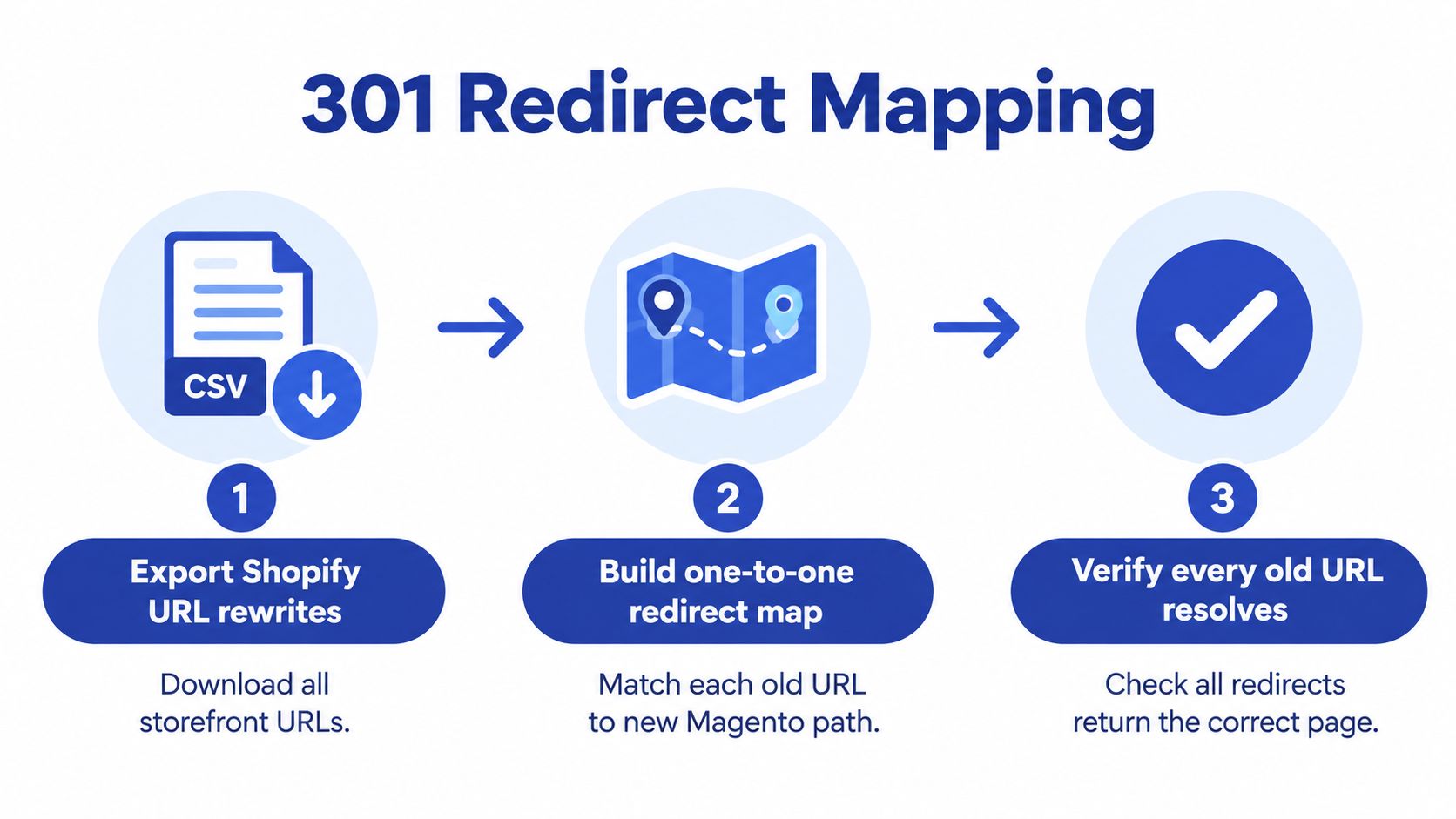
Export Shopify's existing redirects separately from its live storefront URLs. Combine those records with a crawl, XML sitemaps, Search Console landing pages, and URLs used in campaigns or external integrations.
The required asset illustrates the mapping workflow; the export should include both current URLs and historical redirects.
RankEngine's Shopify redirect management tips provide a useful reference while reviewing the source store's redirect administration. Use this migration redirect checklist to structure the handover between SEO and engineering.
Map each changed product, collection, page, and blog URL to its final destination. For discontinued content, choose the closest relevant replacement only where it serves the same intent; don't automatically send everything to the homepage.
Test the deployed behaviour
Run Screaming Frog against the redirect list in a controlled staging setup. Testing the spreadsheet won't catch differences introduced by server rules or Magento routing.
- Response behaviour: Confirm permanent redirects, final destinations, and the absence of loops or unnecessary chains.
- Indexing signals: Review canonicals, hreflang, XML sitemaps, pagination, and staging restrictions.
- Page parity: Check metadata, internal links, structured data, and important content on destination pages.
A redirect map is finished when the deployed URLs pass testing, not when somebody has populated the destination column.
Keep failed checks in the release blocker list. Don't let the launch team replace unresolved mappings with a wildcard.
Handle Apps, Integrations, and Custom Features
An app replacement should preserve a business capability, not merely resemble the old interface. A loyalty widget may look correct while losing redemption history; a subscription integration may create new orders while leaving existing billing agreements behind.
Evaluate each dependency against functional parity, data ownership, maintenance responsibility, and retirement risk. The classification from discovery becomes a delivery decision with a named owner and a testable outcome.
Choose the smallest maintainable implementation
| Route | Appropriate use | Question to resolve |
|---|---|---|
| Magento extension | A standard requirement with a suitable maintained module | Who owns compatibility and regression testing? |
| Direct API integration | A clearly defined exchange with an external system | How are retries, duplicates, and outages handled? |
| Custom module | Business logic that belongs inside commerce workflows | Can the team support it through upgrades? |
| Retirement | A feature without sufficient commercial value | What customer or operational dependency remains? |
Don't select an extension purely because its feature list matches. Ask for a demonstration using your catalogue, pricing exceptions, refund scenarios, and destination Magento edition.
For complex B2B pricing, multi-source inventory, and bespoke checkout logic, write acceptance scenarios before estimating the build. Explicitly identify which behaviour requires an extension, edition-specific functionality, middleware, or custom development.
Define authority during parallel operation
Document which system owns products, sellable stock, customers, orders, and fulfilment updates. Use the principles in this ecommerce ERP integration guide to make those boundaries explicit.
Don't enable competing production consumers to see whether both platforms stay synchronised. Shadow reads and isolated test destinations are safer than duplicate writes.
- Order delivery: Preserve external identifiers and define idempotency so a retried message doesn't create another ERP order.
- Inventory updates: Specify sequencing, stale-message handling, and reconciliation after an outage.
- Payments and subscriptions: Verify provider support for existing references and agreements. Don't infer portability from an exported token field.
- Operational support: Record credentials, alert owners, replay procedures, and a way to inspect failed messages.
Keep test emails, payment requests, warehouse jobs, and marketplace updates away from live recipients. A staging checkout shouldn't accidentally become a production dispatch instruction.
Test, Validate, and Protect Accessibility and Returns Logic
Test business outcomes, not just pages. A checkout can look healthy while sending the wrong VAT amount to accounting or creating an order that customer service can't refund.
Build a scenario matrix covering guest checkout, account login, payments, shipping, discounts, order amendments, and fulfilment exceptions. Ask finance and operations to approve the results, rather than leaving acceptance entirely to developers.
Validate the complete shopping journey
Use browser automation such as Playwright for repeatable purchase paths, then supplement it with manual testing on representative devices. Load-test with k6 against expected trading patterns, and inspect application logs, queues, search behaviour, and cache performance during the run.
Use a post-migration data validation checklist to connect customer-facing tests with record reconciliation.
- VAT and totals: Check inclusive and exclusive pricing, shipping tax, discounts, rounding, invoices, and refunds against finance-approved examples.
- Analytics: Verify product, basket, checkout, purchase, and refund events. Confirm consent behaviour and check for duplicate purchase reporting.
- Customer access: Test activation, password reset, historical-order visibility, and support-assisted recovery.
Protect accessibility and post-purchase operations
UK private-sector ecommerce obligations differ from public-sector WCAG requirements, but the Equality Act 2010 requires service providers to avoid disability discrimination and make reasonable adjustments. The European Accessibility Act has applied to ecommerce services since 28 June 2025, potentially affecting UK businesses serving EU consumers, as outlined in accessiBe's UK ecommerce accessibility report.
Use WCAG testing as an engineering acceptance framework and obtain legal advice on applicability. Combine axe-core checks with keyboard and screen-reader testing of navigation, filters, forms, error messages, payment interfaces, and third-party widgets.
Returns need equally explicit acceptance tests: NetSuite's retail returns analysis reports a 17.5% UK return rate in 2025, with 78.1% resulting in refunds, alongside reported annual returns fraud of £1.3 billion.
Release gate: A successful purchase isn't enough. Staff must also be able to handle the legitimate exceptions that follow it.
Test partial returns, gift returns, exchanges, inspection outcomes, warehouse routing, and refunds against historical payment references. Preserve appropriate fraud controls and support visibility; a smoother portal isn't automatically a better commercial outcome.
Cutover, Rollback, and the First 90 Days
Cutover needs a runbook with named decision-makers, dependencies, checkpoints, and stop conditions. Don't make the deployment engineer responsible for deciding whether unexplained financial discrepancies are commercially acceptable.
Select a low-traffic trading window using the store's own history, avoiding campaigns, warehouse changes, and payment-provider maintenance. Confirm that finance, customer service, fulfilment, and integration owners are available.
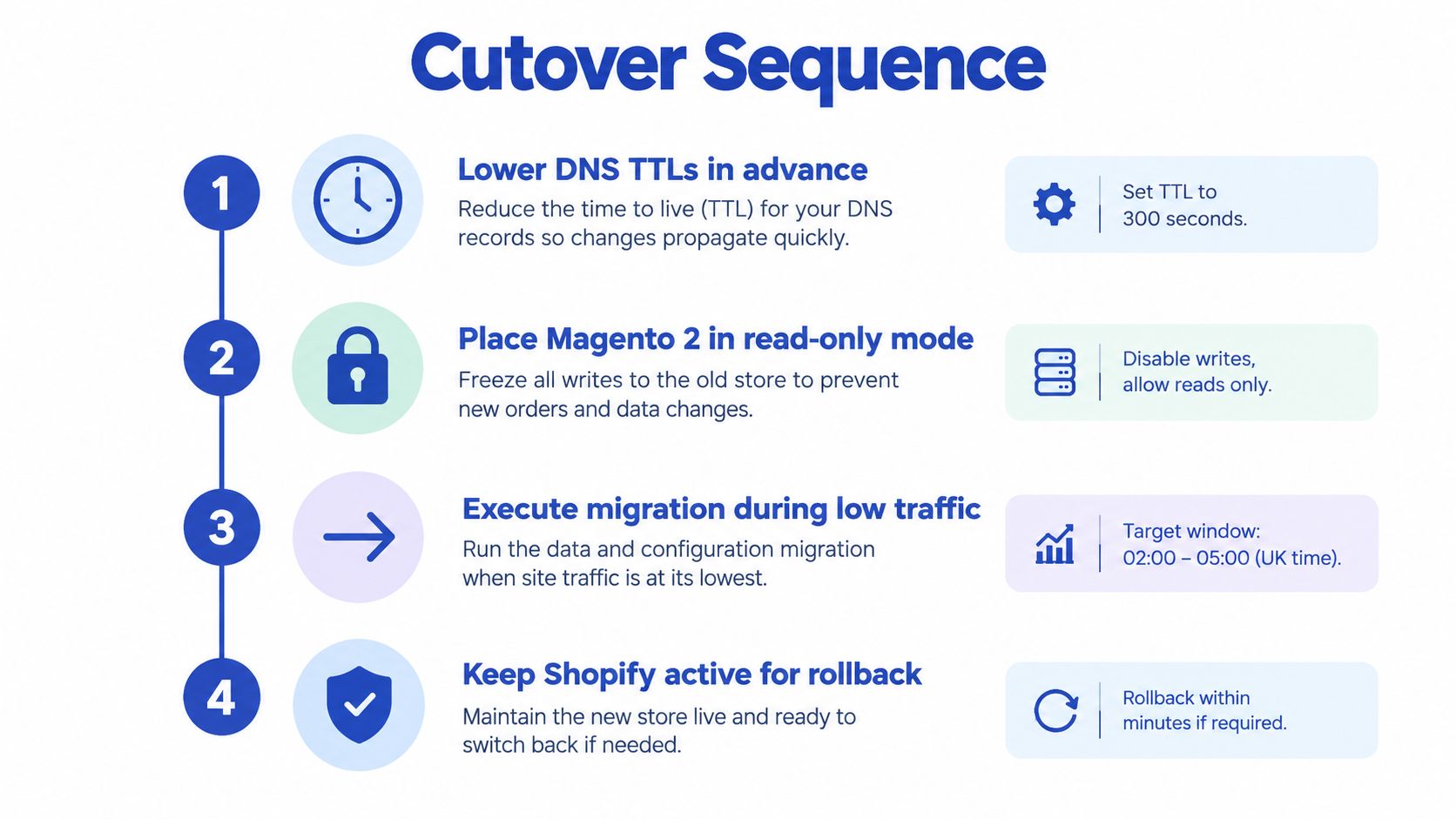
The supplied timeline depicts the reverse migration direction. For Shopify to Magento 2, freeze writes on the outgoing Shopify workflows and keep the destination Magento store restricted until reconciliation passes.
Execute a rehearsed release
Complete repeated full dry runs before choosing the launch date. Record duration, manual interventions, import failures, and reconciliation results so the runbook reflects observed behaviour rather than estimates.
Lower DNS TTLs in advance through the hosting team, and confirm certificates and destination readiness. At cutover, pause outgoing checkout and relevant writes, drain pending integration work, then extract the final delta.
Import and reconcile that delta before routing public traffic to Magento. Verify payment capture, ERP delivery, confirmation messages, and support visibility through controlled production checks. Keep Shopify available as a restricted fallback, not as a competing live checkout.
Make rollback decisions explicit
Agree alert thresholds against the store's baseline before launch. Use absolute blockers for lost orders, unexplained financial mismatches, incorrect payment capture, or inaccessible critical checkout paths. For conversion, latency, and payment-decline changes, define baseline-relative thresholds and observation windows appropriate to actual trading volume.
A full rollback isn't a DNS reversal once Magento has accepted orders. Account for those orders, payments, stock movements, and customer updates before restoring the previous transaction path.
Prefer a limited recovery where it contains the fault safely: disable a broken promotion, pause an integration consumer, or revert a frontend release. Use full rollback when the transaction path or integrity of the records can't be trusted.
For a supplementary migration walkthrough, use the video below alongside your store-specific runbook.
Monitor trading and hand over ownership
Keep the post-launch dashboard focused on commercial continuity: revenue, checkout errors, payment failures, refund processing, customer-service tickets, and Magento-to-ERP reconciliation. Compare like-for-like trading periods and account for promotions or stock availability before blaming every movement on the migration.
Review Search Console crawl and indexing reports, organic landing pages, rankings, missing URLs, and redirect failures throughout the monitoring period. Assign an owner to each alert and preserve the evidence needed to distinguish an application fault from an integration or reporting problem.
Tell returning customers what has changed, how account access works, and where to find historical orders. Brief support staff before launch so customers don't receive conflicting answers.
Copy this delivery checklist
- Decide: Approve the go-or-no-go memo, commercial outcomes, ownership model, and alternatives considered.
- Audit: Sign off the discovery inventory, field mapping, dependency register, and exclusions.
- Export: Deliver repeatable scripts, protected source snapshots, and reconciliation reports.
- Redirect: Approve the deployed redirect map and SEO validation results.
- Integrate: Document system authority, message handling, and recovery procedures.
- Test: Sign off functional, financial, accessibility, performance, and returns evidence.
- Cutover: Rehearse the runbook and authorise release and rollback decisions.
- Monitor: Maintain the monitoring dashboard, incident ownership, and support handover.
Ask prospective agencies to explain a migration exception they resolved, demonstrate their reconciliation approach, and show what post-launch support includes. Keep scope changes visible through an impact log covering cost, dependencies, acceptance tests, and release timing. Choose a partner that can prove continuity, not just deliver a convincing storefront preview.
Grumspot offers Shopify Plus development, technical and SEO audits, and deep integrations to help you establish whether your current platform can meet the requirements driving a migration. Visit Grumspot to discuss your storefront constraints, integration dependencies, and commercial priorities before committing to a rebuild.
Want this kind of work on your store?
Send us the URL and what is slowing it down. We look at the store before we reply.
Related posts
Check out some similar posts.
- magento to shopify migration
Seamless Magento to Shopify migration: expert advice on data transfer, SEO preservation & post-launc...
Read more
- woocommerce to shopify migration
Thinking about a WooCommerce to Shopify migration? Our guide covers data transfer, SEO, costs, and c...
Read more