Critical Rendering Path: The Complete Optimisation Guide
- critical rendering path
- web performance
- shopify optimisation
- page speed
- core web vitals
Launched
August, 2026

A Shopify store can look polished in a design review and still feel broken to a shopper. The hero banner appears late, the cookie banner covers the page before it settles, and the add-to-cart button ignores the first tap while several app scripts compete for the main thread. Compressing another image won't fix that experience if the browser is still waiting to build and paint the page.
The hidden mechanism is the critical rendering path, the browser workflow that turns HTML, CSS, and JavaScript into visible pixels. Once you understand which resources block that workflow, performance work becomes less about chasing an attractive Lighthouse score and more about removing the delays that stop shoppers seeing, reading, and using the parts of your storefront that matter.
Why the Critical Rendering Path Matters for Your Store
The critical rendering path starts before a visitor can interact with a product page. The browser must receive the HTML, parse it into the DOM, process the CSS into the CSSOM, account for JavaScript that may change either structure, build the render tree, calculate layout, paint pixels, and composite the final layers. If a render-blocking stylesheet or synchronous script sits in front of that sequence, the shopper waits for dependencies that may have nothing to do with the first useful view.
Google's explanation of the critical path makes the practical constraint clear. The browser can't produce first paint until it has the HTML and the critical resources required to render it. That means a product title, price, navigation, promotional message, or hero section can remain invisible while an unrelated script downloads and executes.

The conversion problem sits above the fold
On a Shopify storefront, the most commercially important content often appears early. A shopper needs to understand the brand, identify the product, see the value proposition, and find a usable path towards purchase. Cookie consent interfaces, tag managers, reviews, personalisation tools, and app widgets can all compete with that first view.
The critical rendering path is therefore a prioritisation problem:
- Critical content: Product identity, price, primary navigation, core layout, and the main call to action.
- Necessary behaviour: Variant selection, cart actions, and essential merchandising interactions.
- Deferrable extras: Chat, heatmaps, recommendation widgets, social feeds, and marketing scripts that aren't needed for the initial decision.
Google's modern performance framework evaluates LCP, INP, and CLS at the 75th percentile over a 28-day rolling window, as described in its Core Web Vitals documentation. CRP work affects more than the first visible pixels. Heavy JavaScript can delay interaction, while late layout changes can move buttons and product information after the shopper has started reading.
Practical rule: Optimise the path to the first meaningful product decision, not merely the path to a technically completed page.
Two stores can sell identical products and still create different buying experiences because one sends a small, prioritised set of dependencies while the other makes every visitor wait for the entire app ecosystem. The commercial opportunity lies in identifying what the shopper needs now, then making everything else wait.
How Browsers Build Pages Step by Step
Browsers build pages in a sequence that works like an assembly line. Each stage hands work to the next, and one blocking instruction can delay the content a shopper needs first.
The browser starts with the HTML document. While parsing the markup, it creates the Document Object Model, or DOM. A Shopify theme's Liquid output supplies the raw structure, including the header, product form, navigation, sections, and references to stylesheets and scripts.
As the parser encounters CSS, the browser fetches the stylesheets and converts their rules into the CSS Object Model, or CSSOM. It needs the DOM and CSSOM together to determine which elements should appear and how they should look. A stylesheet required for the initial document can therefore block rendering, even when the file itself is small.
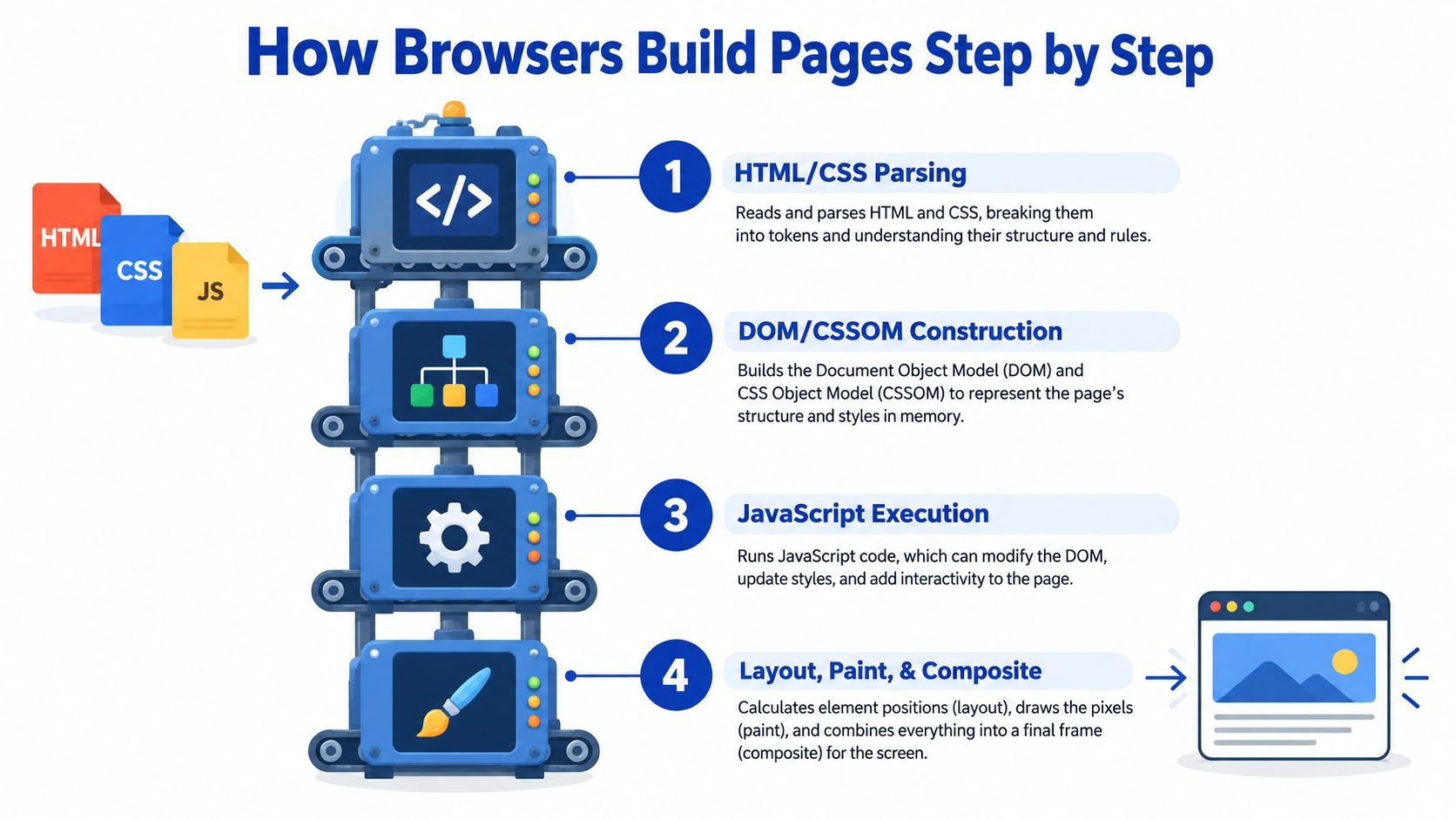
The four stations that decide first paint
HTML and CSS parsing turn downloaded bytes into structures the browser can process. A small stylesheet may still delay the first view if it controls the header, hero, or product layout.
DOM and CSSOM construction provide the page structure and styling rules. The browser combines them into the render tree, leaving out elements that do not need visual output, including content hidden with display: none.
JavaScript execution creates common delays on storefronts. A classic script without defer or async pauses HTML parsing while it downloads and runs. The pause exists because the script might change the DOM or CSSOM. Analytics and marketing scripts often have no reason to run before the first paint, so loading them early can waste the shopper's waiting time.
Layout, paint, and compositing produce the visible result. Layout calculates dimensions and positions. Paint draws colours, images, borders, and shadows. Compositing combines layers for display. A script that changes styles or inserts content can force the browser to repeat parts of this work.
Sequence determines blocking impact. A modest synchronous script in the head can hurt first paint more than a larger asset that downloads without stopping the parser. Check whether the browser needs each file before it can show or support the first important part of the page.
That distinction matters on Shopify because app code frequently adds dependencies outside the theme's main templates. A request that looks harmless in isolation can delay product information or the add-to-cart control if the browser must finish it first. For readers applying similar filtering to information discovery, Talantrix explains how to source faster with boolean search. The same discipline applies to performance work: identify the required inputs before processing everything else.
Measuring and Visualising the Critical Path
Theory won't tell you which Shopify app is blocking your storefront. Your waterfall will.
Start with Chrome DevTools on a representative page, not just the homepage. A product page, collection page, and cart entry point often have different Liquid sections and app dependencies. Open DevTools, select Network, enable Disable cache, reload the page, and use the throttling controls to observe the sequence under a constrained connection rather than relying only on a fast development machine.
Read the Network waterfall
The Network panel gives you the first practical map of the path:
- Filter by document to inspect the initial HTML response and its timing.
- Filter by CSS to find stylesheets discovered early and check when they finish.
- Filter by JS to identify scripts loaded before meaningful content appears.
- Inspect the waterfall for long gaps, sequential requests, and resources that begin only after another resource finishes.
- Check initiators to see which theme or app code triggered a request.
Look for a stylesheet that delays the first render, a script with no loading strategy, or a third-party request that sits in a dependency chain. A request can be quick in isolation and still be harmful if the browser can't proceed until it completes.
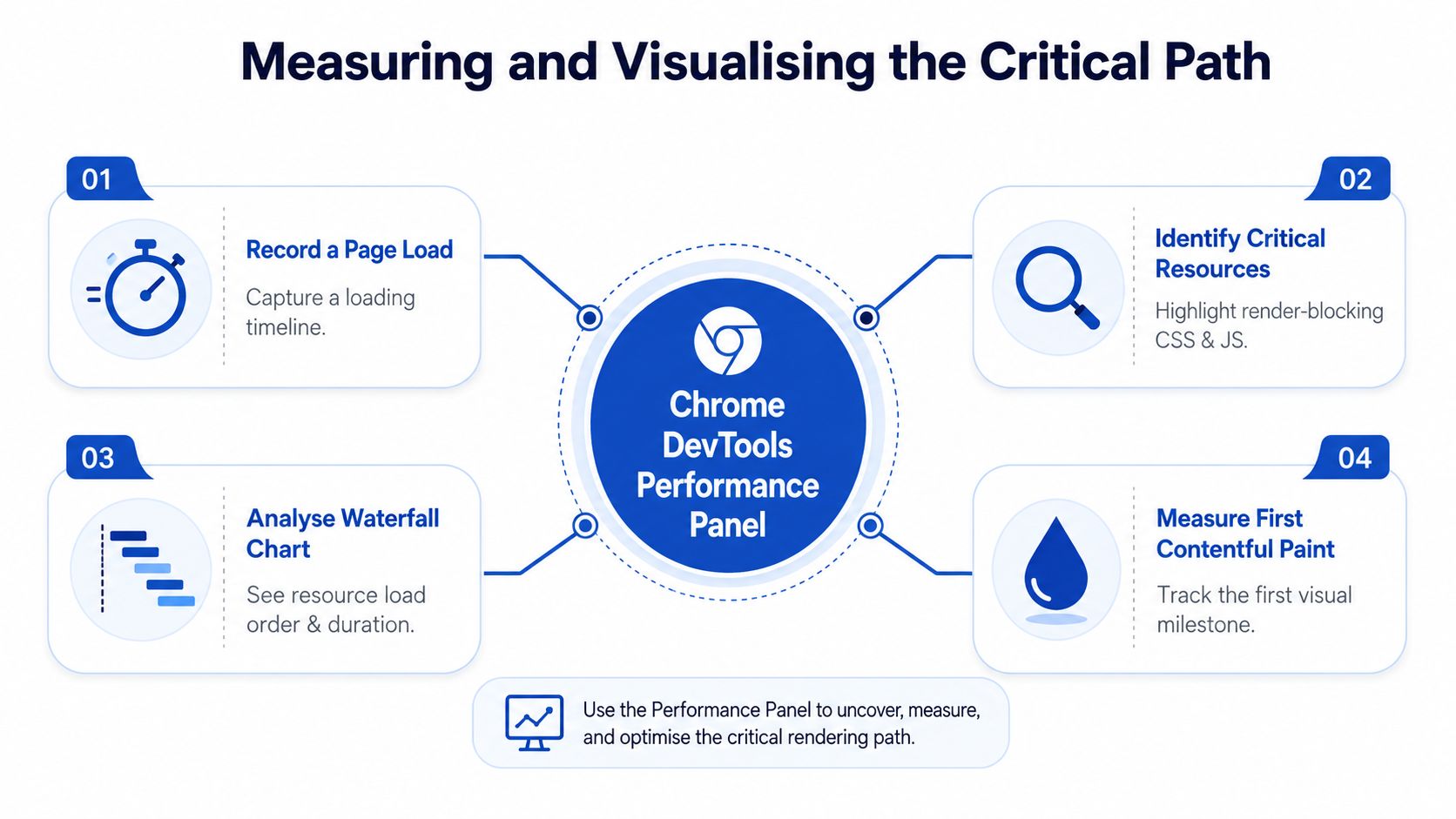
Use Performance and Coverage together
The Performance panel adds the main-thread story. Click Record, reload the page, and stop the recording after the initial interface has settled. Examine the main thread for long script tasks, HTML parsing, style recalculation, layout, and paint activity. If the page paints quickly but remains busy executing app code, the bottleneck has moved from first paint to interactivity.
The Coverage panel helps answer a different question: how much of the CSS and JavaScript loaded for the page was needed during the captured view? Red usage often points to theme styles or app bundles that are arriving before the visitor needs them. Treat Coverage as evidence for investigation, not an instruction to delete everything marked unused, because code can be required after a click or on another template.
Lighthouse is useful as a quick health check, while Search Console and field data show how real visitors experience the origin and individual page groups. Google's PageSpeed Insights documentation distinguishes lab analysis from real-world data, which matters when a polished local test hides slow devices, busy networks, or long-tail rendering delays.
Proven Optimisation Tactics for Faster Paint
The strongest CRP improvements usually come from removing unnecessary dependencies, not applying every performance trick available. Each tactic has a cost, and a change that improves first paint can create a flash of unstyled content, a cache penalty, or broken script ordering if applied without testing.
| Tactic | Impact | Effort | Addresses |
|---|---|---|---|
| Defer non-essential JavaScript | High when scripts block parsing | Low to medium | Parser-blocking execution |
| Inline selective critical CSS | High for above-the-fold styling | Medium | CSS discovery and initial paint |
| Reduce head resources | High when the head contains app and marketing overhead | Medium | Critical resource count and bytes |
| Preload a genuinely critical asset | Useful when discovery happens late | Low | Late discovery of key CSS, fonts, or hero media |
Use async for independent scripts |
Useful for analytics and isolated tooling | Low | Unnecessary execution ordering |
| Optimise fonts | Variable, especially where text is central | Medium | Delayed text and layout instability |
| Improve image delivery | Important when the hero is the LCP element | Medium | Critical visual content |
| Use a CDN and suitable caching | Supports delivery across locations | Low to medium | Network transfer and origin distance |
JavaScript choices
Use defer for application scripts that depend on the completed DOM and need predictable order. Use async only when a script is independent, because it executes as soon as it finishes downloading and can run before another dependency is ready. Moving every script to the bottom of the document can help, but it isn't a substitute for understanding whether a script modifies the initial interface.
CSS choices
Inlining critical CSS can remove a request for styles needed by the first viewport. The trade-off is that inlined CSS increases the HTML response and isn't cached as a separate stylesheet, so keep it selective. The long-standing practical milestone is to keep the initial HTML and resources referenced in the <head> under about 14 KB, because head content must be processed before the DOM is fully created. This guidance is discussed alongside CSS ordering, redirect removal, same-domain delivery, and asynchronous JavaScript in critical rendering path implementation guidance.
Don't inline an entire theme stylesheet. Extract the rules for the header, initial layout, typography needed immediately, and the visible product or hero structure, then load the remaining CSS separately.
Hints and media
preload is appropriate only for a resource the current page will definitely use soon. Preloading several fonts, every stylesheet, and multiple images can make the browser compete with itself. preconnect can help with a third-party origin that the first view needs, but removing the dependency is usually cleaner than establishing more connections.
Image work still matters when the LCP element is visual. Serve an appropriately sized asset, give it dimensions, and avoid lazy-loading the image that defines the first meaningful view. For a more focused treatment, use this guide to image optimisation for the web. Nerdify's faster website tips also provides a useful general checklist, but Shopify teams should validate each recommendation against their own waterfall.
Critical Rendering Path Optimisation for Shopify Stores
Shopify adds a distinctive layer to CRP work. The browser sees the final HTML and assets, but the engineering team has to trace those assets back through Liquid templates, theme sections, app embeds, pixels, tag managers, and injected scripts. A storefront can have a sensible theme structure and still deliver a crowded critical path because every installed tool assumes its code deserves early execution.
Start with the storefront's first commercial view. On a product page, the product title, price, variant controls, primary image, availability, and add-to-cart mechanism deserve priority. Reviews, recommendations, loyalty prompts, chat, post-purchase surveys, and personalisation can often wait until the shopper has a usable page.
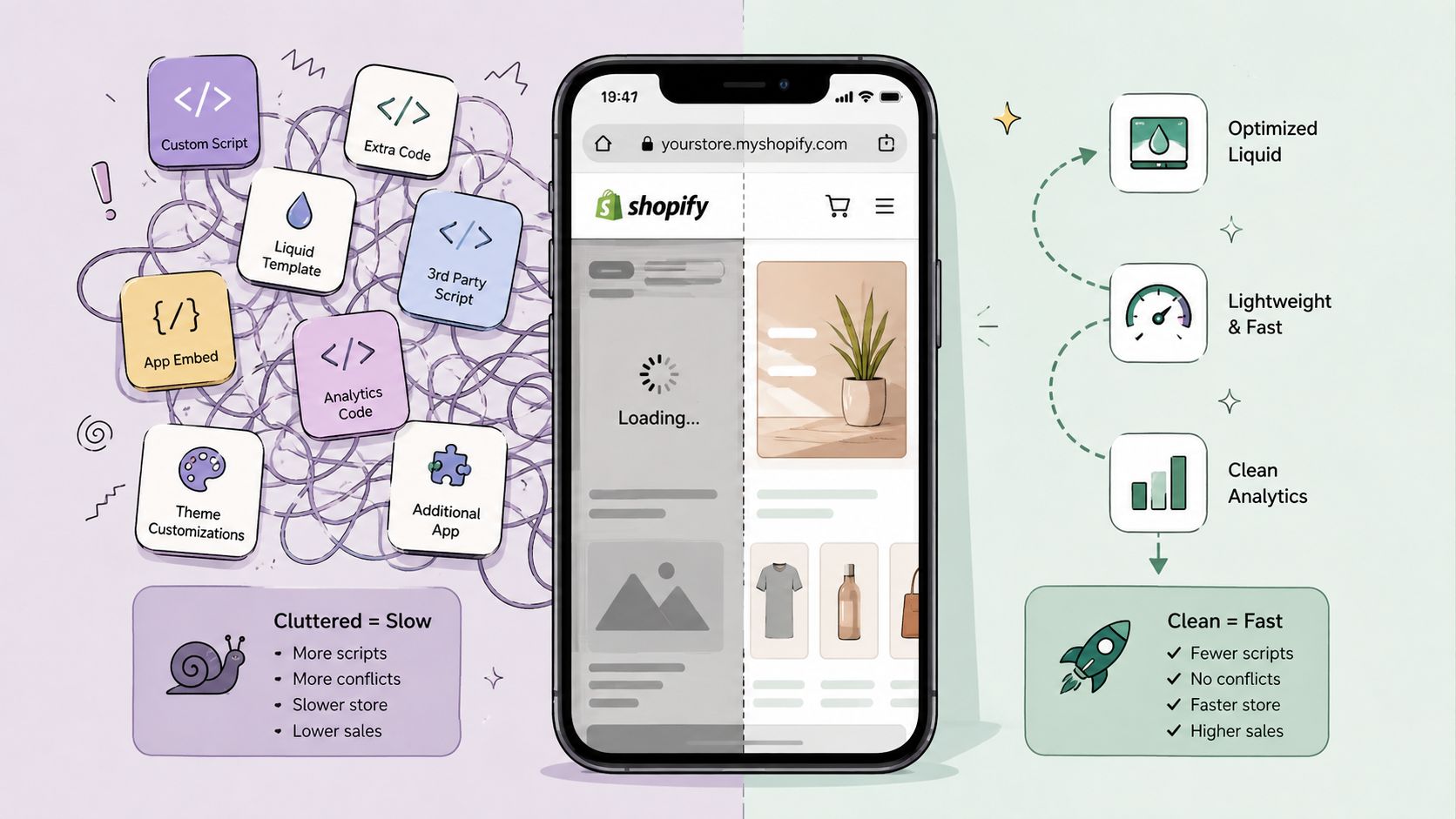
Audit the theme before changing the images
Inspect theme.liquid, section assets, app embeds, and any scripts added through custom pixels or third-party integrations. Look for:
- Global app loading: Code included on every template even when the feature appears on one page.
- Synchronous scripts: Files in the head that pause parsing without supporting the initial interface.
- Liquid repetition: Loops and section logic that generate unnecessary markup or repeated references.
- Duplicate functionality: Several apps handling reviews, search, consent, or tracking at the same time.
- Late visual changes: Banners and widgets that alter dimensions after the first layout.
Shopify's platform constraints mean you can't control every server-level detail, so prioritisation is especially important. Remove unused app embeds, limit scripts to relevant templates where the integration allows it, and use deferred loading for code that isn't needed to display or operate the first view. Don't remove cart or variant logic blindly. Test the full purchase path after every change.
Shorten the dependency chain
Web.dev defines critical path length as the number of round trips or the total time needed to fetch all critical resources. Its guidance is to reduce critical resources and bytes, then load the remaining essentials as early as possible. GOV.UK's performance work showed the potential of this approach, with removal of bytes from the critical rendering path cutting page load time by 13% on high-end 4G devices and reducing Speed Index by 50%, as documented in web.dev's CRP analysis.
A CDN can support delivery of cacheable assets, but it won't rescue a storefront that asks the browser to execute unnecessary scripts before rendering. For context on how edge delivery fits into a broader storefront architecture, see this explanation of what a content delivery network is.
The practical order is simple. Make the first view render with the smallest credible theme payload, make essential commerce behaviour available without waiting for optional tools, and measure the result on representative templates. The biggest Shopify gains often come from app governance and script timing rather than another round of image compression.
Common Pitfalls and How to Fix Them
CRP failures tend to come from reasonable decisions made in isolation. Marketing adds a chat widget, merchandising adds recommendations, analytics adds a tag, and a developer inlines the full stylesheet to compensate. Each choice may seem harmless, but the browser experiences the combined dependency chain.
Pitfall one loads every tool too early
Third-party scripts can add DNS lookups, connections, downloads, parsing, and execution. A consent manager may be necessary for compliance, but a heatmap or chat tool usually doesn't need to delay the product title and purchase controls.
Audit every script by asking three questions:
- Does it affect the first visible layout? If not, it probably doesn't belong on the earliest path.
- Does the shopper need it before the first interaction? If not, defer it until the page is ready or the feature is requested.
- Can the store operate without it? If yes, test removing it rather than merely moving it.
Use defer for ordered storefront logic and async for independent scripts. Don't apply either attribute without checking dependencies, consent behaviour, and checkout-related functionality.
Pitfall two inlines too much CSS
Critical CSS is selective by definition. If the inline block contains every product-card state, footer variation, modal, collection filter, and account component, the HTML becomes heavier and future maintenance becomes painful. Keep only the rules required for the first viewport and load the rest through a cacheable stylesheet.
The same caution applies to images. Caching can reduce repeated transfers, but it won't solve an oversized first-view asset or a render-blocking script. This image caching CDN advice is useful when you're reviewing delivery strategy, provided you still inspect the LCP request and rendering timeline.
Pitfall three stops at first paint
A quick first paint doesn't guarantee a usable store. Google now uses INP, LCP, and CLS at the 75th percentile over a 28-day rolling window, so a page that displays quickly but freezes when a shopper opens a variant selector still has a real performance problem. The current guidance targets LCP within 2.5 seconds, INP under 200 milliseconds, and CLS under 0.1, as set out in Google's Core Web Vitals guidance.
Check the main thread after paint, test cookie interactions, open menus, change variants, and add products to cart. A conversion-focused audit follows the shopper's actions, not just the first coloured pixel.
Getting Started with Your Optimisation Journey
Treat CRP optimisation as a repeatable operating process. Begin with field data from Search Console and PageSpeed Insights, then use Chrome DevTools to explain what the numbers mean on specific templates. Google aggregates field results by origin and page groups, so don't assume the homepage represents every product or collection experience.
Use this order of work:
- Capture a baseline: Record LCP, INP, and CLS for the templates that receive meaningful traffic.
- Trace the first view: Inspect the Network waterfall and identify CSS, JavaScript, fonts, and media that delay meaningful content.
- Remove before tuning: Delete unused app embeds, duplicate tools, and scripts that don't support the initial shopping task.
- Change delivery: Defer ordered JavaScript, load independent scripts asynchronously, and keep critical CSS focused.
- Protect the LCP element: Make the main product or hero content discoverable early, with stable dimensions and an appropriate asset.
- Retest behaviour: Check navigation, consent, search, variants, cart actions, and mobile layouts after every release.
Use this guide to improving website loading speed as a practical reference, but don't treat a checklist as proof of improvement. A successful change is one that improves real rendering or interaction behaviour without damaging merchandising, accessibility, consent, or checkout flows.
Complex migrations, heavily app-dependent themes, and custom Liquid builds need controlled testing rather than a one-afternoon rewrite. Keep a before-and-after record for each change, review field data over the rolling measurement window, and make CRP ownership part of theme and app governance. The aim isn't a perfect lab result. It's a storefront that shows the right content sooner and responds when shoppers act.
Grumspot helps Shopify brands audit blocking scripts, theme output, above-the-fold content, and Core Web Vitals, then turn those findings into tested storefront improvements. Visit Grumspot to discuss a conversion-focused performance audit or a Shopify development plan built around faster rendering and cleaner interactions.
Let's build something together
If you like what you saw, let's jump on a quick call and discuss your project
Related posts
Check out some similar posts.

- technical seo site audit
Run a technical SEO site audit that finds what matters. A practical ecommerce workflow covering craw...
Read more
- render blocking resources
Learn what render blocking resources are, how they hurt Core Web Vitals, and how to fix them on Shop...
Read more
- image optimization
Practical image optimization for web that improves Core Web Vitals, SEO and conversions. Format choi...
Read more
- shopify site speed
Master your shopify site speed optimization. Audit, fix, and monitor your store for faster load time...
Read more