Render Blocking Resources: A Practical Fix Guide
- render blocking resources
- core web vitals
- shopify performance
- critical css
- pagespeed insights
Launched
August, 2026

A shopper lands on a Shopify product page and waits for the first useful screen to settle. The images are compressed, the theme looks modern, and the product data arrives quickly, yet the price, hero image, or Add to cart button appears late. The store feels slow before anyone has had a chance to interact with it.
That delay often comes from render blocking resources, not from one obviously enormous file. A theme stylesheet, synchronous script, font request, review widget, chat tool, or app tag can sit in the browser's critical rendering path and hold back the first paint. The practical fix isn't to remove everything from the head. It's to separate what the shopper needs immediately from what can safely arrive afterwards, then verify the result with real user data.
When Your Shopify Store Feels Slow for No Obvious Reason
A slow commerce store rarely announces the cause clearly. The homepage may load its header quickly while the product page waits for review styling. A collection page may display the grid but delay filters because an app script initialises globally. The checkout button may be present in the HTML but look unavailable while cart-drawer JavaScript catches up.
That pattern points to a timing problem, not just a file-size problem. The browser can receive the document promptly and still postpone the first useful frame if it has to download and process CSS or synchronous JavaScript before painting. Shopify performance optimisation starts with finding that request chain rather than applying a blanket “remove render-blocking resources” fix.
The assets Shopify stores accumulate
A typical store grows through small, reasonable decisions. A merchant adds a reviews app, then a search enhancement, a loyalty widget, a consent manager, a chat service, a personalisation tool, and tracking pixels. Each provider may work correctly in isolation. The problem appears when their styles and scripts are injected on every template through the theme or Shopify's app infrastructure.
Common candidates include:
- Theme CSS: Global files often contain rules for the homepage, collection templates, product sections, cart components, and promotional modules that aren't all needed in the first viewport.
- Synchronous theme JavaScript: Older themes may initialise navigation, product options, cart behaviour, and third-party dependencies before the browser can provide a usable screen.
- App assets: Review stars might be required on a product page but irrelevant to the homepage. Loading them globally creates work where no widget appears.
- Fonts: A font request can affect text measurement and wrapping, particularly when headings or navigation are visible immediately.
- Marketing code: Analytics and advertising tools matter for measurement, but they rarely need to block the first visual render.
Practical rule: Preserve assets that establish the initial layout and the first interaction. Challenge every other request that arrives before the shopper sees meaningful content.
The first audit should compare the navigation start with the first visible element. Identify which stylesheet or script completed immediately before that paint, then trace its initiator back to theme.liquid, a section, a snippet, or an app embed. This approach protects above-the-fold styling and merchandising behaviour while exposing code that's being loaded out of habit.
What Render Blocking Resources Actually Are
A browser can't turn raw HTML into a reliable visual page in one step. It discovers dependencies, fetches them, parses their contents, builds the structures needed for layout, and only then paints pixels. A resource becomes render-blocking when the browser must complete part of that work before it can safely draw the initial content.
CSS in the document head is the classic example. The browser needs the stylesheet to calculate dimensions, positioning, colours, responsive rules, and visibility. Painting before those rules arrive could produce an incorrect layout that immediately changes when CSS finishes, so the browser waits. The critical rendering path guidance from web.dev describes this dependency chain through the document and rendering stages.
Synchronous JavaScript creates a different kind of pause. A script without defer or async can interrupt HTML parsing while the browser fetches and evaluates it. If that script changes the document, depends on earlier code, or injects styles, the browser may need to complete that work before the page can continue towards a useful paint.
Think in terms of the first frame
For a Shopify storefront, the early sequence usually looks like this:
- The browser requests the document and starts parsing the HTML.
- It discovers theme styles, app styles, fonts, and scripts.
- Blocking assets are fetched and processed.
- The browser constructs enough layout information to paint.
- The first visible content appears, followed by interactive enhancements.
That sequence explains why render blocking is about position and behaviour, not just size. A compact stylesheet loaded synchronously can delay the first paint more than a larger product image requested after the browser has already displayed the header. A large image can still delay LCP, but it isn't automatically a render-blocking resource in the browser's strict sense.
What should remain blocking
The answer isn't “make every asset asynchronous”. A commerce homepage may need the header layout, navigation rules, announcement bar, hero structure, and the CSS for the first product or promotional block before painting. A product page may need product-gallery layout, price visibility, variant controls, and the initial Add to cart state.
The rest can often wait, provided deferral doesn't create a flash of unstyled content, shift important elements, or make a primary control appear broken. The critical rendering path reference is useful when mapping those dependencies, but the implementation still needs to follow the actual theme's code and app behaviour.
How Render Blocking Resources Drag Down Core Web Vitals
A shopper can receive the HTML quickly and still wait for the page to become useful. The browser must discover a resource, download it, parse it, execute required code, and then paint. A synchronous stylesheet or script extends the work that must finish before the first meaningful content appears.
First Contentful Paint moves later when the browser has markup but cannot safely display it. A product title may already be in the document, while theme CSS still determines its visibility, position, font treatment, or surrounding layout. A fast server response does not remove that client-side dependency.
Largest Contentful Paint suffers when the largest visible element depends on blocked work. On a Shopify product page, the candidate may be the main product image, a promotional banner, or a large heading. CSS can delay its layout, and JavaScript can determine whether it appears at all. The image request may be fast, yet LCP still shifts because the browser cannot present the element. Image delivery remains a separate concern, so include this Shopify image optimisation guide in the same audit rather than treating image work as a replacement for fixing blocking assets.
The secondary effects
The first paint is only one part of the outcome.
- Cumulative Layout Shift: Late CSS, fonts, or app markup can alter text wrapping, image dimensions, and button placement after the first frame.
- Interaction to Next Paint:
defermay remove a script from the initial render path while leaving its evaluation on the main thread when a shopper opens a menu, selects a variant, or adds an item to the cart. - Product interaction delays: A cart drawer can appear on screen but remain unresponsive until its bootstrap code and dependencies finish.
- Visual prioritisation errors: A third-party widget below the fold can consume early network capacity and main-thread time before the shopper needs it.
The result depends on the page and the loading conditions. Removing a Lighthouse warning will not necessarily improve LCP if the resource was cached or an unoptimised image dominates the metric. A small synchronous stylesheet can still create a noticeable cold-load delay on a mobile device because it sits directly before the first paint.
A UK benchmark worth taking seriously
The UK Government Digital Service offers a useful real-world example. Its 2022 GOV.UK account of removing jQuery reported faster visually complete and total page-load times after removing the dependency. The study also included Android users and recorded slower experiences for some visitors, showing why lower-powered devices matter when assessing a mixed audience.
Treat that case as evidence for the principle, not a forecast for a Shopify store. Reducing blocking JavaScript can improve the first visual experience and full-load behaviour, but the result depends on the LCP candidate, device mix, cache state, theme code, and app stack. Measure those conditions in field data after the change, not only in a clean lab run.
Detecting Render Blocking Resources in Lighthouse, DevTools, and PageSpeed
These tools answer different questions. Lighthouse is good at producing a prioritised audit. DevTools shows what the browser did during a particular recording. PageSpeed Insights adds field context, helping you distinguish a clean test run from a problem affecting real shoppers.
Start with Lighthouse in Chrome or PageSpeed Insights' lab report. Open the render-blocking audit and record the exact URL, the estimated opportunity, and the dependency that initiated the request. Don't treat the savings estimate as a guaranteed result. Use it to decide which asset deserves inspection first.
Read the browser, not only the audit
Chrome DevTools Performance provides the most useful evidence when Lighthouse doesn't explain the feeling of slowness. Record a page load with the cache conditions relevant to your test, then inspect the Main thread around the first paint. Long script evaluation tasks before that point, especially tasks from theme or app code, are strong candidates for investigation.
The Coverage panel adds a second angle. Reload the page while Coverage is recording and inspect which CSS and JavaScript bytes are used during the initial view. Red code isn't automatically safe to delete. It may support a drawer, variant state, or section revealed after interaction. It does show where global bundles are carrying work that the first viewport doesn't need.
PageSpeed Insights combines lab diagnostics with Chrome User Experience Report field data where available. Compare the page type, device conditions, and LCP element before and after each change. A lab improvement that doesn't alter field behaviour may still reduce technical debt, but it shouldn't be reported as a proven customer-facing win.
| Tool | Shows | Best for |
|---|---|---|
| Lighthouse | Blocking URLs, audit warnings, and estimated opportunities | Initial triage and repeatable lab checks |
| Chrome DevTools Performance | Main-thread work, request timing, and paint sequence | Finding script evaluation and dependency order |
| Chrome DevTools Coverage | Used and unused CSS or JavaScript during a load | Locating oversized global theme and app bundles |
| PageSpeed Insights | Lab diagnostics plus field data where available | Comparing controlled tests with real-user experience |
For each candidate, record the resource URL, transfer size, initiator, template, and visible feature it supports. That small evidence set turns “the app is slow” into a concrete question: which app asset blocks which paint, on which template, and what breaks if it waits?
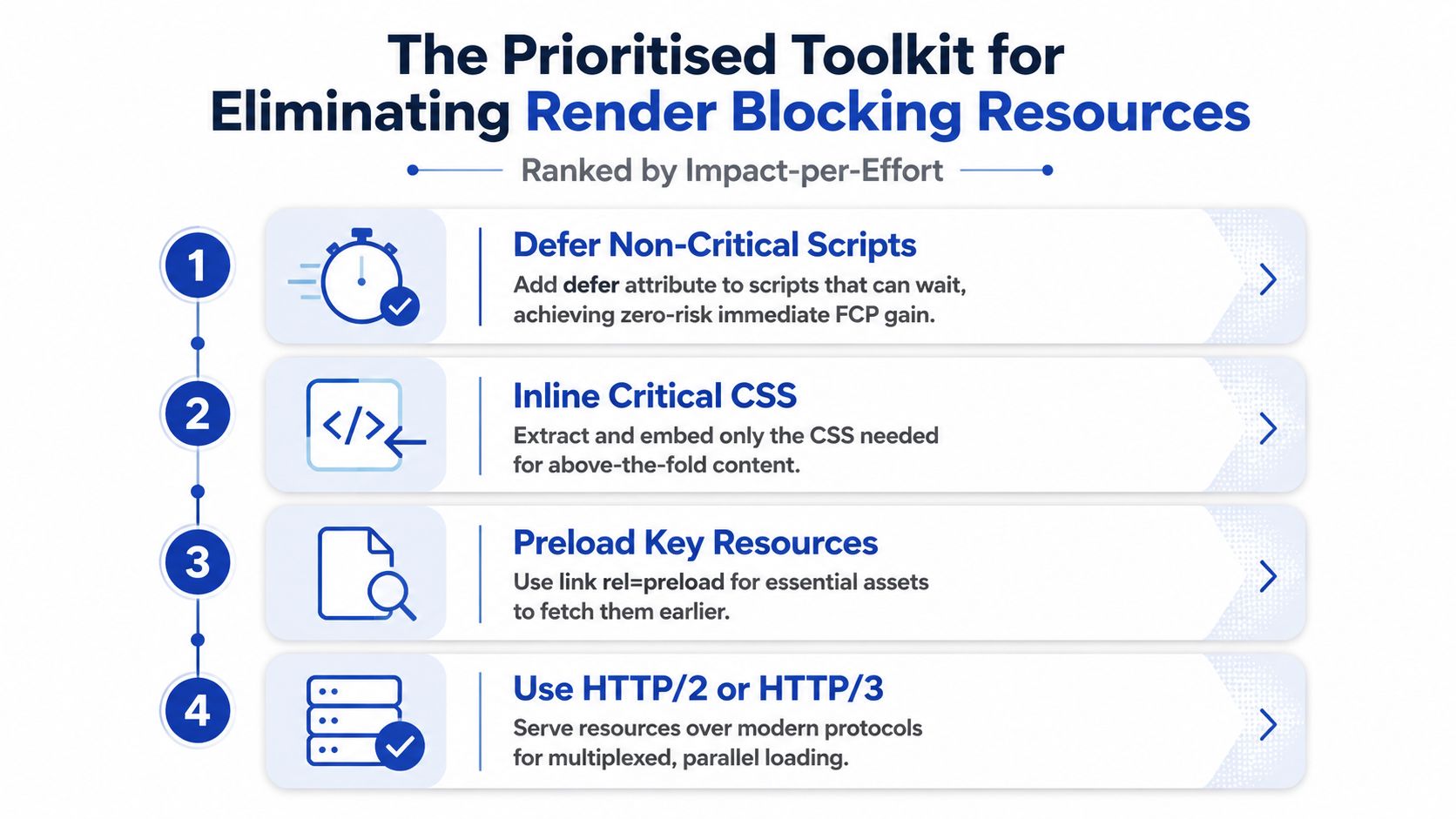
The Prioritised Toolkit for Eliminating Render Blocking Resources
A useful order is impact per effort, adjusted for risk. Start with changes that leave layout and execution semantics intact. Move towards critical CSS extraction and code splitting only after the request chain shows that those larger interventions are justified.
Start with script scheduling
Use defer for scripts that need the document but don't need to execute during HTML parsing. Deferred scripts preserve their order and can initialise after parsing, which suits many theme modules. Use async for independent analytics or tracking code where execution order and DOM readiness aren't dependencies.
That distinction matters. Adding async to a script that expects another library can produce intermittent failures. Deferring code that writes to document.head, establishes a required global, or boots the cart drawer can create a race condition rather than a performance fix.
Reduce the CSS that arrives first
Keep only the rules required for the initial viewport in the head, then load the remaining stylesheet after the first render. Chrome's render-blocking guidance supports inlining small critical requests, deferring non-critical requests, and reducing the CSS and JavaScript needed for first paint.
A common pattern uses a preload request that changes to a stylesheet after loading:
<link rel="preload" href="{{ 'theme.css' | asset_url }}" as="style" onload="this.onload=null;this.rel='stylesheet'">
<noscript>{{ 'theme.css' | asset_url | stylesheet_tag }}</noscript>
This needs testing across browsers and templates. Inlining too much CSS bloats the HTML and can make maintenance harder. Inlining too little causes flashes, missing controls, or layout changes.
Preload only resources you can justify
Preload the font, image, or stylesheet that the first viewport needs and that the browser might otherwise discover late. A key product image can benefit when its markup or CSS hides the request from early discovery. A font preload can backfire if the font isn't used, has the wrong format, or causes text to remain invisible while it waits.
Code splitting is the deeper intervention. Send product-gallery, swatch, review-carousel, and size-chart code only to product templates, rather than placing every feature in a global bundle. It takes more engineering effort, but it reduces both early network work and main-thread evaluation.
Decision rule: Defer first, isolate second, inline selectively, and preload only when the waterfall proves that discovery is late.
For a visual explanation of the browser's work and optimisation sequence, this render-blocking performance video is a useful companion to the implementation work.
Shopify Specific Implementation and What to Watch Out For
Shopify gives you several practical control points, but app injection makes the page harder to reason about than a simple static theme. Begin in layout/theme.liquid. Inspect {{ content_for_header }}, the main stylesheet tag, font declarations, and every script included before the closing head or opening body.
For CSS, extract the rules needed for the first viewport into a small inline <style> block. Keep the full stylesheet available, but load it without holding the first paint where the theme can tolerate that pattern. Don't inline a stylesheet containing @import, because the nested request still creates a dependency and makes the critical block harder to audit.
Make loading conditional by template
Theme code should reflect the page's actual feature set. A product-only asset has no reason to load on the homepage or a collection page.
{% if template == 'product' %}
  <script src="{{ 'product-options.js' | asset_url }}" defer></script>
  <script src="{{ 'reviews.js' | asset_url }}" defer></script>
{% endif %}
The exact condition may need to account for alternate product templates, JSON templates, or section rendering. The principle is stable: load feature code where the feature exists. A size-chart module can wait until a product page needs it, while collection filtering may need its own conditional path.
App scripts require closer inspection. Assets injected through content_for_header may not expose a convenient defer attribute in your theme. Check the app's snippet, embed settings, and documentation before altering a managed include. If you can control the include, use defer for DOM-dependent code and async for independent trackers, then test consent, attribution, and event delivery.
Protect storefront behaviour
Don't defer a library that older theme JavaScript expects synchronously. If a theme still depends on jQuery, moving the library without checking execution order can break menus, product options, or cart updates. Likewise, don't asynchronously load the cart drawer's bootstrap if the first interaction depends on it.
Self-hosting fonts in the theme's assets can simplify control and let you preload the required WOFF2, but remove unused weights and verify that the declared family matches the actual CSS. After every change, test homepage navigation, collection filters, product variants, accelerated checkout buttons, cart drawer behaviour, app widgets, consent flows, and checkout. Keep the work in a duplicate theme or backup branch, and document which asset was changed, why, and where it's used.
Shipping the Fix and Proving It Worked
A performance change is incomplete until shoppers benefit without losing commerce functionality. Establish a baseline for the exact homepage, collection page, and product page you are changing. Run repeatable Lighthouse and PageSpeed Insights checks, then use a waterfall or DevTools recording to identify the current LCP element and the request chain delaying it.
Deploy one coherent change set to a duplicated theme. Do not change image markup, app configuration, CSS delivery, and checkout scripts simultaneously. If performance improves, you need to identify the intervention responsible. If the cart drawer fails or attribution disappears, a clean rollback should take one deployment.
Track the right evidence
| Metric | Tool | Target delta |
|---|---|---|
| Blocking request and first paint order | Chrome DevTools Performance | The identified non-critical asset no longer delays the initial paint |
| LCP element and timing | PageSpeed Insights and field reporting | Earlier or more stable LCP for the affected template |
| Layout movement | Lighthouse and field reporting | No new shifts after deferred CSS, fonts, or app markup |
| Cart interaction responsiveness | DevTools Performance and field reporting | No regression when opening the cart or adding a variant |
| App attribution and events | Analytics platform and app dashboards | Required first-view events still arrive correctly |
Use field data to judge the customer-facing result. As noted earlier, the GOV.UK case shows that removing a blocking dependency can improve performance on real devices and networks. Your store will not necessarily reproduce that outcome, so treat the example as evidence of the mechanism, not a forecast.
Keep a change when field data improves or remains stable and the intended interaction still works. Roll it back when lab scores improve but real-user LCP, layout stability, cart interaction, or attribution worsens. A cleaner audit result does not justify a broken buying journey.
Grumspot audits Shopify theme code, app loading, critical rendering paths, and Core Web Vitals to identify which render blocking resources delay shoppers. Visit Grumspot to discuss a focused performance audit or theme-level implementation that improves speed without sacrificing product, cart, or app functionality.
Let's build something together
If you like what you saw, let's jump on a quick call and discuss your project

Related posts
Check out some similar posts.

- technical seo site audit
Run a technical SEO site audit that finds what matters. A practical ecommerce workflow covering craw...
Read more
- critical rendering path
Master the critical rendering path with practical optimisation tactics, DevTools measurement, and Sh...
Read more
- shopify site speed
Master your shopify site speed optimization. Audit, fix, and monitor your store for faster load time...
Read more
- how to improve website loading speed
Learn how to improve website loading speed with practical strategies to boost SEO, UX, and conversio...
Read more