Customer Service in E Commerce That Protects LTV
- customer service
- ecommerce CX
- Shopify support
- delivery recovery
- retention KPIs
Launched
October, 2026

Your most expensive customer isn't the one who needs an ad to convert. It's the one who already paid, then spends days chasing a parcel, a refund, or a straight answer. If you're treating customer service in e commerce as a chat widget and an inbox, you're protecting conversion while burning repeat revenue. Fix the post-purchase journey first.
Why Customer Service in E Commerce Shapes Revenue
Online sales make delivery and product problems harder to resolve. Citizens Advice research published in January 2024 found that 25% of people in Britain, about 12.4 million consumers, had experienced a problem with an item bought since October 2023. Shoppers were eight times more likely to report a problem with an online purchase than an in-store purchase, at 24% versus 3%.
For a Shopify customer, the product page, delivery promise, carrier updates, and returns process form one service journey. A failure at any point can turn a purchase into extra work for the customer, even before they contact your team.
Delivery Is the Service Problem
Delivery accounted for 57% of reported problems in the research, while defective goods accounted for 52%. These problems are often practical: a late or missing parcel, a faulty product, or uncertainty about a replacement or refund.
The service failure often starts before anyone contacts an agent.
Fast email replies matter, but they cannot fix an unrealistic delivery estimate, unhelpful tracking, or a returns policy customers find only after opening the box. Design recovery into the journey: give customers a clear way to check an order, report a problem, and choose the next step.
Poor recovery puts revenue at risk. Reorder risk rises when customers remember the effort involved. Refund pressure grows when repair or replacement options are hard to find. Support load increases when customers have to ask for information your store could have provided proactively.
Treat support as part of fulfilment and retention, not as a separate cost centre. Your team needs clear incident procedures, useful order data, and tools that give customers and agents the same view of what happened. When a carrier misses a delivery promise, your Shopify store should explain the delay, set an expectation for the next update, and make the available remedy easy to access.
Ask what happens when a parcel goes wrong tonight. Does your store explain the issue and give the customer a clear next step, or does the customer have to chase your team?
What Ecommerce Service Really Covers After Checkout
Think of a good shop assistant who can see the shelf, the till, and the stockroom at once. They know what you bought, what's in stock, when a replacement can arrive, and how to process a return without sending you to another desk. Your Shopify service operation needs that same joined-up view, delivered through systems.
The scale explains why. The UK Consumer Detriment Survey 2024 estimated 72% of UK consumers, approximately 38.5 million people, experienced at least one problem with a product or service in the 12 months to April or May 2024, across roughly 294.9 million incidents. Three in four detriment experiences occurred after online purchases.
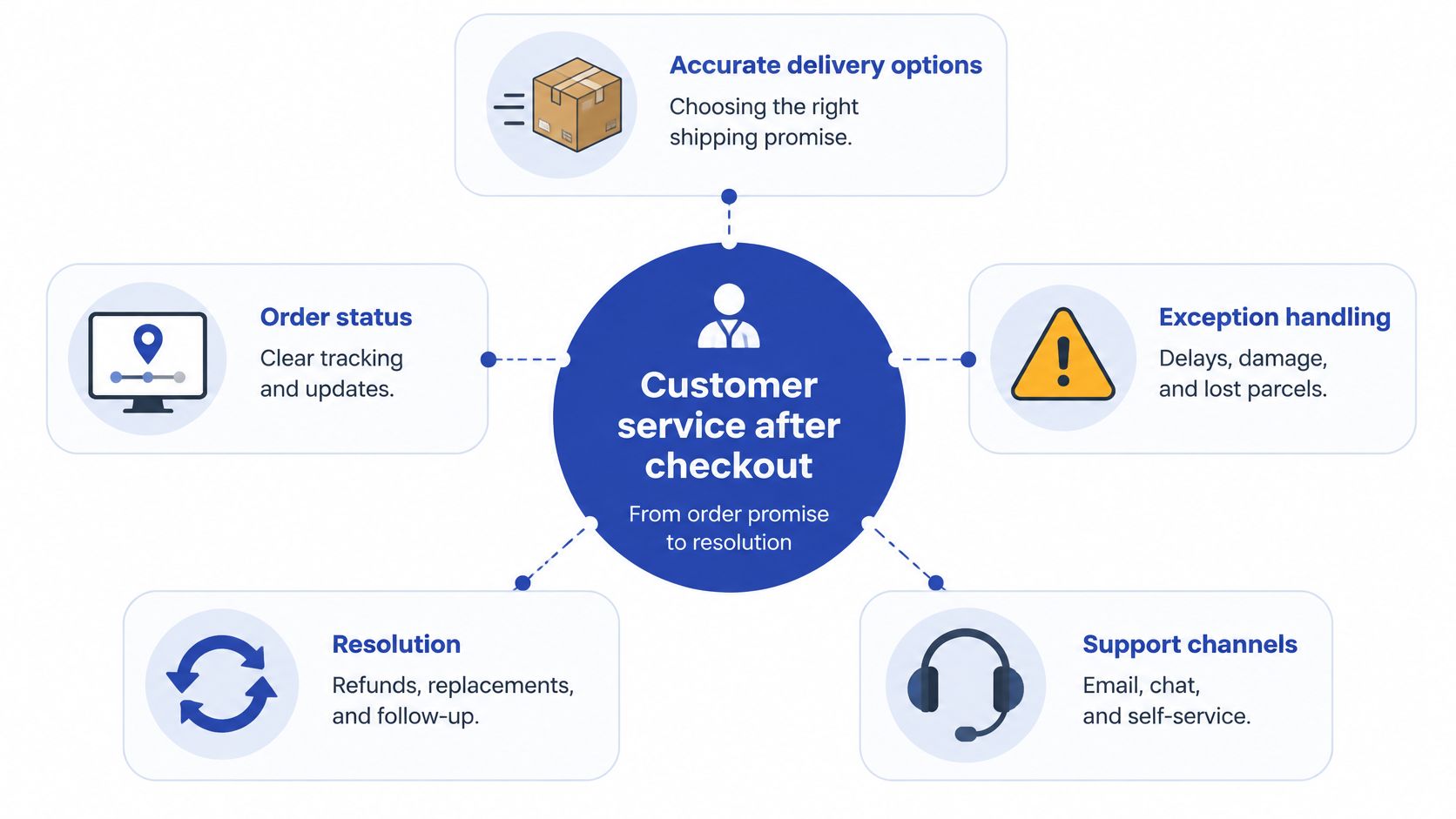
This visual maps service as a connected post-checkout journey rather than a helpdesk queue.
The Work Starts With the Promise
Service begins when checkout states a delivery date, a returns window, or a guarantee. If that promise is vague, optimistic, or contradicted by warehouse cut-off times, you've created tomorrow's ticket. Accurate delivery options, visible stock status, and plain policy copy are service decisions, not only CRO copy.
Next comes order status. Customers should see confirmation, dispatch, carrier tracking, delays, and delivery in one account or order view. They shouldn't need to search old emails for a tracking number, then paste it into a carrier site that uses different wording.
Exceptions and Resolution Complete the Journey
Exception handling covers delays, damage, missing items, failed delivery attempts, and defective goods. Resolution covers replacements, refunds, exchanges, repairs where relevant, and clear complaint routes. The survey finding that most problems were eventually resolved in line with consumers' expectations matters here. Customers can accept that things go wrong. They react badly when resolution is slow, hidden, or hard work.
Use this scope checklist to audit what you own:
- Storefront policies: Delivery, returns, warranty, and refund wording customers can find before and after buying.
- Account order history: Status, tracking, invoices, return eligibility, and support history in one place.
- Carrier events: Dispatch, in transit, delayed, out for delivery, delivered, and exception states mapped into Shopify and your CRM.
- Agent context: Order, fulfilment, product, and previous contacts visible without asking the customer to repeat them.
- Resolution rules: Who can approve a replacement, refund, or goodwill gesture, and at what point escalation happens.
If any item sits in a spreadsheet or one person's head, that's a service gap. Name an owner for each one.
Choosing Chat Email Phone and Self-Service
Don't ask which channel is best. Ask which channel fits the customer's job, how urgent it is, and what evidence or context the agent needs. A blanket decision to add another live chat widget usually adds cost without removing the reasons people contact you.
Self-service should handle predictable, factual jobs first. Order tracking, delivery estimates, return eligibility, exchange rules, password resets, and simple policy questions don't need a conversation when the answer is already in your systems. Build that properly and customers get an answer at midnight without queueing.
A generic FAQ won't do that work. If the answer doesn't know the customer's carrier, order status, or return window, it pushes them back into chat or email. Use a structured Shopify help centre connected to real order information, with a visible route to a person when self-service can't resolve the issue.
Match the Channel to the Job
Chat suits time-sensitive exceptions where a short exchange can prevent a bigger problem, such as changing an address before dispatch. Email suits evidence-heavy claims involving photos, serial numbers, or a paper trail. Phone should be reserved for high-value, complex, or distressed cases where tone and judgement matter more than speed alone.
Which Support Channel Fits the Job
| Customer job | Best first channel | Escalate when | Context the agent needs |
|---|---|---|---|
| Where is my order | Self-service order view | Tracking is stale, missing, or contradictory | Carrier events, promised date, address, fulfilment status |
| Damaged or defective item | Email or guided form | Safety issue, high value, or disputed evidence | Photos, product details, batch or serial information, order history |
| Refund status | Self-service, then email | Payment is overdue or partially refunded | Return scan, inspection result, payment reference |
| Pre-sale product question | Chat or product page content | Technical fit affects a large purchase | Stock, specifications, compatibility, delivery options |
| Urgent delivery change | Chat | Parcel is already with the carrier | Cut-off status, carrier controls, customer contact details |
Design Escalation, Do Not Improvise It
Every self-service answer needs an exit. Show one clear escalation action, carry the order number and issue type into the ticket, and tell the customer when they'll hear back. Making people retype information you've already collected signals that your systems don't talk to each other.
Close channels you can't staff properly. An unanswered phone line or a chat widget that becomes an email form after ten minutes damages trust more than a smaller, reliable channel mix. Fewer routes, clear expectations, and complete context will serve customers better.
Measuring Service Impact on Retention and LTV
If you only report ticket volume and average response time, you don't know whether service protects revenue. You know the team is busy. Build a small scorecard that connects customer effort, operational failure, and whether people buy again after something goes wrong.
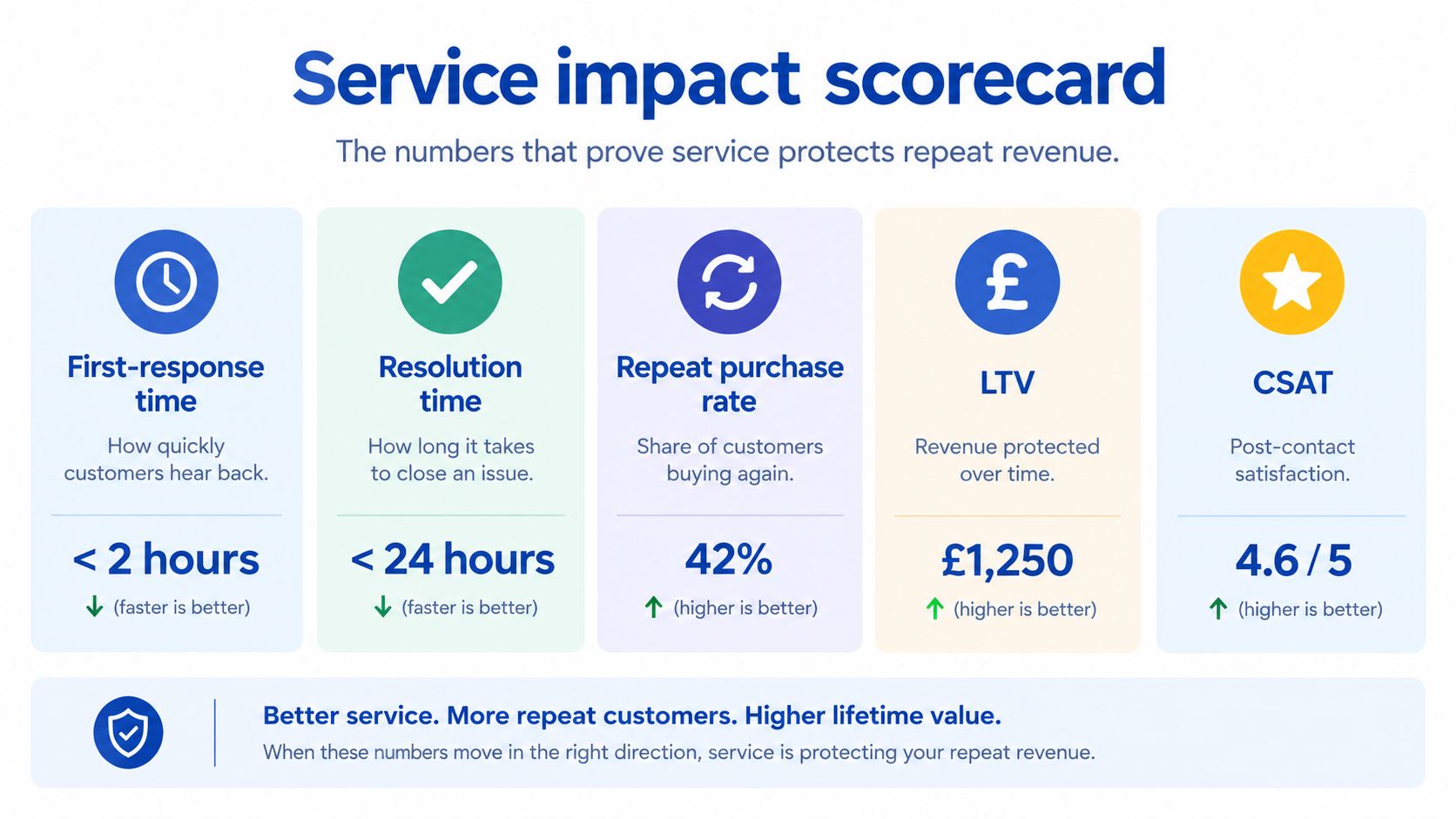
The scorecard below gives leadership a compact view without burying them in helpdesk exports.
Six Metrics Worth Reviewing Monthly
- First-response time: Shows how quickly customers hear from a person, split by channel and issue type.
- Resolution time: Shows how long the problem lasts, which matters more than a fast holding reply.
- Contact rate per order: Reveals whether orders are creating avoidable work, especially after a checkout, carrier, or policy change.
- Reopen rate: Flags answers that closed a ticket without solving the underlying problem.
- Refund and replacement rate: Points to product quality, packing, description accuracy, or a recovery policy that's too rigid.
- Repeat purchase after a resolved issue: Tests whether recovery preserved the relationship, and it's the closest service metric to lifetime value.
Add delivery-exception rate from your carrier data. Without it, support gets blamed for contacts caused by late scans, failed attempts, or poor address data. Pair operational measures with a consistent method for measuring customer satisfaction so you're not judging recovery only by speed.
This short video adds useful context on connecting service decisions with longer-term customer value.
Each metric should trigger a different fix. Rising contacts per order after a policy edit suggests unclear copy. Repeated delivery contacts with normal response times suggest a missing carrier event. High reopens suggest agents lack order context or authority. Strong satisfaction but weak repeat purchase suggests the recovery felt polite yet still cost the customer too much effort.
Reporting rule: Never review an average without the worst issue category sitting beside it.
Averages hide pain. A healthy overall response time can conceal a small group of customers waiting days on missing parcels. Review late delivery, damage, returns, and refunds separately.
Delivery economics also affect whether a recovered customer returns. This guide on how to turn shipping costs into customer loyalty is useful when you're weighing delivery charges, loyalty benefits, and repeat purchase together rather than treating shipping as a standalone fee.
Hold one monthly review with ecommerce, operations, and support. Pick the largest preventable contact driver, assign one owner, fix the journey, and check whether contact rate and repeat purchase move next month.
Building a Delivery Incident Recovery Playbook
A customer doesn't experience a delivery failure as a logistics code. They experience a missed birthday, a parcel left in the rain, or a tracking page that hasn't moved for days. Your playbook must decide in advance what the journey does automatically for each failure type.
Sendcloud's UK shopper research found 57% of shoppers experienced a delivery issue within three months, 64.3% said they would not reorder after a failed delivery, and 91% wanted a simple, direct way to contact support. The stakes aren't abstract.
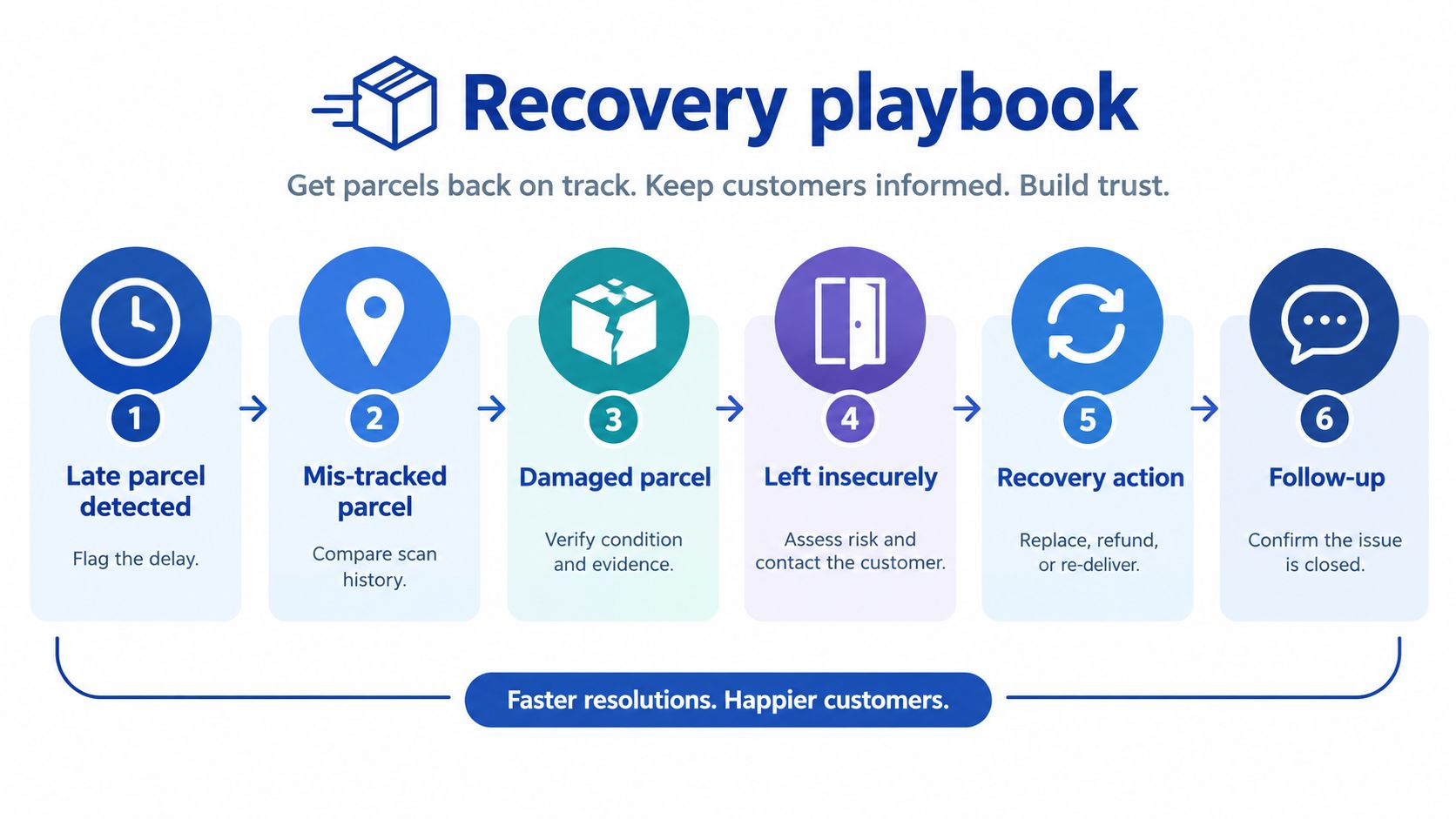
This flow shows how detection, customer choice, and agent recovery should connect.
Write a Rule for Each Failure
Reported failures included late deliveries at 23.6%, insecure drop-offs at 17.9%, damaged parcels at 14%, missing tracking updates at 11.1%, and inaccurate tracking at 10.8%, while 85.4% expected immediate delay notification. Don't collapse those into one apology template. They need different triggers and remedies.
For a late parcel, trigger a message when the promised window is missed or the carrier posts a delay. State the new expectation if you have one, admit uncertainty if you don't, and offer escalation in the same message. Don't send cheerful marketing copy while the order is overdue.
For missing or inaccurate tracking, detect stale scans and mismatched carrier states. Show the last confirmed event in plain English, explain what you're checking, and set the next update time. Silence forces the customer to become your tracking department.
For damage, let the customer upload photos from the order page. Pre-fill the product and order details, then offer the remedy your policy allows, such as replacement, refund, or collection. Agents should verify evidence quickly, not restart the story by email.
For an insecure drop-off, ask whether the parcel was found and whether the contents are intact. If it's missing, move straight to the lost-parcel rule and record the delivery instruction failure against the carrier. Don't make the customer prove a negative through repeated messages.
Keep One Truth for Customer and Agent
Use a single order-status surface fed by the same carrier events your support team sees. Carrier-aware help content should change with the parcel's state, so a delayed order doesn't show generic delivery advice. A one-click escalation from that page should create a ticket containing the order, tracking history, promised date, and selected issue.
Returns often become the next step after damage or a defective item, so connect the playbook to your process for managing ecommerce returns rather than sending customers to a separate portal with different rules.
Define severity in advance. A low-value item one day late may need a proactive update. A missing high-value order, a damaged essential item, or a second failed delivery needs human ownership and a faster replacement or refund decision. Speed of shipping matters less than whether you notice, explain, and recover well.
Connecting Tools Automation and Staffing Models
A helpdesk can't compensate for a checkout that offers the wrong delivery choices. Tooling, fulfilment design, and staffing need one audit, because customers experience them as one journey.
DHL's 2025 UK shopper research found three in four shoppers abandon baskets when their preferred delivery and returns options are unavailable, and 74% will not buy from an online retailer if they don't trust the delivery provider. It also found 69% of UK shoppers had returned an online purchase, and 57% preferred parcel-shop returns.
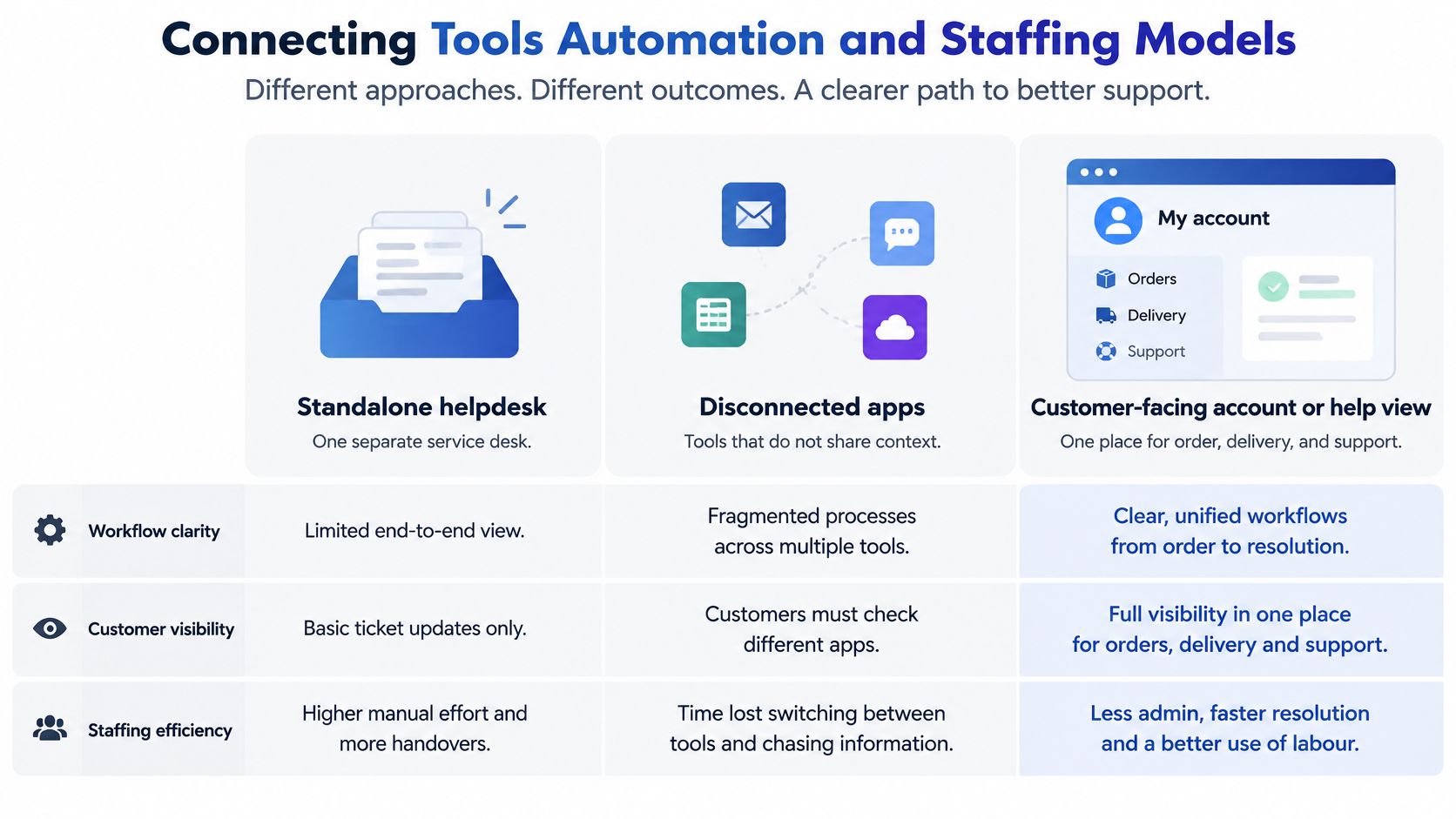
This comparison shows why tool choice shapes both customer visibility and staff workload.
Three Operating Models
A standalone helpdesk is simple to buy. Agents can manage tickets and macros, but they may still copy order numbers into Shopify, carrier portals, and returns software. Customers see separate surfaces that don't agree.
A stack of disconnected apps looks more capable and often performs worse. One app sends tracking emails, another manages returns, another runs chat, and none shares a complete timeline. Automation multiplies inconsistencies when the underlying events aren't mapped properly.
Choose one customer-facing account or help view instead. Feed it consistent Shopify order and fulfilment events, connect carrier status and return eligibility, and pass the same context into your CRM and helpdesk. Customers can track, redirect where the carrier allows it, start a return, or escalate without hunting through emails.
Automate the safe, repetitive work first:
- Status notifications: Dispatch, delay, out for delivery, delivered, return received, and refund issued.
- Paperless returns: QR-code labels and parcel-shop selection where your carrier network supports them.
- Routing rules: Send damaged, missing, high-value, and repeat-contact cases to the right queue with context attached.
- Policy answers: Pull delivery and returns wording from one maintained source, not separate macros that drift.
Keep people on judgement calls. Distressed customers, disputed damage, safety concerns, vulnerable customers, and second failures need a person with authority. If your gap is coverage rather than systems, this resource on how to hire customer service representative support can help you compare dedicated staffing with your current in-house model.
In-house generalists work when volume is steady and product knowledge matters. A specialist partner suits integration and journey rebuild work that your team can't prioritise. Grumspot is a Shopify Plus design and development partner that audits and connects storefront, ERP, CRM, and fulfilment journeys, builds custom or public apps to Built for Shopify standards, and works through projects or an on-demand monthly team.
Decide gap by gap. Fix missing events and broken customer journeys in systems. Add headcount only when the remaining work needs human time.
Turning Service Design into a Practical Next Step
Don't start by shopping for software or hiring another agent. Spend the next 30 days removing the failures that create contacts, then automate what's left in the right order.
Your 30-Day Sequence
- List the main failures: Ecommerce and support leads should group recent tickets by late delivery, missing tracking, damage, defective goods, returns, and refunds. Operations adds carrier exceptions so you're not relying only on customers who complained.
- Test the customer view: Place test orders and check whether a customer can see status, delivery estimate, return eligibility, and refund progress without emailing. Record every point where wording differs between Shopify, email, carrier tracking, and the returns route.
- Set escalation rules: Support and operations agree triggers for late, damaged, insecurely delivered, and missing parcels. Define the proactive message, self-service choice, owner, and replacement or refund authority for each case.
- Pick four leadership KPIs: Choose contact rate per order, resolution time, reopen rate, and repeat purchase after a resolved issue. Review them by issue type, not as one blended service average.
- Then add capacity: Automate notifications, routing, and paperless returns where rules are stable. Add staff only for the complex work that remains.
Assign ownership plainly. Ecommerce owns storefront promises and post-purchase UX. Operations owns carrier performance, warehouse cut-offs, and fulfilment data. Support owns escalation quality, macros, and customer feedback. One named person owns the shared scorecard and the monthly fix list.
Better service should be visible in the storefront, not only felt in the inbox.
You'll know the work is real when customers see a delay before they ask, start a return from their order without searching for instructions, and reach an agent who already has the tracking history open. You'll also see fewer avoidable contacts per order and fewer tickets reopened because the first answer guessed.
Brief the first working session with your top contact categories, carrier exception examples, current returns rules, and screenshots of the order-status journey. Ask for an audit of checkout delivery options, carrier-event mappings, returns rules, and post-purchase UX as one customer-service journey. Then implement the fixes as a focused Shopify project or a retainer covering senior development, UX, and CRO support.
If your delivery, returns, and support journeys tell customers three different stories, ask Grumspot to audit them as one connected Shopify experience and implement the fixes. Bring your main ticket drivers and carrier pain points to the first call, and leave with a prioritised plan to reduce avoidable contacts and protect repeat revenue.
Let's build something together
If you like what you saw, let's jump on a quick call and discuss your project

Related posts
Check out some similar posts.
- Shopify maintenance agency
What is a Shopify maintenance agency and do you need one? Our 2026 guide covers services, pricing, h...
Read more
- Shopify monthly development plan
Learn how a Shopify monthly development plan works to scale your store. Our 2026 guide covers pricin...
Read more