Help Center Shopify: Build, Structure, and Scale It Right
- help center shopify
- shopify knowledge base
- shopify seo
- shopify migration
- shopify support
A customer is halfway through checkout, wants to know whether a return will cost them, and can't find the answer. They open your contact form instead. Meanwhile, your support team is answering the same delivery, payment, and order-status questions again, while useful information sits across scattered FAQ pages, policy templates, app screens, and old blog posts.
That's the point at which a Shopify help centre stops being a copywriting task and becomes store infrastructure. A well-built help centre can remove buying hesitation, guide customers after purchase, give search engines useful pages to index, and show your team where the product or policy experience is failing. A weak one adds another dead end.

The practical questions are straightforward. Should you build with native Shopify pages or install a help desk app? How should articles connect to delivery, returns, checkout, and product pages? Which content deserves organic visibility, and how do you preserve it when you migrate platforms? If you're hiring or expanding the team responsible for this work, skills-first careers at HiredBySkill can also help you find people with relevant Shopify experience.
Why Your Shopify Store Needs a Real Help Center
Most stores begin with a contact form, a returns page, and a short FAQ. That arrangement works while the catalogue, markets, and support volume are simple. It breaks when customers need an answer before committing to a purchase, or when a post-purchase issue involves several systems at once.
A shopper may need delivery timing, payment availability, product compatibility, and return conditions on the same visit. If those answers live in separate places, use different terminology, or omit the relevant UK or international branch, the customer has to do the work your content should have done. Some will submit a ticket. Others will leave without telling you why.
The help centre therefore has two jobs:
- Reduce avoidable contact: Answer common questions with clear steps before a customer reaches an agent.
- Support conversion: Resolve uncertainty beside the relevant product, checkout, or policy decision.
- Create searchable assets: Give Google pages that match specific questions, not just branded navigation terms.
- Protect trust after purchase: Explain what happens next, including delivery, returns, account access, and failed payments.
Practical rule: Treat every repeated support question as evidence of a missing customer journey, not merely an agent workload problem.
A useful help centre collects more than answers. It connects each answer to the action that follows. A delivery article should link to the shipping policy and relevant checkout information. A payment article should distinguish a card decline from identity verification or a provider-owned issue. A returns article should make the next step obvious rather than sending the customer back to a generic contact page.
The strongest structure usually comes from one of two routes. Native Shopify pages give you tight control over design, URLs, templates, and internal linking. A dedicated help desk app adds ticketing, macros, reporting, and agent workflows, but introduces another product, interface, and dependency. The right choice depends less on fashion than on how much operational complexity your team needs.
Native Pages vs a Help Desk App
Native pages are the better default for a small content-led help centre. You can create a dedicated route, build an article template in the theme, add article metadata with metafields, and link content directly to products, policies, and navigation. The experience remains close to the storefront, which helps customers understand that the answer belongs to the same brand and journey.
The limitation is operational. Native pages don't provide a complete ticketing model, agent assignment, canned responses, service-level tracking, or advanced support reporting by themselves. You'll need to connect those functions separately or manage them through your existing service stack.
A help desk app reverses the trade-off. Products such as Gorgias, Zendesk, Freshdesk, and Helpdesk can centralise conversations, expose customer history, automate repetitive replies, and route issues to the right team. They're useful when support agents need a shared queue rather than a collection of articles. The cost is greater platform dependence, more branding work, and a higher risk that the help experience feels bolted onto the shop.
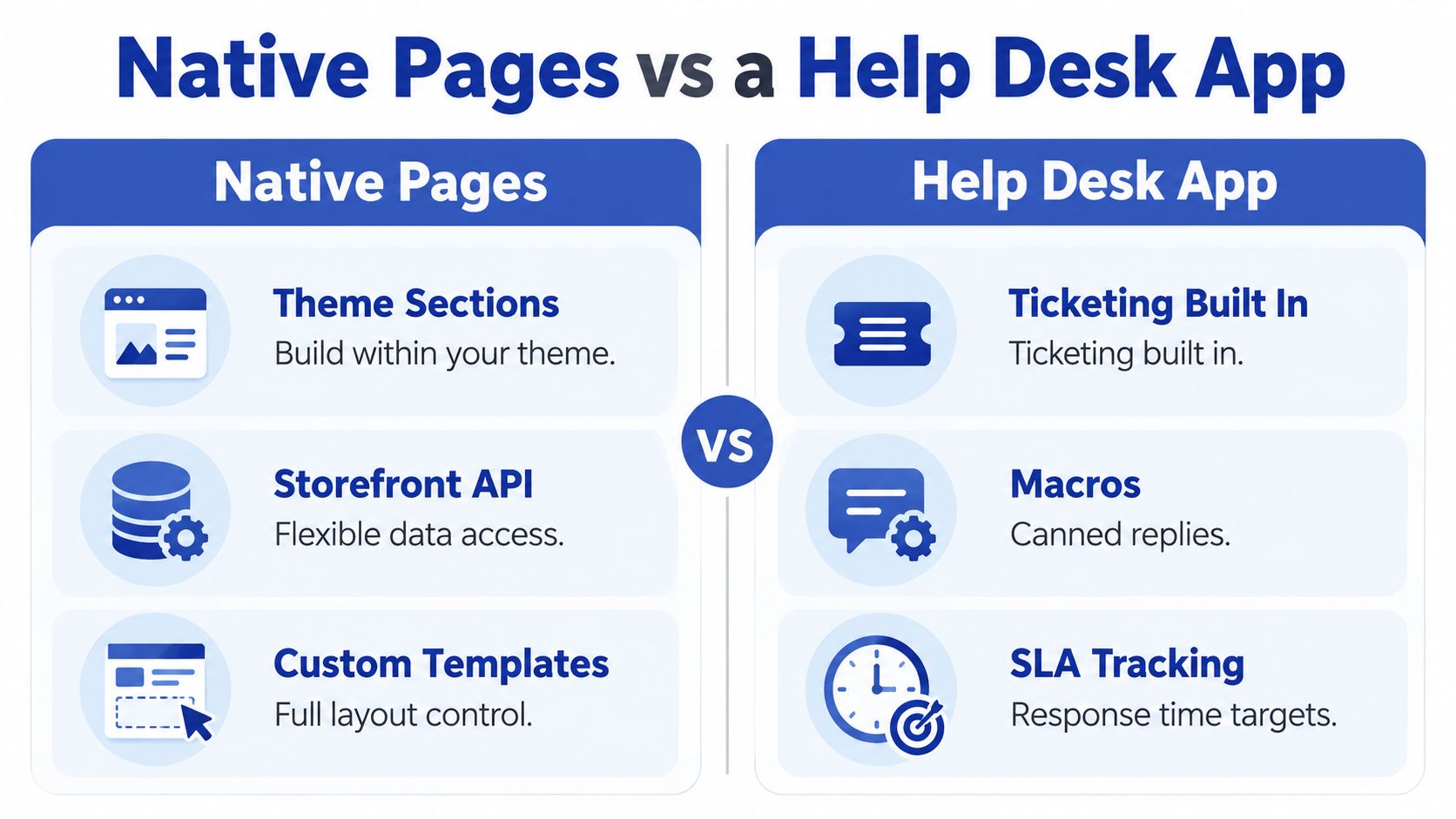
| Criterion | Native Pages | Help Desk App |
|---|---|---|
| Design control | Strong control through theme sections and custom templates | Depends on app templates, embeds, and theme integration |
| Ticketing | Requires another system or custom workflow | Usually built into the platform |
| Search and content ownership | Direct control over page structure and internal links | Varies by app, especially for indexation and URL ownership |
| Analytics | Requires instrumentation and reporting setup | Often includes support and conversation reporting |
| Multilingual content | Flexible, but translation governance is your responsibility | May include knowledge-base tooling, with app-specific limits |
| Maintenance | Theme and content releases remain under your control | App updates and integration changes become part of the workload |
| Best fit | Brand-led content, SEO, lean teams, clear workflows | Larger support operations, routing, automation, and agent collaboration |
The decision should be practical:
- Choose native pages when content quality, organic search, brand control, and a lightweight support model matter most.
- Choose an app when the team needs queues, ticket ownership, macros, automation, and reporting in one workspace.
- Use both carefully when native pages hold the public knowledge base and the help desk manages escalation. Keep ownership of the canonical content clear.
Apps can reduce handling effort, but they won't fix vague policies or poorly named articles. Before choosing one, define the customer questions, escalation points, and URL requirements. For broader service automation considerations, compare the workflow against this guide to customer service automation.
Setting Up the Help Center on Shopify
Start with the public route, not the app catalogue. A help centre should be easy to find from the header or footer, available from account and order-related journeys, and reachable from policy links without forcing customers through a contact form.
For a native build, create a dedicated /help route or a consistent page path such as /pages/help. Build a landing template with search, intent-based categories, popular questions, and a visible contact option. Use a separate article template rather than placing every answer in one long page. Store fields such as category, audience, market, last-reviewed date, and related products in metafields so the content can be filtered and maintained without hard-coding every relationship.

A lightweight search layer can work for a modest library, provided it searches titles and body content and returns useful matches. Test it with real phrases from contact forms, chat transcripts, and failed searches. Search for the customer's wording, not the internal label your team uses.
A workable launch sequence
- Create the information architecture. Start with delivery, returns, payments, orders, products, subscriptions, accounts, and troubleshooting. Remove categories that don't reflect a customer task.
- Build the landing and article templates. Include breadcrumbs, related links, policy references, market labels where necessary, and an escalation route.
- Place the route in navigation. Add it to the footer and the most relevant customer journeys, including account, order-status, product, and checkout-adjacent areas.
- Configure search and redirects. Record the intended URL for each article before publishing, then test empty, partial, misspelled, and highly specific queries.
- Validate the escalation path. A customer should know what information to provide, which team owns the issue, and what happens after submitting a request.
If you use an app, install it in a development or preview context first. Add its theme app block where customers expect help, match typography and colour tokens, remove duplicate navigation, and confirm that the app's search results and article URLs don't compete with native pages. The integration should feel like one help centre, not two systems sharing a logo.
For checkout-sensitive content, use Shopify's documented customer path as the source of truth. Checkout configuration is accessed through Settings > Checkout, and Shopify's troubleshooting guidance recommends checking documented payment-error messages before contacting support. For Shopify Payments UK, keep proof-of-identity and proof-of-address requirements distinct in the instructions, rather than combining them into an ambiguous upload step.
Structuring Articles Around Customer Intent
The article title should describe the customer's problem in the words they might type into search or support chat. “Payment declined” is useful. “Payments” is a category label. “Checkout configuration” describes an internal menu and tells a customer almost nothing.
A reliable article has a simple sequence:
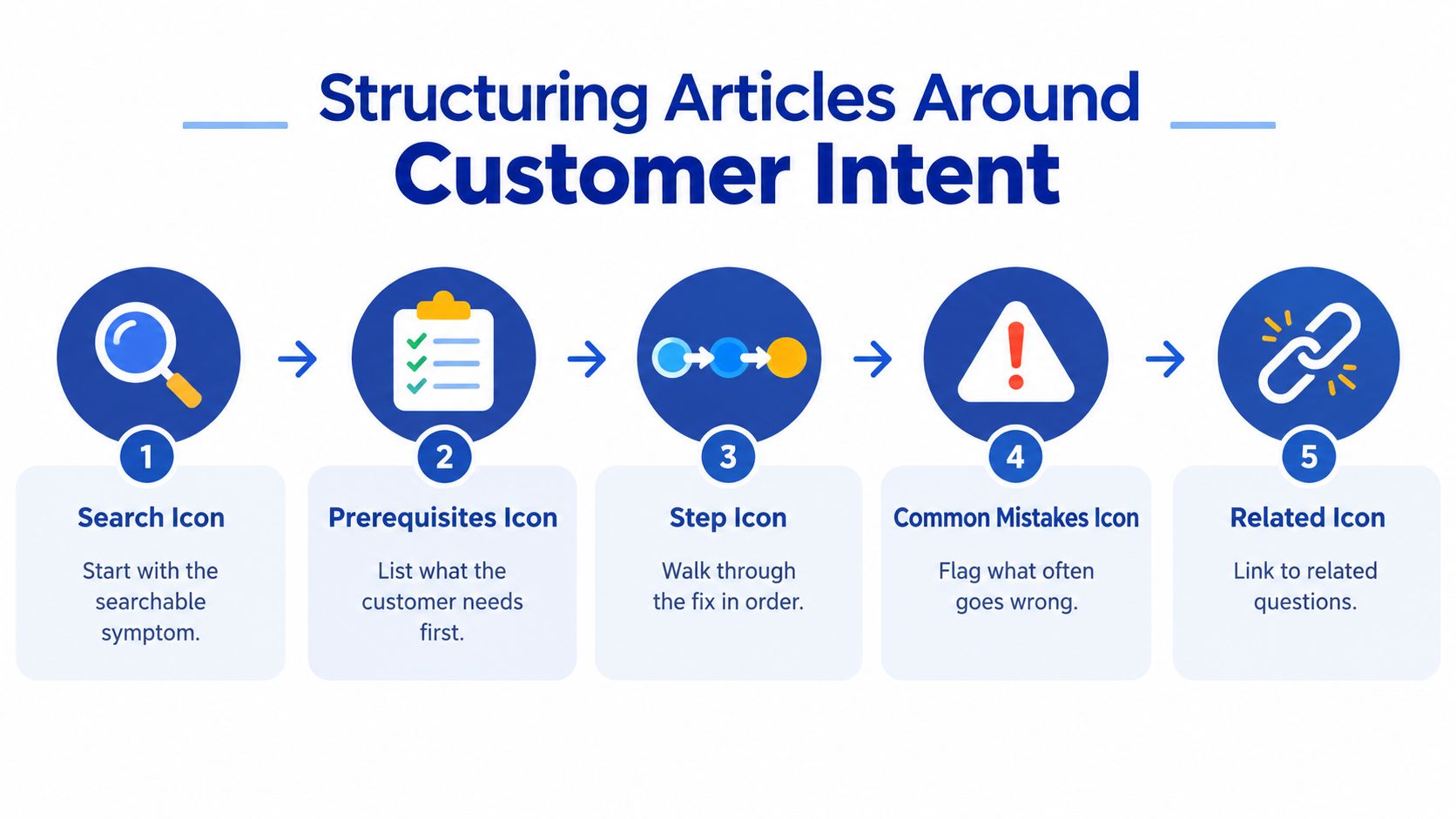
- Name the symptom. Use a question or problem statement, such as “Why was my payment declined?”
- List prerequisites. Explain what the customer needs, including an order number, email address, device, or account access.
- Give the ordered fix. Use numbered steps and identify the exact customer action or admin path.
- Call out common mistakes. Separate incorrect address details, unsupported payment methods, expired links, and provider-owned failures.
- Define escalation. Tell the customer when to contact support and what evidence to include.
This structure works for internal admin guidance too. An article titled “How do I change the checkout email address?” should identify who can make the change, point to Settings > Checkout, explain how to save and validate it, and state what won't change for existing orders. Shopify's own support guidance follows the useful principle of checking a specific error before escalating.
Split content by decision branch
Don't force several materially different outcomes into one generic answer. UK and international delivery rules may need separate paths. Subscription and one-off orders may have different cancellation windows. A product-specific return condition belongs in the relevant product or policy relationship, not buried in a universal FAQ.
Use links as decision points:
- Policy links: Connect return, shipping, privacy, and payment guidance to the canonical policy page.
- Product links: Link compatibility, sizing, care, and usage answers to the relevant product detail page.
- Process links: Move from “Where is my order?” to tracking instructions, then to escalation if the carrier status hasn't changed.
- Market links: Label UK, EU, and other market-specific rules visibly, rather than relying on a customer to infer the difference.
Keep each article focused enough to answer one intent completely. Merge only when the customer needs both answers in the same task. A long article that covers every possible scenario may look efficient in the CMS, but it makes search, scanning, translation, and maintenance harder.
SEO for Your Shopify Help Center
A help centre can rank for questions that sit close to a purchase decision, but only if each page has a distinct purpose. Start with the language already used in support tickets, site search, chat, and failed searches. “Can I return a sale item?” and “Why has my order not shipped?” reveal more useful intent than a generic keyword list because they show the customer's actual uncertainty.
Give every article one clear title, a descriptive meta description, a stable URL, and a strong opening answer. Use headings for decision branches, not decorative fragments. The page should make sense to a customer arriving directly from Google, without requiring a visit to the help-centre homepage first.
Build a link system, not isolated articles
Internal linking is where many Shopify help centres underperform. A return article should link to the returns policy, the relevant product or collection where appropriate, and the contact route for exceptions. Product pages can link to high-value pre-purchase answers. Blog posts can send readers to operational guidance when the question moves from inspiration to buying or ownership.
The link should reflect the next decision. Avoid repeating a generic “read our FAQ” link across every template. Descriptive anchors such as “check delivery options for UK orders” give customers and search engines clearer context. A technical implementation of Shopify structured data setup should also be reviewed alongside the template, especially where article and FAQ markup may overlap.
Use Article structured data for genuine help articles where it matches the page content. Use FAQ markup only when the page visibly presents questions and answers and the implementation follows current search guidance. Structured data can clarify page meaning, but it won't compensate for thin answers, duplicate content, broken links, or a poor mobile experience.
Decide what should be indexable
Don't automatically noindex the entire help centre. Public pages that answer useful, non-branded questions can attract relevant visitors and support the buying journey. Private account guidance, duplicate app screens, internal-only procedures, and pages with no standalone value may need a different visibility strategy.
Watch for cannibalisation. If a blog post explains a broad return policy and a help article answers a specific return question, give each page a distinct scope and link between them. The help article should resolve the task. The blog post can provide context, product education, or a broader comparison. Review titles, headings, internal links, and search impressions together before consolidating pages.
Migrating an Existing Help Center to Shopify
A migration can go unnoticed when the new content looks polished but old URLs disappear. Customers follow saved links, email links, search results, and links inside support macros. Search engines also need a clear signal that an old article has moved rather than vanished.
Begin with an inventory of the current help centre. Export every URL, title, category, language variant, status, and available performance data. Include URLs from Magento, WooCommerce, Zendesk Guide, an older Shopify app, PDFs, and support emails. The audit should identify pages that attract visitors, resolve common issues, or contain policy language that must be reviewed before rewriting.
Map before you rebuild
Create a URL map with one row for each old address:
- Old URL: Record the exact path, including language or category segments.
- New destination: Assign the closest relevant Shopify page, or mark it for retirement.
- Content decision: Keep, rewrite, merge, replace, or remove.
- Redirect status: Track implementation and validation separately.
- Owner: Name the person responsible for checking accuracy after launch.
Don't redirect every old URL to the help homepage. A customer searching for a payment answer should land on the payment answer. If no equivalent exists, create one or send the visitor to the closest useful policy page. Irrelevant redirects may preserve a visit technically while failing the customer's task.
Rewrite content for the new template rather than copying obsolete instructions. Replace old menu paths, remove screenshots from the previous interface, update market branches, and make related links deliberate. Translated pages require the same treatment. Preserve language intent and review whether each translation has a matching destination, rather than sending every language to an English page.
Implement a single 301 redirect from each retained old URL to its final destination. Avoid chains caused by redirecting the old URL to an intermediate category and then to the article. Before launch, crawl the old and new paths, test redirects, inspect internal links, and check for 404s.
Use the Shopify migration guide as a wider technical reference, but treat the help centre as its own migration workstream. After release, review Search Console coverage, landing pages, queries, and errors, then compare support contacts for issues affected by the move.
Measuring, Maintaining, and Scaling Support Content
Page views alone cannot show whether a help centre is working. An article may attract traffic because its answer is unclear, while a low-traffic page may resolve a high-impact issue. Measure whether shoppers find the right answer and complete the next task, such as checking an order, choosing a payment method, or starting a return.
Track search-to-resolution rate, repeat-search rate, contact deflection, and once-and-done resolution. HMRC's UK customer-service reporting offers useful operational reference points, including 79.7% satisfaction and 84.4% once-and-done resolution in 2024–25 (customer-service performance reporting). Treat these figures as context, not universal retailer targets. Resolution quality matters more than article traffic.
Run a simple content cadence
Review failed searches and high-volume contact reasons weekly. Rewrite an article when shoppers abandon it before the first actionable step, repeat the same search, or contact support after reading it. Retire or merge pages that duplicate another answer, describe a removed feature, or attract visits without completing a clear customer task.
Assign ownership for screenshots, policy wording, translations, and app-specific instructions. After a Shopify admin change, update every affected article before the mismatch creates tickets. Each month, compare performance by device, traffic source, market, and issue type. Feed recurring problems into product, fulfilment, and checkout planning.
A help centre scales when its content model reflects the business. Add market-specific decision branches, connect the knowledge base to the help desk, and make escalation diagnostic. A chatbot can provide an entry point, but it should expose human support and exit paths rather than trap shoppers in a loop.
A conversion-focused help centre also supports merchandising and retention. Link answers to the relevant policy, account action, or product choice, so customers can move from uncertainty to completion without returning to search. Keep those links and decision branches current as products, markets, and support tools change.
Want this kind of work on your store?
Send us the URL and what is slowing it down. We look at the store before we reply.
Related posts
Check out some similar posts.
- seo and subdomains
Learn how SEO and subdomains interact, from indexing and authority to internationalisation. A practi...
Read more
- technical seo audit
What Is Technical SEO Audit. Learn what a technical SEO audit is, its core components, and how it dr...
Read more
- shopify seo
Choosing the right SEO app for Shopify means weighing features against speed, scripts, and plan limi...
Read more
- shopify plus seo agency
Learn how to choose the right Shopify Plus SEO agency for your store. Covers evaluation criteria, pr...
Read more