Product Configurator Shopify: A 2026 Guide
- product configurator shopify
- Shopify apps
- Shopify Plus
- checkout flow
- Built for Shopify
You've got the product page looking right. Customers can choose a sofa's fabric, size and legs, or add engraving to a gift. Then someone asks whether the selected fabric is available, why the price changes in the basket, and how the warehouse will know what to make. Suddenly, choosing a Shopify product configurator isn't an app-shopping exercise. It's a decision about how your store accepts and fulfils an order.
A good configurator connects customer choices, validated prices, delivery promises and production instructions. The preview helps customers decide, but the transaction underneath determines whether you can deliver what they bought.
Pick the Right Configurator Route
Say you sell a sofa with selectable upholstery, dimensions and leg finishes. Customers see a series of choices. Your team needs to distinguish separately stocked products from components, production instructions and cosmetic preferences. Those distinctions should determine the implementation.
For a furniture-specific reference, Groen's Fine Furniture's design your own sofa resource gives you a useful starting point for listing the decisions a buyer needs to make. Translate those decisions into product rules before comparing app interfaces.
Configurator routes on Shopify
| Route | Use it when | Where it lives | Main risk |
|---|---|---|---|
| Native variants | Stocked combinations stay few | Product options on any plan | Variant explosion and dead SKUs |
| Public configurator app | Visual choice and moderate rules | Theme app extension, with choices saved as line-item properties | Theme clashes and weak validation |
| Custom Built for Shopify app | Complex rules, pricing and systems | Theme app extension plus app record | Longer build and upkeep |
| Plus checkout layer | Fields or upsells after configuration | Shopify Plus checkout | Cannot replace the product configurator |
Match the route to the operational problem
Native variants work when each combination represents something you stock and manage. They give your team recognisable SKUs, inventory records and reporting. They're less useful when every engraving message or optional trim becomes another supposed product.
A public configurator app suits swatches, conditional fields and image or interactive previews when its rules match your catalogue. Check how it saves selections, adjusts the payable price and exposes order data. A polished demo won't prove that your fulfilment export can read its output.
A custom app becomes sensible when supplier availability, compatibility, live pricing or production routing must agree before purchase. Build it around Shopify's extension architecture and relevant Built for Shopify quality standards. A bespoke app isn't automatically entitled to the Built for Shopify badge, which applies to eligible reviewed apps.
Shopify Plus checkout extensions can collect additional information or present an upsell after configuration. They shouldn't invent the product definition at the final payment step.
Practical rule: Choose the simplest route that can enforce the rules and deliver a readable order, not the route with the most impressive preview.
Make the decision before installing
Answer these questions against each route:
- Valid combinations: How many combinations can you sell, after excluding incompatible choices?
- Commercial changes: Does a selection change the payable price, production time or delivery promise?
- Downstream systems: Must an ERP, supplier or fulfilment service receive structured selections?
Choose the row that satisfies all those requirements. Creating a huge matrix of mostly unused variants moves complexity into catalogue maintenance, where dead SKUs and inconsistent prices become someone's recurring job.
How to Wire Options into Shopify
Build the configuration as a controlled product-data pipeline, not a collection of browser fields. The storefront should help customers make valid choices, while trusted application logic decides whether those choices can become an order.
The Retail Institute's checkout abandonment study found approximately 74% of UK baskets were abandoned in late 2024, with mobile abandonment at 76%, compared with 67% on computers. That doesn't establish configurators as the cause, but it makes an untraceable buying journey a poor foundation for experimentation.
Build the pipeline in order
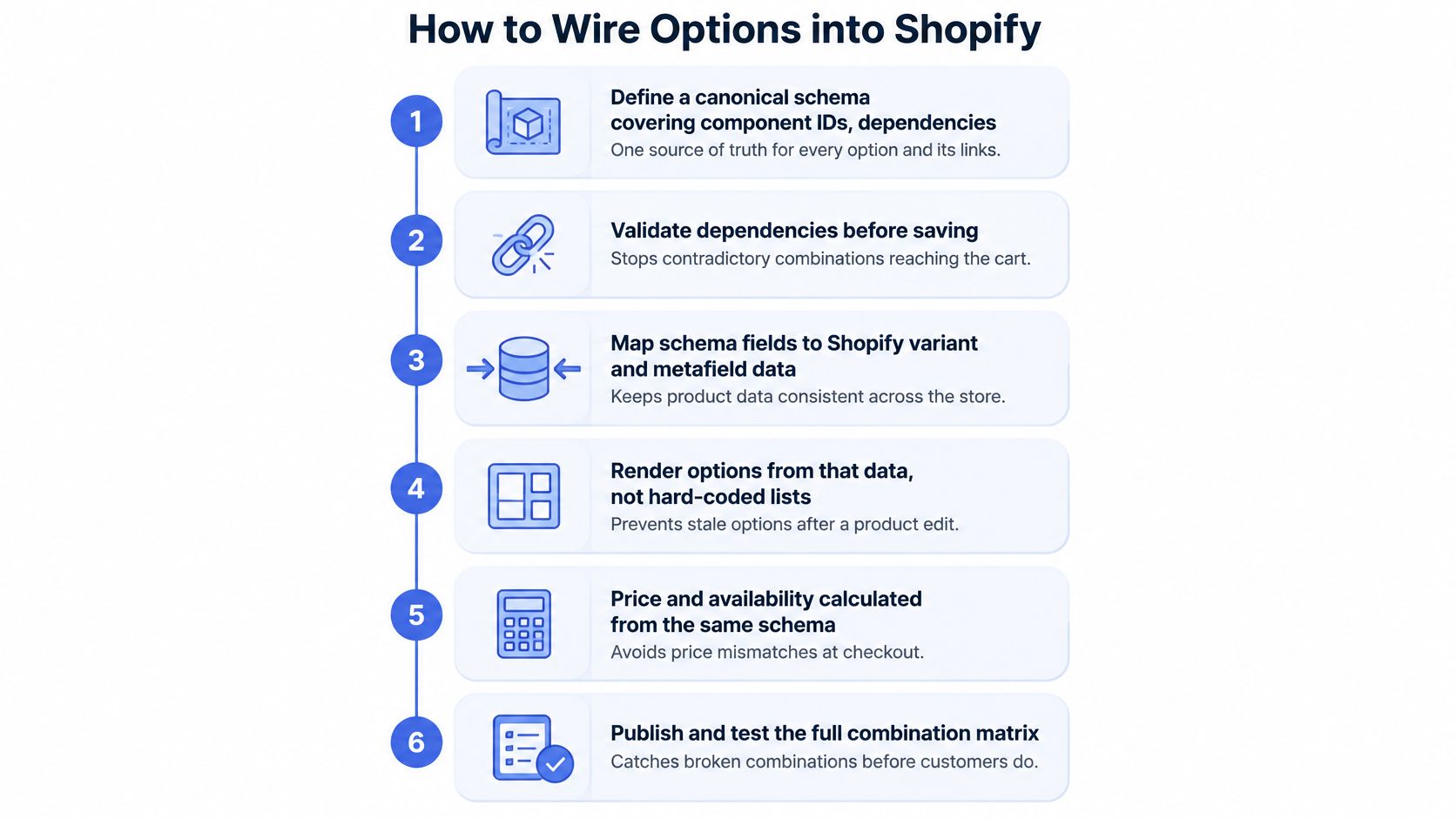
Define a canonical schema. Record component IDs, dependencies, permitted combinations, pricing rules, inventory mappings and VAT treatment. Separate stable identifiers from customer-facing names, so changing a fabric label doesn't break warehouse instructions. This prevents the storefront and operations team from maintaining competing definitions.
Validate every selection server-side. Browser JavaScript can disable impossible choices, but it mustn't be the only gate. Reject unknown component IDs and prohibited combinations before accepting a configuration. For example, a discontinued fabric must remain unavailable even if someone submits an old product form.
Generate a deterministic configuration ID. Normalise the selected values, put them in a consistent order and include the applicable schema version when generating the identifier. Equivalent builds should resolve consistently within that version. This prevents support and production teams from discussing apparently identical builds that use different rules.
Map the ID to an order-readable record. Save concise selections as Shopify line-item properties and retain the full structured build in an app record when necessary. Preserve an immutable order-time snapshot rather than relying on a record that staff can later overwrite. This prevents historical orders from changing meaning after catalogue edits.
Revalidate commercial constraints. Recheck price, stock and delivery eligibility when the cart changes and at the supported checkout enforcement points. Don't assume an external server can arbitrarily intercept every checkout action. Select an app architecture and Shopify capabilities that enforce your rules, preventing stale quotes from becoming accepted orders.
Instrument each transition. Record the configuration ID, schema version, stage and meaningful error code without exposing unnecessary customer information. This lets a developer distinguish a supplier timeout from a rejected combination instead of treating both as a failed add-to-cart.
Keep stock and configuration separate
Reserve native variants for inventory-critical dimensions. Store decorative choices and production instructions in the app-backed model when they don't represent separately stocked goods.
Line-item properties don't change a line's payable price or reserve component inventory by themselves. Those behaviours need an appropriate pricing and inventory implementation. Grumspot's custom app development guide for Shopify store owners is useful when defining that boundary.
Pilot a representative product, including an invalid combination and a stock change during configuration. Expand the schema only after the resulting order can be fulfilled without someone interpreting free text.
Install and Map the Options in Shopify
Start in an unpublished theme copy. Keep the existing product template available so you can compare behaviour and roll back without removing the configuration data you're testing.
The installation method changes by route, but the acceptance test doesn't: the selected build must arrive in the order with the correct payable price.
Connect the selected route
| Route | Admin and theme work | Check before publishing |
|---|---|---|
| Native variants | Create options in the product editor and review the generated combinations | SKU, stock, price and availability for each saleable variant |
| Public app | Install from the Shopify App Store, configure its option set and enable its app embed or product-template block | Correct product assignment and no duplicate configurator |
| Custom app | Install through its supported distribution method and enable its theme app extension | App permissions, server connection and product-template placement |
On an Online Store 2.0 theme, open the relevant product template in the theme editor. Some apps require an embed, others a block, and some use both for different purposes. Follow the app's architecture rather than enabling every available placement.
For a custom implementation, confirm that the product form submits the selected variant and configuration together. Cart drawers, quick-add buttons and accelerated purchase paths need explicit testing because they may use different submission code.
Prove the field mapping
For ordinary form submissions, a hidden input named properties[Fabric] can carry the selected fabric value. Add a separate property for the configuration ID, and update these inputs whenever the customer changes a choice.
- Customer-readable fields: Use clear names such as Fabric, Leg finish and Engraving.
- Internal identifiers: An underscore-prefixed property such as
properties[_configuration_id]is treated as private in checkout. Verify how your theme, notifications and exports handle it rather than assuming universal hiding. - Dynamic forms: Ensure the app updates the submitted data, not just the visible summary.
Place a test order and open it in Shopify admin. Confirm the properties, configuration ID and validated price, then inspect the actual fulfilment export or ERP message. A correct-looking order page isn't proof that the receiving system got the same values.
Show Delivery and Return Rules Early
A customer selects a specialist fabric and sees an attractive sofa preview. The page still promises the base product's dispatch window, even though that fabric requires a separate production slot. The configuration is visually correct and commercially misleading.
Delivery and return information belongs beside the decision that changes it. In DHL's 2025 UK ecommerce report, three in four shoppers said they abandon baskets when their preferred delivery and returns options aren't available. Hiding a restricted service or additional processing time until checkout introduces an avoidable surprise.
How configuration type changes operations
| Product type | Stock logic | Delivery message | Returns |
|---|---|---|---|
| Made to order | No finished goods stock | Lead time from production | Apply the disclosed bespoke-product policy where legally applicable |
| Assembled to order | Component stock | Window set by the slowest part and assembly capacity | Partial returns may be possible under the applicable policy |
| Engraved or printed | Base SKU plus personalisation | Standard dispatch plus processing time | Personalisation may restrict change-of-mind returns, not fault remedies |
| Bundled | Several SKUs reserved together | Slowest component sets the promise unless split delivery is offered | Apply eligibility and refund allocation per line |
Calculate the promise from the work required
Model the required components and processes, then calculate the earliest achievable dispatch date. The slowest required part is your starting constraint, but sequential work matters too. Engraving can't begin before the base item arrives, and assembly may require a production slot.
Store the resulting promise with the configuration:
- Production requirements: Component IDs, quantities, personalisation instructions and routing.
- Delivery terms: Dispatch window, eligible services, surcharges and split-shipment choice.
- Returns treatment: Eligibility category, disclosed policy version and any line-specific restrictions.
Pass those fields through cart, order and fulfilment messages as structured values. Don't ask warehouse staff to extract a delivery commitment from a customer-facing description.
A delivery estimate is useful only if the team making the product receives the assumptions behind it.
Explain restrictions without overclaiming
Don't treat made to order as an automatic synonym for non-returnable. Separate your commercial policy from the customer's applicable rights, and have the wording reviewed for the products and markets you sell into. A final-sale label mustn't imply that customers lose remedies for faulty goods.
For a category-specific comparison of how another retailer presents its terms, consult Vinson Fine Furniture's mattress return guide. Use it to assess the clarity of your own explanation, not as a policy template for UK sales.
A personalised item might need a prominent change-of-mind restriction, while a bundle might contain returnable and restricted lines. Explain how discounts affect partial refunds before payment rather than leaving customer service to negotiate afterwards.
During a migration from Magento or a custom platform, explicitly map legacy production and policy fields. Converting them into unstructured option text discards the logic even if the product page looks unchanged.
Before launch, place a test order for each operational type. Confirm that its delivery commitment and return eligibility survive into the order record and the system staff use.
Protect Speed and Completed Orders
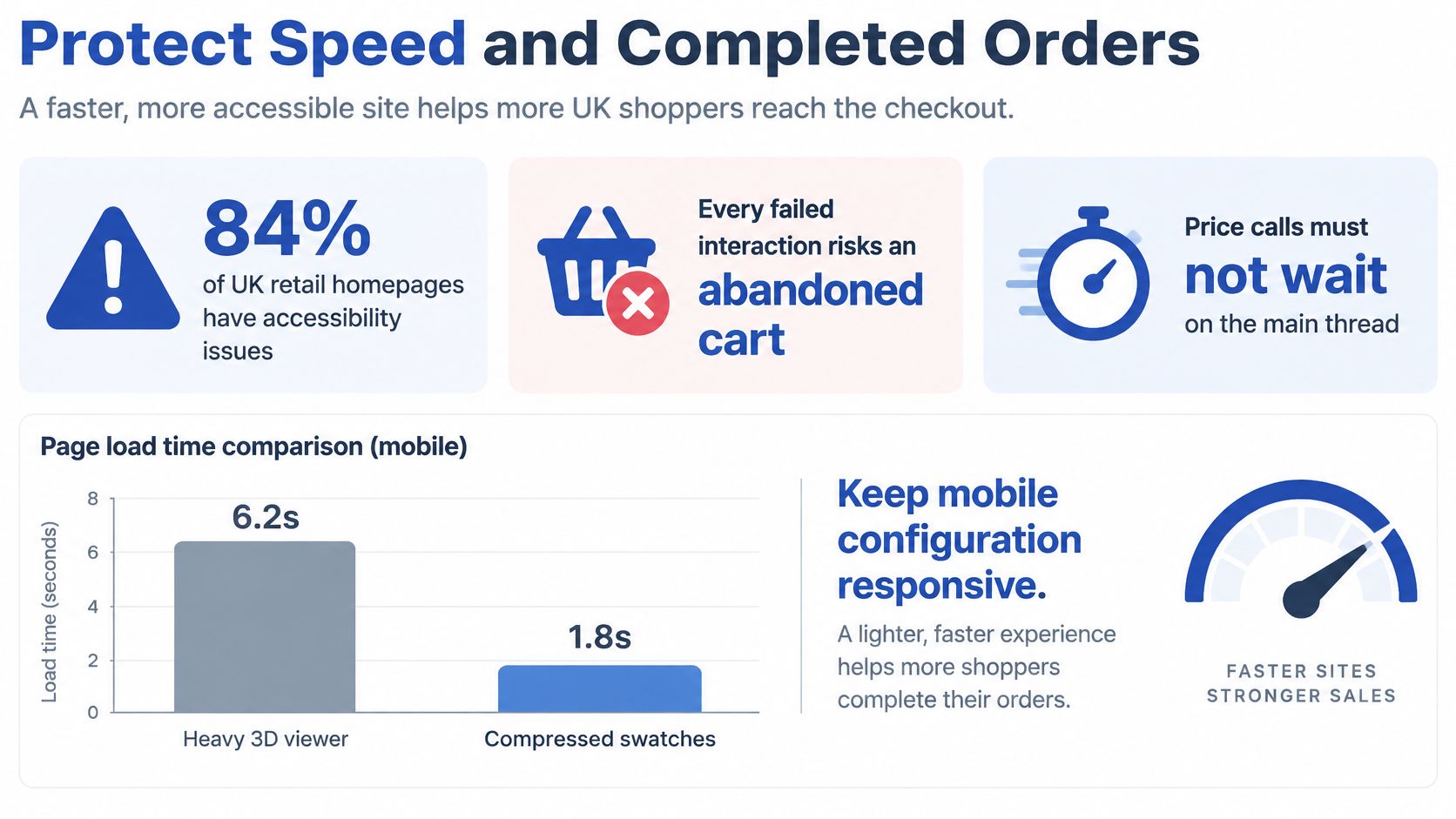
A heavy preview can make a working configurator feel broken. Customers tap a swatch, nothing responds, and they tap again while the browser is still rendering an image or processing scripts.
Make the form usable before loading optional visual detail. Start with labelled controls and a lightweight product image, then load interactive previews when needed. Compress swatch assets, reserve image dimensions and avoid shipping every possible preview on the initial page load.
Give price updates a single owner
Use asynchronous requests for validated pricing and discard outdated responses. If a customer changes fabric twice quickly, the earlier response mustn't overwrite the later selection.
Show a clear pending state while recalculation runs. Don't display a confirmed total until the response corresponds to the current configuration. Keep the theme's price display and app result synchronised instead of running competing calculators.
Use browser performance tools to inspect scripting, layout and network activity on a representative mobile device. Grumspot's Shopify performance optimisation guide provides a broader framework for separating app overhead from theme and asset problems.
Measure the transition that failed
Capture these events separately for mobile and desktop:
- Option viewed: A relevant configuration control becomes available to the customer.
- Option selected: The customer changes a value.
- Validation error: The system rejects a selection or cannot validate it.
- Add to cart: The validated build enters the basket.
- Checkout start: The buyer begins checkout.
- Purchase: The order completes.
Attach a consistent configuration or journey identifier so you can connect the events. Respect consent requirements and avoid sending engraving text or other personal information into analytics.
A drop between selection and add-to-cart is a reason to inspect configuration friction, not proof of its cause. Look at errors, price changes and task completion before drawing a conclusion. A drop after checkout starts warrants investigation of delivery charges, payment problems and account requirements.
Test a focused change, such as placing the delivery window beside the total. Judge it on completed orders, with configuration completion, invalid-combination rate, median configuration time and gross-margin-adjusted conversion as guardrails. More basket additions aren't a win if customers abandon later or buy unprofitable combinations.
Test under seasonal pressure
The Office for National Statistics internet retail sales series shows December 2024 online sales value in Great Britain was approximately 34% higher than July's. Use that seasonal pattern as a reason to test concurrent requests and downstream bottlenecks, not as a forecast of your own store's traffic.
Before a peak trading period, verify:
- Price integrity: The accepted quote matches the payable order.
- Responsive controls: Preview loading doesn't block selection.
- Order traceability: Configuration IDs survive retries and checkout.
- Recovery: A timed-out request preserves choices and offers a safe retry.
Tips for an Accessible Configurator
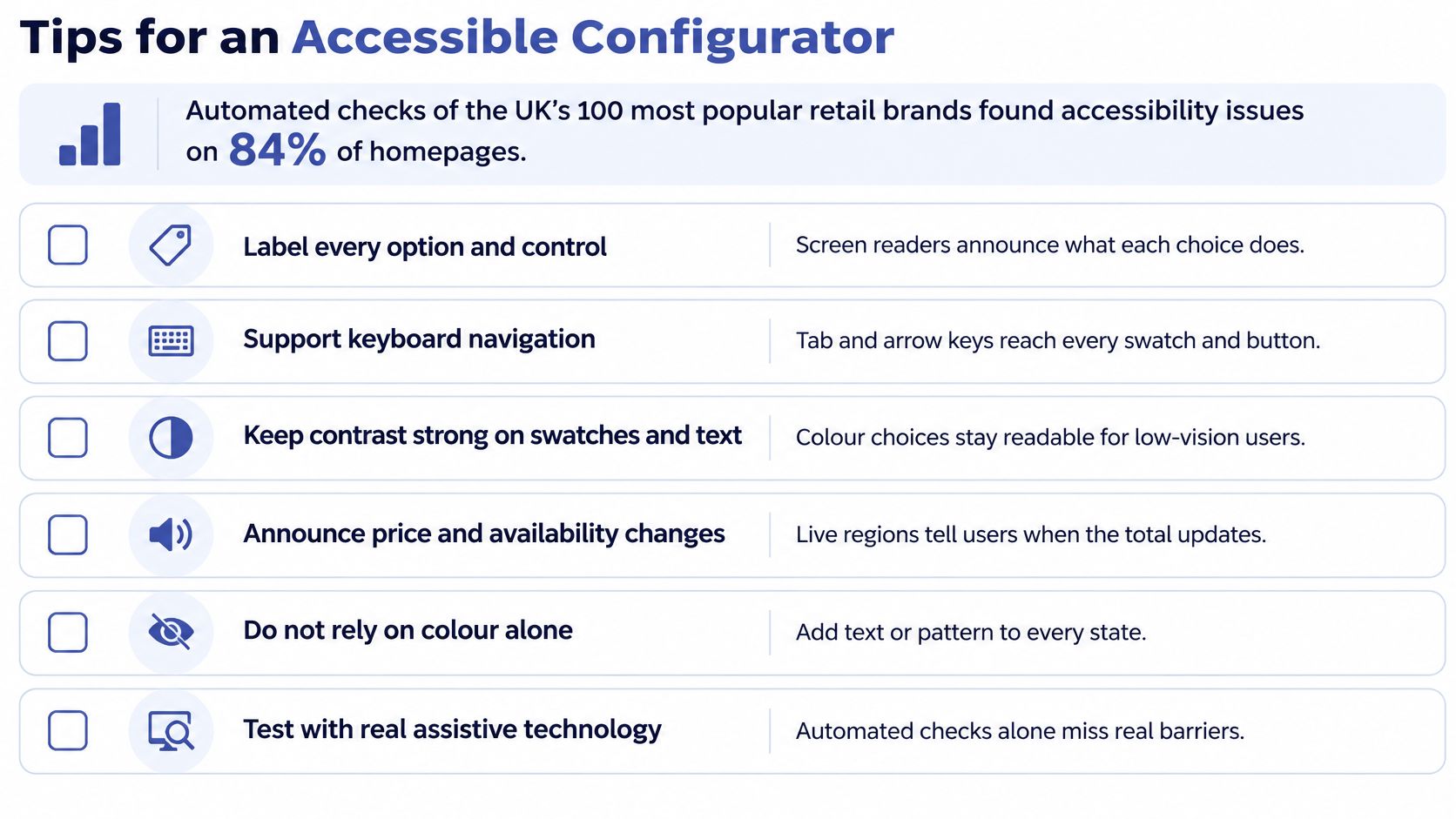
Automated testing reported by Level Access found accessibility issues on 84% of the UK's most popular retail brands' homepages, and every homepage tested had at least one WCAG 2.1 AA violation. Those findings concern homepages, not configurators, but they're a strong reason to test the buying controls rather than assume the theme handles accessibility.
A customer shouldn't need to see a colour, drag a model or use a pointer to specify a product. Build the accessible form first and treat visual interaction as an additional way to use it.
Make each choice understandable
Use native radio buttons, selects and text inputs where they fit. Group related controls with a fieldset and legend, and give every input a programmatically associated label.
A fabric swatch needs a name such as Navy woven fabric, a visible selected state and sufficient contrast around its boundary. Colour alone can't communicate selection, availability or an error.
- Unavailable combinations: Explain the reason in text, such as a finish not being available for the selected size.
- Dependencies: Tell customers when a choice changes the available options.
- Configured outcome: Provide a text summary describing the selected material, dimensions and finish.
- Preview alternatives: Use meaningful image descriptions where the preview conveys information not already available in nearby text.
Keep keyboard order aligned with the visual sequence. If you implement custom radio behaviour, support the expected arrow-key interactions rather than making every swatch a separate, awkward tab stop.
Handle changes without disorientating people
Don't move focus whenever a new field appears. Usually, announce the change and let the customer continue naturally. Move focus deliberately when opening a new step, presenting an error summary or removing the element that currently holds focus.
Use a polite live region for settled price and availability updates. Avoid announcing every intermediate calculation, which can overwhelm screen-reader users.
Release criterion: A customer must be able to understand, correct and purchase the configuration without relying on its preview.
When validation fails, identify the field, explain the problem and describe the correction. Associate inline errors with their controls and preserve every choice that remains valid. Resetting the whole form makes a recoverable mistake unnecessarily expensive for the customer.
Test the purchase rather than the component
Use keyboard-only navigation, browser zoom and a screen reader such as VoiceOver or NVDA. Check the mobile layout too, including sticky summaries, drawers and error messages hidden beneath fixed buttons.
Grumspot's Shopify accessibility audit guide can help organise those checks across the storefront. Automated testing is useful for finding certain implementation errors, but it won't establish whether someone understands a conditional choice.
For release acceptance, complete an order without a pointer. Include changing an earlier answer, encountering an unavailable option and recovering from an error. If any of those actions requires dragging the preview or guessing what a grey swatch means, the configurator isn't ready.
Choose Your Next Build Move
If a public app supports your rules, exposes usable order data and handles the payable price correctly, pilot it on a representative product. Don't commission a custom system merely because a bespoke preview would look better.
If your requirements include interdependent components, live supplier pricing, production scheduling or ERP-driven availability, stop stacking apps around the missing logic. Specify the application boundary first, including which system owns each rule and what happens when that system is unavailable.
Write the implementation brief
Prepare a short brief before installation:
- Combination model: List valid combinations, exclusions and separately stocked dimensions.
- Pricing authority: Define adjustments, VAT handling, quote validity and the system responsible for the payable amount.
- Operational differences: Record delivery and returns treatment for each configured product type.
- Order destination: Name the systems that must receive the configuration ID and structured build.
- Acceptance tests: Include invalid selections, changed availability, interrupted sessions and accessible purchase completion.
Give that brief to the developer responsible for the transaction, not just the person editing the theme. Ask for a demonstration using your awkward combinations rather than a generic sample product.
Scope the build around the order
We offer Custom App Development for requirements that need a custom Shopify app. We also built emma&noah's Shopify Plus custom-made bundle creator, which boosted its AOV by 61%. That result is specific to that implementation, not a promised outcome for another configurator.
Keep checkout enhancements separate from the product definition. Your next build decision should follow the brief: use an existing app when it fits, or fund the missing application logic when it doesn't.
The useful deliverable isn't a working selector alone. It's an order that customers understand, support can trace and fulfilment can execute.
Grumspot offers custom Shopify app development and integrations for configurators that need reliable pricing, structured order data and fulfilment logic. Bring your combination model, delivery rules and receiving-system requirements to Grumspot to discuss a build scoped around the complete transaction.
Want this kind of work on your store?
Send us the URL and what is slowing it down. We look at the store before we reply.
Related posts
Check out some similar posts.
- shopify store templates
Compare Shopify store templates by type, speed and accessibility, then customise or upgrade for a co...
Read more
- ecommerce site search
Discover how ecommerce site search boosts conversion, UX, and SEO. Learn core features, implementati...
Read more
- Shopify Store Launch Checklist
Use this Shopify store launch checklist to cover design, payments, shipping, SEO, analytics, complia...
Read more
- shopify website examples
Explore 7 Shopify website examples and learn the UX, conversion features, and practical lessons merc...
Read more