Ecommerce Site Search: The Complete Guide for 2026
- ecommerce site search
- site search
- Shopify Plus
- conversion
- search UX
Launched
October, 2026
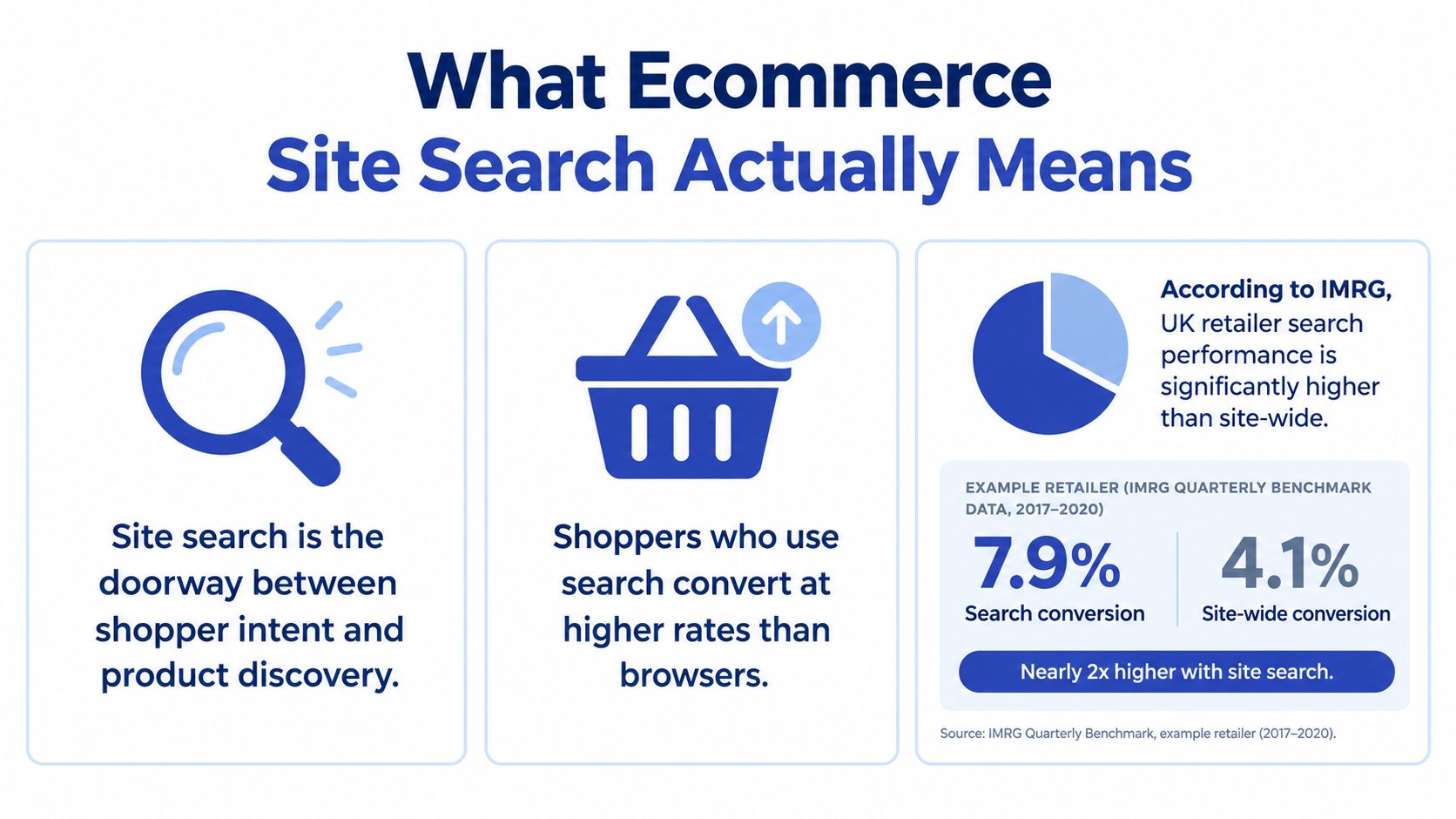
Search users look like a minority and behave like your best customers. In the IMRG and Lucidworks report on site navigation and personalisation, UK retail visits that used site search converted at 6.8%, compared with 2.8% on average and 2.3% for visits without it, while search users made up 13% of users and generated 31% of revenue. That gap reframes search from a header utility into a discovery layer, one that has to reconcile catalogue data, fulfilment reality, and the AI assistants shoppers increasingly arrive from. A high-intent shopper who types what they want and gets nothing does not just abandon a browse. The sale they were trying to complete goes to a marketplace instead.
What Ecommerce Site Search Means in Practice
Ecommerce site search is the whole system behind the magnifying glass in your header: the product index, the ranking logic that orders results, the filters that narrow a set, and the analytics that show whether any of it worked. Shoppers see a box and a results page. Your team owns everything in between.
That ownership is where most roadmaps fall short. Teams polish category pages, run homepage tests, and leave search on defaults. Yet in the same IMRG consumer survey cited above, half of UK shoppers said they use a retailer's website search bar. When that preference meets a weak results page, the shopper rarely browses harder; they start again somewhere that answers faster.
There is a second reason to take search seriously. The index behind your search box increasingly feeds everything else too: collection filters, recommendation blocks, and the structured catalogue data external AI assistants read when a shopper asks them to find a product. Treating search as a merchandising widget misses this. It functions as a product-data layer, and its quality decides how discoverable your catalogue is on-site and off-site.
Search as a revenue surface
A query is declared intent. A shopper who types a brand, size, colour, or use case has done your targeting for you. Your job is to return a usable result, carry that intent through filters and product pages, and remove every reason to restart. Search therefore earns merchandising time, product data work, and a dedicated line in your conversion roadmap. On most Shopify Plus rebuilds I have shipped, that reallocation paid back faster than any theme-level polish.
The pattern holds beyond retail. Travel operators face the same problem with complex catalogues, which is why guidance on how travellers browse and compare safari itineraries leans on structured filtering and clear attributes rather than long scrollable listings. Choosing a trip or a pair of trainers, the mechanics are identical: structured data lets people narrow by what matters to them.
Working search returns the right product, in stock, with the attributes the shopper asked for. Anything less is a results page, and results pages alone rarely recover intent.
What stakeholders need to hear
Budget conversations go better with numbers than mockups. Lead with three figures: the share of sessions using search, the share of revenue those sessions produce, and your zero-result rate. Presented together, they usually settle the debate about whether search belongs on this quarter's roadmap or next year's.
Why Relevance Is Harder Than It Looks
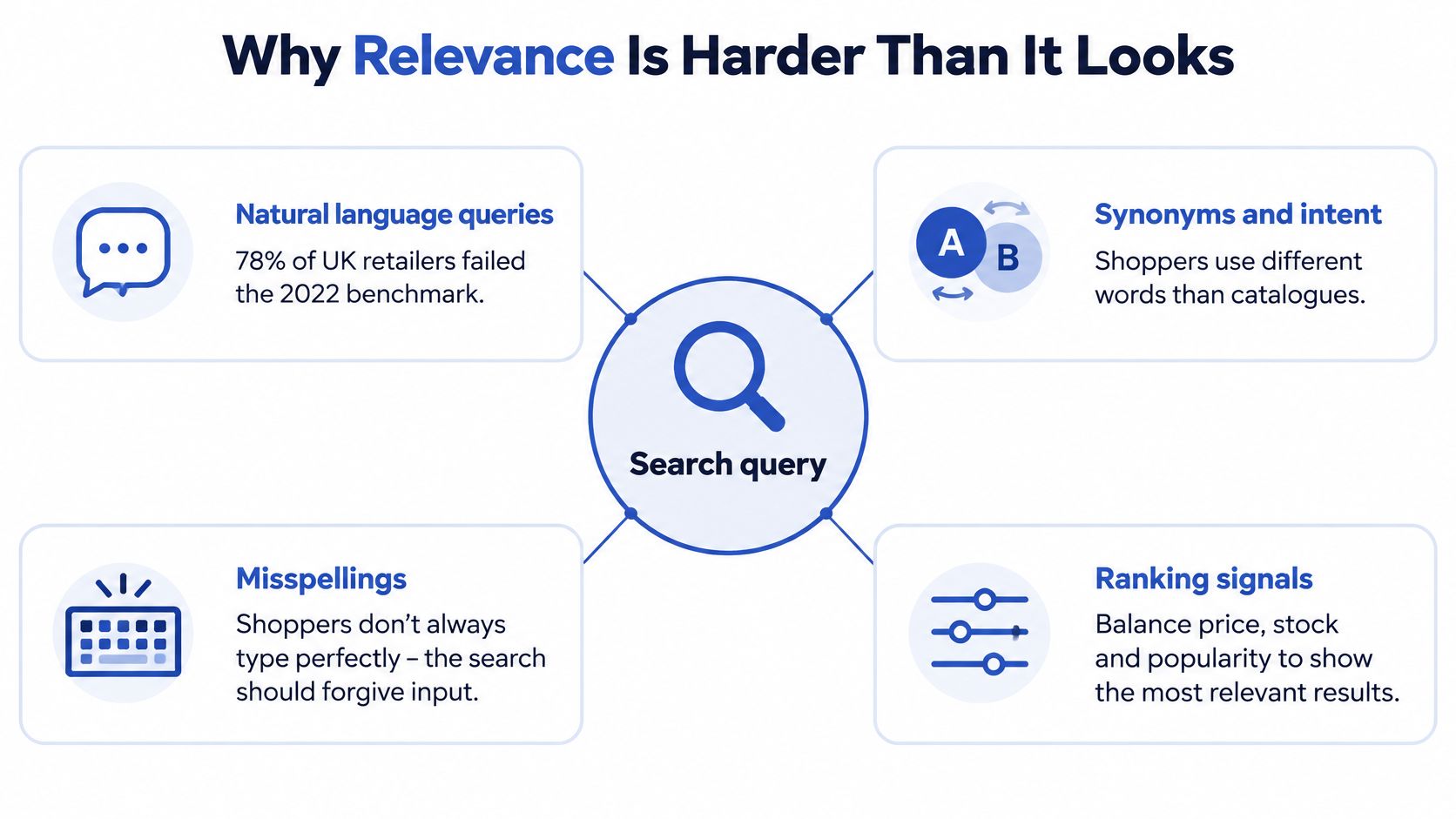
A 2022 benchmark of 50 UK ecommerce retailers found 78% failed to return relevant results for conversational, natural-language queries, only 20% could understand natural language and provide a precise product match, 25% couldn't handle misspellings, and 46% offered no product recommendations on their homepages, as covered in Mollie's guide to online shopping habits and behaviour. Those aren't exotic failures. They're the everyday ways shoppers type, met by systems built for exact catalogue terms.
Relevance looks simple because Google has trained everyone to expect it. Underneath, it's a stack of decisions, and each layer can break the experience.
The stack underneath a single query
Tokenisation decides how a query is split into meaningful parts. Synonym handling connects shopper language to catalogue language, so trainers, sneakers, and running shoes can point at overlapping ranges without flooding results. Typo tolerance forgives the fat-fingered mobile query. Attribute weighting decides whether a match in the title outweighs a match in a tag or description, and business rules then adjust for margin, seasonality, or stock position.
Get one layer wrong and shoppers see nonsense. Overweight old tags and discontinued lines surface first. Underweight variant data and the shopper who asked for a size sees products that were never available in it. Stack too many merchandising boosts and relevance collapses into whatever your team promoted last month, regardless of the query.
Intent is not a keyword
Shoppers describe outcomes, not SKUs. They search by occasion, compatibility, budget, material, and problem. A catalogue organised by internal range names won't meet them halfway unless someone deliberately builds that bridge. That's why a structured approach to search relevance and ranking matters more than any single tool choice, because it forces you to define what a good result looks like for each query class before you start tuning.
- Known-item queries: brand, model, or SKU searches that should land on one exact product.
- Category queries: broad terms where facets and sensible ordering do the heavy lifting.
- Attribute queries: colour, size, material, or compatibility constraints that must be respected, not treated as suggestions.
- Natural-language queries: phrased needs that require interpretation, not literal matching.
If your system can't tell those apart, every feature you add later is decoration on top of a broken foundation.
The Core Features That Move the Needle
Consider a shopper on a Shopify storefront typing gift under 30 three weeks before Christmas. For that query to work, several features have to cooperate in sequence. Organising features by what the shopper's doing at each moment makes the toolkit far easier to prioritise than alphabetical feature lists from vendors.
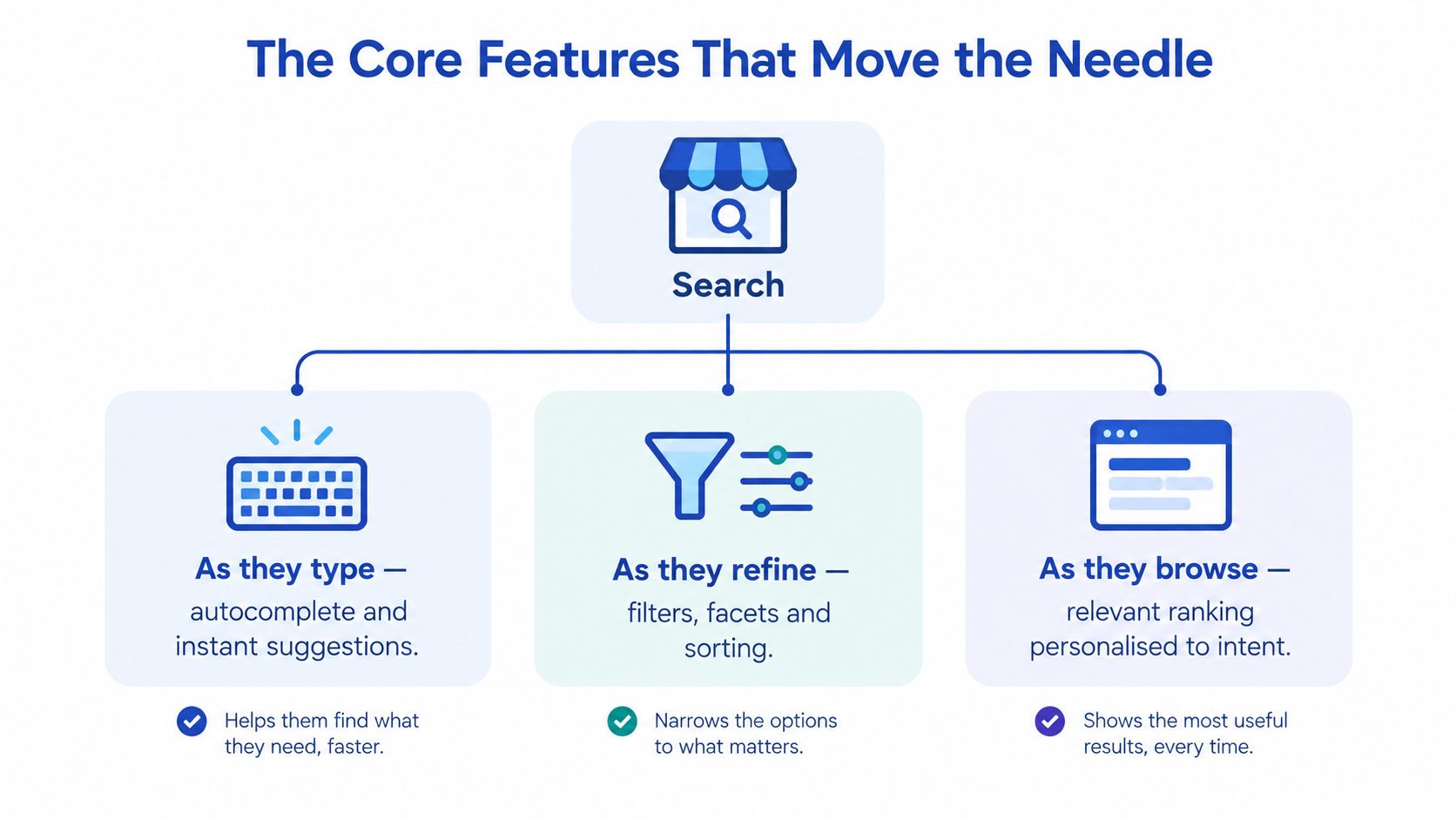
As they start typing, autocomplete does the first job.
As they type
Good predictive search suggests queries, categories, and a small number of visual product matches. It's not a typing shortcut, it's query coaching. It steers shoppers toward language your catalogue can answer and away from dead ends. Keep suggestions fast, scannable, and free of clutter. A dropdown that behaves like a miniature results page overwhelms people before they've finished typing, and laggy suggestions destroy confidence instantly on mobile.
Persist the query on the results page too. Shoppers refine in loops. Forcing them to retype a long query to change one word is friction you've chosen, not friction they deserve.
As they scan and refine
Now the shopper's looking at results for gifts under a budget. Facets and filters take over. They need price, recipient, category, availability, and delivery timing, presented in the order that matters for that query, not a generic filter rail copied from every collection page. Dynamic facets that reflect the actual result set prevent the classic failure where someone filters by an attribute and lands on an empty page.
Search and filtering are complements, not competitors. Your search results page should behave like your best collection page, with the same sorting and filtering controls, because the shopper's mental model doesn't change just because they arrived via a query.
The walkthrough below shows how these interactions feel when they're working together rather than as disconnected widgets.
As they search loosely and get guided
Synonyms and typo tolerance handle the gap between shopper vocabulary and catalogue vocabulary. You can't train customers to use your internal terms, so your system has to learn theirs. Merchandising rules then let your team promote seasonal ranges, protect margin, or bury products with poor availability, as long as those rules respect the query first. Personalisation belongs last. Reordering results by browsing history helps once relevance is solid. Applied too early, it just personalises the wrong results more efficiently.
Practical rule: fix interpretation before presentation. Shoppers forgive plain results that are right. They don't forgive beautiful results that are wrong.
Sequence matters. Interpretation first, refinement second, commercial guidance third.
Choosing Your Implementation Approach
Three paths cover almost every Shopify decision. The honest question isn't which is best in abstract, it's which matches your catalogue size, team capacity, and how much control your merchandisers need week to week.
| Option | Time to launch | Merchandising control | Best for |
|---|---|---|---|
| Shopify Search & Discovery | Fastest, native configuration | Basic boosts, synonyms, product recommendations | Smaller catalogues, lean teams proving demand |
| Third-party search app | Moderate, app install plus tuning | Strong rules, analytics, visual merchandising | Growing brands needing relevance control without replatforming |
| Headless dedicated search engine | Slowest, custom storefront work | Deepest, full control over index and ranking | Large complex catalogues on Hydrogen or custom front ends |
When native is genuinely enough
Shopify Search & Discovery covers synonyms, product boosts, and complementary recommendations without another subscription or integration to maintain. For a focused catalogue where shoppers mostly search by product name and brand, that's often sufficient. Teams outgrow it when they need richer analytics, finer ranking control, natural-language handling, or merchandising that's tied to campaigns rather than static boosts. Don't replace it because a vendor demo looked slick. Replace it when you can name the specific queries it fails.
When an app earns its cost
Third-party tools such as Algolia, Searchspring, Klevu, or Nosto earn their place through better relevance tooling, proper search analytics, A/B testing of ranking changes, and merchandising interfaces your trading team can use without filing developer tickets. The trade-off is real. You're adding index synchronisation to maintain, usage-based pricing that grows with traffic, and another vendor's roadmap to live with. Evaluate them on your worst queries, not their best demo data.
This is also where implementation partners fit. Grumspot, for example, audits Shopify search relevance and implements fixes across search UX and product structure as part of wider storefront work, which suits teams that know search is underperforming but can't yet say whether the fault sits in tooling, data, or design.
When headless is the only honest answer
A dedicated engine behind a Hydrogen or custom storefront gives you full control over indexing, ranking signals, and the results experience. It also makes you responsible for all of it. That investment only makes sense when search is central to how a very large or complex catalogue gets used, when you need location-aware or B2B pricing logic in results, or when you're already committed to headless for other reasons. Going headless to fix a synonym problem is an expensive way to avoid a spreadsheet.
The Product Data Problem Behind Most Search Failures
Shop for a moment like your customers do. 70% of shoppers want retailer websites to show in-store availability, 54% research online before purchasing in-store, and 46% use search engines immediately before purchase to validate reviews, delivery options, and stock availability, according to Retail Tech Innovation Hub's reporting on UK ecommerce and AI. None of those needs are ranking problems. They're data problems wearing a search costume.

What a good result actually requires now
The best result for a query isn't always the highest-converting product. It's the product that's available at the shopper's location, deliverable by the date they need, compatible with what they already own, in the right variant, with returns terms they can accept. If your index doesn't carry live inventory by location, clean variant attributes, delivery promises, and compatibility data, no ranking algorithm can invent those answers at query time.
This is why search post-mortems so often misdiagnose the failure. A team swaps search providers, relevance improves marginally, and the same complaints return, because the new engine is indexing the same incomplete titles, inconsistent attributes, and stale stock positions as the old one. The engine changed. The evidence it had to work with didn't.
The integrations that matter more than the algorithm
For Shopify Plus merchants, the next gains usually come from connecting search to ERP, PIM, inventory, and fulfilment systems. That connection is exactly what disciplined product information management provides, a single structured layer where attributes, variants, and availability stay consistent wherever they're consumed. Clean titles, standardised colour and material values, and complete variant data improve search, filters, feeds, and recommendations simultaneously.
- Inventory accuracy: unavailable products shouldn't dominate results because the feed lagged.
- Variant completeness: size, colour, and fit data must exist at variant level, not buried in description copy.
- Fulfilment promises: click and collect availability, delivery cutoffs, and returns rules belong in the decision, not hidden at checkout.
- Compatibility data: parts, accessories, and refills need explicit relationships, not hopeful keyword overlap.
Before you budget for a new search engine, audit the data you'd feed it. If the data's wrong, you'll just serve wrong answers faster.
Measuring Search Like a Funnel
Teams typically track that search happened and little else. That's not measurement, it's trivia. Treat ecommerce site search as a funnel with distinct stages and you'll immediately see where demand leaks, query submitted, results viewed, result clicked, product added to cart, purchase completed. Each stage needs its own event, segmented by query class, so SKU searches aren't averaged together with vague gift queries that behave completely differently.
Metrics that go beyond revenue per session
Three measures tell you more than headline conversion ever will.
- Usable-result rate: the share of searches returning at least one result the shopper could realistically buy, in stock and matching stated constraints.
- Zero-result rate: the share of queries returning nothing, reviewed as a literal list of customer language your catalogue or synonyms don't understand yet.
- Stock-confirmation rate: how often a search session that checked availability went on to click and collect or purchase, which matters for any store with physical locations.
Layer revenue per search session on top and compare your search cohort against non-search sessions consistently. If a ranking change lifts clicks but drops add-to-cart rate, you've made results more clickable and less truthful. That's a merchandising or data problem surfacing in search clothing, and it's precisely the kind of change worth validating through structured ecommerce A/B testing before you roll it out permanently.
Read your zero-result query list weekly. It's the cheapest customer research you'll ever get, written in your shoppers' own words.
Instrumentation basics for Shopify Plus
Capture the query text, result count, click position, and downstream add-to-cart and order events in Shopify analytics or your BI tool. Keep definitions stable so month-to-month comparisons mean something. The stack producing the numbers matters less than everyone agreeing what each number means.
Optimisation Playbook and the AI Discovery Shift
Optimisation works as a sequence, not a wishlist. First, eliminate zero-result queries by adding synonyms, fixing catalogue gaps, and building sensible fallbacks with recommendations. Second, close spelling and natural-language gaps. Third, add inventory-aware ranking so unavailable products stop winning. Fourth, layer merchandising rules for seasonality and margin. Fifth, personalise. Each step maps to a metric from your funnel, so you can tell whether it worked or just felt productive.
That loop now extends beyond your own storefront. 40% of UK consumers use AI search tools at least daily, 80% have increased their AI-search usage over the past year, and 91% use multiple search sources to validate buying decisions, according to Retail Rewired's coverage of Yext research on UK AI search adoption. Discovery increasingly happens in AI assistants, marketplaces, and search engines before a shopper reaches you to verify price, stock, delivery, and reviews.
The implication is architectural. Your catalogue, attributes, inventory, and delivery data need to be legible to external AI systems, not just your own search bar. Investing only in on-site relevance while your product data stays messy produces diminishing returns, because the same structured layer feeds both.
Your next actions
- Export zero-result queries and fix the top entries this week.
- Audit variant attributes for completeness before evaluating any new tool.
- Instrument the search funnel with query, click, and purchase events by query class.
- Check what external systems see in your feeds and structured data.
If your Shopify Plus search is leaking high-intent demand and you can't tell whether the fault sits in relevance, product data, or storefront design, Grumspot can audit your search experience and implement fixes across search UX, product structure, and performance. Bring your worst-performing queries and we'll show you what's breaking.
Let's build something together
If you like what you saw, let's jump on a quick call and discuss your project

Related posts
Check out some similar posts.
- Shopify Store Launch Checklist
Use this Shopify store launch checklist to cover design, payments, shipping, SEO, analytics, complia...
Read more
- shopify website examples
Explore 7 Shopify website examples and learn the UX, conversion features, and practical lessons merc...
Read more
- cro best practices
Apply cro best practices to Shopify stores with 10 actionable tactics for testing, product pages, ch...
Read more
- ecommerce subscription platform
Learn how an ecommerce subscription platform works, which models drive retention, and how to choose,...
Read more