Shopify Store Templates: How to Choose in 2026
- shopify store templates
- Shopify themes
- Shopify 2.0
- theme customisation
- Shopify Plus
Every homepage in a 2025 analysis of the UK's 100 most popular retail brands had at least one WCAG 2.1 Level AA violation, and accessibility issues appeared on 84% of homepages, according to the Retail Times report on retail accessibility. That single finding changes how you should judge Shopify store templates. A polished demo can still exclude shoppers, load slowly on mobile, and fall apart once reviews, consent banners, subscriptions, and real catalogue photography arrive.
You're not just choosing a look. You're selecting the sections, product patterns, and code habits your team will live with every time you launch a product, run a campaign, or add an app. Judge that foundation after UK merchandising is applied, not before. The right question isn't which homepage looks best today. It's which template still converts when a shopper on a phone needs clear sizing, a VAT-inclusive price, a delivery cut-off, and a checkout route they can confidently operate.
Shopify Store Template Types Compared
A Shopify template sets the layout and repeatable patterns for product, collection, cart, and content pages. The right choice depends on what your catalogue needs now and what it may need next. Use the comparison to assess the working foundation, not just the demo.
| Template type | Best for | What you can change | Main trade-off | UK footprint |
|---|---|---|---|---|
| Free Online Store 2.0 such as Dawn | First catalogue with light customisation | JSON templates and sections on every page | Fast baseline that many stores already share | 40,679 UK stores, about 24% of the reported total |
| Horizon free theme | Newer free foundation with preset-led merchandising | Sections, blocks and theme presets | Quicker than a custom build, still a shared look | 18,783 UK stores |
| Paid Theme Store theme | Brand that wants opinionated layouts | Presets plus app blocks | Speed depends on media and apps, not the sales page | Part of 5,631 unique themes in use |
| Vintage theme such as Debut | Store still on pre-2.0 code | Limited sections and more template files | Hard to extend without slow custom code | 7,720 UK stores on Debut |
| Craft and niche free themes | Small catalogue with an editorial look | Standard 2.0 sections | Fine until apps and markets pile on | 4,647 UK stores on Craft |
| Custom theme | Plus, high SKU, bundles or markets | Bespoke sections on a 2.0 architecture | Full control only if the build stays lean | Built for one store rather than sold at scale |
StoreCensus's United Kingdom Shopify data reports 169,489 active Shopify stores based in the United Kingdom and 5,631 unique themes across stores with theme data. Dawn accounts for roughly a quarter of that reported active-store total. Popularity can make a theme a familiar, tested starting point, but a new font and logo will not change its underlying structure.
How to Read Each Row
Dawn suits a first catalogue if you plan to use a few sections, keep apps limited, and accept a familiar layout while proving demand. Horizon offers a newer free base with preset-led merchandising, so teams can shape the storefront without commissioning code on day one.
A paid Theme Store theme may provide layouts for lookbooks, editorial content, or collection storytelling. Its price does not guarantee speed or accessibility. Check the actual storefront with your images and apps: a slideshow that looks polished in a demo can become a slow, hard-to-use feature on a phone.
Debut and other vintage themes are better treated as upgrade candidates than as foundations for further development. Their limited section model can make routine changes more dependent on developer work. Craft and niche free themes can suit a small editorial catalogue, but subscriptions, markets, and complex filters may stretch their shared components.
A custom theme can suit Shopify Plus, a high-SKU catalogue, bundles, or multi-market rules that settings cannot accommodate. It gives the team control over what loads and where. That control depends on keeping the build focused instead of recreating every feature offered by a paid theme.
Judge each option with your UK catalogue, merchandising, and planned apps in place. A product page's delivery and returns promises should match the operational choices behind them. For packaging decisions, Monopack's ecommerce packaging resources can provide context. Choose the template based on what your store needs to change over the next year, not on the demo homepage alone.
How Sections and App Blocks Fit Together
Think of a template as the floor plan for one type of page. A section is a piece of furniture you can move within that plan. An app block is a plug-in appliance, useful in the right room and capable of causing trouble if you plug one into every room.
The diagram below shows those three layers before we walk through a real product page.
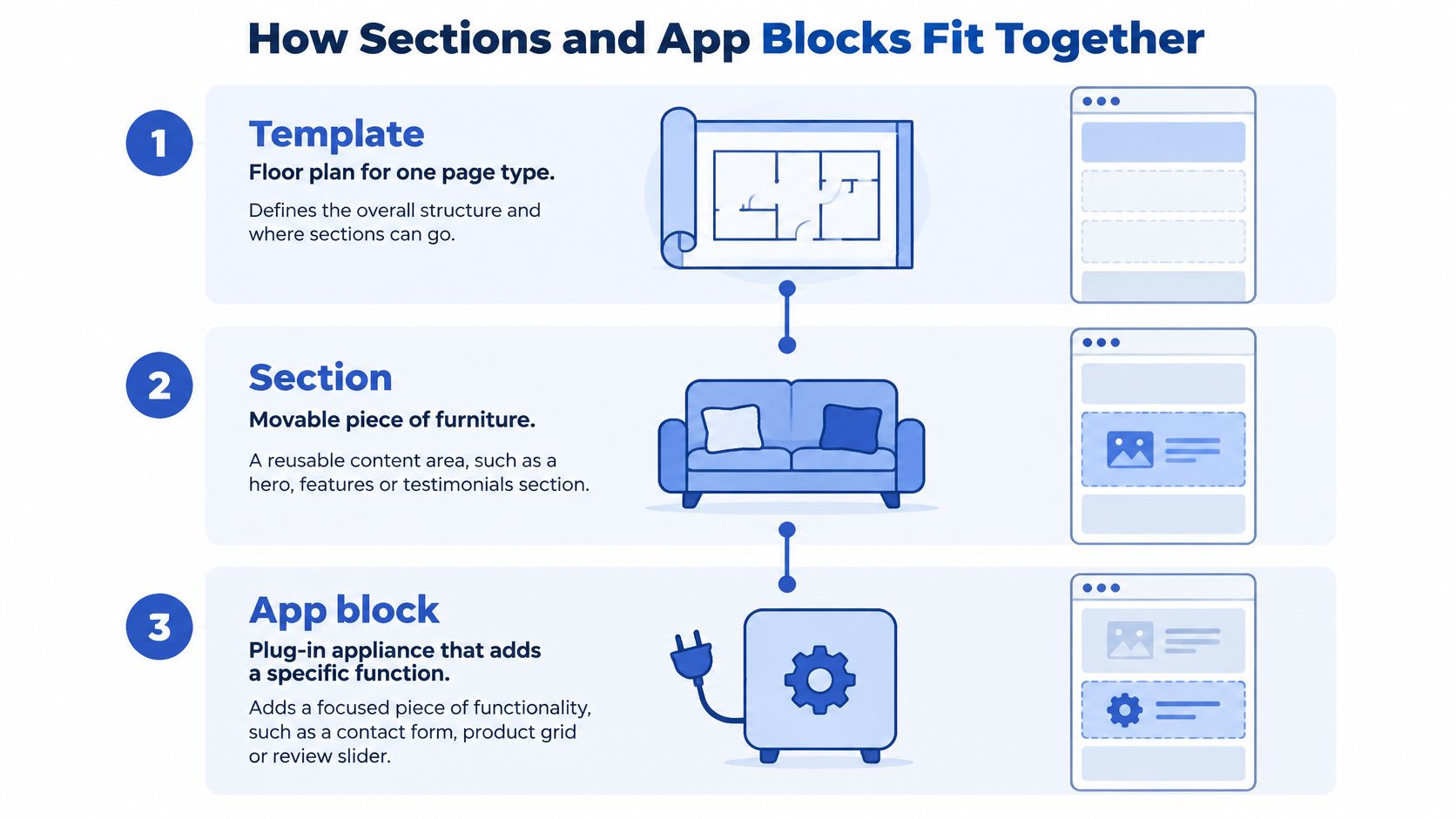
In Online Store 2.0, templates are usually defined in JSON. Your product template might stack media, product information, delivery details, and related products. A collection template might stack a banner, filters, a product grid, and an editorial block. Cart, page, blog, and landing templates can each hold a different stack, and your team can reorder sections in the theme editor without asking a developer to move a banner.
A Product Page in Practice
Say a homeware brand sells lamps. The product template decides which sections exist. Inside the main product section, theme blocks supplied by the theme might control the title, price, variant picker, quantity selector, and buy buttons. An app block then adds reviews below the title, a subscription option near the buy button, or a wishlist control supplied by another company.
That distinction matters when something breaks. If the variant picker behaves badly, you're looking at theme code. If star ratings appear late and push the page down, you're probably looking at the reviews app. Teams that can't tell those apart waste hours blaming the template for an app's script.
Section groups hold shared areas such as the header and footer. They're efficient because navigation doesn't need rebuilding on every template, but they also let you vary context. A paid landing template might drop the usual announcement bar, while the standard product template keeps it. The deeper mechanics are covered in our guide to Shopify 2.0 theme development and editable sections, including how metafields feed repeatable content into those sections.
Every section you add should earn its place on that specific template. If it isn't helping a shopper decide, compare, or buy there, it doesn't belong there.
The trap is loading discipline. A careless theme can ship a section's CSS and JavaScript across the whole site, even when that section appears on one landing page. App blocks can do the same through global embeds. Live chat is a good example, because it may help support but doesn't need equal prominence everywhere, which is why advice to improve retail conversions with live chat should be weighed against where the widget loads and whether it obscures mobile buy buttons.
Keep this ownership map in mind. Merchants can change section order, copy, images, and block visibility in the editor. Small theme edits handle spacing, labels, or conditional delivery messages. A custom section is justified when the store needs bundle logic, a specialist filter, or a product pattern the theme doesn't provide.
Speed Benchmarks That Change Conversion
Don't treat speed as polish. Treat it as a conversion control you either protect or spend. The benchmark table should come before any conversation about hero videos, carousels, or another tracking pixel.
| Signal | Figure | Template consequence |
|---|---|---|
| One-second mobile delay, conversions | 7% fewer conversions | Extra hero media and global app script is a revenue choice |
| One-second mobile delay, browsing | 11% fewer page views | Keep collection and search templates as lean as the homepage |
| One-second mobile delay, satisfaction | 16% lower satisfaction | Do not hide third-party pixels inside the theme by default |
| Ideal mobile load | 1–2 seconds | Preload only the primary above-the-fold asset |
| Pages slower than three seconds | 53% of mobile visits abandoned | Test product, cart and landing templates, not only the homepage |
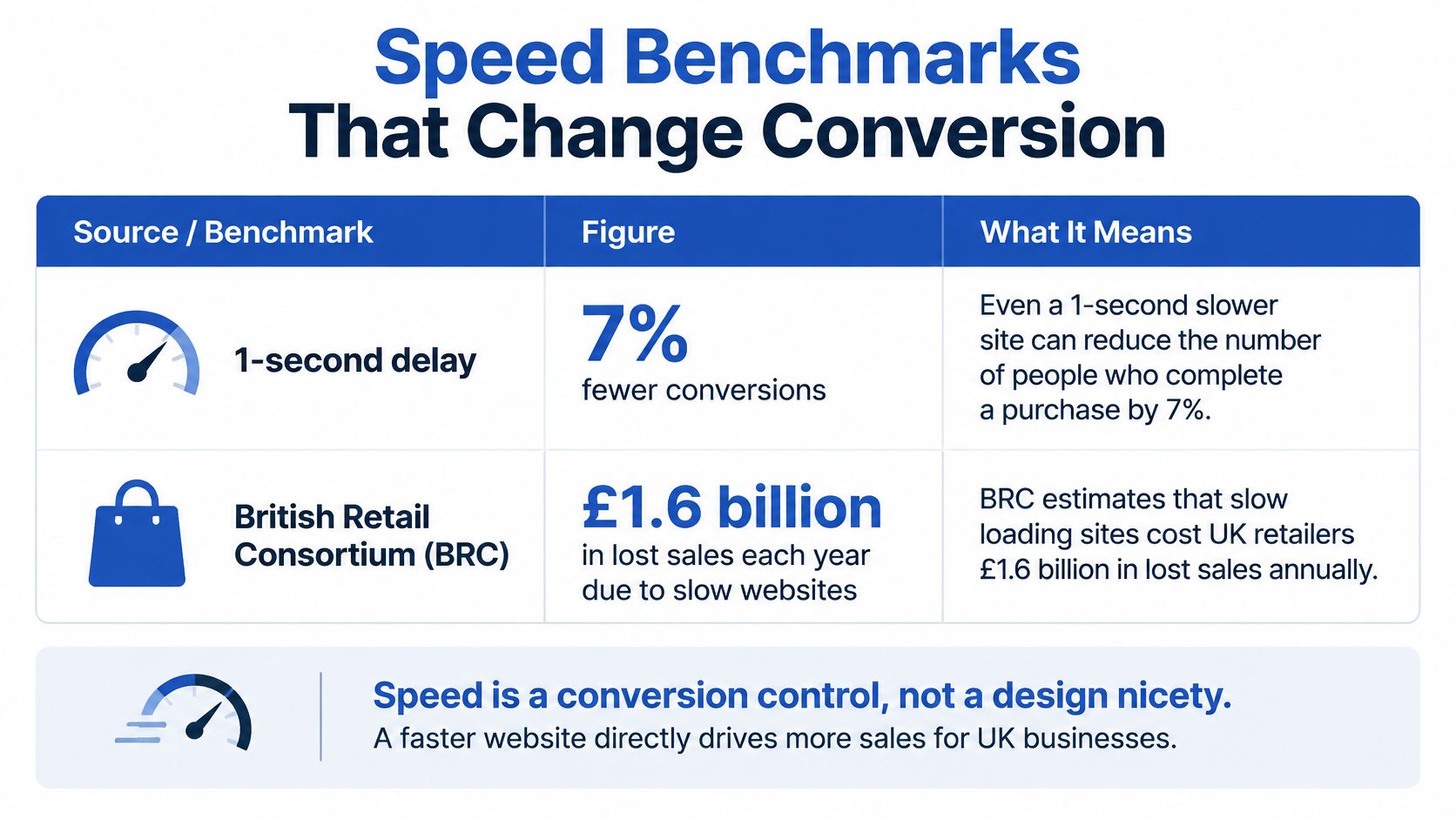
The British Retail Consortium article on frustration-free retail engagement reports that a one-second loading delay is associated with a 7% reduction in conversions, 11% fewer page views, and a 16% decline in customer satisfaction. It identifies 1–2 seconds as the ideal mobile load-time range and notes that 53% of mobile visits are abandoned when pages take longer than three seconds.
The infographic below puts the conversion figure in the form stakeholders tend to remember.
Where the Extra Second Goes
Separate the cause before you choose the fix:
- Theme code: Render-blocking JavaScript, oversized global CSS, and section scripts loaded on pages that never use them.
- Image weight: Responsive settings that still serve desktop-sized files, plus several large product images competing above the fold.
- App script: Reviews, consent tools, chat, subscriptions, and pixels that load globally instead of only where they're needed.
- Custom Liquid: Loops, metafield lookups, or hastily added snippets that repeat work on every product card.
A hero video can be reasonable on one campaign template and wasteful everywhere else. Preload only the primary above-the-fold asset, defer non-critical app scripts, and size images for the slot they'll occupy. If a collection filter needs JavaScript, load it for collections. Don't make a blog reader pay for it.
Measure representative UK mobile journeys on a realistic network, not office Wi-Fi. Test the homepage, collection, product, cart, and one paid landing template. Record LCP, INP, and CLS, then compare them with add-to-cart and checkout initiation rates. Our walkthrough of Core Web Vitals optimisation for Shopify stores explains how to read those signals without chasing a lab score in isolation.
A slightly heavier theme with clean section architecture can beat a minimal theme once you need filters and bundles, because built-in components may avoid app-generated JavaScript. That advantage disappears if every component loads everywhere. Record your four or five key templates first, then retest after each major section, app embed, or pixel. You're looking for the addition that spent your second, not guessing from the demo.
Accessibility Checks Before You Buy
A polished demo can conceal barriers that appear across every product page. CMOtech's report on UK retail website accessibility found an average of 71 accessibility errors per shopping page, 27% more than the average website. Across the pages tested, 95.9% failed basic WCAG 2.0 A or AA checks. Separately, the Retail Times analysis cited in the introduction found low-contrast text on 84% of homepages.
These problems often sit in shared components: product cards, image elements, variant pickers and forms. A single weak component can repeat the same barrier throughout a store.
| Failure pattern | How often | Fix in the theme |
|---|---|---|
| Low-contrast text | 84% of homepages | Use shared colour tokens rather than one-off section CSS |
| Missing alternative text | 53% of cases in the CMOtech report | Set alt-text rules for shared image components |
| Unlabelled form inputs | 51% of cases in the CMOtech report | Add programmatic labels to variants, search and forms |
| Pages failing WCAG 2.0 A or AA | 95.9% of pages tested | Define accessible component behaviour instead of patching pages individually |
| Accessibility errors on shopping pages | 71 per page, 27% above average websites | Check keyboard and screen-reader behaviour after each app block |
Contrast is usually a shared colour-token issue, not a problem with one banner. Product photographs need useful descriptions; decorative icons should be hidden from screen readers. Variant selectors, predictive search, gift-message fields and newsletter forms all need labels that assistive technology can identify.
Test the Journey, Not Just the Homepage
Set the mouse aside and tab through the header, search, collection filters, product cards, variant choices, quantity controls and add-to-cart button. Focus should remain visible, and its order should follow the page. Open the cart drawer and search modal: focus should move into each dialog, stay there while it is open, then return to the control that opened it.
Repeat the journey with a screen reader. Product-card links need meaningful accessible names, rather than identical announcements that tell shoppers little. Variant changes and cart updates should be announced clearly. Error messages must be connected to their fields so shoppers can identify what needs correcting.
Check contrast, zoom and reflow, heading order, touch spacing and dynamic cart updates. Repeat those checks after adding reviews, pop-ups, subscriptions or upsells, since an app block can undermine an accessible theme. A Shopify accessibility audit process can help distinguish automated findings from barriers that require manual testing.
Buy-time rule: If a shared button, product card or form fails once, assume the same component will fail on every template that uses it.
Some issues can be fixed in theme settings, such as colour choices and merchant-entered alt text. Focus traps, custom variant interfaces, inaccessible carousels and app pop-ups usually require code. Identify which fixes fall into each category before you buy. An automated score is a starting point, not proof that a disabled shopper can browse, choose a variant and complete a purchase.
How to Customise a Template for Conversion
Treat the demo as a starting point, not proof that a template will work for your store. Build on a duplicate theme and use a product page or paid landing page to check how UK merchandising, apps, and real content affect the experience. A one-second delay is a conversion decision: weigh each visual addition against the speed it costs.
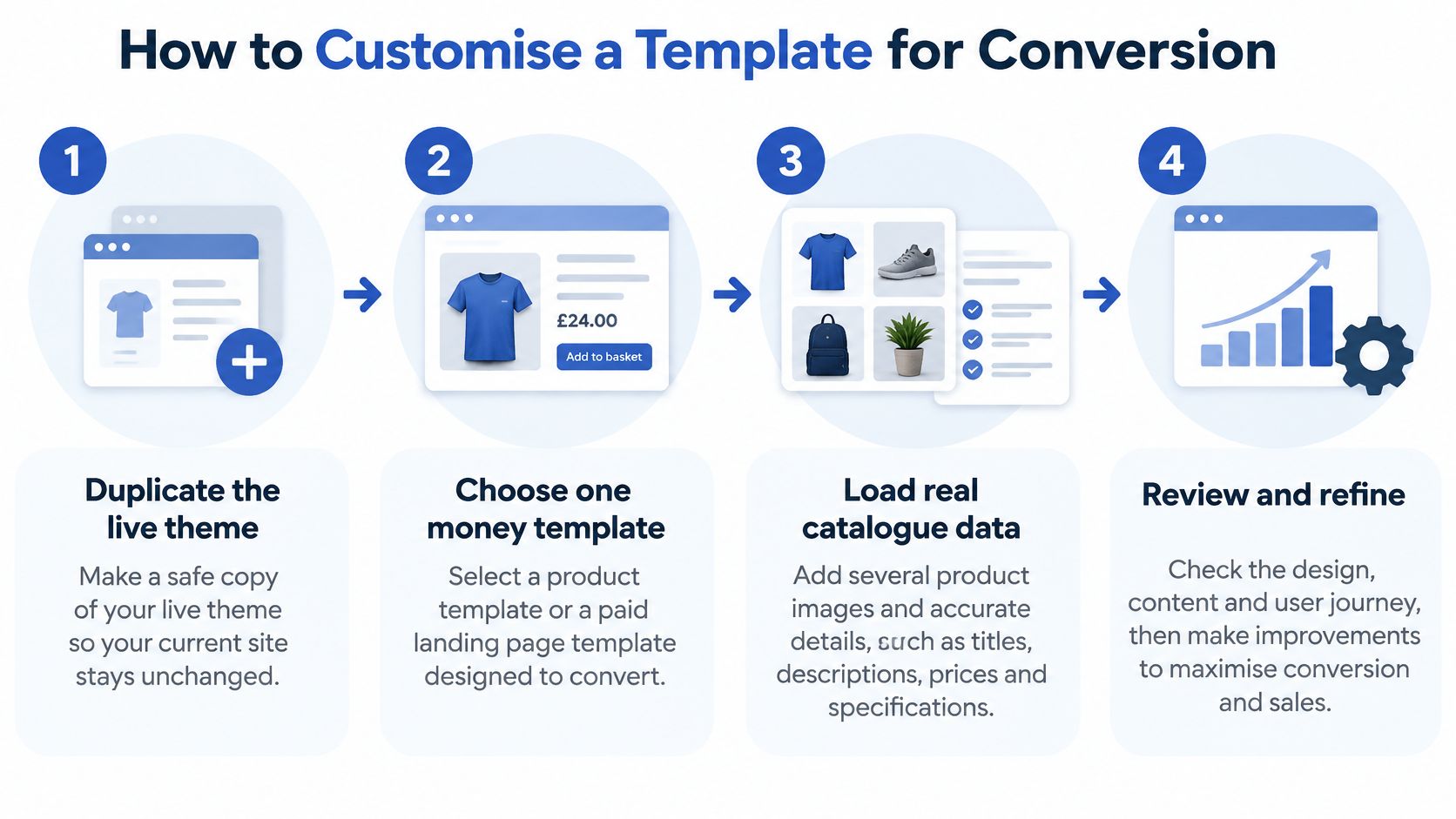
- Duplicate the live theme: Work on a copy, starting with a product page or paid landing page where shoppers make a purchase decision.
- Load real catalogue data: Add several images per product, variants, VAT-inclusive prices, delivery promises, and returns copy, because sample content can hide layout failures.
- Install launch apps only: Add the review, consent, subscription, and payment messaging tools you plan to use, then retest the same page. An app that looks tidy in isolation may crowd the buy button or add scripts.
- Order for a mobile thumb: Put product media, price, variant selector, delivery promise, and add-to-cart button in the order shoppers need them. Place social proof where it supports the decision rather than pushing the purchase controls out of reach.
- Repeat accessibility checks: Retest contrast, labels, focus, and cart announcements after adding app blocks. A reviews widget can disrupt keyboard use even when the theme itself passed checks.
- Retest speed after each addition: Check the effect of hero video, filters, reviews, consent tools, payment messaging, and localisation separately. This makes it easier to identify which addition changed performance.
- Keep only what earns its weight: Retain changes that make the buying decision clearer without spending too much of your speed budget. Remove sections that add length but no useful information.
A controlled test matters on mobile. Oxford Web Services' article on the cost of one-second load times cites 2025 web data showing only 49.7% of websites passed Core Web Vitals on mobile, compared with 57.1% on desktop. The lightest empty template is not automatically the best choice. A well-organised section system can reduce bespoke work and app scripts, while a polished demo may slow down when real products and merchandising are added.
Once you have a shortlist, use the video below to compare editor workflows. Screenshots show appearance; working through the editor shows how practical the template is to change.
Change one meaningful thing at a time. Keep it if the page becomes clearer and performance holds. Remove it if it only makes the page longer.
What UK Catalogues Need from a Theme
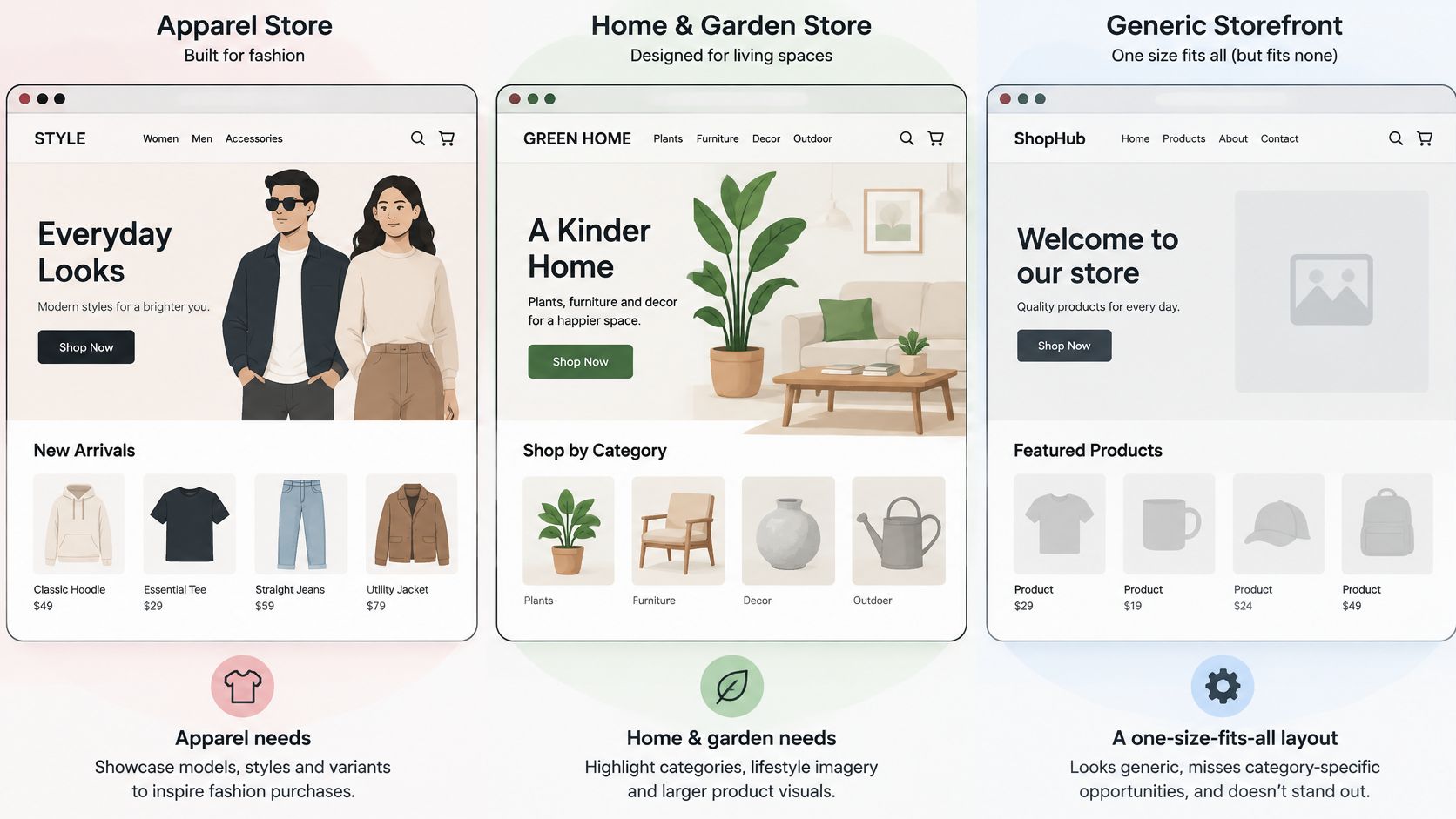
Category changes what a good template must do. StoreLeads' UK Shopify store data identifies apparel as the largest category, accounting for 24.9% of UK Shopify stores, followed by home and garden at 13.8%. One generic homepage can't merchandise both well.
The comparison below shows why catalogue behaviour should drive layout choices.
Apparel Needs Decision Detail Fast
Say a clothing brand starts from a Dawn-like base. Shoppers need size and colour availability without hunting, VAT-inclusive pricing, delivery timing, and returns information near the purchase decision. Product imagery has to work at mobile crop sizes, and sold-out variants must be unmistakable, not merely greyed out so lightly that nobody can read them.
Differentiation won't come from swapping the font. It comes from a custom product section that handles size guidance, colour-linked imagery, and stock states cleanly. Keep apps restrained. A fit finder, reviews, wishlists, size alerts, and social proof can all fight for the same small area around the buy button.
Home and Garden Needs Filtering and Logistics
A home and garden store built around Horizon-style presets faces a different problem. Shoppers compare dimensions, materials, finishes, and availability across bulky products. Collection filters matter more than an atmospheric homepage, and delivery cut-offs or assembly information can matter more than a lookbook.
Refuse the heavy lifestyle video on the collection template first. It consumes the space and loading budget needed for product cards and filters. Use strong imagery inside product templates, where room context helps, and keep category browsing quick enough that shoppers can narrow a long list without repeated waits.
Food and beauty subscriptions expose another limit. Bundles, selling plans, refill intervals, and a quieter cart upsell can break a stock product section. That store needs a dedicated bundle section that loads only on relevant templates, not scripts scattered through content pages. If it sells abroad, currency selectors and translated section copy must work inside the same visual system. Maintaining a second theme for another market creates two merchandising jobs and two places for accessibility fixes to be missed.
Across all three cases, the template succeeds when it supports the catalogue's real decisions. Apparel shoppers decide on fit and returns. Garden shoppers decide on dimensions and delivery. Subscription shoppers decide on commitment and control. A theme that can't surface those facts cleanly is the wrong theme, however attractive its homepage looks.
Decide Whether to Upgrade or Rebuild
Make the decision from the state of your current foundation, not from frustration with its appearance.
Stay and customise when you're already on Online Store 2.0, Core Web Vitals hold after real apps are installed, and the gaps are sections or content patterns. In that case, a careful product template, better filters, or a bundle section can solve the commercial problem without a disruptive move.
Upgrade the theme when you're running Debut or another vintage file, apps rely on old includes, and merchants can't build landing pages without developer help. We have rebuilt stores on outdated themes, legacy code and scattered apps into clean setups on Shopify 2.0 without disrupting the business. A visual reskin doesn't count as that upgrade if it preserves the slow scripts and inaccessible components underneath.
Rebuild when markets, B2B pricing, custom checkout fields, or deep ERP and fulfilment links exceed what a public theme can carry cleanly. That's often Shopify Plus territory, especially when checkout tailoring or multi-market architecture is already on the roadmap. We offer Shopify Migrations to migrate or replatform a store to Shopify, and we've migrated stores from WooCommerce, Magento, and custom e-commerce solutions to Shopify.
Whichever route you choose, protect trading continuity. Build on a duplicate theme, preserve URLs, product and customer data, and redirects, and test the money templates with real catalogue content before launch. Don't commission a rebuild to fix one slow app. Don't keep patching a vintage theme because a rebuild sounds larger than it is. Name the constraint first, then choose the smallest route that removes it.
If your current Shopify store templates are slowing merchandising, failing accessibility checks, or forcing developers into routine page changes, we can assess whether a targeted Shopify 2.0 upgrade or a scoped Plus rebuild is the right route. Visit Grumspot to discuss your catalogue, markets, and migration risks before you commit to another theme.
Want this kind of work on your store?
Send us the URL and what is slowing it down. We look at the store before we reply.
Related posts
Check out some similar posts.
- ecommerce site search
Discover how ecommerce site search boosts conversion, UX, and SEO. Learn core features, implementati...
Read more
- Shopify Store Launch Checklist
Use this Shopify store launch checklist to cover design, payments, shipping, SEO, analytics, complia...
Read more
- shopify website examples
Explore 7 Shopify website examples and learn the UX, conversion features, and practical lessons merc...
Read more
- cro best practices
Apply cro best practices to Shopify stores with 10 actionable tactics for testing, product pages, ch...
Read more