How to Implement Schema Markup for Ecommerce in Shopify
- schema markup ecommerce
- Shopify schema
- JSON-LD
- Rich Results
- ecommerce SEO
You're staring at a Shopify product page that already looks polished, but the search result is still plain. The title is fine, the imagery is strong, and the price is live, yet Google may still not understand the page the way a shopping engine should. That's usually where schema markup for ecommerce becomes the difference between a page that exists and a page that can be parsed properly.
The practical job is simple to describe and easy to get wrong. On Shopify, schema has to follow the product data you display, survive theme updates, and stay clean when pricing, availability, and reviews change. That means treating structured data like part of the storefront, not as a one-off SEO addon.
Understanding Ecommerce Schema Essentials
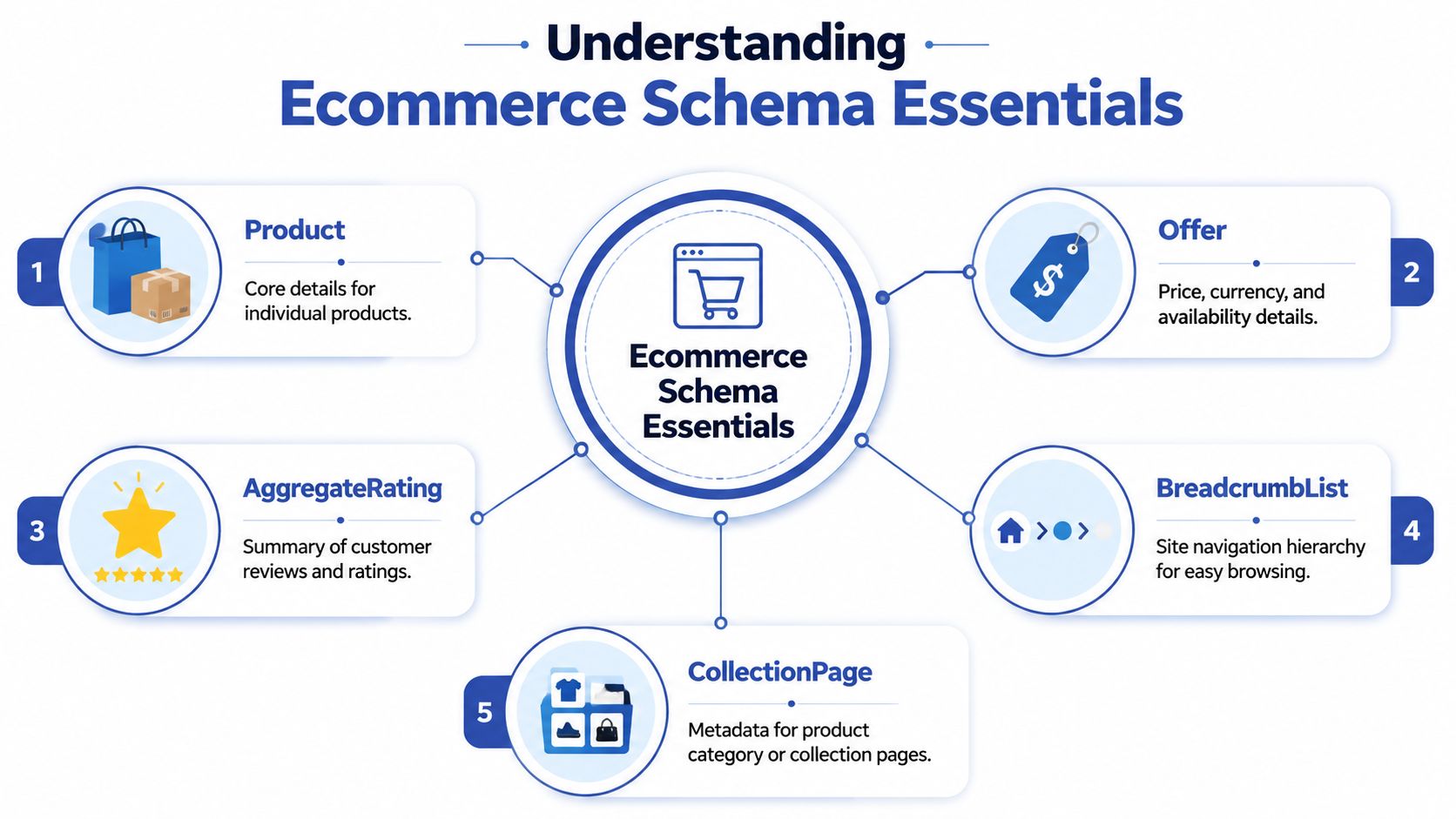
Start by mapping schema types to page templates, not by pasting one giant JSON-LD block across the whole site. Product belongs on individual product pages, Offer carries price and availability, AggregateRating summarises reviews, BreadcrumbList clarifies navigation, and CollectionPage fits category or collection templates. Google's guidance requires individual product pages to mark up Product, Offer, name, image, offers, and aggregateRating for rich result eligibility, and that baseline has been adopted by UK retailers since JSON-LD became the preferred format for schema markup Digital Chakra's ecommerce schema research.
The key question is not whether your store has schema, but whether each page class has the right schema. Product pages need machine-readable commercial detail, while collection pages need hierarchy and discovery signals. If you put product fields on category pages, or omit required properties from product pages, search engines can ignore the markup.
What to prioritise first
If you're deciding where to begin, prioritise the pages that move revenue. Top-selling products deserve the first pass, because that's where rich results and clean structured data matter most. The UK-specific detail that gets missed most often is offer accuracy. Schema only works when the structured data matches the visible page content and feed data, including price, currency, SKU, MPN, GTIN, and live availability Yotpo's ecommerce JSON-LD guidance.
Practical rule: if a merchandiser can change the price in Shopify without updating schema, the schema is already broken.
For site-wide structure, keep BreadcrumbList on product and category pages, and use Organization where appropriate for brand identity. If you want a broader SEO checklist around site architecture, Grumspot's ecommerce SEO best practices are a sensible companion reference, especially when schema and internal linking need to stay aligned.
One useful lens is conversion intent. TryThisFit's conversion rate tips are worth reading alongside schema work, because structured data only pays off when the landing page experience supports the click. Search engines can understand the offer, but buyers still convert on clarity, trust, and speed.
Generating JSON-LD Snippets with Real Examples
The cleanest implementation is JSON-LD with variables replaced by live storefront values. It keeps schema separate from HTML, makes theme maintenance easier, and avoids the fragility that comes with inline microdata. For Shopify teams, this also means you can generate the payload from the same product object your templates already use.
Product and Offer example
Use this on product pages, and bind the dynamic fields to your product object:
{
  "@context": "https://schema.org",
  "@type": "Product",
  "name": "{{ product.title }}",
  "image": ["{{ product.featured_image | image_url: width: 1200 }}"],
  "description": "{{ product.description | strip_html | escape }}",
  "sku": "{{ product.selected_or_first_available_variant.sku }}",
  "gtin13": "{{ product.selected_or_first_available_variant.barcode }}",
  "offers": {
    "@type": "Offer",
    "url": "{{ canonical_url }}",
    "priceCurrency": "{{ shop.currency }}",
    "price": "{{ product.selected_or_first_available_variant.price | divided_by: 100.0 }}",
    "availability": "https://schema.org/{% if product.selected_or_first_available_variant.available %}InStock{% else %}OutOfStock{% endif %}"
  }
}
- name should match the visible product title.
- image should point to a real product image, not a placeholder.
- sku and gtin13 should come from the variant that's being sold.
- offers needs the current price and availability, not archived merchandising data.
BreadcrumbList example
Use this on product and collection pages where the navigation path is meaningful:
{
  "@context": "https://schema.org",
  "@type": "BreadcrumbList",
  "itemListElement": [
    {
      "@type": "ListItem",
      "position": 1,
      "name": "{{ collection.title }}",
      "item": "{{ collection.url | prepend: shop.url }}"
    },
    {
      "@type": "ListItem",
      "position": 2,
      "name": "{{ product.title }}",
      "item": "{{ canonical_url }}"
    }
  ]
}
Organisation example
Use this once site-wide, usually in the theme layout:
{
  "@context": "https://schema.org",
  "@type": "Organization",
  "name": "{{ shop.name }}",
  "url": "{{ shop.url }}",
  "logo": "{{ settings.logo | image_url: width: 600 }}"
}
The main trade-off is control versus convenience. App-generated schema can be quick to install, but it becomes messy when the app and theme both emit JSON-LD. Custom Liquid is slower to build, yet it keeps the payload tied to the same source of truth as your storefront data.
Integrating Schema in Shopify with Liquid Patterns

Build a dedicated snippet, then render it from the relevant templates. A common pattern is snippets/schema-product.liquid, called from main-product.liquid, and a second snippet for collections if your category pages need their own structured data. This keeps the implementation maintainable when the theme changes and makes it easier to review the payload during releases.
A template-first schema workflow binds required Product, Offer, SKU, GTIN, ratingCount, shipping, and returnPolicy properties to a single backend data source, preventing mismatches that cause search engines to ignore markup ALM Corp's rich results guide. That matters on Shopify because product data often lives in more than one place, and schema breaks when developers mix metafields, app output, and hardcoded literals.
Use a snippet structure like this:
{% if template.name == 'product' %}
<script type="application/ld+json">
{
  "@context": "https://schema.org",
  "@type": "Product",
  "name": {{ product.title | json }},
  "sku": {{ product.selected_or_first_available_variant.sku | json }},
  "offers": {
    "@type": "Offer",
    "priceCurrency": {{ shop.currency | json }},
    "price": {{ product.selected_or_first_available_variant.price | divided_by: 100.0 | json }},
    "availability": {{ product.selected_or_first_available_variant.available | json }}
  }
}
</script>
{% endif %}
After you've got the structure working, test for duplicate output. Some themes emit schema in the layout, the product template, and an app block all at once. If that happens, keep one canonical schema source per template and remove the rest. I'd rather see one clean payload than three conflicting ones.
For theme-level implementation detail, Grumspot's Shopify 2.0 theme development guide is relevant when you're deciding whether to inject schema in sections, snippets, or the layout. Placement matters because schema should survive customisation without becoming a maintenance burden.
Validating Schema with Google Tools
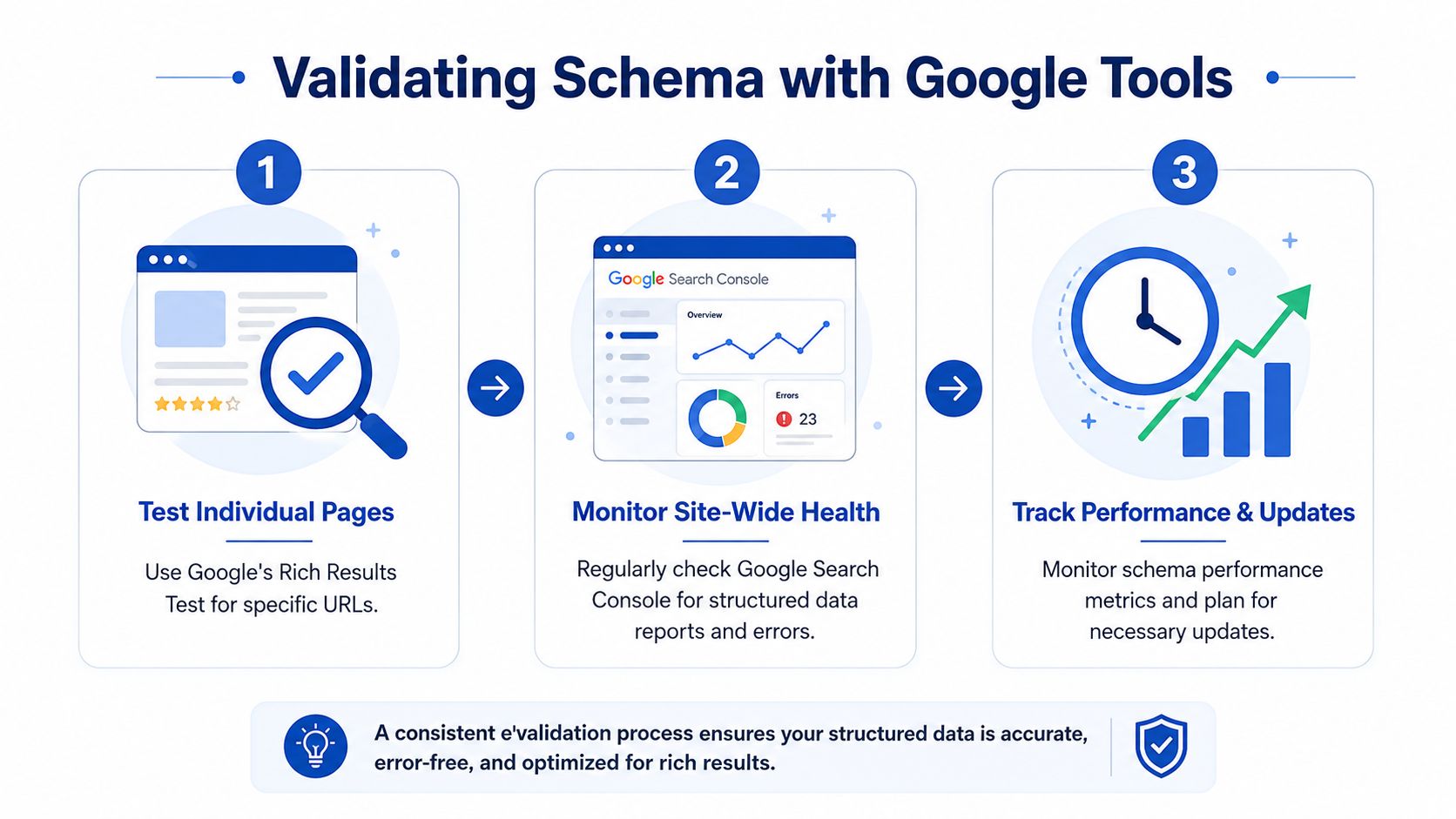
Validation is where practitioners find out whether their schema is useful or just syntactically neat. Run individual product URLs through Google's Rich Results Test first, because that catches page-level eligibility issues before you look at site-wide trends. Then move to Search Console so you can monitor structured data reports and see which page groups are failing in practice.
The highest-value benchmark is coverage quality on top-selling pages, using JSON-LD, server-side generation, and automatic refresh of price and availability to avoid stale data, which is one of the main reasons schema fails Rayo's ecommerce schema guidance. That's a better metric than counting how many templates have some kind of markup. A smaller number of clean, revenue-driving pages beats broad but unreliable coverage.
A practical validation routine
- Test product URLs individually. Start with best-sellers and pages that changed recently.
- Check structured data reports in Search Console. Focus on errors tied to product rich results.
- Re-test after any theme or app change. Schema often breaks when a developer updates layout code.
Search Console tells you what Google is seeing now, not what your code looked like last week.
For diagnosis, look for missing required fields, conflicting schema blocks, and hidden markup that no longer matches the page. If the visible price says one thing and the structured data says another, fix the data source first, then re-test. For a process-driven audit style, Grumspot's SEO audit example is useful as a reference point for how technical checks should be documented and prioritised.
Avoiding Common Schema Pitfalls
The most common failure mode is duplication. A theme outputs one JSON-LD block, an app adds another, and a developer later hardcodes a third into the product template. Search engines don't reward that redundancy, they usually ignore the mess.
The next issue is mismatch. Visible content says one price, schema says another, and the offer node points to an outdated variant or an unavailable SKU. That's where schema stops being an SEO asset and starts becoming a trust problem.
A quick diagnostic checklist helps:
- Check for duplicate JSON-LD: inspect page source and confirm there's one canonical product block.
- Compare visible content to markup: price, stock state, product title, and reviews should match exactly.
- Remove deprecated or hidden fields: older theme code often leaves stale properties behind.
- Verify variant logic: make sure the structured data reflects the right variant, not a generic parent product.
In Shopify audits, the fastest fixes usually come from removing conflicting app output and switching schema generation to a single snippet. That simplifies troubleshooting and makes future theme updates less risky. If you can explain which file owns the schema, you're already ahead of most stores.
Maintaining and Monitoring Schema Over Time
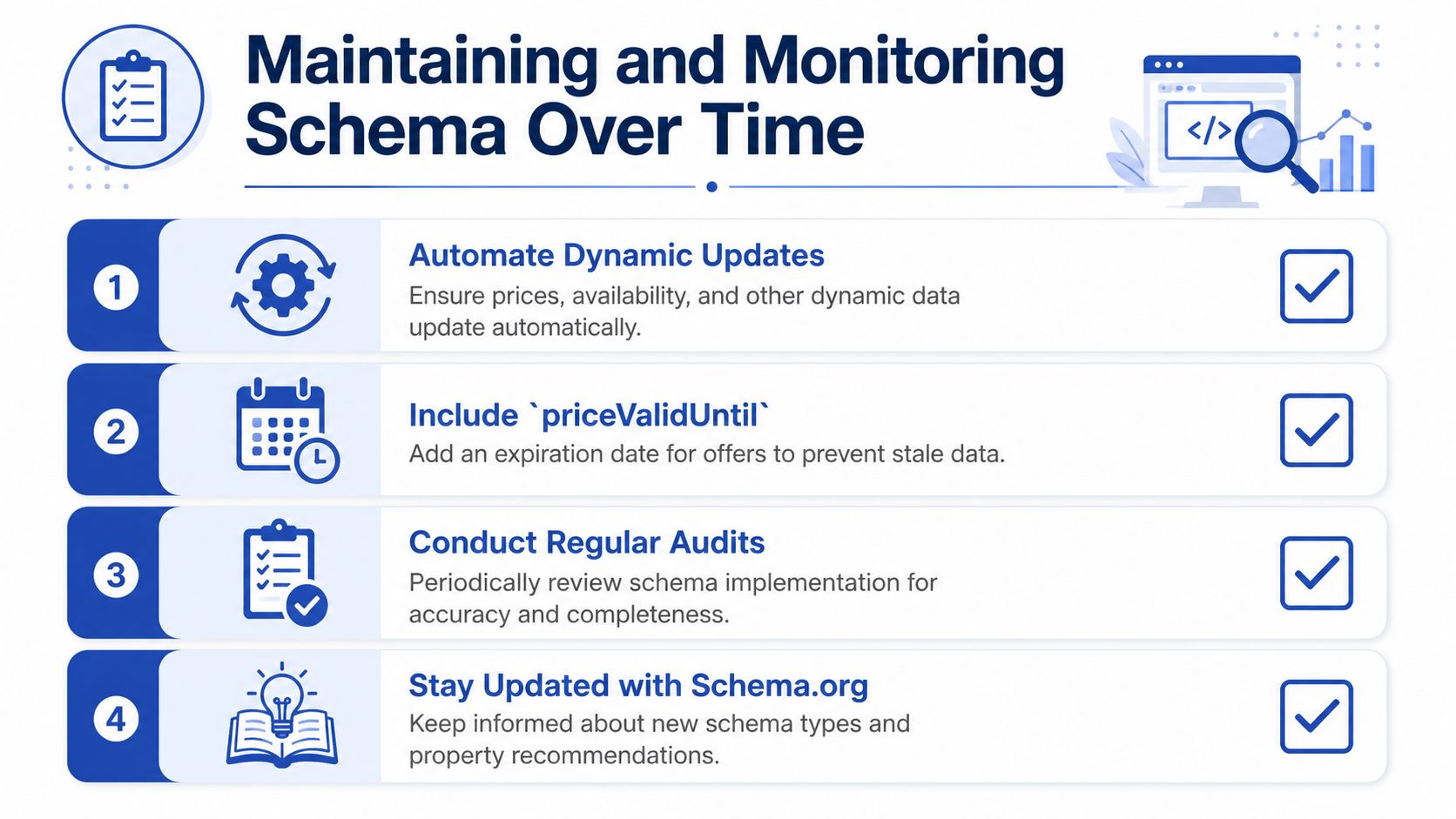
Schema work only stays useful when it keeps pace with live merchandising changes. Price, stock status, and variant data should refresh from the same source that powers the product page, so updates happen as part of the normal flow instead of after a campaign has already gone live. For promotions, priceValidUntil belongs in the offer data when the price has a defined end point, so expired sale terms do not keep circulating in structured data.
Build the workflow into releases
Treat schema like any other release-managed dependency. Re-test after theme changes, after product template edits, and after app installs that touch product data. If a deployment changes the way Shopify renders variants, schema needs to be part of the rollback decision, not an afterthought.
A maintenance routine that holds up in practice usually has three control points. First, the product feed or backend source updates the structured data. Second, the theme snippet renders that data without hardcoding values into Liquid. Third, validation confirms the markup still matches the visible page, including the current offer, availability, and variant selection.
Keep the update path simple
A single setup across the store is easier to maintain than a patchwork of theme code, app output, and manual overrides. Grumspot is one option for teams that want Shopify implementation support alongside technical SEO work, but the main point is ownership. Clear responsibility beats clever tooling when schema breaks during a launch or a theme refresh.
Maintenance rule: if a merchandiser can change the offer state without triggering a schema refresh, the workflow needs another review.
Monitor Search Console warnings after each change, and re-test the pages that drive the most revenue first. Keep an eye on the monitoring workflow shown in the guide infographic titled Maintaining and Monitoring Schema Over Time for ecommerce website optimization and best practices. That keeps schema aligned with fast-moving UK sales cycles and reduces the chance that stale data blocks rich result eligibility.

Want this kind of work on your store?
Send us the URL and what is slowing it down. We look at the store before we reply.
Related posts
Check out some similar posts.

- what is seo audit
What is SEO audit? Learn how technical, on-page and content checks uncover issues hurting your Shopi...
Read more
- seo technical audit checklist
Use this SEO technical audit checklist to find and fix 10 ecommerce issues across crawling, speed, i...
Read more
- structured data
Master structured data implementation for ecommerce in 2026. Practical JSON-LD, Microdata, schema se...
Read more
- internal linking strategy
Build a high-impact internal linking strategy that boosts rankings and conversions. Learn auditing, ...
Read more