How to Improve Site SEO: A Prioritised UK Action Plan
- how to improve site seo
- UK SEO
- Shopify SEO
- technical SEO
- ecommerce SEO
The most common advice on how to improve site SEO still opens with keywords, title tags and a content calendar. On a UK Shopify or Shopify Plus store, that order burns the first month. If Google cannot crawl the product URLs that take orders, or if the price on the page disagrees with the Merchant Center feed, extra blog posts will not recover the lost revenue.
I would start with the cheapest structural fix. Give each selling product one clean URL, then fix speed on the templates that carry the basket, then make product data match across the storefront, the markup and the feed. Copy comes after those three agree. Publishing more pages while the machine-readable record contradicts the shopper is how a team looks busy and stays flat.
Prioritise the Fixes That Move Results First
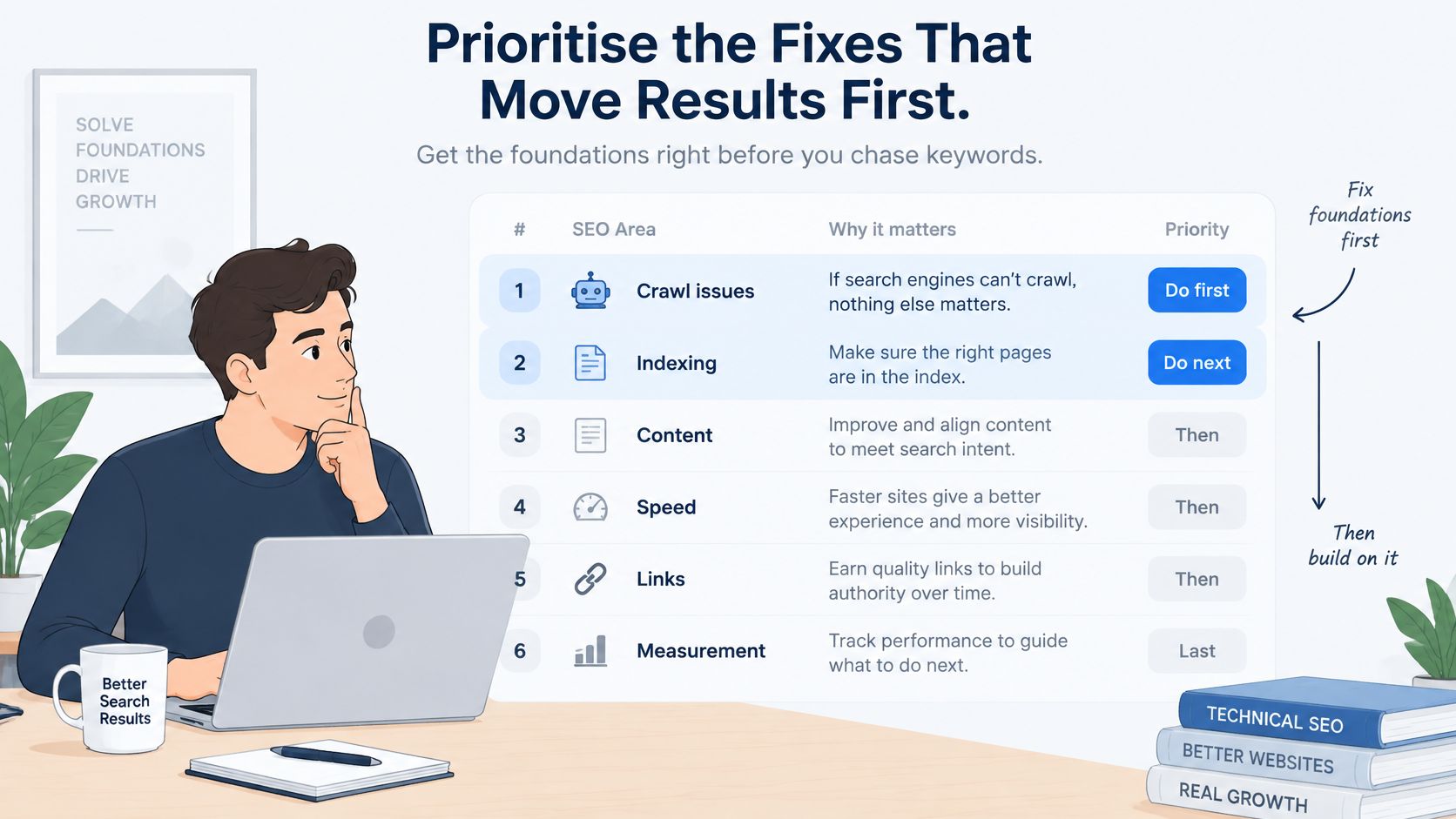
Teams often open a keyword tool and leave the crawl problem for a later sprint. The first two rows below decide whether any later effort is visible at all. A title rewrite cannot rank a URL Google never indexes, and it cannot offset a product template that fails field data on mobile.
Google still takes most of a UK store's organic attention. Ofcom's Online Nation 2025 report found that 82% of UK online adults used Google Search in May 2025, compared with 83% in 2024 and 86% in 2023, and estimated approximately 3 billion Google searches per month in the UK. The average user spent 1 hour and 27 minutes on Google Search during that month. Crawlability, indexation and accurate product information are commercial work, not optional tidy-ups.
Discovery is widening at the same time. Ofcom reported that 43% of adults used social-media platforms for online searching at least once a day, and 34% used video-sharing platforms such as TikTok daily. Those journeys still land on a page. A crawlable store, with GBP prices and clear delivery, is the base every channel quotes.
Compare two lists before you pick a row: URLs in the Search Console index, and URLs that produced orders last quarter. The gap between them is the brief. Three rules keep the queue honest.
- Fix blockers before copy. A bad canonical, a stray noindex or a soft 404 beats any headline test.
- Work the revenue templates. Product, collection and cart pages take the sale. A polished homepage does not.
- Change one area per release. If speed, schema and new category copy ship together, you cannot see what moved.
If filtered URLs flood the index, start at row 1. If product or cart templates fail field data, start at row 2. If price or stock disagrees across the page and the feed, start at row 3. Before you reorder anything, score your SEO backlog against the pages that already earn revenue, so the queue reflects sales rather than a generic checklist.
| Priority | Area | Done when | Typical owner |
|---|---|---|---|
| 1 | Crawlability and indexation | Important URLs are indexed once and duplicates are consolidated | SEO lead with developer |
| 2 | Core Web Vitals on key templates | Product, collection and cart templates pass field data | Developer |
| 3 | Product structured data and feed accuracy | Rich Results Test passes and price and stock match the feed | Developer and merchandiser |
| 4 | On-page titles, headings and category copy | Each indexable page has a unique title and a clear H1 | Content lead |
| 5 | International and UK targeting | Hreflang, GBP pricing and UK delivery information align | Developer and merchandiser |
| 6 | Measurement and testing | Dashboards show clicks and revenue by landing-page type | Analyst |
How to Get Google to Crawl and Index the Right Pages
Index control means deciding which URLs deserve a place in Google, then making those URLs easy to find. Shopify will happily generate a URL for every filter, sort and internal search. Left alone, that list eats crawl budget and splits the links that should sit on the collection that sells.
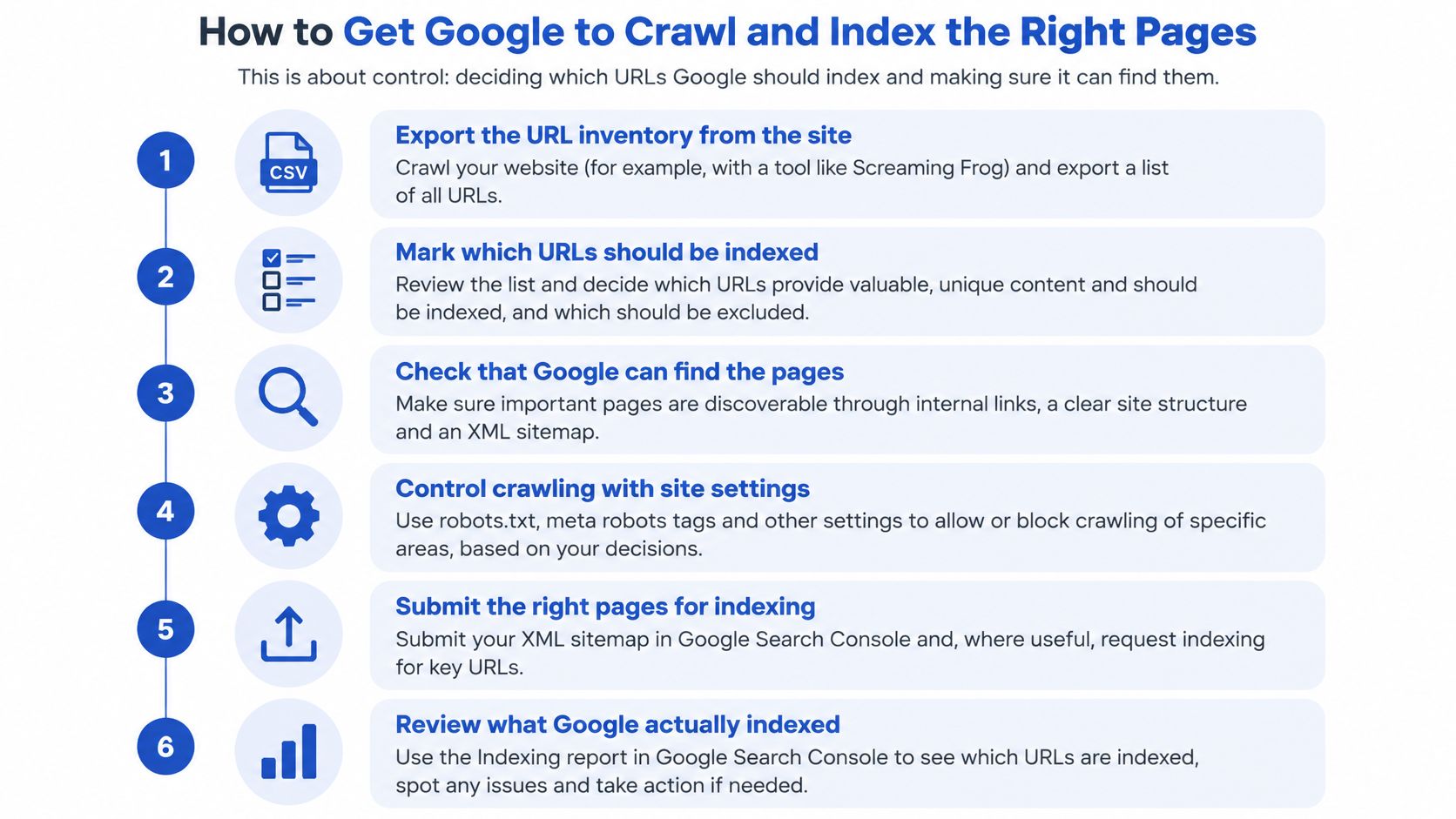
Google's ecommerce guidance recommends structured navigation, a clear URL architecture, internal links and incremental-loading patterns so crawlers can read hierarchy and page importance. Run this routine before you publish more SEO copy.
- Export the URL inventory from Shopify, analytics, Search Console, the XML sitemap and a crawl.
- Classify each URL as product, variant, collection, filter, search result, blog or redirect.
- Choose one canonical URL for every indexable product and collection.
- Consolidate filtered and sorted collection URLs with a canonical to the base collection, or a disallow where the parameter adds no unique demand.
- Link important pages in HTML. A sitemap is a hint, not a substitute for a clickable path.
- Validate with URL Inspection, a rendered crawl, sitemap coverage and a sample of server logs.
Two Shopify pitfalls that waste the crawl
Faceted navigation is the usual leak. Colour, size and sort parameters can create thousands of near-duplicate URLs, which consumes crawl resources and splits internal authority. The other mistake runs the opposite way. Canonicalising a distinct variant, or a regional page, to a different URL stops that page from being indexed at all.
Practical rule: If two URLs show the same product grid, keep one. If they show different stock, price or buying advice, they each need their own address.
Treat index coverage as a weekly KPI. Review excluded URLs, duplicates, crawled-but-not-indexed URLs and soft 404s, then compare organic clicks and revenue by landing-page type rather than staring at a single average position. For UK pages, GBP pricing, delivery and returns, UK spelling and country-specific availability should match across the visible page, the feed and the markup.
When URLs change in a migration, we set up 301 redirects and keep Google Analytics tracking running without interruption, so the old address passes equity and the new one still records the sale. Done looks like this: each important URL is indexed once, under one consistent address, and retired URLs resolve with a 301 to the closest relevant page.
| URL type | Index it? | Control method |
|---|---|---|
| Single product | Yes | Self-referencing canonical, linked from collections |
| Variant with distinct content | Only if it has unique demand | Canonical to the main product unless the variant has its own search demand |
| Collection that sells | Yes | Unique introduction copy and crawlable pagination links |
| Filtered or sorted collection | Usually no | Canonical to the base collection or noindex |
| Internal search results | No | Noindex or disallow |
| Blog and buying guides | Yes | Internal links from the products they support |
| Retired or moved URL | No | 301 redirect to the closest relevant page |
Speed and Mobile Fixes That Protect Rankings and Sales
A green homepage score proves very little. The page that earns organic revenue is the product template on a mid-range phone, and that is where UK stores usually leak speed and sales. Heavy apps, oversized hero images and late-loading review widgets show up as slow mobile product pages, not as a dramatic homepage failure.
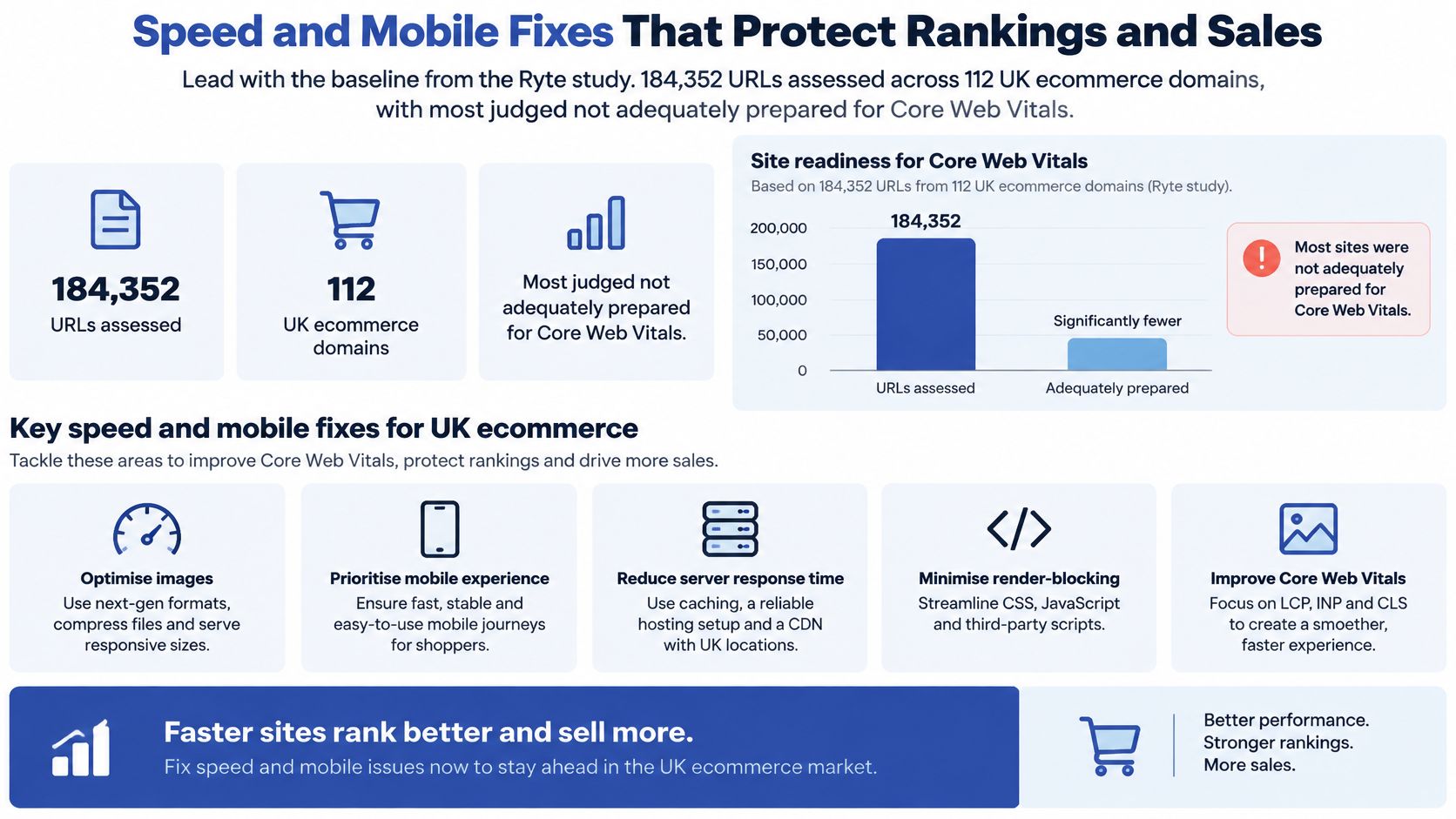
Judge templates against Google's good thresholds, not a lab score for the homepage. Largest Contentful Paint should be 2.5 seconds or less, Interaction to Next Paint 200 milliseconds or less, and Cumulative Layout Shift 0.1 or less. On Shopify, apps, tracking tags, recommendation widgets, reviews and heavy theme components each add rendering cost. A fast homepage can hide a slow product template, and a slow cart wastes the click you already paid for in rankings.
Work in this order, and retest after every release. See Core Web Vitals optimization for template-level fixes.
- Pull field data in Search Console and PageSpeed Insights, not only a lab run on the homepage.
- Segment by device and by template: product, collection, cart and editorial.
- Remove unused scripts and weigh each app. One review app can dominate INP. Check what the app renders before removal, because reviews, loyalty or subscriptions can break.
- Compress images and serve them at the size used by the layout. Test the hero on a mid-range phone before flattening quality.
- Prioritise above-the-fold content so the hero and the price paint first.
- Reserve space for review widgets, promo banners and web fonts so the layout stops jumping.
- Retest the mobile product, collection, cart and editorial templates after the release, then keep the version that wins on field data.
| Metric | Good threshold | Typical Shopify cause |
|---|---|---|
| Largest Contentful Paint (LCP) | 2.5 seconds or less | Oversized hero images and slow theme rendering |
| Interaction to Next Paint (INP) | 200 milliseconds or less | Heavy app scripts and third-party tags blocking input |
| Cumulative Layout Shift (CLS) | 0.1 or less | Review widgets, banners and fonts loading late and moving content |
Tie the work to templates that take revenue. Fixing the largest delay on the product page will move both discoverability and the chance that an organic visit becomes an order. Chasing a perfect score on a campaign landing page that barely sells will not. A Grumspot Shopify audit reviews speed, mobile experience, broken code, inefficient theme code and app conflicts, which gives you the list before you touch a live theme. Keep the data layer in view too: when price, stock and delivery render reliably in the server HTML, the storefront, structured data and feed are easier to keep aligned.
Product Data That Earns Rich Results and Trust
Schema is a data-quality job that shows up in conversion before it shows up in rankings. A shopper, Google and Merchant Center should read the same price, the same stock flag and the same delivery promise. When those three disagree, you get rejected feeds, paid clicks landing on a price the checkout will not honour, and rich results that quote the wrong number.
Build the markup into the product template in the HTML the server returns. JSON-LD pasted page by page will drift. Client-side injection can leave Google and Merchant Center reading a different page from the shopper. Google's product structured data documentation states that Product markup can support richer results showing price, availability, ratings, shipping and related commercial information. Use JSON-LD with Product or ProductGroup and include the visible name, images, SKU or GTIN where you have one, price, currency, availability, brand, reviews that are on the page, shipping and the return policy.
Fields that must agree
| Field | Storefront | Structured data | Merchant feed |
|---|---|---|---|
| Price and currency | Visible GBP price, VAT-inclusive | Offer price matching the page | Same price and currency |
| Availability | Stock status shown on page | InStock or OutOfStock matching the page | Stock flag matching the page |
| Sale price validity | Sale end date shown where promoted | priceValidUntil on the offer | Sale dates included |
| Variants | Option selectors visible | ProductGroup with variant relationships | Each variant has its own ID |
| Reviews | Only reviews shown on the page | AggregateRating matching visible reviews | Review data where supported |
| Shipping and returns | UK delivery and returns copy | Shipping details and return policy | Delivery fields match the page |
QA is a side-by-side check: page, JSON-LD and feed for price, stock, variant IDs and return window. Ship to a small set first: one single-SKU product, one multi-variant product, one on sale, one out of stock and one subscription. Check each in the Rich Results Test and with URL Inspection, then scale. The failures that block eligibility are predictable. Teams mark up reviews that are not on the page, leave a stale price in the offer, omit variant relationships, or let a sale end on the storefront while priceValidUntil still claims it is live.
Schema will not rescue thin buying guidance. Pair it with crawlable copy and Core Web Vitals checks in Search Console and PageSpeed Insights. Our notes on structured data implementation cover how that template-level QA fits a Shopify theme. The same title-to-attribute test applies on marketplaces, which is what good keywords for Amazon Merch titles rely on.
Measure for four to six weeks before you call it a win. Track impressions, rich-result appearance, click-through rate, organic conversion rate and revenue per indexed product, split by device and category. If the rich result appears but conversion falls, the markup is probably quoting a price or a delivery promise the page does not keep.
On-Page and Content Work That Still Earns Clicks
On-page work earns the click only after the URL is indexable and the facts on it are true. Change the template that already gets traffic, not a new blog post nobody links to.
Product and collection titles. Write a unique title for each indexable product and collection, roughly 50 to 60 characters, leading with the product type and the term a UK shopper types. Do not bolt the brand onto every line. "Wool crew neck, navy" beats "Brand | Shop | Knitwear | Navy | New".
Meta descriptions. Treat them as a useful summary, not a second title. Mention UK delivery, returns or the GBP price when that detail is what would make you click. Check the rendered snippet, because apps sometimes overwrite the description you saved in the admin.
Headings. One H1 that names the page. Use H2s to answer buying questions: fit, materials, delivery, returns. A wall of H2s stuffed with synonyms does not help a merchandiser or a crawler.
Category introductions. Put 80 to 120 words above the product grid. Say who the range is for and how the options differ. Give a filtered view its own indexable page only when it has distinct demand and its own copy. Everything else should canonicalise back to the collection.
Images and access. Alt text should describe the product, colour and angle, not repeat a keyword. Descriptive link text beats "shop now" repeated forty times.
Accessibility is part of the same pass. A 2025 analysis by Level Access found that 84% of the homepages of the UK's 100 most popular retail brands contained issues that could create critical barriers for users with disabilities. Fixing contrast, image alt text and link names helps people using a keyboard or a screen reader, and it gives crawlers text they can read.
Rewrite the highest-traffic template first, confirm the snippet on the live page, and add one piece of buying guidance per category. Generic "welcome to our collection" copy does not earn the click.
Set Up UK Targeting and International Signals
A store that sells outside the UK has to tell Google which URL serves which shopper, and that signal has to match the price and the delivery copy on the page. Decide the market list before you touch hreflang. UK only is one job. Adding Ireland, the EU or the US adds a URL version for every important page, and each version has to stay in sync.
For a UK-only store you can skip hreflang. You still need consistent GBP pricing, UK spelling in titles and descriptions, and delivery and returns that match the feed. The comparison between localisation and internationalisation is the right place to decide whether you need translated content, a separate URL, or both.
Where you do serve other countries, use this routine.
- Set the UK as the default, with en-GB content and GBP pricing.
- Add reciprocal hreflang annotations, including an x-default entry that points at the market selector.
- Give each market its own stable URL path. Do not swap currency on a single address and expect Google to keep up.
- Put that market's delivery, VAT and returns on the page and in the feed. Shopify Markets is where regional pricing should be set, and Merchant Center must carry the same currency and availability for each country.
- Test the pairs in URL Inspection. A regional page must not canonicalise to the UK version.
The breaks are boring and expensive. Hreflang that points at a redirected or noindexed URL is ignored. A missing return link between language versions leaves the pair incomplete. A UK template that renders USD in the HTML while the feed sends GBP will fail both trust and feed checks. Pick the URL first, then the currency, then the annotation. Reversing that order is how stores end up with three versions of one product and none of them indexed cleanly.
Measure Whether SEO Work Pays Off, Including AI Search
AI search does not deserve the top of the roadmap yet. Ofcom's visit figures show adoption, not sales. Solve's coverage of AI visibility cites Ofcom figures of 1.8 billion UK visits to ChatGPT in the first eight months of 2025, against 368 million in the same period of 2024. Those are visits to a chat product, not sessions your store can attribute. Use that gap to measure AI referrals against organic sessions, not to rewrite every collection for AI.
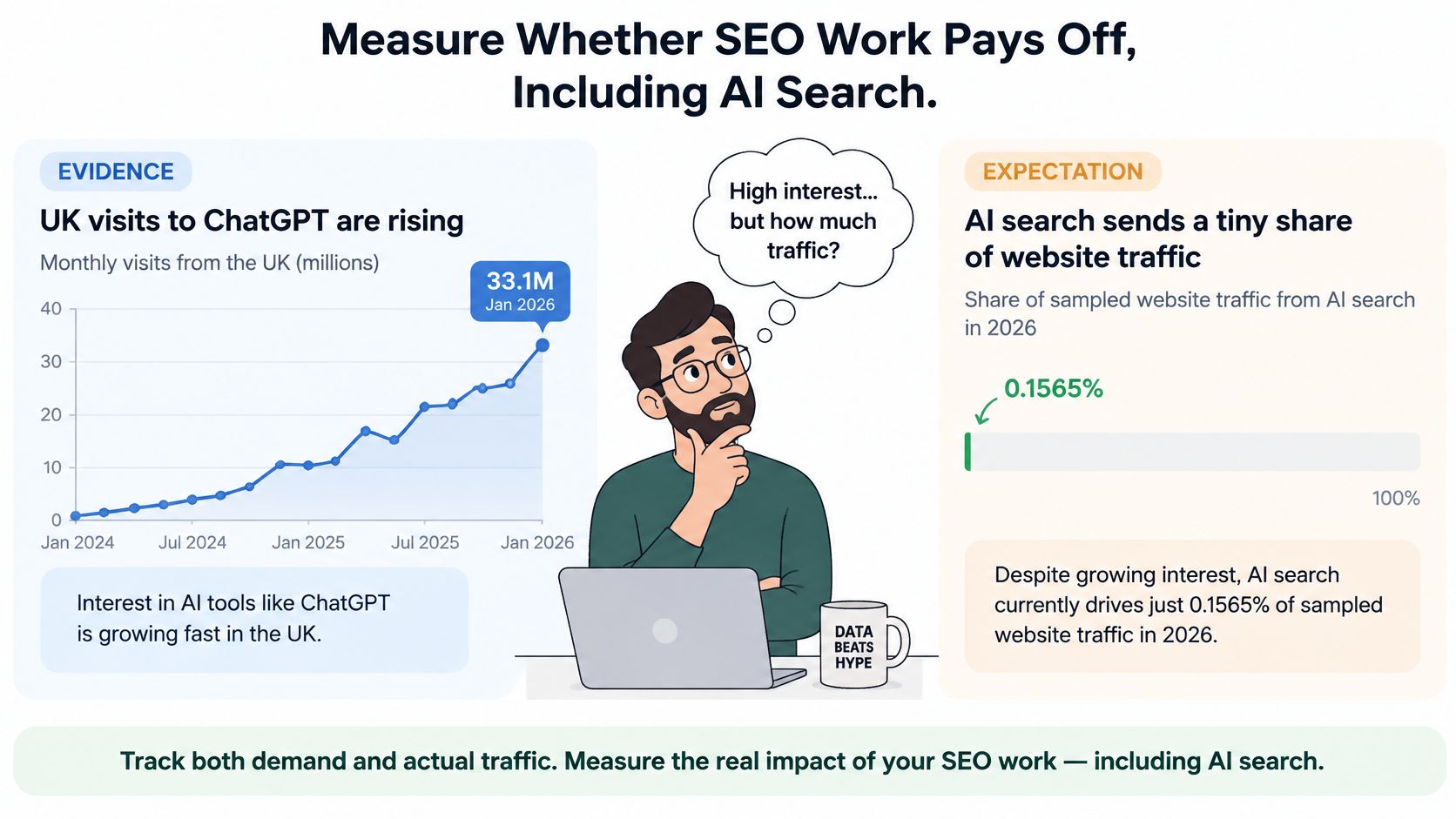
Split the scorecard so a mention cannot masquerade as a sale. Report the AI column beside organic, not instead of it.
- Visibility: brand mentions, product inclusion, how often you are cited, and the sentiment of that citation.
- Commercial: assisted conversions, revenue from new customers, basket value and any lift in branded search.
Compare AI-referred sessions with Google organic sessions by landing page and by category. Keep two limits in the same view. Some visits arrive as dark traffic with no usable referrer. Some shoppers research in an AI tool and come back through Google to buy, so the converting session never shows an AI source. A mention in an AI answer with no click is not revenue. A citation that sends a visitor who converts is worth counting.
The video below walks through how those referral paths show up once analytics is clean enough to trust.
Set the threshold before you spend a sprint. Confirm clean product data, indexable collections and working analytics first. A product feed that disagrees with the page undermines both conventional rankings and any AI answer that cites you. Then test a small set of high-margin categories for four to six weeks. Expand only if assisted conversions, new-customer revenue or branded-search lift move. Index coverage and organic clicks by landing-page type stay the core KPIs. AI search is an emerging discovery layer. It is not a replacement for conventional SEO, and it does not outrank a broken canonical.
Confirm Your First Fix This Week
Pick the first row of the priority table that matches your store, and record a baseline before you change a template. You need four numbers: indexed page count from the Search Console indexing report, Core Web Vitals status on the product, collection and cart templates, rich-result status for product pages, and organic revenue by landing-page type. Without that snapshot, next month's argument will be about feelings.
Use the week like this.
- Crawl the site and export URLs from Shopify, Search Console and the XML sitemap.
- Fix the top blocker on one template. That might be duplicate filtered URLs, or product fields that do not match the feed.
- Set the cadence. Check index coverage weekly, and check performance after each release.
An SEO health check in a Grumspot audit reviews metadata, headings, URL structure, the sitemap and structured data, which suits a store without an in-house technical SEO lead. Projects booked under the monthly offer include a free UX audit worth $1,500, so you can weigh an outside check against doing the first fix internally. Both routes are valid. Capacity, not a slogan, should decide.
The next action is whichever the baseline exposes: book the health check, or ship the single template fix this week and remeasure.
Grumspot designs, builds and fixes Shopify and Shopify Plus stores, including technical SEO audits, on-page fixes and the schema and sitemap work that keeps product data consistent. If your catalogue, crawl and checkout need the same pass, visit Grumspot and tell us which template is costing you organic revenue.
Want this kind of work on your store?
Send us the URL and what is slowing it down. We look at the store before we reply.
Related posts
Check out some similar posts.
- ecommerce on page SEO
On page SEO for ecommerce on Shopify, step by step: product and category pages, metadata, structured...
Read more
- on page SEO
On Page SEO Services explained: the deliverables, Shopify process, template speed and accessibility ...
Read more
- what is seo audit
What is SEO audit? Learn how technical, on-page and content checks uncover issues hurting your Shopi...
Read more
- seo technical audit checklist
Use this SEO technical audit checklist to find and fix 10 ecommerce issues across crawling, speed, i...
Read more