Structured Data Implementation for Ecommerce: A 2026 Guide
- structured data
- JSON-LD
- ecommerce SEO
- Shopify schema
- rich results
Launched
August, 2026

Your product pages look polished, your catalogue copy is useful, and your link profile is healthy. Yet organic traffic has stopped moving. Then a technical review reveals that Google has been rejecting the Product structured data for months because one Liquid value contains an invalid price format. The storefront works for shoppers, but search engines can't reliably interpret the product, its offer, or its reviews.
That's why structured data implementation should be treated as a deployable engineering pipeline, not a one-off SEO task. The work includes choosing the correct schema for each template, generating it from live Shopify data, testing both syntax and eligibility, preventing duplicate output, and monitoring what changes after release. Teams reviewing the wider ecommerce SEO best practices should treat this layer as part of storefront quality, not decorative code.
Why Structured Data Matters for Ecommerce in 2026
Structured data gives search engines explicit information about entities that already exist on the page. On a product detail page, that can include the product name, brand, SKU, offer, price, currency, availability, and genuine review information. The markup doesn't replace visible content. It describes that content in a machine-readable form.
The commercial value is eligibility for enhanced search presentations. Product information can support visibility for price and availability, while review-related markup can help Google understand rating information when the page meets its requirements. Merchant listings add another route for product visibility, and Google's Product structured data documentation explains that ecommerce pages can use Product markup, Merchant Center feeds, or both.
UK adoption shows why this has moved beyond an optional technical enhancement. A UK legal-AEO review reports that 72.6% of page-one Google results use some form of schema markup, while only about 31% of websites implement structured data overall (UK legal-AEO research). The gap matters operationally. High-performing search pages are more likely to carry structured signals, but most sites still leave the implementation incomplete or absent.
Practical rule: Structured data earns eligibility. It doesn't guarantee rankings, rich results, clicks, or citations.
The UK Government's publishing guidance provides a useful engineering analogy. GOV.UK uses schema.org structured data for transparency, statistical data set, and statistics pages, and describes Dataset schema as a way to expose attachments and make tabular information machine-readable. Its guidance also recommends schema.org Dataset alongside Dublin Core and CSV on the Web standards, while requiring publishers to complete metadata fields and keep titles within 50 to 60 characters (GOV.UK schema guidance). Structured publishing at that scale depends on consistent data models, not manual annotations added at the end.
For Shopify teams, the implementation decisions are practical:
- Format: Use JSON-LD rather than embedding attributes throughout theme HTML.
- Template mapping: Render Product on product pages, BreadcrumbList on interior templates, and Organization on brand-led pages.
- Data source: Bind schema to the same product, variant, review, and metafield data shoppers see.
- Quality control: Validate the schema vocabulary first, then test Google eligibility on the live URL.
- Operations: Add release checks so a theme change can't remove or duplicate markup.
If your store needs this work alongside theme refactoring, migration, or app integration, hire experienced ecommerce engineers who can treat schema as part of the storefront architecture rather than an isolated marketing ticket.
JSON-LD Versus Microdata for Storefronts
A Shopify Plus theme can pass validation today and still lose its schema after a section refactor. That risk is the main reason JSON-LD is the practical default for a modern ecommerce storefront. Microdata binds schema attributes to the exact HTML structure used by the theme, so changing a product information component, replacing sections, or introducing a new theme architecture can break the relationship.
JSON-LD lives in a standalone script element. Liquid can generate the structured representation without adding itemscope, itemtype, and itemprop attributes throughout visible markup. Reviews, prices, offers, and product identifiers remain easier to inspect, test, and update when schema is separated from presentation.
| Dimension | JSON-LD | Microdata |
|---|---|---|
| SEO impact | Supported format for structured data and documented by Google | Can describe entities, but offers no practical advantage for a modern storefront |
| Maintenance | Separate from presentation markup, so theme refactors are safer | Coupled to DOM elements and easy to break during component changes |
| Tooling | Straightforward to inspect in validators, source output, and automated tests | Requires checking both attributes and their relationship with rendered HTML |
| Shopify compatibility | Works cleanly in Liquid snippets and layout files | Often spreads schema logic across product and theme components |
| Best use | New implementation and controlled migration | Legacy cleanup where existing markup must be removed or replaced |
The difference is clearer when the same Offer is represented in each format. JSON-LD keeps the offer in one object:
<script type="application/ld+json">
{
  "@context": "https://schema.org",
  "@type": "Product",
  "name": "Example Shirt",
  "offers": {
    "@type": "Offer",
    "price": "79.00",
    "priceCurrency": "GBP",
    "availability": "https://schema.org/InStock"
  }
}
</script>
The equivalent Microdata depends on the surrounding page structure:
<div itemscope itemtype="https://schema.org/Product">
  <span itemprop="name">Example Shirt</span>
  <div itemprop="offers" itemscope itemtype="https://schema.org/Offer">
    <meta itemprop="price" content="79.00">
    <meta itemprop="priceCurrency" content="GBP">
    <link itemprop="availability" href="https://schema.org/InStock">
  </div>
</div>
The Microdata example is valid. Its operational cost is higher. If the title moves, an app injects another product block, or the offer becomes client-rendered, the schema can drift from the content shoppers see.
Use the Schema Markup Validator and Rich Results Test together in a two-stage QA workflow. First inspect vocabulary, nesting, and values in the markup validator. Then test the live URL for Google eligibility. Ship JSON-LD alone on new storefronts. During migration, remove Microdata as legacy code instead of maintaining two representations.
Choosing the Right Schema Types by Page
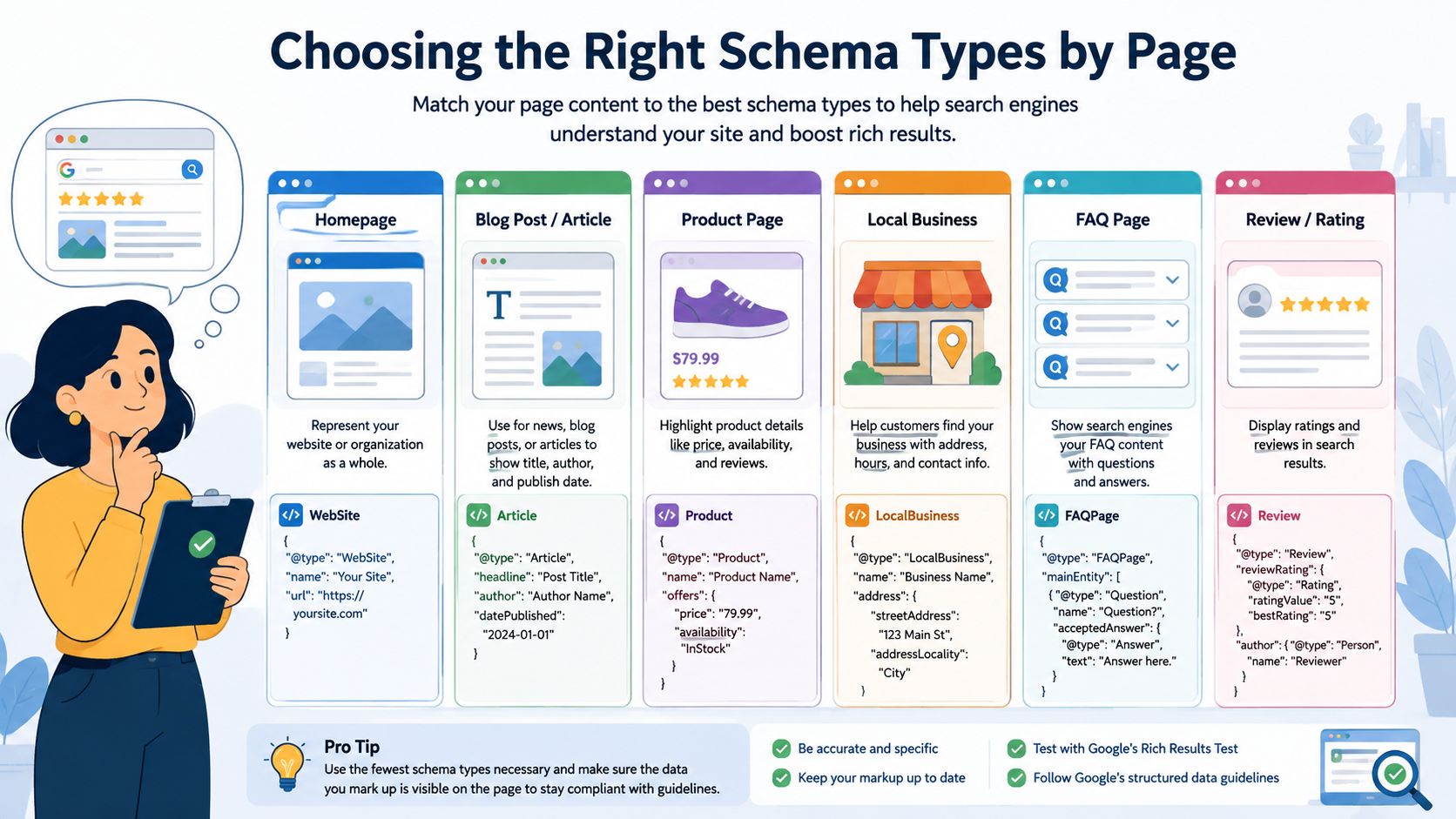
Schema selection should follow the page template and the content users can see. Don't add every available type to every URL. A product page needs commercial entity data. A collection page needs hierarchy and list context. A homepage needs brand identity.
Product pages
A Product page can combine Product, Offer, and, where supported by real visible review content, AggregateRating. In Shopify, bind the values to the product object and review app output rather than hard-coding them.
{
  "@context": "https://schema.org",
  "@type": "Product",
  "name": "{{ product.title }}",
  "image": ["{{ product.featured_image | image_url: width: 1200 }}"],
  "sku": "{{ product.selected_or_first_available_variant.sku }}",
  "brand": {
    "@type": "Brand",
    "name": "{{ shop.name }}"
  },
  "offers": {
    "@type": "Offer",
    "price": "{{ product.selected_or_first_available_variant.price | money_without_currency | strip | replace: ',', '' }}",
    "priceCurrency": "{{ cart.currency.iso_code }}",
    "availability": "https://schema.org/{% if product.selected_or_first_available_variant.available %}InStock{% else %}OutOfStock{% endif %}",
    "url": "{{ shop.url }}{{ product.url }}"
  }
}
Add aggregateRating only when the rating value and review count represent genuine reviews visible to shoppers. Don't create ratings from a single arbitrary review or from a value an app exposes without corresponding page content.
Collection and navigation pages
Collection pages benefit from BreadcrumbList, and an ItemList can describe the products displayed in the grid when the list accurately reflects the page. Breadcrumbs should match the visible hierarchy, including the collection route users can follow. The breadcrumb navigation guide is useful when deciding how that hierarchy should work in both UX and markup.
Brand and editorial templates
The homepage and About page are natural places for Organization, including a canonical logo, URL, and sameAs links to official social profiles. Blog content should use Article or BlogPosting, with the headline, author, publication date, and relevant image sourced from the CMS or Shopify blog data.
FAQ content needs a more cautious approach. Google removed FAQ rich results for most sites on 7 May 2026, so FAQPage markup should not be treated as a primary traffic strategy (Google's structured data update). Product question-and-answer content can still be useful when it is visible and accurately represented, but answer-first page copy is more important than adding FAQ markup for its own sake. Current UK guidance also recommends balancing correct schema with clear question-and-answer content in the page body (UK schema guidance for AI visibility).
Merchant Center deserves separate attention. On-page Product schema helps crawlers interpret the page, but a reliable product feed gives Google another structured source for catalogue information. Align titles, prices, availability, identifiers, and landing-page content across both systems. Conflicts are harder to diagnose than omissions.
Rendering JSON-LD in Shopify Liquid Themes
A product page can look correct in the browser while its structured data fails after deployment. Shopify implementation should therefore render JSON-LD from the same Liquid objects that produce visible content. Keep product markup in a dedicated file such as snippets/product-jsonld.liquid, then include it only on product templates. That keeps the payload readable and limits schema changes to the templates that need them.
A practical product pattern looks like this:
<script type="application/ld+json">
{
  "@context": "https://schema.org",
  "@type": "Product",
  "@id": {{ canonical_url | append: '#product' | json }},
  "name": {{ product.title | json }},
  "url": {{ canonical_url | json }},
  "image": [
    {% for image in product.images %}
      {{ image | image_url: width: 1200 | prepend: 'https:' | json }}{% unless forloop.last %},{% endunless %}
    {% endfor %}
  ],
  "brand": {
    "@type": "Brand",
    "name": {{ shop.name | json }}
  },
  "sku": {{ product.selected_or_first_available_variant.sku | json }},
  "offers": {
    "@type": "Offer",
    "price": {{ product.selected_or_first_available_variant.price | money_without_currency | strip | replace: ',', '' | json }},
    "priceCurrency": {{ cart.currency.iso_code | json }},
    "availability": "https://schema.org/{% if product.selected_or_first_available_variant.available %}InStock{% else %}OutOfStock{% endif %}",
    "url": {{ canonical_url | json }}
  }
}
</script>
The json filter protects titles, brand names, URLs, and metafield values that contain quotes or other characters capable of breaking hand-built JSON. Keep prices in the schema's numeric format. A currency symbol or thousands separator should not enter price.
Breadcrumb rendering
Breadcrumbs should follow the store's intended hierarchy, not the collection a shopper happened to use. A simple product route can use Home, the product's primary collection, and the product itself:
<script type="application/ld+json">
{
  "@context": "https://schema.org",
  "@type": "BreadcrumbList",
  "itemListElement": [
    {
      "@type": "ListItem",
      "position": 1,
      "name": {{ 'general.breadcrumbs.home' | t | json }},
      "item": {{ shop.url | json }}
    }{% if collection %},
    {
      "@type": "ListItem",
      "position": 2,
      "name": {{ collection.title | json }},
      "item": {{ shop.url | append: collection.url | json }}
    }{% endif %},
    {
      "@type": "ListItem",
      "position": {% if collection %}3{% else %}2{% endif %},
      "name": {{ product.title | json }},
      "item": {{ canonical_url | json }}
    }
  ]
}
</script>
For a larger catalogue, save the primary collection reference in a product metafield and use it consistently. Put Organization markup in the layout file, where shop-level values and logo metafields are available.
Liquid rendering keeps data close to the theme and avoids another client-side dependency. A tag manager can support controlled experiments, but it adds a delivery layer that makes timing and duplicate output harder to inspect. Apps that inject Product schema deserve particular scrutiny. If the theme and app both emit Product entities, they can create conflicting offers or duplicate markup. Teams comparing implementation patterns can use this Shopify structured data setup guide. The deployment pipeline should then inspect rendered HTML, not only the Liquid source.
Testing, Validation, and Measuring Real Impact
A validator saying “valid” isn't the same as Google confirming eligibility. Those are different checks, and production teams should run them in that order.
Stage one checks the vocabulary
Start with the Schema Markup Validator. It checks whether the JSON-LD follows the Schema.org vocabulary, whether property values match their expected types, and whether the object is structurally parseable. Malformed JSON, invalid property names, and incorrectly typed values should be fixed.
Run the check against rendered HTML, not just a local object or a Liquid file. A correct template can still produce invalid output when a product has no SKU, a metafield is blank, or a price filter returns an unexpected string.
Stage two checks Google eligibility
Next, use Google's Rich Results Test on the live URL or a crawlable staging URL. Google's own documentation recommends this tool for determining rich-result eligibility, while the Schema Markup Validator handles broader standards compliance. The Rich Results Test can therefore report a different outcome from the schema validator. That isn't a contradiction. It reflects different purposes.
| Tool | What it validates | Best use |
|---|---|---|
| Schema Markup Validator | Schema.org syntax, property types, and vocabulary structure | Confirm the payload is technically well formed |
| Google Rich Results Test | Google-supported result types and required eligibility signals | Check whether a product or other page can qualify for an enhancement |
| Search Console | Crawled coverage, detected issues, and post-release status | Monitor the deployed URL set over time |
After deployment, use Search Console to compare the same URL set before and after the change. Filter by product or collection URL patterns, record impressions and clicks, and allow enough time for Google to crawl and process the pages. Don't compare a new template against a different catalogue segment and call the difference a schema result.
A clean validator report proves your implementation parses. It doesn't prove Google will display a rich result.
Store a baseline in a shared document before each release. Retest after theme changes, review-app changes, currency updates, and catalogue migrations. When Search Console reports a structured data issue, inspect the raw rendered page first. The source often reveals a missing variant value, a second app-generated block, or stale markup that isn't visible in the theme editor.
Common Ecommerce Schema Pitfalls and Fixes
Production failures tend to come from data drift, not from a lack of schema vocabulary. The page changes, the app changes, or a product record contains an edge case that the original Liquid implementation never handled.
Invalid price output
Symptom: The validator flags price, or the Product enhancement doesn't qualify.
Cause: Liquid sends a formatted money string containing a currency symbol, a thousands separator, or locale-specific punctuation. Schema expects a clean numeric value.
Fix: Use a deliberate price filter, normalise the decimal format, and inspect output for markets that use different currency presentation. Test sale prices, unavailable variants, and products with no compare-at price. Keep priceCurrency as the currency code rather than embedding it in price.
Missing reviews
Symptom: The product has reviews on screen, but no rating data appears in the parsed schema.
Cause: The review app renders its content in a widget or iframe and doesn't expose a trustworthy value to the theme. A manually entered rating can also become stale.
Fix: Use the app's documented Liquid integration or API output where it reflects genuine visible reviews. Add a Liquid guard so aggregateRating is omitted when the rating value or count is absent. Don't invent a rating to complete the object.
Duplicate Product blocks
Symptom: Multiple Product entities appear for one URL, often with different prices or availability.
Cause: The theme emits JSON-LD and an SEO or review app injects another block. The two sources can disagree, especially during a sale or inventory update.
Fix: Search the rendered HTML for every application/ld+json block, identify the owner of each Product object, and disable the redundant app output. One authoritative product payload is easier to validate than several competing versions.
Broken breadcrumb trails
Symptom: The breadcrumb parser shows skipped positions, incorrect URLs, or a collection that isn't part of the visible path.
Cause: The code relies on the current navigation context, which may be absent on direct product visits, or it assumes a collection hierarchy that the catalogue doesn't maintain.
Fix: Define a primary collection or taxonomy metafield, generate positions sequentially, and ensure every item URL resolves to the corresponding visible page. Don't mark a hierarchy users can't see.
Aggregate ratings with weak provenance
Symptom: The rating object parses, but the page doesn't qualify or the data raises a quality concern.
Cause: The implementation applies AggregateRating to one review, a hidden rating, or a value copied from a third-party source without matching page content.
Fix: Only output aggregate data when the page visibly supports it and the count represents a real review set. Otherwise, leave the property out. Complete markup is useful, but unsupported markup is worse than omission.
Automation and a 30-Day Rollout Checklist
A Shopify Plus store with a large catalogue shouldn't depend on developers remembering to update schema after every product-model or theme change. In a representative deployment, the merchant stored identifiers in product metafields, generated JSON-LD through shared Liquid snippets, and treated rendered structured data as a release artefact.
The product model exposed values such as namespace.custom.sku and namespace.custom.gtin. The Liquid layer used those values only when present, while core fields such as title, image, availability, and price came from Shopify's product and variant objects. A CI job then rendered representative URLs, ran schema checks against the output, and blocked a merge when the payload became invalid.
The release controls
- Metafield ownership: Define which system owns SKU, GTIN, brand, and review data. Don't allow several apps to overwrite the same meaning.
- Rendered HTML diffing: Compare JSON-LD output for product, collection, and homepage fixtures when a theme commit changes.
- Validator checks: Run the Schema Markup Validator against generated output, then send live URLs through Google's Rich Results Test before release.
- Search monitoring: Watch Search Console for structured-data errors, eligibility changes, and unexpected coverage drops.
- Feed alignment: Compare Merchant Center product data with the page's visible price, availability, identifiers, and canonical URL.
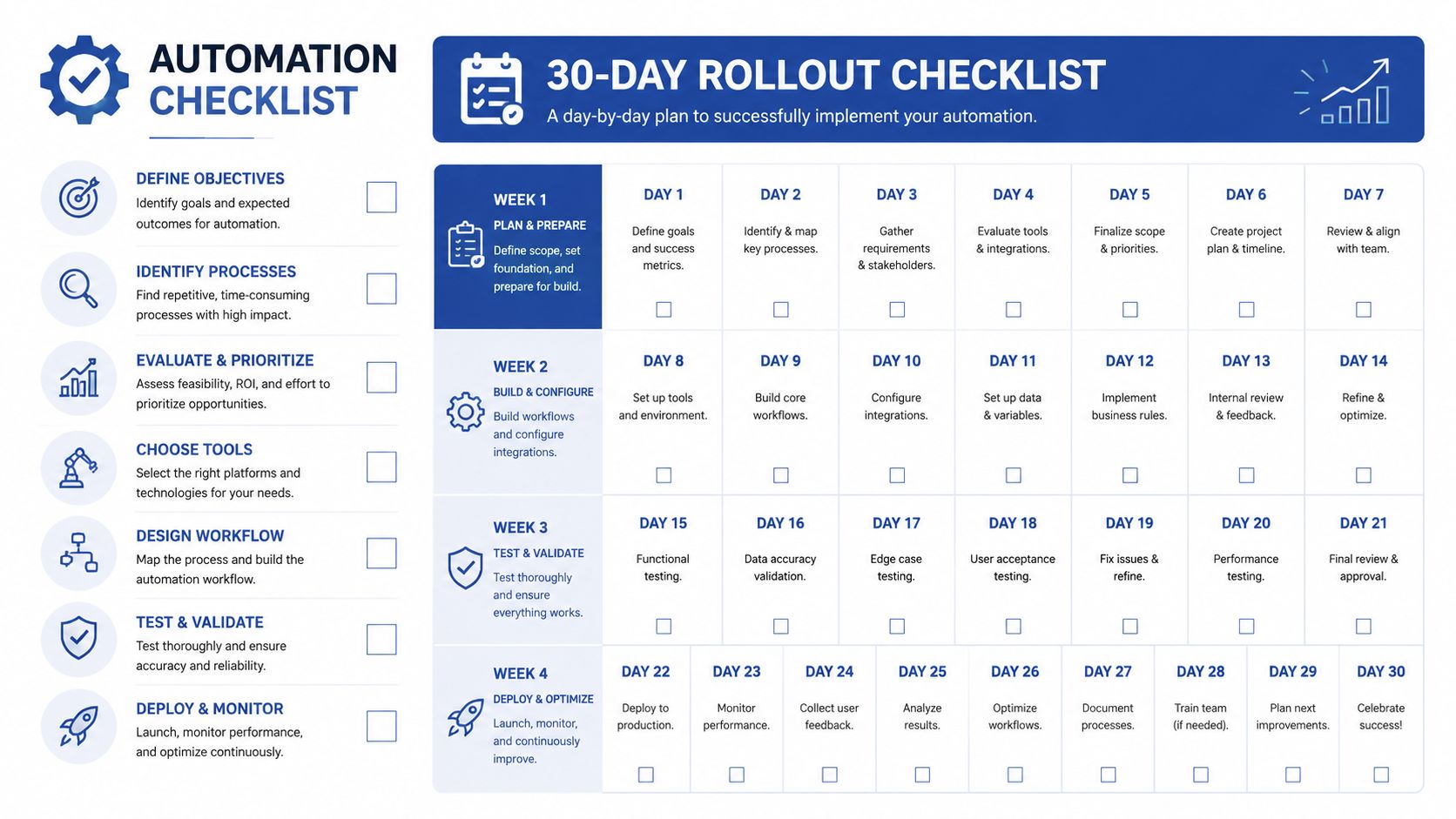
A workable 30-day cadence
Week one, inventory and mapping: List every storefront template, schema block, SEO app, review integration, and Merchant Center feed. Map each page type to the schema it can support, then document the source field for every required value.
Week two, implementation: Build reusable Liquid snippets for Product, BreadcrumbList, Organization, and relevant editorial types. Add guards for missing values, use JSON escaping consistently, and remove duplicate output rather than layering another block on top.
Week three, validation and alignment: Run Schema Markup Validator checks, then confirm Google eligibility with the Rich Results Test. Reconcile Product markup with Merchant Center data and inspect edge cases such as unavailable variants, sale pricing, international currencies, and products without reviews.
Week four, controls and monitoring: Add CI checks, rendered HTML snapshots, and Search Console monitoring. At the end of the rollout, establish a longer-term review point so the team can compare the same URL groups before and after deployment without confusing schema changes with unrelated merchandising or SEO work.
Grumspot helps Shopify Plus teams design, implement, and audit structured data across Liquid themes, product templates, Merchant Center feeds, and technical SEO workflows. If your storefront has duplicate Product markup, rejected rich-result data, or no reliable release checks, visit Grumspot to discuss a practical implementation plan.
Let's build something together
If you like what you saw, let's jump on a quick call and discuss your project

Related posts
Check out some similar posts.

- what is seo audit
What is SEO audit? Learn how technical, on-page and content checks uncover issues hurting your Shopi...
Read more
- seo technical audit checklist
Use this SEO technical audit checklist to find and fix 10 ecommerce issues across crawling, speed, i...
Read more
- internal linking strategy
Build a high-impact internal linking strategy that boosts rankings and conversions. Learn auditing, ...
Read more
- breadcrumb navigation
Learn what breadcrumb navigation is, why it matters for UX and SEO, and how to implement it correctl...
Read more