SEO Technical Audit Checklist: 10 Ecommerce Checks
- seo technical audit checklist
- technical SEO
- Shopify SEO
- ecommerce SEO
- SEO audit
A Shopify store can have excellent products, persuasive copy, and a strong brand, yet still lose valuable discovery because important pages are hard to crawl, slow to use, duplicated across filters, or represented inaccurately in search. The problem often hides in theme code, app scripts, variant URLs, consent tools, or a template change that looked harmless during release.
This SEO technical audit checklist follows diagnostic priority rather than a random list of checks. Start with issues that can block access, rendering, crawling, or indexation. Move to high-impact improvements involving duplication, performance, mobile usability, metadata, markup, and internal linking. Leave authority analysis and recurring maintenance until the foundations are sound.
For each check, use a simple decision. Critical blockers need immediate investigation because they can prevent valuable pages from appearing at all. High-impact fixes should enter the next development sprint when they affect important templates, products, or collection paths. Maintenance checks belong in a recurring workflow so app updates, inventory changes, and releases don't recreate the problem.
1. Site Speed and Core Web Vitals Assessment
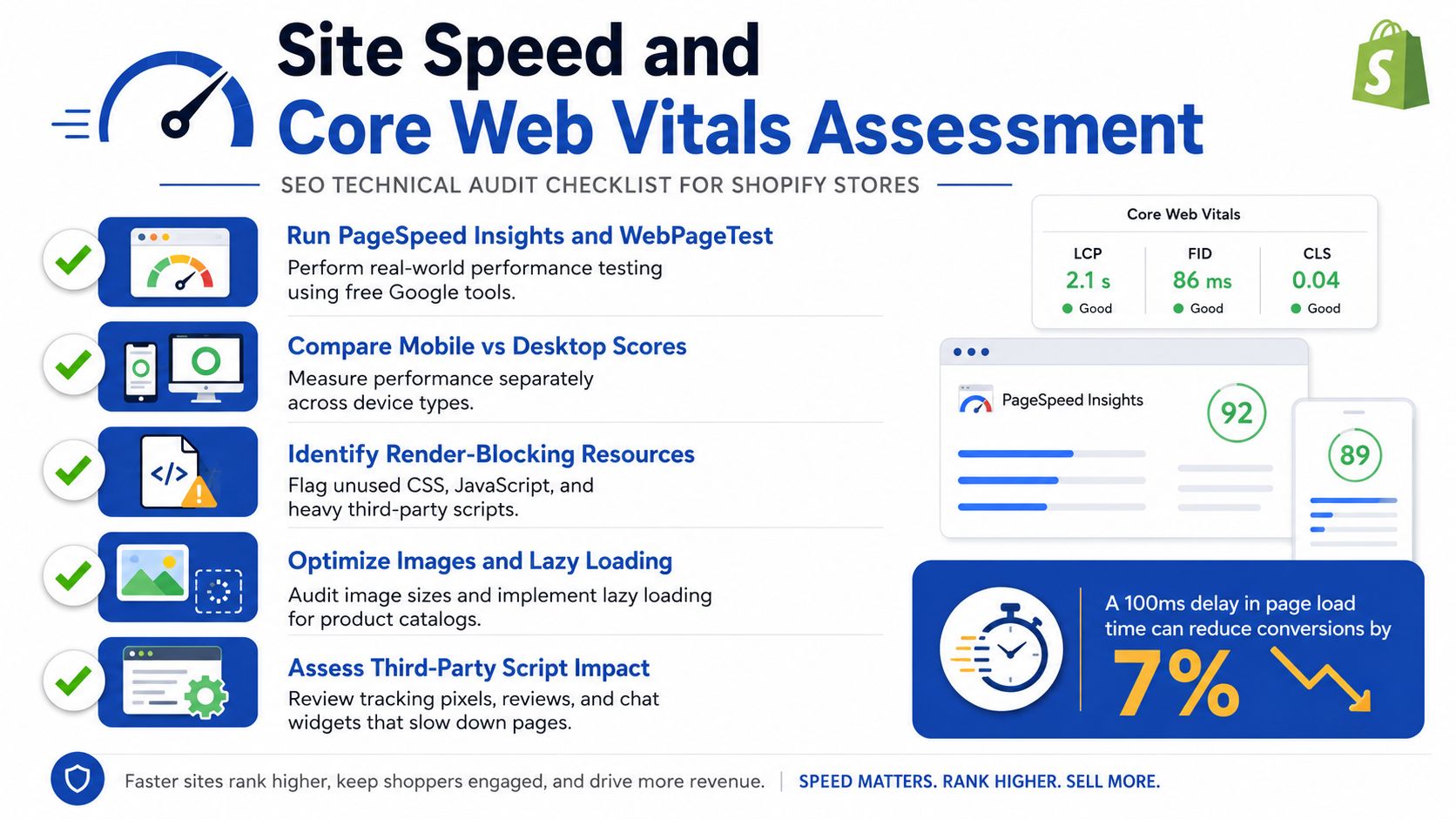
A slow product page can lose a shopper before the product appears. Start with real-user performance in Google Search Console and field data, then use Lighthouse or PageSpeed Insights to isolate the cause. Review Largest Contentful Paint, Interaction to Next Paint, and Cumulative Layout Shift together, because a strong desktop lab score can hide slow mobile delivery or unstable interaction.
GOV.UK's performance work shows why the slowest users deserve attention. Across pages and devices in April and May 2022, the median load time was 0.455 seconds, while 83% of visitors experienced 1 second or less. The remaining 17% faced a poorer experience, with some waiting up to 2.35 seconds, or 417% slower than the median. Removing a Base64-encoded font reduced page weight by 16%, or 75 KB per request, and cut load time by 13% on high-end 4G devices, as documented in GOV.UK's performance work.
Practical rule: Find the largest blocking asset before asking developers to optimise everything. A hero image, app bundle, font, or review widget may matter more than a long list of minor CSS warnings.
Shopify checks that lead to a fix
- Measure key templates: Test the home page, collection, product page, cart, and landing pages receiving paid or organic traffic.
- Audit app impact: Disable or defer non-essential review, chat, upsell, heat-map, and personalisation scripts in a controlled environment. If an app changes layout or interaction, test the replacement rather than hiding the symptom.
- Protect the LCP element: Use Shopify's native image delivery, correctly sized responsive images, and lazy loading below the fold. Avoid lazy-loading the main product image if it delays discovery.
- Control layout movement: Reserve dimensions for images, banners, reviews, and recommendation blocks so late content does not shift buttons or product information.
- Test mobile reality: Use physical devices and constrained connections, including horizontal orientations, rather than relying only on browser emulation.
For implementation detail, use this guide to optimise Core Web Vitals on Shopify. Fix or escalate: remove or defer a script when it has no clear commercial role. Escalate when theme architecture, app injection, or a checkout extension prevents a safe change.
The UK government also estimated that its font change saved roughly 800 GB of mobile data each month for about 48 million monthly visitors, reinforcing page weight as an operational audit priority. Use the cited GOV.UK performance work to review the underlying example and apply the same fix-or-escalate decision to Shopify assets.
2. Mobile Responsiveness and User Experience Testing
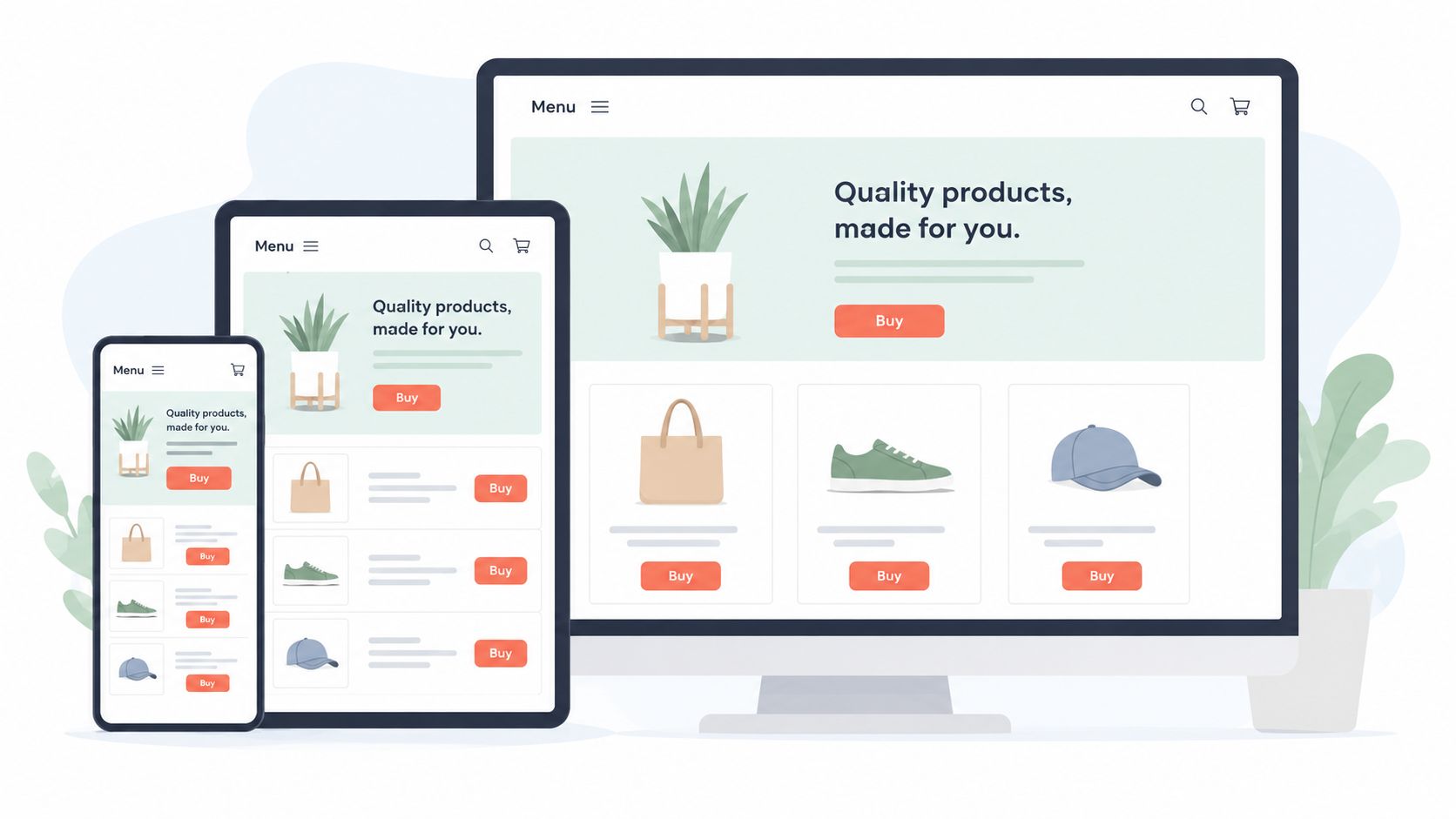
Mobile SEO isn't satisfied by a page that technically shrinks to fit a narrow screen. A shopper must be able to open the menu, select a variant, inspect images, use filters, add the product to cart, and complete checkout without zooming, accidental taps, or content disappearing behind an overlay.
GOV.UK usage data shows why public-sector and commerce teams should treat mobile delivery as a baseline requirement. In 2021, 74% of measured usage was on smartphones and tablets, and mobile accounted for 61% of monthly visits by 2025. The government usage report also describes accessibility as a legal requirement for UK public-sector websites and apps. That context translates well to ecommerce: a technically crawlable page still fails commercially if users can't operate it.
Test the buying path, not just the homepage
Use real iOS and Android devices across narrow and wide screens. Test portrait and landscape orientations, slow connections, browser zoom, keyboard behaviour, sticky elements, and the full route from collection to checkout.
- Check touch interaction: Buttons, swatches, quantity controls, and filter controls need enough space for reliable tapping.
- Check content parity: Product descriptions, price, availability, reviews, internal links, and structured data should remain available in the mobile experience.
- Check menus and filters: A JavaScript menu that only inserts links after interaction can weaken discovery. Make important navigation available in the rendered document.
- Check checkout friction: Watch for address fields covered by sticky bars, keyboard-induced layout shifts, unavailable express payment methods, and error messages that vanish after validation.
Don't redesign the mobile experience solely to satisfy a score. A smaller image may improve performance but weaken product evaluation. A sticky add-to-cart bar may help conversion but create layout instability. Test the trade-off with actual users, analytics, and field performance.
Fix or escalate: correct viewport, overflow, tap, and content-visibility problems in the theme. Escalate when a checkout extension, app block, or device-specific rendering issue needs Shopify Plus development rather than a CSS patch.
3. Crawlability and Indexation Analysis
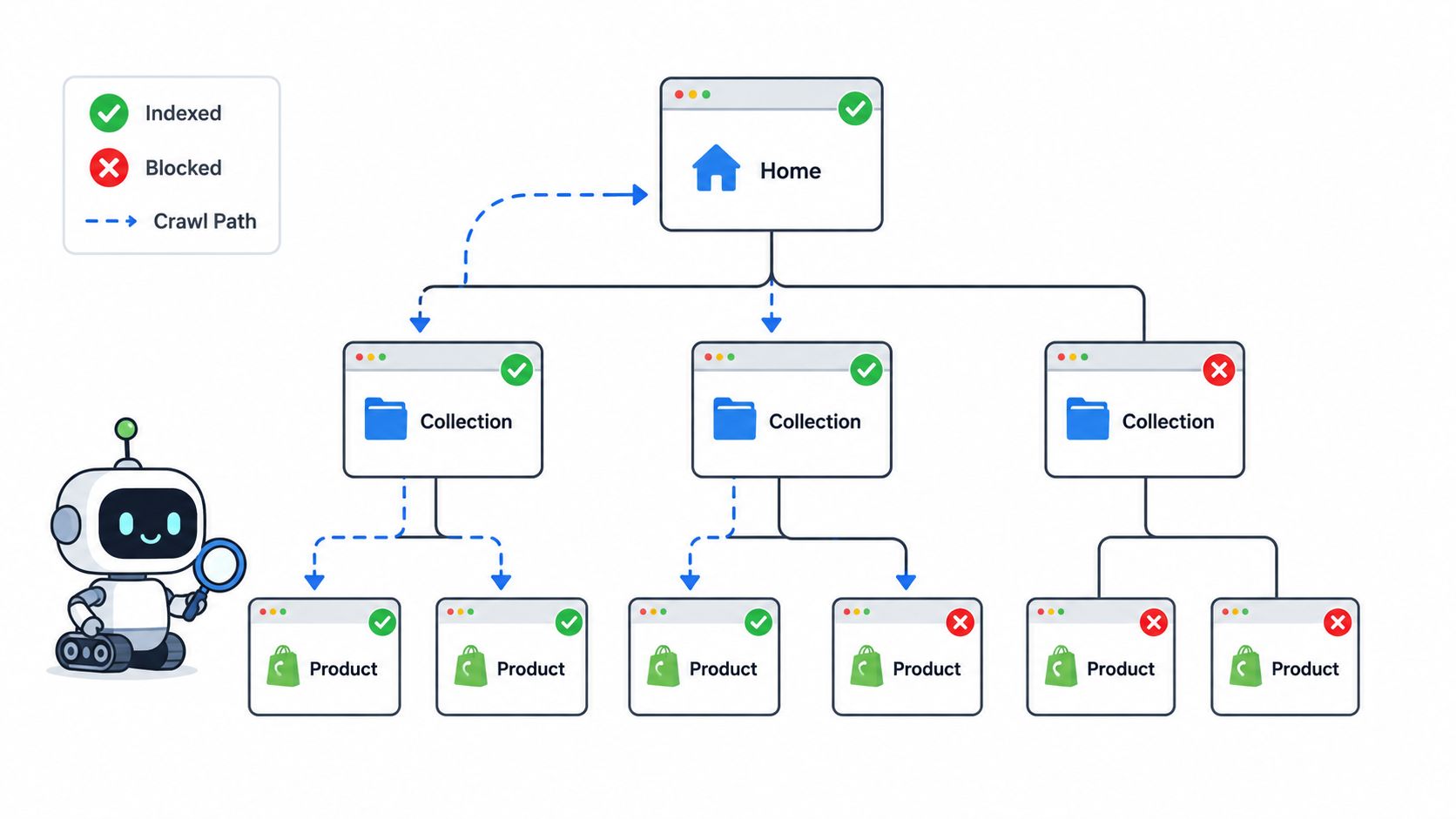
Crawl and indexation errors are the first issues to investigate because every later optimisation depends on search engines reaching the right URLs. Start by fetching robots.txt, the XML sitemap index, key templates, and representative product and collection URLs with a crawler. Then compare the intended URL set with Google Search Console's Pages report and URL Inspection results.
Shopify stores create predictable traps. Search pages, filters, sorting combinations, tracking parameters, retired products, and variant routes can expose large numbers of low-value URLs. A product may also be present in a sitemap while carrying noindex, blocked resources, an incorrect canonical, or no useful internal link.
A sitemap is a discovery aid, not an indexation guarantee. A URL belongs in it because you want search engines to consider the page, not because the platform generated it automatically.
Validate the crawl path
- Inspect robots.txt: Confirm that important product, collection, image, CSS, and JavaScript resources aren't blocked. Keep low-value search and parameter patterns controlled without blocking assets required to render pages.
- Check sitemap hygiene: Include canonical, indexable URLs that return successful responses. Remove redirected, unavailable, duplicate, and intentionally excluded URLs.
- Trace internal discovery: A product linked only through a client-side filter or internal search may be harder to discover than one linked from a collection, menu, or editorial page.
- Review indexation states: Investigate accidental
noindex, duplicate selections, redirects, soft error states, and “discovered” or “crawled” pages that matter commercially. - Inspect rendering: If price, availability, product text, or links appear only after JavaScript executes, compare raw HTML with the rendered DOM and test the resources that deliver the content.
Use these XML sitemap best practices for Shopify when checking the platform output. Shopify's generated sitemap can't always express a complex faceted-navigation strategy, so custom theme logic, robots rules, canonical handling, or an app may be needed.
Fix or escalate: remove accidental blocks and noindex directives immediately. Escalate when a JavaScript storefront, app block, or international setup makes it difficult to prove which resources Googlebot needs before it can understand a page.
4. On-Page SEO Elements Optimisation
Metadata errors rarely block a page completely, but they can make the wrong page compete, weaken relevance, or reduce the chance that a searcher chooses your result. Review titles, meta descriptions, headings, image alternatives, visible copy, and semantic HTML by template, not only URL by URL.
For Shopify, the useful unit is usually the template plus its data source. A product template may generate titles from product names, vendors, and variant information. A collection template may inherit a generic title or expose an empty description. A theme update can also duplicate headings or create a second H1 inside an app block.
Build a template-level review
Export URLs and group them into products, collections, pages, blog articles, and special landing pages. Flag missing, duplicated, truncated, or misleading titles. Then inspect whether the visible page supports the promise made in the title and description.
- Product pages: Make the product, differentiator, and commercial intent clear without stuffing attributes into the title.
- Collection pages: Give each strategically important collection a distinct purpose, useful introductory copy, and a heading that describes the range.
- Headings: Use one clear primary heading where appropriate, then organise supporting sections for shoppers and crawlers.
- Images: Describe what the image communicates, such as colour, product type, or use context. Don't repeat a keyword in every alt attribute.
- URLs: Keep handles stable and readable. Don't change a successful product URL merely to force every word from the product name into it.
A product title that is technically tidy but hides the key differentiator may lose clicks. A long, keyword-heavy meta description may explain everything yet fail to communicate value. The best fix combines search relevance with merchandising judgment.
Fix or escalate: correct repeatable problems in Shopify's theme or metadata fields rather than editing hundreds of pages manually. Escalate when multiple markets, dynamic product feeds, or app-generated headings create conflicting ownership.
5. Structured Data and Schema Markup Implementation
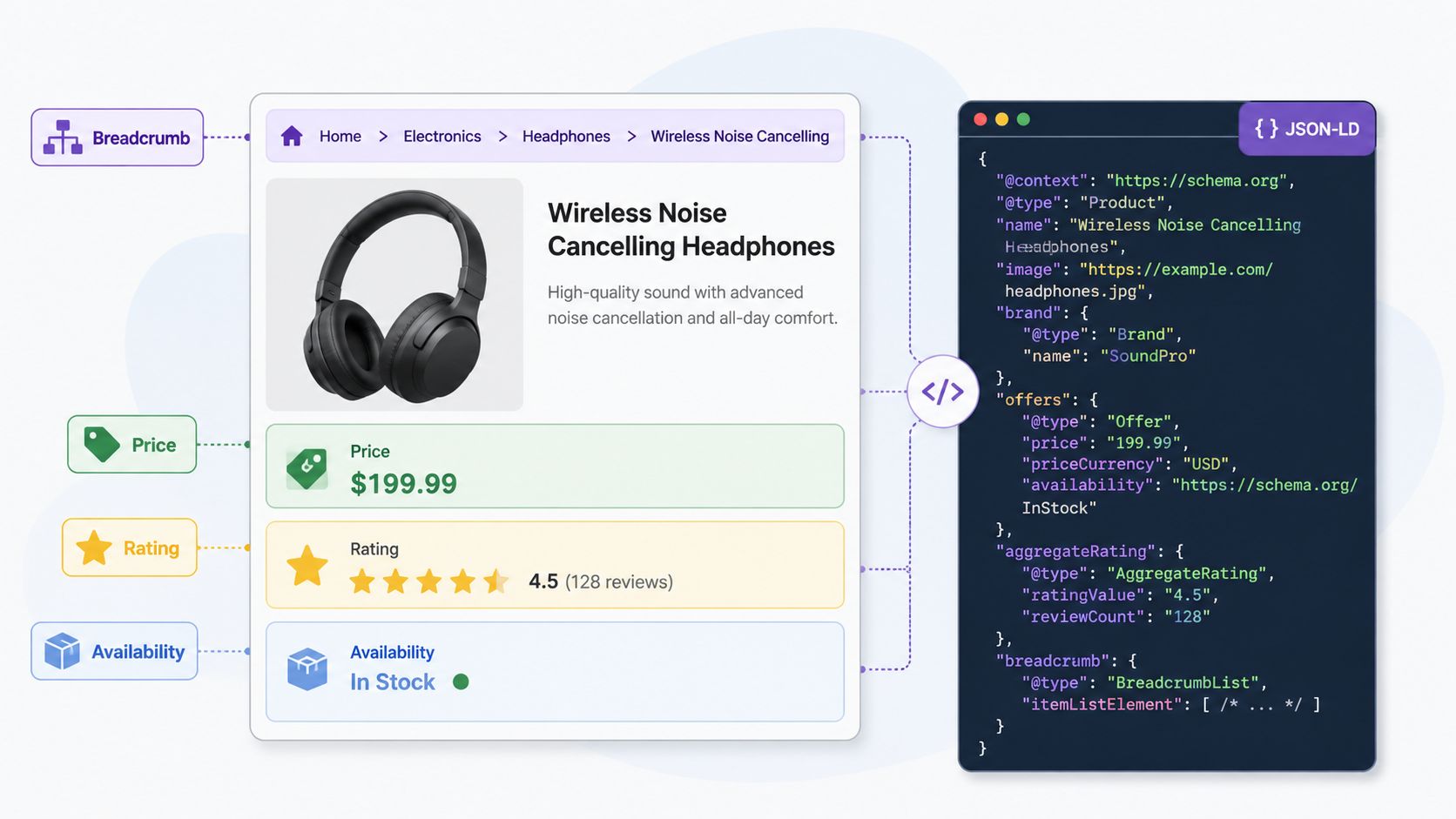
Structured data should confirm what the page visibly says. On a Shopify product page, that means checking the product name, offer, price, currency, availability, brand, identifiers, reviews, and shipping or return information where relevant. A schema test can pass while the implementation remains misleading if an app outputs stale data or marks up content that shoppers can't see.
Use Product markup on genuine product pages, BreadcrumbList where breadcrumbs exist, and Organisation data for the business identity. Review markup deserves particular care. It should reflect real customer reviews and current visible ratings, not a manually entered score copied across every product.
Audit the data pipeline
- Trace the source: Identify whether JSON-LD comes from the theme, Shopify data, a schema app, a review platform, or several systems at once.
- Compare rendered values: Match schema price, currency, stock status, product name, and rating to the visible page after variant selection.
- Test variants: Decide whether the page represents one canonical product with selectable offers or separate indexable products. Avoid emitting conflicting Product objects for the same visible page.
- Validate before release: Use Google's Rich Results Test and the Schema.org Validator, then inspect Search Console enhancement reports after deployment.
- Review consent effects: If a consent manager blocks the app that injects reviews or product data, verify that the remaining markup is still accurate and complete.
Read this practical guide to structured data implementation before changing theme code. UK teams should also consider compliance and measurement together. The Government Digital Service reported a public-sector accessibility compliance rate of 70% in December 2024, up from 59% in the previous monitoring period, as documented in its accessibility monitoring update. Accessibility, consent, and markup can share the same app and rendering dependencies, so audit them as one delivery system.
Fix or escalate: remove duplicate schema providers and correct data mismatches in the source template. Escalate when a review or consent platform controls the output and can't expose reliable, variant-aware data.
6. Internal Linking Structure and Link Equity Distribution
A product can't earn visibility if the site rarely links to it. Internal links help shoppers discover products and help crawlers understand which collections, products, guides, and brand pages matter. On Shopify, inventory changes can create orphaned pages when a product leaves a featured collection, a navigation item is removed, or a campaign landing page expires.
Start with a crawl that records inbound internal links, link targets, anchor text, response codes, and click depth. Separate important orphan pages from products that are intentionally unavailable or excluded. A new product with no contextual link may exist in the sitemap, but that doesn't give it the same discovery path as a product linked from a relevant collection and buying guide.
Strengthen paths to commercial pages
- Link from relevant collections: Feature new, seasonal, best-selling, or strategically important products from collections that already receive strong internal attention.
- Use descriptive anchors: “Waterproof trail jackets” tells users and crawlers more than “shop now”, but don't repeat one exact phrase unnaturally.
- Connect related products: Link alternatives, accessories, bundles, care guides, and comparison content where the relationship helps a shopper decide.
- Keep breadcrumbs accurate: They should reflect the customer's route and lead to live, useful collection pages.
- Repair links at the source: Replace internal links to redirects or deleted products rather than relying on chains.
Don't turn the footer into a dumping ground for every collection. Site-wide links can dilute navigation and make the store harder to use. Give priority to pages with commercial value, strong demand, or a clear role in the category architecture.
Fix or escalate: add links through collection logic, navigation, editorial modules, and product recommendations. Escalate when merchandising rules, international markets, or app-driven recommendations prevent stable control over link placement.
7. Ecommerce-Specific Canonical Tag and URL Parameter Management
Canonical errors are common on stores with variants, filters, sorting, and international versions because similar URLs can represent different things. A colour or size selection might change the offer without creating a separate product page. A filtered collection might deserve its own landing page if it has distinct demand and content, while a combination of filters may be useful only to the shopper who selected it.
Inspect the canonical emitted in the HTML head for product, collection, search, and filtered URLs. Compare it with the URL in the sitemap, internal links, redirects, and hreflang annotations. A canonical is a signal, not a command. Search engines may choose another version when content, links, or technical signals disagree.
Apply a deliberate URL policy
- Unique pages: Use a self-referencing canonical for pages that deserve independent discovery.
- Product variants: Canonicalise variant URLs to the main product when the content is substantially the same and the variant doesn't need its own search presence.
- Filters: Decide which collection combinations have unique value. Canonicalise or exclude low-value combinations, while building proper indexable landing pages for strategically important categories.
- Sorting and tracking: Keep sort, session, and campaign parameters out of the index. Check that canonical links don't point to blocked destinations.
- International versions: Use hreflang for language or regional alternatives, not canonical tags that erase valid local pages.
A common failure is placing noindex on a page while simultaneously canonicalising it to another URL and expecting both instructions to work predictably. Another is canonicalising every paginated collection page to page one, which can hide products that are discoverable only on later pages. Test the live HTML and inspect representative URLs in Search Console rather than trusting a theme setting.
Fix or escalate: encode the policy in theme logic and filter handling. Escalate when Shopify Markets, third-party filtering, or migration redirects generate conflicting URL signals across regions.
8. SSL Certificate and HTTPS Security Implementation
Shopify provides managed SSL for standard storefront delivery, but that doesn't remove security auditing from the technical SEO workflow. The remaining risks usually sit in old asset references, third-party scripts, redirect rules, custom domains, and embedded content.
Open important templates over HTTPS and inspect the browser console and network panel for HTTP requests. Mixed content can affect images, fonts, scripts, stylesheets, video embeds, and app resources. Active content such as scripts is particularly important because browsers may block it, leaving broken interactions or incomplete rendering.
Check the full protocol path
- Test HTTP redirects: Request the HTTP version of the domain and confirm it reaches the preferred HTTPS URL directly.
- Review asset references: Search theme files, metafields, blog content, custom HTML, and app settings for hardcoded HTTP URLs.
- Check domain consistency: Confirm that www and non-www versions resolve to the intended host without competing canonical signals.
- Inspect sensitive flows: Verify that account, cart, checkout handoffs, payment elements, and forms don't introduce insecure resources.
- Review headers where available: HSTS and sensible security headers can reinforce the secure delivery model, but don't add policies that break legitimate storefront scripts without testing.
Be careful with HSTS changes on domains that have subdomains, external services, or incomplete HTTPS coverage. A forceful header can make an operational mistake harder to recover from. Use browser testing and a specialist TLS checker to validate the actual configuration.
Fix or escalate: replace insecure asset URLs and remove unnecessary external dependencies. Escalate when a custom domain, reverse proxy, checkout integration, or security policy needs infrastructure ownership beyond theme editing.
9. Content Quality, Keyword Strategy, and Topic Relevance Assessment
Technical health can't rescue a product page that gives shoppers no reason to choose it. Review product descriptions, collection copy, buying guides, FAQs, and blog pages against the intent behind the queries they target. A page can be indexable and fast yet still fail because it doesn't explain fit, material, compatibility, delivery, care, use cases, or product differences.
Start with the search result and the customer question behind it. For a collection such as waterproof walking jackets, useful copy should clarify who the products suit, what “waterproof” means in the category, and which attributes help shoppers compare. Product copy should combine factual specifications with benefits, but it shouldn't claim features the product doesn't have.
Match content to the buying decision
- Product pages: Put essential facts near the product, including material, dimensions, compatibility, care, stock, and delivery information where relevant.
- Collection pages: Explain the category and distinctions between products without pushing the grid so far below the useful content that shoppers struggle to browse.
- Editorial content: Answer genuine pre-purchase questions and link readers to suitable products or collections.
- Duplicate descriptions: Rewrite supplier copy when it appears across many stores or products. Use structured specifications to make comparison easier.
- Freshness: Update content when products, policies, materials, or availability change. Don't change copy merely to create artificial activity.
Keyword research should inform language, not dictate it. Repeating “best” or “cheap” in every heading creates poor merchandising and can weaken trust. The right fix often requires a collaboration between SEO, merchandising, customer service, and product teams because each group holds part of the user's question.
Fix or escalate: rewrite templates and priority pages where content is thin or mismatched. Escalate when product data is incomplete in the ERP or PIM, since better SEO copy can't compensate for inaccurate source information.
10. Backlink Profile and Link Acquisition Analysis
Backlinks are an authority and discovery signal, but a large export of referring domains isn't an audit. Begin by separating links to live, important pages from links to redirected, deleted, or irrelevant URLs. Review relevance, placement, destination, anchor text, and whether the link appears editorially earned or commercially manipulated.
For a Shopify store, migration history deserves special attention. A replatform can leave valuable links pointing to old product handles, collection paths, or blog URLs. If redirects are missing or chained, the site may lose the practical benefit of those references even though third-party tools still show the links.
Make the link review commercially useful
- Protect valuable destinations: Map links to discontinued products and decide whether a relevant replacement, collection, or explanatory page is the right destination.
- Find relevant opportunities: Study competitors, retailers, publishers, trade bodies, product reviewers, and resource pages that cover the category.
- Earn useful assets: Build buying guides, care resources, compatibility pages, original product information, or tools that publishers can reference.
- Review anchors: A natural profile usually includes brand, URL, product, and descriptive language. Treat aggressive exact-match patterns as a risk signal, not an invitation to build more of the same.
- Avoid reflexive disavowal: Investigate whether a link is harmful and whether there is a manual action or clear manipulation issue before taking action.
Don't buy low-quality directory packages to inflate metrics. A directory submission service marketed for SaaS, such as this guide to directory submission services, may be irrelevant to a consumer ecommerce category and shouldn't replace relevant editorial outreach. Fix or escalate: repair lost links through redirects and helpful replacements first. Escalate when a migration, penalty concern, or large-scale outreach programme needs specialist review.
10-Point SEO Technical Audit Comparison
| Audit | 🔄 Implementation Complexity | ⚡ Resource Requirements | ⭐ Expected Outcomes | 📊 Ideal Use Cases | 💡 Key Advantages / Tips |
|---|---|---|---|---|---|
| Site Speed and Core Web Vitals Assessment | High, requires theme/app code changes and dev work | Dev time, performance tools (PageSpeed, WebPageTest), image work | ⭐⭐⭐⭐, improved LCP/FID/CLS, faster pages, higher conversions | High-traffic stores, large catalogs, conversion-focused sites | Prioritize LCP, audit third-party apps monthly, use Shopify image CDN |
| Mobile Responsiveness and User Experience Testing | Medium–High, may need redesign and UX adjustments | Designers, QA on real devices, dev time for responsive fixes | ⭐⭐⭐⭐, better mobile conversions and reduced friction | Stores with majority mobile traffic, checkout-heavy flows | Test on real devices and slow networks; ensure 44–48px tap targets |
| Crawlability and Indexation Analysis | Medium, config + structural fixes across site | Tools (Screaming Frog, GSC), dev for robots/sitemap changes | ⭐⭐⭐, improved indexation and crawl efficiency | Large catalogs, variant-heavy stores, sites with crawl budget limits | Audit sitemaps monthly, use canonicals and monitor GSC crawl stats |
| On-Page SEO Elements Optimization | Medium, content and template updates | Copywriters, SEO tools, bulk-edit capabilities | ⭐⭐⭐, higher CTR and clearer relevance signals | Product/collection pages needing CTR/ranking improvements | Keep titles 50–60 chars, one H1 per page, write CTAs in meta descriptions |
| Structured Data and Schema Markup Implementation | Medium, JSON-LD or app-based templates | Dev or schema app, Rich Results Test validation | ⭐⭐⭐⭐, richer SERP features, higher CTR (ratings/prices) | Product pages, review-rich sites, FAQ and local stores | Implement Product/AggregateOffer dynamically; validate with Rich Results Test |
| Internal Linking Structure and Link Equity Distribution | Medium, mapping and editorial changes | Site crawl tool, content edits, navigation updates | ⭐⭐⭐, better discovery and authority flow internally | Sites needing improved product discovery and topical authority | Link new products from high-authority collections; use descriptive anchor text |
| Ecommerce-Specific Canonical Tag & URL Parameter Management | High, complex rules for variants/filters | Dev, GSC parameter settings, testing tools | ⭐⭐⭐, reduces duplicate content and preserves crawl budget | Stores with many variants, filters, or sorting parameters | Use self-referential canonicals, canonicalize variants to main product, test in GSC |
| SSL Certificate and HTTPS Security Implementation | Low, Shopify provides SSL, audit for mixed content | Security scanning tools (Qualys, browser console), minor dev fixes | ⭐⭐⭐, trust signal, required for payments and SEO | All stores (mandatory) | Audit for mixed content, implement HSTS, fix external HTTP resources |
| Content Quality, Keyword Strategy & Topic Relevance Assessment | Medium–High, content creation and strategy work | Content writers, keyword tools, editorial calendar | ⭐⭐⭐⭐, drives qualified traffic and conversions | Stores aiming for organic growth and brand authority | Target long-tail keywords, structure features→benefits, update evergreen content |
| Backlink Profile and Link Acquisition Analysis | High, outreach and relationship building | Link tools (Ahrefs/SEMrush), PR/outreach resources | ⭐⭐⭐⭐, strong ranking improvements and referral traffic | Competitive niches targeting high-value keywords | Create link-worthy assets, audit/disavow toxic links, pursue relevant publications |
Turn the Checklist Into a Repeatable Audit Cycle
An audit becomes valuable when someone can implement and validate its findings. Export every issue into a remediation backlog with a priority, affected URL pattern, evidence, owner, proposed fix, validation method, and recheck date. “Canonical problem on product pages” is too vague for a developer. “Variant URLs on the product template emit canonicals to a redirected handle” gives the team something testable.
Resolve the blockers first. Confirm that important templates return the expected response, that robots rules and noindex directives don't exclude valuable pages, and that search engines can reach the content required to understand products and collections. Then address duplicate URL signals, faceted navigation, redirects, and internal discovery. A fast page that isn't indexable won't recover lost visibility.
High-impact work comes next. Improve the largest performance bottlenecks, mobile interaction, template metadata, structured data accuracy, and product-to-collection linking. Connect each fix to a business scenario. A corrected availability signal matters because it helps a shopper see the current offer. A repaired collection link matters because it helps both discovery and product navigation. A faster product page matters when customers are trying to inspect images, choose a variant, or add an item to cart.
Security and authority need their own validation steps. Check HTTPS delivery, mixed content, domain redirects, migration links, referring-page relevance, and redirect destinations. Don't close an issue because a deployment succeeded. Re-crawl the affected pattern, inspect representative live URLs, review Search Console after processing, and compare performance and conversion behaviour over an appropriate period.
Record decisions, not just defects
A useful backlog includes the reason behind each decision:
- Affected pattern: product variants, filtered collections, blog templates, or a specific app block.
- Evidence: crawl export, rendered HTML, browser console, Search Console status, or performance trace.
- Decision: fix, monitor, leave intentionally, or escalate.
- Owner: SEO, development, merchandising, analytics, legal, or an app vendor.
- Validation: recrawl, URL Inspection, Rich Results Test, field data, or a mobile checkout test.
- Recheck date: tied to the release or monitoring cadence.
UK teams should include accessibility and consent dependencies in this record. Public-sector monitoring from the Government Digital Service states that public-sector websites and mobile apps must be accessible by law, and its reported compliance rate rose to 70% from 59% in the previous monitoring period, as shown in the official monitoring publication. For ecommerce, the principle is practical even outside that legal scope. A consent banner, analytics tag, review widget, and schema app may all influence what users and crawlers can access, so separate tickets can create conflicting fixes.
Shopify teams also need a release rhythm. Review app additions before installation, test theme changes on representative templates, crawl after migrations, and monitor product and collection patterns after major inventory updates. UK market data suggests SEO tools are detected on 28% of UK websites, with Yoast SEO holding 73.6% of detected SEO-tool share, compared with 11.7% for Rank Math and 8.6% for All in One SEO, according to the cited UK technology-usage dataset. The exact plugin matters less than ownership. If a plugin, app, theme, or developer can write metadata, sitemaps, schema, or directives, document that responsibility before changing another layer.
Grumspot is one relevant option for Shopify Plus brands that need a rigorous technical or SEO audit, custom development, migration support, or ongoing implementation. Its Shopify audit work can review metadata, headings, URL structure, sitemaps, structured data, missing tags, broken links, duplicate content, app effects, code, tracking, and template behaviour, then turn the findings into an implementation roadmap. The right engagement depends on the backlog. Some stores need a focused fix sprint, while others need migration planning, Shopify 2.0 development, internationalisation, integrations, or an ongoing delivery team.
Grumspot helps Shopify Plus brands turn technical SEO findings into working fixes, from crawl and template audits to custom development, migrations, and performance improvements. Visit Grumspot to discuss the URL, rendering, performance, markup, and implementation issues affecting your store, and build a prioritised plan your team can validate.
Want this kind of work on your store?
Send us the URL and what is slowing it down. We look at the store before we reply.
Related posts
Check out some similar posts.
- ecommerce on page SEO
On page SEO for ecommerce on Shopify, step by step: product and category pages, metadata, structured...
Read more
- on page SEO
On Page SEO Services explained: the deliverables, Shopify process, template speed and accessibility ...
Read more
- what is seo audit
What is SEO audit? Learn how technical, on-page and content checks uncover issues hurting your Shopi...
Read more
- structured data
Master structured data implementation for ecommerce in 2026. Practical JSON-LD, Microdata, schema se...
Read more